
SharePoint GroupedItemPicker Control
这个控件SharePoint用来选择Field ,和Content Type, 以下是一个完整的示例。
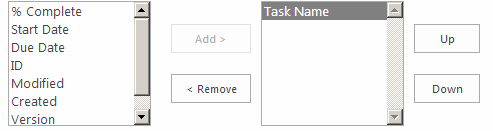
<SharePoint:GroupedItemPicker ID="SelectColumn" runat="server"

                CandidateControlId="SelectCandidate"

                ResultControlId="SelectResult"

                AddButtonId="AddButton"

                RemoveButtonId="RemoveButton" />

            <table class="ms-long" cellpadding="0" cellspacing="0" border="0">

                <tr>

                    <td class="ms-input">

                        <SharePoint:SPHtmlSelect ID="SelectCandidate" Width="143" Height="125" runat="server" multiple="true" />

                    </td>

                    <td style="padding-left: 10px"/>

                    <td align="center" valign="middle" class="ms-input">

                        <button id="AddButton" runat="server" style="width:80px">

                            <SharePoint:EncodedLiteral ID="EncodedLiteral3" runat="server" Text="<%$Resources:wss,multipages_gip_add%>" EncodeMethod='HtmlEncode' />

                        </button>

                        <br />

                        <br />

                        <button id="RemoveButton" runat="server" style="width:80px">

                            <SharePoint:EncodedLiteral ID="EncodedLiteral4" runat="server" Text="<%$Resources:wss,multipages_gip_remove%>" EncodeMethod='HtmlEncode' />

                        </button>

                    </td>

                    <td style="padding-left: 10px"/>

                    <td class="ms-input">

                        <SharePoint:SPHtmlSelect ID="SelectResult" Width="143" Height="125" runat="server" multiple="true" />

                    </td>

                    <td align="center" valign="middle" class="ms-input">

                        <input type="button" runat="server" id="SelectResultUp" value="Up" onclick="listbox_move(SelectResultID, 'up'); GipSetHiddenControlValue(window[SelectColumnsID + '_m']);"/>

                         <br />

                        <br />

                        <input type="button" runat="server" id="SelectResultDown" value="Down" onclick="listbox_move(SelectResultID, 'down'); GipSetHiddenControlValue(window[SelectColumnID + '_m']);"/>

                    </td>

                </tr>

            </table>
服务器端代码:
     foreach (SPField field in SPContext.Current.List.Fields)

            {

                SelectColumn.AddChoice(field.InternalName, field.Title, string.Empty, string.Empty);

            }
1 调整选中项的顺序:
function listbox_move(listID, direction) {

    var listbox = document.getElementById(listID);

    if (direction == "up") {

        for (var i = 0; i < listbox.options.length; i++) {

            var option = listbox.options[i];

            if (option.selected == true) {

                listbox_moveOption(listbox, i, direction);

            }

        }

    } else {

        for (var i = listbox.options.length-1; i >=0; i--) {

            var option = listbox.options[i];

            if (option.selected == true) {

                listbox_moveOption(listbox, i, direction);

            }

        }

    }

}

function listbox_moveOption(listbox, i, direction) {

    var selIndex = i;

    if (-1 == selIndex) {

        alert("Please select an option to move.");

        return;

    }

    var increment = -1;

    if (direction == 'up')

        increment = -1;

    else

        increment = 1;

    if ((selIndex + increment) < 0 ||

        (selIndex + increment) > (listbox.options.length - 1)) {

        return;

    }

    var selValue = listbox.options[selIndex].value;

    var selText = listbox.options[selIndex].text;

    listbox.options[selIndex].value = listbox.options[selIndex + increment].value

    listbox.options[selIndex].text = listbox.options[selIndex + increment].text

    listbox.options[selIndex].selected = false;

    listbox.options[selIndex + increment].value = selValue;

    listbox.options[selIndex + increment].text = selText;

    listbox.options[selIndex + increment].selected = true;

}
2, 更新HiddenField
函数 GipSetHiddenControlValue 位于 "%program files%\Common Files\microsoft shared\Web Server Extensions\15\TEMPLATE\LAYOUTS\GroupedItemPicker.js"
var groupItemData = [];

        for (var i = 0, max = fields.length; i < max; i++) {

            options += "<option value=\"" + fields[i].Second + "\">" + STSHtmlEncode(fields[i].First) + "</option>";

            groupItemData[i+1] = [fields[i].Second, fields[i].First];

        }

        spbLookup(this.lookupFieldSelect).html(options);

        window[this.context.appearanceColumnsID + "_m"].data = [groupItemData];

        spbLookup(this.appearanceColumnsSelectResult).html("");

        GipRefreshGroupCore(window[this.context.appearanceColumnsID + "_m"]);
SharePoint GroupedItemPicker Control的更多相关文章
- Sharepoint delegate control
<?xml version="1.0" encoding="utf-8"?> <Elements xmlns="http://sch ...
- SharePoint 2013:自定义ECB菜单项的添加
本文分别介绍了两种常用的添加ECB菜单项的方式. 声明式创建 这也是微软最佳实践推荐的方式.在VS中创建一个SharePoint空解决方案,并添加一个“空元素”类型的SPI. 在Elements.xm ...
- Interoperability between Java and SharePoint 2013 on Premises
http://ctp-ms.blogspot.com/2012/12/interoperability-between-java-and.html Introduction One of the ...
- 错误解决:SharePoint Designer 2010编辑后,出现数据源控件未能执行插入命令,data source control failed to execute the insert command
打了SharePoint 2010 最新的SP 2的补丁,但是使用SharePoint Designer 2010 定义任何一个列表的“插入视图”时,总是出现标题那样的错误: 数据源控件未能执行插入命 ...
- SharePoint 2016 必备组件离线安装介绍
前言 SharePoint 必备组件安装,一直以来都是SharePoint安装过程中的最大的坑,尤其是不能联网的服务器.博主在这里简单介绍一下离线安装过程,并附组件包下载以及安装命令,并且在windo ...
- 实现一个基于 SharePoint 2013 的 Timecard 应用(上)
在 SharePoint 2013 上面实现一个 Timecard 应用的想法来自一个真实的需求,而实现的方案在我脑海里面盘旋已经很久了,终于这几天准备安排点儿时间将它实现出来. “ We start ...
- 如何在SharePoint 当中使用纯JSOM上传任意二进制文件(小于2MB)
在微软的官方网站上有关于如何在SharePoint当中使用JS创建一个简单的文本文件的例子,经过我的思考我觉得结合Html5特性的浏览器,是完全可以通过JS来读取到文件的内容的(这一部分的内容请大家自 ...
- 好像越来越觉得 SharePoint “难用”了
一开始,我觉得 SharePoint 很神秘,不知道它到底是用来做什么的. 后来,我觉得 SharePoint 很强大,能做很多事情. 再后来,我觉得,SharePoint 没有他们宣传的那-么强大, ...
- SharePoint 2013 图文开发系列之自定义字段
SharePoint使用的优势,就在于开箱即用.快速搭建,SharePoint自身为我们提供了很多字段类型,已经很丰富了.但是,在实际应用中,我们还需要一些功能特殊的字段,下面,我们简单介绍下字段的开 ...
随机推荐
- 使用开源免费类库在.net中操作Excel
自从上次找到NPOI之后,根据园友提供的线索以及Google,又找到了一些开源免费的类库,所以都简单体验了一遍. 主要找到以下类库: MyXls(http://sourceforge.net/proj ...
- msbuild ConfuserEx.Build 加密
https://www.nuget.org/packages/ConfuserEx.Build/ <?xml version="1.0" encoding="utf ...
- git之一
1.Git是什么Git是一款免费.开源的分布式版本控制系统,用于敏捷高效地处理任何或小或大的项目. Git是一个开源的分布式版本控制系统,用以有效.高速的处理从很小到非常大的项目版本管理.Git 是 ...
- 文件件监听器,android系统拍照功能调用后删除系统生成的照片
先说说要实现的功能: android调用系统拍照功能实时 预览 删除 上传 保存 (用户不能再本地文件夹中看到拍的照片) 再说说遇到的问题: 1.调用系统拍照在系统自带的拍照文件夹中生成一张随机命名图 ...
- 从键盘上输入一个正整数n,请按照以下五行杨辉三角形的显示方式, 输出杨辉三角形的前n行。请采用循环控制语句来实现。
Scanner sc=new Scanner(System.in); System.out.println("请输入一个正整数:"); int ss=sc.nextInt(); i ...
- SQL Server求解连续操作(登录)数量(次数)最大的记录(用户)问题
在园中大V深蓝医生中的一篇文中发现了这个问题,感觉挺有意思. 问题简化为"求解连续日期登录次数最大的用户".至少连续2天都登录才能认为是连续日登录. 数据岛问题 这个问题让我联想到 ...
- ZooKeeper之ZAB协议
ZooKeeper为高可用的一致性协调框架,自然的ZooKeeper也有着一致性算法的实现,ZooKeeper使用的是ZAB协议作为数据一致性的算法,ZAB(ZooKeeper Atomic Broa ...
- perl操作sybase
设置环境变量 export PERL5LIB=:/redhat/perl/lib64/perl5 安装DBI tar -xzvf DBI-1.631.tar.gz cd DBI-1.631 perl ...
- shell脚本实现随机筛选
#!/bin/bash name=(val1 val2 val3 val4 ...) a=$() #以时间产生随机数向39取余得到0~38的值
- 必须知道的八大种排序算法【java实现】(二) 选择排序,插入排序,希尔算法【详解】
一.选择排序 1.基本思想:在要排序的一组数中,选出最小的一个数与第一个位置的数交换:然后在剩下的数当中再找最小的与第二个位置的数交换,如此循环到倒数第二个数和最后一个数比较为止. 2.实例 3.算法 ...