
如何在SharePoint 当中使用纯JSOM上传任意二进制文件(小于2MB)
在微软的官方网站上有关于如何在SharePoint当中使用JS创建一个简单的文本文件的例子,经过我的思考我觉得结合Html5特性的浏览器,是完全可以通过JS来读取到文件的内容的(这一部分的内容请大家自行去了解),进而可以实现一个纯的JS的文件上传的例子,经过我的不断的实践,终于可以实现纯JS的文件上传了,当然还是参考了如下的文章。
限制有2个:
1、文件不能太大1.5MB以内完全是没有问题,这是JSOM的限制,没有办法突破。
2、浏览器必须是完全支持HTML5的,Chrome完全可以,IE必须11以上。
原理:使用FileReader来读取文件的Base64Url流,FileReader.readAsDataURL,然后使用自己写的把Base64的字符转成二进制的函数,把这个二进制的代码传给FileCreationInfomation.Content。
神奇的函数convertDataURIToBinary,我不知道是怎么工作的,如果有兴趣你来解释一下。
看如下的代码:
 $(document).ready(function ()

 {

     // Get the URI decoded host web URL

     // We will use this to get a context here to write data

     hostweburl = decodeURIComponent(getQueryStringParameter("SPHostUrl"));

 });

 function CreateFile()

 {

     // Ensure the HTML5 FileReader API is supported

     if (window.FileReader)

     {

         input = document.getElementById("fileinput");

         if (input)

         {

             file = input.files[0];

             fr = new FileReader();

             fr.onload = receivedBinary;

             fr.readAsDataURL(file);

         }

     }

     else

     {

         alert("The HTML5 FileSystem APIs are not fully supported in this browser.");

     }

 }

 // Callback function for onload event of FileReader

 function receivedBinary()

 {

     // Get the ClientContext for the app web

     clientContext = new SP.ClientContext.get_current();

     // Use the host web URL to get a parent context - this allows us to get data from the parent

     parentCtx = new SP.AppContextSite(clientContext, hostweburl);

     parentWeb = parentCtx.get_web();

     parentList = parentWeb.get_lists().getByTitle("Documents");

     fileCreateInfo = new SP.FileCreationInformation();

     fileCreateInfo.set_url(file.name);

     fileCreateInfo.set_overwrite(true);

     fileCreateInfo.set_content(new SP.Base64EncodedByteArray());

     // Read the binary contents of the base 64 data URL into a Uint8Array

     // Append the contents of this array to the SP.FileCreationInformation

     var arr = convertDataURIToBinary(this.result);

     for (var i = 0; i < arr.length; ++i)

     {

         fileCreateInfo.get_content().append(arr[i]);

     }

     // Upload the file to the root folder of the document library

     this.newFile = parentList.get_rootFolder().get_files().add(fileCreateInfo);

     clientContext.load(this.newFile);

     clientContext.executeQueryAsync(onSuccess, onFailure);

 }

 function onSuccess()

 {

     // File successfully uploaded

     alert("Success!");

 }

 function onFailure()

 {

     // Error occurred

     alert("Request failed: " + arguments[1].get_message());

 }

 // Utility function to remove base64 URL prefix and store base64-encoded string in a Uint8Array

 // Courtesy: https://gist.github.com/borismus/1032746

 function convertDataURIToBinary(dataURI)

 {

     var BASE64_MARKER = ';base64,';

     var base64Index = dataURI.indexOf(BASE64_MARKER) + BASE64_MARKER.length;

     var base64 = dataURI.substring(base64Index);

     var raw = window.atob(base64);

     var rawLength = raw.length;

     var array = new Uint8Array(new ArrayBuffer(rawLength));

     for (i = 0; i < rawLength; i++)

     {

         array[i] = raw.charCodeAt(i);

     }

     return array;

 }
本文的原文如下:http://dannyjessee.com/blog/index.php/2013/02/using-jsom-to-write-small-files-to-a-sharepoint-2013-document-library/
A recent post on Yammer lamented the lack of examples in the SharePoint 2013 API documentation that use the JavaScript Object Model (JSOM) to do anything more than create a very basic text file in a SharePoint document library.
After lots of digging and a fair amount of trial and error, I now understand why that is the case.
The use case seems simple enough: allow the user to select a file from his or her local machine using an HTML DOM FileUpload object on a form, then use JSOM to upload this file into a document library. It’s certainly easy enough to do using the Client Script Object Model (CSOM). As it turns out, there are a couple of very good reasons why your document upload capability (whether you package it into an app for SharePoint or something else) should NOT leverage JSOM:
- Per MSDN, you can only work with files up to 1.5 MB when using JSOM. It is recommended that you use REST to deal with larger files. (Incidentally, there is a comment in the article on using the REST endpoints that reads “See How to: Complete basic operations using JavaScript library code in SharePoint 2013 for a code example that shows you how to upload a binary file that is smaller than 1.5 MB by using the SharePoint 2013 Javascript object model.” Unfortunately, the only code example in that article creates a very rudimentary plain text file.)
- Unless your browser supports the File APIs introduced in HTML5 (specifically the FileReader API), you are out of luck. As a general rule, browsers will block attempts by JavaScript to access and read files from the local file system for security reasons. If you are using IE, only version 10 supports the FileReader API.
Although I was somewhat discouraged by this news, I was determined to develop an app for SharePoint 2013 that presented a simple file upload control to the user and stored the file in a document library (as long as it was smaller than 1.5 MB, of course). I figured as long as I could save Office documents to the library (i.e., more than a simple plain text file), I would have succeeded.
To accomplish this, I knew I would need to make use of the HTML5 FileReader API. (Because of that, I also knew I would need to test this solution using IE 10, Firefox, or Chrome!) Based on the MSDN documentation, I knew I would be setting the contents of the file by using a newSP.Base64EncodedByteArray. The FileReader API exposes three methods for reading the contents of a file:
- readAsText() – this method reads the plain text contents of a file, but does not properly handle binary files.
- readAsArrayBuffer() – this seemed to be the most promising option, but no matter how I tried to cast the contents of the ArrayBuffer to a Base64-encoded byte array, I was not able to successfully reproduce a file from the file system in a document library. If anyone out there has any suggestions that might enable readAsArrayBuffer() to work, please let me know in the comments!
- readAsDataURL() – this method returns the contents of the file using the Data URI scheme. Thanks to a handy utility method I found here, I can convert this Base64-encoded string into a JavaScript Uint8Array and use that to populate the SP.Base64EncodedByteArray that the JSOM expects.
 $(document).ready(function ()

 {

     // Get the URI decoded host web URL

     // We will use this to get a context here to write data

     hostweburl = decodeURIComponent(getQueryStringParameter("SPHostUrl"));

 });

 function CreateFile()

 {

     // Ensure the HTML5 FileReader API is supported

     if (window.FileReader)

     {

         input = document.getElementById("fileinput");

         if (input)

         {

             file = input.files[0];

             fr = new FileReader();

             fr.onload = receivedBinary;

             fr.readAsDataURL(file);

         }

     }

     else

     {

         alert("The HTML5 FileSystem APIs are not fully supported in this browser.");

     }

 }

 // Callback function for onload event of FileReader

 function receivedBinary()

 {

     // Get the ClientContext for the app web

     clientContext = new SP.ClientContext.get_current();

     // Use the host web URL to get a parent context - this allows us to get data from the parent

     parentCtx = new SP.AppContextSite(clientContext, hostweburl);

     parentWeb = parentCtx.get_web();

     parentList = parentWeb.get_lists().getByTitle("Documents");

     fileCreateInfo = new SP.FileCreationInformation();

     fileCreateInfo.set_url(file.name);

     fileCreateInfo.set_overwrite(true);

     fileCreateInfo.set_content(new SP.Base64EncodedByteArray());

     // Read the binary contents of the base 64 data URL into a Uint8Array

     // Append the contents of this array to the SP.FileCreationInformation

     var arr = convertDataURIToBinary(this.result);

     for (var i = 0; i < arr.length; ++i)

     {

         fileCreateInfo.get_content().append(arr[i]);

     }

     // Upload the file to the root folder of the document library

     this.newFile = parentList.get_rootFolder().get_files().add(fileCreateInfo);

     clientContext.load(this.newFile);

     clientContext.executeQueryAsync(onSuccess, onFailure);

 }

 function onSuccess()

 {

     // File successfully uploaded

     alert("Success!");

 }

 function onFailure()

 {

     // Error occurred

     alert("Request failed: " + arguments[1].get_message());

 }

 // Utility function to remove base64 URL prefix and store base64-encoded string in a Uint8Array

 // Courtesy: https://gist.github.com/borismus/1032746

 function convertDataURIToBinary(dataURI)

 {

     var BASE64_MARKER = ';base64,';

     var base64Index = dataURI.indexOf(BASE64_MARKER) + BASE64_MARKER.length;

     var base64 = dataURI.substring(base64Index);

     var raw = window.atob(base64);

     var rawLength = raw.length;

     var array = new Uint8Array(new ArrayBuffer(rawLength));

     for (i = 0; i < rawLength; i++)

     {

         array[i] = raw.charCodeAt(i);

     }

     return array;

 }
This code works!–mostly. In my environment, Excel Services was able to successfully open my basic test spreadsheet in the browser:

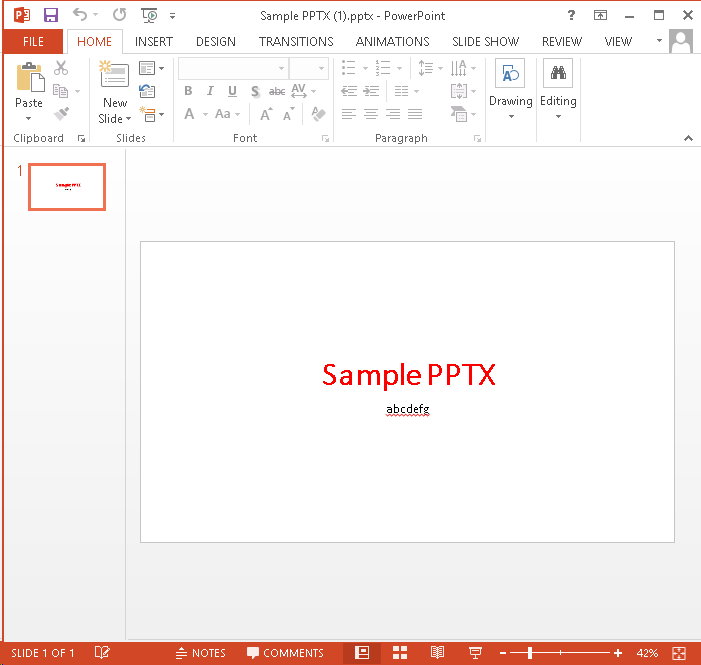
I could also use the Download a Copy option to save local copies and successfully open files of any type:

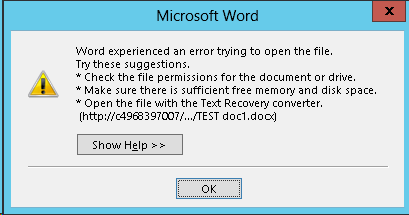
For a simple Word document, though, I was unable to click the link from the document library and have it open successfully in Word. Instead, Word reported an error when trying to open the document:
If you receive the error shown below when opening a document from SharePoint, it is due to “Protected View” in Office 2013. To disable Protected View, follow the steps outlined here.
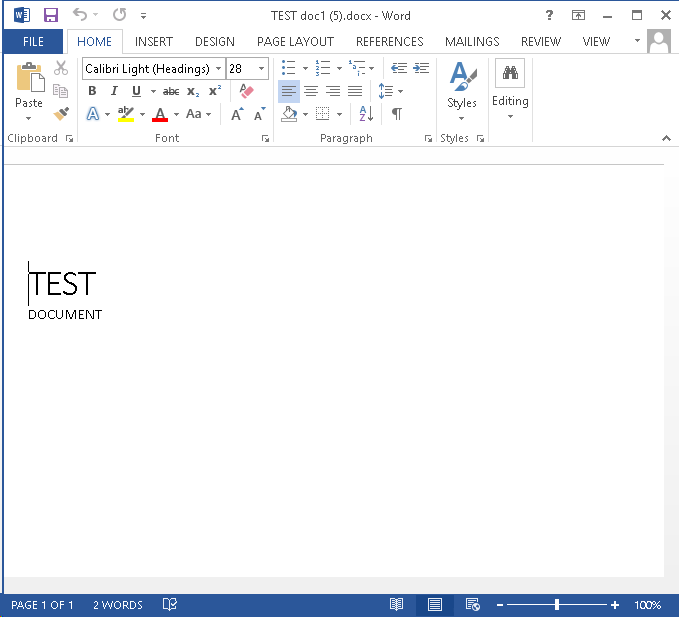
Regardless of your Office 2013 Protected View settings, the Download a Copy option will open the document without the annoying error message.

如何在SharePoint 当中使用纯JSOM上传任意二进制文件(小于2MB)的更多相关文章
- ItunesConnect:上传完二进制文件后在构建版本中找不到
最近经常遇到上传完二进制文件后在构建版本中找不到的情况: 环境:Xcode 8.2 (8C38) 大致有几种原因,可以按照以下步骤排查下. 排查步骤: 1.检查使用的权限,并info.plist文件中 ...
- IIS 6.0 PUT上传 任意文件创建漏洞
IIS 6.0 PUT上传 任意文件创建漏洞 require 1.IIS Server在Web服务扩展中开启了WebDAV. 2.IIS配置了可以写入的权限,包括网站 1.根目录 2.子文件夹 3.i ...
- 利用servlet3.0上传,纯原生上传,不依赖任何第三方包
tomcat7里面自带的servlet3.0.jar,支持很多新特性,例如,annotation配置servlet,上传,异步等等.... 如果你的tomcat版本低于7的话,单独在项目中引入serv ...
- 纯js上传控件——fineuploader
fineuploader是一款基于ajax实现文件上传的插件,具有以下有点: A:支持文件上传进度显示. B:文件拖拽浏览器上传方式 C:Ajax页面无刷新. D:多文件上传. F:跨浏览器. E:跨 ...
- 如何在linux下使用git管理上传代码&误删文件修复
首先需要安装git,sudo apt-get install git,这时就可以下载代码了. 然后先在gituhub上新建一个仓库,然后先在本地建一个git目录,git init 然后再配置用户名和邮 ...
- 纯js上传文件 很好用
<!DOCTYPE html> <html> <head> <meta charset="utf-8"> <meta name ...
- fromdata上传文件,ajax上传文件, 纯js上传文件,html5文件异步上传
前端代码: 上传附件(如支付凭证等) <input type="file" name="fileUpload" id="fileUpload&q ...
- SpringBoot上传任意文件功能的实现
一.pom文件依赖的添加 <dependencies> <dependency> <groupId>org.springframework.boot</gro ...
- SharePoint Server 2013 让上传文件更精彩
新版的SharePoint 2013 提供了多种上传与新建文件的方式,对于与系统集成紧密的IE来上传文档更加方便 使用IE开启SharePoint地址 Figure 1打开文档库,在"新颖快 ...
随机推荐
- 元素绝对居中终极办法兼容IE8
<!DOCTYPE html> <html> <head> <meta charset="UTF-8"> <title> ...
- H5嵌入原生开发小结----兼容安卓与ios的填坑之路
一开始听说开发H5,以为就是做适配现代浏览器的移动网页,心想不用管IE了,欧也.到今天,发现当初too young too simple,兼容IE和兼容安卓与IOS,后者让你更抓狂.接下来数一下踩过的 ...
- 基于Adobe Flash平台的3D页游技术剖析
写在前面 从黑暗之光,佛本是道,大战神的有插件3D页游.再到如今的魔龙之戒. 足以证明,3D无插件正在引领页游技术的潮流. 目前,要做到3D引擎,有以下几个选择. 说到这里,我们发现.这些都不重要. ...
- 敏捷团队中的QA由来
QA,全称为Quality Analyst,即质量分析师(有些称为Quality Assurance,即质量保证师).为什么它总跟质量扯在一块?感觉这个角色明明做的都是测试的事情,为什么不直接叫做te ...
- win10更新系统后wifi连接不上了怎么解决?
遇到了一个小问题,由于更新了一下win10,发现wifi不能用了,以为是wifi密码错了,选择忘记密码试了两次,又试了不同的wifi都不行,发现网卡无线驱动也没事,在网上百度了好久发现说的方法都没用, ...
- android-解决全屏-webview-输入框被输入法挡住-FullScreen-adjustResize失效问题
由于公司开发的 App 中,Html 的页面嵌入的有点多,坑爹的是,还有很多输入框,这就算了,还要求全屏.然后就出现了这个情况. 下面来唠叨唠叨具体的来龙去脉. 起初是这样的,整个项目基本完工了.测试 ...
- HTML5_06之拖放API、Worker线程、Storage存储
1.拖放API中源对象与目标对象事件间的数据传递: ①创建全局变量--污染全局对象: var 全局变量=null; src.ondragstart=function(){ 全局变量=数据值; ...
- MVC5 网站开发之六 管理员 1、登录、验证和注销
上次业务逻辑和展示层的架构都写了,可以开始进行具体功能的实现,这次先实现管理员的登录.验证和注销功能. 目录 奔跑吧,代码小哥! MVC5网站开发之一 总体概述 MVC5 网站开发之二 创建项目 MV ...
- 了解HTML列表
前面的话 从某种意义上讲,不是描述性文本的任何内容都可以认为是列表.人口普查.太阳系.餐馆菜单等都可以表示为一个列表或列表的列表.列表分为无序列表.有序列表和定义列表三种 无序列表 无序列表(unor ...
- ASP.NET Core真实管道详解[2]:Server是如何完成针对请求的监听、接收与响应的【上】
Server是ASP .NET Core管道的第一个节点,负责完整请求的监听和接收,最终对请求的响应同样也由它完成.Server是我们对所有实现了IServer接口的所有类型以及对应对象的统称,如下面 ...