
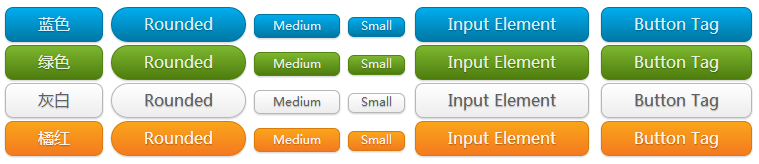
好看的CSS按钮
<!DOCTYPE HTML PUBLIC "-//W3C//DTD HTML 4.01 Transitional//EN" "http://www.w3.org/TR/html4/loose.dtd">

<html>

 <head>

  <title> New Document </title>

  <meta name="Generator" content="EditPlus">

  <meta name="Author" content="">

  <meta name="Keywords" content="">

  <meta name="Description" content="">

<link rel="stylesheet" type="text/css" href="style.css" />

 </head>

 <body>

  <div class="demo">

        <a href="#" class="button blue">蓝色</a>

        <a href="#" class="button blue bigrounded">Rounded</a>

        <a href="#" class="button blue medium">Medium</a>

        <a href="#" class="button blue small">Small</a>

        <input class="button blue" type="button" value="Input Element" />

        <button class="button blue">Button Tag</button>

    </div>

    <div class="demo">

        <a href="#" class="button green">绿色</a>

        <a href="#" class="button green bigrounded">Rounded</a>

        <a href="#" class="button green medium">Medium</a>

        <a href="#" class="button green small">Small</a>

        <input class="button green" type="button" value="Input Element" />

        <button class="button green">Button Tag</button>

    </div>

    <div class="demo">

        <a href="#" class="button white">灰白</a>

        <a href="#" class="button white bigrounded">Rounded</a>

        <a href="#" class="button white medium">Medium</a>

        <a href="#" class="button white small">Small</a>

        <input class="button white" type="button" value="Input Element" />

        <button class="button white">Button Tag</button>

    </div>

    <div class="demo">

        <a href="#" class="button orange">橘红</a>

        <a href="#" class="button orange bigrounded">Rounded</a>

        <a href="#" class="button orange medium">Medium</a>

        <a href="#" class="button orange small">Small</a>

        <input class="button orange" type="button" value="Input Element" />

        <button class="button orange">Button Tag</button>

    </div>

 </body>

</html>
.button {

    display: inline-block;

    outline: none;

    cursor: pointer;

    text-align: center;

    text-decoration: none;

    font: 16px/100% 'Microsoft yahei',Arial, Helvetica, sans-serif;

    padding: .5em 2em .55em;

    text-shadow: 0 1px 1px rgba(0,0,0,.3);

    -webkit-border-radius: .5em;

    -moz-border-radius: .5em;

    border-radius: .5em;

    -webkit-box-shadow: 0 1px 2px rgba(0,0,0,.2);

    -moz-box-shadow: 0 1px 2px rgba(0,0,0,.2);

    box-shadow: 0 1px 2px rgba(0,0,0,.2);

}

.button:hover {

    text-decoration: none;

}

.button:active {

    position: relative;

    top: 1px;

}

.bigrounded {

    -webkit-border-radius: 2em;

    -moz-border-radius: 2em;

    border-radius: 2em;

}

.medium {

    font-size: 12px;

    padding: .4em 1.5em .42em;

}

.small {

    font-size: 11px;

    padding: .2em 1em .275em;

}

/* blue */

.blue {

    color: #d9eef7;

    border: solid 1px #0076a3;

    background: #0095cd;

    background: -webkit-gradient(linear, left top, left bottom, from(#00adee), to(#0078a5));

    background: -moz-linear-gradient(top,  #00adee,  #0078a5);

    filter:  progid:DXImageTransform.Microsoft.gradient(startColorstr='#00adee', endColorstr='#0078a5');

}

.blue:hover {

    background: #007ead;

    background: -webkit-gradient(linear, left top, left bottom, from(#0095cc), to(#00678e));

    background: -moz-linear-gradient(top,  #0095cc,  #00678e);

    filter:  progid:DXImageTransform.Microsoft.gradient(startColorstr='#0095cc', endColorstr='#00678e');

}

.blue:active {

    color: #80bed6;

    background: -webkit-gradient(linear, left top, left bottom, from(#0078a5), to(#00adee));

    background: -moz-linear-gradient(top,  #0078a5,  #00adee);

    filter:  progid:DXImageTransform.Microsoft.gradient(startColorstr='#0078a5', endColorstr='#00adee');

}

/* green */

.green {

    color: #e8f0de;

    border: solid 1px #538312;

    background: #64991e;

    background: -webkit-gradient(linear, left top, left bottom, from(#7db72f), to(#4e7d0e));

    background: -moz-linear-gradient(top,  #7db72f,  #4e7d0e);

    filter:  progid:DXImageTransform.Microsoft.gradient(startColorstr='#7db72f', endColorstr='#4e7d0e');

}

.green:hover {

    background: #538018;

    background: -webkit-gradient(linear, left top, left bottom, from(#6b9d28), to(#436b0c));

    background: -moz-linear-gradient(top,  #6b9d28,  #436b0c);

    filter:  progid:DXImageTransform.Microsoft.gradient(startColorstr='#6b9d28', endColorstr='#436b0c');

}

.green:active {

    color: #a9c08c;

    background: -webkit-gradient(linear, left top, left bottom, from(#4e7d0e), to(#7db72f));

    background: -moz-linear-gradient(top,  #4e7d0e,  #7db72f);

    filter:  progid:DXImageTransform.Microsoft.gradient(startColorstr='#4e7d0e', endColorstr='#7db72f');

}

/* white */

.white {

    color: #606060;

    border: solid 1px #b7b7b7;

    background: #fff;

    background: -webkit-gradient(linear, left top, left bottom, from(#fff), to(#ededed));

    background: -moz-linear-gradient(top,  #fff,  #ededed);

    filter:  progid:DXImageTransform.Microsoft.gradient(startColorstr='#ffffff', endColorstr='#ededed');

}

.white:hover {

    background: #ededed;

    background: -webkit-gradient(linear, left top, left bottom, from(#fff), to(#dcdcdc));

    background: -moz-linear-gradient(top,  #fff,  #dcdcdc);

    filter:  progid:DXImageTransform.Microsoft.gradient(startColorstr='#ffffff', endColorstr='#dcdcdc');

}

.white:active {

    color: #999;

    background: -webkit-gradient(linear, left top, left bottom, from(#ededed), to(#fff));

    background: -moz-linear-gradient(top,  #ededed,  #fff);

    filter:  progid:DXImageTransform.Microsoft.gradient(startColorstr='#ededed', endColorstr='#ffffff');

}

/* orange */

.orange {

    color: #fef4e9;

    border: solid 1px #da7c0c;

    background: #f78d1d;

    background: -webkit-gradient(linear, left top, left bottom, from(#faa51a), to(#f47a20));

    background: -moz-linear-gradient(top,  #faa51a,  #f47a20);

    filter:  progid:DXImageTransform.Microsoft.gradient(startColorstr='#faa51a', endColorstr='#f47a20');

}

.orange:hover {

    background: #f47c20;

    background: -webkit-gradient(linear, left top, left bottom, from(#f88e11), to(#f06015));

    background: -moz-linear-gradient(top,  #f88e11,  #f06015);

    filter:  progid:DXImageTransform.Microsoft.gradient(startColorstr='#f88e11', endColorstr='#f06015');

}

.orange:active {

    color: #fcd3a5;

    background: -webkit-gradient(linear, left top, left bottom, from(#f47a20), to(#faa51a));

    background: -moz-linear-gradient(top,  #f47a20,  #faa51a);

    filter:  progid:DXImageTransform.Microsoft.gradient(startColorstr='#f47a20', endColorstr='#faa51a');

}
 650) this.width=650;" src="http://img1.51cto.com/attachment/201312/143640728.png" title="QQ截图20131214143617.png" alt="143640728.png" />
好看的CSS按钮的更多相关文章
- 漂亮的CSS按钮样式集以及在线生成工具
以前我们制作一样带带阴影.圆角或3D感的按钮都需要用图片来制作,但CSS3出来后就可以不用图片了,由于是代码写的按钮样式,在Retina上浏览依然清晰美观.虽然不错,但我们写一个阴影+质感的按钮还是挺 ...
- css 样式(checkbox开关、css按钮)
checkbox开关 css .iosCheck { /* Blue edition */ } .iosCheck input { display: none; } .iosCheck i { dis ...
- CSS 按钮
总结有关按钮的各种样式 ㈠基本按钮样式 看一下没有进行css样式设计时按钮的样子与进行样式设计的按钮样子 <!DOCTYPE html> <html> <head> ...
- css 按钮悬停效霓虹灯特效
css 按钮悬停效霓虹灯特效 <!DOCTYPE html> <html lang="en"> <head> <meta charset=
- BUTTONS V. 2.0.0——CSS按钮库
BUTTONS-V2-CSS库样式职责 CSS库样式职责分离优点 模块样式命名更清晰化 易于维护.扩展性强 动画效果——修改样式后有过度效果,默认样式 源码如下 <!DOCTYPE html&g ...
- css按钮自适应
原理:利用a标签和i标签各自一个背景组合成为按钮,达到自适应. <!DOCTYPE html> <html> <head> <meta charset=&qu ...
- 四个好看的CSS样式表格
文章来源 http://www.cnphp6.com/archives/58020 1. 单像素边框CSS表格 这是一个非经常常使用的表格样式. 源码: 2. 带背景图的CSS样式表格 和上面差点儿相 ...
- 有用好看的CSS+JS+table 导航
预览效果图 watermark/2/text/aHR0cDovL2Jsb2cuY3Nkbi5uZXQv/font/5a6L5L2T/fontsize/400/fill/I0JBQkFCMA==/dis ...
- html网页什么样的字体最好看,css设置各种中文字体样式代码
css代码如下:{ font-family:"Microsoft YaHei",微软雅黑,"MicrosoftJhengHei",华文细黑,STHeiti,Mi ...
随机推荐
- 用MathType编辑横三角形的方法
如果常常接触数学公式,你会发现同一个符号如果变换方向使用就可以代表不同的数学含义,这是非常常见的一种数学现象了.对于这种情况在数学公式编辑器中,我们可以使用不同的模板来进行编辑.比如横着的三角形符号, ...
- Hibernate 执行原始SQL语句
在hibernate中有时不需要用到表的映射,需要直接执行SQL语句. 其中sessionFactory在配置文件中配置,SSH详细配置见http://blog.csdn.NET/xumengxing ...
- 【BZOJ-2229】最小割 最小割树(最大流+分治)
2229: [Zjoi2011]最小割 Time Limit: 10 Sec Memory Limit: 259 MBSubmit: 1565 Solved: 560[Submit][Status ...
- Metro-UI系统-2-color和icon
1.上图 Color icon 2. 怎么用 2.1 color使用 <!--1,设置背景和前景色--> <div class="tile bg-blue fg-white ...
- VisualSVNServerTools(在线修改VisualSVN密码)
采用的是apache htpasswd的命令行参数进行修改,部署时,采用独立的apache server进行. 源码:https://github.com/easonjim/VisualSVNServ ...
- android录音相关
android的麦克风在现在的生活中发挥着很大的作用,打电话,视频聊天,语音识别等等. android sdk的api里提供了很方便的调用方法,下面写一个小的DEMO. 五个按钮:开始录音,停止,播放 ...
- 如何查询Oracle中所有用户信息
1.查看所有用户: select * from dba_users; select * from all_users; select * from user_users; 2.查看用户或角色系统权限( ...
- sstream使用简介
sstream即字符串流.sstream有三种类:ostringstream:用于输出操作,istringstream:用于输入操作,stringstream:用于输入输出操作其实我感觉只用第三个就够 ...
- [iOS 视频流开发-获得视频帧处理]
调用视频流所使用框架:<Foundation/Foundation.h> 必须定义的参数: 1.AVCaptureDevice(捕获设备:前置.后置摄像头等) 2.AVCaptureInp ...
- Simultaneous Tag Editing in IntelliJ IDEA 14.1
If you're involved in web development and, for some reason, you haven't given a ride to IntelliJ IDE ...