
springMVC之配置
1、项目结构

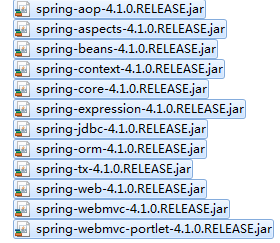
2、所需jar包
3、web.xml文件
<?xml version="1.0" encoding="UTF-8"?>

<web-app xmlns:xsi="http://www.w3.org/2001/XMLSchema-instance" xmlns="http://java.sun.com/xml/ns/javaee" xmlns:web="http://java.sun.com/xml/ns/javaee/web-app_2_5.xsd" xsi:schemaLocation="http://java.sun.com/xml/ns/javaee http://java.sun.com/xml/ns/javaee/web-app_3_0.xsd" id="WebApp_ID" version="3.0">

  <display-name>spring</display-name>

      <servlet>

        <servlet-name>springMVC</servlet-name>

        <servlet-class>org.springframework.web.servlet.DispatcherServlet</servlet-class>

        <init-param>

            <param-name>contextConfigLocation</param-name>

            <param-value>/WEB-INF/spring-config.xml</param-value>

        </init-param>

        <load-on-startup>1</load-on-startup>

    </servlet>

    <servlet-mapping>

        <servlet-name>springMVC</servlet-name>

        <url-pattern>/</url-pattern>

    </servlet-mapping>

  <welcome-file-list>

    <welcome-file>index.html</welcome-file>

    <welcome-file>index.htm</welcome-file>

    <welcome-file>index.jsp</welcome-file>

    <welcome-file>default.html</welcome-file>

    <welcome-file>default.htm</welcome-file>

    <welcome-file>default.jsp</welcome-file>

  </welcome-file-list>

</web-app>
load-on-startup:表示启动容器时初始化该Servlet;
url-pattern:表示哪些请求交给Spring Web MVC处理, “/” 是用来定义默认servlet映射的。也可以如“*.html”表示拦截所有以html为扩展名的请求。
自此请求已交给Spring Web MVC框架处理,因此我们需要配置Spring的配置文件,默认DispatcherServlet会加载WEB-INF/配置文件名.xml配置文件
4、spring配置文件
<?xml version="1.0" encoding="UTF-8"?>

<beans xmlns="http://www.springframework.org/schema/beans"

    xmlns:xsi="http://www.w3.org/2001/XMLSchema-instance" xmlns:oxm="http://www.springframework.org/schema/oxm"

    xmlns:context="http://www.springframework.org/schema/context"

    xmlns:aop="http://www.springframework.org/schema/aop" xmlns:tx="http://www.springframework.org/schema/tx"

    xsi:schemaLocation="http://www.springframework.org/schema/beans

       http://www.springframework.org/schema/beans/spring-beans-3.0.xsd

       http://www.springframework.org/schema/oxm

       http://www.springframework.org/schema/oxm/spring-oxm-3.0.xsd

       http://www.springframework.org/schema/context

       http://www.springframework.org/schema/context/spring-context-3.0.xsd

       http://www.springframework.org/schema/tx

        http://www.springframework.org/schema/tx/spring-tx-3.0.xsd

         http://www.springframework.org/schema/aop

         http://www.springframework.org/schema/aop/spring-aop-3.0.xsd">

    <!--  通知spring容器通过注解的方式装配bean -->

      <context:annotation-config />

    <!--  通知spring容器采用自动扫描机制查找注解的bean -->

      <context:component-scan base-package="com.*" />

    <bean id="viewResolver" class="org.springframework.web.servlet.view.UrlBasedViewResolver">

        <property name="viewClass"

            value="org.springframework.web.servlet.view.JstlView" />

        <property name="prefix" value="" />

        <property name="suffix" value=".jsp" />

    </bean>

</beans>
InternalResourceViewResolver:用于支持Servlet、JSP视图解析。
viewClass:JstlView表示JSP模板页面需要使用JSTL标签库,classpath中必须包含jstl的相关jar包。
prefix和suffix:查找视图页面的前缀和后缀(前缀[逻辑视图名]后缀),比如传进来的逻辑视图名为hello,则该该jsp视图页面应该存放在“WebRoot/*.jsp”。
5、Java代码
package com.controller;

import org.springframework.stereotype.Controller;

import org.springframework.ui.Model;

import org.springframework.web.bind.annotation.RequestMapping;

@Controller

public class ProductsController {

    @RequestMapping("/testSpringMVC")

    public String testSpringMVC(String name, Model model){

        System.out.println("name = "+name);

        model.addAttribute("name", name);

        return "success";

    }

}
6、视图页面
index.jsp
<%@ page language="java" import="java.util.*" pageEncoding="UTF-8"%>

<%

String path = request.getContextPath();

String basePath = request.getScheme()+"://"+request.getServerName()+":"+request.getServerPort()+path+"/";

%>

<!DOCTYPE HTML PUBLIC "-//W3C//DTD HTML 4.01 Transitional//EN">

<html>

  <head>

    <base href="<%=basePath%>">

  </head>

  <body>

    <form action="testSpringMVC" method="post">

          <input type="text" name="name">

        <input type="submit" value="确定">

    </form>  </body>

</html>
success.jsp
<%@ page language="java" import="java.util.*" pageEncoding="ISO-8859-1"%>

<%

String path = request.getContextPath();

String basePath = request.getScheme()+"://"+request.getServerName()+":"+request.getServerPort()+path+"/";

%>

<!DOCTYPE HTML PUBLIC "-//W3C//DTD HTML 4.01 Transitional//EN">

<html>

  <head>

    <base href="<%=basePath%>">

    <title>success</title>

  </head>

  <body>

    ${name},success. <br>

  </body>

</html>
7、报错
Caused by: java.lang.NoClassDefFoundError: javax/servlet/jsp/jstl/core/Config
at org.springframework.web.servlet.support.JstlUtils.exposeLocalizationContext(JstlUtils.java:101)
at org.springframework.web.servlet.view.JstlView.exposeHelpers(JstlView.java:135)
at org.springframework.web.servlet.view.InternalResourceView.renderMergedOutputModel(InternalResourceView.java:146)
at org.springframework.web.servlet.view.AbstractView.render(AbstractView.java:303)
at org.springframework.web.servlet.DispatcherServlet.render(DispatcherServlet.java:1228)
at org.springframework.web.servlet.DispatcherServlet.processDispatchResult(DispatcherServlet.java:1011)
at org.springframework.web.servlet.DispatcherServlet.doDispatch(DispatcherServlet.java:955)
解决方案1:选中工程,右键 --> Build Path --> Configure Build Path --> Libraries --> Add Libraries --> MyEclipse Libraries --> 选择一个jstl包引入
解决方案2:引入jstl.jar standard.jar两个包
springMVC之配置的更多相关文章
- SpringMVC、SpringMVC XML配置(纯XML方式)
1.引入SrpingMVC所使用的Java包: cglib-nodep-2.1_3.jar.commons-logging.jar.spring-aspects-4.1.7.RELEASE.jar.s ...
- Springmvc中配置Quartz使用,实现任务实时调度。
菜鸡的自我修炼,第一次接触quartz,做个记录.-------jstarseven 最近在项目中,第一次在springmvc中配置实用quartz,深刻的感受到quartz带来的方便,顺手做个记录. ...
- springMVC+Hibernate配置
本文描述下 sypro 项目中使用 springMVC+Hibernate配置,初学SpringMVC做下简单整理解. 1.web项目首先我们要使用 web.xml文件将 spring配置引入进来 & ...
- SpringMVC简单配置
SpringMVC简单配置 一.eclipse安装Spring插件 打开help下的Install New Software 点击add,location中输入http://dist.springso ...
- Idea简单SpringMVC框架配置
前边已经介绍过了Struts在Idea上的配置,相对于Struts来说,我觉得SpringMVC有更多的优势,首先Struts是需要对action进行配置,页面发送不同的请求,就需要配置不同的acti ...
- SpringMVC常用配置(二),最简洁的配置实现文件上传
Spring.SpringMVC持续介绍中,基础配置前面已经介绍了很多,如果小伙伴们还不熟悉可以参考这几篇文章: 1.Spring基础配置 2.Spring常用配置 3.Spring常用配置(二) 4 ...
- SpringMVC常用配置
关于Spring.SpringMVC我们前面几篇博客都介绍了很多,但是还不够,这些框架中涉及到的注解.配置非常多,那么我们今天再来介绍一个SpringMVC的基本配置,灵活的使用这些配置,可以让我们在 ...
- SpringMVC基础配置(通过注解配置,非xml配置)
SpringMVC是什么,有多火,我这里就不再啰嗦了,SpringMVC比Struts2好用太多,我在学校的时候私下里两种都接触过,对比之后果断选择了SpringMVC,后来在做Android应用开发 ...
- maven+springmvc的配置
1. 首先创建1个mavenweb项目 如果没有的话最好是去官网下载一个最新版本的eclipse 里面什么都有 maven/gradle 啥的 2. 选择路径 没啥影响 就是一个路径 默认就行 ...
- SpringMVC的配置和使用
SpringMVC的配置和使用 什么是SpringMVC? SpringMVC是Spring家族的一员,Spring是将现在开发中流行的组件进行组合而成的一个框架!它用在基于MVC的表现层开发,类似于 ...
随机推荐
- 获取URL列表,设置代理请求URL,https的加密方式处理
做了一个测试的一个小工具,需求如下: 1.有一批URL列表,需要知道哪个URL请求响应内容中包含http:关键字的. 2.url请求包括http和https 2种协议 3.要部署在linux服务器上, ...
- 【Alpha阶段】第二次Scrum例会
燃尽图软件存在bug,正在排查修复:(已修复)由于时区设置到了美国,图表显示有问题. 会议信息 时间:2016.10.18 22:00 时长:1h 地点:大运村1号公寓5楼楼道 类型:设计阶段阶段性会 ...
- jboss性能优化
jboss linux jboss 部署时优化设置: 在/conf/web.xml中通过参数指定: <session-config> <session-ti ...
- 什么是QName
看代码时经常碰到QName,当时对这个东东具体什么意思也是不太明白:今天在看SOAP消息的时候,想到这个东东,就去仔细看了下.QName其实就是Qualified Name的简称,在"Nam ...
- PHP无限分类分类导航LINK的代码
<?php function getCatePath($cid,&$result=array()){ include("conn.php"); $sql=" ...
- Java——新IO 缓冲区与Buffer
缓冲区和Buffer import java.nio.IntBuffer; //================================================= // File Na ...
- zepto.js之ajax剖析
1.ajax的baseHeaders ajax插件中的baseHeaders对象的是http请求头部的信息 var mime = settings.accepts[dataType], baseHea ...
- init.php 建立自己的前端共享文件
文件位置:include/init.php 1.新建文件lib_xxx.php(lib_liangxin.php) 2.在文件init.php 第74行加入代码 require(ROOT_PATH . ...
- php Hash Table(四) Hash Table添加和更新元素
HashTable添加和更新的函数: 有4个主要的函数用于插入和更新HashTable的数据: int zend_hash_add(HashTable *ht, char *arKey, uint n ...
- lombok+slf4j+logback SLF4J和Logback日志框架详解
maven 包依赖 <dependency> <groupId>org.projectlombok</groupId> <artifactId>lomb ...