
Karma和Jasmine 自动化单元测试环境搭建
最近初学AngularJS ,看到的一些教程中经常有人推荐使用Karma+Jasmine来进行单元测试。自己之前也对Jasmine有些了解,jasmine也是一个不错的测试框架。
1、 karma介绍
Karma是Testacular的新名字,在2012年google开源了Testacular,2013年Testacular改名为Karma。
Karma是一个基于Node.js的JavaScript测试执行过程管理工具(Test Runner)。该工具可用于测试所有主流Web浏览器,也可集成到CI(Continuous integration)工具,也可和其他代码编辑器一起使用。这个测试工具的一个强大特性就是,它可以监控(Watch)文件的变化,然后自行执行,通 过console.log显示测试结果。
Jasmine是单元测试框架,本单将介绍用Karma让Jasmine测试自动化完成。Jasmine的介绍,请参考文章:jasmine行为驱动,测试先行
istanbul是一个单元测试代码覆盖率检查工具,可以很直观地告诉我们,单元测试对代码的控制程度。
1 安装NodeJS 以及Npm
2。全局安装Karma npm install -g karma karma安装过程中会同时安装 karma-jasmine 。karma-requirejs等模块。测试是否安装成功 只需要 在控制台 启用
karma start 会出现

在浏览器中输入 http://localhost:9876

3 Karma + Jasmine配置
初始化karma配置文件karma.conf.js 进入要测试文件夹 在控制台中输入karma init 一直按回车即可最终会生成一个karm-conf.js的配置文件
// Karma configuration

// Generated on Wed Oct 30 2013 16:15:24 GMT+0800 (中国标准时间)

module.exports = function(config) {

  config.set({

    // base path, that will be used to resolve files and exclude

    basePath: '',

    // frameworks to use

    frameworks: ['jasmine'],

    // list of files / patterns to load in the browser

    files: [

    ],

    // list of files to exclude

    exclude: [

    ],

    // test results reporter to use

    // possible values: 'dots', 'progress', 'junit', 'growl', 'coverage'

    reporters: ['progress'],

    // web server port

    port: 9876,

    // enable / disable colors in the output (reporters and logs)

    colors: true,

    // level of logging

    // possible values: config.LOG_DISABLE || config.LOG_ERROR || config.LOG_WARN || config.LOG_INFO || config.LOG_DEBUG

    logLevel: config.LOG_INFO,

    // enable / disable watching file and executing tests whenever any file changes

    autoWatch: true,

    // Start these browsers, currently available:

    // - Chrome

    // - ChromeCanary

    // - Firefox

    // - Opera (has to be installed with `npm install karma-opera-launcher`)

    // - Safari (only Mac; has to be installed with `npm install karma-safari-launcher`)

    // - PhantomJS

    // - IE (only Windows; has to be installed with `npm install karma-ie-launcher`)

    browsers: ['Chrome'],

    // If browser does not capture in given timeout [ms], kill it

    captureTimeout: 60000,

    // Continuous Integration mode

    // if true, it capture browsers, run tests and exit

    singleRun: false

  });

};
4 自动化测试 :三部准备工作 1、编写要测试的js文件即 功能实现js 2编写测试文件 由于我们这里使用的是jasmine 来测试,所以我们按照jasmine的语法来写就行了关于jasmine 请参考上文的连接 3 修改karma.conf.js配置文件。
在D盘根目录下新建一个文件夹 karmatest 新建一个js文件在并编写功能 Caculate.js
function add(a,b){

return a+b;

}
测试文件 test.js
describe("A suite of basic functions", function() {

    it("reverse word",function(){

        expect(add(1,2)).toEqual(3);

    });

});
修改 将karma配置文件 karm.conf.js放入karmatest文件夹下,并修改如下
module.exports = function (config) {

    config.set({

        basePath: '',

        frameworks: ['jasmine'],

        files: ['*.js'],

        exclude: ['karma.conf.js'],

        reporters: ['progress'],

        port: 9876,

        colors: true,

        logLevel: config.LOG_INFO,

        autoWatch: true,

        browsers: ['Chrome'],

        captureTimeout: 60000,

        singleRun: false,

    });

};
开始运行 karma进行测试 在控制台中进入 cd karma 。运行 karma start karma.conf.js 即可开启测试。并且会自动启动 浏览器,上面配置为chrome浏览器。
如果测试通过 控制台显示如下
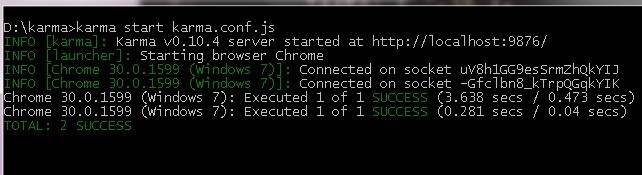
如果修改 测试的代码 将3改为4 控制台立刻给出错误的提示,看得出来
describe("A suite of basic functions", function() {

    it("reverse word",function(){

        expect(add(1,2)).toEqual(4);

    });

});
由于karma.conf.js配置文件中autoWatch: true, 所以test.js文件保存后,会自动执行单元测试。提示我们单元测试出错了。

karma在启动时 chrome 浏览器可能无法自动启动,这时候需要增加一个环境变量CHROME_BIN 值为chome.exe的目录。如
C:\Program Files (x86)\Google\Chrome\Application\chrome.exe

官方解答如下
Chrome won't start. (Issues: #202, #74) Set CHROME_BIN like this > export CHROME_BIN='C:\Program Files (x86)\Google\Chrome\Application\chrome.exe' Increase the timeout from 5000ms to 10000ms. At 5000ms, timeouts occurred and the retry logic kicks in and eventually resolves after two to three tries.
Karma和Jasmine 自动化单元测试环境搭建的更多相关文章
- Karma和Jasmine自动化单元测试
从零开始nodejs系列文章,将介绍如何利Javascript做为服务端脚本,通过Nodejs框架web开发.Nodejs框架是基于V8的引擎,是目前速度最快的Javascript引擎.chrome浏 ...
- Karma和Jasmine自动化单元测试——本质上还是在要开一个浏览器来做测试
1. Karma的介绍 Karma是Testacular的新名字,在2012年google开源了Testacular,2013年Testacular改名为Karma.Karma是一个让人感到非常神秘的 ...
- Karma:1. 集成 Karma 和 Jasmine 进行单元测试
关于 Karma 会是一个系列,讨论在各种环境下,使用 Karma 进行单元测试. 本文讨论 karma 集成 Jasmine 进行单元测试. 初始化 NPM 实现初始化 NPM 包管理,创建 pac ...
- Android自动化测试之环境搭建
Android自动化测试之环境搭建 一.Android-sdk介绍 SDK(Software development kit)软件开发工具包.被软件开发工程师用于为特定的软件包.软件框架.硬件平台. ...
- Robot Framework自动化_环境搭建以及第一个用例
Robot Framework自动化_环境搭建以及第一个脚本 培训老师:肖能尤 2016/06/07 课程目的 一.Robot framework 环境搭建以及第一个脚本 课程内容 1 安装前准 ...
- Windows版Jenkins+SVN+Maven自动化部署环境搭建【转】
前言 因今年公司新产品线较多,为了降低耦合,达到业务分离.重用,提高内部开发效率的目的,采用了基于服务组件.前后端分离的架构体系.与之前传统单应用架构相比,系统部署.配置更加复杂,为了能够频繁地将软件 ...
- Jenkins + Jmeter +Ant自动化集成环境搭建(一)
所需工具 一.jmeter 工具下载 https://jmeter.apache.org/ 配置环境JDK等及各种插件可以看小七之前的教程 二.Ant安装(http://ant.apache.org ...
- jmeter + ant + jenkins 自动化集成环境搭建
所需工具 一.jmeter 工具下载 https://jmeter.apache.org/ 配置环境JDK等及各种插件 二.Ant安装(http://ant.apache.org/) 安装Ant是为 ...
- python 3.6 + robotFramework自动化框架 环境搭建、学习笔记
################################################################# #author: 陈月白 #_blogs: http://www.c ...
随机推荐
- Collection集合学习(二)———List接口与具体实现
二.List接口: 一个可以包含重复元素的Collection,List中的元素不会自动排序,元素顺序由添加时的顺序决定. 具体实现类包括Vector(线程安全的),ArrayList,LinkedL ...
- [POJ] Bode Plot
Description Consider the AC circuit below. We will assume that the circuit is in steady-state. Thus, ...
- excel之工作表工作簿保护暴力撤销
excal之工作表工作簿保护暴力撤销 excel可以在审阅中设置工作表.工作簿的密码保护,但是当密码忘记或一些特殊情况下需要进行操作. 1.工作簿保护撤销 步骤一:将需要破解的excal文件后缀名改为 ...
- Kettle中配置oracle RAC
由于项目中使用了oracle v-ip做了oracle数据库集群,现在需要把项目中程序进行升级. 原来的程序中直接使用的是JDBC然后配置的kettle.properties配置文件,如下图: 根据项 ...
- maven创建webapp项目
新建maven项目 勾选 create a simple project 点击next 填写maven项目信息,packaging 选择war,点击Finish 创建成功后,项目结构如下 选择项目右键 ...
- IE11 - Object doesn't support property or method 'includes'
IE不支持字符串的includes()方法:可以用indexOf()替换: includes()方法返回true和false; var str = "asdklmn": if(st ...
- (转)C#命名规范
C#命名规范 数据类型 数据类型简写 标准命名举例 Array arr arrShoppingList Boolean bln blnIsPostB ...
- guestfs-python 手册
Help on module guestfs: NAME guestfs - Python bindings for libguestfs FILE /usr/lib64/python2.7/site ...
- Linux实战教学笔记46:NoSQL数据库之redis持久化存储 (二)
第3章 Redis数据类型详解 3.1 Redis键/值介绍 Redis key值是二进制安全的,这意味着可以用任何二进制序列作为key值,从形如"foo"的简单字符串到一个JPG ...
- Linux实战教学笔记27:Nginx详细讲解
前言:nginx的特点 本节主要对Nginx Web服务软件进行介绍,涉及Nginx的基础,特性,配置部署,优化,以及企业中的日常运维管理和应用.作为HTTP服务软件的后起之秀,Nginx与它的老大哥 ...