
《DSP using MATLAB》示例Example 8.26

代码:
%% ------------------------------------------------------------------------

%%            Output Info about this m-file

fprintf('\n***********************************************************\n');

fprintf('        <DSP using MATLAB> Exameple 8.26 \n\n');

time_stamp = datestr(now, 31);

[wkd1, wkd2] = weekday(today, 'long');

fprintf('      Now is %20s, and it is %8s  \n\n', time_stamp, wkd2);

%% ------------------------------------------------------------------------

% Digital Lowpass Filter Specifications:

wplp = 0.2*pi;                 % digital passband freq in rad

wslp = 0.3*pi;                 % digital stopband freq in rad

  Rp = 1;                      % passband ripple in dB

  As = 15;                     % stopband attenuation in dB

% Analog prototype specifications: Inverse Mapping for frequencies

T = 1;  Fs = 1/T;                  % set T = 1

OmegaP = (2/T)*tan(wplp/2);        % Prewarp(Cutoff) prototype passband freq

OmegaS = (2/T)*tan(wslp/2);        % Prewarp(cutoff) prototype stopband freq

% Analog Chebyshev-1 Prototype Filter Calculations:

[cs, ds] = afd_chb1(OmegaP, OmegaS, Rp, As);

% Bilinear transformation to obtain digital lowpass:

[blp, alp] = bilinear(cs, ds, Fs);

% Digital Highpass Filter Design:

wphp = 0.6*pi;                        % Digital HP cutoff freq, passband edge freq

% LP-to-HP frequency-band transfromation:

alpha = -(cos((wplp+wphp)/2))/(cos((wplp-wphp)/2))

Nz = -[alpha, 1]; Dz = [1, alpha];

[bhp, ahp] = zmapping(blp, alp, Nz, Dz); [C, B, A] = dir2cas(bhp, ahp)

% Calculation of Frequency Response:

[dblp, maglp, phalp, grdlp, wwlp] = freqz_m(blp, alp);

[dbhp, maghp, phahp, grdhp, wwhp] = freqz_m(bhp, ahp);

%% -----------------------------------------------------------------

%%                             Plot

%% -----------------------------------------------------------------

figure('NumberTitle', 'off', 'Name', 'Exameple 8.26a')

set(gcf,'Color','white');

M = 1;                          % Omega max

subplot(2,2,1); plot(wwlp/pi, maglp); axis([0, M, 0, 1.2]); grid on;

xlabel(' frequency in \pi units'); ylabel('|H|'); title('Lowpass Filter Magnitude Response');

set(gca, 'XTickMode', 'manual', 'XTick', [0, 0.2, 0.3, M]);

set(gca, 'YTickMode', 'manual', 'YTick', [0, 0.1778, 0.8913, 1]);

subplot(2,2,2); plot(wwlp/pi, dblp); axis([0, M, -30, 2]); grid on;

xlabel(' frequency in \pi units'); ylabel('Decibels'); title('Lowpass Filter Magnitude in dB');

set(gca, 'XTickMode', 'manual', 'XTick', [0, 0.2, 0.3, M]);

set(gca, 'YTickMode', 'manual', 'YTick', [-30, -15, -1, 0]);

subplot(2,2,3); plot(wwhp/pi, maghp); axis([0, M, 0, 1.2]); grid on;

xlabel(' frequency in \pi units'); ylabel('|H|'); title('Highpass Filter Magnitude Response');

set(gca, 'XTickMode', 'manual', 'XTick', [0, 0.6, M]);

set(gca, 'YTickMode', 'manual', 'YTick', [0, 0.8913, 1]);

subplot(2,2,4); plot(wwhp/pi, dbhp); axis([0, M, -30, 2]); grid on;

xlabel(' frequency in \pi units'); ylabel('Decibels'); title('Highpass Filter Magnitude in dB');

set(gca, 'XTickMode', 'manual', 'XTick', [0, 0.6, M]);

set(gca, 'YTickMode', 'manual', 'YTick', [-30, -1, 0]);

figure('NumberTitle', 'off', 'Name', 'Exameple 8.26b')

set(gcf,'Color','white');

subplot(2,2,1); plot(wwlp/pi, phalp/pi); axis([0, M, -1.1, 1.1]); grid on;

xlabel('frequency in \pi nuits'); ylabel('radians in \pi units'); title('Lowpass Filter Phase Response');

set(gca, 'XTickMode', 'manual', 'XTick', [0, 0.2, 0.3, M]);

set(gca, 'YTickMode', 'manual', 'YTick', [-1:1:1]);

subplot(2,2,2); plot(wwlp/pi, grdlp); axis([0, M, 0, 15]); grid on;

xlabel('frequency in \pi units'); ylabel('Samples'); title('Lowpass Filter Group Delay');

set(gca, 'XTickMode', 'manual', 'XTick', [0, 0.2, 0.3, M]);

set(gca, 'YTickMode', 'manual', 'YTick', [0:5:15]);

subplot(2,2,3); plot(wwhp/pi, phahp/pi); axis([0, M, -1.1, 1.1]); grid on;

xlabel('frequency in \pi nuits'); ylabel('radians in \pi units'); title('Highpass Filter Phase Response');

set(gca, 'XTickMode', 'manual', 'XTick', [0, 0.6, M]);

set(gca, 'YTickMode', 'manual', 'YTick', [-1:1:1]);

subplot(2,2,4); plot(wwhp/pi, grdhp); axis([0, M, 0, 15]); grid on;

xlabel('frequency in \pi units'); ylabel('Samples'); title('Highpass Filter Group Delay');

set(gca, 'XTickMode', 'manual', 'XTick', [0, 0.6, M]);

set(gca, 'YTickMode', 'manual', 'YTick', [0:5:15]);
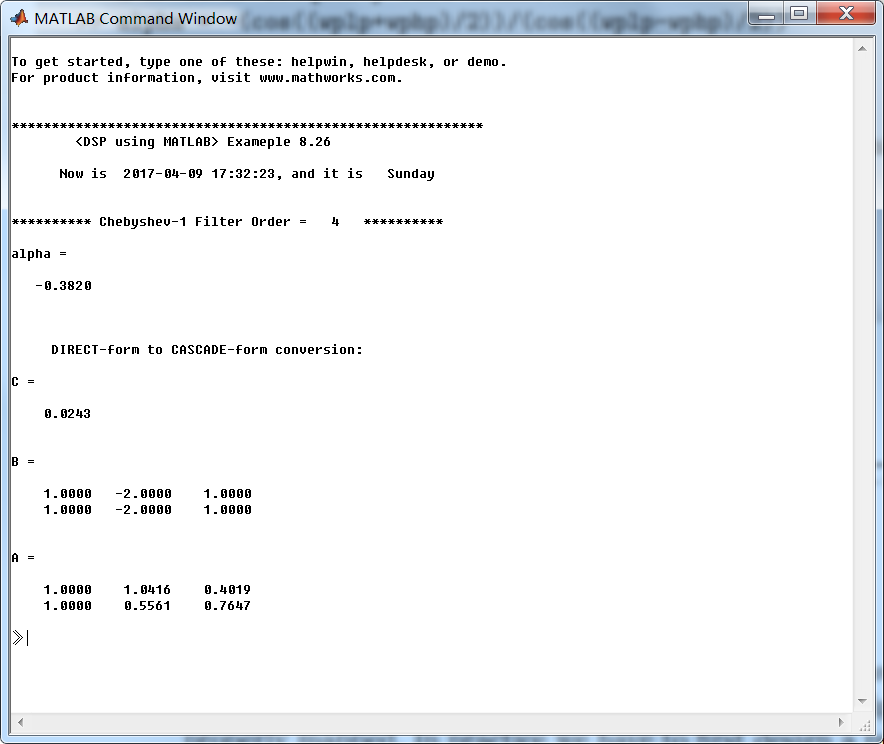
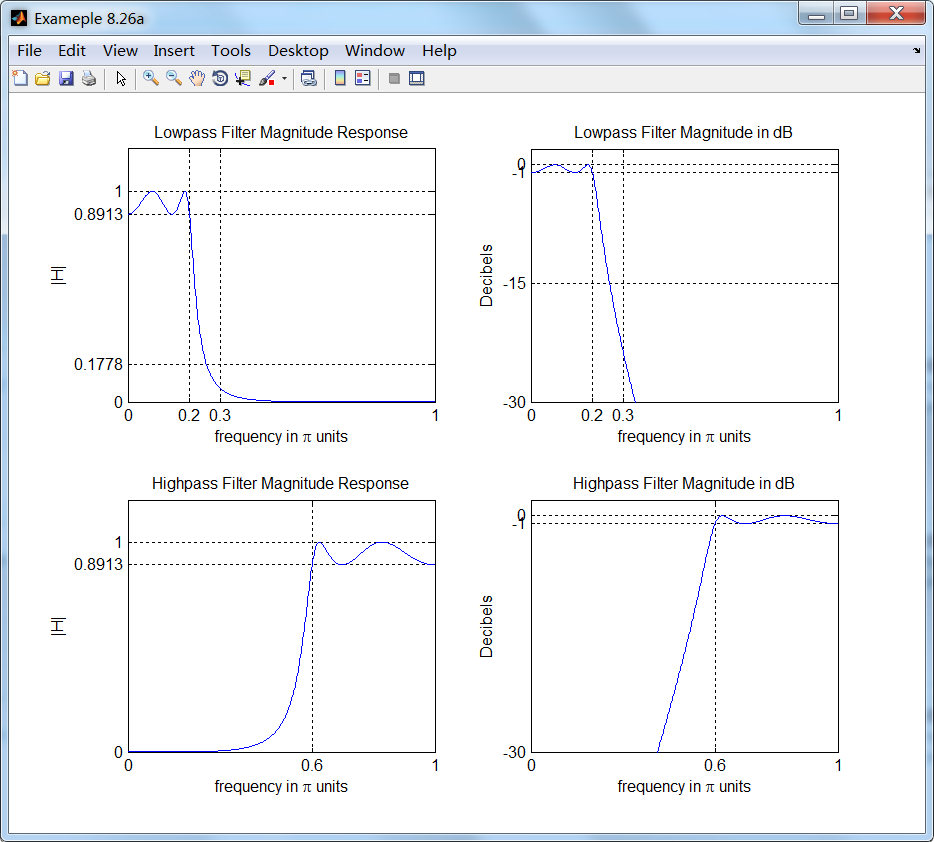
运行结果:


《DSP using MATLAB》示例Example 8.26的更多相关文章
- 《DSP using MATLAB》Problem 7.26
注意:高通的线性相位FIR滤波器,不能是第2类,所以其长度必须为奇数.这里取M=31,过渡带里采样值抄书上的. 代码: %% +++++++++++++++++++++++++++++++++++++ ...
- 《DSP using MATLAB》Problem 8.26
代码: %% ------------------------------------------------------------------------ %% Output Info about ...
- DSP using MATLAB 示例Example3.21
代码: % Discrete-time Signal x1(n) % Ts = 0.0002; n = -25:1:25; nTs = n*Ts; Fs = 1/Ts; x = exp(-1000*a ...
- DSP using MATLAB 示例 Example3.19
代码: % Analog Signal Dt = 0.00005; t = -0.005:Dt:0.005; xa = exp(-1000*abs(t)); % Discrete-time Signa ...
- DSP using MATLAB示例Example3.18
代码: % Analog Signal Dt = 0.00005; t = -0.005:Dt:0.005; xa = exp(-1000*abs(t)); % Continuous-time Fou ...
- DSP using MATLAB 示例Example3.23
代码: % Discrete-time Signal x1(n) : Ts = 0.0002 Ts = 0.0002; n = -25:1:25; nTs = n*Ts; x1 = exp(-1000 ...
- DSP using MATLAB 示例Example3.22
代码: % Discrete-time Signal x2(n) Ts = 0.001; n = -5:1:5; nTs = n*Ts; Fs = 1/Ts; x = exp(-1000*abs(nT ...
- DSP using MATLAB 示例Example3.17
- DSP using MATLAB示例Example3.16
代码: b = [0.0181, 0.0543, 0.0543, 0.0181]; % filter coefficient array b a = [1.0000, -1.7600, 1.1829, ...
- DSP using MATLAB 示例 Example3.15
上代码: subplot(1,1,1); b = 1; a = [1, -0.8]; n = [0:100]; x = cos(0.05*pi*n); y = filter(b,a,x); figur ...
随机推荐
- poi 取excel单元格内容时,需要判断单元格的类型,才能正确取出
以下内容非原创,原文链接http://blog.sina.com.cn/s/blog_4b5bc01101015iuq.html ate String getCellValue(HSSFCell ce ...
- Weex了解
weex描述 weex是一个使用web开发体验来开发高性能原生应用的框架,能支持vue.js框架.它可以实现用同一套代码来构建Andriod.IOS和web应用.可以实现使用JavaScript和流行 ...
- android之代码混淆
项目发布之前混淆是必不可少的工作,混淆可以增加别人反编译阅读代码的难度,还可以缩小APK包. Android 中通过ProGuard 来混淆Java代码,仅仅是混淆java代码.它是无法混淆Nativ ...
- 性能测试TPS目标值确定-二八原则
在性能测试中通常使用二八原则来量化业务需求. 二八原则:指80%的业务量在20%的时间里完成. TPS(QPS)=并发数/响应时间 例:如某个公司1000个员工,在周五下午3点-5点有90%的员工登陆 ...
- Python 常用 PEP8 编码规范
Python 常用 PEP8 编码规范 代码布局 缩进 每级缩进用4个空格. 括号中使用垂直隐式缩进或使用悬挂缩进. EXAMPLE: ? 1 2 3 4 5 6 7 8 9 10 11 12 13 ...
- ansible入门一(Ansible介绍及安装部署)
本节内容: 运维工具 Ansible特性 Ansible架构图和核心组件 安装Ansible 演示使用示例 一.运维工具 作为一个Linux运维人员,需要了解大量的运维工具,并熟知这些工具的差异,能够 ...
- Django-自定义分页组件
1.封装的分页代码: class PageInfo(object): def __init__(self,current_page,all_count,per_page,base_url,show_p ...
- codis3.2安装配置中的一些问题
1.参考文档与参考资料问题 安装codis集群之前,我先在网上找资料,然后又到github的项目官方地址找,不得不说,相关的资料不好找,而且找到之后有些东西说的也不是很清楚.由于codis版本迭代的问 ...
- linux生成随机密码的十种方法
Linux操作系统的一大优点是对于同样一件事情,你可以使用高达数百种方法来实现它.例如,你可以通过数十种方法来生成随机密码.本文将介绍生成随机密码的十种方法. 1. 使用SHA算法来加密日期,并输出结 ...
- [置顶]
kubernetes1.8发布跟踪
一.Kubernetes发布历史回顾 1. Kubernetes 1.0 - 2015年7月发布 2. Kubernetes 1.1 - 2015年11月发布 3. ...