
Springboot(二)springboot之jsp支持
参考恒宇少年的博客:https://www.jianshu.com/p/90a84c814d0c
springboot内部对jsp的支持并不是特别理想,而springboot推荐的视图是Thymeleaf(在以后章节进行讲解),但是开发人员对jsp的应用得掌握,还是必不可少的。
本文目标:
整合springboot web项目支持jsp作为视图输出
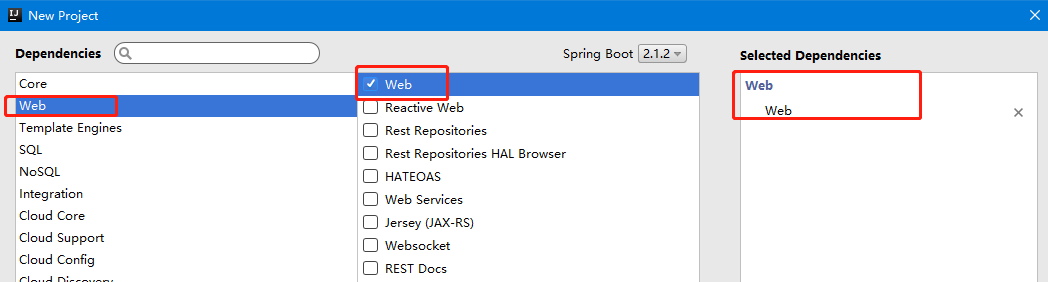
一、使用IntelliJ IDEA 工具来构建项目(建项目时候要选中war包)
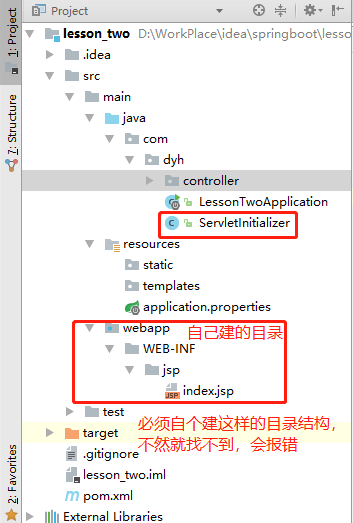
二、自动生成的ServletInitializer类介绍
实现SpringBootServletInitializer的子类需要重写一个configure方法,方法内自动根据LessontwoApplication.class的类型创建一个SpringApplicationBuilder交付给springboot框架来完成初始化运行配置。
三、配置springboot支持jsp
<?xml version="1.0" encoding="UTF-8"?>

<project xmlns="http://maven.apache.org/POM/4.0.0" xmlns:xsi="http://www.w3.org/2001/XMLSchema-instance"

    xsi:schemaLocation="http://maven.apache.org/POM/4.0.0 http://maven.apache.org/xsd/maven-4.0.0.xsd">

    <modelVersion>4.0.0</modelVersion>

    <parent>

        <groupId>org.springframework.boot</groupId>

        <artifactId>spring-boot-starter-parent</artifactId>

        <version>2.1.2.RELEASE</version>

        <relativePath/> <!-- lookup parent from repository -->

    </parent>

    <groupId>com.dyh</groupId>

    <artifactId>lesson_two</artifactId>

    <version>0.0.1-SNAPSHOT</version>

    <packaging>war</packaging>

    <name>lesson_two</name>

    <description>Demo project for Spring Boot</description>

    <properties>

        <java.version>1.8</java.version>

    </properties>

    <dependencies>

        <dependency>

            <groupId>org.springframework.boot</groupId>

            <artifactId>spring-boot-starter-web</artifactId>

        </dependency>

        <dependency>

            <groupId>org.springframework.boot</groupId>

            <artifactId>spring-boot-starter-tomcat</artifactId>

            <scope>provided</scope>

        </dependency>

        <dependency>

            <groupId>org.springframework.boot</groupId>

            <artifactId>spring-boot-starter-test</artifactId>

            <scope>test</scope>

        </dependency>

        <!--添加springboot对jsp支持-->

        <dependency>

            <groupId>org.apache.tomcat.embed</groupId>

            <artifactId>tomcat-embed-jasper</artifactId>

        </dependency>

        <!--servlet支持开启-->

        <dependency>

            <groupId>javax.servlet</groupId>

            <artifactId>javax.servlet-api</artifactId>

        </dependency>

        <!--使用jstl标签-->

        <dependency>

            <groupId>javax.servlet</groupId>

            <artifactId>jstl</artifactId>

        </dependency>

    </dependencies>

    <build>

        <plugins>

            <plugin>

                <groupId>org.springframework.boot</groupId>

                <artifactId>spring-boot-maven-plugin</artifactId>

            </plugin>

        </plugins>

    </build>

</project>
四、配置视图
我们必须按照jsp文件之前的文件目录风格,在/webapp/WEB-INF/jsp目录下。
1. 在main目录下创建webapp文件夹
2. 在webapp下创建jsp文件夹
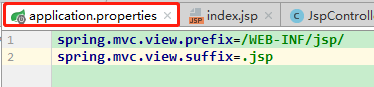
3. 修改application.properties文件让springmvc支持视图的跳转目录指向为/main/webapp/jsp

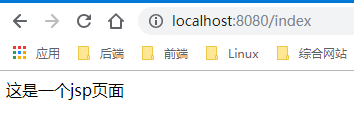
五、controller层代码书写,请求127.0.0.1:8080/index,返回到index.jsp页面
@Controller

public class JspController {

    @RequestMapping(value = "/index",method = RequestMethod.GET)

    public String getJsp(){

        return "index";

    }

}
六、创建Jsp页面,并测试
<%@ page contentType="text/html;charset=UTF-8" language="java" %>

<html>

<head>

    <title>Title</title>

</head>

<body>

    这是一个jsp页面

</body>

</html>
Springboot(二)springboot之jsp支持的更多相关文章
- SpringBoot学习:添加JSP支持
项目下载地址:http://download.csdn.NET/detail/aqsunkai/9805821 (一)pom中添加依赖: <!-- https://mvnrepository.c ...
- springboot(二).springboot整合logback用于日志输出
springboot整合logback用于日志输出 我们项目的基本框架已经完成,http请求已经可以访问,现在给我们的框架添加日志记录的功能并能将每天的记录记录到文件中去 在这里,我们使用logbac ...
- SpringBoot(二) -- SpringBoot配置
一.配置文件 SpringBoot可以使用两种类型的配置文件(文件名固定): application.properties application.yml 配置文件的作用就是来修改SpringBoot ...
- SpringBoot(二) SpringBoot核心配置文件application.yml/properties
我们都知道在Spring中有着application.xml文件对Spring进行相关配置,通过web.xml中的contextConfigLocation指定application.xml文件所在位 ...
- SpringBoot(二): SpringBoot属性配置文件 SpringBoot多环境配置文件 SpringBoot自定义配置文件
1.属性配置文件 一共分为两种,一种是键值对的properties属性配置文件,一种是yaml格式的配置文件 properties配置: 2.多环境配置文件 当我们的项目中有多套配置文件 比如开发的配 ...
- 搭建SpringBoot、Jsp支持学习笔记
Spring Boot 添加JSP支持 大体步骤: (1) 创建Maven web project: (2) 在pom.xml文件添加依赖: (3) ...
- springboot 2.0 整合 同时支持jsp+html跳转
springboot项目创建教程 https://blog.csdn.net/q18771811872/article/details/88126835 springboot2.0 跳转html教程 ...
- spring-boot(二)
学习文章来自:http://www.ityouknow.com/spring-boot.html web开发 spring boot web开发非常的简单,其中包括常用的json输出.filters. ...
- springboot(二):web综合开发
上篇文章介绍了spring boot初级教程:spring boot(一):入门篇,方便大家快速入门.了解实践Spring boot特性:本篇文章接着上篇内容继续为大家介绍spring boot的其它 ...
随机推荐
- Python 简明教程 --- 4,Python 变量与基本数据类型
微信公众号:码农充电站pro 个人主页:https://codeshellme.github.io 任何一个人都会写出能够让机器理解的代码,只有好的程序员才能写出人类可以理解的代码. -- Marti ...
- ceph SSD HDD分离与openstack调用
本例子ceph L版本采用的是filestore,而不是bluestore. 一.查看class类型,只有一个hdd,.Luminous 为每个OSD添加了一个新的属性:设备类.默认情况下,OSD将根 ...
- Write a program to copy its input to its output, replacing each tab by \t, each backspace by \b, and each backslash by \\. This makes tabs and backspa
#include <stdio.h> #define DBS '\\' void main() { int c; while((c=getchar())!=EOF) { if(c=='\t ...
- 控制shell终端提示符格式和颜色
字体颜色值 (ASCII) 背景颜色值 (ASCII) 显示颜色 30 40 黑色 31 41 红色 32 42 绿色 33 43 黄色 34 44 蓝色 35 45 紫红色 36 46 青蓝色 37 ...
- idea 链接 Tomcat 出现的错误 Application server libraries not found
红色字体是重点 好久好久没有上来了.一直忙于工作没事有时间进行总结. 最近在家隔离期间发现了一个好玩的游戏率土之滨 , 玩的不错和大盟主混的很好.在给盟里做考勤任务的时候发现很麻烦还需要用Excel ...
- flask的小错误
这几天刚学flask,根据录屏学代码的时候,遇到一个问题 基本能看懂错误,role_id是类的一个字段,应该是一个对象,最后发现是单词写错了,应该是大写的Column, db.Column(db.In ...
- 如何实现html页面自动刷新
使用场景: 1. 页面需要定时刷新,实时加载数据,需要实时查看监控数据(H5中的WebSocket和SSE可以实现局部刷新) 2. 一定时间之后跳转到指定页面(登录注册之类) 3. 前端开发使用伪数据 ...
- 火车运输(最大生成树+lca) 洛谷P1967
货车运输 题目描述 \(A\) 国有 \(n\) 座城市,编号从 \(1\) 到 \(n\) ,城市之间有 \(m\) 条双向道路.每一条道路对车辆都有重量限制,简称限重. 现在有 \(q\) 辆货车 ...
- return 关键字
return关键字:1.使用范围:使用在方法体中2.作用: ① 结束方法 ② 针对于返回值类型的方法,使用"return 数据"方法返回所要的数据.3.注意点:return关键字后 ...
- NOIP 2016 D2T2 蚯蚓](思维)
NOIP 2016 D2T2 蚯蚓 题目大意 本题中,我们将用符号 \(\lfloor c \rfloor⌊c⌋\) 表示对 \(c\) 向下取整,例如:\(\lfloor 3.0 \rfloor = ...