
JPG学习笔记1(附完整代码)
#topics h2 { background: rgba(43, 102, 149, 1); border-radius: 6px; box-shadow: 0 0 1px rgba(95, 90, 75, 1), 1px 1px 6px 1px rgba(10, 10, 0, 0.5); color: rgba(255, 255, 255, 1); font-family: "微软雅黑", "宋体", "黑体", Arial; font-size: 15px; font-weight: bold; height: 24px; line-height: 23px; margin: 12px 0 !important; padding: 5px 0 5px 10px; text-shadow: 2px 2px 3px rgba(34, 34, 34, 1) }
#topics h1 span { font-weight: bold; line-height: 1.5; font-family: "Helvetica Neue", Helvetica, Verdana, Arial, sans-serif; text-decoration: underline; color: rgba(201, 27, 67, 1); text-shadow: 2px 2px 3px rgba(34, 34, 34, 1) }
在学习图象处理的过程中,JPEG是我的第一个拦路虎。一直很想手写一下JPG的压缩和解压的过程,我在网上找到了一些代码或者文章,很多都是没有注释或者是解释不够清楚的。所以特地写这篇文章记录自己从无到有写一个JPEG_Encoder的过程,也能帮助其他学习图形或者音视频的童鞋。对于不想看文章的同学,这边直接上代码 https://github.com/Cheemion/JPEG_COMPRESS。 以下是JPEG的压缩流程。采样->>离散傅里叶变化->>量化->>哈夫曼压缩->>写入jpg文件. 在进行这些流程之前,必须从BMP文件中读取待压缩的图片文件。
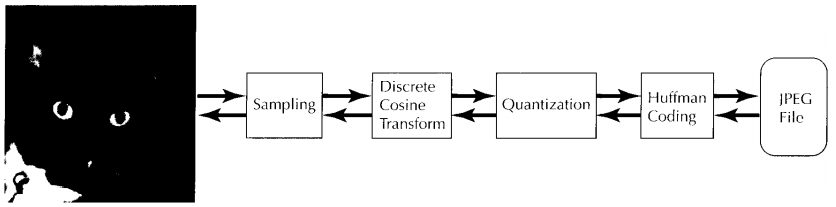
图片引用自"Compressed Image File Formats JPEG, PNG, GIF, XBM, BMP - John Miano"[4]
1.BMP文件Format
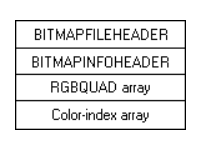
[1]BMP文件
一个文件头BITMAPFILEHEADER,里面包含了文件的各种信息。
一个图片头BITMAPINFOHEADER,里面包含了图片信息。
一个RGBQUAD array,里面包含了像素的对应关系,比如1 代表 RGB(1,1,1)。因为我们用的都是24位图片,所以我们不会不考虑这一项。
一个Color-index,就是我们的图片的像素了。我们只考虑24位图像
BMP文件的字节是大端存储的
BMP图片的每一行像素所占的字节数必须是4字节的的整数倍
BMP数据的第一行像素存储的是图片的最后一行的数据(相当于图片在BMP中是倒置的)
2.BITMAPFILEHEADER(头文件格式)
[2]头文件包含如下的字段
1 typedef struct tagBITMAPFILEHEADER {

2   WORD  bfType; //文件类型 规定为'BM'

3   DWORD bfSize; //文件大小

4   WORD  bfReserved1; //保留

5   WORD  bfReserved2; //保留

6   DWORD bfOffBits;  //数据起始地址距离首地址的位置

7 } BITMAPFILEHEADER, *LPBITMAPFILEHEADER, *PBITMAPFILEHEADER;
3.BITMAPINFOHEADER文件格式
[3]bitMapInfoHeader根据版本的不同包含了不同的结构,我们主要用到了BitMapInfoHeader和BitMapCoreHeader
以下是BitMapInfoHeader
 1 typedef struct tagBITMAPINFOHEADER {

 2   DWORD biSize;  // infoHeader这个头文件的大小

 3   LONG  biWidth; // 图片宽多少像素

 4   LONG  biHeight; //高多少

 5   WORD  biPlanes; //默认1

 6   WORD  biBitCount; //一个像素点有多少位

 7   DWORD biCompression; //是否压缩过

 8   DWORD biSizeImage; //图片大小

 9   LONG  biXPelsPerMeter; //never used

10   LONG  biYPelsPerMeter; //never used

11   DWORD biClrUsed; //never used

12   DWORD biClrImportant; //never used

13 } BITMAPINFOHEADER, *PBITMAPINFOHEADER;
以下是BitMapCoreHeader, coreHeader就简单多了,就是少了一些字段,其他一毛一样。
typedef struct tagBITMAPCOREHEADER {

  DWORD bcSize;

  WORD  bcWidth;

  WORD  bcHeight;

  WORD  bcPlanes;

  WORD  bcBitCount;

} BITMAPCOREHEADER, *LPBITMAPCOREHEADER, *PBITMAPCOREHEADER;
4.读取图片数据
定义常用结构
using byte = unsigned char;

using uint = unsigned int;

struct RGB {

    byte blue;

    byte green;

    byte red;

};
定义文件结构,和一个BMPReader(用来读取bmp文件)
 1 #pragma once

 4 class BMPReader {

 5 public:

 6     BMPReader() = default;

 7     ~BMPReader() {

 8         if (data) {

 9             delete[] data;
         data = nullptr;

10         }

11     }

12     bool open(std::string& path);

13 public:

14     uint height = 0;

15     uint width = 0;

16     uint paddingBytes = 0;

17     RGB* data = nullptr;  //实际的数据

18 };

19

20 //2个字节对齐,

21 #pragma pack(2)

22 typedef struct {

23     unsigned short    bfType = 0x424d;

24     unsigned int      bfSize = 0;

25     unsigned short    bfReserved1 = 0;

26     unsigned short    bfReserved2 = 0;

27     unsigned int    bfOffBits = 0;

28 } BitMapFileHeader;

29

30 typedef struct {

31     unsigned int    biSize;

32     int                biWidth;

33     int                biHeight;

34     unsigned short    biPlanes;

35     unsigned short    biBitCount;

36     unsigned int    biCompression;

37     unsigned int    biSizeImage;

38     int                biXPelsPerMeter;

39     int                biYPelsPerMeter;

40     unsigned int    biClrUsed;

41     unsigned int    biClrImportant;

42 } BitMapInfoHeader;

43

44 typedef struct {

45     unsigned int     bcSize;

46     unsigned short  bcWidth;

47     unsigned short  bcHeight;

48     unsigned short  bcPlanes = 1;

49     unsigned short  bcBitCount = 24;

50 } BitMapCoreHeader;

51 #pragma pack()
读取图片数据到BMPReader的data字段
bool BMPReader::open(std::string& path) {

    FILE* file = nullptr;

   //判断是否打开图片成功

    if ((file = fopen(path.c_str(), "rb")) == nullptr) {

        printf("error occured when opening file:%s", path.c_str());

        return false;

    }

    BitMapFileHeader fileHeader;

    //读取文件头

    if (fread(&fileHeader, sizeof(fileHeader), 1, file) != 1) {

        printf("Error - error occured when reading BITMAPFILEHEADER");

        return false;

    }

  //判断是不是BMP文件,通过判断'BM'

    if(fileHeader.bfType != 0x4D42) {

        printf("Error - this is not a BMP file that you're reading");

        return false;

    }


    //读取infoHeader的大小,通过size来判断是哪个版本的BitMapInfoHeader

    uint infoHeaderSize;

    fread(&infoHeaderSize, sizeof(infoHeaderSize), 1, file);

    fseek(file, -sizeof(infoHeaderSize), SEEK_CUR);

    //2中infoHeader, 通过size来判断

    //如果是BitMapCoreHeader的话

    if (infoHeaderSize == sizeof(BitMapCoreHeader)) {

        BitMapCoreHeader bitMapCoreHeader;

        if (fread(&bitMapCoreHeader, sizeof(bitMapCoreHeader), 1, file) != 1) {

            printf("Error - mal-structure BITMAPCOREHEADER");

            return false;

        }

        this->width = bitMapCoreHeader.bcWidth;

        this->height = bitMapCoreHeader.bcHeight;

        if (bitMapCoreHeader.bcBitCount != 24) {

            printf("Error - the picture format is not consistent with our programm");

            return false;

        }

    } else {

        BitMapInfoHeader bitMapInfoHeader;

        if (fread(&bitMapInfoHeader, sizeof(bitMapInfoHeader), 1, file) != 1) {

            printf("Error - mal-structure BITMAPINFOHEADER");

            return false;

        }

        this->width = bitMapInfoHeader.biWidth;

        this->height = bitMapInfoHeader.biHeight;

        if (bitMapInfoHeader.biBitCount != 24) {

            printf("Error - the picture format is not consistent with our programm");

            return false;

        }

    }

    // 必须是4byte的整数倍,算出需要padding多少字节,也就是需要填补多少字节// if width = 1, 1 * 3个像素 * 8位 = 24位, 差一个字节, paddingSize = 1

    // if width = 2, 2 * 3个 * 8位 = 48位  paddingSize = 2

    // if width = 3, paddingSize = 3

    // if width = 4, paddingSize = 0

    this->paddingBytes = width % 4;


    //为像素数据 创建内存空间

    data = new (std::nothrow) RGB[this->width * this->height];

    if (!data) {

        printf("Error - error when allocating memroy for RGB");

        return false;

    }

    //跳到data数据的位置

    fseek(file, fileHeader.bfOffBits, SEEK_SET);

    for (uint i = 0; i < height; i++) {

        //read data一行,一行的读取放入我们的data

        if (width != fread(data + (height - 1 - i) * width , sizeof(RGB), width, file)) {

            printf("Error - something wrong when reading data from BMP file");

            delete data;

            return false;

        }
        //因为可能有paddingSize,所以这边跳过PaddingSize

        fseek(file, paddingBytes, SEEK_CUR);

    }

    fclose(file);

    return true;
}
以上全部的代码在https://github.com/Cheemion/JPEG_COMPRESS/tree/main/Day1
完结
Thanks for reading, happy lunar new year.
参考资料
[1]https://docs.microsoft.com/en-us/windows/win32/gdi/bitmap-storage
[2]https://docs.microsoft.com/en-us/previous-versions//dd183376(v=vs.85)
[3]https://docs.microsoft.com/en-us/windows/win32/api/wingdi/ns-wingdi-bitmapcoreheader
JPG学习笔记1(附完整代码)的更多相关文章
- JPG学习笔记3(附完整代码)
#topics h2 { background: rgba(43, 102, 149, 1); border-radius: 6px; box-shadow: 0 0 1px rgba(95, 90, ...
- Android 监听双卡信号强度(附完整代码)
Android 监听双卡信号强度 监听单卡信号强度 监听单卡的信号强度非常简单直接用TelephonyManager.listen()去监听sim卡的信号强度. TelephonyManager = ...
- JPG学习笔记4(附完整代码)
#topics h2 { background: rgba(43, 102, 149, 1); border-radius: 6px; box-shadow: 0 0 1px rgba(95, 90, ...
- JPG学习笔记2(附完整代码)
#topics h2 { background: rgba(43, 102, 149, 1); border-radius: 6px; box-shadow: 0 0 1px rgba(95, 90, ...
- WebGL three.js学习笔记 创建three.js代码的基本框架
WebGL学习----Three.js学习笔记(1) webgl介绍 WebGL是一种3D绘图协议,它把JavaScript和OpenGL ES 2.0结合在一起,通过增加OpenGL ES 2.0的 ...
- 学习笔记:python3,代码。小例子习作(2017)
http://www.cnblogs.com/qq21270/p/7634025.html 学习笔记:python3,一些基本语句(一些基础语法的代码,被挪到这里了) 日期和时间操作 http://b ...
- 学习笔记:python3,代码。小例子习作
http://www.cnblogs.com/qq21270/p/7634025.html 学习笔记:python3,一些基本语句(一些基础语法的代码,被挪到这里了) 日期和时间操作 http://b ...
- 雨痕 的《Python学习笔记》--附脑图(转)
原文:http://www.pythoner.com/148.html 近日,在某微博上看到有人推荐了 雨痕 的<Python学习笔记>,从github上下载下来看了下,确实很不错. 注意 ...
- Linux Shell输出颜色字符学习笔记(附Python脚本实现自动化定制生成)
齿轮发出咔嚓一声,向前进了一格.而一旦向前迈进,齿轮就不能倒退了.这就是世界的规则. 0x01背景 造了个轮子:御剑师傅的ipintervalmerge的Python版本.觉得打印的提示信息如果是普通 ...
- 基于C#的内网穿透学习笔记(附源码)
如何让两台处在不同内网的主机直接互连?你需要内网穿透! 上图是一个非完整版内外网通讯图由内网端先发起,内网设备192.168.1.2:6677发送数据到外网时候必须经过nat会转换成 ...
随机推荐
- EXPORT和IMPORT使用示例
1 report ztestprog. 2 data:begin of itab1 occurs 0, 3 ff(10), 4 end of itab1. 5 data:itab2 like itab ...
- 微人事项目-mybatis-持久层
摘要 最近将微人事这个开源项目进行了复现,这篇文章记录mybaits访问数据库这一块. 其中MyBatis是一个流行的持久层框架,支持自定义SQL.存储过程和高级映射.MyBatis消除了几乎所有的J ...
- ctfshow_djb杯
桐桑又开始摸鱼了 ctfshow的比赛整的一手好活.djb杯. web1_veryphp 打开就是源码: 1 <?php 2 error_reporting(0); 3 highlight_fi ...
- kotlin和python哪个好!程序员怎样优雅度过35岁中年危机?满满干货指导
导语 学历永远是横在我们进人大厂的一道门槛,好像无论怎么努力,总能被那些985,211 按在地上摩擦! 不仅要被"他们"看不起,在HR挑选简历,学历这块就直接被刷下去了,连证明自己 ...
- Go 如何实现热重启
https://mp.weixin.qq.com/s/UVZKFmv8p4ghm8ICdz85wQ Go 如何实现热重启 原创 zhijiezhang 腾讯技术工程 2020-09-09
- javamail发送邮件,支持yahoo,google,163.com,qq.com邮件发送
https://www.iteye.com/blog/fangyunfeng-1847352 https://blog.csdn.net/weixin_38465623/article/details ...
- 权限过大 ssh协议通过pem文件登陆
root@oneweek:~# ssh -i uat.pem root@110.5.15.6@@@@@@@@@@@@@@@@@@@@@@@@@@@@@@@@@@@@@@@@@@@@@@@@@@@@@@ ...
- Flash 终将谢幕:微软将于年底停止对 Flash 的支持
近日,微软宣布将于今年 12 月终止对 Adobe Flash Player 的支持,届时,微软旗下所有浏览器都将无法使用 Flash,Adobe 也不会在今年 12 月后发布安全更新.早在 2017 ...
- 网络流 - dinic + 当前弧优化【代码】
这是初学网络流的时候从<算法竞赛进阶指南>抄下来的一份代码,自己理解的也不是很透彻. 注意,边要从 \(1\) 开始计,不然直接 \(xor\) 运算的话取反边会直接炸掉. #includ ...
- P2573 [SCOI2012]滑雪 题解
下午花了三个小时肝这道题,心态差点爆炸! 下面是分析: 1 题目要求: 2 求最小生成树 3 但是 4 - a是从1号点开始的 --> 如果以后的某个点比一号高,则不可能到达 5 - a只能从高 ...