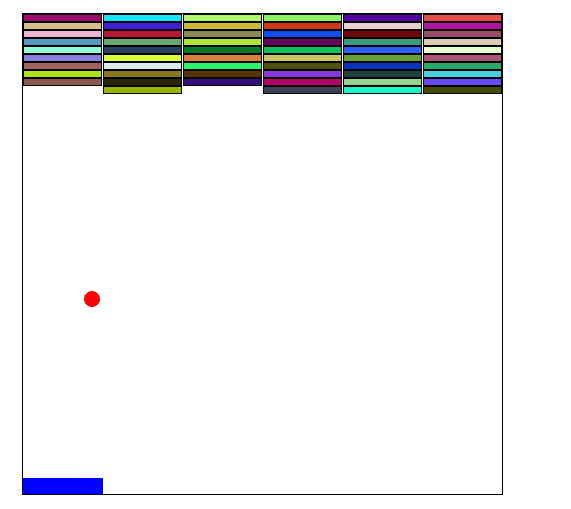
实现效果如图所示:

1、布局
  在html中,声明  div1 作为作为带有边框的父物体,一切行为都要在 div1 中进行。创建小球ball、左右可滑动的板子bat,以及存放要销毁的砖块的父物体 brick。
    div1:父物体
    ball:小球
    bat:板子
    brick:承载砖块的父容器
<body>
    <div class="div1">
        <div class="ball"></div>
        <div class="bat"></div>
        <div class="brick">
        </div>
    </div>
</body>
2、样式
  div1:设置大小,边框,线对定位,以及左右居中。
   ball:设成圆形,相对div1居中,设置大小,绝对定位
   bat:设置大小,绝对定位,位置在div1的左下方
   brick::预设一个div样式,并设置浮动,以及边框的大小。目的是为了让砖块可以自动生成 
  
<style>
        .div1 {
            width: 600px;
            height: 600px;
            border: 1px solid black;
            margin: 100px auto;
            position: relative;
        }
        
        .ball {
            position: absolute;
            width: 20px;
            height: 20px;
            background: red;
            border-radius: 50%;
            left: 300px;
            top: 300px;
        }
        
        .bat {
            width: 100px;
            height: 20px;
            background: blue;
            position: absolute;
            left: 0;
            bottom: 0;
        }
        .brick div {
            height: 8px;
            width: 98px;
            float: left;
            background-color: yellow;
            border: 1px solid black;
        }
    </style>
3、行为
  ① 拿到所有定义的标签对象
         const oDiv = document.querySelector('.div1');
              const oBrick = oDiv.querySelector('.brick');
              const oBall = oDiv.querySelector('.ball');
              const oBatt = oDiv.querySelector('.bat');
              var aBricks = oBrick.getElementsByTagName("div");
  ② 生成指定个数砖块,每个砖块随机生成颜色,并添加到父物体 brick下。为了以后销毁做准备,将每个砖块添加 top left属性,以及absolute绝对定位(解决在销毁时,由于浮动原因,带来销毁后其他砖块左移动的影响)。
     creatStone(60);
              //生成砖块
            function creatStone(num) {
                  for (var i = 0; i < num; i++) {
                      var div = document.createElement('div');
                      div.style.background = setColors();
                      oBrick.appendChild(div);
                      div.style.left = div.offsetLeft + 'px';
                      div.style.top = div.offsetTop + 'px';
                  }
                  for (var j = 0; j < num; j++) {
                     aBricks[j].style.position = 'absolute';
                  }
             }
    随机颜色
     //设置砖块随机颜色
            function setColors() {
                let r = parseInt(Math.random() * 256);
                let g = parseInt(Math.random() * 256);
                let b = parseInt(Math.random() * 256);
                return `rgb(${r},${g},${b})`;
            }
  ③ 设置滑块的移动
   oBatt.onmousedown = function(e) {
                e = e || window.event;
                let x = e.clientX - oBatt.offsetLeft;
                document.onmousemove = function(ev) {
                    ev = ev || window.event;
                    let l = ev.clientX - x;
                    if (l <= 0) {
                        l = 0;
                    }
                    if (l >= oDiv.clientWidth - oBatt.offsetWidth) {
                        l = oDiv.clientWidth - oBatt.offsetWidth;
                    }
                    oBatt.style.left = l + 'px';
                }
            }
            document.onmouseup = function() {
                document.onmousemove = null;
            }
        }
  ④ 设置小球随机滚动,这里定义了x y两个方向的随机速度,当ball碰到边框是,将速度设为负值,进行反方向运动。运动时间间隔为40ms。运动形式是通过改变小球的left top值来实现的。这里做了一个校验,当碰到底边时会弹窗,告诉玩家重新开始。knock()为自定义的碰撞函数,接下来会为大家介绍。

            var speedx = parseInt(Math.random() * 4) + 3;
            var speedy = parseInt(Math.random() * 3) + 4;
            setInterval(function() {
                oBall.style.left = oBall.offsetLeft + speedx + 'px';
                oBall.style.top = oBall.offsetTop + speedy + 'px';
                if (oBall.offsetLeft <= 0 || oBall.offsetLeft > oDiv.clientWidth - oBall.offsetWidth) {
                    speedx *= -1;
                }
                if (oBall.offsetTop <= 0 || oBall.offsetTop > oDiv.clientHeight - oBall.offsetHeight) {
                    speedy *= -1;
                }
                if (oBall.offsetTop == oDiv.clientHeight - oBall.offsetHeight) {
                    window.alert('重新开始')
                    window.location.reload();
                }
                if (knock(oBall, oBatt)) {
                    speedy *= -1;
                }
                for (var i = 0; i < aBricks.length; i++) {
                    if (knock(oBall, aBricks[i])) {
                        speedy *= -1;
                        oBrick.removeChild(aBricks[i]);
                    }
                }
            }, 40);
  ⑤ 碰撞函数的介绍:两个参数node1,node2,获取两个对象的每条边相对于父物体的坐标值。通过比较是否发生重叠的原理,判断是否发生了碰撞。
  function knock(node1, node2) {
            let l1 = node1.offsetLeft;
            let r1 = node1.offsetLeft + node1.offsetWidth;
            let t1 = node1.offsetTop;
            let b1 = node1.offsetTop + node1.offsetHeight;
            let l2 = node2.offsetLeft;
            let r2 = node2.offsetLeft + node2.offsetWidth;
            let t2 = node2.offsetTop;
            let b2 = node2.offsetTop + node2.offsetHeight;
            if (l2 >= r1 || r2 <= l1 || t2 >= b1 || b2 <= t1) {
                return false;
            } else {
                return true;
            }
        }
4、详细js代码如下
 <script>
        window.onload = function() {
            const oDiv = document.querySelector('.div1');
            const oBrick = oDiv.querySelector('.brick');
            const oBall = oDiv.querySelector('.ball');
            const oBatt = oDiv.querySelector('.bat');
            var aBricks = oBrick.getElementsByTagName("div");
            creatStone(60);
            //生成砖块
            function creatStone(num) {
                for (var i = 0; i < num; i++) {
                    var div = document.createElement('div');
                    div.style.background = setColors();
                    oBrick.appendChild(div);
                    div.style.left = div.offsetLeft + 'px';
                    div.style.top = div.offsetTop + 'px';
                }
                for (var j = 0; j < num; j++) {
                    aBricks[j].style.position = 'absolute';
                }
            }
            //设置砖块随机颜色
            function setColors() {
                let r = parseInt(Math.random() * 256);
                let g = parseInt(Math.random() * 256);
                let b = parseInt(Math.random() * 256);
                return `rgb(${r},${g},${b})`;
            }
            //设置小球随机滚动
            var speedx = parseInt(Math.random() * 4) + 3;
            var speedy = parseInt(Math.random() * 3) + 4;
            setInterval(function() {
                oBall.style.left = oBall.offsetLeft + speedx + 'px';
                oBall.style.top = oBall.offsetTop + speedy + 'px';
                if (oBall.offsetLeft <= 0 || oBall.offsetLeft > oDiv.clientWidth - oBall.offsetWidth) {
                    speedx *= -1;
                }
                if (oBall.offsetTop <= 0 || oBall.offsetTop > oDiv.clientHeight - oBall.offsetHeight) {
                    speedy *= -1;
                }
                if (oBall.offsetTop == oDiv.clientHeight - oBall.offsetHeight) {
                    window.alert('重新开始')
                    window.location.reload();
                }
                if (knock(oBall, oBatt)) {
                    speedy *= -1;
                }
                for (var i = 0; i < aBricks.length; i++) {
                    if (knock(oBall, aBricks[i])) {
                        speedy *= -1;
                        oBrick.removeChild(aBricks[i]);
                    }
                }
            }, 40);
            //设置滑块的移动
            oBatt.onmousedown = function(e) {
                e = e || window.event;
                let x = e.clientX - oBatt.offsetLeft;
                document.onmousemove = function(ev) {
                    ev = ev || window.event;
                    let l = ev.clientX - x;
                    if (l <= 0) {
                        l = 0;
                    }
                    if (l >= oDiv.clientWidth - oBatt.offsetWidth) {
                        l = oDiv.clientWidth - oBatt.offsetWidth;
                    }
                    oBatt.style.left = l + 'px';
                }
            }
            document.onmouseup = function() {
                document.onmousemove = null;
            }
        }
        function knock(node1, node2) {
            let l1 = node1.offsetLeft;
            let r1 = node1.offsetLeft + node1.offsetWidth;
            let t1 = node1.offsetTop;
            let b1 = node1.offsetTop + node1.offsetHeight;
            let l2 = node2.offsetLeft;
            let r2 = node2.offsetLeft + node2.offsetWidth;
            let t2 = node2.offsetTop;
            let b2 = node2.offsetTop + node2.offsetHeight;
            if (l2 >= r1 || r2 <= l1 || t2 >= b1 || b2 <= t1) {
                return false;
            } else {
                return true;
            }
        }
    </script>

H5 简单实现打砖块游戏的更多相关文章

  1. H5简单内容

    1.简单认识H5 HTML5不仅仅是作为HTML标记语言的一个最新版本,更重要的是它指定了Web开发的一系列标准,成为第一个将Web作为应用开发平台的HTML语言. 我们日常讨论的H5其实是有一个泛称 ...

  2. h5 简单拖放

    最新的HTML5标准为所有的html元素规定了一个draggable属性,它表明了元素是否可以拖动,默认情况下,图像,链接,选中的文字是可以拖动的,因为他们的draggable属性被自动设置为true ...

  3. js进阶 10-7 简单的伪类选择器可以干什么

    js进阶 10-7 简单的伪类选择器可以干什么 一.总结 一句话总结:伪类选择器是冒号. 1.学而不用,有什么用? 多用啊,在项目中多用 2.简单的伪类选择器可以干什么? 除某元素以外,某元素的一切索 ...

  4. MVC文件上传 - 使用jquery异步上传并客户端验证类型和大小

    本篇体验MVC上传文件,从表单上传过渡到jquery异步上传. MVC最基本的上传文件是通过form表单提交方式 □ 前台视图部分 <% using(Html.BeginForm("F ...

  5. ionic新入坑-环境搭建+新建项目+打开低版本项目处理

    是的.我又双叒叕入新坑了.想我大学的时候web-app刚火起来.还帮忙做了我们学校医务室系统的web-app页面部分呢.时间太紧最后也没出个完整的版本.那时候只是用H5简单做了web部分.是想着用ph ...

  6. MVC文件上传01-使用jquery异步上传并客户端验证类型和大小

    本篇体验MVC上传文件,从表单上传过渡到jquery异步上传. MVC最基本的上传文件是通过form表单提交方式 □ 前台视图部分 <% using(Html.BeginForm("F ...

  7. js进阶 10-8 伪类选择器有哪几类(自己不用,永远不是自己的)

    js进阶 10-8 伪类选择器有哪几类(自己不用,永远不是自己的) 一.总结 一句话总结:自己不用,永远不是自己的. 0.学而不用,却是为何? 自己不用,永远不是自己的,有需求的时候要想到它,然后操作 ...

  8. 用PHP+H5+Boostrap做简单的音乐播放器(进阶版)

    前言:之前做了一个音乐播放器(纯前端),意外的受欢迎,然后有人建议我把后台一起做了,正好也想学习后台,所以学了两天php(不要吐槽我的速度,慢工出细活嘛~)然后在之前的基础上也又完善了一些功能,所以这 ...

  9. 移动端 H5图片裁剪插件,内置简单手势操作

    前面曾经写过一篇<H5图片裁剪升级版>,但里面需要借助第三方手势库,这次就不需要使用手势库,全部封装在代码中. 下图是裁剪的展示,下面就做了拖放和裁剪,没有做缩放,在插件中需要用到大量的计 ...

随机推荐

  1. 弹性伸缩 AS(Auto Scaling)

    根据业务需求和策略设置伸缩规则,在业务需求增长时自动为您增加 ECS 实例以保证计算能力,在业务需求下降时自动减少 ECS 实例以节约成本,弹性伸缩不仅适合业务量不断波动的应用程序,同时也适合业务量稳 ...

  2. 二进制安装kubernetes(一) 环境准备及etcd组件安装及etcd管理软件etcdkeeper安装

    实验环境: 架构图: 主机环境: 操作系统:因docker对内核需要,本次部署操作系统全部采用centos7.6(需要内核3.8以上) VM :2C 2G 50G * 5  PS:因后面实验需要向k8 ...

  3. springboot( 三)redis demo

    redis介绍 Redis是目前业界使用最广泛的内存数据存储.相比memcached,Redis支持更丰富的数据结构,例如hashes, lists, sets等,同时支持数据持久化.除此之外,Red ...

  4. 吐槽 Apple iPhone 十大反人类的设计 All In One

    吐槽 Apple iPhone 十大反人类的设计 All In One 不支持 GPS 快捷开关 每次都要到,设置> 隐身 > 位置,脑残的设计 顶部的状态栏,网络不支持显示网速 顶部的状 ...

  5. The best Fibonacci is achieved in js

    The best Fibonacci is achieved in js the best realized by using js 斐波那契数列 "use strict"; /* ...

  6. React.memo All In One

    React.memo All In One https://reactjs.org/docs/react-api.html#components React.memo const MyComponen ...

  7. TypeScript 4.0 New Features

    TypeScript 4.0 New Features $ npm install typescript@beta https://devblogs.microsoft.com/typescript/ ...

  8. js online playground & web editor

    js online playground & web editor -javascript playgrounds 2019 https://scotch.io/tutorials/7-jav ...

  9. taro render html

    taro render html html = `<h1 style='color: red'>Wallace is way taller than other reporters.< ...

  10. 「NGK每日快讯」2021.2.1日NGK公链第90期官方快讯!