
WCF权限控制
前面写了 WCF账户密码认证, 实现了帐号密码认证, 接下来看看如何对方法的细粒度控制, 本文很大程度参考了 WCF安全之基于自定义声明授权策略, 这篇文章对原理讲得比较清楚, 而我这篇文章呢, 顶多算对操作实现进行补遗.
自定义权限访问, 需要你实现两个类
- 自定义授权策略声明集管理器: 找出某个用户的所有权限
- 自定义的基于服务授权访问检查的管理器: 当前访问资源与权限集合比较, 并给出能否访问的结果
1. 自定义授权策略声明集管理器
需要注意的是需要始终允许Metadata请求(mex) https://msdn.microsoft.com/en-us/library/aa347849(v=vs.110).aspx
using System;

using System.Linq;

using System.ServiceModel;

using System.ServiceModel.Description;

using System.IdentityModel.Claims;

using System.Security.Principal;

namespace WCF_UserPassword

{

    public class CustomServiceAuthorizationManager : ServiceAuthorizationManager

    {

        protected override bool CheckAccessCore(OperationContext operationContext)

        {

            //始终允许Metadata请求(mex)

            if (operationContext.EndpointDispatcher.ContractName == ServiceMetadataBehavior.MexContractName &&

            operationContext.EndpointDispatcher.ContractNamespace == "http://schemas.microsoft.com/2006/04/mex" &&

            operationContext.IncomingMessageHeaders.Action == "http://schemas.xmlsoap.org/ws/2004/09/transfer/Get")

            {

                GenericIdentity identity = new GenericIdentity("");//必须插入一个Principal

                operationContext.ServiceSecurityContext.AuthorizationContext.Properties["Principal"] = new GenericPrincipal(identity, null);

                return true;

            }

            //访问的方法

            string action = operationContext.RequestContext.RequestMessage.Headers.Action;

            string userName = "";

            foreach (ClaimSet cs in operationContext.ServiceSecurityContext.AuthorizationContext.ClaimSets)

            {

                //找到用户名

                foreach (Claim claim in cs.FindClaims(ClaimTypes.Name, Rights.PossessProperty))

                {

                    userName = claim.Resource.ToString();

                }

                if (cs.Issuer == ClaimSet.System)//如果此声明是应用程序颁发的。

                {

                    //参数ClaimType应该是ClaimTypes的公开成员,不过无所谓, 反正是字符串, 只要相同就可以了

                    var result = cs.FirstOrDefault(c => c.Resource.ToString() == action && c.ClaimType == "net.tcp://CustomClaimSet/" && c.Right == Rights.PossessProperty);

                    if (result != null)

                    {

                        //必须插入一个Principal

                        GenericIdentity identity = new GenericIdentity("");

                        operationContext.ServiceSecurityContext.AuthorizationContext.Properties["Principal"] = new GenericPrincipal(identity, null);

                        Console.WriteLine("同意{0}访问,URI:{1}", userName,action);

                        return true;

                    }

                }

            }

            Console.WriteLine("拒绝访问,URI:{0}", action);

            Console.WriteLine();

            return false;

        }

    }

}
2. 自定义授权策略声明集管理器
using System;

using System.Collections.Generic;

using System.Linq;

using System.IdentityModel.Claims;

using System.IdentityModel.Policy;

namespace WCF_UserPassword

{

    class CustomAuthorizationPolicy : IAuthorizationPolicy

    {

        string id = string.Empty;

        public CustomAuthorizationPolicy()

        {

            id = new Guid().ToString();//每个声明集都是一个唯一的

        }

        //评估用户是否符合基于此授权策略的声明

        public bool Evaluate(EvaluationContext evaluationContext, ref object state)

        {

            bool flag = false;

            bool r_state = false;

            if (state == null) { state = r_state; } else { r_state = Convert.ToBoolean(state); }

            if (!r_state)

            {

                IList<Claim> claims = new List<Claim>();//实体声明集

                foreach (ClaimSet cs in evaluationContext.ClaimSets)

                {

                    foreach (Claim claim in cs.FindClaims(ClaimTypes.Name, Rights.PossessProperty))

                    {

                        var userName = claim.Resource.ToString();

                        claims = claims.Concat(GetOperatorClaims(userName, "net.tcp://CustomClaimSet/", Rights.PossessProperty)).ToList();

                    }

                }

                evaluationContext.AddClaimSet(this, new DefaultClaimSet(Issuer, claims)); r_state = true; flag = true;

            }

            else { flag = true; }

            return flag;

        }

        // 赋予用户声明权限, 可以用数据库的方式

        private IList<Claim> GetOperatorClaims(string userName, string claimType, string right)

        {

            IList<Claim> claimList = new List<Claim>();

            if (userName == "admin")

            {

                //第一个参数claimType应该是ClaimTypes的公开成员, 这个程序里最好用ClaimTypes.AuthorizationDecision, 不过无所谓, 反正是字符串, 只要相同就可以了

                claimList.Add(new Claim(claimType, "http://tempuri.org/IService1/GetData", right));

            }

            //else if (userName == "admin2")  //作为测试, 这里没有给admin2对GetData方法的访问权限

            //{

            //    claimList.Add(new Claim(claimType, "http://tempuri.org/IService1/GetData", right));

            //}

            return claimList;

        }

        #region IAuthorizationComponent 成员/属性实现

        public ClaimSet Issuer

        {

            //ClaimSet.System表示应用程序可信颁发者的 System.IdentityModel.Claims.ClaimSet 对象

            get { return ClaimSet.System; }

            //另一种是ClaimSet.Windows 一组包含 Windows 安全标识符的声明, 用于Windows策略验证, 不适合这里

        }

        public string Id

        {

            get { return id; }

        }

        #endregion

    }

}
这段代码花花绿绿一大片, 其实也是从微软论坛提供的代码(找不到原文地址了), 涉及的知识比较多了, 如果对claim、Principal不太熟悉, 建议看看蒋金楠的《WCF技术剖析》下册 第七章, 弄懂背后的原理, 比实现代码有意义的多
3. 下面是WCF配置操作
进行下面的操作前, 请先编译或者运行一下, 因为上面添加的两个类需要被引用
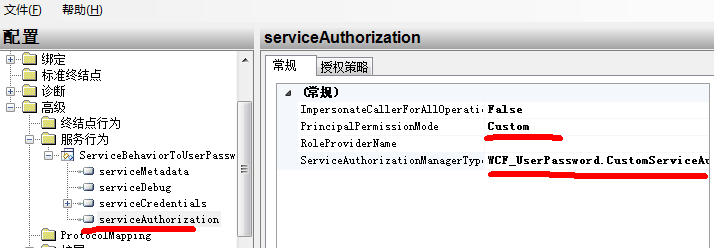
在服务行为中增加serviceAuthorization
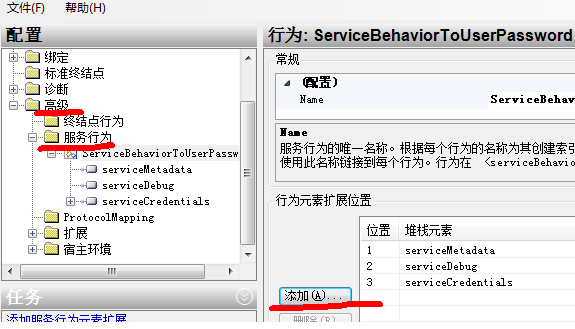
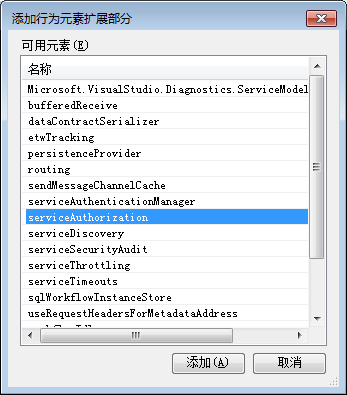
将principalPermissionMode 改为 Custom
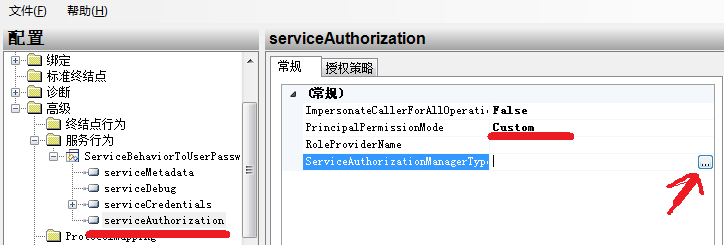
修改serviceAuthorizationManagerType 改成 WCF_UserPassword.CustomServiceAuthorizationManager, WCF_UserPassword
弹出的对话框中, 选择 bin –> debug
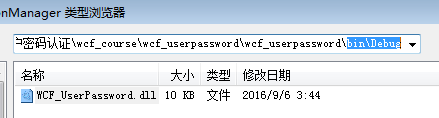
继续点进去, 你将看到编译成功的 CustomServiceAuthorizationManager
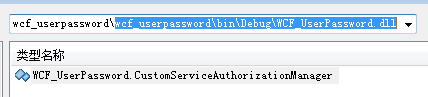
选中它, WCF服务配置器变成了这个样子
然后切换到授权策略, 添加授权策略
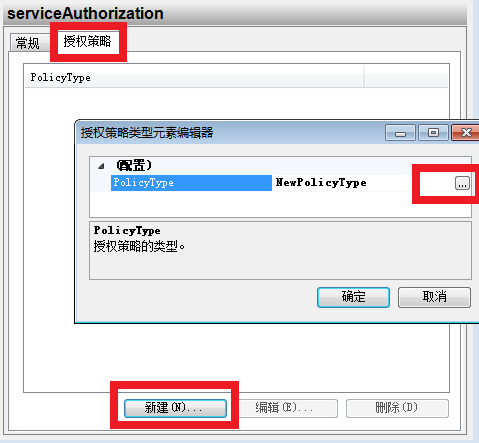
如同CustomServiceAuthorizationManager一样, 选择CustomAuthorizationPolicy

操作到这里, 记得要保存
其实直接复制App.config 更方便, 你只需修改里面部分字符串即可(下面的是VS2013的, 比起VS2010, 要清爽很多)
<serviceBehaviors>
<behavior name="ServiceBehaviorToUserPassword">
<serviceMetadata httpGetEnabled="true" />
<serviceDebug includeExceptionDetailInFaults="true" />
<serviceCredentials>
<serviceCertificate findValue="MyServerCert" x509FindType="FindBySubjectName" />
<userNameAuthentication userNamePasswordValidationMode="Custom" customUserNamePasswordValidatorType="WCF_UserPassword.MyCustomValidator,WCF_UserPassword" />
</serviceCredentials>
<!-- 以下部分请复制-->
<serviceAuthorization principalPermissionMode="Custom" serviceAuthorizationManagerType="WCF_UserPassword.CustomServiceAuthorizationManager,WCF_UserPassword">
<authorizationPolicies>
<add policyType="WCF_UserPassword.CustomAuthorizationPolicy, WCF_UserPassword, Version=1.0.0.0, Culture=neutral, PublicKeyToken=null" />
</authorizationPolicies>
</serviceAuthorization>
<!--复制到这里-->
</behavior>
</serviceBehaviors>
4. 测试
客户端
        static void Main(string[] args)

        {

            var proxy = new ServiceReference1.Service1Client();

            Console.WriteLine("现在是admin访问");

            proxy.ClientCredentials.UserName.UserName = "admin";

            proxy.ClientCredentials.UserName.Password = "admin";

            try

            {

                Console.WriteLine(proxy.GetData(2));

            }

            catch (Exception e)

            {

                Console.WriteLine(e.Message);

            }

            Console.WriteLine();

            proxy = new ServiceReference1.Service1Client();

            Console.WriteLine("现在是admin2访问");

            proxy.ClientCredentials.UserName.UserName = "admin2";

            proxy.ClientCredentials.UserName.Password = "admin2";

            try

            {

                Console.WriteLine(proxy.GetData(2));

            }

            catch (Exception e)

            {

                Console.WriteLine(e.Message);

            }

        }
结果
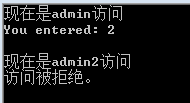
ok
WCF权限控制的更多相关文章
- 尝试asp.net mvc 基于controller action 方式权限控制方案可行性
微软在推出mvc框架不久,短短几年里,版本更新之快,真是大快人心,微软在这种优秀的框架上做了大量的精力投入,是值得赞同的,毕竟程序员驾驭在这种框架上,能够强力的精化代码,代码层次也更加优雅,扩展较为方 ...
- MongoDB 安全和访问权限控制
MongoDB的访问控制能够有效保证数据库的安全,访问控制是指绑定Application监听的IP地址,设置监听端口,使用账户和密码登录 一,访问控制的参数 1,绑定IP地址 mongod 参数:-- ...
- WebGIS中快速整合管理多源矢量服务以及服务权限控制的一种设计思路
文章版权由作者李晓晖和博客园共有,若转载请于明显处标明出处:http://www.cnblogs.com/naaoveGIS/ 1.背景 在真实项目中,往往GIS服务数据源被其他多个信息中心或者第三方 ...
- ASP.NET MVC实现权限控制
这篇分享一下 ASP.NET MVC权限控制.也就是说某一用户登录之后,某一个用户是否有权限访问Controller,Action(操作),视图等 想实现这些功能,需要在数据库创建好几个表:[User ...
- springmvc+spring+mybatis+maven项目集成shiro进行用户权限控制【转】
项目结构: 1.maven项目的pom中引入shiro所需的jar包依赖关系 ? 1 2 3 4 5 6 7 8 9 10 11 12 13 14 15 16 17 18 19 20 21 22 ...
- Appfuse:权限控制
Appfuse的权限控制依赖于Struts的Menu机制,common下的menu.jsp是对菜单顺序的定义,详细的菜单项和菜单链接及权限再menu-config.xml中控制,如下: <Men ...
- .NET WebAPI 用ActionFilterAttribute实现token令牌验证与对Action的权限控制
项目背景是一个社区类的APP(求轻吐...),博主主要负责后台业务及接口.以前没玩过webAPI,但是领导要求必须用这个(具体原因鬼知道),只好硬着头皮上了. 最近刚做完权限这一块,分享出来给大家.欢 ...
- 浅谈Yii-admin的权限控制
说到CMS,最需要有的东西就是权限控制,特别是一些复杂的场景,多用户,多角色,多部门,子父级查看等等.最近在开发一个线下销售的东东,这个系统分为管理员端,省代端,客户端,门店端,销售端, 部门端,部门 ...
- Go语言实战 - revel框架教程之权限控制
一个站点上面最基本都会有三种用户角色,未登录用户.已登录用户和管理员.这一次我们就来看看在revel框架下如何进行权限控制. 因为revel是MVC结构的,每一个url其实都会映射到一个具体的Cont ...
随机推荐
- OpenWrt自定义和官方一样的固件
我用的OpenWrt版本是Barrier Breaker 14.07,硬件是NetGear WNDR4300. 我自定义固件的目的是把固件的根分区扩到最大(100MB,总FLASH是128MB),试过 ...
- JAVA获取客户端IP地址
在JSP里,获取客户端的IP地址的方法是:request.getRemoteAddr(),这种方法在大部分情况下都是有效的.但是在通过了Apache,Squid等反向代理软件就不能获取到客户端的真实I ...
- SICP练习记录
-------------求一个数的平方根(牛顿法平方根求解法): (define (sqrt-iter guess x) (if (good-enough? guess x) guess (sqrt ...
- STL迭代器之二:迭代器型别
如果一个迭代器要兼容stl,必须遵循约定,自行以内嵌型别定义的方式定义出相应型别.根据书中介绍,最常用到的迭代器型别有五种:value type,difference type, pointer, r ...
- High Memory in the Linux Kernel
This is enabled via the PAE (Physical Address Extension) extension of the PentiumPro processors. PAE ...
- 用CMake屏蔽Release运行时的控制台窗口
在默认情况下,CMake构建的VS工程运行时会弹出控制台窗口,可以通过手动方式进行屏蔽,也可以通过CMake命令进行屏蔽. 手动方式:分为两步 第一步:右击VS项目,选择"属性"- ...
- BitLocker 加密工具挂起和恢复命令行(windows7)
如果你的硬盘使用BitLocker加密了,但是有时候需要高效率的硬盘做某些事情,可以暂时挂起加密,命令行如下方便做个bat. 挂起: manage-bde -protectors -disable C ...
- Spring基本框架
1.Spring基本框架的概念 Spring 框架是一个分层架构,由 7 个定义良好的模块组成.Spring模块构建在核心容器之上,核心容器定义创建.配置和管理bean的方式.组成Spring框架的每 ...
- Android菜鸟成长记9 -- selector的用法
在项目开发的时候,由于系统给出的控件不够美观,因此开发时领导常常要我更改下界面,用美工给的图片取代系统图片.开始时,我只是给按钮等设置一下背景图片,这样做虽然美观了,但界面看起来却比较死板,比如用户点 ...
- [原创.数据可视化系列之六]使用openlyaers进行公网地图剪切
进行地图开发的过程中,我一般使用天地图或者微软的地图作为地图,因为这两种地图的经纬度偏差最小,基本可以满足用户需求,比如: 不用说,都是全部地图,这也是最常用的一种方法. 但是用户说,我只看大连的地图 ...