
ElasticSearch5+logstash的logstash-input-jdbc实现mysql数据同步
在实现的路上遇到了各种坑,再次验证官方文档只能产考不能全信!
ElasticSearch安装就不说了上一篇有说!
安装logstash
官方:https://www.elastic.co/guide/en/logstash/current/installing-logstash.html
1.下载公共密钥
rpm --import https://artifacts.elastic.co/GPG-KEY-elasticsearch
2.添加yum源
vim /etc/yum.repos.d/logstash.repo
文件中写入
[logstash-.x]

name=Elastic repository for .x packages

baseurl=https://artifacts.elastic.co/packages/5.x/yum

gpgcheck=

gpgkey=https://artifacts.elastic.co/GPG-KEY-elasticsearch

enabled=

autorefresh=

type=rpm-md
保存退出
3.使用yum安装
yum install logstash
4.验证是否安装成功
进入 logstash 安装目录
cd /usr/share/logstash
运行
bin/logstash -e 'input { stdin { } } output { stdout {} }'
等待几秒钟 出现
The stdin plugin is now waiting for input:
然后输入
hello world
得到类似的结果
2016-11-24T08:01:55.949Z bogon hello world
安装logstash-input-jdbc插件
1.修改ruby仓库镜像
如果没有安装 gem 的话 安装gem
yum install gem
替换国内的镜像
gem sources --add https://gems.ruby-china.org/ --remove https://rubygems.org/
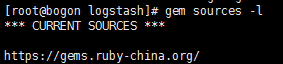
验证是否成功
gem sources -l
修改Gemfile的数据源地址
whereis logstash # 查看logstash安装的位置, 我的在 /usr/share/logstash目录
cd /usr/share/logstash

vim Gemfile
修改 source 的值 为: "https://gems.ruby-china.org/"
vim Gemfile.jruby-1.9.lock # 找到 remote 修改它的值为:
https://gems.ruby-china.org/
或者直接替换源这样你不用改你的 Gemfile 的 source。
gem install bundler

$ bundle config mirror.https://rubygems.org https://gems.ruby-china.org/
然后开始安装
bin/logstash-plugin install logstash-input-jdbc
如果镜像地址没有改错的话应该可以直接安装
或者 进入源码地址的release页面logstash-input-jdbc
2.开始同步 mysql 数据
需要建立 两个文件 一个 .conf后缀的 一个 .sql 后缀
一个 mysql 的Java 驱动包 : mysql-connector-java-5.1.40-bin.jar
filename.conf 内容:
里面的参数可以参考 logstash-input-jdbc官方参考文档
input {

    stdin {

    }

    jdbc {

    # 数据库地址  端口  数据库名

      jdbc_connection_string => "jdbc:mysql://localhost:3306/shen"

    # 数据库用户名

    jdbc_user => "root"

    # 数据库密码

      jdbc_password => "rootroot"

    # mysql java驱动地址

      jdbc_driver_library => "/usr/share/logstash/mysql-connector-java-5.1.40-bin.jar"

      jdbc_driver_class => "com.mysql.jdbc.Driver"

      jdbc_paging_enabled => "true"

      jdbc_page_size => ""

      # sql 语句文件

      statement_filepath => "filename.sql"

      schedule => "* * * * *"

      type => "jdbc"

    }

}

output {

 stdout {

        codec => json_lines

    }

   elasticsearch {

        hosts  => "localhost:9200"

        index => "contacts"

     document_type => "contact"

        document_id => "%{id}"

    }

}
filename.sql
select * from a
注意: 在你的数据库里 要有一个数据库名字和filename.conf 里的对应就可以了 表明 和 filename.sql 里的对应就可以了 在表中 有一个id字段是为了和filename.conf 中document_id => "%{id}" 这个参数对应 可以执行修改
然后开始执行
bin/logstash -f fielname.conf
如果出现错误 或者没有结果 可以进入 logs 目录中查看日志

出现类似这样的内容 就可以了
可以通过地址 http://192.168.199.115:9200/contacts/contact/1?pretty=true
查看
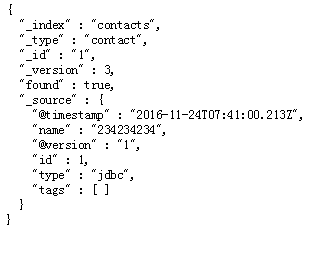
url 参数说明 contacts 是对应 filename.conf 中 index => "contacts" contact 对应document_type => "contact" 1表示id为1 的数据
转载请注明来源http://www.cnblogs.com/phpshen/p/6098333.html
ElasticSearch5+logstash的logstash-input-jdbc实现mysql数据同步的更多相关文章
- 几篇关于MySQL数据同步到Elasticsearch的文章---第一篇:Debezium实现Mysql到Elasticsearch高效实时同步
文章转载自: https://mp.weixin.qq.com/s?__biz=MzI2NDY1MTA3OQ==&mid=2247484358&idx=1&sn=3a78347 ...
- Mysql数据同步Elasticsearch方案总结
Mysql数据同步Elasticsearch方案总结 https://my.oschina.net/u/4000872/blog/2252620
- Elasticsearch和mysql数据同步(logstash)
1.版本介绍 Elasticsearch: https://www.elastic.co/products/elasticsearch 版本:2.4.0 Logstash: https://www ...
- 对于使用JDBC连接mysql数据时The server time zone value '¤¤°ê¼Ð·Ç®É¶¡'...的异常问题解决。
相信很多小伙伴和我一样遇到了这类问题,在使用JDBC连接mysql数据库的时候发生SQLException如下所示的异常情况! java.sql.SQLException: The server ti ...
- mysql数据同步到Elasticsearch
1.版本介绍 Elasticsearch: https://www.elastic.co/products/elasticsearch 版本:2.4.0 Logstash: https://www ...
- 几篇关于MySQL数据同步到Elasticsearch的文章---第五篇:logstash-input-jdbc实现mysql 与elasticsearch实时同步深入详解
文章转载自: https://blog.csdn.net/laoyang360/article/details/51747266 引言: elasticsearch 的出现使得我们的存储.检索数据更快 ...
- 几篇关于MySQL数据同步到Elasticsearch的文章---第三篇:logstash_output_kafka:Mysql同步Kafka深入详解
文章转载自: https://mp.weixin.qq.com/s?__biz=MzI2NDY1MTA3OQ==&mid=2247484411&idx=1&sn=1f5a371 ...
- 几篇关于MySQL数据同步到Elasticsearch的文章---第二篇:canal 实现Mysql到Elasticsearch实时增量同步
文章转载自: https://mp.weixin.qq.com/s?__biz=MzI2NDY1MTA3OQ==&mid=2247484377&idx=1&sn=199bc88 ...
- Elasticsearch和mysql数据同步(elasticsearch-jdbc)
1.介绍 对mysql.oracle等数据库数据进行同步到ES有三种做法:一个是通过elasticsearch提供的API进行增删改查,一个就是通过中间件进行数据全量.增量的数据同步,另一个是通过收集 ...
随机推荐
- telnet输入乱码的解决
1.Win+R --- 运行窗口 输入cmd回车 2.输入telnet 主机 端口 3.连接主机发现无法输入 4.这里什么也不要输入,按下 ctrl+] 键 5.按下回车键,然后会弹出新的窗口,就可 ...
- 安装ionic出现node-sass无法下载的解决方法
解决方法: 修改C:\users\[用户名]下的.npmrc文件: registry=https://registry.npm.taobao.org sass-binary-site=https:// ...
- XSLT简介
什么是? http://www.w3school.com.cn/xsl/xsl_intro.asp XSLT 是一种用于将 XML 文档转换为 XHTML 文档或其他 XML 文档的语言. XPath ...
- STMFD 和LDMFD指令
http://blog.163.com/oy_mcu/blog/static/16864297220120193458892/ LDM/STM指令主要用于现场保护,数据复制,参数传送等. STMFD指 ...
- 【Python学习】函数参数传递方法四种(位置,关键字,默认值,包裹位置,包裹关键字传递)
1. 位置传递: #--coding:utf-8-- def send(name,address): return 'package is sent to %s, located in %s' %(n ...
- FileUpload组件
package com.itheima.servlet; import java.io.File; import java.io.FileOutputStream; import java.io.IO ...
- 使用Maven构建Java Web项目时,关于jsp中引入js、css文件路径问题。
今天有点闲,自己动手搭建一个Java Web项目,遇到jsp中引入js.css文件时路径不正确的问题,于是在网上查阅了很多资料,最终都无法解决问题,于是,上stackoverflow找到了解决方法,这 ...
- 详解clientHeight、offsetHeight、scrollHeight
关于clientHeight.offsetHeight.scrollHeight window.screen.availWidth 返回当前屏幕宽度(空白空间) window.screen.av ...
- Visual Studio配色方案
Eclipse开源工具和VS在诸多方面真的是差距非常大,无奈Java编程,使用VS非常麻烦.所以只能选择Eclipse 但是Eclipse的系统配色,又实在是不舒服,于是抽时间,从VS上抠了一份默认的 ...
- webpack模块依赖管理介绍
http://webpack.github.io/docs/ webpack is a module bundler. 是一个模块管理器 webpack可以管理模块的依赖关系,并产生可以替代这些模块的 ...