
【原创分享·微信支付】C# MVC 微信支付之微信模板消息推送

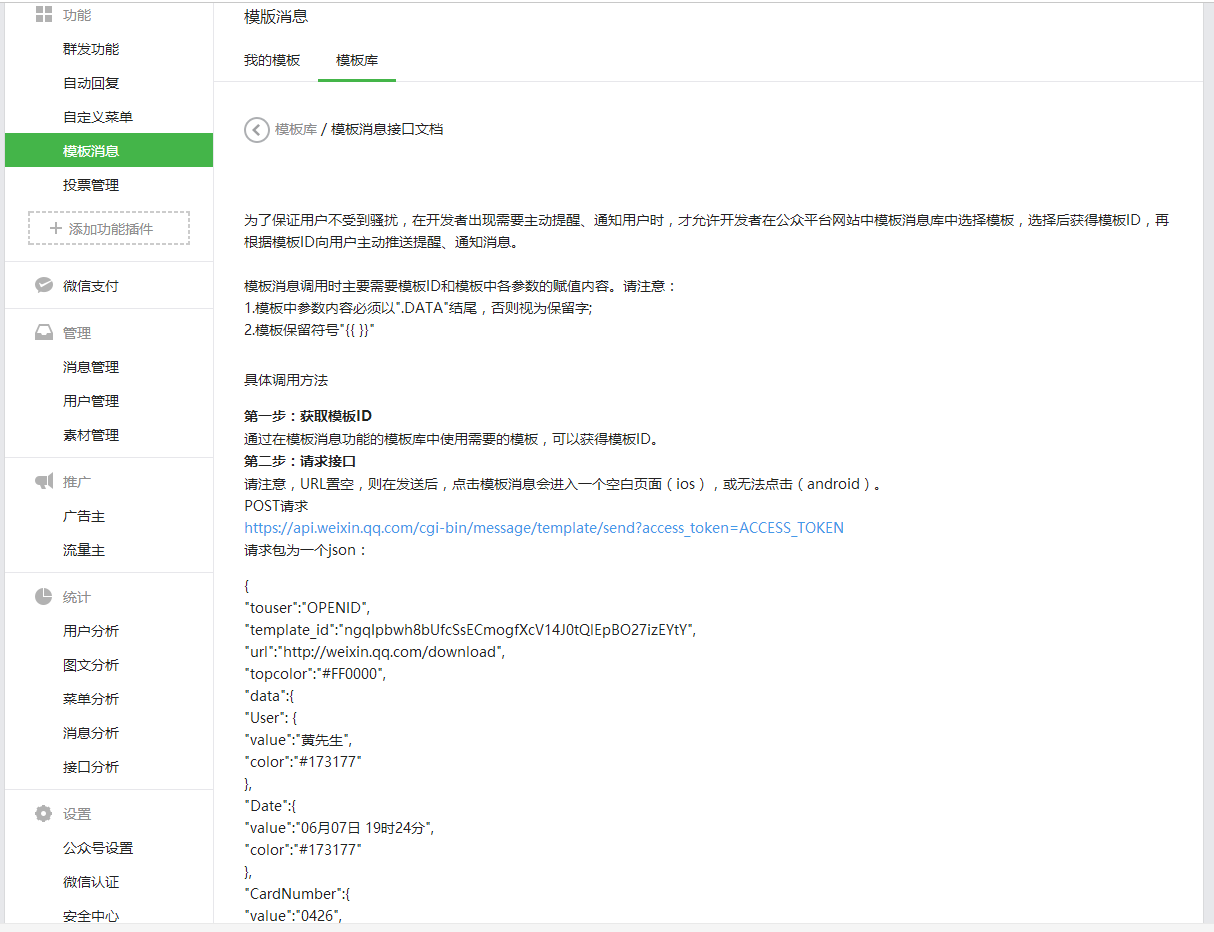
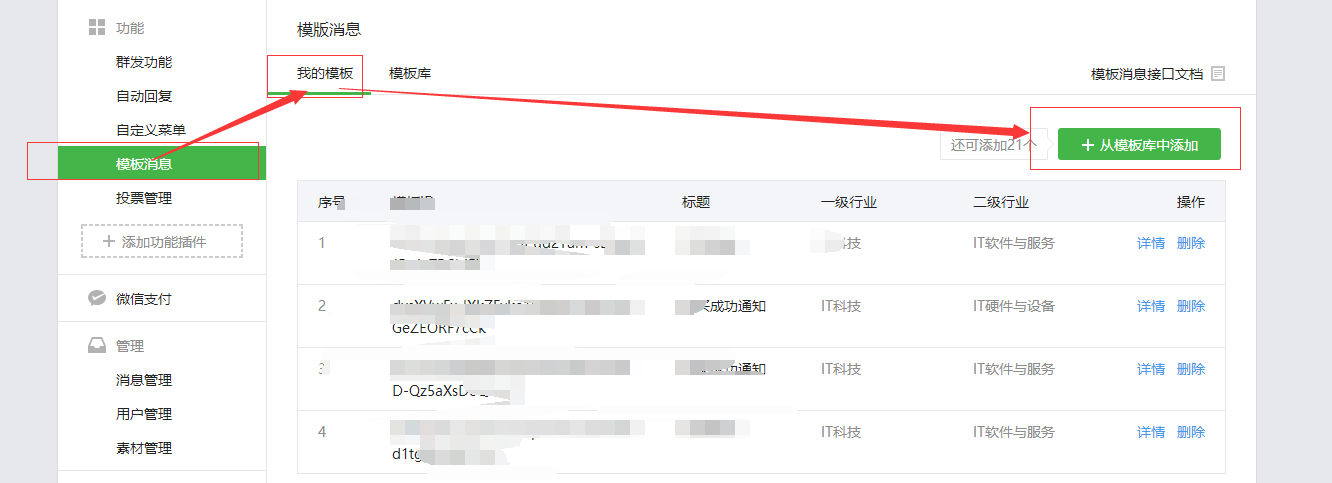
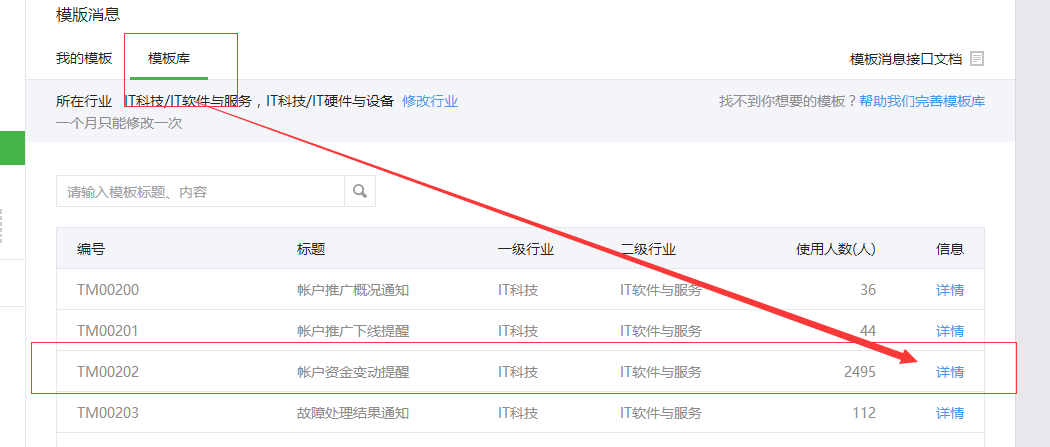
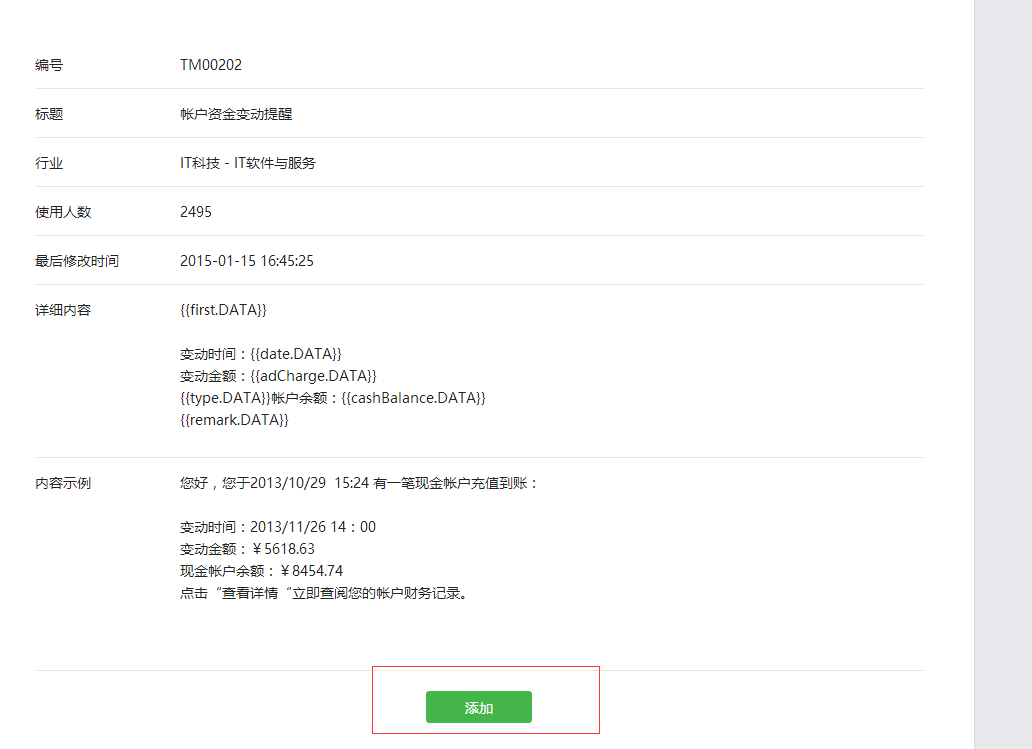

using System;

using System.Collections.Generic;

using System.Linq;

using System.Web;

using System.Web.Mvc;

namespace 微信支付之模板消息推送.Controllers

{

    public class HomeController : Controller

    {

        // GET: Home

        public ActionResult Index()

        {

            return View();

        }

    }

}
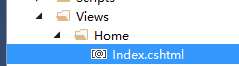
@{

    Layout = null;

}

<!DOCTYPE html>

<html>

<head>

    <meta name="viewport" content="width=device-width" />

    <title>Index</title>

</head>

<body>

    <div>

    </div>

</body>

</html>
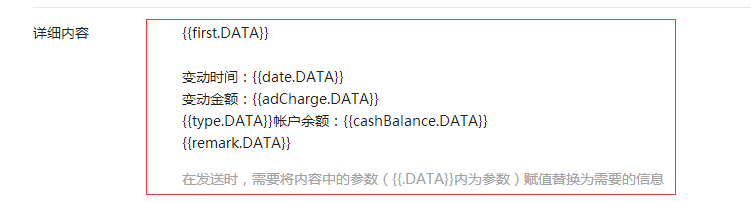
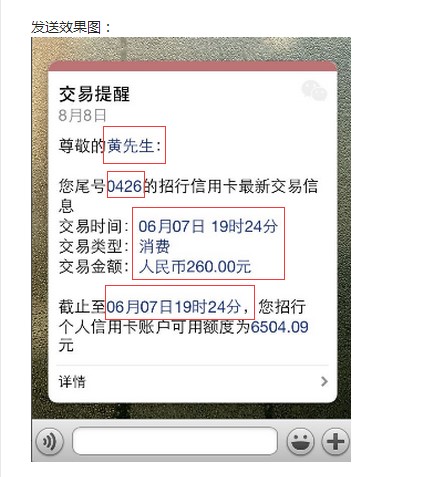
using System;

using System.Collections.Generic;

using System.Linq;

using System.Web;

namespace 微信支付之模板消息推送.Models

{

    public class DataFontStyle

    {

        public string value { get; set; }

        public string color { get; set; }

    }

}
using System;

using System.Collections.Generic;

using System.Linq;

using System.Web;

namespace 微信支付之模板消息推送.Models

{

    /// <summary>

    /// 帐户资金变动提醒Model

    /// </summary>

    public class CashModel

    {

        public DataFontStyle first { get; set; }

        public DataFontStyle date { get; set; }

        public DataFontStyle adCharge { get; set; }

        public DataFontStyle type { get; set; }

        public DataFontStyle cashBalance { get; set; }

        public DataFontStyle remark { get; set; }

    }

}
using System;

using System.Collections.Generic;

using System.Linq;

using System.Web;

namespace 微信支付之模板消息推送.Models

{

    public class PushMessage

    {

        public string touser { get; set; }

        public string template_id { get; set; }

        public string url { get; set; }

        public string topcolor { get; set; }

        /// <summary>

        /// 注意,这里是CashModel,你如果要通用,有多个推送模板要用,那你就用object

        /// </summary>

        public CashModel data { get; set; }

    }

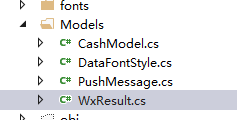
}漏了一个类,现在补回来,我们命名为:WxResult.cs,代码如下:public class WxResult
{
public int? errcode { get; set; }
public string errmsg { get; set; }
public int? msgid { get; set; }
}
@{

    Layout = null;

}

<!DOCTYPE html>

<html>

<head>

    <meta name="viewport" content="width=device-width" />

    <title>身份认证</title>

    <link href="~/Scripts/jquery-easyui-1.4.5/themes/bootstrap/easyui.css" rel="stylesheet" />

    <link href="~/Scripts/jquery-easyui-1.4.5/themes/mobile.css" rel="stylesheet" />

    <link href="~/Scripts/jquery-easyui-1.4.5/themes/icon.css" rel="stylesheet" />

    <style type="text/css">

        .line {

            width: 100%;

            float: left;

            height: auto;

            text-align: center;

            margin-top: 15pt;

            font-size: x-large;

        }

        .lineText {

            width: 100%;

            float: left;

            height: auto;

            text-indent: 5%;

            text-align: left;

            font-size: x-large;

            margin: 0;

        }

        a {

            text-decoration: none;

            color: white;

        }

        .input {

            height: 30pt;

            width: 90%;

            font-size: x-large;

            border-radius: 10px;

            margin: 0;

            padding: 0;

        }

        .btn {

            width: 90%;

            height: 35pt;

            font-size: x-large;

            background-color: green;

            color: white;

            border: none;

            border-radius: 10px;

        }

    </style>

</head>

<body>

    <div style="width: 100%; text-align: center;">

        <form id="form1">

            <div class="line">

                <div class="lineText">*接收者openid:</div>

            </div>

            <div class="line">

                <input type="text" id="openid" name="openid" class="input" />

            </div>

            <div class="line">

                <div class="lineText">*first.DATA:</div>

            </div>

            <div class="line">

                <input type="text" id="first" name="first" class="input" />

            </div>

        </form>

    </div>

    <div class="line">

        <input type="button" id="btnSave" class="btn" value="推送" onclick="fPush()" />

    </div>

    <script src="~/Scripts/jquery-easyui-1.4.5/jquery.min.js"></script>

    <script src="~/Scripts/jquery-easyui-1.4.5/jquery.easyui.min.js"></script>

    <script src="~/Scripts/jquery-easyui-1.4.5/jquery.easyui.mobile.js"></script>

    <script src="~/Scripts/jquery-easyui-1.4.5/easyloader.js"></script>

    <script type="text/javascript">

        $(function () {

            var vCode = getQueryString("code");

            if (vCode != "" && vCode != null) {

                $.ajax({

                    type: 'post',

                    data: {

                        code: vCode

                    },

                    url: '/Home/getWxInfo',

                    success: function (sjson) {

                        $.messager.show({

                            title: '提示',

                            msg: '欢迎您的到来(看到这个提示,代表已经成功获取openid和access_token了)。'

                        });

                        $("#openid").val(sjson.openid);

                    }

                })

            }

            else {

                $.ajax({

                    type: 'post',

                    url: '/Home/getCode',

                    success: function (sjson) {

                        location.href = sjson;

                    }

                })

            }

        })

        //获取url的参数

        function getQueryString(name) {

            var reg = new RegExp("(^|&)" + name + "=([^&]*)(&|$)", "i");

            var r = window.location.search.substr(1).match(reg);

            if (r != null) return unescape(r[2]); return null;

        }

        //推送

        function fPush() {

            var vTtile = $("#first").val();

            $.ajax({

                type: 'post',

                data: {

                    first: vTtile

                },

                url: '/Home/Push',

                success: function (sjson) {

                    if (sjson.result) {

                        $.messager.alert("提示", sjson.msg, 'info');

                    }

                    else {

                        $.messager.alert("提示", sjson.msg, 'warning');

                    }

                }

            })

        }

    </script>

</body>

</html>
using System;

using System.Collections.Generic;

using System.IO;

using System.Linq;

using System.Net;

using System.Text;

using System.Web;

using System.Web.Mvc;

using System.Web.Script.Serialization;

using WxPayAPI;

using 微信支付之模板消息推送.Models;

namespace 微信支付之模板消息推送.Controllers

{

    public class HomeController : Controller

    {

        JsApiPay jsApiPay = new JsApiPay();

        JavaScriptSerializer JsonHelper = new JavaScriptSerializer();

        /// <summary>

        /// 最后更新Access_token的时间

        /// </summary>

        public static DateTime dtAccess_token;

        /// <summary>

        /// Access_token的值

        /// </summary>

        public static string strAccess_token;

        // GET: Home

        public ActionResult Index()

        {

            if (Session["openid"] == null)

            {

                try

                {

                    //调用【网页授权获取用户信息】接口获取用户的openid和access_token

                    GetOpenidAndAccessToken();

                }

                catch (Exception ex)

                {

                    //Response.Write(ex.ToString());

                    //throw;

                }

            }

            return View();

        }

        /**

        *

        * 网页授权获取用户基本信息的全部过程

        * 详情请参看网页授权获取用户基本信息:http://mp.weixin.qq.com/wiki/17/c0f37d5704f0b64713d5d2c37b468d75.html

        * 第一步:利用url跳转获取code

        * 第二步:利用code去获取openid和access_token

        *

        */

        public void GetOpenidAndAccessToken()

        {

            if (Session["code"] != null)

            {

                //获取code码,以获取openid和access_token

                string code = Session["code"].ToString();

                Log.Debug(this.GetType().ToString(), "Get code : " + code);

                jsApiPay.GetOpenidAndAccessTokenFromCode(code);

            }

            else

            {

                //构造网页授权获取code的URL

                string host = Request.Url.Host;

                string path = Request.Path;

                string redirect_uri = HttpUtility.UrlEncode("http://" + host + path);

                WxPayData data = new WxPayData();

                data.SetValue("appid", WxPayConfig.APPID);

                data.SetValue("redirect_uri", redirect_uri);

                data.SetValue("response_type", "code");

                data.SetValue("scope", "snsapi_base");

                data.SetValue("state", "STATE" + "#wechat_redirect");

                string url = "https://open.weixin.qq.com/connect/oauth2/authorize?" + data.ToUrl();

                Log.Debug(this.GetType().ToString(), "Will Redirect to URL : " + url);

                Session["url"] = url;

            }

        }

        /// <summary>

        /// 获取code

        /// </summary>

        /// <returns></returns>

        [HttpPost]

        public ActionResult getCode()

        {

            object objResult = "";

            if (Session["url"] != null)

            {

                objResult = Session["url"].ToString();

            }

            else

            {

                objResult = "url为空。";

            }

            return Json(objResult);

        }

        /// <summary>

        /// 通过code换取网页授权access_token和openid的返回数据

        /// </summary>

        /// <returns></returns>

        [HttpPost]

        public ActionResult getWxInfo()

        {

            object objResult = "";

            string strCode = Request.Form["code"];

            string strAccess_Token = "";

            string strOpenid = "";

            if (Session["access_token"] == null || Session["openid"] == null)

            {

                jsApiPay.GetOpenidAndAccessTokenFromCode(strCode);

                strAccess_Token = Session["access_token"].ToString();

                strOpenid = Session["openid"].ToString();

            }

            else

            {

                strAccess_Token = Session["access_token"].ToString();

                strOpenid = Session["openid"].ToString();

            }

            objResult = new { openid = strOpenid, access_token = strAccess_Token };

            return Json(objResult);

        }

        /// <summary>

        /// 推送

        /// </summary>

        /// <returns></returns>

        [HttpPost]

        public ActionResult Push()

        {

            object objResult = "";

            string strFirst = Request.Form["first"];

            string strMsg = "";

            bool bResult = false;

            //这个是推送消息的类

            PushMessage aPushMessage = new PushMessage()

            {

                template_id = "lypG1jYyOEfY********OK7-LhEwpPeVNHHxemSI",//模板ID

                //data=,//暂时不赋值

                topcolor = "#FF0000",//头部颜色

                touser = Session["openid"].ToString(),//用户的Openid

                url = "http://www.baidu.com"//用途是当用户点击推送消息的时候,会进入这个页面,具体用途,自己拓展

            };

            //构造要推送的内容

            CashModel aCachData = new CashModel()

            {

                adCharge = new DataFontStyle()

                {

                    color = "#589E63",

                    value = "对应变动金额"

                },

                cashBalance = new DataFontStyle()

                {

                    color = "#589E63",

                    value = "对应帐户余额"

                },

                date = new DataFontStyle()

                {

                    color = "#589E63",

                    value = DateTime.Now.ToString("yyyy-MM-dd HH:mm:ss")

                },

                first = new DataFontStyle()

                {

                    color = "#589E63",

                    value = strFirst

                },

                remark = new DataFontStyle()

                {

                    color = "#589E63",

                    value = "对应:点击“查看详情“立即查阅您的帐户财务记录。"

                },

                type = new DataFontStyle()

                {

                    color = "#589E63",

                    value = "对应“现金”"

                }

            };

            //这时候,把要推送的内容,赋值给push,这样,我们要推送的内容就完成了。

            aPushMessage.data = aCachData;

            string strUrl = "https://api.weixin.qq.com/cgi-bin/message/template/send?access_token=" + GetLatestAccess_token();

            string strJsonData = JsonHelper.Serialize(aPushMessage);

            string strResult = HttpPost(strUrl, strJsonData);

            WxResult aResult = JsonHelper.Deserialize<WxResult>(strResult);

            if (aResult != null)

            {

                if (aResult.errcode == )

                {

                    bResult = true;

                }

                else

                {

                    bResult = false;

                    strMsg = aResult.errmsg;

                }

            }

            else

            {

                bResult = false;

                strMsg = "通讯失败,请重试。";

            }

            objResult = new { result = bResult, msg = strMsg };

            return Json(objResult);

        }

        /// <summary>

        /// HttpPost

        /// </summary>

        /// <param name="Url"></param>

        /// <param name="postDataStr"></param>

        /// <returns></returns>

        public static string HttpPost(string Url, string postDataStr)

        {

            byte[] postData = Encoding.UTF8.GetBytes(postDataStr);//编码,尤其是汉字,事先要看下抓取网页的编码方式

            WebClient webClient = new WebClient();

            webClient.Headers.Add("Content-Type", "application/x-www-form-urlencoded");//采取POST方式必须加的header,如果改为GET方式的话就去掉这句话即可

            byte[] responseData = webClient.UploadData(Url, "POST", postData);//得到返回字符流

            string srcString = Encoding.UTF8.GetString(responseData);//解码

            return srcString;

        }

        /// <summary>

        /// 返回最新的Access_token

        /// </summary>

        /// <returns></returns>

        public string GetLatestAccess_token()

        {

            if (dtAccess_token == null || dtAccess_token <= DateTime.Now.AddHours(-) || string.IsNullOrWhiteSpace(strAccess_token))

            {

                string strUrl = string.Format("https://api.weixin.qq.com/cgi-bin/token?grant_type=client_credential&appid={0}&secret={1}", WxPayConfig.APPID, WxPayConfig.APPSECRET);

                string strAccess_tokenData = HttpGet(strUrl, "");

                ModelForAccess_token aToken = JsonHelper.Deserialize<ModelForAccess_token>(strAccess_tokenData);

                dtAccess_token = DateTime.Now;

                strAccess_token = aToken.access_token;

                return strAccess_token;

            }

            else

            {

                return strAccess_token;

            }

        }

        /// <summary>

        /// WebGet

        /// </summary>

        /// <param name="Url"></param>

        /// <param name="postDataStr"></param>

        /// <returns></returns>

        public static string HttpGet(string Url, string postDataStr)

        {

            HttpWebRequest request = (HttpWebRequest)WebRequest.Create(Url + (postDataStr == "" ? "" : "?") + postDataStr);

            request.Method = "GET";

            request.ContentType = "text/html;charset=UTF-8";

            HttpWebResponse response = (HttpWebResponse)request.GetResponse();

            Stream myResponseStream = response.GetResponseStream();

            StreamReader myStreamReader = new StreamReader(myResponseStream, Encoding.GetEncoding("utf-8"));

            string retString = myStreamReader.ReadToEnd();

            myStreamReader.Close();

            myResponseStream.Close();

            return retString;

        }

        public class ModelForAccess_token

        {

            public string access_token { get; set; }

            public int? expires_in { get; set; }

        }

    }

}
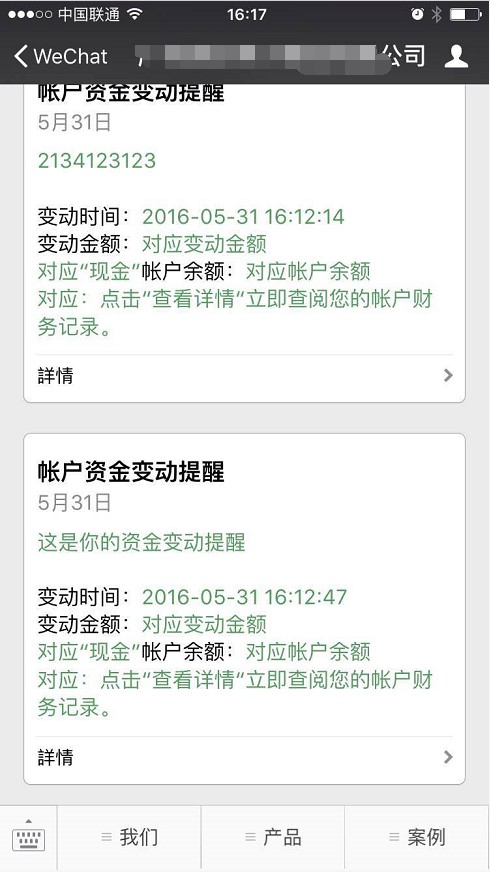
【原创分享·微信支付】C# MVC 微信支付之微信模板消息推送的更多相关文章
- C# MVC 微信支付之微信模板消息推送
微信支付之微信模板消息推送 今天我要跟大家分享的是"模板消息"的推送,这玩意呢,你说用途嘛,那还是真真的牛逼呐.原因在哪?就是因为它是依赖微信 ...
- 前后端分离djangorestframework—— 接入微信模板消息推送
微信 什么是微信也不多说,跟前面的支付宝一样的 微信支付 微信支付也有个沙箱环境,沙箱环境官方文档 由文档中那句很显眼的话所得,即使是测试环境也需要真实的商户号,所以这个就没法想支付宝那样用沙箱账号来 ...
- java开发微信模板消息推送
发布时间:2018-12-12 技术:springboot+maven 概述 该demo主要涉及微信模板消息推送功能, 详细 代码下载:http://www.demodashi.com/dem ...
- ASP.NET 微信公众平台模板消息推送功能完整开发
最近公众平台的用户提出了新需求,他们希望当收到新的邮件或者日程的时候,公众平台能主动推送一条提醒给用户.看了看平台提供的接口,似乎只有[模板消息]能尽量满足这一需求,但不得不说微信提供的实例太少,而且 ...
- 微信小程序之模板消息推送
最近在用sanic框架写微信小程序,其中写了一个微信消息推送,还挺有意思的,写了个小demo 具体见官方文档:https://developers.weixin.qq.com/miniprogram/ ...
- qhfl-9 微信模板消息推送
开发中用的是测试号 微信公众号认证流程 用户登陆 <!DOCTYPE html> <html lang="en"> <head> <met ...
- Java对接微信公众号模板消息推送
内容有点多,请耐心! 最近公司的有这个业务需求,又很凑巧让我来完成: 首先想要对接,先要一个公众号,再就是开发文档了:https://developers.weixin.qq.com/doc/offi ...
- 微信小程序:模板消息推送提示{“errcode”:41030,”errmsg”:”invalid page hint: [gP1eXXXXXX]”}
在开发小程序 模板消息定时推送功能时,在开发版测试程序功能运行正常,但提交到线上后提示报错{“errcode”:41030,”errmsg”:”invalid page hint: [gP1eXXXX ...
- C#微信公众号开发系列教程五(接收事件推送与消息排重)
微信公众号开发系列教程一(调试环境部署) 微信公众号开发系列教程一(调试环境部署续:vs远程调试) C#微信公众号开发系列教程二(新手接入指南) C#微信公众号开发系列教程三(消息体签名及加解密) C ...
随机推荐
- 12306官方火车票Api接口
2017,现在已进入春运期间,真的是一票难求,深有体会.各种购票抢票软件应运而生,也有购买加速包提高抢票几率,可以理解为变相的黄牛.对于技术人员,虽然写一个抢票软件还是比较难的,但是还是简单看看123 ...
- JavaScript 对数据处理的5个API
JavaScript对数据处理包括向上取整.向下取整.四舍五入.固定精度和固定长度5种方式,分别对应ceil,floor,round,toFixed,toPrecision等5个API,本文将对这5个 ...
- Android Ormlite 学习笔记1 -- 基础
Ormlite 是一个开源Java数据实体映射框架.其中依赖2个核心类库: 1.ormlite-android-4.48.jar 2.ormlite-core-4.48.jar 新建项目,引用上面2个 ...
- [C#] C# 知识回顾 - 异常介绍
异常介绍 我们平时在写程序时,无意中(或技术不够),而导致程序运行时出现意外(或异常),对于这个问题, C# 有专门的异常处理程序. 异常处理所涉及到的关键字有 try.catch 和 finally ...
- 阿里云学生优惠Windows Server 2012 R2安装IIS,ftp等组件,绑定服务器域名,域名解析到服务器,域名备案,以及安装期间错误的解决方案
前言: 这几天终于还是按耐不住买了一个月阿里云的学生优惠.只要是学生,在学信网上注册过,并且支付宝实名认证,就可以用9块9的价格买阿里云的云服务ECS.确实是相当的优惠. 我买的是Windows S ...
- 使用HTML5的cavas实现的一个画板
<!DOCTYPE html><html><head> <meta charset="utf-8"> <meta http-e ...
- Node.js入门
开始之前,安利一本正在看的书<站在两个世界的边缘>,作者程浩,上帝丢给他太多理想,却忘了给他完成理想的时间.OK,有兴趣的可以看一看. node.js如标题一样,我也是刚开始接触,大家一起 ...
- (转载) Linux IO模式及 select、poll、epoll详解
注:本文是对众多博客的学习和总结,可能存在理解错误.请带着怀疑的眼光,同时如果有错误希望能指出. 同步IO和异步IO,阻塞IO和非阻塞IO分别是什么,到底有什么区别?不同的人在不同的上下文下给出的答案 ...
- 解除win7网络限速.
在电脑刚买或者系统重装了的时候,win7系统会默认限制20%的网络速度,限制了我们的上网速度,我们可以解决这个限制,让上网变得更快 下面是操作步骤 1.开始>运行 2.输入以下命令,然后确定 g ...
- 我正在使用Xamarin的跨平台框架—Xamarin.Android回忆录
一.缘起 在自己给别家公司做兼职外包的时候,已经明确知道外包的活不是那么好干的,一般在经历了初期热血澎湃的激情后,逐渐冷淡,愤怒,再冷淡,再愤怒…,听上去好像高潮迭起,但令人尴尬的是,这高潮迭起我们都 ...