
个人网站对xss跨站脚本攻击(重点是富文本编辑器情况)和sql注入攻击的防范
昨天本博客受到了xss跨站脚本注入攻击,3分钟攻陷……其实攻击者进攻的手法很简单,没啥技术含量。只能感叹自己之前竟然完全没防范。

这是数据库里留下的一些记录。最后那人弄了一个无限循环弹出框的脚本,估计这个脚本之后他再想输入也没法了。
类似这种:
<html>

     <body onload='while(true){alert(1)}'>

     </body>

</html>
我立刻认识到这事件严重性,它说明我的博客有严重安全问题。因为xss跨站脚本攻击可能导致用户Cookie甚至服务器Session用户信息被劫持,后果严重。虽然攻击者就用些未必有什么技术含量的脚本即可做到。
第二天花些时间去了解,该怎么防范。顺便也看了sql注入方面。
sql注入是源于sql语句的拼接。所以需要对用户输入参数化。由于我使用的是jpa,不存在sql拼接问题,但还是对一些用户输入做处理比较好。我的博客系统并不复杂,一共四个表,Article,User,Message,Comment。
涉及数据库查询且由用户输入的就只有用户名,密码,文章标题。其它后台产生的如文章日期一类就不用管。
对于这三个字段的校验,可以使用自定义注解方式。
/**

* @ClassName: IsValidString

* @Description: 自定义注解实现前后台参数校验,判断是否包含非法字符

* @author 无名

* @date 2016-7-25 下午8:22:58

* @version 1.0

 */

@Target({ElementType.FIELD, ElementType.METHOD})

@Retention(RetentionPolicy.RUNTIME)

@Constraint(validatedBy = IsValidString.ValidStringChecker.class)

@Documented

public @interface IsValidString

{

    String message() default "The string is invalid.";

    Class<?>[] groups() default {};

    Class<? extends Payload>[] payload() default{};

    class ValidStringChecker implements ConstraintValidator<IsValidString,String>

    {

        @Override

        public void initialize(IsValidString arg0)

        {

        }

        @Override

        public boolean isValid(String strValue, ConstraintValidatorContext context)

        {

            //校验方法添在这里

            return true;

        }

    }

}
定义了自定义注解以后就可以在对应的实体类字段上添上@IsValidString即可。
但由于我还没研究出怎么拦截自定义注解校验返回的异常,就在controller类里做校验吧。
    public static boolean contains_sqlinject_illegal_ch(String str_input) {

        //"[`~!@#$%^&*()+=|{}':;',\\[\\].<>/?~!@#¥%……&*()——+|{}【】‘;:”“’。,、?]"

        String regEx = "['=<>;\"]";

        Pattern p = Pattern.compile(regEx);

        Matcher m = p.matcher(str_input);

        if (m.find()) {

            return true;

        } else {

            return false;

        }

    }
拦截的字符有 ' " [] <> ;
我觉得这几个就够了吧。<>顺便就解决了xxs跨站脚本注入问题。
而xxs跨站脚本注入问题还是让我很头疼。因为我的博客系统使用wangEditor web文本编辑器,返回给后台的包含很多合法的html标签,用来表现文章格式。所以不能统一过滤<>这类字符。
例如,将<html><body onload='while(true){alert(1)}'></body></html>这句输入编辑器,提交。后台得到的是:

中间被转意的<,>是合法的可供页面显示的<>字符。而外面的<p><br>就是文本编辑器生产的用来控制格式的正常的html标签。
问题在于,如果有人点击编辑器“源代码”标识,将文本编辑器生产的正常的html标签,再输入这句<html><body onload='while(true){alert(1)}'></body></html>结果返回后台的就是原封不动的<html><body onload='while(true){alert(1)}'></body></html> <和>没有变成<和>。
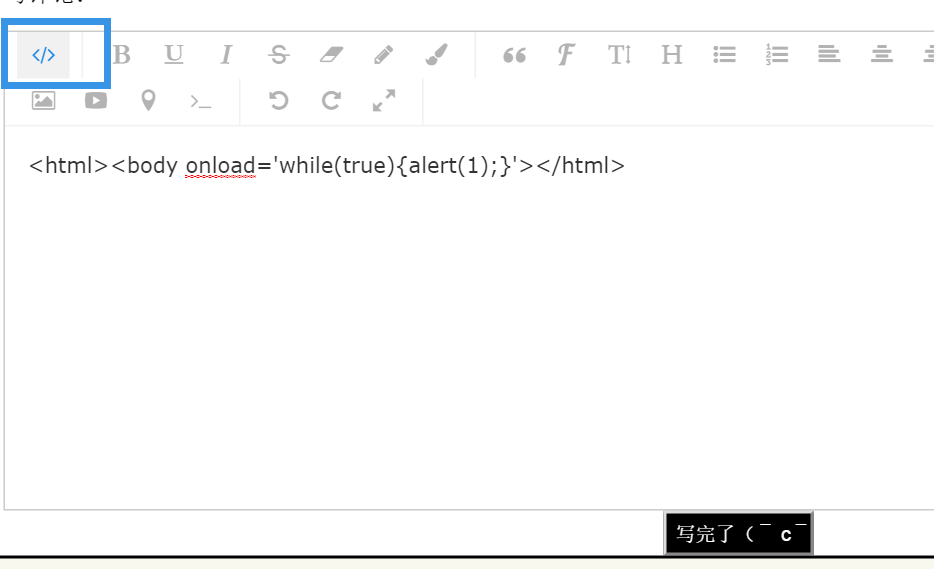
这让人头痛,我在想这个编辑器为什么提供什么狗屁查看源代码功能,导致不能统一对<>。
在这种情况下,我只能过滤一部分认准是有危害的html标签,而众所周知,这类黑名单校验是不够安全的。(2016-12-30:下面这个函数是肯定不行的,写的很蠢,下文已经把它干掉,用白名单校验,并应用正则表达式的方式来做)
    /*

     * Cross-site scripting (XSS) is a type of computer security vulnerability

     * typically found in web applications. XSS enables attackers to inject

     * client-side scripts into web pages viewed by other users. A cross-site

     * scripting vulnerability may be used by attackers to bypass access

     * controls such as the same-origin policy. Cross-site scripting carried out

     * on websites accounted for roughly 84% of all security vulnerabilities

     * documented by Symantec as of 2007. Their effect may range from a petty

     * nuisance to a significant security risk, depending on the sensitivity of

     * the data handled by the vulnerable site and the nature of any security

     * mitigation implemented by the site's owner.(From en.wikipedia.org)

     */

    public static boolean contains_xss_illegal_str(String str_input) {

        if (str_input.contains("<html") || str_input.contains("<HTML")

                || str_input.contains("<body") || str_input.contains("<BODY")

                || str_input.contains("<script")

                || str_input.contains("<SCRIPT") || str_input.contains("<link")

                || str_input.contains("<LINK")

                || str_input.contains("%3Cscript")

                || str_input.contains("%3Chtml")

                || str_input.contains("%3Cbody")

                || str_input.contains("%3Clink")

                || str_input.contains("%3CSCRIPT")

                || str_input.contains("%3CHTML")

                || str_input.contains("%3CBODY")

                || str_input.contains("%3CLINK") || str_input.contains("<META")

                || str_input.contains("<meta") || str_input.contains("%3Cmeta")

                || str_input.contains("%3CMETA")

                || str_input.contains("<style") || str_input.contains("<STYLE")

                || str_input.contains("%3CSTYLE")

                || str_input.contains("%3Cstyle") || str_input.contains("<xml")

                || str_input.contains("<XML") || str_input.contains("%3Cxml")

                || str_input.contains("%3CXML")) {

            return true;

        } else {

            return false;

        }

    }
我在考虑着把这个文本编辑器的查看源代码功能给干掉。
另外,还是要系统学习xss跨站脚本注入防范。开始看一本书《白帽子讲web安全》,觉得这本书不错。
到时候有新见解再在这篇文章补充。
2016-12-30日补充:
今天读了那本《白帽子讲web安全》,果然获益不少。其中提到富文本编辑器的情况,由于富文本编辑器本身会使用正常的一些html标签,所以需要做白名单校验。只允许使用一些确定安全的标签,除富文本编辑器使用的标签,其他的都过滤掉。这是白名单方式,是真正合理的。
另外下午研究下正则表达式的写法:<([^(a)(img)(div)(p)(span)(pre)(br)(code)(b)(u)(i)(strike)(font)(blockquote)(ul)(li)(ol)(table)(tr)(td)(/)][^>]*)>(2016-12-30夜-2016-12-31 发现这个正则有误,下面就继续补充)
[^]是非的意思。
上面的正则的意思就是若含有a、img、div……之外的标签则匹配。
    /*

     * Cross-site scripting (XSS) is a type of computer security vulnerability

     * typically found in web applications. XSS enables attackers to inject

     * client-side scripts into web pages viewed by other users. A cross-site

     * scripting vulnerability may be used by attackers to bypass access

     * controls such as the same-origin policy. Cross-site scripting carried out

     * on websites accounted for roughly 84% of all security vulnerabilities

     * documented by Symantec as of 2007. Their effect may range from a petty

     * nuisance to a significant security risk, depending on the sensitivity of

     * the data handled by the vulnerable site and the nature of any security

     * mitigation implemented by the site's owner.(From en.wikipedia.org)

     */

    public static boolean contains_xss_illegal_str(String str_input) {

        final String REGULAR_EXPRESSION =

                "<([^(a)(img)(div)(p)(span)(pre)(br)(code)(b)(u)(i)(strike)(font)(blockquote)(ul)(li)(ol)(table)(tr)(td)(/)][^>]*)>";

        Pattern pattern = Pattern.compile(REGULAR_EXPRESSION);

        Matcher matcher = pattern.matcher(str_input);

        if (matcher.find()) {

            return true;

        } else {

            return false;

        }

    }
2016-12-30夜-2016-12-31 补充:
实验发现前面写的那个正则表达式是无效的。同时发现这个正则是非常难写、很有技术含量的,对于我这个基本正则都不太熟悉的菜鸟来说。
这种‘非’的表达,不能简单的用上面提到的[^]。那种无法匹配字符串的非。例如(a[^bc]d)表示地是ad其中的字符串不能为b或c。
对于字符串的非,应该用这种表达式:^(?!.*helloworld).*$
以此为前提,下面的正则可以表达不为<p>的html标签:
<((?!p)[^>])> 后面[^]表示<>中只有一个字符(?!p)且第一个字符非p
若写成<((?!p)[^>]*)>则表示有n个字符,且第一个字符非p
    @Test

    public void test_Xss_check() {

        System.out.println("begin");

        String str_input = "<p>";

        final String REGULAR_EXPRESSION = "<((?!p)[^>])>";

        Pattern pattern = Pattern.compile(REGULAR_EXPRESSION);

        Matcher matcher = pattern.matcher(str_input);

        if (matcher.find()) {

            System.out.println("yes");

        }

    }
那么该如何匹配,不为AA且不为BB的html标签呢?
<((?!p)(?!a)[^>]*)>匹配的就是不以p开头且不以a开头html标签!
我们要求的匹配的是:不为<b>、不为<ul>、不为<li>……且不以<a 开头、不以<img 开头、不以</开头……的html标签。该如何写?
先写一个简单的例子:<(((?!p )(?!a )[^>]*)((?!p)(?!a).))>匹配的是非<p xxxx>且非<a xxxx>且非<p>且非<a>的<html>标签。
例如,字符串<pasd>则匹配,<p asd>则不匹配,<p>则不匹配。然而不精准的一点是,<ppp>或<aaa>也不匹配。其他问题也有,例如非<table>的标签就不知道该怎么表示。
总之感觉这个正则很难写,超出了我的能力范围。所以最后决定用正则先筛选html标签,再由java代码做白名单筛选。
用于筛选html标签的正则是<(?!a )(?!p )(?!img )(?!code )(?!spab )(?!pre )(?!font )(?!/)[^>]*>,筛选到的html排除掉<a xxx><p xxx><img xx></>等等,因为那些是默认合法的。筛选得到的<html>标签存进List里,再做白名单校验。
代码如下:
    @Test

    public void test_Xss_check() {

        String str_input =

                "<a ss><script>sds<body><a></adsd><d/s><p dsd><pp><a><dsds>dsdas<font ds>" +

                "<fontdsdsd><font>das<oooioacc><pp sds><script><code ><br><code><ccc><abug>";

        System.out.println("String inputed:" + str_input);

        final String REGULAR_EXPRESSION =

                "<(?!a )(?!p )(?!img )(?!code )(?!spab )(?!pre )(?!font )(?!/)[^>]*>";

        final Pattern PATTERN = Pattern.compile(REGULAR_EXPRESSION);

        final Matcher MATCHER = PATTERN.matcher(str_input);

        List<String> str_lst = new ArrayList<String>();

        while (MATCHER.find()) {

            str_lst.add(MATCHER.group());

        }

        final String  LEGAL_TAGS = "<a><img><div><p><span><pre><br><code>" +

                "<b><u><i><strike><font><blockquote><ul><li><ol><table><tr><td>";

        for (String str:str_lst) {

            if (!LEGAL_TAGS.contains(str)) {

                    System.out.println(str + " is illegal");

            }

        }

    }
上述代码输出为:
String inputed:<a ss><script>sds<body><a></adsd><d/s><p dsd><pp><a><dsds>dsdas<font ds><fontdsdsd><font>das<oooioacc><pp sds><script><code ><br><code><ccc><abug>
<script> is illegal
<body> is illegal
<d/s> is illegal
<pp> is illegal
<dsds> is illegal
<fontdsdsd> is illegal
<oooioacc> is illegal
<pp sds> is illegal
<script> is illegal
<ccc> is illegal
<abug> is illegal
2017年1月1日
新年好,然而,不得不再说下这个xss白名单校验的新进展。昨天,更新了上述校验方法。那个脚本小子又来了,根据上文内容可知,我现在做到的是只限定有限的html标签,但没对标签属性做限制。结果这个脚本小子就拿这个做文章。比如把p标签设为绝对定位,绑定指定位置,设置长宽,一类的……
而且onclick、onload这些东西很多标签都有。
所以上文所述的方法写的也不够。但又感觉去再校验属性对我来说好麻烦。就上网上找找别人怎么做的。最后就找到了jsoup这个开源jar包。
https://jsoup.org/download
引入jar包后,这样写即可:
articleContent = Jsoup.clean(articleContent, Whitelist.basicWithImages());
妈的,能用轮子就尽快用,自己造太难了,浪费我五天。
最后,祝天下所有脚本猴子,2017年倒大霉!!!
2017年1月10日
上次加了Jsoup的过滤后,感觉写博客方面有些问题。明显是一些不该被过滤的标签被过滤掉了。
articleContent = Jsoup.clean(articleContent,Whitelist.basicWithImages());
觉得有必要继续处理。
设置断点调试。作为例子,博客中写这样的html代码:
<html>

     <body>

    <audio controls="controls" autoplay="autoplay" height="100" width="100">

            <source src="<%=basePath %>music/Breath and Life.mp3" type="audio/mp3" />

          <source src="<%=basePath %>music/Breath and Life.ogg" type="audio/ogg" />

          <embed height="100" width="100" src="<%=basePath %>music/Breath and Life.mp3" />

     </audio>

    <script type="text/javascript" src="<%=basePath %>js/global.js"></script>

    <script type="text/javascript" src="<%=basePath %>js/photos.js"></script>

    </body>

</html>
富文本编辑器传到后台的字符串为:
<p>hello,日向blog</p><pre style="max-width:100%;overflow-x:auto;"><code class="html hljs xml"
codemark="1"><span class="hljs-tag"><<span class="hljs-name">html</span>></span>
<span class="hljs-tag"><<span class="hljs-name">body</span>></span>
<span class="hljs-tag"><<span class="hljs-name">audio</span> <span class="hljs-attr">controls</span>=<span class="hljs-
string">"controls"</span> <span class="hljs-attr">autoplay</span>=<span class="hljs-string">"autoplay"</span> <span class="hljs-
attr">height</span>=<span class="hljs-string">"100"</span> <span class="hljs-attr">width</span>=<span class="hljs-
string">"100"</span>></span>
<span class="hljs-tag"><<span class="hljs-name">source</span> <span class="hljs-attr">src</span>=<span class="hljs-
string">"<%=basePath %>music/Breath and Life.mp3"</span> <span class="hljs-attr">type</span>=<span class="hljs-
string">"audio/mp3"</span> /></span>
<span class="hljs-tag"><<span class="hljs-name">source</span> <span class="hljs-attr">src</span>=<span class="hljs-
string">"<%=basePath %>music/Breath and Life.ogg"</span> <span class="hljs-attr">type</span>=<span class="hljs-
string">"audio/ogg"</span> /></span>
<span class="hljs-tag"><<span class="hljs-name">embed</span> <span class="hljs-attr">height</span>=<span class="hljs-
string">"100"</span> <span class="hljs-attr">width</span>=<span class="hljs-string">"100"</span> <span class="hljs-attr">src</span>=<span
class="hljs-string">"<%=basePath %>music/Breath and Life.mp3"</span> /></span>
<span class="hljs-tag"></<span class="hljs-name">audio</span>></span>
<span class="hljs-tag"><<span class="hljs-name">script</span> <span class="hljs-attr">type</span>=<span class="hljs-
string">"text/javascript"</span> <span class="hljs-attr">src</span>=<span class="hljs-string">"<%=basePath
%>js/global.js"</span>></span><span class="undefined"></span><span class="hljs-tag"></<span class="hljs-
name">script</span>></span>
<span class="hljs-tag"><<span class="hljs-name">script</span> <span class="hljs-attr">type</span>=<span class="hljs-
string">"text/javascript"</span> <span class="hljs-attr">src</span>=<span class="hljs-string">"<%=basePath
%>js/photos.js"</span>></span><span class="undefined"></span><span class="hljs-tag"></<span class="hljs-
name">script</span>></span>
<span class="hljs-tag"></<span class="hljs-name">body</span>></span>
<span class="hljs-tag"></<span class="hljs-name">html</span>></span></code></pre>
<p><br></p>
经jsoup过滤后的值为:
<p>hello,日向blog</p>
<pre><code><span><<span>html</span>></span>
<span><<span>body</span>></span>
<span><<span>audio</span> <span>controls</span>=<span>"controls"</span> <span>autoplay</span>=<span>"autoplay"</span> <span>height</span>=<span>"100"</span> <span>width</span>=<span>"100"</span>></span>
<span><<span>source</span> <span>src</span>=<span>"<%=basePath %>music/Breath and Life.mp3"</span> <span>type</span>=<span>"audio/mp3"</span> /></span>
<span><<span>source</span> <span>src</span>=<span>"<%=basePath %>music/Breath and Life.ogg"</span> <span>type</span>=<span>"audio/ogg"</span> /></span>
<span><<span>embed</span> <span>height</span>=<span>"100"</span> <span>width</span>=<span>"100"</span> <span>src</span>=<span>"<%=basePath %>music/Breath and Life.mp3"</span> /></span>
<span></<span>audio</span>></span>
<span><<span>script</span> <span>type</span>=<span>"text/javascript"</span> <span>src</span>=<span>"<%=basePath %>js/global.js"</span>></span><span></span><span></<span>script</span>></span>
<span><<span>script</span> <span>type</span>=<span>"text/javascript"</span> <span>src</span>=<span>"<%=basePath %>js/photos.js"</span>></span><span></span><span></<span>script</span>></span>
<span></<span>body</span>></span>
<span></<span>html</span>></span></code></pre>
<p><br></p>
显然pre标签的style、span和code标签的class属性被过滤掉了,而这些属性是无害而必须的。所以,我们需要改动jsoup原有的白名单。
查看代码,了解到Jsoup的过滤是通过传入Whitelist.basicWithImages()这个参数实现的,这是个白名单。
查看其源代码:
    /**

     <p>

     This whitelist allows a fuller range of text nodes: <code>a, b, blockquote, br, cite, code, dd, dl, dt, em, i, li,

     ol, p, pre, q, small, span, strike, strong, sub, sup, u, ul</code>, and appropriate attributes.

     </p>

     <p>

     Links (<code>a</code> elements) can point to <code>http, https, ftp, mailto</code>, and have an enforced

     <code>rel=nofollow</code> attribute.

     </p>

     <p>

     Does not allow images.

     </p>

     @return whitelist

     */

    public static Whitelist basic() {

        return new Whitelist()

                .addTags(

                        "a", "b", "blockquote", "br", "cite", "code", "dd", "dl", "dt", "em",

                        "i", "li", "ol", "p", "pre", "q", "small", "span", "strike", "strong", "sub",

                        "sup", "u", "ul")

                .addAttributes("a", "href")

                .addAttributes("blockquote", "cite")

                .addAttributes("q", "cite")

                .addProtocols("a", "href", "ftp", "http", "https", "mailto")

                .addProtocols("blockquote", "cite", "http", "https")

                .addProtocols("cite", "cite", "http", "https")

                .addEnforcedAttribute("a", "rel", "nofollow")

                ;

    }

    /**

     This whitelist allows the same text tags as {@link #basic}, and also allows <code>img</code> tags, with appropriate

     attributes, with <code>src</code> pointing to <code>http</code> or <code>https</code>.

     @return whitelist

     */

    public static Whitelist basicWithImages() {

        return basic()

                .addTags("img")

                .addAttributes("img", "align", "alt", "height", "src", "title", "width")

                .addProtocols("img", "src", "http", "https")

                ;

    }
我做了修改后为:
   public static Whitelist basic() {

       return new Whitelist()

               .addTags(

                       "a", "b", "blockquote", "br", "cite", "code", "dd", "dl", "dt", "em",

                       "i", "li", "ol", "p", "pre", "q", "small", "span", "strike", "strong", "sub",

                       "sup", "u", "ul")

               .addAttributes("a", "href")

               .addAttributes("blockquote", "cite")

               .addAttributes("q", "cite")

               .addAttributes("code", "class")

               .addAttributes("span", "class")

               .addAttributes("pre", "style")

               .addProtocols("a", "href", "ftp", "http", "https", "mailto")

               .addProtocols("blockquote", "cite", "http", "https")

               .addProtocols("cite", "cite", "http", "https")

               .addEnforcedAttribute("a", "rel", "nofollow")

               ;

   }
添加了:
.addAttributes("span", "class")
.addAttributes("pre", "style")
.addAttributes("code", "class")
这三项
个人网站对xss跨站脚本攻击(重点是富文本编辑器情况)和sql注入攻击的防范的更多相关文章
- XSS攻击&SQL注入攻击&CSRF攻击?
- XSS(Cross Site Script,跨站脚本攻击)是向网页中注入恶意脚本在用户浏览网页时在用户浏览器中执行恶意脚本的攻击方式.跨站脚本攻击分有两种形式:反射型攻击(诱使用户点击一个嵌入恶意 ...
- 什么是XSS攻击?什么是SQL注入攻击?什么是CSRF攻击?
1. XSS(Cross Site Script,跨站脚本攻击) 是向网页中注入恶意脚本在用户浏览网页时在用户浏览器中执行恶意脚本的攻击方式. 1.1跨站脚本攻击分有两种形式: 反射型攻击(诱使用户点 ...
- 第三百九十二节,Django+Xadmin打造上线标准的在线教育平台—sql注入攻击,xss攻击,csrf攻击
第三百九十二节,Django+Xadmin打造上线标准的在线教育平台—sql注入攻击,xss攻击,csrf攻击 sql注入攻击 也就是黑客通过表单提交的地方,在表单里输入了sql语句,就是通过SQL语 ...
- bbs项目引入富文本编辑器和处理xss攻击和文章预览
一.富文本编辑上传文章和图片 富文本编辑器我们使用kindeditor,我们首先去官网下载,然后解压,放到我们的static的目录中 然后我们在html中这样使用富文本编辑器 <!DOCTYPE ...
- Spring MVC 如何防止XSS、SQL注入攻击
在Web项目中,通常需要处理XSS,SQL注入攻击,解决这个问题有两个思路: 在数据进入数据库之前对非法字符进行转义,在更新和显示的时候将非法字符还原 在显示的时候对非法字符进行转义 如果项目还处在起 ...
- 使用SQLMAP对网站和数据库进行SQL注入攻击
from:http://www.blackmoreops.com/2014/05/07/use-sqlmap-sql-injection-hack-website-database/ 0x00 背景介 ...
- 富文本编辑器、日期选择器、软件天堂、防止XSS攻击、字体icon、转pdf
[超好用的日期选择器] Layui:http://www.layui.com/laydate/ 备注:日期选择器,用过很多很多,自己也写过一些:相信这个简单而又不简单的选择器,能够给你多些美好的时光 ...
- 网站mysql防止sql注入攻击 3种方法总结
mysql数据库一直以来都遭受到sql注入攻击的影响,很多网站,包括目前的PC端以及手机端都在使用php+mysql数据库这种架构,大多数网站受到的攻击都是与sql注入攻击有关,那么mysql数据库如 ...
- 网站如何防止sql注入攻击的解决办法
首先我们来了解下什么是SQL注入,SQL注入简单来讲就是将一些非法参数插入到网站数据库中去,执行一些sql命令,比如查询数据库的账号密码,数据库的版本,数据库服务器的IP等等的一些操作,sql注入是目 ...
随机推荐
- 多线程爬坑之路-学习多线程需要来了解哪些东西?(concurrent并发包的数据结构和线程池,Locks锁,Atomic原子类)
前言:刚学习了一段机器学习,最近需要重构一个java项目,又赶过来看java.大多是线程代码,没办法,那时候总觉得多线程是个很难的部分很少用到,所以一直没下决定去啃,那些年留下的坑,总是得自己跳进去填 ...
- Java基础Collection集合
1.Collection是所有集合的父类,在JDK1.5之后又加入了Iterable超级类(可以不用了解) 2.学习集合从Collection开始,所有集合都继承了他的方法 集合结构如图:
- 2014年暑假c#学习笔记目录
2014年暑假c#学习笔记 一.C#编程基础 1. c#编程基础之枚举 2. c#编程基础之函数可变参数 3. c#编程基础之字符串基础 4. c#编程基础之字符串函数 5.c#编程基础之ref.ou ...
- Newtonsoft.Json设置类的属性不序列化
参考页面: http://www.yuanjiaocheng.net/webapi/parameter-binding.html http://www.yuanjiaocheng.net/webapi ...
- 反应器(Reactor)和主动器(Proactor)
网络方面用的比较多的库是libevent和boost.asio,两者都是跨平台的.其中libevent是基于Reactor实现的,而boost.asio是基于Proactor实现的.Reactor和P ...
- Three.JS 从世界坐标系转换到屏幕坐标系
var projector = new THREE.Projector(); var world_vector = new THREE.Vector3(0,0,1); var vector = pro ...
- H3 BPM初次安装常见错误详解1-4
错误1: 首次安装完成无法访问,效果如下. 错误原因:没有配置IIS. 解决方法: 控制面板-程序-打开或关闭Windows功能,选择internet信息服务. 因为安装的时候没有没有iis,所以程序 ...
- 从零开始,DIY一个jQuery(1)
从本篇开始会陪大家一起从零开始走一遍 jQuery 的奇妙旅途,在整个系列的实践中,我们会把 jQuery 的主要功能模块都了解和实现一遍. 这会是一段很长的历程,但也会很有意思 —— 作为前端领域的 ...
- Fedora 21 安装 Nvidia 驱动以及失败后的补救方法
在 Linux 桌面系统下玩了这么久,大部分时间都是使用 Ubuntu,偶尔使用一下 Fedora.我的电脑中安装有多个 Linux 发行版,见这里<在同一个硬盘上安装多个Linux发行版及Fe ...
- 【初探Spring】------Spring IOC(三):初始化过程---Resource定位
我们知道Spring的IoC起到了一个容器的作用,其中装得都是各种各样的Bean.同时在我们刚刚开始学习Spring的时候都是通过xml文件来定义Bean,Spring会某种方式加载这些xml文件,然 ...