
UIDatePicker控件
UIDatePicker继承关系如下:
UIDatePicker-->UIControl-->UIView-->UIResponder-->NSObject
1、创建UIDatePicker
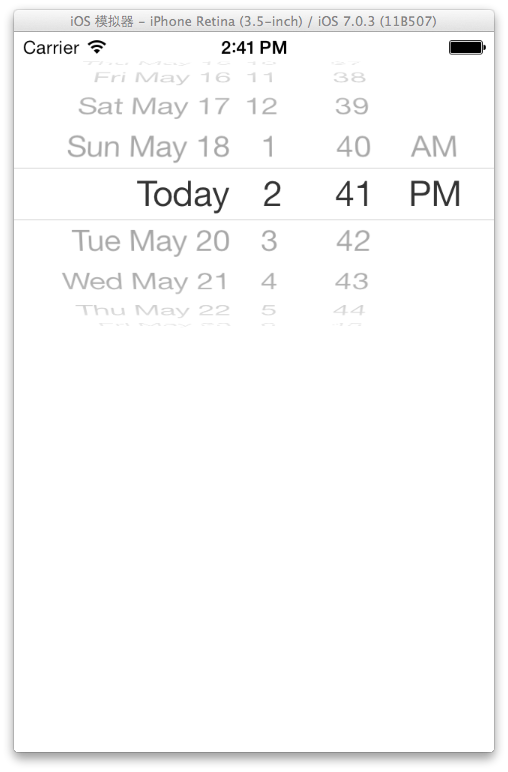
创建一个UIDatePicker控件并显示出来来看看这玩意长什么模样,代码:
     UIDatePicker *datePicker = [[UIDatePicker alloc] initWithFrame:CGRectMake(, , , )];//创建一个UIDatePicker对象

     [self.view addSubview:datePicker];//添加到当前的视图中显示出来
样子如下:

2、配置UIDatePicker
2.1 UIDatePicker国际化
我们看见默认的UIDatePicker是英文的,这让我很不爽,用下面这个方法让它变成中文
@property(nonatomic, retain) NSLocale *locale
下面赶紧用这个方法给UIDatePicker对象设置上让它变成中文,英文看着实在不爽:
     UIDatePicker *datePicker = [[UIDatePicker alloc] initWithFrame:CGRectMake(, , , )];//创建一个UIDatePicker对象

     NSLocale *chineseLocale = [NSLocale localeWithLocaleIdentifier:@"zh_cn"]; //创建一个中文的地区对象

     [datePicker setLocale:chineseLocale]; //将这个地区对象给UIDatePicker设置上

     [self.view addSubview:datePicker];//添加到当前的视图中显示出来
设置好了,来看看效果吧

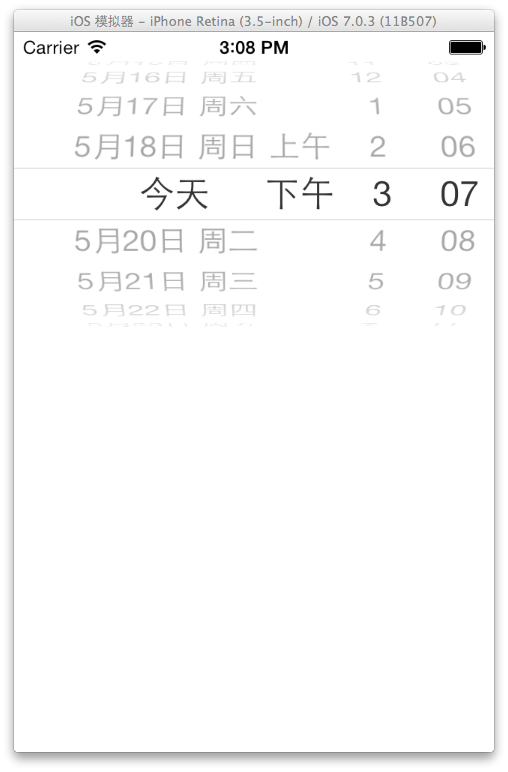
恩,现在UIDatePicker变成中文了,但是有个问题,不管这个IOS系统是什么语言,它总是显示成中文,不利于国际化,下面我们修改代码实现UIDatePicker的国际化
     UIDatePicker *datePicker = [[UIDatePicker alloc] initWithFrame:CGRectMake(, , , )];//创建一个UIDatePicker对象

     NSLocale *currentLocale = [NSLocale currentLocale]; //取得当前IOS用户所设置的地区信息

     [datePicker setLocale:currentLocale]; //给UIDatePicker对象设置地区信息

     [self.view addSubview:datePicker];//添加到当前的视图中显示出来
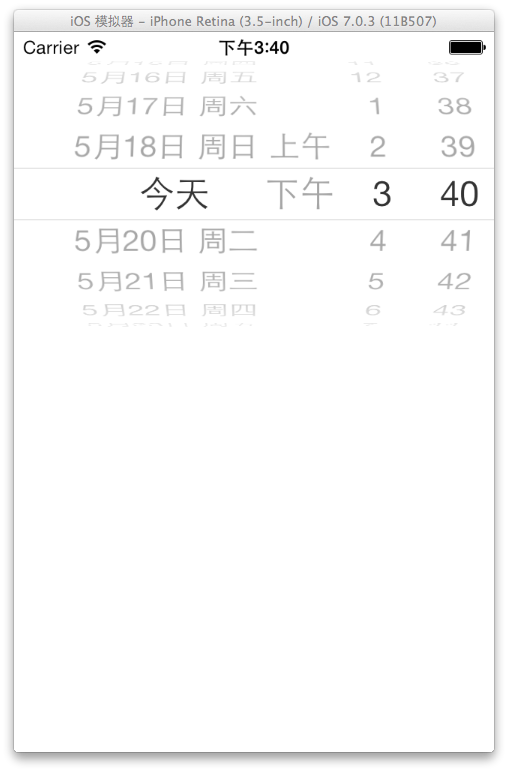
使用以上代码后有可能程序显示的效果还是英文的,这需要设置你的IPhone的International信息才可以。


如上图我设置的是语言为英文,下面的地区格式设置为中国,日历为公历(吐槽苹果都IOS7了,中国农历还是没实现,连小日本的日历都有,这是什么意思),我的程序显示效果如下:

2.2 UIDatePicker显示模式
用于配置UIDatePicker显示模式的方法如下
@property(nonatomic) UIDatePickerMode datePickerMode
该方法用于配置UIDatePicker是只显示日期选择、时间选择、或者既有日期又有时间选择(默认就是这种),还是显示为一个倒计时器。
UIDatePickerMode是个枚举分别对应那四种方法的值。定义如下:
 typedef enum {

     UIDatePickerModeTime, //只有时间选择的模式

     UIDatePickerModeDate, //只有日期选择的模式

     UIDatePickerModeDateAndTime, //既有时间又有日期的选择模式(默认这种)

     UIDatePickerModeCountDownTimer //倒计时器模式

 } UIDatePickerMode;
由于上面三种模式都是默认模式的变体,比较好理解,下面只实现一下倒计时器,看看啥子模样,
     UIDatePicker *datePicker = [[UIDatePicker alloc] initWithFrame:CGRectMake(, , , )];//创建一个UIDatePicker对象

     [datePicker setDatePickerMode:UIDatePickerModeCountDownTimer]; //设置显示模式是一个倒计时器

     [self.view addSubview:datePicker];//添加到当前的视图中显示出来
显示效果为:


3、UIDatePicker的事件处理
3.1 普通形态的UIDatePicker添加事件
上面的方法用于创建和配置UIDatePicker的显示模式,UIDatePicker也是继承与UIControl的因此也可以使用
 - (void)addTarget:(id)target action:(SEL)action forControlEvents:(UIControlEvents)controlEvents

 - (void)removeTarget:(id)target action:(SEL)action forControlEvents:(UIControlEvents)controlEvents
下面来给UIDatePicker添加一个事件,当用户改变了UIDatePicker的值时就弹出一个警告框显示用户选择的日期及时间,下面是初始化以及添加事件的代码:
     UIDatePicker *datePicker = [[UIDatePicker alloc] initWithFrame:CGRectMake(, , , )];//创建一个UIDatePicker对象

     [datePicker addTarget:self action:@selector(changeTime:) forControlEvents:UIControlEventValueChanged]; //为UIDatePicker添加一个事件当UIDatePicker的值被改变时触发

     [[self view] addSubview:datePicker];//添加到当前的视图中显示出来
下面是事件处理方法:
 - (void)changeTime:(UIDatePicker*)sender

 {

     NSDateFormatter * df = [[NSDateFormatter alloc] init]; //初始化一个日期格式化器

     [df setLocale:[[NSLocale alloc] initWithLocaleIdentifier:@"zh_cn"]]; //初始化一个中国的区域信息对象

     [df setDateStyle:NSDateFormatterFullStyle]; //设置日期格式化器的日期显示样式为完整样式

     [df setTimeStyle:NSDateFormatterFullStyle]; //设置日期格式化器的事件显示样式为完整样式

     UIAlertView *alert = [[UIAlertView alloc] initWithTitle:@"UIDatePicker事件" message:[df stringFromDate:[sender date]] delegate:nil cancelButtonTitle:@"确定" otherButtonTitles:nil];//初始化一个UIAlertView用户显示用户选择的日期及时间

     [alert show];//显示这个UIAlertView

 }
下面来看效果:


3.2 倒计时器形态的UIDatePicker添加事件
这里用倒计时器的模式以及计时器对象做一个倒计时程序,下面贴出完整的ViewController代码,首先是头文件:
 #import <UIKit/UIKit.h>

 @interface ZFCViewController : UIViewController

 @property (nonatomic,strong) NSTimer *timer; //计时器对象

 @property (nonatomic,strong) UIDatePicker *datePicker; //倒计时选择器对象

 @property (nonatomic,assign) double leftSeconds; //倒计时选择器对象剩余多少秒

 @end
接着是实现文件:
 //

 //  ZFCViewController.m

 //  UIDatePickerTest

 //

 //  Created by 赵 福成 on 14-5-19.

 //  Copyright (c) 2014年 ZhaoFucheng. All rights reserved.

 //

 #import "ZFCViewController.h"

 @interface ZFCViewController ()

 @end

 @implementation ZFCViewController

 NSString *msg; //用于显示还有多少秒的信息变量

 NSDateFormatter *df; //用于格式化日期的显示格式

 UIAlertView *alert; //用于循环时弹出的警告框

 - (id)initWithNibName:(NSString *)nibNameOrNil bundle:(NSBundle *)nibBundleOrNil

 {

     self = [super initWithNibName:nibNameOrNil bundle:nibBundleOrNil];

     if (self) {

         // Custom initialization

     }

     return self;

 }

 - (void)loadView

 {

     UIView *rootView = [[UIView alloc] initWithFrame:[[UIScreen mainScreen] applicationFrame]];

     [self setView:rootView];

     self.datePicker = [[UIDatePicker alloc] initWithFrame:CGRectMake(, , , )];//创建一个UIDatePicker对象

     [self.datePicker setDatePickerMode:UIDatePickerModeCountDownTimer]; //设置为倒计时器

     [self.datePicker addTarget:self action:@selector(changeTime:) forControlEvents:UIControlEventValueChanged]; //为UIDatePicker添加一个事件当UIDatePicker的值被改变时触发

     [[self view] addSubview:self.datePicker];//添加到当前的视图中显示出来

 }

 - (void)changeTime:(UIDatePicker*)sender

 {

     [self setLeftSeconds:[sender countDownDuration]];//取得这个UIDatePicker倒计时器还剩多少秒

     [sender setEnabled:NO];//当触发了一个事件就将UIDatePicker设置为禁用

     [self setTimer:[NSTimer scheduledTimerWithTimeInterval: target:self selector:@selector(countDownTimer) userInfo:nil repeats:YES]];//设置了一个计时器对象,每隔一秒执行一次

 }

 - (void)countDownTimer

 {

     self.leftSeconds -= ; //每次执行减去一秒

     if (self.leftSeconds <= ) { //如果时间为0了

         [self.timer invalidate]; //将取消计时器

         [self.datePicker setEnabled:YES]; //将UIDatePicker设置为可用

     }

     msg = [NSString stringWithFormat:@"还剩%g秒",self.leftSeconds]; //修改UIAlertView上的剩余时间提示信息

     [alert setMessage:msg]; //将信息放到UILaterView上

     if (!alert.visible) { //这个UIAlertView是否已经显示

         [alert show];//如果没有显示就显示这个UIAlertView

     }

 }

 - (void)viewDidLoad

 {

     [super viewDidLoad];

     // Do any additional setup after loading the view.

     df = [[NSDateFormatter alloc] init]; //初始化一个日期格式化器

     [df setLocale:[[NSLocale alloc] initWithLocaleIdentifier:@"zh_cn"]]; //初始化一个中国的区域信息对象

     [df setDateStyle:NSDateFormatterFullStyle]; //设置日期格式化器的日期显示样式为完整样式

     [df setTimeStyle:NSDateFormatterFullStyle]; //设置日期格式化器的事件显示样式为完整样式

     alert = [[UIAlertView alloc] initWithTitle:@"UIDatePicker事件" message:msg delegate:nil cancelButtonTitle:@"确定" otherButtonTitles:nil];//初始化一个UIAlertView用户显示用户选择的日期及时间

 }

 - (void)didReceiveMemoryWarning

 {

     [super didReceiveMemoryWarning];

     // Dispose of any resources that can be recreated.

 }

 /*

 #pragma mark - Navigation

 // In a storyboard-based application, you will often want to do a little preparation before navigation

 - (void)prepareForSegue:(UIStoryboardSegue *)segue sender:(id)sender

 {

     // Get the new view controller using [segue destinationViewController].

     // Pass the selected object to the new view controller.

 }

 */

 @end
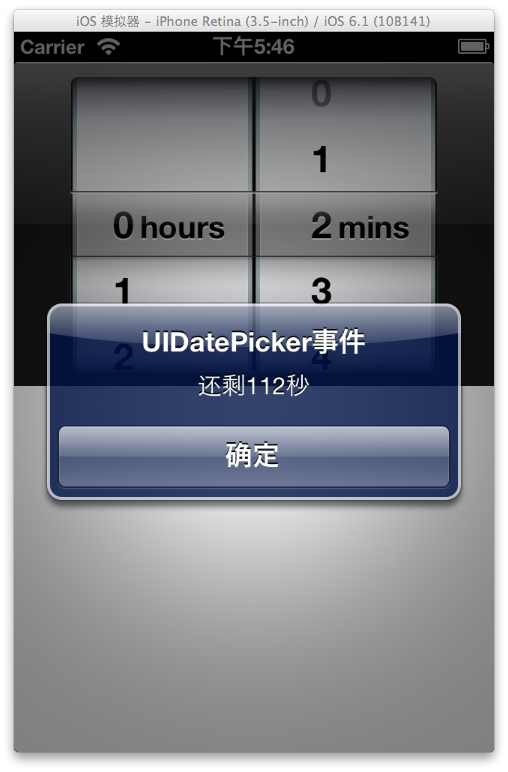
这样就做好了一个倒计时程序,效果图如下:

先到这里、以后继续添加。。
UIDatePicker控件的更多相关文章
- iOs基础篇(二十二)—— UIPickerView、UIDatePicker控件的使用
一.UIPickerView UIPickerView是一个选择器控件,可以生成单列的选择器,也可生成多列的选择器,而且开发者完全可以自定义选择项的外观,因此用法非常灵活. 1.常用属性 (1)num ...
- iOS开发中UIDatePicker控件的使用方法简介
iOS上的选择时间日期的控件是这样的,左边是时间和日期混合,右边是单纯的日期模式. 您可以选择自己需要的模式,Time, Date,Date and Time , Count Down Timer四 ...
- iOS学习之UIDatePicker控件使用
iOS上的选择时间日期的控件是这样的,左边是时间和日期混合,右边是单纯的日期模式. , 您可以选择自己需要的模式,Time, Date,Date and Time , Count Down Ti ...
- Swift - 日期选择控件(UIDatePicker)的用法
1,使用storyboard创建日期选择控件 首先我们将一个UIDatePicker控件和一个按钮直接添加到Main.Storyboard上.该按钮是为了点击时弹出提示框显示当前选择的日期和时间. 同 ...
- 【IOS 开发】基本 UI 控件详解 (UIDatePicker | UIPickerView | UIStepper | UIWebView | UIToolBar )
转载注明出处 : http://blog.csdn.net/shulianghan/article/details/50348982 一. 日期选择器 (UIDatePicker) UIDatePic ...
- Swift学习之熟悉控件
最近是比较清闲一些的,对于一个开发者来说,这也是一个很好的充电机会.以前做项目都是使用Objective-C去开发,但我们都知道,Swift语言从2014年的出现到现在,一步一步变的完善,渐渐变的受欢 ...
- iOS-UI-UI控件概述
以下列举一些在开发中可能用得上的UI控件: IBAction和IBOutlet,UIView 1 @interface ViewController : UIViewController 2 3 @p ...
- ios开发中经常用到的控件
以下是按照使用频率对ios的控件进行罗列. 1.最常用的UI控件: UIButton (按钮).UILabel (文本标签).UITextField (文本输入框).UIImageView( 图片显示 ...
- iOS开发UI篇—Date Picker和UITool Bar控件简单介绍
iOS开发UI篇—Date Picker和UITool Bar控件简单介绍 一.Date Picker控件 1.简单介绍: Date Picker显示时间的控件 有默认宽高,不用设置数据源和代理 如何 ...
随机推荐
- HDU 1026 Ignatius and the Princess I(BFS+优先队列)
Ignatius and the Princess I Time Limit:1000MS Memory Limit:32768KB 64bit IO Format:%I64d &am ...
- ASP.NET MVC 4.0 学习4-Code First
之前我們需要用到的數據,通過添加Entity實體數據模型把數據庫中需要的Database拉到項目中如下圖, 而就是Code First就是相對於這種處理數據的方法而言的 Code First更加準確的 ...
- Linux系统编程(16)——正则表达式入门
字符是计算机软件处理文字时最基本的单位,可能是字母,数字,标点符号,空格,换行符,汉字等等.字符串是0个或更多个字符的序列.文本也就是文字,字符串.说某个字符串匹配某个正则表达式,通常是指这个字符串里 ...
- Plus One 解答
Question Given a non-negative number represented as an array of digits, plus one to the number. The ...
- 过程化开发2048智力游戏WebApp
时间荏苒,唯编程与青春不可辜负,感觉自己一直没有专心去提升编程的技能,甚是惭愧!!! 周五,无意间看到一个开发2048的视频,有点兴趣就动起手来了,虽然不擅长前端开发,在此献丑,分享一下自己使用过程化 ...
- structs2标签
Struts2常用标签总结 一 介绍 1.Struts2的作用 Struts2标签库提供了主题.模板支持,极大地简化了视图页面的编写,而且,struts2的主题.模板都提供了很好的扩展性.实现了更好的 ...
- Handshakes(思维) 2016(暴力)
Handshakes Time Limit:2000MS Memory Limit:65536KB 64bit IO Format:%lld & %llu Submit Sta ...
- crm使用url打开窗口视图
//URL可寻址元素使您能够包含指向Microsoft Dynamics CRM窗口. 视图. 对话框和其它应用程序中的报告. //这样.您就能够轻松扩展其它应用程序.报表或站点,以便用户无需切换应用 ...
- [bzoj2301: [HAOI2011]Problem b] 乞讨
</pre><pre code_snippet_id="507886" snippet_file_name="blog_20141104_2_53831 ...
- SPOJ 130 - Rent your airplane and make money(dp+优化)
题意:有n列预定航班,从st时刻开始出发,飞行时间为d,花费为p,且同一时刻不能有两个航班,求最大的花费 对航班的开始时间(或结束时间)按升序排序,从后往前找到对应结束时间所在的航班位置(如按结束时间 ...