
React react-ui-tree的使用
公司需要做一个IDE,要做IDE当然少不了文件列表了。下面我就来展示一下刚刚研究的一个库。
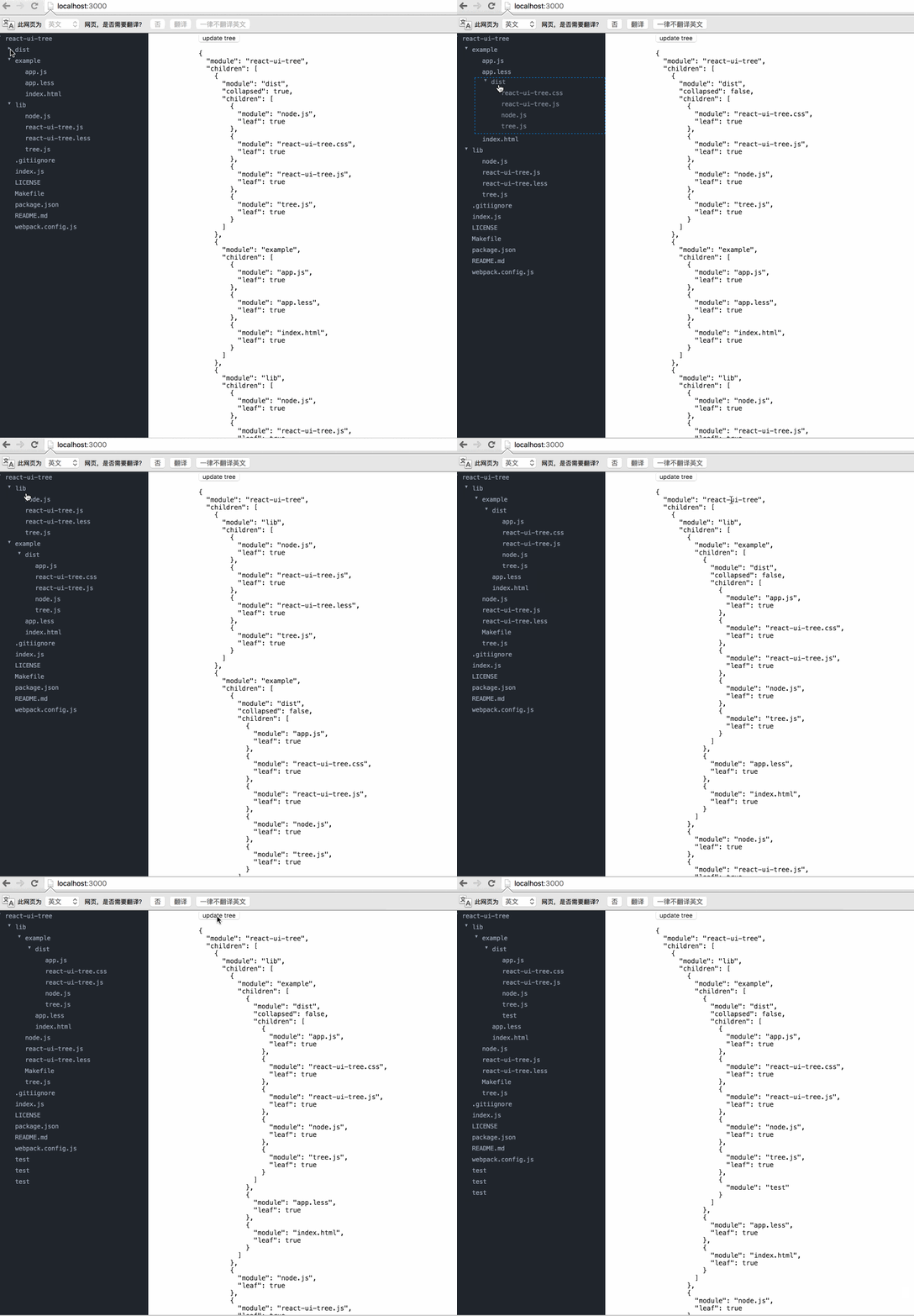
下面是链接:https://react.rocks/example/react-ui-tree
至于如何导入module,官方文档都写的很清楚我就不再贴出。
这里由于给的介绍太过简单。我就将我的代码贴出:
第一个文件就是我们组件文件:
var cx = require('classnames');

var React = require('react');

var ReactDOM = require('react-dom');

var Tree = require('react-ui-tree');

var tree = require('./tree');

require('react-ui-tree/dist/react-ui-tree.css')

require('./css.css')

var UiTree = React.createClass({

  getInitialState() {

    return {

      active: null,

      tree: tree

    };

  },

  renderNode(node) {

    return (

      <span className={cx('node', {

        'is-active': node === this.state.active

        })} onClick={this.onClickNode.bind(null, node)}>

        {node.module}

      </span>

    );

  },

  onClickNode(node) {

    this.setState({

      active: node

    });

  },

  render() {

    return (

      <div className="app">

        <div className="tree">

          <Tree

            paddingLeft={20}

            tree={this.state.tree}

            onChange={this.handleChange}

            isNodeCollapsed={this.isNodeCollapsed}

            renderNode={this.renderNode}

          />

        </div>

        <div className="inspector">

          <button onClick={this.updateTree}>update tree</button>

          <pre>

          {JSON.stringify(this.state.tree, null, '  ')}

          </pre>

        </div>

      </div>

    );

  },

  handleChange(tree) {

    this.setState({

      tree: tree

    });

  },

  updateTree() {

    var tree = this.state.tree;

    tree.children.push({module: 'test'});

    this.setState({

      tree: tree

    });

  }

});

module.exports = UiTree;
下面是数据:
module.exports = {

  module: 'react-ui-tree',

  children: [{

    module: 'dist',

    collapsed: true,

    children: [{

      module: 'node.js',

      leaf: true

    }, {

      module: 'react-ui-tree.css',

      leaf: true

    }, {

      module: 'react-ui-tree.js',

      leaf: true

    }, {

      module: 'tree.js',

      leaf: true

    }]

  }, {

    module: 'example',

    children: [{

      module: 'app.js',

      leaf: true

    }, {

      module: 'app.less',

      leaf: true

    }, {

      module: 'index.html',

      leaf: true

    }]

  }, {

    module: 'lib',

    children: [{

      module: 'node.js',

      leaf: true

    }, {

      module: 'react-ui-tree.js',

      leaf: true

    }, {

      module: 'react-ui-tree.less',

      leaf: true

    }, {

      module: 'tree.js',

      leaf: true

    }]

  }, {

    module: '.gitiignore',

    leaf: true

  }, {

    module: 'index.js',

    leaf: true

  }, {

    module: 'LICENSE',

    leaf: true

  }, {

    module: 'Makefile',

    leaf: true

  }, {

    module: 'package.json',

    leaf: true

  }, {

    module: 'README.md',

    leaf: true

  }, {

    module: 'webpack.config.js',

    leaf: true

  }]

}
这里有个坑,就是当我们将程序运行起来的时候发现样式是不对的,查阅它的源码才知道他是将样式放入了“.less”的文件之中,所以我们需要将文件先转化成css文件,然后添加文件手动导入:
.tree {

  position: fixed;

  top:;

  left:;

  bottom:;

  width: 300px;

  overflow-x: hidden;

  overflow-y: auto;

  background-color: #21252B;

}

.m-node.placeholder {

  border: 1px dashed #1385e5;

}

.m-node .inner {

  color: #9DA5B4;

  font-size: 12px;

  font-family: Menlo;

}

.m-node .node {

  display: inline-block;

  width: 100%;

  padding: 4px 5px;

}

.m-node .node.is-active {

  background-color: #31363F;

}

.m-node .children {

  transition: 1s;

}

*,

*:before,

*:after {

  -webkit-box-sizing: border-box;

  -moz-box-sizing: border-box;

  box-sizing: border-box;

}

body {

  margin:;

  padding:;

  font-size: 100%;

}

.inspector {

  margin-left: 400px;

}

.inspector pre {

  font-family: Menlo;

  font-size: 13px;

}
最后还有一个坑就是他跟bootstrap是有冲突的,所以如果你使用了bootstrap再使用它,可能样式会有所改变。
demo可以从我的github上看到:
https://github.com/weifengzz/react-ui-tree-demo
React react-ui-tree的使用的更多相关文章
- [React] react+redux+router+webpack+antd环境搭建一版
好久之前搭建的一个react执行环境,受历史影响是webpack3.10.0和webpack-dev-server2.7.1的环境,新项目准备用webpack4重新弄弄了,旧的记录就合并发布了(在没有 ...
- React/React Native 的ES5 ES6写法对照表
//es6与es5的区别很多React/React Native的初学者都被ES6的问题迷惑:各路大神都建议我们直接学习ES6的语法(class Foo extends React.Component ...
- React/React Native 的ES5 ES6写法对照表-b
很多React/React Native的初学者都被ES6的问题迷惑:各路大神都建议我们直接学习ES6的语法(class Foo extends React.Component),然而网上搜到的很多教 ...
- [React] React Fundamentals: Integrating Components with D3 and AngularJS
Since React is only interested in the V (view) of MVC, it plays well with other toolkits and framewo ...
- Element ui tree树形控件获取当前节点id和父节点id
低版本Element ui tree树形控件获取当前节点id和父节点id的方法:点击查看 最新版本Element ui tree树形控件获取当前节点id和父节点id教程: 1.找到node_modul ...
- React: React组件的生命周期
一.简介 在前面的第二篇博文中对组件的生命周期虽然做了一个大略介绍,但总感觉说的过于简单,毕竟生命周期是React组件的核心部分.在我们熟练使用React挂载和合成组件来创建应用表现层的过程中,针对数 ...
- React: React的属性验证机制
一.简介 在开发中,属性变量类型的验证,几乎是任何语言都必须关注的问题,因为如果传入的数据类型不对,轻者程序运行仅仅是给出警告⚠️,严重的会直接导致程序中断,APP闪退或者web页面挂掉,这是很严重的 ...
- React/react相关小结
React React组件由React元素组成,React组件使用React.Component或React.PureComponent来生成:React元素使用JSX的语法来编写或使用React.c ...
- 使用CRA开发的基于React的UI组件发布到内网NPM上去
前言:构建的ES组件使用CNPM发布内网上过程 1. 使用Create-React-APP开的组件 如果直接上传到NPM,你引用的时候会报: You may need an appropriate l ...
- [React] Optimistic UI update in React using setState()
In this lesson we will refactor an existing UI update from a typical loading approach to an optimist ...
随机推荐
- Sql Server 查看所有存储过程或视图的位置及内容
and a.object_id = b.object_id and a.[type] in ('P','V','AF') order by a.[name] asc 通过这个sql语句可以查到sql ...
- FpSpread添加表头(列名)标注
for (int j = 0; j < fp.ActiveSheetView.ColumnCount; j++) { fp.ActiveSheetView.ColumnHeader.Cells[ ...
- redis的备份和恢复
Redis 数据备份与恢复 数据备份 语法 redis Save 命令基本语法如下: redis > SAVE 实例 redis > SAVE OK 该命令将在 redis 备份目录中创建 ...
- VC中遍历进程并获取进程信息
代码如下: /***************************************************/ /* 函数: 遍历进程信息 /* 参数:进程名称 例如: aaa.exe /* ...
- WCF入门教程系列五
一.概述 WCF在通信过程中有三种模式:请求与答复.单向.双工通信.以下我们一一介绍. 二.请求与答复模式 描述: 客户端发送请求,然后一直等待服务端的响应(异步调用除外),期间处于假死状态,直到服务 ...
- UWP开发小记
针对个人的上一篇文章中提到的遇到的几个问题,做一下个人解答 DLL部署的问题,可以将DLL添加到工程中,属性中设置content为true,这样,部署目录下就会有这个文件. 需要说明的是,这个文件确实 ...
- shell中的if语句
语法格式 if command;then commands fi 其中的command包含如下: shell command 任何shell命令,如果shell命令返回0,代表true,否则,代表fa ...
- 【0】Laravel 5.1 简介
1.简介 Laravel是一套简洁.优雅的PHP Web开发框架(PHP Web Framework).它可以让你从面条一样杂乱的代码中解脱出来:它可以帮你构建一个完美的网络APP,而且每行代码都可以 ...
- 视觉差效果 - jqyery scrollTop原理
原理是用页面的滚动高度scrollTop()来控制背景图的位置 附上源码 <!DOCTYPE html PUBLIC "-//W3C//DTD XHTML 1.0 Transition ...
- PHP学习路上的一点心得
继学些了java后,接触php的项目后发现 php真的也是很强大的一门语言,这只是一篇回想,想到什么就写什么把,大家随便看看. 1.php其实无需等待,一般的改完代码后直接刷新页面即可,不需要像jav ...