
Android中连接蓝牙设备时遇到createRfcommSocketToServiceRecord的UUID问题和BluetoothSocket的connect失败
【问题】
折腾:
【记录】编写Android中的蓝牙模块驱动和底层HART设备
期间,参考:
Bluetooth | Android Developers – ManagingAConnection
参考“Connecting as a client”中的:
tmp = device.createRfcommSocketToServiceRecord(MY_UUID);
遇到UUID不懂的问题。
然后随便去
http://www.guidgenerator.com/online-guid-generator.aspx
弄了个UUID:
e214d9ae-c3ba-4e25-abb5-299041353bc3
结果运行到:
            try {

                // Connect the device through the socket. This will block

                // until it succeeds or throws an exception

                mmSocket.connect();

            } catch (IOException connectException) {

                // Unable to connect; close the socket and get out

                try {

                    mmSocket.close();

                } catch (IOException closeException) { }

                return;

            }
中的:
mmSocket.connect();
时就抛异常了。
即:
遇到createRfcommSocketToServiceRecord的UUID不懂,以及BluetoothSocket的connect失败。
【解决过程】
1.参考:
android – Why can’t HTC Droid running OTA 2.1 communicate with RFCOMM? – Stack Overflow
去试试:
Method m = device.getClass().getMethod("createRfcommSocket", new Class[] {int.class});

mBTSocket = (BluetoothSocket) m.invoke(device, 1);
结果看着就不太对啊。。就不继续试了。
2.参考:
Need Bluetooth UUID clarification – Google Groups
去试试:
00001101-0000-1000-8000-00805F9B34FB
结果直接挂掉。
3.再去试试:
00000003-0000-1000-8000-00805F9B34FB
也会挂掉。
4.后来再去搜:
android bluetooth connect fail
然后去参考:
android bluetooth can’t connect – Stack Overflow
和:
The Missing Manual: Android Bluetooth RFCOMM « Wires Are Obsolete
去试试,用代码:
 // Create a BroadcastReceiver for ACTION_FOUND

 private final BroadcastReceiver mReceiver = new BroadcastReceiver() {

     public void onReceive(Context context, Intent intent) {

//	 BluetoothDevice deviceExtra = intent.getParcelableExtra("android.bluetooth.device.extra.DEVICE");

//	 Parcelable[] uuidExtra = intent.getParcelableArrayExtra("android.bluetooth.device.extra.UUID");

         String action = intent.getAction();

         // When discovery finds a device

         if (BluetoothDevice.ACTION_FOUND.equals(action)) {

             // Get the BluetoothDevice object from the Intent

             BluetoothDevice btDev = intent.getParcelableExtra(BluetoothDevice.EXTRA_DEVICE);

             Parcelable[] btDevUuid = intent.getParcelableArrayExtra(BluetoothDevice.EXTRA_UUID);
调试得到的btDevUuid都是null的。
5.换用:
         if (BluetoothDevice.ACTION_FOUND.equals(action)) {

             // Get the BluetoothDevice object from the Intent

             BluetoothDevice btDev = intent.getParcelableExtra(BluetoothDevice.EXTRA_DEVICE);

             //Parcelable[] btDevUuid = intent.getParcelableArrayExtra(BluetoothDevice.EXTRA_UUID);

             UUID btDevUuid = intent.getParcelableExtra(BluetoothDevice.EXTRA_UUID);
还是不行。
6.参考:
Issue 15919 – android – Bluetooth connect fails under 2.3.3 for SPP devices using secure comms
中提到的:
BluetoothDevice | Android Developers
中提示的:
| Hint: If you are connecting to a Bluetooth serial board then try using the well-known SPP UUID 00001101-0000-1000-8000-00805F9B34FB. However if you are connecting to an Android peer then please generate your own unique UUID. |
所以再去试试这个UUID:
00001101-0000-1000-8000-00805F9B34FB
最终是可以了:
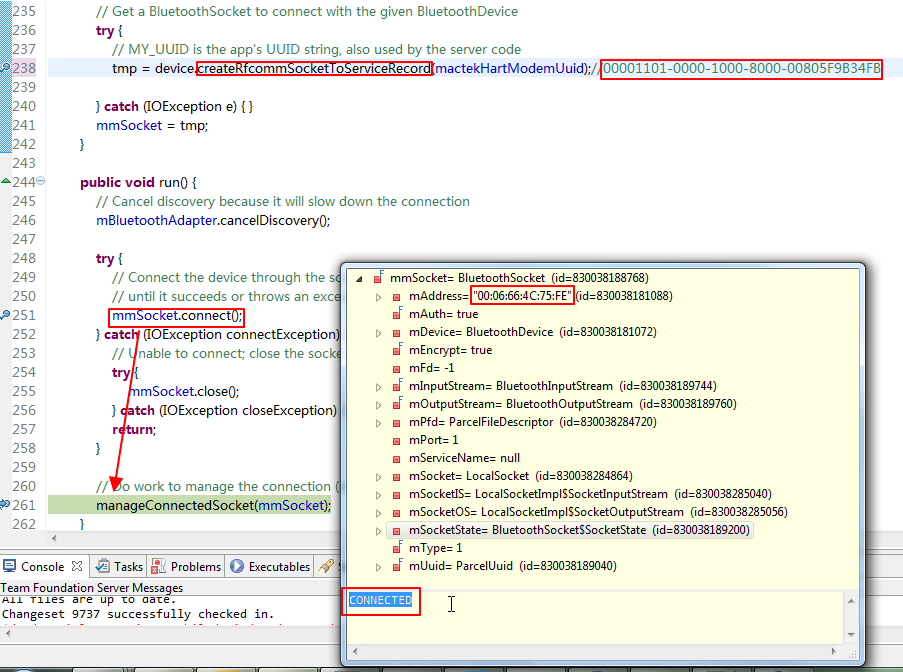
对应的相关代码为:
private String mactekHartModemName;
private UUID mactekHartModemUuid; //void afterFoundBtHartModem(BluetoothDevice btDev, Parcelable[] btDevUuid){
void afterFoundBtHartModem(BluetoothDevice btDev, UUID btDevUuid){
if(null != btDevUuid){ } //mactekHartModemName = btDev.getName(); //"MACTekViator75FE"
//mactekHartModemUuid = UUID.fromString(mactekHartModemName); String uuidValue;
//http://www.guidgenerator.com/online-guid-generator.aspx
//uuidValue = "e214d9ae-c3ba-4e25-abb5-299041353bc3"; //https://groups.google.com/forum/#!topic/android-developers/vyTEJOXELos
//uuidValue = "00001101-0000-1000-8000-00805F9B34FB";
//uuidValue = "00000003-0000-1000-8000-00805F9B34FB";
uuidValue = "00001101-0000-1000-8000-00805F9B34FB"; mactekHartModemUuid = UUID.fromString(uuidValue); ConnectThread connectBtThread = new ConnectThread(btDev);
connectBtThread.start();
} private class ConnectThread extends Thread {
private final BluetoothSocket mmSocket;
private final BluetoothDevice mmDevice; public ConnectThread(BluetoothDevice device) {
// Use a temporary object that is later assigned to mmSocket,
// because mmSocket is final
BluetoothSocket tmp = null;
mmDevice = device; // Get a BluetoothSocket to connect with the given BluetoothDevice
try {
// MY_UUID is the app's UUID string, also used by the server code
tmp = device.createRfcommSocketToServiceRecord(mactekHartModemUuid);//00001101-0000-1000-8000-00805F9B34FB } catch (IOException e) { }
mmSocket = tmp;
} public void run() {
// Cancel discovery because it will slow down the connection
mBluetoothAdapter.cancelDiscovery(); try {
// Connect the device through the socket. This will block
// until it succeeds or throws an exception
mmSocket.connect();
} catch (IOException connectException) {
// Unable to connect; close the socket and get out
try {
mmSocket.close();
} catch (IOException closeException) { }
return;
} // Do work to manage the connection (in a separate thread)
manageConnectedSocket(mmSocket);
} /** Will cancel an in-progress connection, and close the socket */
public void cancel() {
try {
mmSocket.close();
} catch (IOException e) { }
}
}
【总结】
此处,必须使用Android的SSP(协议栈默认)的UUID:
00001101-0000-1000-8000-00805F9B34FB
才能正常和外部的,也是SSP串口的蓝牙设备去连接。
Android中连接蓝牙设备时遇到createRfcommSocketToServiceRecord的UUID问题和BluetoothSocket的connect失败的更多相关文章
- Android中打包JAR时获取资源ID的方法
前言:在打包android源码的时,有的时候源码中包含了资源文件,但是jar包中不包含,所以会异常,解决的方案就是不用系统的提供的id名,而是直接 获取id,如反射. 1.系统提供的方法: /** * ...
- Android中Activity运行时屏幕方向与显示方式详解
现在我们的手机一般都内置有方向感应器,手机屏幕会根据所处位置自动进行横竖屏切换(前提是未锁定屏幕方向).但有时我们的应用程序仅限在横屏或者竖屏状态下才可以运行,此时我们需要锁定该程序Activity运 ...
- Android中使用getDrawable时提示:Call requires API level 21(current min is 15)
场景 在通过getDrawable方法获取照片资源时提示: Call requires API level 21(current min is 15) 注: 博客: https://blog.csdn ...
- Android中ListView滚动时上下边界的那一抹色彩
后台实现: if (Integer.parseInt(Build.VERSION.SDK) >= 9) { listview.setOverScrollMode(View.OVER_SCROLL ...
- Android中Activity切换时共享视图元素的切换动画(5.0以上)
同一时候公布在我的博客 点此进入 背景 说来这个的背景很easy,常常在使用图片列表的时候就会想,假设"列表中的图片放大到整个屏幕"作为 Activity 的补间动画.就很完美了. ...
- Android中decode JPG时建议使用inPreferQualityOverSpeed
在BitmapFactory.decodeBitmap方法中,参数BitmapFactory.Options里有一项是inPreferQualityOverSpeed:设为true的话,画质更好,加载 ...
- vue项目中连接MySQL时,报错ER_ACCESS_DENIED_ERROR: Access denied for user 'root'@'localhost' (using password:YES)
一.前言 我们前端很多时候在写vue项目的时候,会把后端的数据拿到本地来跑,在连接MySQL数据库的时候,可能出现一些问题,如: ER_ACCESS_DENIED_ERROR: Access deni ...
- android中 检查网络连接状态的变化,无网络时跳转到设置界面
1:在AndroidManifest.xml中加一个声明 <receiver android:name="NetCheckReceiver"> <inten ...
- 在android中配置 slf4j + log4j 日志记录框架
需求: 在项目开发中,需要记录 操作日志 .起初自己写了个简单的日志记录文本写入到文本的方法,后来随着项目的膨胀,需要考虑更多的操作,开始考虑性能问题. 实现: 考虑使用 slf4j + log4j ...
随机推荐
- Jetty 8.1 安装 运行 部署
链接地址:http://blog.csdn.net/lego2816/article/details/42650545 Java + MySQL 从Jfinal开始,第一步先走完整个流程,主要是发布部 ...
- HTML5 总结-画布-4
HTML5 画布 创建 Canvas 元素 向 HTML5 页面添加 canvas 元素. 规定元素的 id.宽度和高度: <canvas id="myCanvas" wid ...
- Python学习之一
运行Python的步骤 1 加载内存 2 词法分析 3 语法分析 4编译字节码=>机器码 5运行 11:03:49 2016-01-11
- NSString 用法大全。
一.NSString 创建字符串. NSString *astring = @"This is a String!"; 创建空字符串,给予赋值. NSString *astri ...
- Ants (POJ 1852)
题目描述: Description An army of ants walk on a horizontal pole of length l cm, each with a constant spe ...
- C陷阱与缺陷(二)
第二章 语法陷阱 2.1 理解函数声明 (*(void(*)())0)();任何C变量的声明都由两部分组成:类型以及一组类似表达式的声明符.一旦我们知道了如何声明一个给定类型的变量,那么该类型的类型转 ...
- hibernate 缓存 4.3
缓存在hibernate中是天生就有的,是一级缓存,当session关闭时一级缓存就失效了 一级缓存是内置的,生效范围是在同一个session中才行.二级缓存是需要配置才有 判断当前项在不在一级缓存中 ...
- wchar_t*和char*之间的互相转换的那些事
最近在看一写PE文件格式的东西,想做一个读取PE文件信息的小工具,中间遇到将LPVOID格式无法转换到LPTSTR格式,强制转换屡试屡败,多显示乱码.我们知道LPVOID格式可以直接转换到char * ...
- USACO March. 2012
Connect the Cows Times17 水题 Landscaping Flowerpot Tractor 广搜 搜到边界就可以终止了 没什么难度 #include <stdio.h&g ...
- android 判断网络连接的工具类
package com.way.util; import android.content.Context; import android.net.ConnectivityManager; import ...