
onmouseover和onmouseout的烦恼
一个DIV层,当鼠标移进的时候会触发onmouseover,移出的时候会触发onmouseout。

非常easy的逻辑,这也是我们想要的!但随之烦恼也就来了:onmouseover并不会仅仅在移进时才触发,onmouseout也不会仅仅在移出时才触发!鼠标在DIV里面移动时也会可能触发onmouseover或onmouseout。
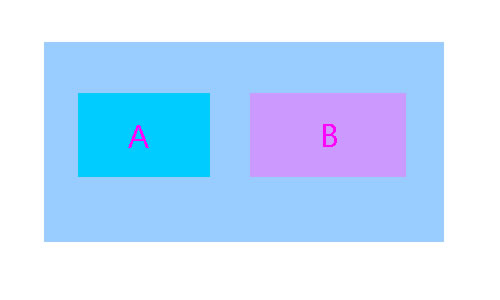
在上图中,对于’A'来说:当鼠标进入’A'(路径’1′)时那么就会触发’A'的onmouseover事件;接着鼠标移动到’B'(路径’2′),此时’A'会触发onmouseout(先)和onmouseover(后)事件。
由此可见,假设HTML元素(‘A’层)内还有其它元素(‘B’,'C’层),当我们移动到这些内部的元素时就会触发最外层(‘A’层)的onmouseout和onmouseover事件。
这两个事件的触发表现真的就是你想要的吗?或许你须要一个仅仅在移进时才触发的,一个仅仅在移出时才触发的事件,无论其内部是否还有其它元素….
解决方式
在IE下确实有你须要的两个这样事件:onmouseenter 和 onmouseleave。但非常不幸FF等其它浏览器并不支持,仅仅好模拟实现:
document.getElementById('...').onmouseover = function(e){

    if( !e ) e = window.event;

    var reltg = e.relatedTarget ? e.relatedTarget : e.fromElement;

    while( reltg && reltg != this ) reltg = reltg.parentNode;

    if( reltg != this ){

        // 这里能够编写 onmouseenter 事件的处理代码

    }

}

document.getElementById('...').onmouseout = function(e){

    if( !e ) e = window.event;

    var reltg = e.relatedTarget ? e.relatedTarget : e.toElement;

    while( reltg && reltg != this ) reltg = reltg.parentNode;

    if( reltg != this ){

        // 这里能够编写 onmouseleave 事件的处理代码

   }

}
备注:
W3C在mouseover和mouseout事件中加入�了relatedTarget属性
- 在mouseover事件中,它表示鼠标来自哪个元素
- 在mouseout事件中,它指向鼠标去往的那个元素
而Microsoft在mouseover和mouseout事件中加入�了两个属性
- fromElement,在mouseover事件中表示鼠标来自哪个元素
- toElement,在mouseout事件中指向鼠标去往的那个元素
onmouseover和onmouseout的烦恼的更多相关文章
- 关于onmouseover和onmouseout的bug
总结了一下关于使用onmouseover以及onmouseout会出现的bug 首先简单的布局: <div id="box"> <div>这是一个内容< ...
- onmouseover和onmouseout的那些事
这篇文章来自一个偶然...以前刚开始学习javascript事件的时候就被一个东西搞得晕头撞向的.就是一对名字很相近的事件.一组是onmouseover()和onmouseout().另一组就是onm ...
- JQuery 之事件中的 ----- hover 与 onmouseover 、onmouseout 联系
hover([over,]out) 一个模仿悬停事件(鼠标移动到一个对象上面及移出这个对象)的方法.这是一个自定义的方法,它为频繁使用的任务提供了一种“保持在其中”的状态. 当鼠标移动到一个匹配的元素 ...
- 使用HTML DOM 来分配事件 —— onmouseover和onmouseout ,onmousedown和onmouseup
一, onmouseover 和 onmouseout 事件 onmouseover 和 onmouseout 事件可用于在用户的鼠标移至 HTML 元素上方或移出元素时触发函数. 一个小例:鼠标未在 ...
- JS:onmouseover 、onmouseout
鼠标移动到P标签上时,改变文本和边框样式 <style type="text/css"> .onmouseover { color: red; border: 1px ...
- 【try..catch..】【判断输入是否为空】【onchange事件】【onmouseover和onmouseout事件】【onmousedown和onmouseup事件】
1.try..catch.. <body><script>function myFunction(){try{ var x=document.getElementById(&q ...
- Repeater控件添加onmouseover和onmouseout事件
网友有问题,在Repeater控件中,需要添加onmouseover和onmouseout事件功能.Insus.NET有叫他参考<onmouseover和onmouseout在Repeater控 ...
- onmouseover和onmouseout的bug
脑子不好用了,一点东西要看几遍才能记住,学过的东西也要好几遍,悲哀. 习惯了jquery的hover,或者看过hover源码,或者是正美的<框架设计>,onmouseover和onmous ...
- HTML事件(onclick、onmouseover、onmouseout、this)
<!DOCTYPE html> <html lang="en"> <head> <meta charset="UTF-8&quo ...
随机推荐
- C++对象模型5--多继承下的对象模型
C++对象模型中加入多继承 从单继承可以知道,派生类中只是扩充了基类的虚函数表.如果是多继承的话,又是如何扩充的? 1) 每个基类都有自己的虚表. 2) 子类的成员函数被放 ...
- MongDb添加嵌套文档
想添加嵌套文档,就需要创建2个实体类.如下图 usermodel.Student = student; 其中Student的类型就是StudentModel: 第一个实体类 ...
- [LeetCode]题解(python):007-Reverse Integer
题目来源: https://leetcode.com/problems/reverse-integer/ 题意分析: 这道题目很简单,就是将一个数反转,123变321,-123变321. 题目思路: ...
- poj 1269 计算几何
/** 判断直线位置关系 **/ #include <iostream> #include <cmath> #include <cstdio> using name ...
- SVN 在 linux 下的配置
0.服务器主机需要打开websharing: sudo su (进入root,需要输入密码) apachectl start (没有反应即打开成功) 1.建立想要保存软件仓库的目录 最好在/users ...
- How to access the properties of an object in Javascript
Javascript has three different kinds of properties: named data property, named accessor property and ...
- 使用jetty和mongodb实现简易网盘接口
依赖库: 1,jetty(提供http方式接口) 2,mongodb的java驱动(访问mongodb存取文件) 3,thumbnailator包,进行缩略图生成 4,commons-fileuplo ...
- phpmyadmin出现空password登录被禁止
在Windows或者Linux下mysql安装后默认的password为空,又当我们又安装了mysql的管理工具 phpmyadmin后登陆时出现"空password登陆呗禁止(參见同意pa ...
- Google启封后依然不能用
门事件周年纪念日过后一段时间,狗狗启封了,但撸主的狗狗仍旧不能用,突然想起来之前帆樯时候改动了某些配置,比方hosts文件,这个文件的路径为:C:\Windows\System32\drivers\e ...
- 指尖上的电商---(2)Solr全文搜索引擎的准备工作
Solr是一个基于Lucene的全文搜索引擎.提供了更丰富的搜索语言.更灵活的配置.更高的查询效率. 一句话.与Lucene相比.有过之而无不及.这一节里, 主要谈论两个知识点:Jdk的安装和Tomc ...