
Unity3D 之3D游戏角色控制器运动
3D运动,绑定了人形控制器后的一个简单的运动方法。
using UnityEngine;

using System.Collections;

public class PlayerMove : MonoBehaviour {

    private CharacterController cc;

    private Animator animator;

    public float speed = ;

    void Awake() {

        cc = this.GetComponent < CharacterController>();

        animator = this.GetComponent<Animator>();

    }

    // Update is called once per frame

    void Update () {

        float h = Input.GetAxis("Horizontal");

        float v = Input.GetAxis("Vertical");

        //按键的取值,以虚拟杆中的值为优先

        if (Joystick.h !=  || Joystick.v != ) {

            h = Joystick.h;

            v = Joystick.v;

        }

        if (Mathf.Abs(h) > 0.1f || Mathf.Abs(v) > 0.1) {

            animator.SetBool("Walk", true);

            if (animator.GetCurrentAnimatorStateInfo().IsName("PlayerRun")) {

                Vector3 targetDir = new Vector3(h, , v);

                transform.LookAt(targetDir + transform.position);

                cc.SimpleMove(transform.forward * speed);

            }

        } else {

            animator.SetBool("Walk", false);

        }

    }

}
复杂的运动,比如尝试着通过动力移动控制器。
public float speed = 6.0F;

    public float jumpSpeed = 8.0F;

    public float gravity = 20.0F;

    private Vector3 moveDirection = Vector3.zero;

       //一个复杂的运动

        if (cc.isGrounded)

        {

            moveDirection = new Vector3(Input.GetAxis("Horizontal"), , Input.GetAxis("Vertical"));

            moveDirection = transform.TransformDirection(moveDirection);

            moveDirection *= speed;

            if (Input.GetButton("Jump"))

                moveDirection.y = jumpSpeed;

        }

        moveDirection.y -= gravity * Time.deltaTime;

        cc.Move(moveDirection * Time.deltaTime);
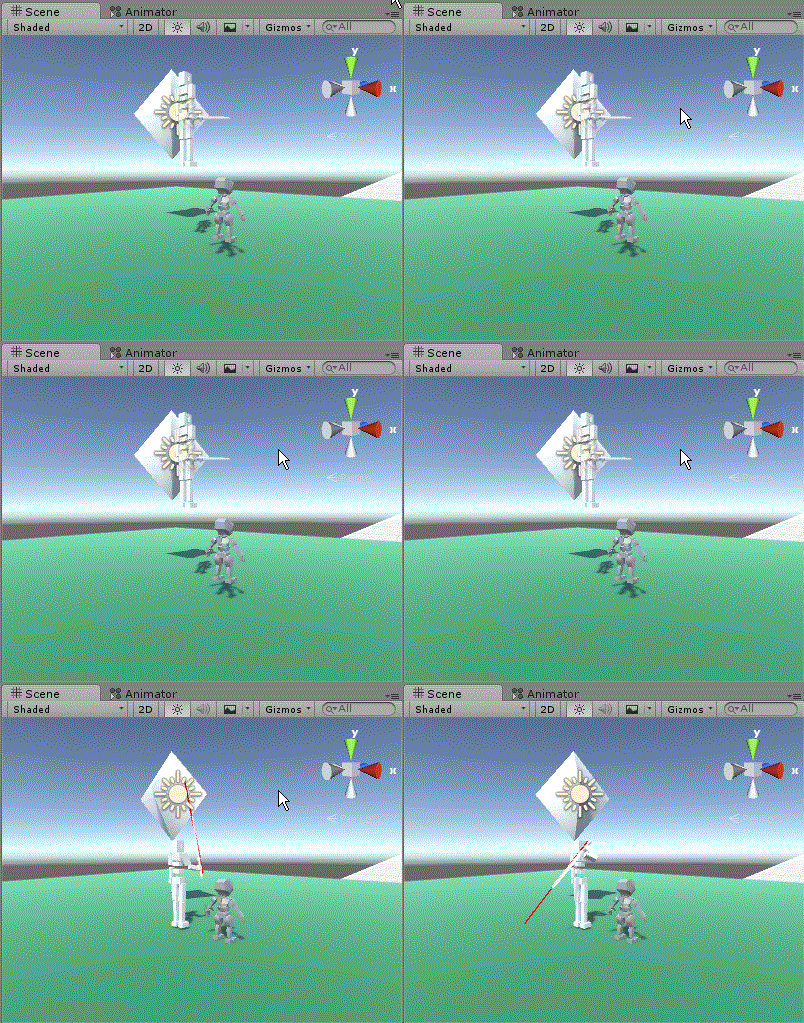
可以完成人物贴在地面上运动的效果。
Unity3D 之3D游戏角色控制器运动的更多相关文章
- Unity3D 之3D游戏SD快打 3D游戏基础入门开发全(1)
这里记录一个U3D游戏,3D游戏的基本开发. 导入素材 1.首先导入需要的素材.因为FBX格式的素材是通用的,所以尽量导入这样的资源使用 导入后的结果: 然后对人形骨骼进行设置. 看哪里没有映射到骨骼 ...
- Unity3D 之3D游戏入门Hello world(一)
这几天开始玩Unity3D 有关3D的内容了,去年开始玩过一段时间的2D制作,不过因为年初找工作,所以放了一段时间, 现在再捡起来发现忘的已经差不多了,只能再从头开始,所以就从3D开始算了.下面是3D ...
- unity3d-代码控制游戏角色控制器移动
先上一个gif看看效果.因为图片大小限制.所以录制的比较小.个人认为效果比较牵强.特别是里面的逻辑代码. 不过我还是认为一切是为了先实现,因为我是刚接触的新手. 工程结构图 这次实现的效果是: 1:摄 ...
- 【Unity3D】3D游戏学习
1.理解游戏元素,简单回答以下问题: 1.1简单介绍一款上世纪(19XX)出品的计算机游戏,然后按课件的方法描述游戏的五个基本元素.(讲目标.玩法.规则) 1.1.1仙剑奇侠传 <仙剑奇侠传&g ...
- 【转】 [Unity3D]手机3D游戏开发:场景切换与数据存储(PlayerPrefs 类的介绍与使用)
http://blog.csdn.net/pleasecallmewhy/article/details/8543181 在Unity中的数据存储和iOS中字典的存储基本相同,是通过关键字实现数据存储 ...
- 【Unity 3D】学习笔记三十八:角色控制器
角色控制器 在unity中,已经帮我们实现的上下左右跳等动作,并将他们封装成了角色控制器.角色控制器保存在unity标准资源包中,能够说是很的强大.能够模拟第一或者第三人称视角.不受刚体的限制,很适用 ...
- Unity3D实现3D立体游戏原理及过程
Unity3D实现3D立体游戏原理及过程 183 0 0 下面的教程是我今天整理的资料,教大家一步步完成自己的3D立体游戏,并向大家介绍一些3D成像的原理. 理论上,每个普通的非立体3 ...
- 【Unity3d】3d网页游戏场景打包与加载
http://www.cnblogs.com/dosomething/archive/2012/04/07/2436353.html 3d游戏中 一个场景往往比较大 如果游戏的进行需要下载一个10 ...
- unity3d角色控制器01
参考出处貌似是雨松大神.如有侵权,立即删除. 需要导入包 ①将FirstPerson Controller拖拽入Hierarchy(层次视图)中.由于角色控制器是具有一定物理引擎的,所以一定要将它放在 ...
随机推荐
- easyui treegrid 封装(不用分页,用加载更多按钮)延迟加载加加载更多
/** * @author wsf数据加载 */ ; var intervalId = null; (function (win,$){ $.myCache = { dataCache : {},// ...
- Log4net 写文件日志与数据库日志
一.数据库日志表结构 CREATE TABLE [dbo].[WebLog_Msg]( [LogID] [int] IDENTITY(1,1) NOT NULL, [Date] [datetime] ...
- bootstrap基本标签总结[转]
文件头: DOCTYPE HTML> <html> <head> <meta charset="utf-8"> <title> ...
- boost库的使用(一)
参考http://www.cnblogs.com/lexus/archive/2012/07/15/2592250.html bjam stage --without-python --toolset ...
- swift Swauth install
devAuth 是swift原生的认证中间层, Swauth是为了解决devAuth不能扩展的问题而开发的替代方案. Quick Install #git clone https://github.c ...
- 决策树及其python实现
剪枝 由于悲观错误剪枝 PEP (Pessimistic Error Pruning).代价-复杂度剪枝 CCP (Cost-Complexity Pruning).基于错误剪枝 EBP (Error ...
- Microsoft SQL Server Data Tools - Business Intelligence for Visual Studio 2013 http://www.microsoft.com/en-us/download/details.aspx?id=42313
Microsoft SQL Server Data Tools - Business Intelligence for Visual Studio 2013 http://www.microsoft. ...
- mac使用初级
imac使用的是login shell,所有开启一个terminal的时候,不会运行.bashrc文件,而是运行.bash_profile文件,因此只需要中home目录新建一个.bash_profil ...
- rcp(插件开发)The type XXX cannot be resolved. It is indirectly referenced from required .class files解决办法
如果你在使用插件开发时遇到这个问题: The type org.eclipse.core.resources.IFile cannot be resolved. It is indirectly re ...
- Powerdesigner设置name与code不同时变化
Tools-General Options-Dialog Name to Code mirroring去掉对勾