
Spring Remoting by HTTP Invoker Example--reference
Spring provides its own implementation of remoting service known as HttpInvoker. It can be used for http request than RMI and works well across the firewall.
By the help of HttpInvokerServiceExporter and HttpInvokerProxyFactoryBean classes, we can implement the remoting service provided by Spring's Http Invokers.
Http Invoker and Other Remoting techniques
You can use many Remoting techniques, let's see which one can be best for you.
Http Invoker Vs RMI
RMI uses JRMP protocol whereas Http Invokes uses HTTP protocol. Since enterprise applications mostly use http protocol, it is the better to use HTTP Invoker. RMI also has some security issues than HTTP Invoker. HTTP Invoker works well across firewalls.
Http Invoker Vs Hessian and Burlap
HTTP Invoker is the part of Spring framework but Hessian and burlap are proprietary. All works well across firewall. Hessian and Burlap are portable to integrate with other languages such as .Net and PHP but HTTP Invoker cannot be.
Example of Spring HTTP Invoker
To create a simple spring's HTTP invoker application, you need to create following files.
- Calculation.java
- CalculationImpl.java
- web.xml
- httpInvoker-servlet.xml
- client-beans.xml
- Client.java
1) Calculation.java
It is the simple interface containing one method cube.
- package com.javatpoint;
- public interface Calculation {
- int cube(int number);
- }
2) CalculationImpl.java
This class provides the implementation of Calculation interface.
- package com.javatpoint;
- public class CalculationImpl implements Calculation{
- public int cube(int number) {
- return number*number*number;
- }
- }
3) web.xml
In this xml file, we are defining DispatcherServlet as the front controller. If any request is followed by .http extension, it will be forwarded to DispatcherServlet.
- <?xml version="1.0" encoding="UTF-8"?>
- <web-app version="2.5"
- xmlns="http://java.sun.com/xml/ns/javaee"
- xmlns:xsi="http://www.w3.org/2001/XMLSchema-instance"
- xsi:schemaLocation="http://java.sun.com/xml/ns/javaee
- http://java.sun.com/xml/ns/javaee/web-app_2_5.xsd">
- <servlet>
- <servlet-name>httpInvoker</servlet-name>
- <servlet-class>org.springframework.web.servlet.DispatcherServlet</servlet-class>
- <load-on-startup>1</load-on-startup>
- </servlet>
- <servlet-mapping>
- <servlet-name>httpInvoker</servlet-name>
- <url-pattern>*.http</url-pattern>
- </servlet-mapping>
- </web-app>
4) httpInvoker-servlet.xml
It must be created inside the WEB-INF folder. Its name must be servletname-servlet.xml. It defines bean forCalculationImpl and HttpInvokerServiceExporter.
- <?xml version="1.0" encoding="UTF-8"?>
- <beans xmlns="http://www.springframework.org/schema/beans"
- xmlns:xsi="http://www.w3.org/2001/XMLSchema-instance"
- xsi:schemaLocation="http://www.springframework.org/schema/beans
- http://www.springframework.org/schema/beans/spring-beans.xsd">
- <bean id="calculationBean" class="com.javatpoint.CalculationImpl"></bean>
- <bean name="/Calculation.http"
- class="org.springframework.remoting.httpinvoker.HttpInvokerServiceExporter">
- <property name="service" ref="calculationBean"></property>
- <property name="serviceInterface" value="com.javatpoint.Calculation"></property>
- </bean>
- </beans>
5) client-beans.xml
In this xml file, we are defining bean for HttpInvokerProxyFactoryBean. You need to define two properties of this class.
- serviceUrl
- serviceInterface
- <?xml version="1.0" encoding="UTF-8"?>
- <beans xmlns="http://www.springframework.org/schema/beans"
- xmlns:xsi="http://www.w3.org/2001/XMLSchema-instance"
- xsi:schemaLocation="http://www.springframework.org/schema/beans
- http://www.springframework.org/schema/beans/spring-beans.xsd">
- <bean id="calculationBean"
- class="org.springframework.remoting.httpinvoker.HttpInvokerProxyFactoryBean">
- <property name="serviceUrl"
- value="http://localhost:8888/httpinvoker/Calculation.http"></property>
- <property name="serviceInterface" value="com.javatpoint.Calculation"></property>
- </bean>
- </beans>
6) Client.java
This class gets the instance of Calculation and calls the method.
- package com.javatpoint;
- import org.springframework.context.ApplicationContext;
- import org.springframework.context.support.ClassPathXmlApplicationContext;
- public class Client {
- public static void main(String[] args){
- ApplicationContext context = new ClassPathXmlApplicationContext("client-beans.xml");
- Calculation calculation = (Calculation)context.getBean("calculationBean");
- System.out.println(calculation.cube(5));
- }
- }
Output
- Output: 125
How to run this example
Start and deploy the project, here we are assuming that server is running on 8888 port number. If the port number is different, change the serviceURL in client-beans.xml.
Then, Compile and Run the Client.java file.
Web-based Client
In the example given above, we used console based client. We can also use web based client. You need to create 3 additional files. Here, we are using following files:
- ClientInvoker.java
- index.jsp
- process.jsp
ClientInvoker.java
It defines only one method getCube() that returns cube of the given number
- package com.javatpoint;
- import org.springframework.context.ApplicationContext;
- import org.springframework.context.support.ClassPathXmlApplicationContext;
- public class ClientInvoker {
- public static int getCube(int number){
- ApplicationContext context = new ClassPathXmlApplicationContext("client-beans.xml");
- Calculation calculation = (Calculation)context.getBean("calculationBean");
- return calculation.cube(number);
- }
- }
index.jsp
It creates a form to get number.
- <form action="process.jsp">
- Enter Number:<input type="text" name="number"/>
- <input type="submit" value="cube" />
- </form>
process.jsp
It creates a form to get number.
- <jsp:include page="index.jsp"></jsp:include>
- <hr/>
- <%@page import="com.javatpoint.ClientInvoker"%>
- <%
- int number=Integer.parseInt(request.getParameter("number"));
- out.print("cube of "+number+" is: "+ClientInvoker.getCube(number));
- %>
Output
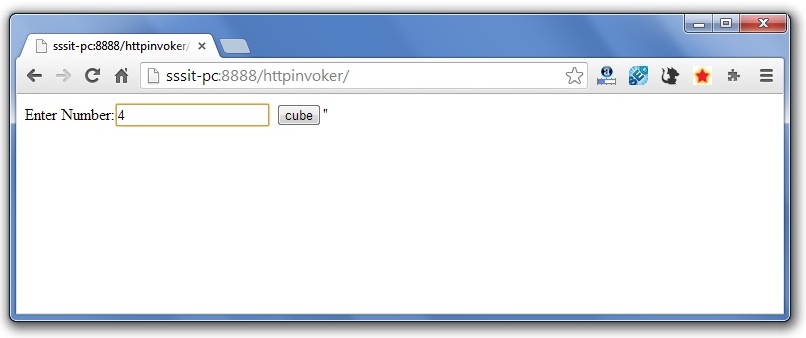
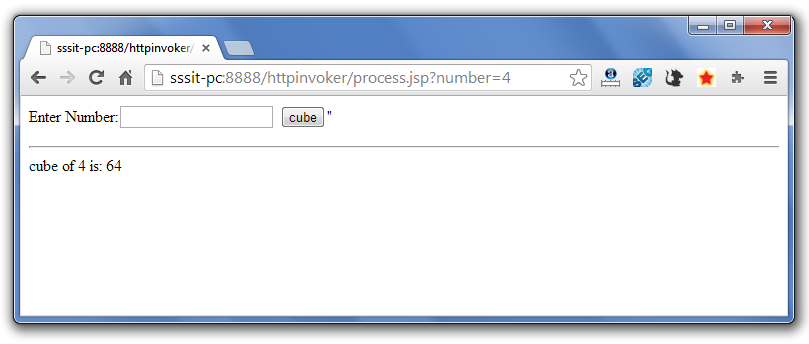
reference from:http://www.javatpoint.com/spring-remoting-by-http-invoker-example
Spring Remoting by HTTP Invoker Example--reference的更多相关文章
- Spring Remoting: Remote Method Invocation (RMI)--转
原文地址:http://www.studytrails.com/frameworks/spring/spring-remoting-rmi.jsp Concept Overview Spring pr ...
- Spring Remoting: HTTP Invoker--转
原文地址:http://www.studytrails.com/frameworks/spring/spring-remoting-http-invoker.jsp Concept Overview ...
- Lingo (Spring Remoting) : Passing client credentials to the server
http://www.jroller.com/sjivan/entry/lingo_spring_remoting_passing_client Lingo (Spring Remoting) : P ...
- Spring Remoting: Burlap--转
原文地址:http://www.studytrails.com/frameworks/spring/spring-remoting-burlap.jsp Concept Overview In the ...
- Spring Remoting: Hessian--转
原文地址:http://www.studytrails.com/frameworks/spring/spring-remoting-hessian.jsp Concept Overview The p ...
- Asynchronous calls and remote callbacks using Lingo Spring Remoting
http://www.jroller.com/sjivan/entry/asynchronous_calls_and_callbacks_using Asynchronous calls and re ...
- Spring Framework 4.3.22.RELEASE Reference文档目录
<Spring Framework Reference Documentation 4.3.22.RELEASE> https://docs.spring.io/spring/docs/4 ...
- spring remoting源码分析--Hessian分析
1. Caucho 1.1 概况 spring-remoting代码的情况如下: 本节近分析caucho模块. 1.2 分类 其中以hession为例,Hessian远程服务调用过程: Hessian ...
- Spring Remoting: Hessian
随机推荐
- 局部线性嵌入(LLE)原理总结
局部线性嵌入(Locally Linear Embedding,以下简称LLE)也是非常重要的降维方法.和传统的PCA,LDA等关注样本方差的降维方法相比,LLE关注于降维时保持样本局部的线性特征,由 ...
- hibernate_validator_03
约束继承 如果要验证的对象继承于某个父类或者实现了某个接口,那么定义在父类或者接口中的约束会在验证这个对象的时候被自动加载,如同这些约束定义在这个对象所在的类中一样. 让我们来看看下面的示例: pac ...
- 读取url(1
就书本例子 import java.io.InputStream; import java.net.URL; public class Test { public static void main(S ...
- 【USACO 1.5.3】特殊的质数肋骨
[题目描述]农民约翰的母牛总是生产出最好的肋骨.你能通过农民约翰和美国农业部标记在每根肋骨上的数字认出它们. 农民约翰确定他卖给买方的是真正的质数肋骨,是因为从右边开始切下肋骨,每次还剩下的肋骨上的数 ...
- table-css
- 手把手教你使用python复杂一点点的装饰器
#只要@deco后面跟括号,都要 先传装饰器参数,返回 再传目标待装饰函数,返回 传目标函数的参数 #这个参数可以是类 def deco(arg):#装饰器的函数在这里传 print('0',arg) ...
- 写给新手看的Flask+uwsgi+Nginx+Ubuntu部署教程
学习 Flask,写完一个 Flask 应用需要部署的时候,就想着折腾自己的服务器.根据搜索的教程照做,对于原理一知半解,磕磕碰碰,只要运行起来了,谢天谢地然后不再折腾了,到下一次还需要部署时,这样的 ...
- iOS开发——C篇&数组与指针
2015-07-17 13:23 编辑 前面我们介绍了关于C语言的内存分配问题,下面我们就开始介绍关于C语言的两个非常重要的知识点:数组与指针 数组与指针其实不仅仅是再C语言中,再OC中(当然OC是内 ...
- angular2 学习笔记 (Typescript)
1.接口奇葩验证 interface Abc { name : string } function abc(obj : Abc) { } let ttc = { name: "adad&qu ...
- Android Service 简介
Service是Android系统中的一种组件,它跟Activity的级别差不多,但是它不能自己运行,只能后台运行,并且可以和其他组件进行交互.Service是没有界面的长生命周期的代码.Servic ...