
spring boot-html和templates
静态页面
spring boot项目只有src目录,没有webapp目录,会将静态访问(html/图片等)映射到其自动配置的静态目录,如下
/static
/public
/resources
/META-INF/resources
比如,在resources建立一个static目录和index.htm静态文件,访问地址 http://localhost:8080/index.html
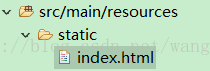
如果要从后台跳转到静态index.html,代码如下。
- @Controller
- public class HtmlController {
- @GetMapping("/html")
- public String html() {
- return "/index.html";
- }
@Controller

public class HtmlController {

	@GetMapping("/html")

	public String html() {

		return "/index.html";

	}
动态页面
动态页面需要先请求服务器,访问后台应用程序,然后再转向到页面,比如访问JSP。spring boot建议不要使用JSP,默认使用Thymeleaf来做动态页面。
在pom.xml 中添加Thymeleaf组件
- <dependency>
- <groupId>org.springframework.boot</groupId>
- <artifactId>spring-boot-starter-thymeleaf</artifactId>
- </dependency>
		<dependency>

			<groupId>org.springframework.boot</groupId>

			<artifactId>spring-boot-starter-thymeleaf</artifactId>

		</dependency>
TemplatesController.java
- package hello;
- import javax.servlet.http.HttpServletRequest;
- import org.springframework.stereotype.*;
- import org.springframework.web.bind.annotation.*;
- @Controller
- public class TemplatesController {
- @GetMapping("/templates")
- String test(HttpServletRequest request) {
- //逻辑处理
- request.setAttribute("key", "hello world");
- return "/index";
- }
- }
package hello; import javax.servlet.http.HttpServletRequest; import org.springframework.stereotype.;
import org.springframework.web.bind.annotation.; @Controller
public class TemplatesController {@GetMapping("/templates")
String test(HttpServletRequest request) {
//逻辑处理
request.setAttribute("key", "hello world");
return "/index";
}
}
@RestController:上一篇中用于将返回值转换成json
@Controller:现在要返回的是一个页面,所以不能再用@RestController,而用普通的@Controller/
request.setAttribute("key", "hello world"):这是最基本的语法,向页面转参数 key和value。
return "/index": 跳转到 templates/index.html动态页面,templates目录为spring boot默认配置的动态页面路径。
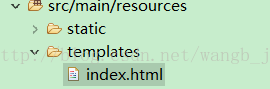
index.html 将后台传递的key参数打印出来
- <!DOCTYPE html>
- <html>
- <span th:text="${key}"></span>
- </html>
<!DOCTYPE html>

<html>

<span th:text="${key}"></span>

</html>
访问http://localhost:8080/templates
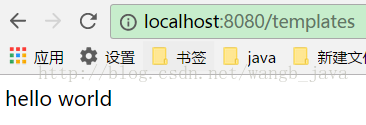
这只是一个最基本的传参,templates标签和JSP标签一样,也可以实现条件判断,循环等各种功能。不过我在上一篇讲过,建议用静态html+rest替代动态页面,所以关于templates在此不做详细介绍
动态和静态区别
静态页面的return默认是跳转到/static/index.html,当在pom.xml中引入了thymeleaf组件,动态跳转会覆盖默认的静态跳转,默认就会跳转到/templates/index.html,注意看两者return代码也有区别,动态没有html后缀。
重定向
如果在使用动态页面时还想跳转到/static/index.html,可以使用重定向return "redirect:/index.html"。
- @GetMapping("/html")
- public String html() {
- return "redirect:/index.html";
- }
	@GetMapping("/html")

	public String html() {

		return "redirect:/index.html";

	}
spring boot-html和templates的更多相关文章
- Spring boot 直接访问templates中html文件
application.properties 在浏览器中输入http://localhost:8080/index.html 会报一个 因为Spring boot 无法直接访问templates下的文 ...
- spring boot(4)-html和templates
静态页面 spring boot项目只有src目录,没有webapp目录,会将静态访问(html/图片等)映射到其自动配置的静态目录,如下 /static /public /resources ...
- 玩转spring boot——结合redis
一.准备工作 下载redis的windows版zip包:https://github.com/MSOpenTech/redis/releases 运行redis-server.exe程序 出现黑色窗口 ...
- 玩转spring boot——AOP与表单验证
AOP在大多数的情况下的应用场景是:日志和验证.至于AOP的理论知识我就不做赘述.而AOP的通知类型有好几种,今天的例子我只选一个有代表意义的“环绕通知”来演示. 一.AOP入门 修改“pom.xml ...
- 玩转spring boot——结合JPA入门
参考官方例子:https://spring.io/guides/gs/accessing-data-jpa/ 接着上篇内容 一.小试牛刀 创建maven项目后,修改pom.xml文件 <proj ...
- 玩转spring boot——结合JPA事务
接着上篇 一.准备工作 修改pom.xml文件 <project xmlns="http://maven.apache.org/POM/4.0.0" xmlns:xsi=&q ...
- 玩转spring boot——结合AngularJs和JDBC
参考官方例子:http://spring.io/guides/gs/relational-data-access/ 一.项目准备 在建立mysql数据库后新建表“t_order” ; -- ----- ...
- 玩转spring boot——MVC应用
如何快速搭建一个MCV程序? 参照spring官方例子:https://spring.io/guides/gs/serving-web-content/ 一.spring mvc结合thymeleaf ...
- 第一个Spring Boot Web程序
需要的环境和工具: 1.Eclipse2.Java环境(JDK 1.7或以上版本)3.Maven 3.0+(Eclipse已经内置了) 写个Hello Spring: 1.新建一个Maven项目,项目 ...
- Spring boot配置文件 application.properties
http://www.tuicool.com/articles/veUjQba 本文记录Spring Boot application.propertis配置文件的相关通用属性 # ========= ...
随机推荐
- 【转】Intellij IDEA 提交代码到远程GitHub仓库
1.文章参考自:http://my.oschina.net/lujianing/blog/180728 2.设置相关绑定 Settings——Version Control——Git——Path to ...
- Java Marker Interface
先看看什么是标记接口?标记接口有时也叫标签接口(Tag interface),即接口不包含任何方法. 在Java里很容易找到标记接口的例子,比如JDK里的Serializable接口就是一个标记接口. ...
- WinForm中Timer倒计时
添加一个Timer控件: 在初始化代码中 public Form1() { InitializeComponent(); button_Read.Enabled = false; button_Sta ...
- cocos2dx 使用XMLHttpRequest时回调status为0的问题
今天使用cocos连接http访问时,使用XMLHttpRequest在pc上反问时正常的返回了status=0,但是在android上去返回status是0,看了一下底层代码, 发现status只有 ...
- ReactiveCocoa入门-part2
ReactiveCocoa是一个框架,它能让你在iOS应用中使用函数响应式编程(FRP)技术.在本系列教程的第一部分中,你学到了如何将标准的动作与事件处理逻辑替换为发送事件流的信号.你还学到了如何转换 ...
- Inkscape基础
What is Inkscape A program for creating vector graphics For Windows, Mac OS, and Linux Open source F ...
- Vue木桶布局插件
公司最近在重构,使用的是Vue框架.涉及到一个品牌的布局,因为品牌的字符长度不一致,所以导致每一个的品牌标签长短不一.多行布局下就会导致每行的品牌布局参差不齐,严重影响美观.于是就有了本篇的木 ...
- Spring Cloud构建微服务架构(二)分布式配置中心
注:此文不适合0基础学习者直接阅读,请先完整的将作者关于微服务的博文全部阅读一遍,如果还有疑问,可以再来阅读此文,地址:http://blog.csdn.net/sosfnima/article/d ...
- python3 完全平方数(循环)
题目 一个整数,它加上100后是一个完全平方数,再加上168又是一个完全平方数,请问该数是多少? 代码: for i in range(1,85): if 168 % i == 0: j = 168 ...
- Python9-hashilib模块-day28(大年初三)
__getitem__\__setitem__\__delitem__ class Foo: def __init__(self,name,age,sex): self.name = name sel ...