
pymysql 模块的使用
一 . pymysql 的下载和使用
在python 中操作数据库需要用到 pymysql 模块.
(1) . pymysql 模块的下载
pip3 install pymysql
(2) . pymysql 的使用
数据库和数据都已经存在
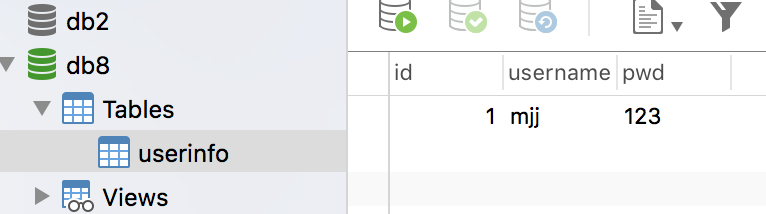
# 实现:使用Python实现用户登录,如果用户存在则登录成功(假设该用户已在数据库中)

import pymysql

user = input('请输入用户名:')

pwd = input('请输入密码:')

# 1.连接

conn = pymysql.connect(host='127.0.0.1', port=3306, user='root', password='', db='db8', charset='utf8')

# 2.创建游标

cursor = conn.cursor()

#注意%s需要加引号

sql = "select * from userinfo where username='%s' and pwd='%s'" %(user, pwd)

print(sql)

# 3.执行sql语句

cursor.execute(sql)

result=cursor.execute(sql) #执行sql语句,返回sql查询成功的记录数目

print(result)

# 关闭连接,游标和连接都要关闭

cursor.close()

conn.close()

if result:

    print('登陆成功')

else:

    print('登录失败')
二 . execute() 之 sql 注入
最后那一个空格,在一条sql语句中如果遇到select * from userinfo where username='mjj' -- asadasdas' and pwd='' 则--之后的条件被注释掉了(注意--后面还有一个空格)

#1、sql注入之:用户存在,绕过密码

mjj' -- 任意字符

#2、sql注入之:用户不存在,绕过用户与密码

xxx' or 1=1 -- 任意字符


# 原来是我们对sql进行字符串拼接

# sql="select * from userinfo where name='%s' and password='%s'" %(username,pwd)

# print(sql)

# result=cursor.execute(sql)

#改写为(execute帮我们做字符串拼接,我们无需且一定不能再为%s加引号了)

sql="select * from userinfo where name=%s and password=%s" #!!!注意%s需要去掉引号,因为pymysql会自动为我们加上

result=cursor.execute(sql,[user,pwd]) #pymysql模块自动帮我们解决sql注入的问题,只要我们按照pymysql的规矩来。
三 . 增 , 删 , 改 : conn.commit()
commit() : 在数据库里增 ,删 , 改 的时候,必须要进行提交,否则插入的数据不生效 .
import pymysql

username = input('请输入用户名:')

pwd = input('请输入密码:')

# 1.连接

conn = pymysql.connect(host='localhost', port=3306, user='root', password='', db='db8', charset='utf8')

# 2.创建游标

cursor = conn.cursor()

# 操作

# 增

# sql = "insert into userinfo(username,pwd) values (%s,%s)"

# effect_row = cursor.execute(sql,(username,pwd))

#同时插入多条数据

#cursor.executemany(sql,[('李四','110'),('王五','119')])

# print(effect_row)#

# 改

# sql = "update userinfo set username = %s  where id = 2"

# effect_row = cursor.execute(sql,username)

# print(effect_row)

# 删

sql = "delete from userinfo  where id = 2"

effect_row = cursor.execute(sql)

print(effect_row)

#一定记得commit

conn.commit()

# 4.关闭游标

cursor.close()

# 5.关闭连接

conn.close()
四 . 查 : fetchone , fetchmany , fetchall
fetchone():   #获取下一行数据,第一次为首行;

fetchall():     #获取所有行数据源

fetchmany(4):  #获取4行数据
查看表内容 :
mysql> select * from userinfo;

+----+----------+-----+

| id | username | pwd |

+----+----------+-----+

|  1 | mjj      | 123 |

|  3 | 张三     | 110 |

|  4 | 李四     | 119 |

+----+----------+-----+

3 rows in set (0.00 sec)
使用 fetchone() :
import pymysql

# 1.连接

conn = pymysql.connect(host='localhost', port=3306, user='root', password='', db='db8', charset='utf8')

# 2.创建游标

cursor = conn.cursor()

sql = 'select * from userinfo'

cursor.execute(sql)

# 查询第一行的数据

row = cursor.fetchone()

print(row) # (1, 'mjj', '123')

# 查询第二行数据

row = cursor.fetchone()

print(row) # (3, '张三', '110')

# 4.关闭游标

cursor.close()

# 5.关闭连接

conn.close()
使用 fetchall():
import pymysql

# 1.连接

conn = pymysql.connect(host='localhost', port=3306, user='root', password='', db='db8', charset='utf8')

# 2.创建游标

cursor = conn.cursor()

sql = 'select * from userinfo'

cursor.execute(sql)

# 获取所有的数据

rows = cursor.fetchall()

print(rows)

# 4.关闭游标

cursor.close()

# 5.关闭连接

conn.close()

#运行结果

((1, 'mjj', ''), (3, '张三', ''), (4, '李四', ''))
默认情况下,获取的返回值是元组,只能看到每行的数据,但是不知道每一列代表的是什么 ? 可以使用以下方式来返回字典,每一行的数据都会生成一个字典 :
cursor = conn.cursor(cursor=pymysql.cursors.DictCursor)

 #在实例化的时候,将属性cursor设置为pymysql.cursors.DictCursor
在fentchone 示例中,在获取行数据的时候,可以理解为开始,有一个行指针指着第一行的上方,获取一行,他就像下移动,所以当行指针到最后一行的时候,就不能再获取到行的内容,所以我们可以使用如下方法来移动指针 :
cursor.scroll(1,mode='relative')  # 相对当前位置移动

cursor.scroll(2,mode='absolute') # 相对绝对位置移动

第一个值为移动的行数,整数为向下移动,负数为向上移动,mode指定了是相对当前位置移动,还是相对于首行移动
# 1.Python实现用户登录

# 2.Mysql保存数据

import pymysql

# 1.连接

conn = pymysql.connect(host='localhost', port=3306, user='root', password='', db='db8', charset='utf8')

# 2.创建游标

cursor = conn.cursor(cursor=pymysql.cursors.DictCursor)

sql = 'select * from userinfo'

cursor.execute(sql)

# 查询第一行的数据

row = cursor.fetchone()

print(row) # (1, 'mjj', '123')

# 查询第二行数据

row = cursor.fetchone() # (3, '张三', '110')

print(row)

cursor.scroll(-1,mode='relative') #设置之后,光标相对于当前位置往前移动了一行,所以打印的结果为第二行的数据

row = cursor.fetchone()

print(row)

cursor.scroll(0,mode='absolute') #设置之后,光标相对于首行没有任何变化,所以打印的结果为第一行数据

row = cursor.fetchone()

print(row)

# 4.关闭游标

cursor.close()

# 5.关闭连接

conn.close()

#结果如下

{'id': 1, 'username': 'mjj', 'pwd': ''}

{'id': 3, 'username': '张三', 'pwd': ''}

{'id': 3, 'username': '张三', 'pwd': ''}

{'id': 1, 'username': 'mjj', 'pwd': ''}
使用 fetchmany():
import pymysql

# 1.连接

conn = pymysql.connect(host='localhost', port=3306, user='root', password='', db='db8', charset='utf8')

# 2.创建游标

cursor = conn.cursor(cursor=pymysql.cursors.DictCursor)

sql = 'select * from userinfo'

cursor.execute(sql)

# 获取2条数据

rows = cursor.fetchmany(2)

print(rows)

# 4.关闭游标

# rows = cursor.fetchall()

# print(rows)

cursor.close()

# 5.关闭连接

conn.close()

#结果如下:

[{'id': 1, 'username': 'mjj', 'pwd': ''}, {'id': 3, 'username': '张三', 'pwd': ''}]
pymysql 模块的使用的更多相关文章
- Python中操作mysql的pymysql模块详解
Python中操作mysql的pymysql模块详解 前言 pymsql是Python中操作MySQL的模块,其使用方法和MySQLdb几乎相同.但目前pymysql支持python3.x而后者不支持 ...
- python实战第一天-pymysql模块并练习
操作系统 Ubuntu 15.10 IDE & editor JetBrains PyCharm 5.0.2 ipython3 Python版本 python-3.4.3 安装pymysql模 ...
- pymysql 模块介绍
pymysql模块是python与mysql进行交互的一个模块. pymysql模块的安装: pymysql模块的用法: import pymysql user=input('user>> ...
- Mysql(六):数据备份、pymysql模块
一 IDE工具介绍 生产环境还是推荐使用mysql命令行,但为了方便我们测试,可以使用IDE工具 下载链接:https://pan.baidu.com/s/1bpo5mqj 掌握: #1. 测试+链接 ...
- python如何使用pymysql模块
Python 3.x 操作MySQL的pymysql模块详解 前言pymysql是Python中操作MySQL的模块,其使用方法和MySQLdb几乎相同.但目前pymysql支持python3.x而M ...
- MySQL之pymysql模块
MySQL之pymysql模块 import pymysql #s链接数据库 conn = pymysql.connect( host = '127.0.0.1', #被连接数据库的ip地址 po ...
- PyMySQL模块的使用
PyMySQL介绍 PyMySQL是在Python3.x版本中用于连接MySQL服务器的一个库,Python2系列中则使用mysqldb.Django中也可以使用PyMySQL连接MySQL数据库. ...
- MySQL学习12 - pymysql模块的使用
一.pymysql的下载和使用 1.pymysql模块的下载 2.pymysql的使用 二.execute()之sql注入 三.增.删.改:conn.commit() 四.查:fetchone.fet ...
- 数据库入门-pymysql模块的使用
一.pymysql模块安装 由于本人的Python版本为python3.7,所以用pymysql来连接数据库(mysqldb不支持python3.x) 方法一: #在cmd输入 pip3 instal ...
- Python连接MySQL数据库之pymysql模块使用
安装PyMySQL pip install pymysql PyMySQL介绍 PyMySQL是在python3.x版本中用于连接MySQL服务器的一个库,2中则使用mysqldb. Django中也 ...
随机推荐
- 一张图,关于 Bayes error rate,贝叶斯错误率等的分析
造轮子是那帮搞研究的“科学家”干的事情(类似E&E里的explore),“工程师”的职责是利用已有的东西解决问题(类似E&E里的exploit). 其次,即使以工程师的角色解决业务问题 ...
- linux系统故障分析与排查
在处理Linux系统出现的各种故障时,故障的症状是最先发现的,而导致这以故障的原因才是最终排除故障的关键.熟悉Linux系统的日志管理,了解常见故障的分析与解决办法,将有助于管理员快速定位故障点.“对 ...
- 粗略。。Java项目设计模式之笔记----studying
设计模式 设计模式:解决这个问题的一种行之有效的思想. 设计模式:用于解决特定环境下.反复出现的特定问题的解决方式. 设计模式学习概述 ★ 为什么要学习设计模式 1.设计模式都是一些相对优秀的解决方式 ...
- TP框架模板中ifelse
{if $_username}<ul class="afterLogin"> <li class="username"><a ...
- window.location.href重定向 不会触发webview
通过window.location.href来重定向的,安卓不会触发shouldOverrideUrlLoading.
- 决策树之 C4.5
C4.5 是对 ID3 的一个优化,它依据信息增益率来进行属性选择. 关于决策树.请參见:http://blog.csdn.net/bone_ace/article/details/46299681 ...
- scramble-string——两个字符串经过树化并旋转后是否一致、递归、动态规划
Given a string s1, we may represent it as a binary tree by partitioning it to two non-empty substrin ...
- jquery代码小片段
1. 使用jQuery来切换样式表 //找出你希望切换的媒体类型(media-type),然后把href设置成新的样式表. $(‘link[media="screen"]‘).at ...
- 彻底解决zend studio 下 assignment in condition警告
最近在mac系统下安装zend studio作为php开发工具,把以前的代码导入,发现项目中有很多 “assignment in condition”的警告,造成原因是在条件判断的if.while中使 ...
- HTML5之Canvas绘图(二) ——应用篇之七巧板
1.canvas绘制七巧板-- <!DOCTYPE html> <html> <head> <meta charset="UTF-8"&g ...