
Jasper_crosstab_headerPosition_columngroup header position config - (headerPosition="Stretch")
i.e
<columnGroup name="column11" height="20" totalPosition="Start" headerPosition="Stretch">
demo
result : header part : col1111

data source:
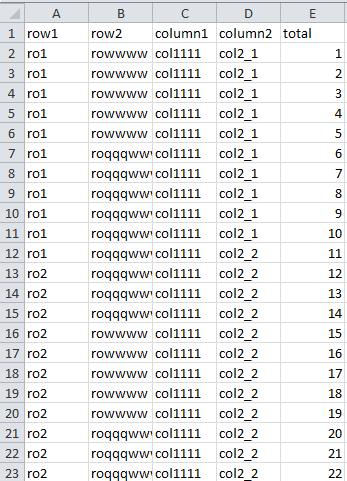
jasper file :
<?xml version="1.0" encoding="UTF-8"?>

<!-- Created with Jaspersoft Studio version 6.2.0.final using JasperReports Library version 5.5.1  -->

<!-- 2016-11-04T14:16:41 -->

<jasperReport xmlns="http://jasperreports.sourceforge.net/jasperreports" xmlns:xsi="http://www.w3.org/2001/XMLSchema-instance" xsi:schemaLocation="http://jasperreports.sourceforge.net/jasperreports http://jasperreports.sourceforge.net/xsd/jasperreport.xsd" name="nanancrosstab" pageWidth="595" pageHeight="842" columnWidth="555" leftMargin="20" rightMargin="20" topMargin="20" bottomMargin="20" uuid="83ac89eb-10c4-4c29-8dd3-59ffa793d713">

    <style name="Crosstab_CH" mode="Opaque" backcolor="#F0F8FF">

        <box>

            <pen lineWidth="0.5" lineColor="#000000"/>

            <topPen lineWidth="0.5" lineColor="#000000"/>

            <leftPen lineWidth="0.5" lineColor="#000000"/>

            <bottomPen lineWidth="0.5" lineColor="#000000"/>

            <rightPen lineWidth="0.5" lineColor="#000000"/>

        </box>

    </style>

    <style name="Crosstab_CG" mode="Opaque" backcolor="#BFE1FF">

        <box>

            <pen lineWidth="0.5" lineColor="#000000"/>

            <topPen lineWidth="0.5" lineColor="#000000"/>

            <leftPen lineWidth="0.5" lineColor="#000000"/>

            <bottomPen lineWidth="0.5" lineColor="#000000"/>

            <rightPen lineWidth="0.5" lineColor="#000000"/>

        </box>

    </style>

    <style name="Crosstab_CT" mode="Opaque" backcolor="#005FB3">

        <box>

            <pen lineWidth="0.5" lineColor="#000000"/>

            <topPen lineWidth="0.5" lineColor="#000000"/>

            <leftPen lineWidth="0.5" lineColor="#000000"/>

            <bottomPen lineWidth="0.5" lineColor="#000000"/>

            <rightPen lineWidth="0.5" lineColor="#000000"/>

        </box>

    </style>

    <style name="Crosstab_CD" mode="Opaque" backcolor="#FFFFFF">

        <box>

            <pen lineWidth="0.5" lineColor="#000000"/>

            <topPen lineWidth="0.5" lineColor="#000000"/>

            <leftPen lineWidth="0.5" lineColor="#000000"/>

            <bottomPen lineWidth="0.5" lineColor="#000000"/>

            <rightPen lineWidth="0.5" lineColor="#000000"/>

        </box>

    </style>

    <queryString language="CSV">

        <![CDATA[]]>

    </queryString>

    <field name="row1" class="java.lang.String"/>

    <field name="row2" class="java.lang.String"/>

    <field name="column1" class="java.lang.String"/>

    <field name="column2" class="java.lang.String"/>

    <field name="total" class="java.lang.String"/>

    <background>

        <band splitType="Stretch"/>

    </background>

    <summary>

        <band height="208" splitType="Stretch">

            <crosstab>

                <reportElement x="0" y="8" width="550" height="200" uuid="e01ca2a5-bc71-40d8-bc5e-81533045b333">

                    <property name="com.jaspersoft.studio.layout" value="com.jaspersoft.studio.editor.layout.VerticalRowLayout"/>

                </reportElement>

                <rowGroup name="row11" width="60">

                    <bucket class="java.lang.String">

                        <bucketExpression><![CDATA[$F{row1}]]></bucketExpression>

                    </bucket>

                    <crosstabRowHeader>

                        <cellContents mode="Opaque" style="Crosstab_CH">

                            <textField>

                                <reportElement x="0" y="0" width="60" height="20" uuid="3ff09f7a-8383-4fba-a01a-5939e42e97e3"/>

                                <textFieldExpression><![CDATA[$V{row11}]]></textFieldExpression>

                            </textField>

                        </cellContents>

                    </crosstabRowHeader>

                    <crosstabTotalRowHeader>

                        <cellContents>

                            <staticText>

                                <reportElement x="0" y="0" width="-2147483648" height="-2147483648" uuid="12b3e0d4-d51a-437e-91ed-d77470b1cfc2"/>

                                <text><![CDATA[Total row11]]></text>

                            </staticText>

                        </cellContents>

                    </crosstabTotalRowHeader>

                </rowGroup>

                <rowGroup name="row21" width="60">

                    <bucket class="java.lang.String">

                        <bucketExpression><![CDATA[$F{row2}]]></bucketExpression>

                    </bucket>

                    <crosstabRowHeader>

                        <cellContents mode="Opaque" style="Crosstab_CH">

                            <textField>

                                <reportElement x="0" y="0" width="60" height="20" uuid="5988f665-b81b-4f92-bb2d-bed07e2029dc"/>

                                <textFieldExpression><![CDATA[$V{row21}]]></textFieldExpression>

                            </textField>

                        </cellContents>

                    </crosstabRowHeader>

                    <crosstabTotalRowHeader>

                        <cellContents>

                            <staticText>

                                <reportElement x="0" y="0" width="-2147483648" height="-2147483648" uuid="62fd2a86-8b30-476c-872d-aade860a57d0"/>

                                <text><![CDATA[Total row21]]></text>

                            </staticText>

                        </cellContents>

                    </crosstabTotalRowHeader>

                </rowGroup>

                <columnGroup name="column11" height="20" totalPosition="Start" headerPosition="Stretch">

                    <bucket class="java.lang.String">

                        <bucketExpression><![CDATA[$F{column1}]]></bucketExpression>

                    </bucket>

                    <crosstabColumnHeader>

                        <cellContents mode="Opaque" style="Crosstab_CH">

                            <textField>

                                <reportElement x="0" y="0" width="60" height="20" uuid="af8fba4b-affa-4d34-9018-783604964e90"/>

                                <textElement textAlignment="Center"/>

                                <textFieldExpression><![CDATA[$V{column11}]]></textFieldExpression>

                            </textField>

                        </cellContents>

                    </crosstabColumnHeader>

                    <crosstabTotalColumnHeader>

                        <cellContents mode="Opaque" style="Crosstab_CT">

                            <staticText>

                                <reportElement x="0" y="0" width="60" height="40" forecolor="#FFFFFF" uuid="83b6a124-78e5-46e1-a525-3f10b15f6157"/>

                                <text><![CDATA[Total column11]]></text>

                            </staticText>

                        </cellContents>

                    </crosstabTotalColumnHeader>

                </columnGroup>

                <columnGroup name="column21" height="20">

                    <bucket class="java.lang.String">

                        <bucketExpression><![CDATA[$F{column2}]]></bucketExpression>

                    </bucket>

                    <crosstabColumnHeader>

                        <cellContents mode="Opaque" style="Crosstab_CH">

                            <textField>

                                <reportElement x="0" y="0" width="60" height="20" uuid="b71c29cf-9284-4f61-80da-fcc5071a3fd8"/>

                                <textFieldExpression><![CDATA[$V{column21}]]></textFieldExpression>

                            </textField>

                        </cellContents>

                    </crosstabColumnHeader>

                    <crosstabTotalColumnHeader>

                        <cellContents>

                            <staticText>

                                <reportElement x="0" y="0" width="-2147483648" height="-2147483648" uuid="2b435028-6b6f-415c-9a4f-9309f76fb057"/>

                                <text><![CDATA[Total column21]]></text>

                            </staticText>

                        </cellContents>

                    </crosstabTotalColumnHeader>

                </columnGroup>

                <measure name="total_MEASURE1" class="java.lang.Integer" calculation="Count">

                    <measureExpression><![CDATA[$F{total}]]></measureExpression>

                </measure>

                <crosstabCell width="60" height="20">

                    <cellContents mode="Opaque" style="Crosstab_CD">

                        <textField>

                            <reportElement x="0" y="0" width="60" height="20" uuid="6d820ded-d85d-4ed7-972c-40072f3ae870"/>

                            <textFieldExpression><![CDATA[$V{total_MEASURE1}]]></textFieldExpression>

                        </textField>

                    </cellContents>

                </crosstabCell>

                <crosstabCell width="60" height="20" columnTotalGroup="column11">

                    <cellContents mode="Opaque" style="Crosstab_CT">

                        <textField>

                            <reportElement x="0" y="0" width="60" height="20" forecolor="#FFFFFF" uuid="66f89360-84b4-494c-a18e-8506773cda8b"/>

                            <textFieldExpression><![CDATA[$V{total_MEASURE1}]]></textFieldExpression>

                        </textField>

                    </cellContents>

                </crosstabCell>

                <crosstabCell width="60" height="20" columnTotalGroup="column21">

                    <cellContents mode="Opaque" style="Crosstab_CG">

                        <textField>

                            <reportElement x="0" y="0" width="60" height="20" uuid="769e326c-a7f0-4ee3-96f9-9d5a4d8097a8"/>

                            <textFieldExpression><![CDATA[$V{total_MEASURE1}]]></textFieldExpression>

                        </textField>

                    </cellContents>

                </crosstabCell>

                <crosstabCell width="60" height="20" rowTotalGroup="row11">

                    <cellContents mode="Opaque" style="Crosstab_CT">

                        <textField>

                            <reportElement x="0" y="0" width="60" height="20" forecolor="#FFFFFF" uuid="5a75ad84-53dd-42e0-accc-59581569fdd5"/>

                            <textFieldExpression><![CDATA[$V{total_MEASURE1}]]></textFieldExpression>

                        </textField>

                    </cellContents>

                </crosstabCell>

                <crosstabCell width="60" height="20" rowTotalGroup="row11" columnTotalGroup="column11">

                    <cellContents mode="Opaque" style="Crosstab_CT">

                        <textField>

                            <reportElement x="0" y="0" width="60" height="20" forecolor="#FFFFFF" uuid="085aef20-d954-438d-9959-4ec702c855e1"/>

                            <textFieldExpression><![CDATA[$V{total_MEASURE1}]]></textFieldExpression>

                        </textField>

                    </cellContents>

                </crosstabCell>

                <crosstabCell width="60" height="20" rowTotalGroup="row11" columnTotalGroup="column21">

                    <cellContents mode="Opaque" style="Crosstab_CT">

                        <textField>

                            <reportElement x="0" y="0" width="60" height="20" forecolor="#FFFFFF" uuid="d0e69f40-ea94-407c-b73f-1abec2d221ca"/>

                            <textFieldExpression><![CDATA[$V{total_MEASURE1}]]></textFieldExpression>

                        </textField>

                    </cellContents>

                </crosstabCell>

                <crosstabCell width="60" height="20" rowTotalGroup="row21">

                    <cellContents mode="Opaque" style="Crosstab_CG">

                        <textField>

                            <reportElement x="0" y="0" width="60" height="20" uuid="59273a52-60c7-4398-96bc-b0225ab51b9e"/>

                            <textFieldExpression><![CDATA[$V{total_MEASURE1}]]></textFieldExpression>

                        </textField>

                    </cellContents>

                </crosstabCell>

                <crosstabCell width="60" height="20" rowTotalGroup="row21" columnTotalGroup="column11">

                    <cellContents mode="Opaque" style="Crosstab_CT">

                        <textField>

                            <reportElement x="0" y="0" width="60" height="20" forecolor="#FFFFFF" uuid="4b102117-1136-45a9-8f9d-4691bb749772"/>

                            <textFieldExpression><![CDATA[$V{total_MEASURE1}]]></textFieldExpression>

                        </textField>

                    </cellContents>

                </crosstabCell>

                <crosstabCell width="60" height="20" rowTotalGroup="row21" columnTotalGroup="column21">

                    <cellContents mode="Opaque" style="Crosstab_CG">

                        <textField>

                            <reportElement x="0" y="0" width="60" height="20" uuid="e800c1be-431e-48ef-93ce-3ae054ef52d7"/>

                            <textFieldExpression><![CDATA[$V{total_MEASURE1}]]></textFieldExpression>

                        </textField>

                    </cellContents>

                </crosstabCell>

            </crosstab>

        </band>

    </summary>

</jasperReport>
jrxml
jasper API:
Position of Totals Row
The totalPosition attribute controls the appearance of the row that displays the totals for the row group:
Start: The row that displays the totals for the group precedes the rows corresponding to the groupfs bucket values (totalPosition="Start").
End: The row that displays the totals for the group is rendered after the rows corresponding to the groupfs bucket values (totalPosition="End").
None: The row that displays the totals for the group is not displayed (totalPosition= "None").
Row Header Stretch Behavior
When multiple nested row groups are used in the crosstab, the height of the row headers for the higher-level groups grows in order to wrap the rows of the nested groups. The headerPosition attribute determines how the row header content should adapt to the increased height. The possible values for this attribute are as follows:
Top: The content of the row header does not stretch and remains at the top of the header area (headerPosition="Top").

Middle: The content of the row header does not stretch and moves to the middle of the header area (headerPosition="Middle").

Bottom: The content of the row header does not stretch and moves to the bottom of the header area (headerPosition="Bottom").

Stretch: The content of the row header adapts its height proportionally to the newly increased row header height (headerPosition="Stretch").

default, the row header content stays at the top of the row header area.
COLUMN GROUPS
As previously mentioned for the row groups, a crosstab can contain any number of
nested columns. The order of column groups is also important.
below gives the JRXML syntax for column groups.
<!ELEMENT columnGroup (bucket, crosstabColumnHeader?,crosstabTotalColumnHeader?)>

<!ATTLIST columnGroup

    name CDATA #REQUIRED

    height NMTOKEN #REQUIRED

    totalPosition (Start | End | None) "None"

    headerPosition (Left | Center | Right | Stretch) "Left"

>

<!ELEMENT crosstabColumnHeader (cellContents?)>

<!ELEMENT crosstabTotalColumnHeader (cellContents?)>
Jasper_crosstab_headerPosition_columngroup header position config - (headerPosition="Stretch")的更多相关文章
- Jasper_crosstab_columngroup header position config - (headerPosition="Stretch")
Position of Totals RowThe totalPosition attribute controls the appearance of the row that displays t ...
- 深入理解css中position属性及z-index属性
深入理解css中position属性及z-index属性 在网页设计中,position属性的使用是非常重要的.有时如果不能认识清楚这个属性,将会给我们带来很多意想不到的困难. position属性共 ...
- 关于苹果手机微信端 position: fixed定位top导航栏问题
在移动端,position: fixed定位一般不被识别,或者在ios系统中,获取input焦点时,会导致position: fixed的top失效,下面是我验证过的方法,大家可以试试.<!do ...
- Angularjs中config中置入以下拦截器
$httpProvider.interceptors.push(['$rootScope', '$q', '$localStorage', function ($rootScope, $q, $loc ...
- CSS position:absolute浅析
一.绝对定位的特征 绝对定位有着与浮动一样的特性,即包裹性和破坏性. 就破坏性而言,浮动仅仅破坏了元素的高度,保留了元素的宽度:而绝对定位的元素高度和宽度都没有了. 请看下面代码: <!DOCT ...
- 在iOS中实现sticky header
经常在网页中看到这样一种效果,当页面滚动一段距离后,页面中的某个部分固定在一个区域(通常是头部导航),这种效果一般称为Sticky Header,如下图所示: 上述操作在Android系统中非常好实现 ...
- 一种移动端position:absolute布局:
一种移动端position:absolute布局: 1.他父级不需要加上 position:relative; 如果父级不是不是body,则加position:absolute; 2.红色加量部分 ...
- ios position:fixed 上滑下拉抖动
ios position:fixed 上滑下拉抖动 最近呢遇到一个ios的兼容问题,界面是需要一个头底部的固定的效果,用的position:fixed定位布局,写完测试发现安卓手机正常的,按时ios上 ...
- 深入理解css中position属性及z-index属性 https://www.cnblogs.com/zhuzhenwei918/p/6112034.html
深入理解css中position属性及z-index属性 请看出处:https://www.cnblogs.com/zhuzhenwei918/p/6112034.html 在网页设计中,positi ...
随机推荐
- React Native 隐藏组件思路
In your render function:{ this.state.showTheThing && <TextInput/>} Then just do: this. ...
- Css的使用细谈
Css的使用细谈 Css可以通过简单的更改CSS文件,改变网页的整体表现形式,可以减少我们的工作量,所以她是每一个网页设计人员的必修课. Css简介 (1) CSS是用于布局 ...
- 【C/C++】获取当前系统时间
#include<iostream> #include<Ctime> using namespace std; int main() { time_t t; time(& ...
- Windows Vista for Developers——第四部分:用户帐号控制(User Account Control,UAC)
作者:Kenny Kerr 翻译:Dflying Chen 原文:http://weblogs.asp.net/kennykerr/archive/2006/09/29/Windows-Vista-f ...
- MTK touchscreen 流程
1. kernel-3.18/drivers/input/touchscreen/mediatek/tpd_common_probe.c static int __init tpd_probe_ini ...
- SPOJ(后缀数组求不同子串个数)
DISUBSTR - Distinct Substrings Given a string, we need to find the total number of its distinct subs ...
- CS231n 2016 通关 第四章-NN 作业
cell 1 显示设置初始化 # A bit of setup import numpy as np import matplotlib.pyplot as plt from cs231n.class ...
- windows下mysql5.1忘记root密码解决方法[win7]
步骤如下:1.停止mysql服务(以管理员身份,在cmd命令行下运行) net stop mysql2.使用 mysqld –skip-grant-tables 命令启动mysql数据库 D:\> ...
- 【Hadoop】MapReduce笔记(一):MapReduce作业运行过程、任务执行
一.MR作业运行过程 JobClient的runJob()方法:新建JobClient实例,并调用其submitJob()方法.提交作业后,runJob()每秒轮询作业进度,如果发现上次上报后信息有改 ...
- Flutter实战视频-移动电商-32.列表页_小类高亮交互效果制作
32.列表页_小类高亮交互效果制作 点击大类右侧的横向的小类红色显示当前的小类别 解决之前溢出的问题: 先解决一个bug,之前右侧的这里设置的高度是1000,但是有不同的虚拟机和手机设别的问题造成了溢 ...