
Jasper_crosstab_columngroup header position config - (headerPosition="Stretch")
i.e
<columnGroup name="column11" height="20" totalPosition="Start" headerPosition="Stretch">
demo
result : header part : col1111

data source:
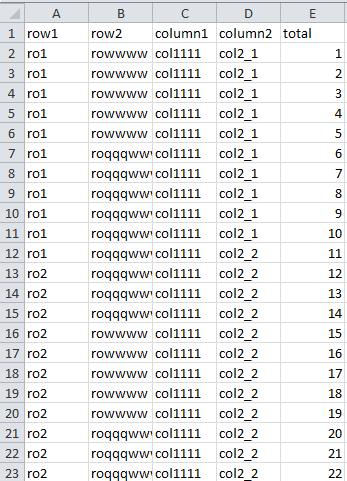
jasper file :
<?xml version="1.0" encoding="UTF-8"?>

<!-- Created with Jaspersoft Studio version 6.2.0.final using JasperReports Library version 5.5.1  -->

<!-- 2016-11-04T14:16:41 -->

<jasperReport xmlns="http://jasperreports.sourceforge.net/jasperreports" xmlns:xsi="http://www.w3.org/2001/XMLSchema-instance" xsi:schemaLocation="http://jasperreports.sourceforge.net/jasperreports http://jasperreports.sourceforge.net/xsd/jasperreport.xsd" name="nanancrosstab" pageWidth="595" pageHeight="842" columnWidth="555" leftMargin="20" rightMargin="20" topMargin="20" bottomMargin="20" uuid="83ac89eb-10c4-4c29-8dd3-59ffa793d713">

    <style name="Crosstab_CH" mode="Opaque" backcolor="#F0F8FF">

        <box>

            <pen lineWidth="0.5" lineColor="#000000"/>

            <topPen lineWidth="0.5" lineColor="#000000"/>

            <leftPen lineWidth="0.5" lineColor="#000000"/>

            <bottomPen lineWidth="0.5" lineColor="#000000"/>

            <rightPen lineWidth="0.5" lineColor="#000000"/>

        </box>

    </style>

    <style name="Crosstab_CG" mode="Opaque" backcolor="#BFE1FF">

        <box>

            <pen lineWidth="0.5" lineColor="#000000"/>

            <topPen lineWidth="0.5" lineColor="#000000"/>

            <leftPen lineWidth="0.5" lineColor="#000000"/>

            <bottomPen lineWidth="0.5" lineColor="#000000"/>

            <rightPen lineWidth="0.5" lineColor="#000000"/>

        </box>

    </style>

    <style name="Crosstab_CT" mode="Opaque" backcolor="#005FB3">

        <box>

            <pen lineWidth="0.5" lineColor="#000000"/>

            <topPen lineWidth="0.5" lineColor="#000000"/>

            <leftPen lineWidth="0.5" lineColor="#000000"/>

            <bottomPen lineWidth="0.5" lineColor="#000000"/>

            <rightPen lineWidth="0.5" lineColor="#000000"/>

        </box>

    </style>

    <style name="Crosstab_CD" mode="Opaque" backcolor="#FFFFFF">

        <box>

            <pen lineWidth="0.5" lineColor="#000000"/>

            <topPen lineWidth="0.5" lineColor="#000000"/>

            <leftPen lineWidth="0.5" lineColor="#000000"/>

            <bottomPen lineWidth="0.5" lineColor="#000000"/>

            <rightPen lineWidth="0.5" lineColor="#000000"/>

        </box>

    </style>

    <queryString language="CSV">

        <![CDATA[]]>

    </queryString>

    <field name="row1" class="java.lang.String"/>

    <field name="row2" class="java.lang.String"/>

    <field name="column1" class="java.lang.String"/>

    <field name="column2" class="java.lang.String"/>

    <field name="total" class="java.lang.String"/>

    <background>

        <band splitType="Stretch"/>

    </background>

    <summary>

        <band height="208" splitType="Stretch">

            <crosstab>

                <reportElement x="0" y="8" width="550" height="200" uuid="e01ca2a5-bc71-40d8-bc5e-81533045b333">

                    <property name="com.jaspersoft.studio.layout" value="com.jaspersoft.studio.editor.layout.VerticalRowLayout"/>

                </reportElement>

                <rowGroup name="row11" width="60">

                    <bucket class="java.lang.String">

                        <bucketExpression><![CDATA[$F{row1}]]></bucketExpression>

                    </bucket>

                    <crosstabRowHeader>

                        <cellContents mode="Opaque" style="Crosstab_CH">

                            <textField>

                                <reportElement x="0" y="0" width="60" height="20" uuid="3ff09f7a-8383-4fba-a01a-5939e42e97e3"/>

                                <textFieldExpression><![CDATA[$V{row11}]]></textFieldExpression>

                            </textField>

                        </cellContents>

                    </crosstabRowHeader>

                    <crosstabTotalRowHeader>

                        <cellContents>

                            <staticText>

                                <reportElement x="0" y="0" width="-2147483648" height="-2147483648" uuid="12b3e0d4-d51a-437e-91ed-d77470b1cfc2"/>

                                <text><![CDATA[Total row11]]></text>

                            </staticText>

                        </cellContents>

                    </crosstabTotalRowHeader>

                </rowGroup>

                <rowGroup name="row21" width="60">

                    <bucket class="java.lang.String">

                        <bucketExpression><![CDATA[$F{row2}]]></bucketExpression>

                    </bucket>

                    <crosstabRowHeader>

                        <cellContents mode="Opaque" style="Crosstab_CH">

                            <textField>

                                <reportElement x="0" y="0" width="60" height="20" uuid="5988f665-b81b-4f92-bb2d-bed07e2029dc"/>

                                <textFieldExpression><![CDATA[$V{row21}]]></textFieldExpression>

                            </textField>

                        </cellContents>

                    </crosstabRowHeader>

                    <crosstabTotalRowHeader>

                        <cellContents>

                            <staticText>

                                <reportElement x="0" y="0" width="-2147483648" height="-2147483648" uuid="62fd2a86-8b30-476c-872d-aade860a57d0"/>

                                <text><![CDATA[Total row21]]></text>

                            </staticText>

                        </cellContents>

                    </crosstabTotalRowHeader>

                </rowGroup>

                <columnGroup name="column11" height="20" totalPosition="Start" headerPosition="Stretch">

                    <bucket class="java.lang.String">

                        <bucketExpression><![CDATA[$F{column1}]]></bucketExpression>

                    </bucket>

                    <crosstabColumnHeader>

                        <cellContents mode="Opaque" style="Crosstab_CH">

                            <textField>

                                <reportElement x="0" y="0" width="60" height="20" uuid="af8fba4b-affa-4d34-9018-783604964e90"/>

                                <textElement textAlignment="Center"/>

                                <textFieldExpression><![CDATA[$V{column11}]]></textFieldExpression>

                            </textField>

                        </cellContents>

                    </crosstabColumnHeader>

                    <crosstabTotalColumnHeader>

                        <cellContents mode="Opaque" style="Crosstab_CT">

                            <staticText>

                                <reportElement x="0" y="0" width="60" height="40" forecolor="#FFFFFF" uuid="83b6a124-78e5-46e1-a525-3f10b15f6157"/>

                                <text><![CDATA[Total column11]]></text>

                            </staticText>

                        </cellContents>

                    </crosstabTotalColumnHeader>

                </columnGroup>

                <columnGroup name="column21" height="20">

                    <bucket class="java.lang.String">

                        <bucketExpression><![CDATA[$F{column2}]]></bucketExpression>

                    </bucket>

                    <crosstabColumnHeader>

                        <cellContents mode="Opaque" style="Crosstab_CH">

                            <textField>

                                <reportElement x="0" y="0" width="60" height="20" uuid="b71c29cf-9284-4f61-80da-fcc5071a3fd8"/>

                                <textFieldExpression><![CDATA[$V{column21}]]></textFieldExpression>

                            </textField>

                        </cellContents>

                    </crosstabColumnHeader>

                    <crosstabTotalColumnHeader>

                        <cellContents>

                            <staticText>

                                <reportElement x="0" y="0" width="-2147483648" height="-2147483648" uuid="2b435028-6b6f-415c-9a4f-9309f76fb057"/>

                                <text><![CDATA[Total column21]]></text>

                            </staticText>

                        </cellContents>

                    </crosstabTotalColumnHeader>

                </columnGroup>

                <measure name="total_MEASURE1" class="java.lang.Integer" calculation="Count">

                    <measureExpression><![CDATA[$F{total}]]></measureExpression>

                </measure>

                <crosstabCell width="60" height="20">

                    <cellContents mode="Opaque" style="Crosstab_CD">

                        <textField>

                            <reportElement x="0" y="0" width="60" height="20" uuid="6d820ded-d85d-4ed7-972c-40072f3ae870"/>

                            <textFieldExpression><![CDATA[$V{total_MEASURE1}]]></textFieldExpression>

                        </textField>

                    </cellContents>

                </crosstabCell>

                <crosstabCell width="60" height="20" columnTotalGroup="column11">

                    <cellContents mode="Opaque" style="Crosstab_CT">

                        <textField>

                            <reportElement x="0" y="0" width="60" height="20" forecolor="#FFFFFF" uuid="66f89360-84b4-494c-a18e-8506773cda8b"/>

                            <textFieldExpression><![CDATA[$V{total_MEASURE1}]]></textFieldExpression>

                        </textField>

                    </cellContents>

                </crosstabCell>

                <crosstabCell width="60" height="20" columnTotalGroup="column21">

                    <cellContents mode="Opaque" style="Crosstab_CG">

                        <textField>

                            <reportElement x="0" y="0" width="60" height="20" uuid="769e326c-a7f0-4ee3-96f9-9d5a4d8097a8"/>

                            <textFieldExpression><![CDATA[$V{total_MEASURE1}]]></textFieldExpression>

                        </textField>

                    </cellContents>

                </crosstabCell>

                <crosstabCell width="60" height="20" rowTotalGroup="row11">

                    <cellContents mode="Opaque" style="Crosstab_CT">

                        <textField>

                            <reportElement x="0" y="0" width="60" height="20" forecolor="#FFFFFF" uuid="5a75ad84-53dd-42e0-accc-59581569fdd5"/>

                            <textFieldExpression><![CDATA[$V{total_MEASURE1}]]></textFieldExpression>

                        </textField>

                    </cellContents>

                </crosstabCell>

                <crosstabCell width="60" height="20" rowTotalGroup="row11" columnTotalGroup="column11">

                    <cellContents mode="Opaque" style="Crosstab_CT">

                        <textField>

                            <reportElement x="0" y="0" width="60" height="20" forecolor="#FFFFFF" uuid="085aef20-d954-438d-9959-4ec702c855e1"/>

                            <textFieldExpression><![CDATA[$V{total_MEASURE1}]]></textFieldExpression>

                        </textField>

                    </cellContents>

                </crosstabCell>

                <crosstabCell width="60" height="20" rowTotalGroup="row11" columnTotalGroup="column21">

                    <cellContents mode="Opaque" style="Crosstab_CT">

                        <textField>

                            <reportElement x="0" y="0" width="60" height="20" forecolor="#FFFFFF" uuid="d0e69f40-ea94-407c-b73f-1abec2d221ca"/>

                            <textFieldExpression><![CDATA[$V{total_MEASURE1}]]></textFieldExpression>

                        </textField>

                    </cellContents>

                </crosstabCell>

                <crosstabCell width="60" height="20" rowTotalGroup="row21">

                    <cellContents mode="Opaque" style="Crosstab_CG">

                        <textField>

                            <reportElement x="0" y="0" width="60" height="20" uuid="59273a52-60c7-4398-96bc-b0225ab51b9e"/>

                            <textFieldExpression><![CDATA[$V{total_MEASURE1}]]></textFieldExpression>

                        </textField>

                    </cellContents>

                </crosstabCell>

                <crosstabCell width="60" height="20" rowTotalGroup="row21" columnTotalGroup="column11">

                    <cellContents mode="Opaque" style="Crosstab_CT">

                        <textField>

                            <reportElement x="0" y="0" width="60" height="20" forecolor="#FFFFFF" uuid="4b102117-1136-45a9-8f9d-4691bb749772"/>

                            <textFieldExpression><![CDATA[$V{total_MEASURE1}]]></textFieldExpression>

                        </textField>

                    </cellContents>

                </crosstabCell>

                <crosstabCell width="60" height="20" rowTotalGroup="row21" columnTotalGroup="column21">

                    <cellContents mode="Opaque" style="Crosstab_CG">

                        <textField>

                            <reportElement x="0" y="0" width="60" height="20" uuid="e800c1be-431e-48ef-93ce-3ae054ef52d7"/>

                            <textFieldExpression><![CDATA[$V{total_MEASURE1}]]></textFieldExpression>

                        </textField>

                    </cellContents>

                </crosstabCell>

            </crosstab>

        </band>

    </summary>

</jasperReport>
jrxml
jasper API:
Position of Totals Row
The totalPosition attribute controls the appearance of the row that displays the totals for the row group:
Start: The row that displays the totals for the group precedes the rows corresponding to the groupfs bucket values (totalPosition="Start").
End: The row that displays the totals for the group is rendered after the rows corresponding to the groupfs bucket values (totalPosition="End").
None: The row that displays the totals for the group is not displayed (totalPosition= "None").
Row Header Stretch Behavior
When multiple nested row groups are used in the crosstab, the height of the row headers for the higher-level groups grows in order to wrap the rows of the nested groups. The headerPosition attribute determines how the row header content should adapt to the increased height. The possible values for this attribute are as follows:
Top: The content of the row header does not stretch and remains at the top of the header area (headerPosition="Top").

Middle: The content of the row header does not stretch and moves to the middle of the header area (headerPosition="Middle").

Bottom: The content of the row header does not stretch and moves to the bottom of the header area (headerPosition="Bottom").

Stretch: The content of the row header adapts its height proportionally to the newly increased row header height (headerPosition="Stretch").

default, the row header content stays at the top of the row header area.
COLUMN GROUPS
As previously mentioned for the row groups, a crosstab can contain any number of
nested columns. The order of column groups is also important.
below gives the JRXML syntax for column groups.
<!ELEMENT columnGroup (bucket, crosstabColumnHeader?,crosstabTotalColumnHeader?)>

<!ATTLIST columnGroup

    name CDATA #REQUIRED

    height NMTOKEN #REQUIRED

    totalPosition (Start | End | None) "None"

    headerPosition (Left | Center | Right | Stretch) "Left"

>

<!ELEMENT crosstabColumnHeader (cellContents?)>

<!ELEMENT crosstabTotalColumnHeader (cellContents?)>
Jasper_crosstab_columngroup header position config - (headerPosition="Stretch")的更多相关文章
- Jasper_crosstab_headerPosition_columngroup header position config - (headerPosition="Stretch")
i.e <columnGroup name="column11" height="20" totalPosition="Start" ...
- 深入理解css中position属性及z-index属性
深入理解css中position属性及z-index属性 在网页设计中,position属性的使用是非常重要的.有时如果不能认识清楚这个属性,将会给我们带来很多意想不到的困难. position属性共 ...
- 关于苹果手机微信端 position: fixed定位top导航栏问题
在移动端,position: fixed定位一般不被识别,或者在ios系统中,获取input焦点时,会导致position: fixed的top失效,下面是我验证过的方法,大家可以试试.<!do ...
- Angularjs中config中置入以下拦截器
$httpProvider.interceptors.push(['$rootScope', '$q', '$localStorage', function ($rootScope, $q, $loc ...
- CSS position:absolute浅析
一.绝对定位的特征 绝对定位有着与浮动一样的特性,即包裹性和破坏性. 就破坏性而言,浮动仅仅破坏了元素的高度,保留了元素的宽度:而绝对定位的元素高度和宽度都没有了. 请看下面代码: <!DOCT ...
- 在iOS中实现sticky header
经常在网页中看到这样一种效果,当页面滚动一段距离后,页面中的某个部分固定在一个区域(通常是头部导航),这种效果一般称为Sticky Header,如下图所示: 上述操作在Android系统中非常好实现 ...
- 一种移动端position:absolute布局:
一种移动端position:absolute布局: 1.他父级不需要加上 position:relative; 如果父级不是不是body,则加position:absolute; 2.红色加量部分 ...
- ios position:fixed 上滑下拉抖动
ios position:fixed 上滑下拉抖动 最近呢遇到一个ios的兼容问题,界面是需要一个头底部的固定的效果,用的position:fixed定位布局,写完测试发现安卓手机正常的,按时ios上 ...
- 深入理解css中position属性及z-index属性 https://www.cnblogs.com/zhuzhenwei918/p/6112034.html
深入理解css中position属性及z-index属性 请看出处:https://www.cnblogs.com/zhuzhenwei918/p/6112034.html 在网页设计中,positi ...
随机推荐
- 转:什么是CGI、FastCGI、PHP-CGI、PHP-FPM、Spawn-FCGI?
什么是CGI CGI全称是“公共网关接口”(Common Gateway Interface),HTTP服务器与你的或其它机器上的程序进行“交谈”的一种工具,其程序须运行在网络服务器上. CGI可以用 ...
- mina变长帧处理
通过mina进行TCP开发,遇到对数据进行解码处理,网上例子基本都是帧长度定长,在doDecode中通过in.remaining()就可以判断得到的数据帧长度为多少,是否能够正常解析,长度不对返回fa ...
- day54
今天复习时间15个小时 那都做了什么呢 数学2000试卷 阅读2篇整理 翻译2个视频 政治背诵加视频 数学综合5个证明 作文两篇 c语言结构体以及简单总结 博客园日记 数据结构 好了 感觉也没有做什么 ...
- <php>添加数据注意事项
如果报错信息里有:fetch_all(),肯定是sql语句写错 get传值:<a href="chuli.php?name=1&code=2">处理</a ...
- python删除指定位置 2个元素
# -*- coding: utf-8 -*-__author__ = 'Administrator'import bisect#排序说明:http://en.wikipedia.org/wiki/i ...
- 看了一本书,说可以利用Hierarchy Viewer优化布局
看了一本书,说可以利用Hierarchy Viewer优化布局,今以志之. 参考:http://www.cnblogs.com/Rocky_/archive/2011/11/04/2236243.ht ...
- MSSQL Express版本自动备份数据库
由于Express版本的数据库没有自动备份数据库的功能,所以需要自己搭建好备份功能 一.具体原理: 1.利用SQL备份命令:Backup Database 2.使用sqlcmd执行备份命令 3.使用系 ...
- Cocos2d-x学习笔记(3)
Cocos2d-x有一个包括全部其它头文件的cocos2d.h,仅仅要在使用时包括这个头文件,就能够使用引擎的全部功能.Cocos2d-x的类都放置于cocos2d的命名空间下,如引擎下的" ...
- poj 2388 Who's in the Middle
Who's in the Middle Time Limit: 1000MS Memory Limit: 65536K Total Submissions: 31149 Accepted: 1 ...
- Servlet登陆功能的实现
(1)创建动态的Login页面 //登陆界面 package com.lc; import javax.servlet.http.*; import java.io.*; public class L ...