
HyperLedger Fabric 1.4 kafka生产环境部署(11.1)
网易云课堂视频在线教学,地址:https://study.163.com/course/introduction/1209401942.htm
11.1 Kafka模式简介
上一章介绍的Solo模式只存在一个排序(orderer)服务,是一种中心化结构,一旦排序(orderer)服务出现了问题,整个区块链网络将会崩溃,为了能在正式环境中稳定运行,需要对排序(orderer)服务采用集群方式,Hyperledger Fabric采用kafka方式实现排序(orderer)服务的集群,kafka模块被认为是半中心化结构。
顺便提一下,去中心化的BFT(拜占庭容错)排序(orderer)服务集群方式目前还在开发,还没有规定发布时间,将在1.x周期内发布,可以关注跟踪FAB-33的更新。
11.2 Kafka网络拓扑
Kafka模式通过Kafka集群和zookeeper集群保证数据的一致性,实现排序功能,网络拓扑图如下:
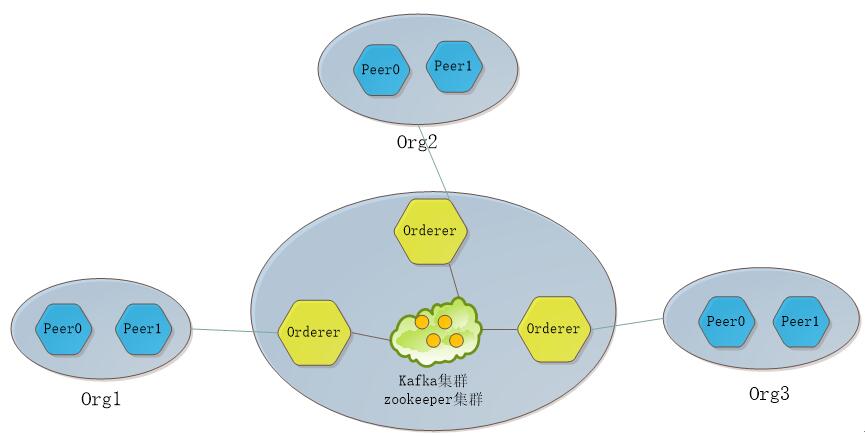
图:网络拓扑
Kafka模式由排序(orderer)服务、kafka集群和zookeeper集群组成。每个排序(orderer)服务相互之间不通信,只与kafka集群通信,kafka集群与zookeeper相互连接。
Fabric网络中的各节点(Peer)收到客户端发送的交易请求时,把交易信息发送给与其连接的排序(orderer)服务,交由排序(orderer)服务集群进行排序处理。
11.3 Kafka运行配置
Kafka生产环境部署案例采用三个排序(orderer)服务、四个kafka、三个zookeeper和四个节点(peer)组成,共准备八台服务器,每台服务器对应的服务如下表所示:
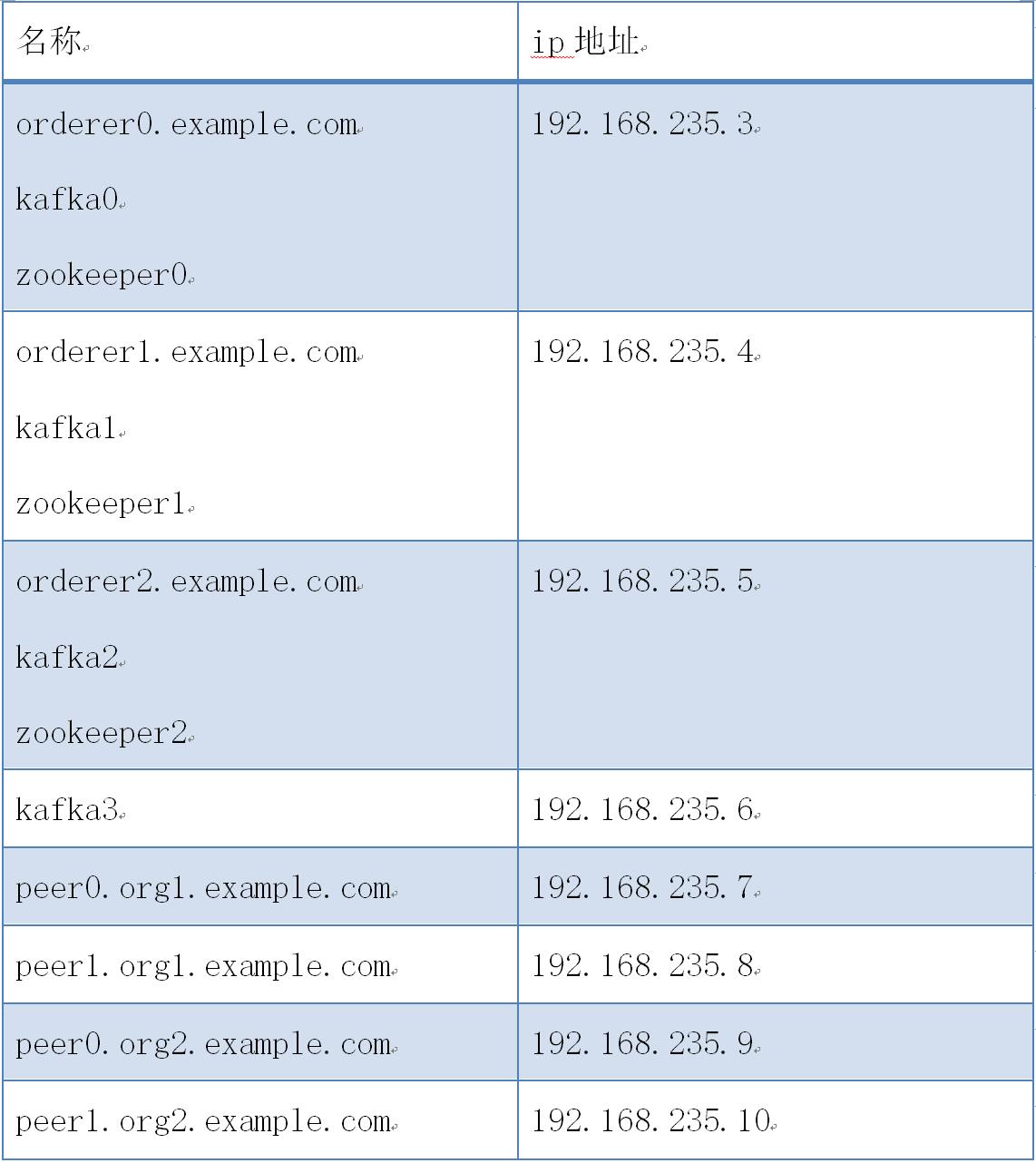
kafka案例网络拓扑图如下:

图:kafka案例网络拓扑
kafka案例部署步骤如下:
11.3.1 服务器(192.168.235.3)部署配置
1) 创建kafkapeer目录
# cd $GOPATH/src/github.com/hyperledger/fabric

# mkdir kafkapeer

# cd kafkapeer
2) 获取生成工具
把下载的hyperledger-fabric-linux-amd64-1.2.0.tar.gz二进制文件包解压,把其中的bin目录拷贝到kafkapeer目录下。
# chmod -R ./bin
3) 准备生成证书和区块配置文件
配置crypto-config.yaml和configtx.yaml文件,拷贝到kafkapeer目录下。
- crypto-config.yaml:
# Copyright IBM Corp. All Rights Reserved.

#

# SPDX-License-Identifier: Apache-2.0

#

# ---------------------------------------------------------------------------

# "OrdererOrgs" - Definition of organizations managing orderer nodes

# ---------------------------------------------------------------------------

OrdererOrgs:

  # ---------------------------------------------------------------------------

  # Orderer

  # ---------------------------------------------------------------------------

  - Name: Orderer

    Domain: example.com

    CA:

        Country: US

        Province: California

        Locality: San Francisco

    # ---------------------------------------------------------------------------

    # "Specs" - See PeerOrgs below for complete description

    # ---------------------------------------------------------------------------

    Specs:

      - Hostname: orderer0

      - Hostname: orderer1

      - Hostname: orderer2

# ---------------------------------------------------------------------------

# "PeerOrgs" - Definition of organizations managing peer nodes

# ---------------------------------------------------------------------------

PeerOrgs:

  # ---------------------------------------------------------------------------

  # Org1

  # ---------------------------------------------------------------------------

  - Name: Org1

    Domain: org1.example.com

    EnableNodeOUs: true

    CA:

        Country: US

        Province: California

        Locality: San Francisco

    # ---------------------------------------------------------------------------

    # "Specs"

    # ---------------------------------------------------------------------------

    # Uncomment this section to enable the explicit definition of hosts in your

    # configuration.  Most users will want to use Template, below

    #

    # Specs is an array of Spec entries.  Each Spec entry consists of two fields:

    #   - Hostname:   (Required) The desired hostname, sans the domain.

    #   - CommonName: (Optional) Specifies the template or explicit override for

    #                 the CN.  By default, this is the template:

    #

    #                              "{{.Hostname}}.{{.Domain}}"

    #

    #                 which obtains its values from the Spec.Hostname and

    #                 Org.Domain, respectively.

    # ---------------------------------------------------------------------------

    # Specs:

    #   - Hostname: foo # implicitly "foo.org1.example.com"

    #     CommonName: foo27.org5.example.com # overrides Hostname-based FQDN set above

    #   - Hostname: bar

    #   - Hostname: baz

    # ---------------------------------------------------------------------------

    # "Template"

    # ---------------------------------------------------------------------------

    # Allows for the definition of  or more hosts that are created sequentially

    # from a template. By default, this looks like "peer%d" from  to Count-.

    # You may override the number of nodes (Count), the starting index (Start)

    # or the template used to construct the name (Hostname).

    #

    # Note: Template and Specs are not mutually exclusive.  You may define both

    # sections and the aggregate nodes will be created for you.  Take care with

    # name collisions

    # ---------------------------------------------------------------------------

    Template:

      Count:

      # Start:

      # Hostname: {{.Prefix}}{{.Index}} # default

    # ---------------------------------------------------------------------------

    # "Users"

    # ---------------------------------------------------------------------------

    # Count: The number of user accounts _in addition_ to Admin

    # ---------------------------------------------------------------------------

    Users:

      Count:

  # ---------------------------------------------------------------------------

  # Org2: See "Org1" for full specification

  # ---------------------------------------------------------------------------

  - Name: Org2

    Domain: org2.example.com

    EnableNodeOUs: true

    CA:

        Country: US

        Province: California

        Locality: San Francisco

    Template:

      Count:

    Users:

      Count:
- configtx.yaml
# Copyright IBM Corp. All Rights Reserved.

#

# SPDX-License-Identifier: Apache-2.0

#

---

################################################################################

#

#   Section: Organizations

#

#   - This section defines the different organizational identities which will

#   be referenced later in the configuration.

#

################################################################################

Organizations:

    # SampleOrg defines an MSP using the sampleconfig.  It should never be used

    # in production but may be used as a template for other definitions

    - &OrdererOrg

        # DefaultOrg defines the organization which is used in the sampleconfig

        # of the fabric.git development environment

        Name: OrdererOrg

        # ID to load the MSP definition as

        ID: OrdererMSP

        # MSPDir is the filesystem path which contains the MSP configuration

        MSPDir: crypto-config/ordererOrganizations/example.com/msp

        # Policies defines the set of policies at this level of the config tree

        # For organization policies, their canonical path is usually

        #   /Channel/<Application|Orderer>/<OrgName>/<PolicyName>

        Policies:

            Readers:

                Type: Signature

                Rule: "OR('OrdererMSP.member')"

            Writers:

                Type: Signature

                Rule: "OR('OrdererMSP.member')"

            Admins:

                Type: Signature

                Rule: "OR('OrdererMSP.admin')"

    - &Org1

        # DefaultOrg defines the organization which is used in the sampleconfig

        # of the fabric.git development environment

        Name: Org1MSP

        # ID to load the MSP definition as

        ID: Org1MSP

        MSPDir: crypto-config/peerOrganizations/org1.example.com/msp

        # Policies defines the set of policies at this level of the config tree

        # For organization policies, their canonical path is usually

        #   /Channel/<Application|Orderer>/<OrgName>/<PolicyName>

        Policies:

            Readers:

                Type: Signature

                Rule: "OR('Org1MSP.admin', 'Org1MSP.peer', 'Org1MSP.client')"

            Writers:

                Type: Signature

                Rule: "OR('Org1MSP.admin', 'Org1MSP.client')"

            Admins:

                Type: Signature

                Rule: "OR('Org1MSP.admin')"

        AnchorPeers:

            # AnchorPeers defines the location of peers which can be used

            # for cross org gossip communication.  Note, this value is only

            # encoded in the genesis block in the Application section context

            - Host: peer0.org1.example.com

              Port:

    - &Org2

        # DefaultOrg defines the organization which is used in the sampleconfig

        # of the fabric.git development environment

        Name: Org2MSP

        # ID to load the MSP definition as

        ID: Org2MSP

        MSPDir: crypto-config/peerOrganizations/org2.example.com/msp

        # Policies defines the set of policies at this level of the config tree

        # For organization policies, their canonical path is usually

        #   /Channel/<Application|Orderer>/<OrgName>/<PolicyName>

        Policies:

            Readers:

                Type: Signature

                Rule: "OR('Org2MSP.admin', 'Org2MSP.peer', 'Org2MSP.client')"

            Writers:

                Type: Signature

                Rule: "OR('Org2MSP.admin', 'Org2MSP.client')"

            Admins:

                Type: Signature

                Rule: "OR('Org2MSP.admin')"

        AnchorPeers:

            # AnchorPeers defines the location of peers which can be used

            # for cross org gossip communication.  Note, this value is only

            # encoded in the genesis block in the Application section context

            - Host: peer0.org2.example.com

              Port:

################################################################################

#

#   SECTION: Capabilities

#

#   - This section defines the capabilities of fabric network. This is a new

#   concept as of v1.1.0 and should not be utilized in mixed networks with

#   v1..x peers and orderers.  Capabilities define features which must be

#   present in a fabric binary for that binary to safely participate in the

#   fabric network.  For instance, if a new MSP type is added, newer binaries

#   might recognize and validate the signatures from this type, while older

#   binaries without this support would be unable to validate those

#   transactions.  This could lead to different versions of the fabric binaries

#   having different world states.  Instead, defining a capability for a channel

#   informs those binaries without this capability that they must cease

#   processing transactions until they have been upgraded.  For v1..x if any

#   capabilities are defined (including a map with all capabilities turned off)

#   then the v1..x peer will deliberately crash.

#

################################################################################

Capabilities:

    # Channel capabilities apply to both the orderers and the peers and must be

    # supported by both.  Set the value of the capability to true to require it.

    Global: &ChannelCapabilities

        # V1. for Global is a catchall flag for behavior which has been

        # determined to be desired for all orderers and peers running v1..x,

        # but the modification of which would cause incompatibilities.  Users

        # should leave this flag set to true.

        V1_1: true

    # Orderer capabilities apply only to the orderers, and may be safely

    # manipulated without concern for upgrading peers.  Set the value of the

    # capability to true to require it.

    Orderer: &OrdererCapabilities

        # V1. for Order is a catchall flag for behavior which has been

        # determined to be desired for all orderers running v1..x, but the

        # modification of which  would cause incompatibilities.  Users should

        # leave this flag set to true.

        V1_1: true

    # Application capabilities apply only to the peer network, and may be safely

    # manipulated without concern for upgrading orderers.  Set the value of the

    # capability to true to require it.

    Application: &ApplicationCapabilities

        # V1. for Application is a catchall flag for behavior which has been

        # determined to be desired for all peers running v1..x, but the

        # modification of which would cause incompatibilities.  Users should

        # leave this flag set to true.

        V1_2: true

################################################################################

#

#   SECTION: Application

#

#   - This section defines the values to encode into a config transaction or

#   genesis block for application related parameters

#

################################################################################

Application: &ApplicationDefaults

    # Organizations is the list of orgs which are defined as participants on

    # the application side of the network

    Organizations:

    # Policies defines the set of policies at this level of the config tree

    # For Application policies, their canonical path is

    #   /Channel/Application/<PolicyName>

    Policies:

        Readers:

            Type: ImplicitMeta

            Rule: "ANY Readers"

        Writers:

            Type: ImplicitMeta

            Rule: "ANY Writers"

        Admins:

            Type: ImplicitMeta

            Rule: "MAJORITY Admins"

    # Capabilities describes the application level capabilities, see the

    # dedicated Capabilities section elsewhere in this file for a full

    # description

    Capabilities:

        <<: *ApplicationCapabilities

################################################################################

#

#   SECTION: Orderer

#

#   - This section defines the values to encode into a config transaction or

#   genesis block for orderer related parameters

#

################################################################################

Orderer: &OrdererDefaults

    # Orderer Type: The orderer implementation to start

    # Available types are "solo" and "kafka"

    OrdererType: kafka

    Addresses:

        - orderer0.example.com:

        - orderer1.example.com:

        - orderer2.example.com:

    # Batch Timeout: The amount of time to wait before creating a batch

    BatchTimeout: 2s

    # Batch Size: Controls the number of messages batched into a block

    BatchSize:

        # Max Message Count: The maximum number of messages to permit in a batch

        MaxMessageCount:

        # Absolute Max Bytes: The absolute maximum number of bytes allowed for

        # the serialized messages in a batch.

        AbsoluteMaxBytes:  MB

        # Preferred Max Bytes: The preferred maximum number of bytes allowed for

        # the serialized messages in a batch. A message larger than the preferred

        # max bytes will result in a batch larger than preferred max bytes.

        PreferredMaxBytes:  KB

    Kafka:

        # Brokers: A list of Kafka brokers to which the orderer connects. Edit

        # this list to identify the brokers of the ordering service.

        # NOTE: Use IP:port notation.

        Brokers:

            - kafka0:

            - kafka1:

            - kafka2:

            - kafka3:

    # Organizations is the list of orgs which are defined as participants on

    # the orderer side of the network

    Organizations:

    # Policies defines the set of policies at this level of the config tree

    # For Orderer policies, their canonical path is

    #   /Channel/Orderer/<PolicyName>

    Policies:

        Readers:

            Type: ImplicitMeta

            Rule: "ANY Readers"

        Writers:

            Type: ImplicitMeta

            Rule: "ANY Writers"

        Admins:

            Type: ImplicitMeta

            Rule: "MAJORITY Admins"

        # BlockValidation specifies what signatures must be included in the block

        # from the orderer for the peer to validate it.

        BlockValidation:

            Type: ImplicitMeta

            Rule: "ANY Writers"

    # Capabilities describes the orderer level capabilities, see the

    # dedicated Capabilities section elsewhere in this file for a full

    # description

    Capabilities:

        <<: *OrdererCapabilities

################################################################################

#

#   CHANNEL

#

#   This section defines the values to encode into a config transaction or

#   genesis block for channel related parameters.

#

################################################################################

Channel: &ChannelDefaults

    # Policies defines the set of policies at this level of the config tree

    # For Channel policies, their canonical path is

    #   /Channel/<PolicyName>

    Policies:

        # Who may invoke the 'Deliver' API

        Readers:

            Type: ImplicitMeta

            Rule: "ANY Readers"

        # Who may invoke the 'Broadcast' API

        Writers:

            Type: ImplicitMeta

            Rule: "ANY Writers"

        # By default, who may modify elements at this config level

        Admins:

            Type: ImplicitMeta

            Rule: "MAJORITY Admins"

    # Capabilities describes the channel level capabilities, see the

    # dedicated Capabilities section elsewhere in this file for a full

    # description

    Capabilities:

        <<: *ChannelCapabilities

################################################################################

#

#   Profile

#

#   - Different configuration profiles may be encoded here to be specified

#   as parameters to the configtxgen tool

#

################################################################################

Profiles:

    TwoOrgsOrdererGenesis:

        <<: *ChannelDefaults

        Orderer:

            <<: *OrdererDefaults

            Organizations:

                - *OrdererOrg

        Consortiums:

            SampleConsortium:

                Organizations:

                    - *Org1

                    - *Org2

    TwoOrgsChannel:

        Consortium: SampleConsortium

        Application:

            <<: *ApplicationDefaults

            Organizations:

                - *Org1

                - *Org2
5) 生成公私钥和证书
# ./bin/cryptogen generate --config=./crypto-config.yaml
6) 生成创世区块
# mkdir channel-artifacts

# ./bin/configtxgen -profile TwoOrgsOrdererGenesis -outputBlock ./channel-artifacts/genesis.block
7) 生成通道配置区块
# ./bin/configtxgen -profile TwoOrgsChannel -outputCreateChannelTx ./channel-artifacts/mychannel.tx -channelID mychannel
8) 拷贝生成文件到其它服务器
# cd ..

# scp -r kafkapeer root@192.168.235.4:/opt/gopath/src/github.com/hyperledger/fabric

# scp -r kafkapeer root@192.168.235.5:/opt/gopath/src/github.com/hyperledger/fabric

# scp -r kafkapeer root@192.168.235.6:/opt/gopath/src/github.com/hyperledger/fabric

# scp -r kafkapeer root@192.168.235.7:/opt/gopath/src/github.com/hyperledger/fabric

# scp -r kafkapeer root@192.168.235.8:/opt/gopath/src/github.com/hyperledger/fabric

# scp -r kafkapeer root@192.168.235.9:/opt/gopath/src/github.com/hyperledger/fabric

# scp -r kafkapeer root@192.168.235.10:/opt/gopath/src/github.com/hyperledger/fabric
9) 准备zookeeper配置文件
配置docker-compose-zookeeper.yaml文件,拷贝到kafkapeer目录下。
# Copyright IBM Corp. All Rights Reserved.

#

# SPDX-License-Identifier: Apache-2.0

#

version: ''

services:

  zookeeper0:

    container_name: zookeeper0

    hostname: zookeeper0

    image: hyperledger/fabric-zookeeper

    restart: always

    environment:

      - ZOO_MY_ID=

      - ZOO_SERVERS=server.=zookeeper0:: server.=zookeeper1:: server.=zookeeper2::

    ports:

      - :

      - :

      - :

    extra_hosts:

      - "zookeeper0:192.168.235.3"

      - "zookeeper1:192.168.235.4"

      - "zookeeper2:192.168.235.5"

      - "kafka0:192.168.235.3"

      - "kafka1:192.168.235.4"

      - "kafka2:192.168.235.5"

      - "kafka3:192.168.235.6"
10) 准备kafka配置文件
配置docker-compose-kafka.yaml文件,拷贝到kafkapeer目录下。
# Copyright IBM Corp. All Rights Reserved.

#

# SPDX-License-Identifier: Apache-2.0

#

version: ''

services:

  kafka0:

    container_name: kafka0

    hostname: kafka0

    image: hyperledger/fabric-kafka

    restart: always

    environment:

      - KAFKA_MESSAGE_MAX_BYTES= #  *  *  B

      - KAFKA_REPLICA_FETCH_MAX_BYTES= #  *  *  B

      - KAFKA_UNCLEAN_LEADER_ELECTION_ENABLE=false

    environment:

      - KAFKA_BROKER_ID=

      - KAFKA_MIN_INSYNC_REPLICAS=

      - KAFKA_DEFAULT_REPLICATION_FACTOR=

      - KAFKA_ZOOKEEPER_CONNECT=zookeeper0:,zookeeper1:,zookeeper2:

    ports:

      - :

    extra_hosts:

      - "zookeeper0:192.168.235.3"

      - "zookeeper1:192.168.235.4"

      - "zookeeper2:192.168.235.5"

      - "kafka0:192.168.235.3"

      - "kafka1:192.168.235.4"

      - "kafka2:192.168.235.5"

      - "kafka3:192.168.235.6"
11) 准备orderer配置文件
配置docker-compose-orderer.yaml文件,拷贝到kafkapeer目录下。
# Copyright IBM Corp. All Rights Reserved.

#

# SPDX-License-Identifier: Apache-2.0

#

version: ''

services:

  orderer0.example.com:

    container_name: orderer0.example.com

    image: hyperledger/fabric-orderer

    environment:

      - ORDERER_GENERAL_LOGLEVEL=debug

      - ORDERER_GENERAL_LISTENADDRESS=0.0.0.0

      - ORDERER_GENERAL_GENESISMETHOD=file

      - ORDERER_GENERAL_GENESISFILE=/var/hyperledger/orderer/orderer.genesis.block

      - ORDERER_GENERAL_LOCALMSPID=OrdererMSP

      - ORDERER_GENERAL_LOCALMSPDIR=/var/hyperledger/orderer/msp

      # enabled TLS

      - ORDERER_GENERAL_TLS_ENABLED=true

      - ORDERER_GENERAL_TLS_PRIVATEKEY=/var/hyperledger/orderer/tls/server.key

      - ORDERER_GENERAL_TLS_CERTIFICATE=/var/hyperledger/orderer/tls/server.crt

      - ORDERER_GENERAL_TLS_ROOTCAS=[/var/hyperledger/orderer/tls/ca.crt]

      - ORDERER_KAFKA_RETRY_LONGINTERVAL=10s

      - ORDERER_KAFKA_RETRY_LONGTOTAL=100s

      - ORDERER_KAFKA_RETRY_SHORTINTERVAL=1s

      - ORDERER_KAFKA_RETRY_SHORTTOTAL=30s

      - ORDERER_KAFKA_VERBOSE=true

    working_dir: /opt/gopath/src/github.com/hyperledger/fabric

    command: orderer

    volumes:

      - ./channel-artifacts/genesis.block:/var/hyperledger/orderer/orderer.genesis.block

      - ./crypto-config/ordererOrganizations/example.com/orderers/orderer0.example.com/msp:/var/hyperledger/orderer/msp

      - ./crypto-config/ordererOrganizations/example.com/orderers/orderer0.example.com/tls/:/var/hyperledger/orderer/tls

    ports:

      - :

    extra_hosts:

     - "kafka0:192.168.235.3"

     - "kafka1:192.168.235.4"

     - "kafka2:192.168.235.5"

     - "kafka3:192.168.235.6"
11.3.2 服务器(192.168.235.4)部署配置
1) 准备zookeeper配置文件
配置docker-compose-zookeeper.yaml文件,拷贝到kafkapeer目录下。
# Copyright IBM Corp. All Rights Reserved.

#

# SPDX-License-Identifier: Apache-2.0

#

version: ''

services:

  zookeeper1:

    container_name: zookeeper1

    hostname: zookeeper1

    image: hyperledger/fabric-zookeeper

    restart: always

    environment:

      - ZOO_MY_ID=

      - ZOO_SERVERS=server.=zookeeper0:: server.=zookeeper1:: server.=zookeeper2::

    ports:

      - :

      - :

      - :

    extra_hosts:

      - "zookeeper0:192.168.235.3"

      - "zookeeper1:192.168.235.4"

      - "zookeeper2:192.168.235.5"

      - "kafka0:192.168.235.3"

      - "kafka1:192.168.235.4"

      - "kafka2:192.168.235.5"

      - "kafka3:192.168.235.6"
2) 准备kafka配置文件
配置docker-compose-kafka.yaml文件,拷贝到kafkapeer目录下。
# Copyright IBM Corp. All Rights Reserved.

#

# SPDX-License-Identifier: Apache-2.0

#

version: ''

services:

  kafka1:

    container_name: kafka1

    hostname: kafka1

    image: hyperledger/fabric-kafka

    restart: always

    environment:

      - KAFKA_MESSAGE_MAX_BYTES= #  *  *  B

      - KAFKA_REPLICA_FETCH_MAX_BYTES= #  *  *  B

      - KAFKA_UNCLEAN_LEADER_ELECTION_ENABLE=false

    environment:

      - KAFKA_BROKER_ID=

      - KAFKA_MIN_INSYNC_REPLICAS=

      - KAFKA_DEFAULT_REPLICATION_FACTOR=

      - KAFKA_ZOOKEEPER_CONNECT=zookeeper0:,zookeeper1:,zookeeper2:

    ports:

      - :

    extra_hosts:

      - "zookeeper0:192.168.235.3"

      - "zookeeper1:192.168.235.4"

      - "zookeeper2:192.168.235.5"

      - "kafka0:192.168.235.3"

      - "kafka1:192.168.235.4"

      - "kafka2:192.168.235.5"

      - "kafka3:192.168.235.6"
3) 准备orderer配置文件
配置docker-compose-orderer.yaml文件,拷贝到kafkapeer目录下。
# Copyright IBM Corp. All Rights Reserved.

#

# SPDX-License-Identifier: Apache-2.0

#

version: ''

services:

  orderer1.example.com:

    container_name: orderer1.example.com

    image: hyperledger/fabric-orderer

    environment:

      - ORDERER_GENERAL_LOGLEVEL=debug

      - ORDERER_GENERAL_LISTENADDRESS=0.0.0.0

      - ORDERER_GENERAL_GENESISMETHOD=file

      - ORDERER_GENERAL_GENESISFILE=/var/hyperledger/orderer/orderer.genesis.block

      - ORDERER_GENERAL_LOCALMSPID=OrdererMSP

      - ORDERER_GENERAL_LOCALMSPDIR=/var/hyperledger/orderer/msp

      # enabled TLS

      - ORDERER_GENERAL_TLS_ENABLED=true

      - ORDERER_GENERAL_TLS_PRIVATEKEY=/var/hyperledger/orderer/tls/server.key

      - ORDERER_GENERAL_TLS_CERTIFICATE=/var/hyperledger/orderer/tls/server.crt

      - ORDERER_GENERAL_TLS_ROOTCAS=[/var/hyperledger/orderer/tls/ca.crt]

      - ORDERER_KAFKA_RETRY_LONGINTERVAL=10s

      - ORDERER_KAFKA_RETRY_LONGTOTAL=100s

      - ORDERER_KAFKA_RETRY_SHORTINTERVAL=1s

      - ORDERER_KAFKA_RETRY_SHORTTOTAL=30s

      - ORDERER_KAFKA_VERBOSE=true

    working_dir: /opt/gopath/src/github.com/hyperledger/fabric

    command: orderer

    volumes:

      - ./channel-artifacts/genesis.block:/var/hyperledger/orderer/orderer.genesis.block

      - ./crypto-config/ordererOrganizations/example.com/orderers/orderer1.example.com/msp:/var/hyperledger/orderer/msp

      - ./crypto-config/ordererOrganizations/example.com/orderers/orderer1.example.com/tls/:/var/hyperledger/orderer/tls

    ports:

      - :

    extra_hosts:

     - "kafka0:192.168.235.3"

     - "kafka1:192.168.235.4"

     - "kafka2:192.168.235.5"

     - "kafka3:192.168.235.6"
11.3.3 服务器(192.168.235.5)部署配置
1) 准备zookeeper配置文件
配置docker-compose-zookeeper.yaml文件,拷贝到kafkapeer目录下。
# Copyright IBM Corp. All Rights Reserved.

#

# SPDX-License-Identifier: Apache-2.0

#

version: ''

services:

  zookeeper2:

    container_name: zookeeper2

    hostname: zookeeper2

    image: hyperledger/fabric-zookeeper

    restart: always

    environment:

      - ZOO_MY_ID=

      - ZOO_SERVERS=server.=zookeeper0:: server.=zookeeper1:: server.=zookeeper2::

    ports:

      - :

      - :

      - :

    extra_hosts:

      - "zookeeper0:192.168.235.3"

      - "zookeeper1:192.168.235.4"

      - "zookeeper2:192.168.235.5"

      - "kafka0:192.168.235.3"

      - "kafka1:192.168.235.4"

      - "kafka2:192.168.235.5"

      - "kafka3:192.168.235.6"
2) 准备kafka配置文件
配置docker-compose-kafka.yaml文件,拷贝到kafkapeer目录下。
# Copyright IBM Corp. All Rights Reserved.

#

# SPDX-License-Identifier: Apache-2.0

#

version: ''

services:

  kafka2:

    container_name: kafka2

    hostname: kafka2

    image: hyperledger/fabric-kafka

    restart: always

    environment:

      - KAFKA_MESSAGE_MAX_BYTES= #  *  *  B

      - KAFKA_REPLICA_FETCH_MAX_BYTES= #  *  *  B

      - KAFKA_UNCLEAN_LEADER_ELECTION_ENABLE=false

    environment:

      - KAFKA_BROKER_ID=

      - KAFKA_MIN_INSYNC_REPLICAS=

      - KAFKA_DEFAULT_REPLICATION_FACTOR=

      - KAFKA_ZOOKEEPER_CONNECT=zookeeper0:,zookeeper1:,zookeeper2:

    ports:

      - :

    extra_hosts:

      - "zookeeper0:192.168.235.3"

      - "zookeeper1:192.168.235.4"

      - "zookeeper2:192.168.235.5"

      - "kafka0:192.168.235.3"

      - "kafka1:192.168.235.4"

      - "kafka2:192.168.235.5"

      - "kafka3:192.168.235.6"
3) 准备orderer配置文件
配置docker-compose-orderer.yaml文件,拷贝到kafkapeer目录下。
# Copyright IBM Corp. All Rights Reserved.

#

# SPDX-License-Identifier: Apache-2.0

#

version: ''

services:

  orderer2.example.com:

    container_name: orderer2.example.com

    image: hyperledger/fabric-orderer

    environment:

      - ORDERER_GENERAL_LOGLEVEL=debug

      - ORDERER_GENERAL_LISTENADDRESS=0.0.0.0

      - ORDERER_GENERAL_GENESISMETHOD=file

      - ORDERER_GENERAL_GENESISFILE=/var/hyperledger/orderer/orderer.genesis.block

      - ORDERER_GENERAL_LOCALMSPID=OrdererMSP

      - ORDERER_GENERAL_LOCALMSPDIR=/var/hyperledger/orderer/msp

      # enabled TLS

      - ORDERER_GENERAL_TLS_ENABLED=true

      - ORDERER_GENERAL_TLS_PRIVATEKEY=/var/hyperledger/orderer/tls/server.key

      - ORDERER_GENERAL_TLS_CERTIFICATE=/var/hyperledger/orderer/tls/server.crt

      - ORDERER_GENERAL_TLS_ROOTCAS=[/var/hyperledger/orderer/tls/ca.crt]

      - ORDERER_KAFKA_RETRY_LONGINTERVAL=10s

      - ORDERER_KAFKA_RETRY_LONGTOTAL=100s

      - ORDERER_KAFKA_RETRY_SHORTINTERVAL=1s

      - ORDERER_KAFKA_RETRY_SHORTTOTAL=30s

      - ORDERER_KAFKA_VERBOSE=true

    working_dir: /opt/gopath/src/github.com/hyperledger/fabric

    command: orderer

    volumes:

      - ./channel-artifacts/genesis.block:/var/hyperledger/orderer/orderer.genesis.block

      - ./crypto-config/ordererOrganizations/example.com/orderers/orderer2.example.com/msp:/var/hyperledger/orderer/msp

      - ./crypto-config/ordererOrganizations/example.com/orderers/orderer2.example.com/tls/:/var/hyperledger/orderer/tls

    ports:

      - :

    extra_hosts:

     - "kafka0:192.168.235.3"

     - "kafka1:192.168.235.4"

     - "kafka2:192.168.235.5"

     - "kafka3:192.168.235.6"
11.3.4 服务器(192.168.235.6)部署配置
1) 准备kafka配置文件
配置docker-compose-kafka.yaml文件,拷贝到kafkapeer目录下。
# Copyright IBM Corp. All Rights Reserved.

#

# SPDX-License-Identifier: Apache-2.0

#

version: ''

services:

  kafka3:

    container_name: kafka3

    hostname: kafka3

    image: hyperledger/fabric-kafka

    restart: always

    environment:

      - KAFKA_MESSAGE_MAX_BYTES= #  *  *  B

      - KAFKA_REPLICA_FETCH_MAX_BYTES= #  *  *  B

      - KAFKA_UNCLEAN_LEADER_ELECTION_ENABLE=false

    environment:

      - KAFKA_BROKER_ID=

      - KAFKA_MIN_INSYNC_REPLICAS=

      - KAFKA_DEFAULT_REPLICATION_FACTOR=

      - KAFKA_ZOOKEEPER_CONNECT=zookeeper0:,zookeeper1:,zookeeper2:

    ports:

      - :

    extra_hosts:

      - "zookeeper0:192.168.235.3"

      - "zookeeper1:192.168.235.4"

      - "zookeeper2:192.168.235.5"

      - "kafka0:192.168.235.3"

      - "kafka1:192.168.235.4"

      - "kafka2:192.168.235.5"

      - "kafka3:192.168.235.6"
11.3.5 服务器(192.168.235.7)部署配置
1) 准备peer配置文件
配置docker-compose-peer.yaml文件,拷贝到kafkapeer目录下。
# All elements in this file should depend on the docker-compose-base.yaml

# Provided fabric peer node

version: ''

services:

  peer0.org1.example.com:

    container_name: peer0.org1.example.com

    hostname: peer0.org1.example.com

    image: hyperledger/fabric-peer

    environment:

       - CORE_PEER_ID=peer0.org1.example.com

       - CORE_PEER_ADDRESS=peer0.org1.example.com:

       - CORE_PEER_CHAINCODELISTENADDRESS=peer0.org1.example.com:

       - CORE_PEER_GOSSIP_EXTERNALENDPOINT=peer0.org1.example.com:

       - CORE_PEER_LOCALMSPID=Org1MSP

       - CORE_VM_ENDPOINT=unix:///host/var/run/docker.sock

       # the following setting starts chaincode containers on the same

       # bridge network as the peers

       # https://docs.docker.com/compose/networking/

       #- CORE_LOGGING_LEVEL=ERROR

       - CORE_LOGGING_LEVEL=DEBUG

       - CORE_PEER_GOSSIP_USELEADERELECTION=true

       - CORE_PEER_GOSSIP_ORGLEADER=false

       - CORE_PEER_PROFILE_ENABLED=true

       - CORE_PEER_TLS_ENABLED=true

       - CORE_PEER_TLS_CERT_FILE=/etc/hyperledger/fabric/tls/server.crt

       - CORE_PEER_TLS_KEY_FILE=/etc/hyperledger/fabric/tls/server.key

       - CORE_PEER_TLS_ROOTCERT_FILE=/etc/hyperledger/fabric/tls/ca.crt

    working_dir: /opt/gopath/src/github.com/hyperledger/fabric/peer

    command: peer node start

    volumes:

       - /var/run/:/host/var/run/

       - ./crypto-config/peerOrganizations/org1.example.com/peers/peer0.org1.example.com/msp:/etc/hyperledger/fabric/msp

       - ./crypto-config/peerOrganizations/org1.example.com/peers/peer0.org1.example.com/tls:/etc/hyperledger/fabric/tls

    ports:

      - :

      - :

      - :

    extra_hosts:

      - "orderer0.example.com:192.168.235.3"

      - "orderer1.example.com:192.168.235.4"

      - "orderer2.example.com:192.168.235.5"

  cli:

    container_name: cli

    image: hyperledger/fabric-tools

    tty: true

    environment:

      - GOPATH=/opt/gopath

      - CORE_VM_ENDPOINT=unix:///host/var/run/docker.sock

      # - CORE_LOGGING_LEVEL=ERROR

      - CORE_LOGGING_LEVEL=DEBUG

      - CORE_PEER_ID=cli

      - CORE_PEER_ADDRESS=peer0.org1.example.com:

      - CORE_PEER_LOCALMSPID=Org1MSP

      - CORE_PEER_TLS_ENABLED=true

      - CORE_PEER_TLS_CERT_FILE=/opt/gopath/src/github.com/hyperledger/fabric/peer/crypto/peerOrganizations/org1.example.com/peers/peer0.org1.example.com/tls/server.crt

      - CORE_PEER_TLS_KEY_FILE=/opt/gopath/src/github.com/hyperledger/fabric/peer/crypto/peerOrganizations/org1.example.com/peers/peer0.org1.example.com/tls/server.key

      - CORE_PEER_TLS_ROOTCERT_FILE=/opt/gopath/src/github.com/hyperledger/fabric/peer/crypto/peerOrganizations/org1.example.com/peers/peer0.org1.example.com/tls/ca.crt

      - CORE_PEER_MSPCONFIGPATH=/opt/gopath/src/github.com/hyperledger/fabric/peer/crypto/peerOrganizations/org1.example.com/users/Admin@org1.example.com/msp

    working_dir: /opt/gopath/src/github.com/hyperledger/fabric/peer

    volumes:

        - /var/run/:/host/var/run/

        - ./chaincode/go/:/opt/gopath/src/github.com/hyperledger/fabric/kafkapeer/chaincode/go

        - ./crypto-config:/opt/gopath/src/github.com/hyperledger/fabric/peer/crypto/

        - ./channel-artifacts:/opt/gopath/src/github.com/hyperledger/fabric/peer/channel-artifacts

    extra_hosts:

      - "orderer0.example.com:192.168.235.3"

      - "orderer1.example.com:192.168.235.4"

      - "orderer2.example.com:192.168.235.5"

      - "peer0.org1.example.com:192.168.235.7"

      - "peer1.org1.example.com:192.168.235.8"

      - "peer0.org2.example.com:192.168.235.9"

      - "peer1.org2.example.com:192.168.235.10"
11.3.6 服务器(192.168.235.8)部署配置
1) 准备peer配置文件
配置docker-compose-peer.yaml文件,拷贝到kafkapeer目录下。
# All elements in this file should depend on the docker-compose-base.yaml

# Provided fabric peer node

version: ''

services:

  peer1.org1.example.com:

    container_name: peer1.org1.example.com

    hostname: peer1.org1.example.com

    image: hyperledger/fabric-peer

    environment:

       - CORE_PEER_ID=peer1.org1.example.com

       - CORE_PEER_ADDRESS=peer1.org1.example.com:

       - CORE_PEER_CHAINCODELISTENADDRESS=peer1.org1.example.com:

       - CORE_PEER_GOSSIP_EXTERNALENDPOINT=peer1.org1.example.com:

       - CORE_PEER_LOCALMSPID=Org1MSP

       - CORE_VM_ENDPOINT=unix:///host/var/run/docker.sock

       # the following setting starts chaincode containers on the same

       # bridge network as the peers

       # https://docs.docker.com/compose/networking/

       #- CORE_LOGGING_LEVEL=ERROR

       - CORE_LOGGING_LEVEL=DEBUG

       - CORE_PEER_GOSSIP_USELEADERELECTION=true

       - CORE_PEER_GOSSIP_ORGLEADER=false

       - CORE_PEER_PROFILE_ENABLED=true

       - CORE_PEER_TLS_ENABLED=true

       - CORE_PEER_TLS_CERT_FILE=/etc/hyperledger/fabric/tls/server.crt

       - CORE_PEER_TLS_KEY_FILE=/etc/hyperledger/fabric/tls/server.key

       - CORE_PEER_TLS_ROOTCERT_FILE=/etc/hyperledger/fabric/tls/ca.crt

    working_dir: /opt/gopath/src/github.com/hyperledger/fabric/peer

    command: peer node start

    volumes:

       - /var/run/:/host/var/run/

       - ./crypto-config/peerOrganizations/org1.example.com/peers/peer1.org1.example.com/msp:/etc/hyperledger/fabric/msp

       - ./crypto-config/peerOrganizations/org1.example.com/peers/peer1.org1.example.com/tls:/etc/hyperledger/fabric/tls

    ports:

      - :

      - :

      - :

    extra_hosts:

      - "orderer0.example.com:192.168.235.3"

      - "orderer1.example.com:192.168.235.4"

      - "orderer2.example.com:192.168.235.5"

  cli:

    container_name: cli

    image: hyperledger/fabric-tools

    tty: true

    environment:

      - GOPATH=/opt/gopath

      - CORE_VM_ENDPOINT=unix:///host/var/run/docker.sock

      # - CORE_LOGGING_LEVEL=ERROR

      - CORE_LOGGING_LEVEL=DEBUG

      - CORE_PEER_ID=cli

      - CORE_PEER_ADDRESS=peer1.org1.example.com:

      - CORE_PEER_LOCALMSPID=Org1MSP

      - CORE_PEER_TLS_ENABLED=true

      - CORE_PEER_TLS_CERT_FILE=/opt/gopath/src/github.com/hyperledger/fabric/peer/crypto/peerOrganizations/org1.example.com/peers/peer1.org1.example.com/tls/server.crt

      - CORE_PEER_TLS_KEY_FILE=/opt/gopath/src/github.com/hyperledger/fabric/peer/crypto/peerOrganizations/org1.example.com/peers/peer1.org1.example.com/tls/server.key

      - CORE_PEER_TLS_ROOTCERT_FILE=/opt/gopath/src/github.com/hyperledger/fabric/peer/crypto/peerOrganizations/org1.example.com/peers/peer1.org1.example.com/tls/ca.crt

      - CORE_PEER_MSPCONFIGPATH=/opt/gopath/src/github.com/hyperledger/fabric/peer/crypto/peerOrganizations/org1.example.com/users/Admin@org1.example.com/msp

    working_dir: /opt/gopath/src/github.com/hyperledger/fabric/peer

    volumes:

        - /var/run/:/host/var/run/

        - ./chaincode/go/:/opt/gopath/src/github.com/hyperledger/fabric/kafkapeer/chaincode/go

        - ./crypto-config:/opt/gopath/src/github.com/hyperledger/fabric/peer/crypto/

        - ./channel-artifacts:/opt/gopath/src/github.com/hyperledger/fabric/peer/channel-artifacts

    extra_hosts:

      - "orderer0.example.com:192.168.235.3"

      - "orderer1.example.com:192.168.235.4"

      - "orderer2.example.com:192.168.235.5"

      - "peer0.org1.example.com:192.168.235.7"

      - "peer1.org1.example.com:192.168.235.8"

      - "peer0.org2.example.com:192.168.235.9"

      - "peer1.org2.example.com:192.168.235.10"
11.3.7 服务器(192.168.235.9)部署配置
1) 准备peer配置文件
配置docker-compose-peer.yaml文件,拷贝到kafkapeer目录下。
# All elements in this file should depend on the docker-compose-base.yaml

# Provided fabric peer node

version: ''

services:

  peer0.org2.example.com:

    container_name: peer0.org2.example.com

    hostname: peer0.org2.example.com

    image: hyperledger/fabric-peer

    environment:

       - CORE_PEER_ID=peer0.org2.example.com

       - CORE_PEER_ADDRESS=peer0.org2.example.com:

       - CORE_PEER_CHAINCODELISTENADDRESS=peer0.org2.example.com:

       - CORE_PEER_GOSSIP_EXTERNALENDPOINT=peer0.org2.example.com:

       - CORE_PEER_LOCALMSPID=Org2MSP

       - CORE_VM_ENDPOINT=unix:///host/var/run/docker.sock

       # the following setting starts chaincode containers on the same

       # bridge network as the peers

       # https://docs.docker.com/compose/networking/

       #- CORE_LOGGING_LEVEL=ERROR

       - CORE_LOGGING_LEVEL=DEBUG

       - CORE_PEER_GOSSIP_USELEADERELECTION=true

       - CORE_PEER_GOSSIP_ORGLEADER=false

       - CORE_PEER_PROFILE_ENABLED=true

       - CORE_PEER_TLS_ENABLED=true

       - CORE_PEER_TLS_CERT_FILE=/etc/hyperledger/fabric/tls/server.crt

       - CORE_PEER_TLS_KEY_FILE=/etc/hyperledger/fabric/tls/server.key

       - CORE_PEER_TLS_ROOTCERT_FILE=/etc/hyperledger/fabric/tls/ca.crt

    working_dir: /opt/gopath/src/github.com/hyperledger/fabric/peer

    command: peer node start

    volumes:

       - /var/run/:/host/var/run/

       - ./crypto-config/peerOrganizations/org2.example.com/peers/peer0.org2.example.com/msp:/etc/hyperledger/fabric/msp

       - ./crypto-config/peerOrganizations/org2.example.com/peers/peer0.org2.example.com/tls:/etc/hyperledger/fabric/tls

    ports:

      - :

      - :

      - :

    extra_hosts:

      - "orderer0.example.com:192.168.235.3"

      - "orderer1.example.com:192.168.235.4"

      - "orderer2.example.com:192.168.235.5"

  cli:

    container_name: cli

    image: hyperledger/fabric-tools

    tty: true

    environment:

      - GOPATH=/opt/gopath

      - CORE_VM_ENDPOINT=unix:///host/var/run/docker.sock

      # - CORE_LOGGING_LEVEL=ERROR

      - CORE_LOGGING_LEVEL=DEBUG

      - CORE_PEER_ID=cli

      - CORE_PEER_ADDRESS=peer0.org2.example.com:

      - CORE_PEER_LOCALMSPID=Org2MSP

      - CORE_PEER_TLS_ENABLED=true

      - CORE_PEER_TLS_CERT_FILE=/opt/gopath/src/github.com/hyperledger/fabric/peer/crypto/peerOrganizations/org2.example.com/peers/peer0.org2.example.com/tls/server.crt

      - CORE_PEER_TLS_KEY_FILE=/opt/gopath/src/github.com/hyperledger/fabric/peer/crypto/peerOrganizations/org2.example.com/peers/peer0.org2.example.com/tls/server.key

      - CORE_PEER_TLS_ROOTCERT_FILE=/opt/gopath/src/github.com/hyperledger/fabric/peer/crypto/peerOrganizations/org2.example.com/peers/peer0.org2.example.com/tls/ca.crt

      - CORE_PEER_MSPCONFIGPATH=/opt/gopath/src/github.com/hyperledger/fabric/peer/crypto/peerOrganizations/org2.example.com/users/Admin@org2.example.com/msp

    working_dir: /opt/gopath/src/github.com/hyperledger/fabric/peer

    volumes:

        - /var/run/:/host/var/run/

        - ./chaincode/go/:/opt/gopath/src/github.com/hyperledger/fabric/kafkapeer/chaincode/go

        - ./crypto-config:/opt/gopath/src/github.com/hyperledger/fabric/peer/crypto/

        - ./channel-artifacts:/opt/gopath/src/github.com/hyperledger/fabric/peer/channel-artifacts

    extra_hosts:

      - "orderer0.example.com:192.168.235.3"

      - "orderer1.example.com:192.168.235.4"

      - "orderer2.example.com:192.168.235.5"

      - "peer0.org1.example.com:192.168.235.7"

      - "peer1.org1.example.com:192.168.235.8"

      - "peer0.org2.example.com:192.168.235.9"

      - "peer1.org2.example.com:192.168.235.10"
11.3.8 服务器(192.168.235.10)部署配置
1) 准备peer配置文件
配置docker-compose-peer.yaml文件,拷贝到kafkapeer目录下。
# All elements in this file should depend on the docker-compose-base.yaml

# Provided fabric peer node

version: ''

services:

  peer1.org2.example.com:

    container_name: peer1.org2.example.com

    hostname: peer1.org2.example.com

    image: hyperledger/fabric-peer

    environment:

       - CORE_PEER_ID=peer1.org2.example.com

       - CORE_PEER_ADDRESS=peer1.org2.example.com:

       - CORE_PEER_CHAINCODELISTENADDRESS=peer1.org2.example.com:

       - CORE_PEER_GOSSIP_EXTERNALENDPOINT=peer1.org2.example.com:

       - CORE_PEER_LOCALMSPID=Org2MSP

       - CORE_VM_ENDPOINT=unix:///host/var/run/docker.sock

       # the following setting starts chaincode containers on the same

       # bridge network as the peers

       # https://docs.docker.com/compose/networking/

       #- CORE_LOGGING_LEVEL=ERROR

       - CORE_LOGGING_LEVEL=DEBUG

       - CORE_PEER_GOSSIP_USELEADERELECTION=true

       - CORE_PEER_GOSSIP_ORGLEADER=false

       - CORE_PEER_PROFILE_ENABLED=true

       - CORE_PEER_TLS_ENABLED=true

       - CORE_PEER_TLS_CERT_FILE=/etc/hyperledger/fabric/tls/server.crt

       - CORE_PEER_TLS_KEY_FILE=/etc/hyperledger/fabric/tls/server.key

       - CORE_PEER_TLS_ROOTCERT_FILE=/etc/hyperledger/fabric/tls/ca.crt

    working_dir: /opt/gopath/src/github.com/hyperledger/fabric/peer

    command: peer node start

    volumes:

       - /var/run/:/host/var/run/

       - ./crypto-config/peerOrganizations/org2.example.com/peers/peer1.org2.example.com/msp:/etc/hyperledger/fabric/msp

       - ./crypto-config/peerOrganizations/org2.example.com/peers/peer1.org2.example.com/tls:/etc/hyperledger/fabric/tls

    ports:

      - :

      - :

      - :

    extra_hosts:

      - "orderer0.example.com:192.168.235.3"

      - "orderer1.example.com:192.168.235.4"

      - "orderer2.example.com:192.168.235.5"

  cli:

    container_name: cli

    image: hyperledger/fabric-tools

    tty: true

    environment:

      - GOPATH=/opt/gopath

      - CORE_VM_ENDPOINT=unix:///host/var/run/docker.sock

      # - CORE_LOGGING_LEVEL=ERROR

      - CORE_LOGGING_LEVEL=DEBUG

      - CORE_PEER_ID=cli

      - CORE_PEER_ADDRESS=peer1.org2.example.com:

      - CORE_PEER_LOCALMSPID=Org2MSP

      - CORE_PEER_TLS_ENABLED=true

      - CORE_PEER_TLS_CERT_FILE=/opt/gopath/src/github.com/hyperledger/fabric/peer/crypto/peerOrganizations/org2.example.com/peers/peer1.org2.example.com/tls/server.crt

      - CORE_PEER_TLS_KEY_FILE=/opt/gopath/src/github.com/hyperledger/fabric/peer/crypto/peerOrganizations/org2.example.com/peers/peer1.org2.example.com/tls/server.key

      - CORE_PEER_TLS_ROOTCERT_FILE=/opt/gopath/src/github.com/hyperledger/fabric/peer/crypto/peerOrganizations/org2.example.com/peers/peer1.org2.example.com/tls/ca.crt

      - CORE_PEER_MSPCONFIGPATH=/opt/gopath/src/github.com/hyperledger/fabric/peer/crypto/peerOrganizations/org2.example.com/users/Admin@org2.example.com/msp

    working_dir: /opt/gopath/src/github.com/hyperledger/fabric/peer

    volumes:

        - /var/run/:/host/var/run/

        - ./chaincode/go/:/opt/gopath/src/github.com/hyperledger/fabric/kafkapeer/chaincode/go

        - ./crypto-config:/opt/gopath/src/github.com/hyperledger/fabric/peer/crypto/

        - ./channel-artifacts:/opt/gopath/src/github.com/hyperledger/fabric/peer/channel-artifacts

    extra_hosts:

      - "orderer0.example.com:192.168.235.3"

      - "orderer1.example.com:192.168.235.4"

      - "orderer2.example.com:192.168.235.5"

      - "peer0.org1.example.com:192.168.235.7"

      - "peer1.org1.example.com:192.168.235.8"

      - "peer0.org2.example.com:192.168.235.9"

      - "peer1.org2.example.com:192.168.235.10"
11.4 Kafka集群启动
11.4.1 Zookeeper集群启动
1. 服务器(192.168.235.3)启动
# cd $GOPATH/src/github.com/hyperledger/fabric/kafkapeer

# docker-compose -f docker-compose-zookeeper.yaml up -d
2. 服务器(192.168.235.4)启动
# cd $GOPATH/src/github.com/hyperledger/fabric/kafkapeer

# docker-compose -f docker-compose-zookeeper.yaml up -d
3. 服务器(192.168.235.5)启动
# cd $GOPATH/src/github.com/hyperledger/fabric/kafkapeer

# docker-compose -f docker-compose-zookeeper.yaml up -d
11.4.2 Kafka集群启动
1. 服务器(192.168.235.3)启动
# cd $GOPATH/src/github.com/hyperledger/fabric/kafkapeer

# docker-compose -f docker-compose-kafka.yaml up -d
2. 服务器(192.168.235.4)启动
# cd $GOPATH/src/github.com/hyperledger/fabric/kafkapeer

# docker-compose -f docker-compose-kafka.yaml up -d
3. 服务器(192.168.235.5)启动
# cd $GOPATH/src/github.com/hyperledger/fabric/kafkapeer

# docker-compose -f docker-compose-kafka.yaml up -d
4. 服务器(192.168.235.6)启动
# cd $GOPATH/src/github.com/hyperledger/fabric/kafkapeer

# docker-compose -f docker-compose-kafka.yaml up -d
11.4.3 Orderer集群启动
1. 服务器(192.168.235.3)启动
# cd $GOPATH/src/github.com/hyperledger/fabric/kafkapeer

# docker-compose -f docker-compose-orderer.yaml up -d
2. 服务器(192.168.235.4)启动
# cd $GOPATH/src/github.com/hyperledger/fabric/kafkapeer

# docker-compose -f docker-compose-orderer.yaml up -d
3. 服务器(192.168.235.5)启动
# cd $GOPATH/src/github.com/hyperledger/fabric/kafkapeer

# docker-compose -f docker-compose-orderer.yaml up -d
11.4.4 Peer节点启动
1. 服务器(192.168.235.7)启动
# cd $GOPATH/src/github.com/hyperledger/fabric/kafkapeer

# docker-compose -f docker-compose-peer.yaml up -d
2. 服务器(192.168.235.8)启动
# cd $GOPATH/src/github.com/hyperledger/fabric/kafkapeer

# docker-compose -f docker-compose-peer.yaml up -d
3. 服务器(192.168.235.9)启动
# cd $GOPATH/src/github.com/hyperledger/fabric/kafkapeer

# docker-compose -f docker-compose-peer.yaml up -d
4. 服务器(192.168.235.10)启动
# cd $GOPATH/src/github.com/hyperledger/fabric/kafkapeer

# docker-compose -f docker-compose-peer.yaml up -d
11.5 Kafka运行验证
11.5.1 服务器(192.168.235.7)运行
1. 准备部署智能合约
拷贝examples/chaincode/go/example02目录下的文件到kafkapeer/chaincode/go/example02目录下。
2. 启动Fabric网络
1) 启动cli容器
# docker exec -it cli bash
2) 创建Channel
# ORDERER_CA=/opt/gopath/src/github.com/hyperledger/fabric/peer/crypto/ordererOrganizations/example.com/orderers/orderer0.example.com/msp/tlscacerts/tlsca.example.com-cert.pem

# peer channel create -o orderer0.example.com: -c mychannel -f ./channel-artifacts/mychannel.tx --tls --cafile $ORDERER_CA
3) Peer加入Channel
# peer channel join -b mychannel.block
4) 保存mychannel.block
命令的xxxxxxxx替换为图中红框中的字符。
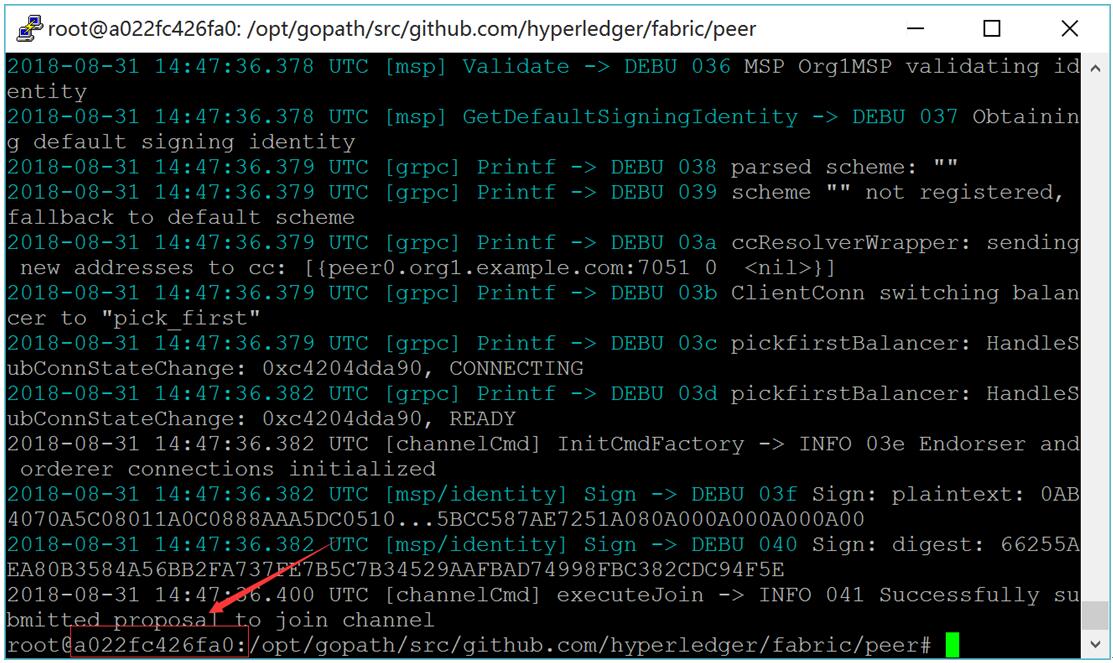
图:cli客户端
# exit

# docker cp xxxxxxxx:/opt/gopath/src/github.com/hyperledger/fabric/peer/mychannel.block /opt/gopath/src/github.com/hyperledger/fabric/kafkapeer
5) mychannel.block拷贝到其它电脑
# scp mychannel.block root@192.168.235.8:/opt/gopath/src/github.com/hyperledger/fabric/kafkapeer

# scp mychannel.block root@192.168.235.9:/opt/gopath/src/github.com/hyperledger/fabric/kafkapeer

# scp mychannel.block root@192.168.235.10:/opt/gopath/src/github.com/hyperledger/fabric/kafkapeer
3. 安装与运行智能合约
1) 安装智能合约
# docker exec -it cli bash

# peer chaincode install -n mycc -p github.com/hyperledger/fabric/kafkapeer/chaincode/go/example02/cmd/ -v 1.0
2) 实例化智能合约
区块初始化数据为a为200,b为400。
# ORDERER_CA=/opt/gopath/src/github.com/hyperledger/fabric/peer/crypto/ordererOrganizations/example.com/orderers/orderer0.example.com/msp/tlscacerts/tlsca.example.com-cert.pem

# peer chaincode instantiate -o orderer0.example.com: --tls --cafile $ORDERER_CA -C mychannel -n mycc -v 1.0 -c '{"Args":["init","a","200","b","400"]}' -P "OR ('Org1MSP.peer','Org2MSP.peer')"
3) Peer上查询a,显示200
# peer chaincode query -C mychannel -n mycc -c '{"Args":["query","a"]}'
查询a成功结果如下图所示:
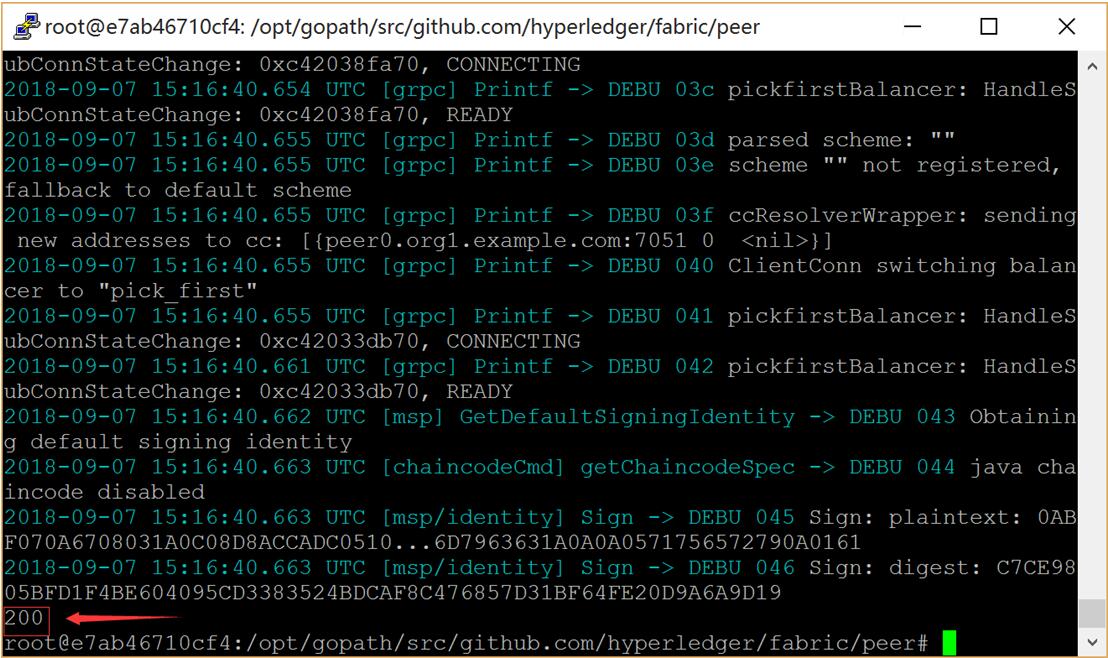
图:查询a成功结果
11.5.2 服务器(192.168.235.8)运行
1 准备部署智能合约
拷贝examples/chaincode/go/example02目录下的文件到kafkapeer/chaincode/go/example02目录下。
2 启动Fabric网络
1) 启动peer
# cd $GOPATH/src/github.com/hyperledger/fabric/kafkapeer

# docker-compose -f docker-compose-peer.yaml up -d
2) 启动cli容器
# docker exec -it cli bash
3) 拷贝mychannel.block到peer中
命令的xxxxxxxx替换为图中红框中的字符。
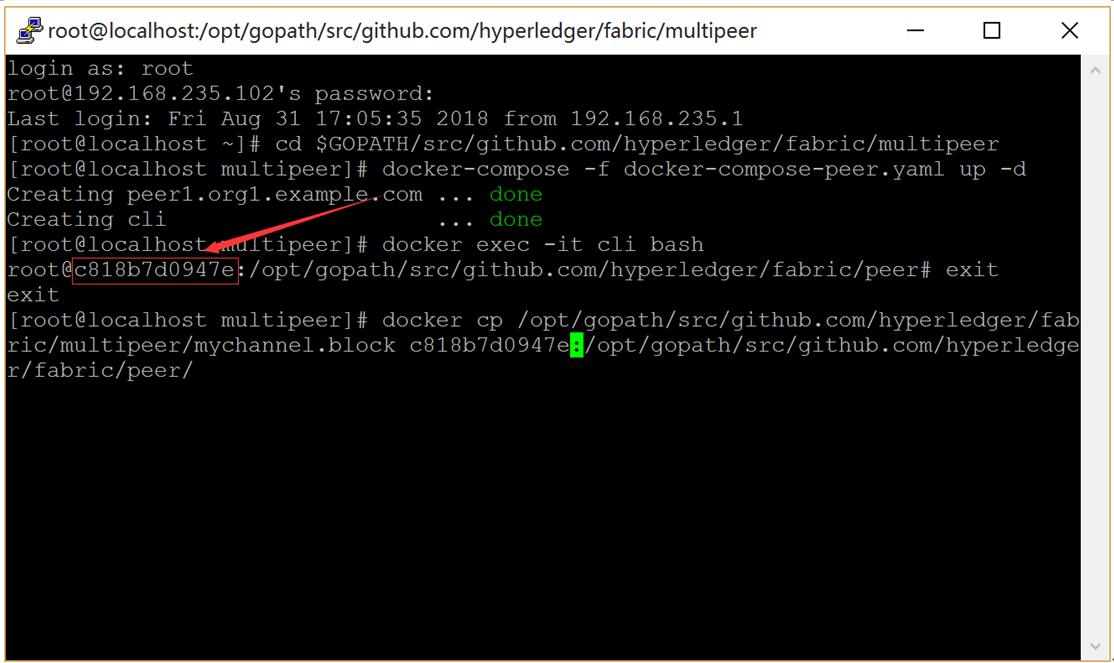
图:cli客户端
# exit

# docker cp /opt/gopath/src/github.com/hyperledger/fabric/kafkapeer/mychannel.block xxxxxxxx:/opt/gopath/src/github.com/hyperledger/fabric/peer/
4) Peer加入Channel
# docker exec -it cli bash

# peer channel join -b mychannel.block
3 安装与运行智能合约
1) 安装智能合约
# peer chaincode install -n mycc -p github.com/hyperledger/fabric/kafkapeer/chaincode/go/example02/cmd/ -v 1.0
2) Peer上进行a向b转20交易
# ORDERER_CA=/opt/gopath/src/github.com/hyperledger/fabric/peer/crypto/ordererOrganizations/example.com/orderers/orderer0.example.com/msp/tlscacerts/tlsca.example.com-cert.pem

# peer chaincode invoke --tls --cafile $ORDERER_CA -C mychannel -n mycc -c '{"Args":["invoke","a","b","20"]}'
交易成功结果如下图所示:
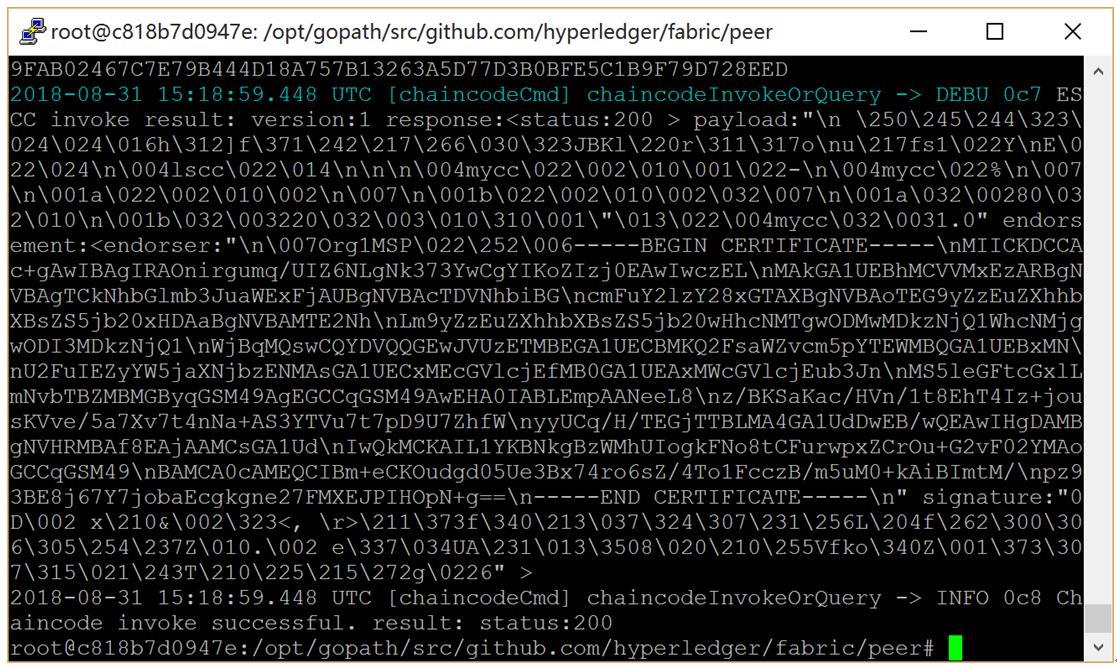
图:交易成功结果
11.5.3 服务器(192.168.235.9)运行
1 准备部署智能合约
拷贝examples/chaincode/go/example02目录下的文件到kafkapeer/chaincode/go/example02目录下。
2 启动Fabric网络
1) 启动peer
# cd $GOPATH/src/github.com/hyperledger/fabric/kafkapeer

# docker-compose -f docker-compose-peer.yaml up -d
2) 启动cli容器
# docker exec -it cli bash
3) 拷贝mychannel.block到peer中
命令的xxxxxxxx替换为图中红框中的字符。
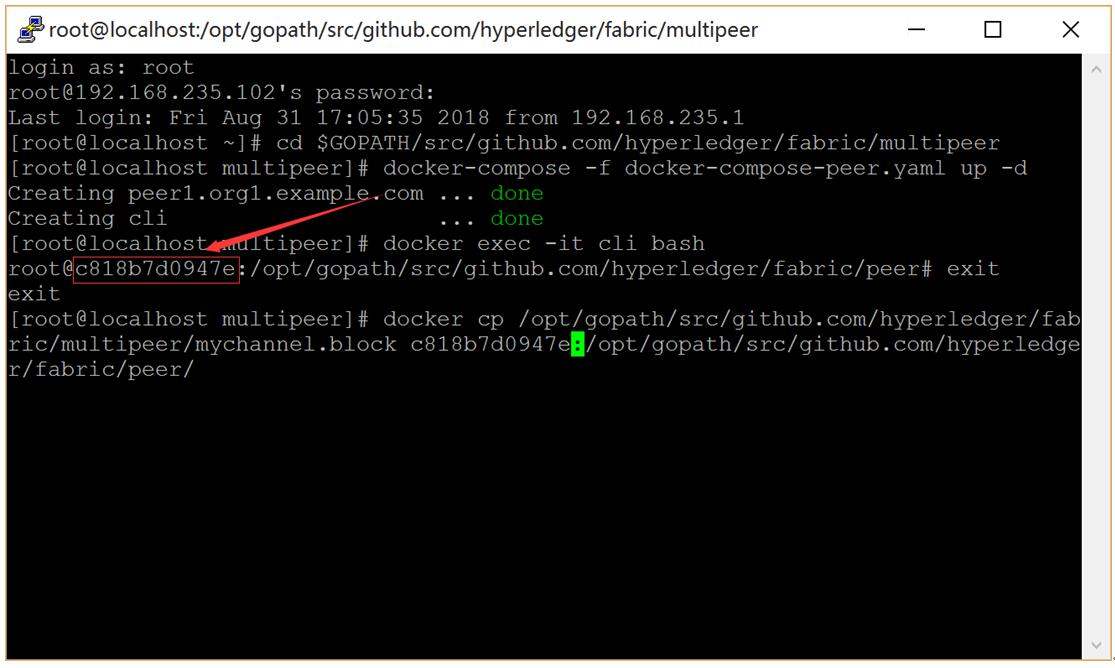
图:cli客户端
# exit

# docker cp /opt/gopath/src/github.com/hyperledger/fabric/kafkapeer/mychannel.block xxxxxxxx:/opt/gopath/src/github.com/hyperledger/fabric/peer/
4) Peer加入Channel
# docker exec -it cli bash

# peer channel join -b mychannel.block
3 安装与运行智能合约
1) 安装智能合约
# peer chaincode install -n mycc -p github.com/hyperledger/fabric/kafkapeer/chaincode/go/example02/cmd/ -v 1.0
2) Peer上查询a,显示180
# peer chaincode query -C mychannel -n mycc -c '{"Args":["query","a"]}'
查询a成功结果如下图所示:
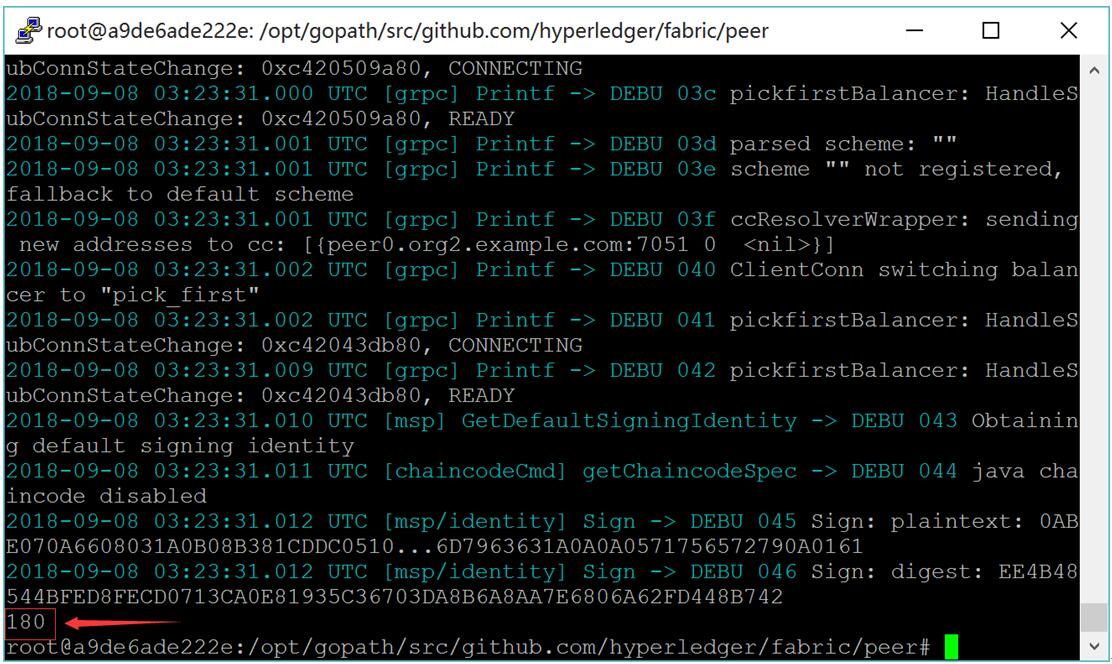
图:查询a成功结果
3) Peer上进行a向b转50交易
# ORDERER_CA=/opt/gopath/src/github.com/hyperledger/fabric/peer/crypto/ordererOrganizations/example.com/orderers/orderer0.example.com/msp/tlscacerts/tlsca.example.com-cert.pem

# peer chaincode invoke --tls --cafile $ORDERER_CA -C mychannel -n mycc -c '{"Args":["invoke","a","b","50"]}'
交易成功结果如下图所示:
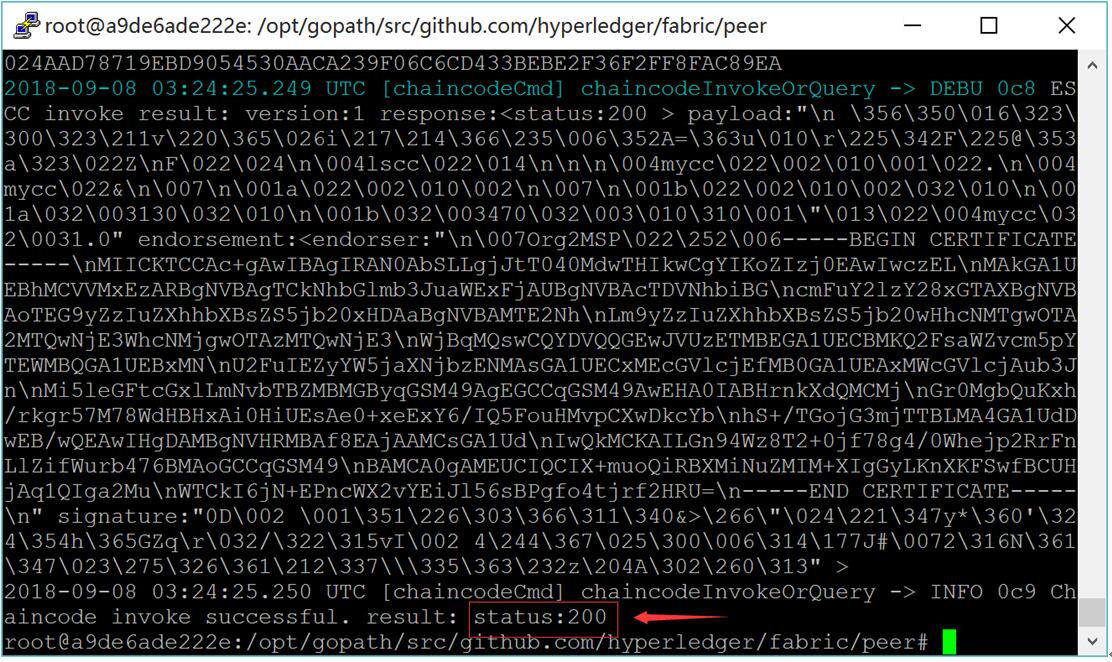
图:交易成功结果
11.5.4 服务器(192.168.235.10)运行
1 准备部署智能合约
拷贝examples/chaincode/go/example02目录下的文件到kafkapeer/chaincode/go/example02目录下。
2 启动Fabric网络
1) 启动peer
# cd $GOPATH/src/github.com/hyperledger/fabric/kafkapeer

# docker-compose -f docker-compose-peer.yaml up -d
2) 启动cli容器
# docker exec -it cli bash
3) 拷贝mychannel.block到peer中
命令的xxxxxxxx替换为图中红框中的字符。
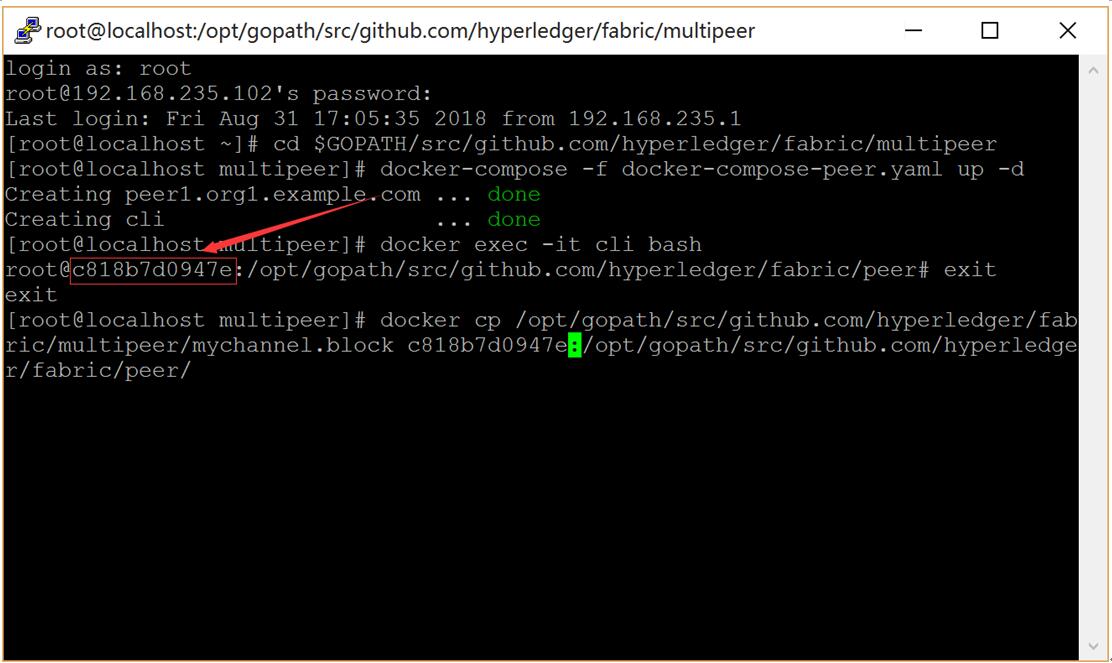
图:cli客户端
# exit

# docker cp /opt/gopath/src/github.com/hyperledger/fabric/kafkapeer/mychannel.block xxxxxxxx:/opt/gopath/src/github.com/hyperledger/fabric/peer/
4) Peer加入Channel
# docker exec -it cli bash

# peer channel join -b mychannel.block
3 安装与运行智能合约
1) 安装智能合约
# peer chaincode install -n mycc -p github.com/hyperledger/fabric/kafkapeer/chaincode/go/example02/cmd/ -v 1.0
2) Peer上查询a,显示130
# peer chaincode query -C mychannel -n mycc -c '{"Args":["query","a"]}'
查询a成功结果如下图所示:
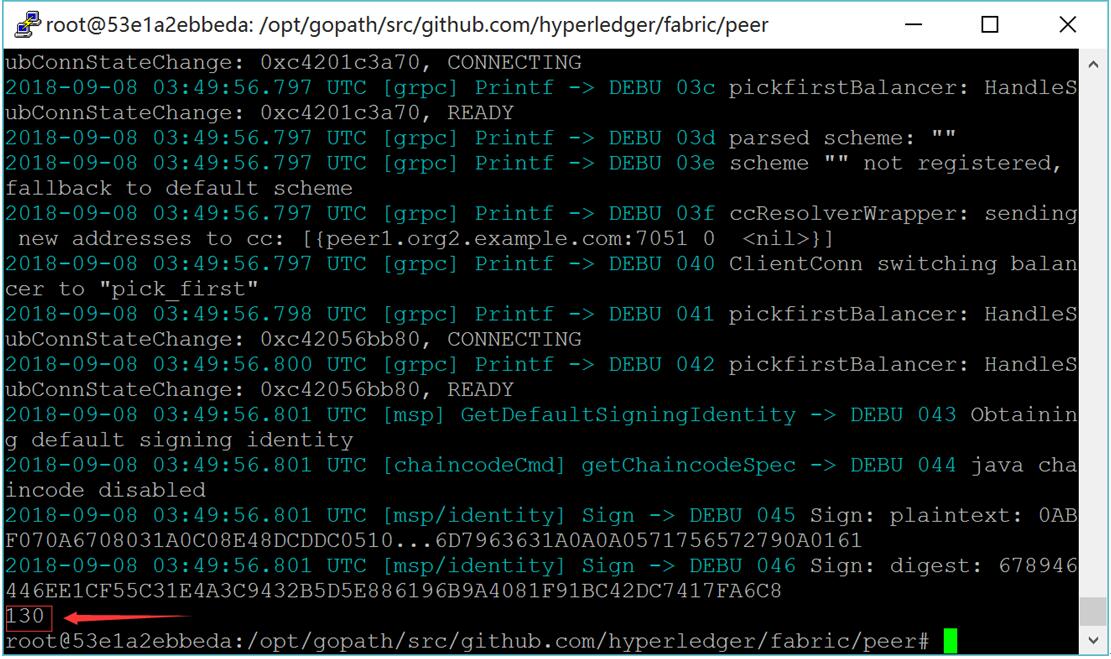
图:查询a成功结果
3) Peer上查询b,显示470
# peer chaincode query -C mychannel -n mycc -c '{"Args":["query","b"]}'
查询b成功结果如下图所示:
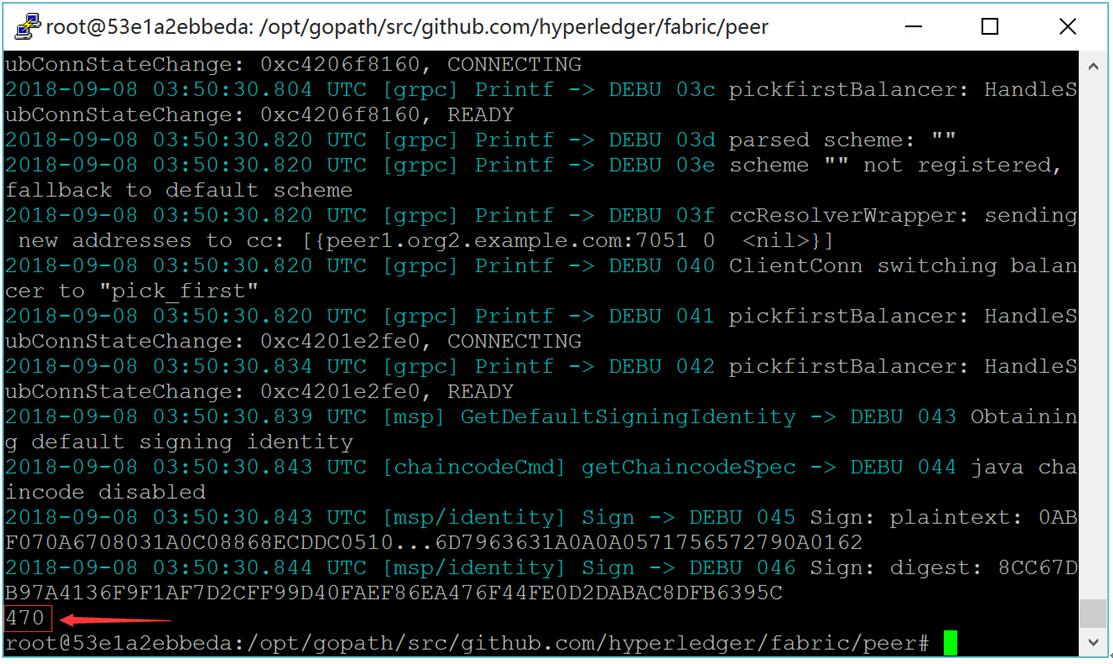
图:查询b成功结果
multipeer
HyperLedger Fabric 1.4 kafka生产环境部署(11.1)的更多相关文章
- Hyperledger Fabric (1.0)环境部署 chaincode【转】
三.测试Fabric 其实我们在前面运行./network_setup.sh up的时候系统已经运行了一个Example02的ChainCode测试,部署上去的ChainCodeName是mycc,所 ...
- HyperLedger Fabric ca 1.2 正式环境部署
生成一个根CA(RootCA),在根CA下3个中间CA(IntermediaCA). 1. 运行和配置RootCA服务#cd /opt/gopath/src/github.com/hyperledge ...
- Centos7 HyperLedger Fabric 1.4 生产环境部署
Kafka生产环境部署案例采用三个排序(orderer)服务.四个kafka.三个zookeeper和四个节点(peer)组成,共准备八台服务器,每台服务器对应的服务如下所示: kafka案例网络拓扑 ...
- Django + Uwsgi + Nginx 的生产环境部署
使用runserver可以使我们的django项目很便捷的在本地运行起来,但这只能在局域网内访问,如果在生产环境部署django,就要多考虑一些问题了.比如静态文件处理,安全,效率等等,本篇文章总结归 ...
- 深度学习Tensorflow生产环境部署(上·环境准备篇)
最近在研究Tensorflow Serving生产环境部署,尤其是在做服务器GPU环境部署时,遇到了不少坑.特意总结一下,当做前车之鉴. 1 系统背景 系统是ubuntu16.04 ubuntu@ub ...
- Spring Boot (二)集成Jsp与生产环境部署
一.简介 提起Java不得不说的一个开发场景就是Web开发,也是Java最热门的开发场景之一,说到Web开发绕不开的一个技术就是JSP,因为目前市面上仍有很多的公司在使用JSP,所以本文就来介绍一下S ...
- Vue生产环境部署
前面的话 开发时,Vue 会提供很多警告来帮助解决常见的错误与陷阱.生产时,这些警告语句却没有用,反而会增加载荷量.再次,有些警告检查有小的运行时开销,生产环境模式下是可以避免的.本文将详细介绍Vue ...
- 【原创】大数据基础之Airflow(2)生产环境部署airflow研究
一 官方 airflow官方分布式部署结构图 airflow进程 webserver scheduler flower(非必须) worker airflow缺点 scheduler单点 通过在sch ...
- 第四百零二节,Django+Xadmin打造上线标准的在线教育平台—生产环境部署,uwsgi安装和启动,nginx的安装与启动,uwsgi与nginx的配置文件+虚拟主机配置
第四百零二节,Django+Xadmin打造上线标准的在线教育平台—生产环境部署,uwsgi安装和启动,nginx的安装与启动,uwsgi与nginx的配置文件+虚拟主机配置 软件版本 uwsgi- ...
随机推荐
- 上传附件(图片base64)封装方法
上传附件(图片base64)封装方法 php 上传附件,base64 项目中封装的接口: public function error($msg){ header("Content-type: ...
- EJB 3.1 @Startup @Singleton sequence
The annotation javax.ejb.Startup (@Startup) is used to mark an EJB so to make the EJB can be brought ...
- 二、基于事件的异步编程模式(EAP)
一.引言 在上一个专题中为大家介绍了.NET 1.0中提出来的异步编程模式--APM,虽然APM为我们实现异步编程提供了一定的支持,同时它也存在着一些明显的问题--不支持对异步操作的取消和没有提供对进 ...
- Java -- Arrays.asList()方法
Arrays.asList() 是将数组作为列表 问题来源于: public class Test { public static void main(String[] args) { int[] a ...
- 鲁宾斯坦说:"思维是在概括中完成的。"
鲁宾斯坦说:"思维是在概括中完成的."
- UVa 1151 - Buy or Build(最小生成树)
链接: https://uva.onlinejudge.org/index.php?option=com_onlinejudge&Itemid=8&page=show_problem& ...
- PHP不定维数组去除空值
最近遇到一个问题,是将不定维数组的空值去除,回来研究了一下,写出来了,不知道是否还能优化 写的不好的,如果有好的想法或者好的实现方法,欢迎提出来,如果哪里写错了,也欢迎大牛可以讲解一下 代码如下,欢迎 ...
- 【原创】多字节版本下MFC控件处理字符集的BUG
工程项目属性: 字符集:多字节 stdafx.h文件中添加: #pragma comment(linker,"/manifestdependency:\"type='win32' ...
- shiro注解,初始化资源和权限,会话管理
有具体问题的可以参考之前的关于shiro的博文,关于shiro的博文均是一次工程的内容 注解: 新建一个类: 此时需要有admin的权限才可以执行下面的代码 public class ShiroS ...
- .Net Core SignalR 初体验
前言 Asp.Net SignalR已经出来很久了,但是一直没有静下心来好好看看.昨天花了几个小时的时间看了下.首先借鉴了官方文档,如何搭建一个SignalR的Demo. 参考文章:https://d ...