
树莓派使用Samba共享文件夹
转载自:http://raspberrypihq.com/how-to-share-a-folder-with-a-windows-computer-from-a-raspberry-pi/
Sharing files over the network is often very useful. Whether you need to transfer media files to the Raspberry Pi or you want to use the raspberry as a simple Network-Attached Storage (NAS) device, this guide will show you how to enable file sharing of a folder on the Raspberry Pi running the Raspbian OS.
Prerequisites & Equipment
You are going to need the following:
- A Raspberry Pi (Buy here)
- A SD Card flashed with the Raspbian OS (Here is a guide if you need)
- Access to the Raspberry either via keyboard and a monitor or remotely
- A home network
- A Windows computer (for this guide we will be running Windows 7)
Install and configure required software
To share network folders to a Windows computer we need to install some special software on the Raspberry Pi. The software providing the secret sauce this time is called Samba. The Samba software package implements the SMB protocol and provides support for the Windows naming service (WINS) and for joining a Windows Workgroup.
Installing the software is easy – login to your Raspberry Pi and run:
sudo apt-get install samba samba-common-bin
After installation configure the software by opening the file /etc/samba/smb.conf using the command:
sudo nano /etc/samba/smb.conf
Read through the file and make sure you have the following parameters set:
workgroup = WORKGROUP

wins support = yes
You can use anything as your workgroup name as long as it is alphanumerical and matches the workgroup you would like to join. The default workgroup in Windows 7 is WORKGROUP.
Setup folder to share
Next step is to create the folder you would like to share. To create a folder called “share” in your home directory do the following:
mkdir ~/share
With the folder created we can now tell the Samba software to share it on the network. Open the file /etc/samba/smb.conf using the command:
sudo nano /etc/samba/smb.conf
Scroll to the bottom and add the following:
[PiShare]

 comment=Raspberry Pi Share

 path=/home/pi/share

 browseable=Yes

 writeable=Yes

 only guest=no

 create mask=0777

 directory mask=0777

 public=no
Notice how we tell Samba that public access is not allowed via “public=no” – this means that anyone wanting to access the shared folder must login with a valid user.
In this case the valid user is the user called “pi”. To let Samba know that “pi” is a network user run the command:
sudo smbpasswd -a pi
And enter pi’s password twice (default: raspberry).
At this point we can now login to the share from our Windows computer – use Domain: raspberrypi, User: pi and Password: raspberry (unless you changed the password) as you can see below:
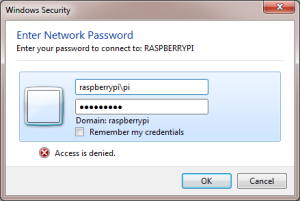
If you do not want to deal with logging in you can always make the share publicly available by changing the config file to say:
public=yes
However please note that this is extremely dangerous since anyone will be able to access, modify and delete your files.
树莓派使用Samba共享文件夹的更多相关文章
- 常见企业IT支撑【2、samba共享文件夹】
samba共享文件夹,较Window自带的比较:开源,安全 建议安装samba4,兼容性好 1.安装samba #yum -y install samba4 samba4-client 2.备份sam ...
- 使用samba共享文件夹,提供给window访问
1. 下载yumdownloader yum install -y yum-utils 2. 下载samba mkdir samba cd samba yumdownloader --resolve ...
- samba共享文件夹设置
sudo apt-get install samba(4) mkdir /home/用户名/share (新建share文件夹) sudo cp /etc/samba/smb.conf /etc/sa ...
- ubuntu 安装samba共享文件夹
安装samba sudo apt-get install samba smbclient 配置samba sudo cp /etc/samba/smb.conf /etc/samba/smb.conf ...
- cetos6 安装samba共享文件夹
yum方式安装 yum install samba 修改配置文件 vim /etc/samba/smb.conf [global] comment = global workgroup = QFpay ...
- Linux使用mount挂载samba共享文件夹
挂载smb的目录,使用读写644权限 mount -t cifs -o "rw,dir_mode=0644,file_mode=0644,username=username,password ...
- Ubuntu 配置、使用samba共享文件夹
安装库 sudo apt install smbclient samba samba-common 启动samba sudo /etc/init.d/samba start 备份配置文件 sudo c ...
- debian 11 开启 samba 共享文件夹
安装 apt-get install samba 安装时,提示搜索不到 此包时 解决办法1:apt-get update 更新源 解决办法2:更改镜像源,可以采用阿里云,网易云等镜像站里提供的镜 ...
- [Z] 将samba共享文件夹映射到linux的目录下
Linux系统下访问远程共享资源 使用mount加载共享目录: -把WinXP机器192.168.16.249上的共享目录test001映射到本地目录/wdl/下. -把Linux机器192.168. ...
随机推荐
- [USACO09Open] Tower of Hay 干草塔
为了调整电灯亮度,贝西要用干草包堆出一座塔,然后爬到牛棚顶去把灯泡换掉.干草包会从传送带上运来,共会出现N包干草,第i包干草的宽度是W i ,高度和长度统一为1.干草塔要从底层开始铺建.贝西会选择最先 ...
- 三个线程ABC,交替打印ABC
转载与:https://www.cnblogs.com/x_wukong/p/4009709.html 创建3个线程,让其交替打印ABC . 输出如下: ABCABCABCABC. 方法:使用syn ...
- 反片语 (Ananagrams,UVa 156)
题目描述: #include <iostream> #include <string> #include <cctype> #include <vector& ...
- 微信小程序 选项 、时间日期选择器
wxml: <view class="section" > <picker bindchange="bindPickerChange" val ...
- C++与C#数据类型对应关系总结
https://blog.csdn.net/u010159842/article/details/51720458 添加: 1.c++参数含有&,c#也需要用ref关键字. 2.在c++中声明 ...
- 第八次作业——项目UML设计
分工及贡献分评定 成员 参与 贡献比例 朱跃安(031602348) 类图 13% 后敬甲(031602409) 实体关系图+博客整理 14.5% 林志华(031602128) 用例图+活动图 14. ...
- Where to go from here
Did you get through all of that content? Congratulations! You've learnt the fundamentals of algorith ...
- TCP系列27—窗口管理&流控—1、概述
在前面的内容中我们依次介绍了TCP的连接建立和终止过程和TCP的各种重传方式.接着我们在这部分首先关注交互式应用TCP连接相关内容如延迟ACK.Nagle算法.Cork算法等,接着我们引入流控机制(f ...
- Python ZKPython 安装
1.由于python客户端依赖c的客户端所以要先安装c版本的客户端cd zookeeper-3.4.5/src/c./configuremake make install 2.下载python扩展包, ...
- centos7编译安装redis遇坑
编译redis时:make cc Command not found 原因分析:没有安装gcc,执行: yum install gcc 编译redis时:error: jemalloc/jemallo ...