
numpy.meshgrid()理解
本文的目的是记录meshgrid()的理解过程:
step1. 通过一个示例引入创建网格点矩阵;
step2. 基于步骤1,说明meshgrid()的作用;
step3. 详细解读meshgrid()的官网定义;
说明:step1和2 的数据都是基于笛卡尔坐标系的矩阵,目的是为了方便讨论。
step1. 通过一个示例引入创建网格点矩阵;
示例1,创建一个2行3列的网格点矩阵。
 #!/usr/bin/env python3

 #-*- coding:utf-8 -*-

 ############################

 #File Name: meshgrid1.py

 #Brief:

 #Author: frank

 #Mail: frank0903@aliyun.com

 #Created Time:2018-06-14 21:33:14

 ############################

 import numpy as np

 import matplotlib.pyplot as plt

 X = np.array([[0, 0.5, 1],[0, 0.5, 1]])

 print("X的维度:{},shape:{}".format(X.ndim, X.shape))

 Y = np.array([[0, 0, 0],[1, 1, 1]])

 print("Y的维度:{},shape:{}".format(Y.ndim, Y.shape))

 plt.plot(X, Y, 'o--')

 plt.grid(True)

 plt.show()
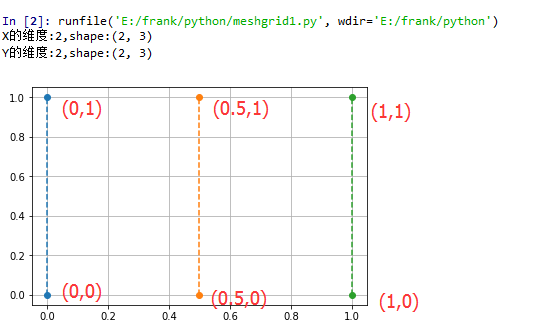
X矩阵是:[[0. 0.5 1. ], [0. 0.5 1. ]]
Y矩阵是:[[0 0 0],[1 1 1]]
step2. meshgrid()的作用;
当要描绘的 矩阵网格点的数据量小的时候,可以用上述方法构造网格点坐标数据;
但是如果是一个(256, 100)的整数矩阵网格,要怎样构造数据呢?
方法1:将x轴上的100个整数点组成的行向量,重复256次,构成shape(256,100)的X矩阵;将y轴上的256个整数点组成列向量,重复100次构成shape(256,100)的Y矩阵
显然方法1的数据构造过程很繁琐,也不方便调用,那么有没有更好的办法呢?of course!!!
那么meshgrid()就显示出它的作用了
使用meshgrid方法,你只需要构造一个表示x轴上的坐标的向量和一个表示y轴上的坐标的向量;然后作为参数给到meshgrid(),该函数就会返回相应维度的两个矩阵;
例如,你想构造一个2行3列的矩阵网格点,那么x生成一个shape(3,)的向量,y生成一个shape(2,)的向量,将x,y传入meshgrid(),最后返回的X,Y矩阵的shape(2,3)
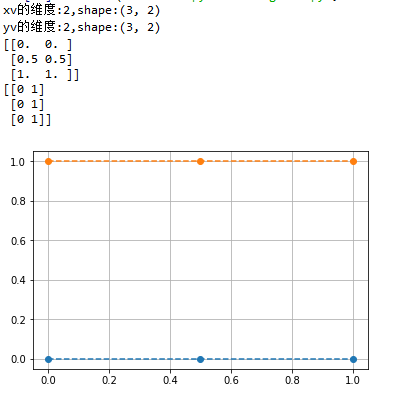
示例2,使用meshgrid()生成step1中的网格点矩阵
 x = np.array([0, 0.5, 1])

 y = np.array([0,1])

 xv,yv = np.meshgrid(x, y)

 print("xv的维度:{},shape:{}".format(xv.ndim, xv.shape))

 print("yv的维度:{},shape:{}".format(yv.ndim, yv.shape))

 plt.plot(xv, yv, 'o--')

 plt.grid(True)

 plt.show()
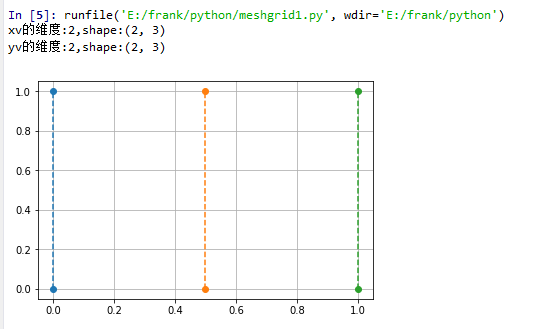
示例3,生成一个20行30列的网格点矩阵
 x = np.linspace(0,500,30)

 print("x的维度:{},shape:{}".format(x.ndim, x.shape))

 print(x)

 y = np.linspace(0,500,20)

 print("y的维度:{},shape:{}".format(y.ndim, y.shape))

 print(y)

 xv,yv = np.meshgrid(x, y)

 print("xv的维度:{},shape:{}".format(xv.ndim, xv.shape))

 print("yv的维度:{},shape:{}".format(yv.ndim, yv.shape))

 plt.plot(xv, yv, '.')

 plt.grid(True)

 plt.show()
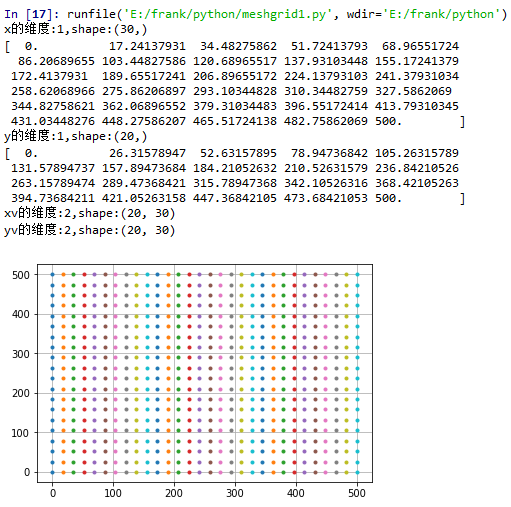
step3. 详细解读meshgrid()的官网定义;
numpy.meshgrid(*xi, **kwargs)
Return coordinate matrices from coordinate vectors.
根据输入的坐标向量生成对应的坐标矩阵
Parameters:
x1, x2,…, xn : array_like
1-D arrays representing the coordinates of a grid.
indexing : {‘xy’, ‘ij’}, optional
Cartesian (‘xy’, default) or matrix (‘ij’) indexing of output. See Notes for more details.
sparse : bool, optional
If True a sparse grid is returned in order to conserve memory. Default is False.
copy : bool, optional
If False, a view into the original arrays are returned in order to conserve memory.
Default is True. Please note that sparse=False, copy=False will likely return non-contiguous arrays.
Furthermore, more than one element of a broadcast array may refer to a single memory location.
If you need to write to the arrays, make copies first.
Returns:
X1, X2,…, XN : ndarray
For vectors x1, x2,…, ‘xn’ with lengths Ni=len(xi) ,
return (N1, N2, N3,...Nn) shaped arrays if indexing=’ij’
or (N2, N1, N3,...Nn) shaped arrays if indexing=’xy’
with the elements of xi repeated to fill the matrix along the first dimension for x1, the second for x2 and so on.
针对indexing参数的说明:
indexing只是影响meshgrid()函数返回的矩阵的表示形式,但并不影响坐标点
 x = np.array([0, 0.5, 1])

 y = np.array([0,1])

 xv,yv = np.meshgrid(x, y)

 print("xv的维度:{},shape:{}".format(xv.ndim, xv.shape))

 print("yv的维度:{},shape:{}".format(yv.ndim, yv.shape))

 print(xv)

 print(yv)

 plt.plot(xv, yv, 'o--')

 plt.grid(True)

 plt.show()
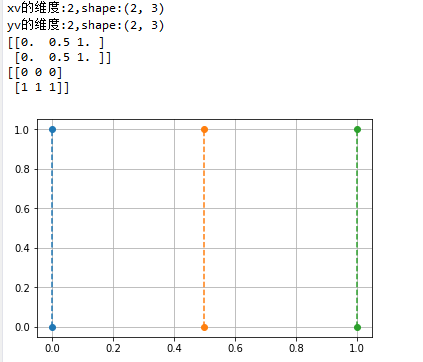
 x = np.array([0, 0.5, 1])

 y = np.array([0,1])

 xv,yv = np.meshgrid(x, y,indexing='ij')

 print("xv的维度:{},shape:{}".format(xv.ndim, xv.shape))

 print("yv的维度:{},shape:{}".format(yv.ndim, yv.shape))

 print(xv)

 print(yv)

 plt.plot(xv, yv, 'o--')

 plt.grid(True)

 plt.show()
numpy.meshgrid()理解的更多相关文章
- 对numpy.meshgrid()理解
一句话解释numpy.meshgrid()——生成网格点坐标矩阵.关键词:网格点,坐标矩阵 网格点是什么?坐标矩阵又是什么鬼?看个图就明白了: 图中,每个交叉点都是网格点,描述这些网格点的坐标的矩阵, ...
- numpy.meshgrid()
numpy提供的numpy.meshgrid()函数可以让我们快速生成坐标矩阵X,Y 语法:X,Y = numpy.meshgrid(x, y)输入:x,y,就是网格点的横纵坐标列向量(非矩阵)输出: ...
- numpy meshgrid 和 mgrid 的两个简单实例和解析
numpy.meshgrid 和 numpy.mgrid 用于返回包含坐标向量的坐标矩阵. 当坐标矩阵为二维时, 可用于在图像变形时构建网格. 实例一 from __future__ import p ...
- numpy.meshgrid的理解以及3D曲面图绘制(梯度下降法实现过程)
相关概念: 1.x向量和y向量 import numpy as np import matplotlib.pyplot as plt x = np.array([[0,1,2,3], [0,0,0,0 ...
- numpy meshgrid函数
1.meshgrid函数用两个坐标轴上的点在平面上画格. 用法: [X,Y]=meshgrid(x,y) [X,Y]=meshgrid(x)与[X,Y]=meshgrid(x,x)是等同的 [X, ...
- NumPy之:理解广播
目录 简介 基础广播 广播规则 简介 广播描述的是NumPy如何计算不同形状的数组之间的运算.如果是较大的矩阵和较小的矩阵进行运算的话,较小的矩阵就会被广播,从而保证运算的正确进行. 本文将会以具体的 ...
- numpy深入理解剖析
http://www.scipy-lectures.org/advanced/advanced_numpy/index.html
- 《利用Python进行数据分析·第2版》第四章 Numpy基础:数组和矢量计算
<利用Python进行数据分析·第2版>第四章 Numpy基础:数组和矢量计算 numpy高效处理大数组的数据原因: numpy是在一个连续的内存块中存储数据,独立于其他python内置对 ...
- Numpy应用100问
对于从事机器学习的人,python+numpy+scipy+matplotlib是重要的基础:它们基本与matlab相同,而其中最重要的当属numpy:因此,这里列出100个关于numpy函数的问题, ...
随机推荐
- jquery滚动条插件nanoscroller的应用
默认的滚动条的样式,各个版本的兼容性不是很好, 推荐一款jQuery 插件nanoscroller ,可以自定义滚动条的样式. 应用: 1.引入样式 nanoscroller.css <link ...
- 判断一组checkbox中是否有被选中的
if ($(":checkbox[name=subcheck]:checked").size() == 0) { alert("请至少选择一条记录进行删除操作!" ...
- 【Python】装饰器实现日志记录
好的日志对一个软件的重要性是显而易见的.如果函数的入口都要写一行代码来记录日志,这种方式实在是太低效了,但一直没有找到更好的方法.后来用python写一些软件,了解到python的装饰器功能时,突然人 ...
- HDU 4372 - Count the Buildings(组合计数)
首先想过n^3的组合方法,即f(i,j,k)=f(i-1,j,k)*(i-2)+f(i-1,j-1,k)+f(i-1,j,k-1),肯定搞不定 然后想了好久没有效果,就去逛大神博客了,结果发现需要用到 ...
- 【笔记】js 关于定时器的理解
总所周知 js 里面的 setTimeout() 方法是用来设定某些功能在某段时间间隔之后执行的.但是今天看了高程对定时器的描述发现并不是这样. setTimeout(function(){ //.c ...
- 有道单词导入 有道单词 生词本 批量导入 添加 有道单词XML 背单词
本程序 主要功能: 对有道生词实现批量导入功能 生成有道单词XML的功能,实现快速导入 有了本程序后就可以批量添加生词. 有道生词本 XML模板 分析 word 为单词,可以为一个单词 ...
- Ubuntu12.04 Bugzilla 和 TestOpia的安装步骤
1. 安装apache User@ubuntu:$ sudo apt-get install apache2 注:安装完以后能够通过http://192.168.128.128/ 来訪 ...
- windows print 自定义字体颜色【python】
windows print 自定义字体颜色 import ctypes STD_INPUT_HANDLE = -10 STD_OUTPUT_HANDLE= -11 STD_ERROR_HANDLE = ...
- EAS常用工具类
package com.kingdee.eas.custom; import java.io.File; import java.io.FileNotFoundException; import ja ...
- #pragma pack(push,1)与#pragma pack(1)的区别(转)
这是给编译器用的参数设置,有关结构体字节对齐方式设置, #pragma pack是指定数据在内存中的对齐方式. #pragma pack (n) 作用:C编译器将按照n个字节对 ...