
Learning WCF:A Simple Demo
This is a very simple demo which can help you create a wcf applition quickly.
Create a Solution
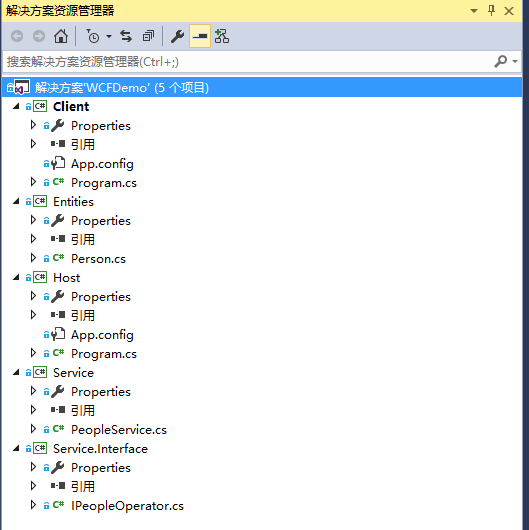
Open Vistual Stuido and create a solution named WCFDemoJoey. It looks like this:
Crate a Entity
using System.Runtime.Serialization;

namespace Entities

{

    [DataContract]

    public class Person

    {

        [DataMember]

        public int PersonId { get; set; }

        [DataMember]

        public string Name { get; set; }

        [DataMember]

        public int Age { get; set; }

    }

}
The attribute DataConract and DataMember represents a way of Serialization.
Create a Service Contract
A contract is a interface which defines some remote methods:
namespace Service.Interface

{

    [ServiceContract(Name = "PeopleOperatorService", Namespace ="http://zzy0471.cnblogs.com")]

    public interface IPeopleOperator

    {

        [OperationContract]

        Person GetPerson();

    }

}
We can identify a interface as a contract by using attribute ServiceContract
Create a Service
A service is a implement of a contract:
using Service.Interface;

using Entities;

namespace Service

{

    public class PeopleService : IPeopleOperator

    {

        public Person GetPerson()

        {

            return new Person { PersonId = 1, Name = "Joey", Age = 30 };

        }

    }

}
Create a Host
WCF must be in a process which be called Host:
namespace Host

{

    class Program

    {

        static void Main(string[] args)

        {

            using (ServiceHost host = new ServiceHost(typeof(PeopleService)))

            {

                host.AddServiceEndpoint(typeof(IPeopleOperator),

                new WSHttpBinding(),

                "http://localhost:9999/PeopleService");

                if (host.Description.Behaviors.Find<ServiceMetadataBehavior>() == null)

                {

                    ServiceMetadataBehavior behavior = new ServiceMetadataBehavior();

                    behavior.HttpGetEnabled = true;

                    behavior.HttpGetUrl = new Uri("http://localhost:9999/PeopleService/PeopleService/metadata");

                    host.Description.Behaviors.Add(behavior);

                }

                host.Opened += (s, e) => Console.WriteLine("Service is running, press any key to stop");

                host.Open();

                Console.Read();

            }

        }

    }

}
Create a Clinet
using Service.Interface;

using System;

using System.ServiceModel;

namespace Client

{

    class Program

    {

        static void Main(string[] args)

        {

            using (ChannelFactory<IPeopleOperator> channelFactory = new ChannelFactory<IPeopleOperator>(new WSHttpBinding(),

                "http://localhost:9999/PeopleService"))

            {

                IPeopleOperator proxy = channelFactory.CreateChannel();

                var person = proxy.GetPerson();

                Console.WriteLine(person.Name + " " + person.Age);

                Console.Read();

            }

        }

    }

}
There are three points we must pay close attention to:
- Address
- Binding
- Contract
Address represents where should we visit the service.
Binding represents how do we Transfer information, the WSHttpBinding is one of the ways.
Contract represents what romate mehods we can call.
Learning WCF:A Simple Demo的更多相关文章
- Learning WCF:Life Cycle of Service instance
示例代码下载地址:WCFDemo1Day 概述 客户端向WCF服务发出请求后,服务端会实例化一个Service对象(实现了契约接口的对象)用来处理请求,实例化Service对象以及维护其生命周期的方式 ...
- Learning WCF:Fault Handling
There are two types of Execptions which can be throwed from the WCF service. They are Application ex ...
- Learning WCF Chapter1 Generating a Service and Client Proxy
In the previous lab,you created a service and client from scratch without leveraging the tools avail ...
- Learning WCF Chapter1 Hosting a Service in IIS
How messages reach a service endpoint is a matter of protocols and hosting. IIS can host services ov ...
- Java 下的 JSON库性能比较:JSON.simple
JSON已经成为当前服务器与WEB应用之间数据传输的公认标准,不过正如许多我们所习以为常的事情一样,你会觉得这是理所当然的便不再深入思考了.我们很少会去想用到的这些JSON库到底有什么不同,但事实上它 ...
- JSON库之性能比较:JSON.simple VS GSON VS Jackson VS JSONP
从http://www.open-open.com/lib/view/open1434377191317.html 转载 Java中哪个JSON库的解析速度是最快的? JSON已经成为当前服务器与WE ...
- WCF:为 SharePoint 2010 Business Connectivity Services 构建 WCF Web 服务(第 1 部分,共 4 部分)
转:http://msdn.microsoft.com/zh-cn/library/gg318615.aspx 摘要:通过此系列文章(共四部分)了解如何在 Microsoft SharePoint F ...
- Learning WCF 书中的代码示例下载地址
Learning WCF Download Example Code 第一个压缩文件LearningWCF.zip是VS2005创建的项目,不要下载这个. 建议下载VS2008版的,以及Media
- simple demo of Handlebars.js & jquery.js
simple demo of Handlebars.js & jquery.js <html> <head> <script src="jquery-1 ...
随机推荐
- leetcode322
public class Solution { public int coinChange(int[] coins, int amount) { ) ; ]; dp[] = ; ;i <= am ...
- java List<Map<String,Object>
xml <select id="selectShopList" resultType="java.util.HashMap"> SELECT p.P ...
- java学习-- equals和hashCode的关系
hashcode的目的就是在hashset或者hashmap等中比较两个对象相等时,减少equals的使用次数来提高效率 以下为摘录 java中hashcode和equals的区别和联系 HashSe ...
- Python学习—基础篇之基本数据类型(一)
数据类型 在python中,能够直接处理的基本数据类型主要有数字类型.字符串类型.字节类型.布尔类型.列表.元组.字典.集合等. 一.数字类型 1.1 数字类型的创建 # 数字类型 a = 10 b ...
- 【mac环境】终端配色 & 配置使用ll命令
1.MAC OS X 命令终端的颜色显示 打开 terminal 会发现 ls 和 grep 后的结果是没有色彩的,这时候可以这么干: 用 vim 打开文件 ~/.bash_profile,然后把下边 ...
- 8.24 关于valid.js
这是昨天遇到的一个问题. js文件的validator函数里面套用了框架,但是页面上报错,说这不是一个函数..找了wd ht调都不知道怎么回事 后来jf哥说,是因为html页面没有引入valid.js ...
- centos6 下erlang安装
https://packages.erlang-solutions.com/erlang/
- node.js中path路径模块的使用
path模块是node.js中处理路径的核心模块.可以很方便的处理关于文件路径的问题. join() 将多个参数值合并成一个路径 const path = require('path'); conso ...
- adb、monkey常用命令
adb.monkey常用命令 1.查看连接设备 adb devices 2.连接android模拟器 adb connect 127.0.0.1:62001 3.安装软件 adb install 这个 ...
- 多进程和mongo的配合使用
这篇文章主要是讲在多线程下使用mongo数据库的一个报错,算是一个警告,如下: /usr/lib64/python2.6/site-packages/pymongo/topology.py:75: U ...