
Learning WCF:Fault Handling
There are two types of Execptions which can be throwed from the WCF service. They are Application excepiton and Infrastructure exception.
Handle Application Exception
If we do nothing, a FaultException always be throwed when your WCF service appear any error. For example:
Service:
using Service.Interface;

using Entities;

using System;

namespace Service

{

    public class PeopleService : IPeopleOperator

    {

        public void DeletePerson(Person person)

        {

            Console.WriteLine("Have deleted a person whoes name is:" + person.Name);

        }

    }

}
Client:
using Entities;

using Service.Interface;

using System;

using System.ServiceModel;

namespace Client

{

    class Program

    {

        static void Main(string[] args)

        {

            using (ChannelFactory<IPeopleOperator> channelFactory = new ChannelFactory<IPeopleOperator>(new WSHttpBinding(),

                "http://localhost:9999/PeopleService"))

            {

                IPeopleOperator proxy = channelFactory.CreateChannel();

                Person person = null;

                proxy.DeletePerson(person);

                Console.Read();

            }

        }

    }

}
When you run the Client code:
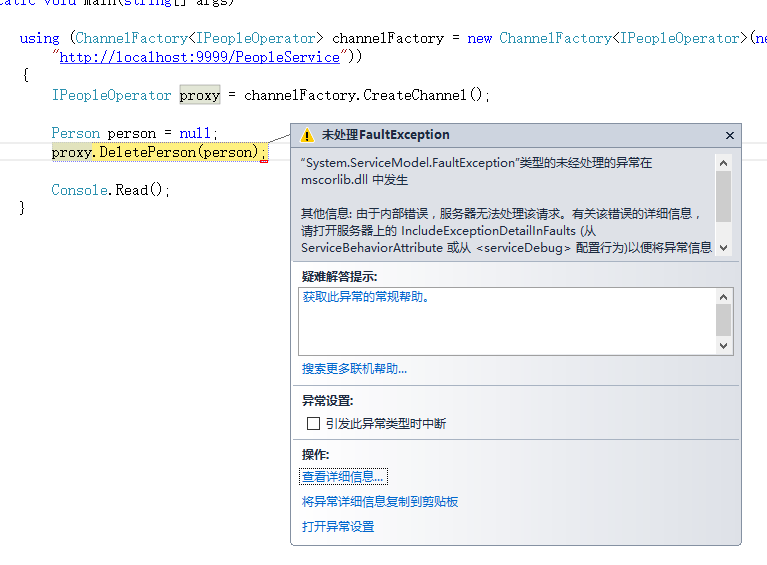
There is no useful information. We should use Fault Contract. Fault Contract allow developer define error information entity flexible.
Using Fault Contract
Create an Error message container entity
using System.Runtime.Serialization;

namespace Entities

{

    [DataContract]

    public class ErrorInformation

    {

        public ErrorInformation(string messages,

            string serviceName,

            string methodName)

        {

            Messages = messages;

            ServiceName = serviceName;

            MethodName = methodName;

        }

        [DataMember]

        public string Messages { get; private set; }

        [DataMember]

        public string ServiceName { get; private set; }

        [DataMember]

        public string MethodName { get; private set; }

    }

}
Apply FaultContract attribute on the operation of the contract interface
using Entities;

using System.ServiceModel;

namespace Service.Interface

{

    [ServiceContract(Name = "PeopleOperatorService", Namespace ="http://zzy0471.cnblogs.com")]

    public interface IPeopleOperator

    {

        [FaultContract(typeof(ErrorInformation))]

        [OperationContract]

        void DeletePerson(Person person);

    }

}
Mondify the Service Code
using Service.Interface;

using Entities;

using System;

using System.ServiceModel;

namespace Service

{

    public class PeopleService : IPeopleOperator

    {

        public void DeletePerson(Person person)

        {

            if (person == null)

            {

                var error = new ErrorInformation("参数person为null",

                    "PeopleService",

                    "DeletePerson");

                throw new FaultException<ErrorInformation>(error);

            }

            else

            {

                Console.WriteLine("Have deleted a person whoes name is:" + person.Name);

            }

        }

    }

}
Mondify the Clinet Code:
using Entities;

using Service.Interface;

using System;

using System.ServiceModel;

namespace Client

{

    class Program

    {

        static void Main(string[] args)

        {

            using (ChannelFactory<IPeopleOperator> channelFactory = new ChannelFactory<IPeopleOperator>(new WSHttpBinding(),

                "http://localhost:9999/PeopleService"))

            {

                IPeopleOperator proxy = channelFactory.CreateChannel();

                Person person = null;

                try

                {

                    proxy.DeletePerson(person);

                }

                catch (FaultException<ErrorInformation> fe)

                {

                    Console.WriteLine(fe.Detail.Messages + " in method " + fe.Detail.MethodName + " of service " + fe.Detail.ServiceName);

                }

                catch(FaultException)

                {

                    Console.WriteLine("Unknow FaultException");

                }

                Console.Read();

            }

        }

    }

}
Handle Infrastructure Exception
Except application exceptions, some Infrastructure Exceptions occasionally occur. For example: communication error, which may occur because of network unavailability, an incorrect address, the host process not running, and so on. The second type of error is related to the state of the proxy
and the channels. So We need some more catch:
catch (CommunicationException ex)

{

    Console.WriteLine("Communication error:" + ex.Message);

}

catch(ObjectDisposedException ex)

{

    Console.WriteLine("The proxy is closed:" + ex.Message);

}

catch (InvalidOperationException ex)

{

    Console.WriteLine("InvalidOperation:" + ex.Message);

}

catch(TimeoutException ex)

{

    Console.WriteLine("Timeout:" + ex.Message);

}

catch(Exception)

{

    Console.WriteLine("Unknow Infrastructure Exception ");

}
Whole code of client:
using Entities;

using Service.Interface;

using System;

using System.ServiceModel;

namespace Client

{

    class Program

    {

        static void Main(string[] args)

        {

            using (ChannelFactory<IPeopleOperator> channelFactory = new ChannelFactory<IPeopleOperator>(new WSHttpBinding(),

                "http://localhost:9999/PeopleService"))

            {

                IPeopleOperator proxy = channelFactory.CreateChannel();

                Person person = null;

                try

                {

                    proxy.DeletePerson(person);

                }

                //

                // Application Exception

                //

                catch (FaultException<ErrorInformation> fe)

                {

                    Console.WriteLine(fe.Detail.Messages + " in method " + fe.Detail.MethodName + " of service " + fe.Detail.ServiceName);

                }

                catch(FaultException)

                {

                    Console.WriteLine("Unknow Application FaultException");

                }

                //

                // Infrastructure Exception

                //

                catch (CommunicationException ex)

                {

                    Console.WriteLine("Communication error:" + ex.Message);

                }

                catch(ObjectDisposedException ex)

                {

                    Console.WriteLine("The proxy is closed:" + ex.Message);

                }

                catch (InvalidOperationException ex)

                {

                    Console.WriteLine("InvalidOperation:" + ex.Message);

                }

                catch(TimeoutException ex)

                {

                    Console.WriteLine("Timeout:" + ex.Message);

                }

                catch(Exception)

                {

                    Console.WriteLine("Unknow Infrastructure Exception ");

                }

                Console.Read();

            }

        }

    }

}
That's all.
Learning WCF:Fault Handling的更多相关文章
- Learning WCF:Life Cycle of Service instance
示例代码下载地址:WCFDemo1Day 概述 客户端向WCF服务发出请求后,服务端会实例化一个Service对象(实现了契约接口的对象)用来处理请求,实例化Service对象以及维护其生命周期的方式 ...
- Learning WCF:A Simple Demo
This is a very simple demo which can help you create a wcf applition quickly. Create a Solution Open ...
- Learning WCF Chapter1 Hosting a Service in IIS
How messages reach a service endpoint is a matter of protocols and hosting. IIS can host services ov ...
- Learning WCF Chapter1 Generating a Service and Client Proxy
In the previous lab,you created a service and client from scratch without leveraging the tools avail ...
- WCF:为 SharePoint 2010 Business Connectivity Services 构建 WCF Web 服务(第 1 部分,共 4 部分)
转:http://msdn.microsoft.com/zh-cn/library/gg318615.aspx 摘要:通过此系列文章(共四部分)了解如何在 Microsoft SharePoint F ...
- Learning WCF 书中的代码示例下载地址
Learning WCF Download Example Code 第一个压缩文件LearningWCF.zip是VS2005创建的项目,不要下载这个. 建议下载VS2008版的,以及Media
- Multiple address space mapping technique for shared memory wherein a processor operates a fault handling routine upon a translator miss
Virtual addresses from multiple address spaces are translated to real addresses in main memory by ge ...
- Learning WCF Chapter1 Exposing Multiple Service Endpoints
So far in this chapter,I have shown you different ways to create services,how to expose a service en ...
- Portal:Machine learning机器学习:门户
Machine learning Machine learning is a scientific discipline that explores the construction and stud ...
随机推荐
- Jquery中addClass方法不起作用的解决方案
selected类是要在点击后添加上去的新样式,在点击后,发现没有变化,打开开发者工具,发现selected类已经添加成功了. 在这里没有显示成功的主要原因是后添加的样式表优先级更低,我暂时不清楚具体 ...
- python_06 函数、全局变量与局部变量、函数递归
函数 1.函数的定义: def 函数名(参数): #解释函数的功能 代码块 返回值 函数的定义主要有如下要点: def:表示函数的关键字 函数名:函数的名称,日后根据函数名调用函数 函数体:函数中进行 ...
- django 验证码实现
django验证码的使用: 验证码的作用:用于人机识别. 验证码 ###验证码: def code_str(request): from PIL import Image from PIL impor ...
- GIT TEAMWORK
Learn GIT TEAMWORK generalizations Congratulations, you now know enough to start collaborating on Gi ...
- 使用jQuery+huandlebars遍历if判断不足引用helper
兼容ie8(很实用,复制过来,仅供技术参考,更详细内容请看源地址:http://www.cnblogs.com/iyangyuan/archive/2013/12/12/3471227.html) & ...
- springboot整合devtool无法热部署
参见https://www.cnblogs.com/winner-0715/p/6666579.html.
- Linux安装配置Redis,CentOS7下安装Redis教程
1.下载Redis wget https://download.redis.io/releases/redis-3.0.4.tar.gz 2 . 解压Redis .tar.gz 3 . 编译安装Red ...
- 四、Vmware虚拟机三种网络模式详解
转载自: http://note.youdao.com/share/web/file.html?id=236896997b6ffbaa8e0d92eacd13abbf&type=note 1. ...
- c#Dapper 批量插入Mysql
<connectionStrings> <add name="sqlconnectionString" connectionString="server ...
- mybatis进阶--一对多查询
首先,我们还是先给出一个需求:根据订单id查询订单明细——我们知道,一个订单里面可以有多个订单的明细(需求不明确的同学,请留言或者去淘宝网上的订单处点一下就知道了).这个时候,一个订单,对应多个订单的 ...