
NLog在.NET Core Console Apps中的简单应用
什么是NLog?
NLog is a free logging platform for .NET with rich log routing and management capabilities. It makes it easy to produce and manage high-quality logs for your application regardless of its size or complexity.
It can process diagnostic messages emitted from any .NET language, augment them with contextual information, format them according to your preference and send them to one or more targets such as file or database.
NLog在GitHub的官网:https://github.com/NLog
NLog for .NET Core:https://github.com/NLog/NLog.Extensions.Logging
创建一个.NET Core Console 应用
使用CLI(Command Line Interface)创建一个example程序:
- dotnet new
- dotnet restore
- dotnet run
这些命令行的具体意思这里就不再赘述。
更改project.json的配置

主要是新增了NLog相关的配置:
- NLog的包引用;
- 程序发布时包含NLog的配置文件。
新增NLog的配置文件
在程序的根目录下新增NLog的配置文件:nlog.config
<?xml version="1.0" encoding="utf-8" ?>

<nlog xmlns="http://www.nlog-project.org/schemas/NLog.xsd"

      xmlns:xsi="http://www.w3.org/2001/XMLSchema-instance"

      autoReload="true"

      internalLogLevel="Warn"

      internalLogFile="internal-nlog.txt">

  <!-- define various log targets -->

  <targets>

    <!-- write logs to file -->

    <target xsi:type="File" name="allfile" fileName="nlog-all-${shortdate}.log"

                 layout="${longdate}|${event-properties:item=EventId.Id}|${logger}|${uppercase:${level}}|${message} ${exception}" />

    <target xsi:type="File" name="ownFile-web" fileName="nlog-own-${shortdate}.log"

             layout="${longdate}|${threadid}|${event-properties:item=EventId.Id}|${logger}|${uppercase:${level}}|  ${message} ${exception}" />

    <target xsi:type="Null" name="blackhole" />

  </targets>

  <rules>

    <!--Skip Microsoft logs and so log only own logs-->

    <logger name="Microsoft.*" minlevel="Trace" writeTo="blackhole" final="true" />

    <!--All logs, including from Microsoft-->

    <logger name="*" minlevel="Trace" writeTo="allfile" />

    <logger name="*" minlevel="Info" writeTo="ownFile-web" />

  </rules>

</nlog>
在Startup类中注册NLog的MiddleWare
 using Microsoft.AspNetCore.Builder;

 using Microsoft.AspNetCore.Hosting;

 using Microsoft.AspNetCore.Http;

 using Microsoft.Extensions.Logging;

 using NLog.Extensions.Logging;

 namespace ConsoleApplication

 {

     public class Startup

     {

         public void Configure(IApplicationBuilder app, IHostingEnvironment env, ILoggerFactory loggerFactory)

         {

             // Add NLog to ASP.NET Core

             loggerFactory.AddNLog();


             // configure nlog.config in your project root

             env.ConfigureNLog("nlog.config");


             app.Run(context =>

             {

                 return context.Response.WriteAsync("Hello World!!");

             });

         }

     }

 }
在入口类中记录日志
 using System.Threading;

 using Microsoft.AspNetCore.Hosting;

 using NLog;

 namespace ConsoleApplication

 {

     public class Program

     {

         private static Logger logger = LogManager.GetCurrentClassLogger();

         public static void Main(string[] args)

         {

             logger.Info("Server is running...");

             logger.Info(string.Format("Current Thead Id:{0}", Thread.CurrentThread.ManagedThreadId));

             var host = new WebHostBuilder().UseKestrel().UseStartup<Startup>().Build();

             host.Run();

         }

     }

 }
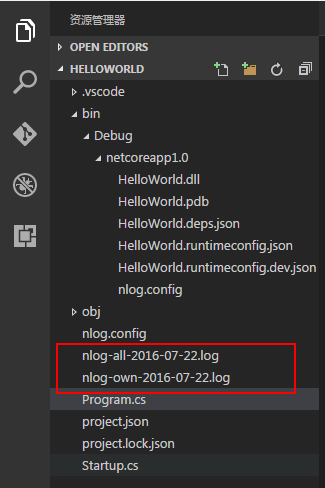
运行程序后会在主目录下生成2个日志文件:
NLog在.NET Core Console Apps中的简单应用的更多相关文章
- 在.NET Core console application中使用User Secrets(用户机密)
微软很坑地只在Microsoft.NET.Sdk.Web中提供了VS项目右键菜单的"管理用户机密"/"Manage User Secrets"菜单项,在使用Mi ...
- .NET CORE——Console中使用依赖注入
我们都知道,在 ASP.NET CORE 中通过依赖注入的方式来使用服务十分的简单,而在 Console 中,其实也只是稍微绕了个小弯子而已.不管是内置 DI 组件或者第三方的 DI 组件(如Auto ...
- asp.net core 5.0 中的 JsonConsole
asp.net core 5.0 中的 JsonConsole Intro asp.net core 5.0 中日志新增了 JsonConsole,还是输出日志到 Console,但是会应用 Json ...
- 在.NET Core控制台程序中使用依赖注入
之前都是在ASP.NET Core中使用依赖注入(Dependency Injection),昨天遇到一个场景需要在.NET Core控制台程序中使用依赖注入,由于对.NET Core中的依赖注入机制 ...
- ASP.NET Core 1.0 中的依赖项管理
var appInsights=window.appInsights||function(config){ function r(config){t[config]=function(){var i= ...
- Core 1.0中的管道-中间件模式
ASP.NET Core 1.0中的管道-中间件模式 SP.NET Core 1.0借鉴了Katana项目的管道设计(Pipeline).日志记录.用户认证.MVC等模块都以中间件(Middlewar ...
- 在ASP.NET Core Web API中为RESTful服务增加对HAL的支持
HAL(Hypertext Application Language,超文本应用语言)是一种RESTful API的数据格式风格,为RESTful API的设计提供了接口规范,同时也降低了客户端与服务 ...
- [.Net Core] 在 Mvc 中简单使用日志组件
在 Mvc 中简单使用日志组件 基于 .Net Core 2.0,本文只是蜻蜓点水,并非深入浅出. 目录 使用内置的日志组件 简单过渡到第三方组件 - NLog 使用内置的日志 下面使用控制器 Hom ...
- async/await 的基本实现和 .NET Core 2.1 中相关性能提升
前言 这篇文章的开头,笔者想多说两句,不过也是为了以后再也不多嘴这样的话. 在日常工作中,笔者接触得最多的开发工作仍然是在 .NET Core 平台上,当然因为团队领导的开放性和团队风格的多样性(这和 ...
随机推荐
- win7 VS2012+openCV-2.4.11 配置
1.下载 http://opencv.org/downloads.html (根据版本的不同选择,这里选择的是opencv-2.4.11) 2.安装 3.环境变量配置 计算机->属性->高 ...
- JS调用WebService
<html> <title>接口测试</title> <meta http-equiv="Content-Type" content=&q ...
- wndbg下载与安装
wndbg分X86和X64两个版本 如果你的程序是32位的,就下载安装X86的版本:如果你的程序是64位,就下载X64版本. x86位版本下载:[微软官方安装版] x64位版本下载:[微软官方安装版]
- 利用SSIS发送邮件
璎Nicole珞 博客园 闪存 首页 新随笔 联系 管理 订阅 随笔- 15 文章- 0 评论- 0 SSIS 利用发送邮件服务 Send Email Task 1. 在SSIS中如何发送邮 ...
- MyBatis知多少(26)MyBatis和Hibernate区别
iBatis和Hibernate之间有着较大的差异,但两者解决方案很好,因为他们有特定的领域.我个人建议使用MyBatis的,如果: 你想创建自己的SQL,并愿意维持他们. 你的环境是由关系数据模型驱 ...
- Jellycons – iOS 8 图标下载(PNG, SKETCH)
Jellycons 这套由 LoveUI.co 设计图标包括30款扁平化,圆滑,丰富多彩的 iOS 8 应用程序图标,可以用于于个人和商业项目的使用.另外,PNG 格式包含11种尺寸(1024px, ...
- Bucky – 免费开源的实时用户监控工具
Bucky 是一个开源的实时用户监控工具,用于衡量用户在浏览器中使用 Web 应用程序时的性能.它可以自动测量你的网页需要多长时间来加载,Ajax 请求需要多长时间和各个函数需要实行多久. 您可能感兴 ...
- #敏捷个人资料# 免费下载 《敏捷个人-认识自我,管理自我 v0.8.pdf》
快乐.高效.平衡,做一个爱学习.有目标.懂生活的影响者. 从今天开始至7月31日,点击http://t.cn/Rv3koHU 免费收到 1000多页的 <敏捷个人-认识自我,管理自我 v0.8. ...
- Scrum 3.1 多鱼点餐系统开发进度(第三阶段项目构思与任务规划)
Scrum 3.1 多鱼点餐系统开发进度(第三阶段项目构思与任务规划) 1.团队名称:重案组 2.团队目标:长期经营,积累客户充分准备,伺机而行 3.团队口号:矢志不渝,追求完美 4.团队选题:餐厅到 ...
- Build 2016概览
很快Microsoft Build 2016马上就要开始,在直播放出来之前,微软已经提前把本次大会期间的所有课程列表放了出来,你可以在这里看到: https://channel9.msdn.com/E ...