
一个简单的3DTouch、Peek和Pop手势Demo,附github地址
参考文章:http://www.jianshu.com/p/74fe6cbc542b
下载链接:https://github.com/banchichen/3DTouch-PeekAndPopGestureDemo.git
前言:写博客呢,一来可以记录自己学习进步的点滴;二来可以边写博客边复习下对应的知识;三来:还没想到....。第一篇博客,排版、代码等难免有瑕疵,见谅~
一、shortcutIems
1.6s和6s plus特有效果,对着应用图标用力按会触发。效果是这样子的:每一个快捷按钮对应一个shortcutItem,整个是一个数组,shortcutItems。

2.对应的代码如下:也就三步,(1)配置shortcutItems;(2)判断UIApplicationLaunchOptionsShortcutItemKey是否存在,在application:didFinishLaunchWithOptions里返回不同的值;(3)实现application:performActionForShortcutItem:completionHandler方法,处理shortcutItem的点击事件。
 /*

  当程序启动时

  1、判断launchOptions字典内的UIApplicationLaunchOptionsShortcutItemKey是否为空

  2、当不为空时,application:didFinishLaunchWithOptions方法返回NO,否则返回YES

  3、在application:performActionForShortcutItem:completionHandler方法内处理点击事件

  */

 - (BOOL)application:(UIApplication *)application didFinishLaunchingWithOptions:(NSDictionary *)launchOptions {

     [self configShortCutItems];

     if (launchOptions[@"UIApplicationLaunchOptionsShortcutItemKey"] == nil) {

         return YES;

     } else {

         return NO;

     }

 }

 // 动态方式 创建shortcutItems 「已在info.plist里配置好。这是代码配置的示例。」

 - (void)configShortCutItems {

     NSMutableArray *shortcutItems = [NSMutableArray array];

     UIApplicationShortcutItem *item1 = [[UIApplicationShortcutItem alloc] initWithType:@"" localizedTitle:@"测试1"];

     UIApplicationShortcutItem *item2 = [[UIApplicationShortcutItem alloc] initWithType:@"" localizedTitle:@"测试2"];

     [shortcutItems addObject:item1];

     [shortcutItems addObject:item2];

     [[UIApplication sharedApplication] setShortcutItems:shortcutItems];

 }

 // 处理shortcutItem

 - (void)application:(UIApplication *)application performActionForShortcutItem:(UIApplicationShortcutItem *)shortcutItem completionHandler:(void (^)(BOOL))completionHandler {

     switch (shortcutItem.type.integerValue) {

         case : { // 测试1

             [[NSNotificationCenter defaultCenter] postNotificationName:@"gotoTestVc" object:self userInfo:@{@"type":@""}];

         }

         case : { // 测试2

             [[NSNotificationCenter defaultCenter] postNotificationName:@"gotoTestVc" object:self userInfo:@{@"type":@""}];

         }   break;

         default:

             break;

     }

 }
是的,总共就这么些代码。
二、peek和pop手势
1.也是6s和6s plus上才能触发。效果是这样子的:(peek手势,预览)
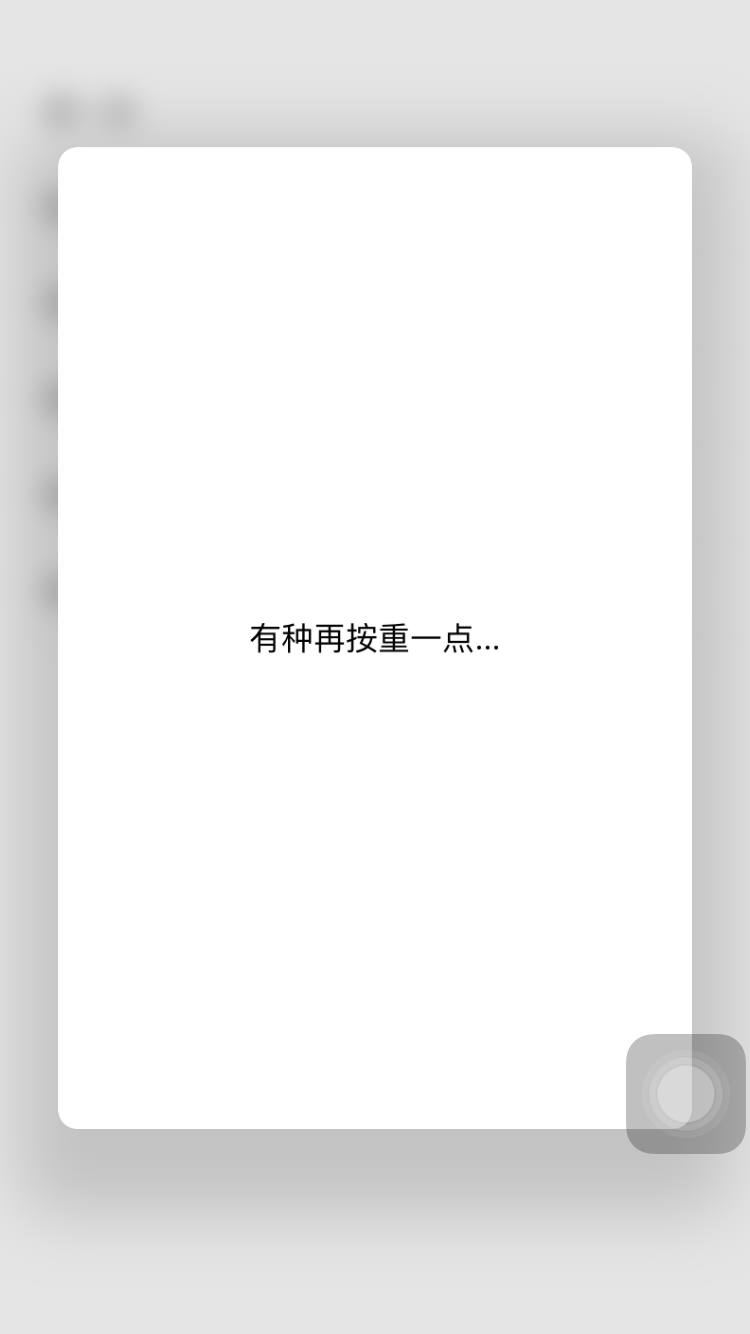
是的,我就配了个Lable和背景View...比较粗糙...
2.对应的代码如下:步骤为:
(1)让控制器遵守协议 UIViewControllerPreviewingDelegate
(2)注册 [self registerForPreviewingWithDelegate:self sourceView:self.view];
(3)实现代理方法
 /** peek手势  */

 - (nullable UIViewController *)previewingContext:(id <UIViewControllerPreviewing>)previewingContext viewControllerForLocation:(CGPoint)location {

     UIViewController *childVC = [[UIViewController alloc] init];

     // 获取用户手势点所在cell的下标。同时判断手势点是否超出tableView响应范围。

     if (![self getShouldShowRectAndIndexPathWithLocation:location]) return nil;

     previewingContext.sourceRect = self.sourceRect;

     // 加个白色背景

     UIView *bgView =[[UIView alloc] initWithFrame:CGRectMake(, , __kScreenWidth - , __kScreenHeight -  -  * )];

     bgView.backgroundColor = [UIColor whiteColor];

     bgView.layer.cornerRadius = ;

     bgView.clipsToBounds = YES;

     [childVC.view addSubview:bgView];

     // 加个lable

     UILabel *lable = [[UILabel alloc] initWithFrame:bgView.bounds];

     lable.textAlignment = NSTextAlignmentCenter;

     lable.text = @"有种再按重一点...";

     [bgView addSubview:lable];

     return childVC;

 }

 /** pop手势  */

 - (void)previewingContext:(id <UIViewControllerPreviewing>)previewingContext commitViewController:(UIViewController *)viewControllerToCommit {

     [self tableView:self.tableView didSelectRowAtIndexPath:self.indexPath];

 }

 /** 获取用户手势点所在cell的下标。同时判断手势点是否超出tableView响应范围。*/

 - (BOOL)getShouldShowRectAndIndexPathWithLocation:(CGPoint)location {

     NSInteger row = (location.y - )/;

     self.sourceRect = CGRectMake(, row *  + , __kScreenWidth, );

     self.indexPath = [NSIndexPath indexPathForItem:row inSection:];

     // 如果row越界了,返回NO 不处理peek手势

     return row >= self.items.count ? NO : YES;

 }
恩,总共就这些代码。补充几点说明:
(1)因为我这里tableView只放了6条,所以这里有判断用户的peek手势触摸点是否在tableView范围内,在才返回预览控制器,否则返回nil,不显示预览。
(2)sourceRect是peek触发时的高亮区域。这个区域内的View会高亮显示,其余的会模糊掉。你把sourceRect随意改改试试~
(3)末尾再放一下Demo地址:https://github.com/banchichen/3DTouch-PeekAndPopGestureDemo.git 觉得好的可以给个star,谢谢~
一个简单的3DTouch、Peek和Pop手势Demo,附github地址的更多相关文章
- 【Java】Jsoup爬虫,一个简单获取京东商品信息的小Demo
简单记录 - Jsoup爬虫入门实战 数据问题?数据库获取,消息队列中获取中,都可以成为数据源,爬虫! 爬取数据:(获取请求返回的页面信息,筛选出我们想要的数据就可以了!) 我们经常需要分析HTML网 ...
- 一、项目基础架构(附GitHub地址)——以ABP为基础架构的一个中等规模的OA开发日志
前言: 最近园子里ABP炒的火热.看了几篇对于ABP的介绍后,深感其设计精巧,实现优雅.个人感觉,ABP或ABP衍生品的架构设计,未来会成为中型Net项目的首选架构模式.如果您还不了解ABP是什么,有 ...
- 一个简单的scrapy爬虫抓取豆瓣刘亦菲的图片地址
一.第一步是创建一个scrapy项目 sh-3.2# scrapy startproject liuyifeiImage sh-3.2# chmod -R 777 liuyifeiImage/ 二.分 ...
- 神经进化学的简介和一个简单的CPPN(Compositional Pattern Producing Networks)DEMO
近期迷上神经进化(Neuroevolution)这个方向,感觉是Deep Learning之后的一个非常不错的研究领域. 该领域的一个主导就是仿照人的遗传机制来进化网络參数与结构.注意,连网络结构都能 ...
- 一个简单的代码计算行数demo编写
最近手头的项目基本上已经完结,历经了5个月的开发和迭代,各种的需求调整,想对自己的代码量进行一个客观的计算,于是抽了点时间写下了这个小demo,朋友们有需要的可以看看,很简单. 基本的思想就是:根目录 ...
- 一个简单的AMD模块加载器
一个简单的AMD模块加载器 参考 https://github.com/JsAaron/NodeJs-Demo/tree/master/require PS Aaron大大的比我的完整 PS 这不是一 ...
- 使用ssm(spring+springMVC+mybatis)创建一个简单的查询实例(二)(代码篇)
这篇是上一篇的延续: 用ssm(spring+springMVC+mybatis)创建一个简单的查询实例(一) 源代码在github上可以下载,地址:https://github.com/guoxia ...
- 手写一个简单版的SpringMVC
一 写在前面 这是自己实现一个简单的具有SpringMVC功能的小Demo,主要实现效果是; 自己定义的实现效果是通过浏览器地址传一个name参数,打印“my name is”+name参数.不使用S ...
- iOS9 3DTouch、ShortcutItem、Peek And Pop技术一览
[iOS]iOS9 3DTouch.ShortcutItem.Peek And Pop技术一览 3DTouch UITouch类里API的变化 iOS9中添加的属性 altitudeAngle 当 ...
随机推荐
- oprofile
一.原理 在关注事件发生一定次数时,进行一次采样,记录下需要的信息(比如指令寄存器或栈寄存器信息). 二.参数 项 说明 eventname 要关注的事件名称,常用的事件名称及功能如下: CP ...
- HBM内存介绍
原帖地址:http://www.anandtech.com/show/9969/jedec-publishes-hbm2-specification The high-bandwidth memory ...
- Revit中将倾斜轴线显示为正交模式
Revit建模过程中有时候会遇到某些特殊的建筑不规则建筑或者其轴线视图中并非正交二是倾斜的情况,用Revit建模过程中对于倾斜的建筑不仅不符合人的视觉习惯,而且也会对后期的机电管线的布设造成困扰,稍不 ...
- Python字符串的修改以及传参
前两天去面试web developer,面试官提出一个问题,用JavaScript或者Python实现字符串反转,我选择了Python,然后写出了代码(错误的): #!/usr/bin/env pyt ...
- ASP.NET MVC验证标注的扩展-checkbox必选
我们知道ASP.NET mvc提供一些表单的验证标注,比如必填属性RequiredAttribute 但是这个属性不适合选择框的必选 但是很多时候,我们却是需要一些必选的单选框 比如网站注册的时候,需 ...
- 完全图解scrollLeft,scrollWidth,clientWidth,offsetWidth 获取相对途径,滚动图片(网上找的,未经试验,但觉得比较好)
获取元素的位置属性可以通过 HTMLElement.offsetLeft HTMLElement.offsetTop 但是,这两个属性所储存的数值并不是该元素相对整个浏览器画布的绝对位置,而是相对于其 ...
- 通信错误:(-1)[描述:无法解析路由器DDNS地址,请检查DDNS状态.] 解析办法
EasyRadius提示:通信错误:(-1)[描述:无法解析路由器DDNS地址,请检查DDNS状态.] 出现以上问题,和easyradius没有直接的联系,主要产生原因有两种可能: 可能1:easyr ...
- iOS开发——项目实战总结&带你看看Objective-C的精髓
带你看看Objective-C的精髓 1:接口与实现 @interface...@end @implementation...@end @class 接口(头文件) 实现文件 向前引用 注:类别通过增 ...
- Ajax加载子域跨站cookie丢失的问题.
我们有两个网站一个是main.xxx.cn 一个是 preveiw.xxx.cn main.xxx.cn 页面需要加载preview.xxx.cn的内容. 项目里面出现了两种的加载preview.xx ...
- cocos2dx的lua绑定
一.cocos2dx对tolua++绑定的修正 A.c对lua回调函数的引用 在使用cocos2dx编写游戏时,我们经常会设置一些回调函数(时钟.菜单选择等).如果采用脚本方式编写游戏的话,这些回调函 ...