
ASP.NET Core的身份认证框架IdentityServer4--(5)自定义用户登录(使用官网提供的UI)
IdentityServer官方提供web页面,可以根据需求修改样式。具体UI下载跟配置参考官网文档。
文档地址:https://identityserver4.readthedocs.io/en/release/quickstarts/3_interactive_login.html
使用UI登录涉及的知识点参考园里大佬@solenovex的文章。这里不在重复说明,感兴趣的同学可以去看看。原文地址:https://www.cnblogs.com/cgzl/p/9253667.html
我这里是根据官方提供的UI进行修改、自定义用户登录、访问API。
源码地址:https://github.com/YANGKANG01/IdentityServer4-IdentityAuth
一、配置IdentityServer
1、引入官网包:IdentityServer4
2、需要重新定义Web端信息,除了ClientId,AllowedGrantTypes,ClientSecrets,AllowedScopes等属性还需要配置登录成功或注销后的返回地址RedirectUris跟PostLogoutRedirectUris。Config文件配置如下:
using IdentityServer4;

using IdentityServer4.Models;

using System;

using System.Collections.Generic;

using System.Linq;

using System.Threading.Tasks;

namespace IdentityServer

{

    /// <summary>

    /// IdentityServer配置

    /// </summary>

    public class Config

    {

        /// <summary>

        /// 添加对OpenID Connect的支持

        /// </summary>

        /// <returns></returns>

        public static IEnumerable<IdentityResource> GetIdentityResources()

        {

            return new List<IdentityResource>

            {

                new IdentityResources.OpenId(), //必须要添加,否则报无效的scope错误

                new IdentityResources.Profile()

            };

        }

        /// <summary>

        /// 定义系统中的API资源

        /// </summary>

        /// <returns></returns>

        public static IEnumerable<ApiResource> GetApiResources()

        {

            return new List<ApiResource>

            {

                new ApiResource("api1", "My API")

            };

        }

        /// <summary>

        /// 客户端访问资源

        /// </summary>

        /// <returns></returns>

        public static IEnumerable<Client> GetClients()

        {

            // 客户端信息

            return new List<Client>

            {

             //自定义接口登录的客户端

             new Client

                {

                    //客户端ID名称

                    ClientId = "client1",

                    //客户端访问方式:密码验证

                    AllowedGrantTypes = GrantTypes.ResourceOwnerPassword,

                    //用于认证的密码加密方式

                    ClientSecrets =

                    {

                        new Secret("secret".Sha256())

                    },

                    //客户端有权访问的范围

                    AllowedScopes = { "api1",

                    IdentityServerConstants.StandardScopes.OpenId, //必须要添加,否则报403 forbidden错误

                    IdentityServerConstants.StandardScopes.Profile

                 }

                },

                //定义mvc客户端

                new Client

                {

                    //客户端ID名称

                    ClientId = "mvc",

                    ClientName = "MVC Client",

                    //访问类型

                    AllowedGrantTypes = GrantTypes.Hybrid,

                    //关闭确认是否返回身份信息界面

                    RequireConsent=false,

                   // 登录成功后重定向地址

                    RedirectUris = { "http://localhost:5002/signin-oidc" },

                   //注销成功后的重定向地址

                    PostLogoutRedirectUris = { "http://localhost:5002/signout-callback-oidc" },

                     //用于认证的密码加密方式

                    ClientSecrets =

                    {

                        new Secret("secret".Sha256())

                    },

                     //客户端有权访问的范围

                    AllowedScopes = new List<string>

                    {

                        IdentityServerConstants.StandardScopes.OpenId,

                        IdentityServerConstants.StandardScopes.Profile,

                        "api1",//要访问的api名称

                    },

                }

            };

        }

    }

}
3、Startup的配置跟前面自定义接口登录一样没什么变化,这里也贴下源码方便没看前篇的同学:
using System;

using System.Collections.Generic;

using System.Linq;

using System.Threading.Tasks;

using IdentityServer.Service;

using Microsoft.AspNetCore.Builder;

using Microsoft.AspNetCore.Hosting;

using Microsoft.AspNetCore.Http;

using Microsoft.Extensions.DependencyInjection;

namespace IdentityServer

{

    public class Startup

    {

        // This method gets called by the runtime. Use this method to add services to the container.

        // For more information on how to configure your application, visit https://go.microsoft.com/fwlink/?LinkID=398940

        public void ConfigureServices(IServiceCollection services)

        {

            //配置身份服务器与内存中的存储,密钥,客户端和资源

            services.AddIdentityServer()

                .AddDeveloperSigningCredential()

                .AddInMemoryIdentityResources(Config.GetIdentityResources())//用户信息建模

                .AddInMemoryApiResources(Config.GetApiResources())//添加api资源

                .AddInMemoryClients(Config.GetClients())//添加客户端

                .AddResourceOwnerValidator<LoginValidator>()//用户校验

                .AddProfileService<ProfileService>();

            //注册mvc服务

            services.AddMvc();

        }

        // This method gets called by the runtime. Use this method to configure the HTTP request pipeline.

        public void Configure(IApplicationBuilder app, IHostingEnvironment env)

        {

            if (env.IsDevelopment())

            {

                app.UseDeveloperExceptionPage();

            }

            //添加到HTTP管道中。

            app.UseIdentityServer();

            //添加静态资源访问

            app.UseStaticFiles();

            //添加mvc到管道中

            app.UseMvcWithDefaultRoute();

        }

    }

}
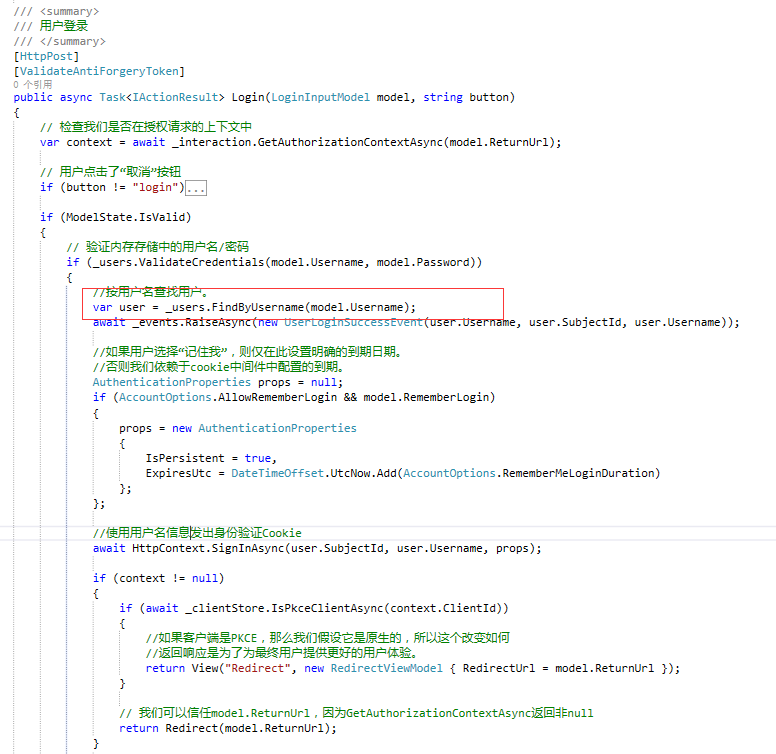
4、添加官网UI后找到AccountController类,修改登录方法Login ,把下图中的代码替换成自己的查询数据库用户即可,这里官方使用的是TestUsers类中自定义的用户来登录。
二、Web端配置获取登录后的用户信息
1、引入官网包:IdentityModel。
2、Startup配置如下。ResponseType返回类型详情可参考@solenovex的文章,大佬在文章说的比较详细,这里不在重复说明,地址:https://www.cnblogs.com/cgzl/p/9253667.html
using System;

using System.Collections.Generic;

using System.IdentityModel.Tokens.Jwt;

using System.Linq;

using System.Threading.Tasks;

using Microsoft.AspNetCore.Authentication;

using Microsoft.AspNetCore.Builder;

using Microsoft.AspNetCore.Hosting;

using Microsoft.AspNetCore.Http;

using Microsoft.AspNetCore.Mvc;

using Microsoft.Extensions.Configuration;

using Microsoft.Extensions.DependencyInjection;

namespace Web

{

    public class Startup

    {

        public Startup(IConfiguration configuration)

        {

            Configuration = configuration;

        }

        public IConfiguration Configuration { get; }

        // This method gets called by the runtime. Use this method to add services to the container.

        public void ConfigureServices(IServiceCollection services)

        {

            services.Configure<CookiePolicyOptions>(options =>

            {

                // This lambda determines whether user consent for non-essential cookies is needed for a given request.

                options.CheckConsentNeeded = context => true;

                options.MinimumSameSitePolicy = SameSiteMode.None;

            });

            JwtSecurityTokenHandler.DefaultInboundClaimTypeMap.Clear();

            services.AddAuthentication(options =>

            {

                options.DefaultScheme = "Cookies";

                options.DefaultChallengeScheme = "oidc";

            })

                .AddCookie("Cookies")

                .AddOpenIdConnect("oidc", options =>

                {

                    options.SignInScheme = "Cookies";

                    //授权端服务地址

                    options.Authority = "http://localhost:5000/";

                    //是否https请求

                    options.RequireHttpsMetadata = false;

                    //客户端ID名称

                    options.ClientId = "mvc";

                    options.ClientSecret = "secret";

                    //返回的类型

                    options.ResponseType = "code id_token";

                    //添加自定义用户信息

                    options.Scope.Clear();

                    options.Scope.Add("openid");

                    options.Scope.Add("profile");

                    //是否存储token

                    options.SaveTokens = true;

                    //用于设置在从令牌端点接收的id_token创建标识后,处理程序是否应转到用户信息端点

                    options.GetClaimsFromUserInfoEndpoint = true;

                    //访问名称api

                    options.Scope.Add("api1");

                    //避免claims被默认过滤掉,如果不想让中间件过滤掉nbf和amr, 把nbf和amr从被过滤掉集合里移除。可以使用下面这个方方式:

                    options.ClaimActions.Remove("nbf");

                    options.ClaimActions.Remove("amr");

                    //删除某些Claims

                    options.ClaimActions.DeleteClaim("sid");

                    options.ClaimActions.DeleteClaim("idp");

                });

            services.AddMvc().SetCompatibilityVersion(CompatibilityVersion.Version_2_1);

        }

        // This method gets called by the runtime. Use this method to configure the HTTP request pipeline.

        public void Configure(IApplicationBuilder app, IHostingEnvironment env)

        {

            if (env.IsDevelopment())

            {

                app.UseDeveloperExceptionPage();

            }

            else

            {

                app.UseExceptionHandler("/Home/Error");

            }

            app.UseStaticFiles();

            app.UseCookiePolicy();

            //添加用户验证中间件

            app.UseAuthentication();

            //

            app.UseMvc(routes =>

            {

                routes.MapRoute(

                    name: "default",

                    template: "{controller=Home}/{action=Index}/{id?}");

            });

        }

    }

}
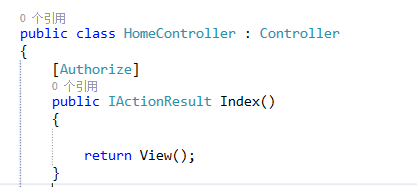
3、在需要登录的页面方法添加Authorize特性。
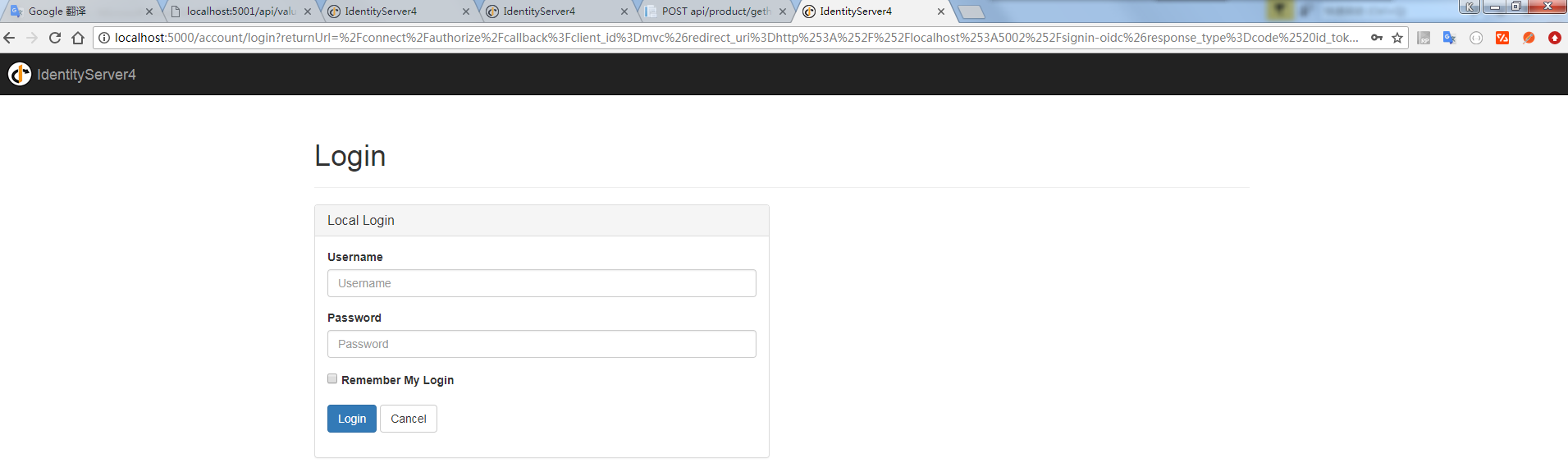
启动web 会看到页面自动重定向到登录页面效果如图:
4、获取用户信息可使用HttpContext.User.Identity来获取当前用户信息,代码如下:
 //获取用户信息

 var claimIdentity = (ClaimsIdentity)HttpContext.User.Identity;

 var claimsPrincipal = claimIdentity.Claims as List<Claim>;
5、获取用户token,这里的token是服务端生成发送给客户端,用于身份校验,可使用token访问需要登录权限的API接口。代码如下:
//获取用户token

var token = await HttpContext.GetTokenAsync(OpenIdConnectParameterNames.AccessToken);
Ps:注销登录默认跳转到退出信息提示页面,如不需要修改服务端的 AccountOptions类中的AutomaticRedirectAfterSignOut属性,默认为false,修改为true即可。
三、API配置
1、引入官网包:IdentityServer4.AccessTokenValidation。
2、Startup类配置如下:
using System;

using System.Collections.Generic;

using System.Linq;

using System.Threading.Tasks;

using Microsoft.AspNetCore.Builder;

using Microsoft.AspNetCore.Hosting;

using Microsoft.AspNetCore.Mvc;

using Microsoft.Extensions.Configuration;

using Microsoft.Extensions.DependencyInjection;

using Microsoft.Extensions.Logging;

using Microsoft.Extensions.Options;

namespace API

{

    public class Startup

    {

        public Startup(IConfiguration configuration)

        {

            Configuration = configuration;

        }

        public IConfiguration Configuration { get; }

        // This method gets called by the runtime. Use this method to add services to the container.

        public void ConfigureServices(IServiceCollection services)

        {

            services.AddMvcCore()

                    .AddAuthorization()//添加身份验证服务

                    .AddJsonFormatters();

            //AddAuthentication将身份验证服务添加到DI并配置"Bearer"为默认方案

            services.AddAuthentication("Bearer")

                    .AddIdentityServerAuthentication(options =>

                    {

                        options.Authority = "http://localhost:5000";//identifyServer服务地址

                        options.RequireHttpsMetadata = false;//是否使用https

                        options.ApiName = "api1";//进行身份验证的API资源的名称

                    });

        }

        // This method gets called by the runtime. Use this method to configure the HTTP request pipeline.

        public void Configure(IApplicationBuilder app, IHostingEnvironment env)

        {

            if (env.IsDevelopment())

            {

                app.UseDeveloperExceptionPage();

            }

            //将身份验证中间件添加到管道中

            app.UseAuthentication();

            app.UseMvc();

        }

    }

}
3、给对应的API接口添加Authorize特性,Web端登录通过token访问该接口。代码如下:
//获取用户token

var token = await HttpContext.GetTokenAsync(OpenIdConnectParameterNames.AccessToken);

//实例化HttpClient

var client = new HttpClient();

client.SetBearerToken(token);

//请求identity接口

var response = await client.GetAsync("http://localhost:5001/identity");

if (!response.IsSuccessStatusCode)

{

     Console.WriteLine(response.StatusCode);

}
ASP.NET Core的身份认证框架IdentityServer4--(5)自定义用户登录(使用官网提供的UI)的更多相关文章
- ASP.NET Core的身份认证框架IdentityServer4(3)-术语的解释
IdentityServer4 术语 IdentityServer4的规范.文档和对象模型使用了一些你应该了解的术语. 身份认证服务器(IdentityServer) IdentityServer是一 ...
- ASP.NET Core的身份认证框架IdentityServer4(7)- 使用客户端证书控制API访问
前言 今天(2017-9-8,写于9.8,今天才发布)一口气连续把最后几篇IdentityServer4相关理论全部翻译完了,终于可以进入写代码的过程了,比较累.目前官方的文档和Demo以及一些相关组 ...
- ASP.NET Core的身份认证框架IdentityServer4(1)-特性一览
IdentityServer4是ASP.NET Core的一个包含OpenID和OAuth 2.0协议的框架.OpenID和OAuth 的区别请看 https://www.zhihu.com/ques ...
- ASP.NET Core的身份认证框架IdentityServer4(6)- 开始
安装和概述 启动一个新的IdentityServer项目有两种基本方法: 从头开始 从Visual Studio中的ASP.NET身份模板开始 如果从头开始,我们提供了一些文档.项目帮助和内存存储支持 ...
- ASP.NET Core的身份认证框架IdentityServer4(5)- 包和构建
包和构建 IdentityServer有许多nuget包 IdentityServer4 nuget | github 包含IdentityServer核心对象模型,服务和中间件. 仅支持内存配置和用 ...
- ASP.NET Core的身份认证框架IdentityServer4(9)-使用OpenID Connect添加用户认证
OpenID Connect OpenID Connect 1.0是OAuth 2.0协议之上的一个简单的身份层. 它允许客户端基于授权服务器执行的身份验证来验证最终用户的身份,以及以可互操作和类似R ...
- ASP.NET Core的身份认证框架IdentityServer4--(4)添加第三方快捷登录
添加对外部认证的支持 接下来我们将添加对外部认证的支持.这非常简单,因为你真正需要的是一个兼容ASP.NET Core的认证处理程序. ASP.NET Core本身也支持Google,Facebook ...
- ASP.NET Core的身份认证框架IdentityServer4(8)- 使用密码认证方式控制API访问
前言 本文及IdentityServer这个系列使用的都是基于.net core 2.0的.上一篇博文在API项目中我使用了icrosoft.AspNetCore.Authentication.Jwt ...
- ASP.NET Core的身份认证框架IdentityServer4(4)- 支持的规范
IdentityServer实现以下规范: OpenID Connect OpenID Connect Core 1.0 (spec) OpenID Connect Discovery 1.0 (sp ...
随机推荐
- HDU 5925 Coconuts 离散化
题目链接: http://acm.hdu.edu.cn/showproblem.php?pid=5925 Coconuts Time Limit: 9000/4500 MS (Java/Others) ...
- 【DL.AI】《Structuring Machine Learning Projects》笔记
一.改进模型的几个方法 Collect more data Collect more diverse training set Train algorithm longer with gradient ...
- source和sh
写了一个脚本[xxyScript.sh],用于判断tomcat是否启动 #!/bin/bash if [ -z "$(ps -ef | grep tomcat | grep -v 'grep ...
- vue 组件 模板中根数据绑定需要指明路径并通信父
<!DOCTYPE html><html> <head> <meta charset="UTF-8"> <title>T ...
- mybaits入门(含实例教程和源码) http://blog.csdn.net/u013142781/article/details/50388204
前言:mybatis是一个非常优秀的存储过程和高级映射的优秀持久层框架.大大简化了,数据库操作中的常用操作.下面将介绍mybatis的一些概念和在eclipse上的实际项目搭建使用. 一.mybati ...
- 用SQL查询方式显示GROUP BY中的TOP解决方法[转]
用SQL查询方式显示GROUP BY中的TOP怎样用一个SQL语句来显示 分组后每个组的前几位 比如把一个学校所有学生的成绩按班级分组,再显示每个班级前五名的信息. 班级 学生 成绩 一班 ...
- UVAlive4080_Warfare And Logistics
给一个无向图,求出两个值,所有点到所有其他点的最短距离和,任意删除一条边后的这个值. 数据规模是100点1000边. 白书例题,不多说了直接对于每个点求出最短路树,对于每条边,如果它不是最短路树上的边 ...
- (2)YARN的工作流程
Writing YARN Applications 文档中的启动过程: Application submission client向Yarn ResourceManager提交一个Applicatio ...
- Python 变量 (上)
Python通过变量引用内存中的值,变量的值占用多少空间是由变量的类型决定的.声明变量不需要指定变量的类型,解释器会自动根据值来判断.变量名称必须符合标识符的定义 标识符 标识符是由字母,数字和下划线 ...
- ldap禁止匿名用户登录
此处默认ldap已经安装完成,安装文档传送门:https://www.cnblogs.com/crysmile/p/9470508.html openldap默认安装完成,是允许匿名用户登录的,因此需 ...