
OSGi 系列(十三)之 Configuration Admin Service
OSGi 系列(十三)之 Configuration Admin Service
OSGi 的 CM 就是 Configuration Admin Service,是用于管理 Bundle 属性、并在属性发生变更时通知相应的 Service,这是保持 OSGi 动态性的很关键的一个服务。
1. ConfigurationAdmin
用于管理配置数据的服务,主要有两个作用:
- 获取配置数据
- 更新配置数据
public class ConfigurationAdminDemo {

    private ConfigurationAdmin configurationAdmin;

    public void init() {

        try {

            Configuration conf = configurationAdmin.getConfiguration("jdbc.mysql");

            Dictionary<String, Object> dict = conf.getProperties();

            System.out.println(dict);

            Dictionary<String, String> properties = new Hashtable<>();

            properties.put("username", "root");

            properties.put("password", "123456");

            conf.update(properties);

        } catch (IOException e) {

            e.printStackTrace();

        }

    }

    public ConfigurationAdmin getConfigurationAdmin() {

        return configurationAdmin;

    }

    public void setConfigurationAdmin(ConfigurationAdmin configurationAdmin) {

        this.configurationAdmin = configurationAdmin;

    }

}
blueprint.xml 配制文件:
<reference id="configurationAdmin" interface="org.osgi.service.cm.ConfigurationAdmin" />

<bean class="com.edu.osgi.cm.ConfigurationAdminDemo" init-method="init">

    <property name="configurationAdmin" ref="configurationAdmin" />

</bean>
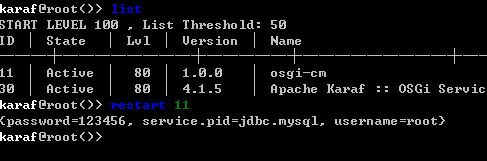
结果如下:
2. ManagedService
用来关联和操作单个配置文件的服务当相关联的配置文件发生变化的时候,会通知到相应的服务。
public class DBConfigManagedService implements ManagedService {

    public void updated(Dictionary<String, ?> properties) throws ConfigurationException {

        System.out.println("======updated======");

        System.out.println(properties);

    }

}
blueprint.xml 配制文件:
<service interface="org.osgi.service.cm.ManagedService">

    <service-properties>

        <entry key="service.pid" value="jdbc.mysql" />

    </service-properties>

    <bean class="com.edu.osgi.cm.DBConfigManagedService" />

</service>
手动修改 jdbc.mysql.cfg 文件后,结果如下:

3. blueprint 中 cm 的使用
<?xml version="1.0" encoding="UTF-8"?>

<blueprint xmlns="http://www.osgi.org/xmlns/blueprint/v1.0.0"

           xmlns:xsi="http://www.w3.org/2001/XMLSchema-instance"

           xmlns:cm="http://aries.apache.org/blueprint/xmlns/blueprint-cm/v1.1.0"

           xsi:schemaLocation="http://www.osgi.org/xmlns/blueprint/v1.0.0 http://www.osgi.org/xmlns/blueprint/v1.0.0/blueprint.xsd

           http://aries.apache.org/blueprint/xmlns/blueprint-cm/v1.1.0 http://aries.apache.org/schemas/blueprint-cm/blueprint-cm-1.1.0.xsd">

    <cm:property-placeholder persistent-id="jdbc.mysql.conf" update-strategy="reload"/>

    <bean class="com.edu.osgi.cm.MysqlConfig" init-method="display">

        <property name="className" value="${className}" />

        <property name="url" value="${url}" />

        <property name="username" value="${username}" />

        <property name="password" value="${password}" />

    </bean>

</blueprint>
4. karaf 中 cm 命令
config:list "(service.pid=jdbc.mysql)"列出 jdbc.mysql 配制文件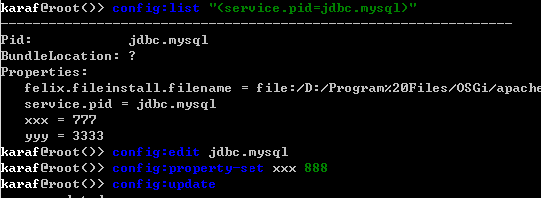
config:edit编辑属性config:edit jdbc.mysql
config:property-set name join
config:update
5. ManagedServiceFactory
用来关联和操作多个配置文件的服务,当多个相关联的配置文件发生变化的时候,都会通知到相应的服务。
(1) 环境准备
<dependency>

    <groupId>org.osgi</groupId>

    <artifactId>org.osgi.core</artifactId>

    <version>5.0.0</version>

</dependency>

<dependency>

    <groupId>org.osgi</groupId>

    <artifactId>org.osgi.compendium</artifactId>

    <version>5.0.0</version>

</dependency>

<dependency>

    <groupId>org.apache.commons</groupId>

    <artifactId>commons-dbcp2</artifactId>

    <version>2.1.1</version>

</dependency>

<dependency>

    <groupId>mysql</groupId>

    <artifactId>mysql-connector-java</artifactId>

    <version>5.1.38</version>

</dependency>
(2) 实现 ManagedServiceFactory 接口
public class DataSourceServiceFactory implements ManagedServiceFactory {

    private BundleContext bundleContext;

    private Map<String, ServiceRegistration<?>> serviceMap = new ConcurrentHashMap<>();

    public String getName() {

        return "DataSourceServiceFactory";

    }

    // 更新配置文件

    public void updated(String pid, Dictionary<String, ?> properties) throws ConfigurationException {

        System.out.println("============updated============");

        System.out.println(pid);

        System.out.println(properties);

        BasicDataSource bds = new BasicDataSource();

        bds.setDriverClassName(properties.get("driverClassName").toString());

        bds.setUrl(properties.get("url").toString());

        bds.setUsername(properties.get("username").toString());

        bds.setPassword(properties.get("password").toString());

        Dictionary<String, String> props = new Hashtable<>();

        props.put("instance", properties.get("instance").toString());

        ServiceRegistration<?> sr = bundleContext.registerService(DataSource.class.getName(), bds, props);

        System.out.println("------------");

        serviceMap.put(pid, sr);

    }

    // 删除配置文件

    public void deleted(String pid) {

        System.out.println("============deleted============");

        System.out.println(pid);

        ServiceRegistration<?> sr = serviceMap.get(pid);

        sr.unregister();

        serviceMap.remove(pid);

    }

    public void setBundleContext(BundleContext bundleContext) {

        this.bundleContext = bundleContext;

    }

}
(3) blueprint.xml
<?xml version="1.0" encoding="UTF-8"?>

<blueprint xmlns="http://www.osgi.org/xmlns/blueprint/v1.0.0"

           xmlns:xsi="http://www.w3.org/2001/XMLSchema-instance"

           xmlns:cm="http://aries.apache.org/blueprint/xmlns/blueprint-cm/v1.1.0"

           xsi:schemaLocation="http://www.osgi.org/xmlns/blueprint/v1.0.0 http://www.osgi.org/xmlns/blueprint/v1.0.0/blueprint.xsd

           http://aries.apache.org/blueprint/xmlns/blueprint-cm/v1.1.0 http://aries.apache.org/schemas/blueprint-cm/blueprint-cm-1.1.0.xsd">

    <service interface="org.osgi.service.cm.ManagedServiceFactory">

        <service-properties>

            <entry key="service.pid" value="jdbc.datasource"/>

        </service-properties>

        <bean class="com.edu.osgi.cm.DataSourceServiceFactory">

            <property name="bundleContext" ref="blueprintBundleContext" />

        </bean>

    </service>

    <!--<reference interface="javax.sql.DataSource" filter="(instance=test)"/>-->

</blueprint>
(4) 测试
# 安装事务

feature:install transaction

install -s mvn:org.apache.commons/commons-pool2/2.4.2

install -s mvn:org.apache.commons/commons-dbcp2/2.1.1

install -s mvn:mysql/mysql-connector-java/5.1.18
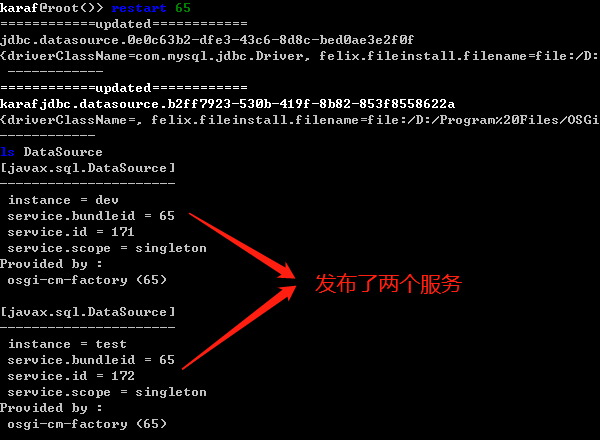
在 deploy 目录下新建二个文件 jdbc.datasource-dev.cfg、jdbc.datasource-test.cfg(注意:文件要以 jdbc.datasource 开头,"-" 分隔)
jdbc.datasource-dev.cfg
instance=dev

driverClassName=com.mysql.jdbc.Driver

url=jdbc:mysql:///dev

username=root

password=root
jdbc.datasource-test.cfg
instance=test

driverClassName=com.mysql.jdbc.Driver

url=jdbc:mysql:///test

username=root

password=root
OSGi 系列(十三)之 Configuration Admin Service的更多相关文章
- OSGi 系列(十四)之 Event Admin Service
OSGi 系列(十四)之 Event Admin Service OSGi 的 Event Admin 服务规范提供了开发者基于发布/订阅模型,通过事件机制实现 Bundle 间协作的标准通讯方式. ...
- OSGi 系列(十二)之 Http Service
OSGi 系列(十二)之 Http Service 1. 原始的 HttpService (1) 新建 web-osgi 工程,目录结构如下: (2) HomeServlet package com. ...
- OSGi 系列(十六)之 JDBC Service
OSGi 系列(十六)之 JDBC Service compendium 规范提供了 org.osgi.service.jdbc.DataSourceFactory 服务 1. 快速入门 1.1 环境 ...
- OSGi 系列(六)之服务的使用
OSGi 系列(六)之服务的使用 1. 为什么使用服务 降低服务提供者和服务使用者直接的耦合,这样更容易重用组件 隐藏了服务的实现细节 支持多个服务的实现.这样你可以互换这实现 2. 服务的使用 2. ...
- OSGi 系列(一)之什么是 OSGi :Java 语言的动态模块系统
OSGi 系列(一)之什么是 OSGi :Java 语言的动态模块系统 OSGi 的核心:模块化.动态.基于 OSGi 就可以模块化的开发 java 应用,模块化的部署 java 应用,还可以动态管理 ...
- OSGi 系列(十八)之 基于注解的 Blueprint
OSGi 系列(十八)之 基于注解的 Blueprint 1. 注解实现 blueprint 第一步:bundle 添加 Bundle-Blueprint-Annotation <plugin& ...
- OSGi 系列(三)之 bundle 详解
OSGi 系列(三)之 bundle 详解 1. 什么是 bundle bundle 是以 jar 包形式存在的一个模块化物理单元,里面包含了代码,资源文件和元数据(metadata),并且 jar ...
- OSGi 系列(十)之 Blueprint
OSGi 系列(十)之 Blueprint blueprint 是 OSGi 的一个规范,类似于 spring 的 IOC,用来处理 OSGi 的动态特性,可以大大简化服务的使用. blueprint ...
- OSGi 系列(七)之服务的监听、跟踪、声明等
OSGi 系列(七)之服务的监听.跟踪.声明等 1. OSGi 服务的事件监听 和 bundle 的事件监听类似,服务的事件监听是在服务注册.注销,属性被修改的时候,OSGi 框架会发出各种不同的事件 ...
随机推荐
- Python之函数——内置函数
内置函数(Built-in Functions) 截止到3.6版本,python一共为我们提供了68个内置函数.它们就是python提供给的可以直接拿来使用的所有函数,接下来让我们一起认识一下这些函数 ...
- paycharm导入webdriver包报错:module 'selenium.webdriver' has no attribute 'Firefox'
首先:试试看在cmd中试试输入from selenium import webdriver,看是否报错,看一看是不是pycharm的原因.经过确认,在dos窗口中输入导入包的命令并没有报错.最后我重现 ...
- nginx直接返回json
尝试配置nginx.conf之后,访问直接变成下载文件... 查阅之后,发现需要配置返回内容的格式. location ~ ^/get_json { default_type application/ ...
- LINQ to SQL语句(1)Select查询的九种形式
目录 说明 简单形式 匿名类型形式 条件形式 指定类型形式 筛选形式 Shaped形式 嵌套形式 本地调用方法形式 Distinct形式 说明 与SQL命令中的select作用相似但位置不同,查询表达 ...
- mysql 慢查询记录方法
========================================================= 方法一: 这个方法我正在用,呵呵,比较喜欢这种即时性的. Mysql5.0以上的版本 ...
- cobbler全自动批量安装部署linux
Cobbler的设计方式: Cobbler的配置结构基于一组注册的对象.每个对象表示一个与另一个实体相关联的实体(该对象指向另一个对象,或者另一个对象指向该对象).当一个对象指向另一个对象时,它就继承 ...
- 【339】matplotlib based on python3
Ref: python3 的 matplotlib绘图库的使用 Ref: python matplotlib绘图设置坐标轴刻度.文本 Ref: python中matplotlib的颜色及线条控制 Re ...
- 软件工程导论复习 如何画系统流程图和数据流图 part1
一.数据流图与流程图的区别 数据流程图是以图形的方式表达在问题中信息的变换和传递过程.它把系统看成是由数据流联系的各种概念的组合,用分解及抽象手段来控制需求分析的复杂性,采用分层的数据流程图来表示一个 ...
- sparkSQL、dataframe
http://www.aboutyun.com/forum.php?mod=viewthread&tid=12358&page=1 空值填充:http://spark.apache.o ...
- DOM 练习
练习一: <!DOCTYPE html PUBLIC "-//W3C//DTD XHTML 1.0 Transitional//EN" "http://www.w3 ...