
WPF 自定义下拉列表
XAML代码:
<Popup x:Name="popupStrategy" StaysOpen="False" PopupAnimation="Scroll" Width="190" MaxHeight="300" AllowsTransparency="True">

    <Border Background="#0c5ab0" BorderThickness="1" BorderBrush="#1992d6">

        <ItemsControl x:Name="itemsCtrlStrategy" Grid.Row="1" Margin="0 5 0 0">

            <ItemsControl.Template>

                <ControlTemplate>

                    <ScrollViewer HorizontalScrollBarVisibility="Auto" MinHeight="{Binding ElementName=itemsCtrlStrategy,Path=ActualHeight}" MinWidth="{Binding ElementName=itemsCtrlStrategy, Path=ActualWidth}">

                        <ItemsPresenter></ItemsPresenter>

                    </ScrollViewer>

                </ControlTemplate>

            </ItemsControl.Template>

            <ItemsControl.ItemsPanel>

                <ItemsPanelTemplate>

                    <StackPanel/>

                </ItemsPanelTemplate>

            </ItemsControl.ItemsPanel>

            <ItemsControl.ItemTemplate>

                <DataTemplate>

                    <StackPanel Orientation="Horizontal" Margin="5 0 5 5" Background="#00234E">

                        <Button x:Name="btnStrategySel" Click="btnStrategySel_Click_1" CommandParameter="{Binding}" Width="120" Margin="5" VerticalAlignment="Center" HorizontalAlignment="Center">

                            <Button.Template>

                                <ControlTemplate>

                                    <TextBlock Text="{Binding Info.STRATEGYNAME}" ToolTip="{Binding Info.STRATEGYNAME}" Width="120" Foreground="#1ba4f6" VerticalAlignment="Center" HorizontalAlignment="Center"></TextBlock>

                                </ControlTemplate>

                            </Button.Template>

                        </Button>

                        <Button x:Name="btnStrategyDel" Margin="5" CommandParameter="{Binding}" Click="btnStrategyDel_Click_1" Height="12" Width="12" VerticalAlignment="Center" HorizontalAlignment="Center">

                            <Button.Template>

                                <ControlTemplate>

                                    <Image Name="img" Width="12" Height="12" VerticalAlignment="Center" Source="/SunCreate.CombatPlatform.Client.Resources;component/Image/CaseExportStrategy/删除.png"></Image>

                                </ControlTemplate>

                            </Button.Template>

                        </Button>

                        <Button x:Name="btnStrategyEdit" Margin="5" CommandParameter="{Binding}" Click="btnStrategyEdit_Click_1" Height="12" Width="12" VerticalAlignment="Center" HorizontalAlignment="Center">

                            <Button.Template>

                                <ControlTemplate>

                                    <Image Name="img" Width="12" Height="12" VerticalAlignment="Center" Source="/SunCreate.CombatPlatform.Client.Resources;component/Image/CaseExportStrategy/编辑.png"></Image>

                                </ControlTemplate>

                            </Button.Template>

                        </Button>

                    </StackPanel>

                </DataTemplate>

            </ItemsControl.ItemTemplate>

        </ItemsControl>

    </Border>

</Popup>
后台代码:
itemsCtrlStrategy.ItemsSource = strategyViewModelList;

popupStrategy.PlacementTarget = sender as Button;

popupStrategy.Placement = PlacementMode.Bottom;

popupStrategy.IsOpen = true;
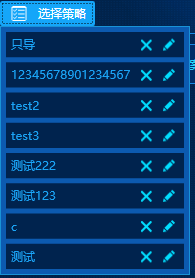
效果图:
WPF 自定义下拉列表的更多相关文章
- WPF 自定义柱状图 BarChart
WPF 自定义柱状图 当前的Telerik控件.DevExpress控件在图表控件方面做得不错,但是有时项目中需要特定的样式,不是只通过修改图表的模板和样式就能实现的. 或者说,通过修改当前的第三方控 ...
- wpf 自定义圆形按钮
wpf 自定义圆形按钮 效果图 默认样式 获取焦点样式 点击样式 下面是实现代码: 一个是自定义控件类,一个是控件类皮肤 using System; using System.Collections. ...
- WPF自定义窗口基类
WPF自定义窗口基类时,窗口基类只定义.cs文件,xaml文件不定义.继承自定义窗口的类xaml文件的根节点就不再是<Window>,而是自定义窗口类名(若自定义窗口与继承者不在同一个命名 ...
- WPF 自定义 MessageBox (相对完善版)
WPF 自定义 MessageBox (相对完善版) 基于WPF的自定义 MessageBox. 众所周知WPF界面美观.大多数WPF元素都可以简单的修改其样式,从而达到程序的风格统一.可是当 ...
- WPF自定义Window样式(2)
1. 引言 在上一篇中,介绍了如何建立自定义窗体.接下来,我们需要考虑将该自定义窗体基类放到类库中去,只有放到类库中,我们才能在其他地方去方便的引用该基类. 2. 创建类库 接上一篇的项目,先添加一个 ...
- WPF自定义Window样式(1)
1. 引言 WPF是制作界面的一大利器.最近在做一个项目,用的就是WPF.既然使用了WPF了,那么理所当然的,需要自定义窗体样式.所使用的代码是在网上查到的,遗憾的是,整理完毕后,再找那篇帖子却怎么也 ...
- WPF自学入门(九)WPF自定义窗口基类
今天简单记录一个知识点:WPF自定义窗口基类,常用winform的人知道,winform的窗体继承是很好用的,写一个基础窗体,直接在后台代码改写继承窗体名.但如果是WPF要继承窗体,我个人感觉没有理解 ...
- WPF自定义TabControl样式
WPF自定义TabControl,TabControl美化 XAML代码: <TabControl x:Class="SunCreate.Common.Controls.TabCont ...
- WPF 自定义ComboBox样式,自定义多选控件
原文:WPF 自定义ComboBox样式,自定义多选控件 一.ComboBox基本样式 ComboBox有两种状态,可编辑和不可编辑状态.通过设置IsEditable属性可以切换控件状态. 先看基本样 ...
随机推荐
- iOS - 上架的APP 生成二维码下载
1.首先打开苹果App Store商店进入到里面,找到需要打开链接地址的应用程序,例如:百度. 2. 在App Store商店里面先点击一下应用程序图标,再按一下…分享按钮. 3. 接着选择分享APP ...
- 过滤输入htmlentities与htmlspecialchars用法
过滤输入 (即来自所列数据源中的任何数据)是指,转义或删除不安全的字符.在数据到达应用的存储层之前,一定要过滤输入数据.这是第一道防线.假如网站的评论表单接收html,默认情况下 访客可以毫无阻拦地在 ...
- ueditor使用注意
问题1:后端配置项没有正常加载,上传插件不能正常使用! 我用的是开发版,1.4.3.3 .Net版 网上查了很多,后来发现只是配置的问题而已. 1.在根目录下:config.json 其中有Img上传 ...
- Apache虚拟主机/端口多开
Apache就是强大啊,简单配置一下就可以再开启另一个端口的web服务. 笔者最近使用XAMPP架设php服务端.有一些特别的需求:同样的代码,需要开始不同的端口, 协议类型提供web服务给客户端(h ...
- [Selenium]对弹出的Alert窗口进行操作
Alert alert = driver.switchTo().alert(); alert.accept();
- jsoup Java HTML解析器:使用选择器语法来查找元素
jsoup Java HTML解析器:使用选择器语法来查找元素 使用选择器语法来查找元素 问题 你想使用类似于CSS或jQuery的语法来查找和操作元素. 方法 可以使用Element.select( ...
- 2018.09.09 UVa10529 - Dumb Bones(期望dp)
传送门 期望dp好题. f[i]表示摆放i个的最小花费,于是f[i]可以从f[j]与f[i-j+1]转移过来了. 代码: #include<bits/stdc++.h> #define N ...
- asp.net web api 安装swagger
使用nuget控制台, 输入 Install-Package Swashbuckle,回车,等待安装引用.nuget国内没有镜像,安装比较慢 安装成功后会多出一个引用 右键工程点--属性,左边导航栏选 ...
- HDU 1513 && POJ 1159 Palindrome (DP+LCS+滚动数组)
题意:给定一个字符串,让你把它变成回文串,求添加最少的字符数. 析:动态规划是很明显的,就是没有了现思路,还是问的别人才知道,哦,原来要么写,既然是回文串, 那么最后正反都得是一样的,所以我们就正反求 ...
- chrome添加 postman扩展程序图文简介
Postman是一款功能强大的网页调试与发送网页HTTP请求的Chrome插件.无论是web前端开发 或 android.ios开发,只要涉及调用后端接口,postman这类型工具就必不可少了.相对于 ...