
POP数值动画
POP数值动画
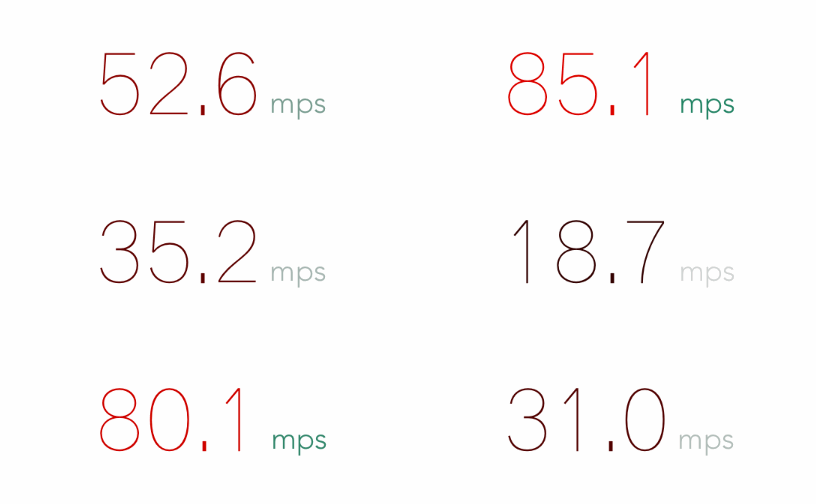
效果
源码
https://github.com/YouXianMing/Animations
//

//  PopNumberController.m

//  Animations

//

//  Created by YouXianMing on 15/11/18.

//  Copyright © 2015年 YouXianMing. All rights reserved.

//

#import "PopNumberController.h"

#import "POPNumberAnimation.h"

#import "GCD.h"

#import "StringAttributeHelper.h"

@interface PopNumberController () <POPNumberAnimationDelegate>

@property (nonatomic, strong) POPNumberAnimation *numberAnimation;

@property (nonatomic, strong) GCDTimer           *timer;

@property (nonatomic, strong) UILabel            *label;

@end

@implementation PopNumberController

- (void)viewDidLoad {

    [super viewDidLoad];

}

- (void)setup {

    [super setup];

    _label = [[UILabel alloc] initWithFrame:CGRectMake(, , , )];

    _label.textAlignment = NSTextAlignmentCenter;

    _label.center        = self.view.center;

    [self.view addSubview:_label];

    // Init numberAnimation.

    self.numberAnimation          = [[POPNumberAnimation alloc] init];

    self.numberAnimation.delegate = self;

    // Timer event.

    __weak PopNumberController *weakSelf = self;

    self.timer = [[GCDTimer alloc] initInQueue:[GCDQueue mainQueue]];

    [self.timer event:^{

        // Start animation.

        [weakSelf configNumberAnimation];

        [weakSelf.numberAnimation startAnimation];

    } timeIntervalWithSecs:.f];

    [self.timer start];

}

- (void)configNumberAnimation {

    self.numberAnimation.fromValue      = self.numberAnimation.currentValue;

    self.numberAnimation.toValue        = (arc4random() %  / .f);

    self.numberAnimation.duration       = .f;

    self.numberAnimation.timingFunction = [CAMediaTimingFunction functionWithControlPoints:0.69 :0.11 :0.32 :0.88];

    [self.numberAnimation saveValues];

}

- (void)POPNumberAnimation:(POPNumberAnimation *)numberAnimation currentValue:(CGFloat)currentValue {

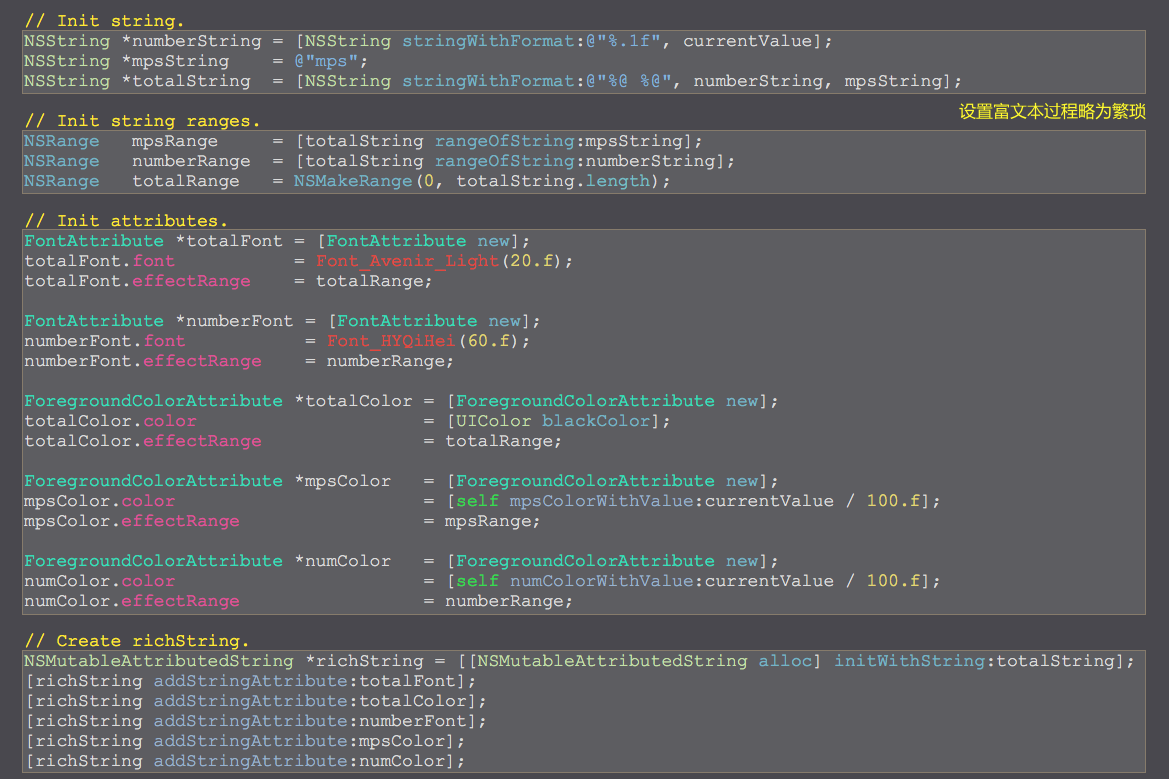
    // Init string.

    NSString *numberString = [NSString stringWithFormat:@"%.1f", currentValue];

    NSString *mpsString    = @"mps";

    NSString *totalString  = [NSString stringWithFormat:@"%@ %@", numberString, mpsString];

    // Init string ranges.

    NSRange   mpsRange     = [totalString rangeOfString:mpsString];

    NSRange   numberRange  = [totalString rangeOfString:numberString];

    NSRange   totalRange   = NSMakeRange(, totalString.length);

    // Init attributes.

    FontAttribute *totalFont = [FontAttribute new];

    totalFont.font           = Font_Avenir_Light(.f);

    totalFont.effectRange    = totalRange;

    FontAttribute *numberFont = [FontAttribute new];

    numberFont.font           = Font_HYQiHei(.f);

    numberFont.effectRange    = numberRange;

    ForegroundColorAttribute *totalColor = [ForegroundColorAttribute new];

    totalColor.color                     = [UIColor blackColor];

    totalColor.effectRange               = totalRange;

    ForegroundColorAttribute *mpsColor   = [ForegroundColorAttribute new];

    mpsColor.color                       = [self mpsColorWithValue:currentValue / .f];

    mpsColor.effectRange                 = mpsRange;

    ForegroundColorAttribute *numColor   = [ForegroundColorAttribute new];

    numColor.color                       = [self numColorWithValue:currentValue / .f];

    numColor.effectRange                 = numberRange;

    // Create richString.

    NSMutableAttributedString *richString = [[NSMutableAttributedString alloc] initWithString:totalString];

    [richString addStringAttribute:totalFont];

    [richString addStringAttribute:totalColor];

    [richString addStringAttribute:numberFont];

    [richString addStringAttribute:mpsColor];

    [richString addStringAttribute:numColor];

    _label.attributedText = richString;

}

- (UIColor *)numColorWithValue:(CGFloat)value {

    return [UIColor colorWithRed:value green: blue: alpha:.f];

}

- (UIColor *)mpsColorWithValue:(CGFloat)value {

    return [UIColor colorWithRed: green:value / .f blue:value / .f alpha:value];

}

@end
细节
POP数值动画的更多相关文章
- iOS利用Runtime自定义控制器POP手势动画
前言 苹果在iOS 7以后给导航控制器增加了一个Pop的手势,只要手指在屏幕边缘滑动,当前的控制器的视图就会跟随你的手指移动,当用户松手后,系统会判断手指拖动出来的大小来决定是否要执行控制器的Pop操 ...
- pop弹簧动画实现
POP是一个在iOS与OS X上通用的极具扩展性的动画引擎.它在基本的静态动画的基础上增加的弹簧动画与衰减动画,使之能创造出更真实更具物理性的交互动画.POP的API可以快速的与现有的ObjC代码集成 ...
- POP缩放动画
POP缩放动画 效果 源码 https://github.com/YouXianMing/Animations // // SpringScaleViewController.m // Animati ...
- POP按钮动画
POP按钮动画 效果 源码 https://github.com/YouXianMing/Animations // // ButtonPressViewController.m // Faceboo ...
- 在SOUI3.0中使用数值动画
上一篇介绍了插值动画,插值动画是直接作用于窗口对象的. 数值动画则可以作用于任何对象. SOUI内置了3种数值类型的动画,分别是SIntAnimator, SFloatAnimator, SColor ...
- POP简单动画简单使用 (入门级别)
动画可以让APP“更友好”的与用户交互,苹果提供很多的好看的动画供开发者使用,不过简单的平移.旋转.缩放.......使用起来很简单,但是想要进行一些比较复杂的动画效果,使用起来就比较难以实现,俗话说 ...
- ios pop 折叠动画
今天写了一个很有趣的电影太,我们可以去githoub下载. 这部动画是高级写作,我参考了它.而凝视,我希望你能看的懂. 各种动画.事实上,一些不起眼的开始.我也只是摸索. 我希望有更多的交流.[ ...
- Swift基础之自定义PUSH和POP跳转动画
之前用OC代码写过PUSH和POP的转场动画,闲来无事,将其转换成Swift语言,希望对大家有帮助,转载请注明.... 如何实现PUSH和POP的转场动画? 首先,创建一个NSObject的类,分别用 ...
- POP介绍与使用实践(快速上手动画)[转]
前言 动画在APP开发过程中 大家多多少少都会接触到 而且随着ios7的扁平化风格启用之后 越来越多的APP开始尝试加入各种绚丽的动画交互效果以增加APP的用户体验(当然 还是以国外的APP居多) 有 ...
随机推荐
- IntelliJ IDEA 显示行号
设置方法如下: File->Settings->Editor->Appearence->Show Line Number
- HTML--1
<!DOCTYPE html PUBLIC "-//W3C//DTD XHTML 1.0 Transitional//EN" "http://www.w3.org/ ...
- Python全栈开发之15、DOM
文档对象模型(Document Object Model,DOM)是一种用于HTML和XML文档的编程接口.它给文档提供了一种结构化的表示方法,可以改变文档的内容和呈现方式.我们最为关心的是,DOM把 ...
- LoadRunner中文乱码问题解决方法
LoadRunner中文乱码问题解决方法 前段时间在录制,增强,整合LoadRunner脚本,期间两次遇到了中文乱码问题.在此记录一下中文乱码问题的解决办法. 一.录制回放中文乱码 我录制登陆的脚本, ...
- CentOS 5.x上配置JBoss6.x步骤图解教程
1.如何远程连接CentOS和文件上传下载 使用工具Xmanager下的Xbroswer 首先在Xbroswer下的Xshell下新建文件夹JavaPlatServer,新建一个Xshell Sess ...
- Kubernetes(k8s)集群部署(k8s企业级Docker容器集群管理)系列之flanneld网络介绍及部署(三)
0.前言 整体架构目录:ASP.NET Core分布式项目实战-目录 k8s架构目录:Kubernetes(k8s)集群部署(k8s企业级Docker容器集群管理)系列目录 一.flanneld介绍 ...
- C++下的强制转换类型
一.static_cast static_cast,静态类型转换. 下面,我举几个例子,大家就能清楚了. int main(int argc, char const *argv[]) { char ...
- 浏览器在线查看pdf文件 pdf.js的使用教程
谷歌浏览器可以直接在线查看pdf,而IE内核浏览器无法在线查看,默认是下载. 这里用到的是pdf.js,不仅支持IE内核浏览器,而且兼容手机查看pdf 官网地址:http://mozilla.gith ...
- 【20181102T2】飞越行星带【智商题+最小瓶颈路】
题面 [正解] 一眼不可做啊 --相当于求路线上穿过的点最小距离最大 最小最大--二分啊 现在相当于给一个直径,要判断这个直径是否能从左边穿到右边 我们可以在距离不超过直径的点连一条边,\(y=0\) ...
- BlocksKit(1)-基本类型的分类
BlocksKit(1)-基本类型的分类 BlocksKit是一个用block的方式来解决我们日常用对集合对象遍历.对象快速生成使用.block作为委托对象的一种综合便利封装库.这个库主要分三个大块C ...