
struts2 内容记录
多xml文件配置
在开发过程中我们经常会将每一张表(如:user表)的struts.xml文件分开,便于管理,故需要建立struts_user.xml文件管理请求等。那么需要用到inculde标签。
在原生的struts.xml文件里引入管理表的struts.xml文件(如:引入struts_user.xml文件):在原生文件中加入<include file="struts_user.xml"></include>
全局结果集
在开发中,多个action的结果集跳转name相同,那么我们可以吧所有action里的结果跳转提出来,简化代码需要用到global-results标签。
例:<global-results>
<result name="input">/login.jsp</result>
<global-results>
局部异常和全局异常:
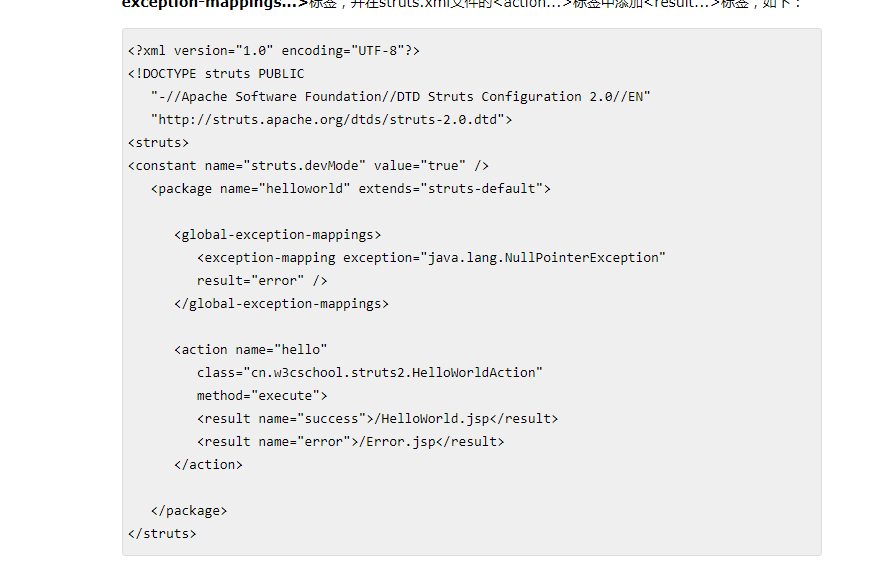
上图讲解:通过异常映射让空指针异常请求name="error"结果集
可以将result 通过<global-results> <result name="error">/Error.jsp</result> </global-results>标签将异常设置为全局异常跳转
Action
关于Action的三种实现方式(Servlet的实现HttpServlet接口)
1、普通的JavaBean
2、实现(implements)Action接口
3、继承(extends) ActionSupport类
参考网址:https://www.w3cschool.cn/struts_2/struts_actions.html
关于Action的方法动态调用
1、方法动态调用(出现高危漏洞,现在已经被大众抛弃使用)
*struts.enable.DynamicMethodlnvocation=true,通过strutsXML文件配置该动态方法调用为true使得,struts2请求将form表单提交的请求通过!分开变成数组(如:login!creat-------struts2请求name="login" method="creat")
2、通配符调用

如果javaBean的query方法的返回值是String return "query",那么当前台请求为emp-query.action的时候则会调用query的方法返回query,result则会调用/emp-query.jsp。注:增加*,{number},number对应第几个星。
3,定义别名的方式动态调用
可以将method直接写死,使代码不容易被混淆,并且不容易通过请求名获取后台调用的方法(安全)。
Action的两种参数收集方式
1、字段驱动参数收集
ParameterInterceptor
~声明JavaBean属性,提供get/set方法
~表单 input name="JavaBean.userName"
2、模型驱动参数收集
ModelDrivenInterceptor
~实现 ModelDrivenInterceptor接口,重写getObject();
~声明属性并进行初始化操作
~表单 input name="userName"
注:模型驱动必须要实例化属性对象(及new一个对象:private User user = new User();)
表单验证:https://www.w3cschool.cn/struts_2/struts_validations.html
在action实现类中获取内置对象
在使用struts2处理业务的过程中,我们通常都用到了jsp的内置对象,这里提供两种方式来获取这些常用的内置对象:
~通过ActionContext上下文方式(其实是为了获取的是值栈里map栈的对内置对象封装的Map):
启用request,response,session,application对象的方法是通过ActionContext来找,再用他们来获取前端输入的值,代码如下:
//获取上下文
ActionContext ac = ActionContext.getContext();
//获取request
Map<String, Object> request = (Map) ac.get("request");
//保存数据
request.put("requestMsg", "request中保存的信息");
//获取response
Map<String, Object> response = (Map)ac.get("response");
//获取session
Map<String, Object> session = ac.getSession();
session.put("sessionMsg", "session中保存的信息");
//获取application
Map<String, Object> application = ac.getApplication();
application.put("applicationMsg", "application中保存的信息");
前台JSP获取:
request中的数据:${requestScope.requestMsg}</br>
session中的数据:${sessionScope.sessionMsg}</br>
application中的数据:${applicationScope.applicationMsg}</br>
~通过ServletActionContext上下文方式(获取的是原生的servlet上下文,为了获取原生的内置对象):
HttpServletRequest request = ServletActionContext.getRequest();
request.setAttribute("requestMsg","request中保存的信息");
HttpServletResponse response = ServletActionContext.getResponse();
HttpSession session = request.getSession();
session.setAttribute("sessionMsg", "session中保存的信息");
ServletContext application = session.getServletContext();
application.setAttribute("applicationMsg", "application中保存的信息");
前台JSP获取:
request中的数据:${requestScope.requestMsg}</br>
session中的数据:${sessionScope.sessionMsg}</br>
application中的数据:${applicationScope.applicationMsg}</br>
Result的类型
1、dispatcher 内部跳转 带参数页面跳转
2、redirect 重定向 无参数页面跳转
3、chain 内部跳转请求 带参数的请求调转(result 跳转地址写另一个action的name值)
4、redirectAction 重定向跳转请求 无参数的请求跳转
5、stream 流 常用于下载或需要在页面上显示图片等操作
S标签
引入需要在JSP页面加入头文件
<%@ taglib prefix="s" uri="/struts-tags"%>
注:所有的s标签都不认EL表达式!!!
s:debug标签非常实用,可以看到值栈里面的所有信息
<s:debug></s:debug>
s:form,默认的表单提交方式为post,还可以利用table自动布局,同时引入了一些样式
<h1>请登录:</h1>
<s:form action="login.action" method="post">
<!-- theme="simple"属性可以去掉布局 可以在xml里面配置常量为theme-->
<s:textfield name="loginname" label="用户名"></s:textfield>
<s:password name="loginpwd" label="密码"></s:password>
<s:submit value="登录"></s:submit>
</s:form>
s:property标签获取loginname:<s:property value="loginname" />
(因为其是直接从值栈中获取值也就是从[ActionContext]里,效率高于EL表达式,值栈里有对象栈和MAP栈)
MAP栈存放的是内置对象的封装MAP对象用s:property取值需要加上#号
s:date标签用来显示日期<s:date name="birth" format="yyyy-MM-dd HH:mm:ss" />
s:if s:elseif s:else s:iterator标签:
 package com.tzy.www;

 import java.io.Serializable;

 public class Users implements Serializable {
 private Integer userId;
 private String userName;
 private String pwd;
 private String realname;
 public Users(Integer userId, String userName, String pwd, String realname) {
     super();
     this.userId = userId;
     this.userName = userName;
     this.pwd = pwd;
     this.realname = realname;
 }
 public Users() {
     super();
 }
 public Integer getUserId() {
     return userId;
 }
 public void setUserId(Integer userId) {
     this.userId = userId;
 }
 public String getUserName() {
     return userName;
 }
 public void setUserName(String userName) {
     this.userName = userName;
 }
 public String getPwd() {
     return pwd;
 }
 public void setPwd(String pwd) {
     this.pwd = pwd;
 }
 public String getRealname() {
     return realname;
 }
 public void setRealname(String realname) {
     this.realname = realname;
 }

 }
Users |
 package com.tzy.www;

 import java.util.ArrayList;
 import java.util.List;

 public class UserAction {
 private List<Users> userList;

 public List<Users> getUserList() {
     return userList;
 }

 public void setUserList(List<Users> userList) {
     this.userList = userList;
 }
 public String execute(){
     Users u1 = new Users(1001, "zhangsan", "123", "张三");
     Users u2 = new Users(1002, "lisi", "345", "李四");
     Users u3 = new Users(1003, "wangwu", "678", "王五");
     userList = new ArrayList<Users>();
     userList.add(u1);
     userList.add(u2);
     userList.add(u3);
     System.out.println("user");
     return "success";

 }
 }
UserAction |
 <%@ page language="java" contentType="text/html; charset=UTF-8"
     pageEncoding="UTF-8"%>
     <%@ taglib prefix="s" uri="/struts-tags"%>
 <!DOCTYPE html PUBLIC "-//W3C//DTD HTML 4.01 Transitional//EN" "http://www.w3.org/TR/html4/loose.dtd">
 <html>
 <head>
 <meta http-equiv="Content-Type" content="text/html; charset=UTF-8">
 <title>Insert title here</title>
 </head>
 <body>
 <h3>这是index.jsp页面</h3>
 <a href="login.action">测试</a>
 </body>
 </html>
index.jsp <%@ page language="java" contentType="text/html; charset=UTF-8"
pageEncoding="UTF-8"%>
<%@ taglib prefix="s" uri="/struts-tags"%>
<!DOCTYPE html PUBLIC "-//W3C//DTD HTML 4.01 Transitional//EN" "http://www.w3.org/TR/html4/loose.dtd">
<html>
<head>
<meta http-equiv="Content-Type" content="text/html; charset=UTF-8">
<title>Insert title here</title>
</head>
<body>
<h1>成功</h1>
<s:if test="userList==null">
<h5>没有查询到数据</h5>
</s:if>
<s:else>
<s:iterator value="userList" >
Property:<s:property value="userId"/>---
EL:${pwd}---
Property:<s:property value="userName"/>---
EL:${realname}<br/>
</s:iterator>
</s:else>
<s:debug></s:debug>
</body>
</html>
success.jsp |
 <?xml version="1.0" encoding="UTF-8" ?>
 <!DOCTYPE struts PUBLIC
     "-//Apache Software Foundation//DTD Struts Configuration 2.3//EN"
     "http://struts.apache.org/dtds/struts-2.3.dtd">

 <struts>

 <package name="tzy" extends="struts-default">
 <action name="login" class="com.tzy.www.UserAction">
     <result name="input">/index.jsp</result>
     <result>/success.jsp</result>
 </action>
 </package>

 </struts>
struts.xml |
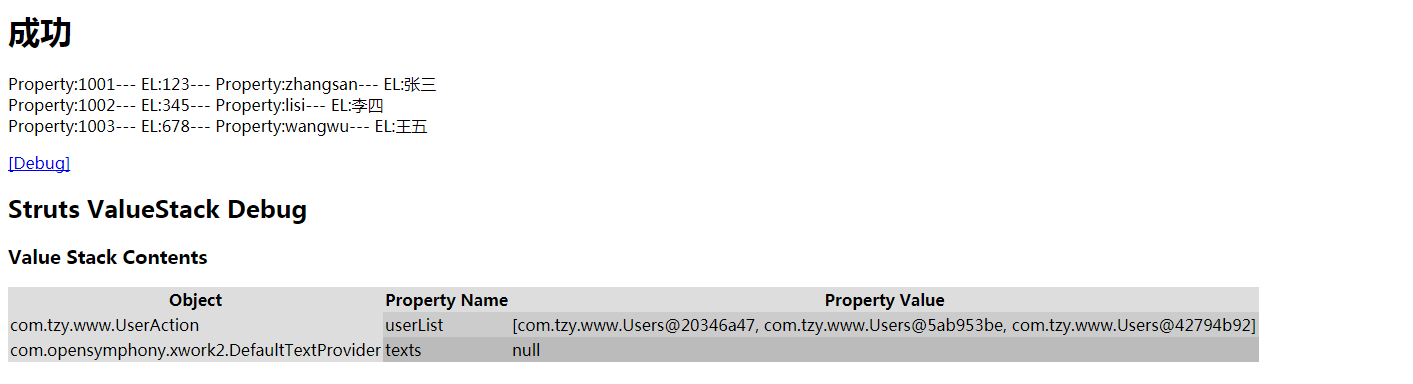
Action验证validate
理念:对于页面上,用户输入的数据,我们在项目中是需要进行效验的,常见的效验分服务器端效验和客户端效验:
客户端效验是指在浏览器端通过javascript进行初步效验,为了减轻服务器端的负载;
服务器端效验是效验数据的最后一道防线。
1、全局验证,第一步,需要在struts.xml文件中,为action配置input结果集;第二步,action的实现类,必须继承ActionSupport父类,同时重写validate()方法。
2、验证某个方法:类似上面的验证步骤,我们只需要在第二步重写validate方法时,将方法名做一点修改即可,其他部分完全一致。如针对execute方法进行验证,那么验证方法名就是validateExecute。
单独验证某个方法的好处:通过同一个action类,其他方法可以正常通过,而全局验证做不到。
添加错误信息的方法:super.addFieldError("pwdnull", "密码不能为空"); 但是写死了不利于做到国际化,所以一般用到配置文件。(请看3)
那么JSP取错误信息的方式为:${fieldErrors.pwdnull[0]}或者<s:property value="errors.pwdnull"/><br/>
3、properties文件保存错误信息
考虑到项目的国际化应用,我们还可以把错误信息放在properties文件中。
第一步,先创建一个properties文件,此时创建文件常见的有三种写法:
第一种,在action实现类同样的目录下,properties文件的名字与action实现类的名字一致。比如,这里的实现类叫UserAction,那么properties文件的名字就叫UserAction.properties。
properties文件为key=value的格式,此时的properties文件只针对UserAction一个实现类有效。如内容为:pwdisnull=密码不能为空
添加错误信息的方法:super.addFieldError("pwdnull", super.getText("pwdisnull")); 那么JSP取错误信息的方式为:${fieldErrors.pwdnull[0]}或者<s:property value="errors.pwdnull"/><br/>

 nameisnull=\u7528\u6237\u540D\u4E0D\u80FD\u4E3A\u7A7A-useraction
 pwdisnull=\u5BC6\u7801\u4E0D\u80FD\u4E3A\u7A7A-useraction
UserAction.properties
第二种,在action实现类的同一个包下,properties文件的名字叫package.properties,文件内容同上。此时的properties文件针对于所在包下的实现类都有效。

 nameisnull=\u7528\u6237\u540D\u4E0D\u80FD\u4E3A\u7A7A-packageaction
 pwdisnull=\u5BC6\u7801\u4E0D\u80FD\u4E3A\u7A7A-packageaction
package.proties
第三种,在src目录下,文件名自定义,然后通过常量来配置xml:<constant name="struts.custom.i18n.resources" value="properties文件的名字(不带后缀)"></constant>
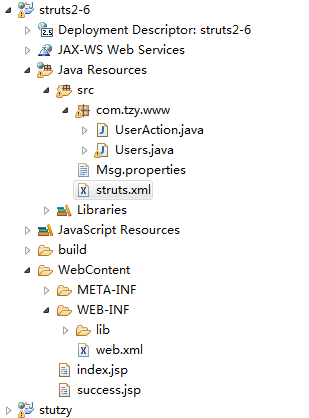
 nameisnull=\u7528\u6237\u540D\u4E0D\u80FD\u4E3A\u7A7A-Msg
 pwdisnull=\u5BC6\u7801\u4E0D\u80FD\u4E3A\u7A7A-Msg
Msg.properties
 <?xml version="1.0" encoding="UTF-8" ?>
 <!DOCTYPE struts PUBLIC
     "-//Apache Software Foundation//DTD Struts Configuration 2.3//EN"
     "http://struts.apache.org/dtds/struts-2.3.dtd">

 <struts>

 <constant name="struts.custom.i18n.resources" value="Msg"></constant>
 <package name="tzy" extends="struts-default">
 <action name="login" class="com.tzy.www.UserAction">
     <result name="input">/index.jsp</result>
     <result>/success.jsp</result>
 </action>
 <action name="cs" class="com.tzy.www.UserAction" method="cs">
     <result>/success.jsp</result>
 </action>
 </package>

 </struts>
struts.xml
注:3种方法范围越小的优先级越大。
 package com.tzy.www;

 import java.io.Serializable;

 public class Users implements Serializable {
 private Integer userId;
 private String userName;
 private String pwd;
 private String realname;
 public Users(Integer userId, String userName, String pwd, String realname) {
     super();
     this.userId = userId;
     this.userName = userName;
     this.pwd = pwd;
     this.realname = realname;
 }
 public Users() {
     super();
 }
 public Integer getUserId() {
     return userId;
 }
 public void setUserId(Integer userId) {
     this.userId = userId;
 }
 public String getUserName() {
     return userName;
 }
 public void setUserName(String userName) {
     this.userName = userName;
 }
 public String getPwd() {
     return pwd;
 }
 public void setPwd(String pwd) {
     this.pwd = pwd;
 }
 public String getRealname() {
     return realname;
 }
 public void setRealname(String realname) {
     this.realname = realname;
 }

 }
Users
 package com.tzy.www;

 import java.util.ArrayList;
 import java.util.List;

 import com.opensymphony.xwork2.ActionSupport;

 public class UserAction extends ActionSupport {
     /**
          *
          */
     private static final long serialVersionUID = 1L;
     private String userName;
     private String userPwd;
 //全局的验证
 //    @Override
 //    public void validate() {
 //        if(userName==null||"".equals(userName.trim())){
 //            super.addFieldError("namenull", "用户名不能为空");
 //        }
 //        if(userPwd==null||"".equals(userPwd.trim())){
 //            super.addFieldError("pwdnull", "密码不能为空");
 //        }
 //    }
     //对某一个方法验证,如只针对execute方法验证
     public void validateExecute(){
         if(userName==null||"".equals(userName.trim())){
         super.addFieldError("namenull", super.getText("nameisnull"));
     }
     if(userPwd==null||"".equals(userPwd.trim())){
         super.addFieldError("pwdnull", super.getText("pwdisnull"));
     }
     }

     private List<Users> userList;

     public List<Users> getUserList() {
         return userList;
     }

     public void setUserList(List<Users> userList) {
         this.userList = userList;
     }

     public String execute() {
         Users u1 = new Users(1001, "zhangsan", "123", "张三");
         Users u2 = new Users(1002, "lisi", "345", "李四");
         Users u3 = new Users(1003, "wangwu", "678", "王五");
         userList = new ArrayList<Users>();
         userList.add(u1);
         userList.add(u2);
         userList.add(u3);
         System.out.println("user");
         return "success";

     }
     public String cs(){
         return "success";
     }

     public String getUserName() {
         return userName;
     }

     public void setUserName(String userName) {
         this.userName = userName;
     }

     public String getUserPwd() {
         return userPwd;
     }

     public void setUserPwd(String userPwd) {
         this.userPwd = userPwd;
     }

 }
UserAction
 <?xml version="1.0" encoding="UTF-8" ?>
 <!DOCTYPE struts PUBLIC
     "-//Apache Software Foundation//DTD Struts Configuration 2.3//EN"
     "http://struts.apache.org/dtds/struts-2.3.dtd">

 <struts>

 <constant name="struts.custom.i18n.resources" value="Msg"></constant>
 <package name="tzy" extends="struts-default">
 <action name="login" class="com.tzy.www.UserAction">
     <result name="input">/index.jsp</result>
     <result>/success.jsp</result>
 </action>
 <action name="cs" class="com.tzy.www.UserAction" method="cs">
     <result>/success.jsp</result>
 </action>
 </package>

 </struts>
struts.xml
 <%@ page language="java" contentType="text/html; charset=UTF-8"
     pageEncoding="UTF-8"%>
     <%@ taglib prefix="s" uri="/struts-tags"%>
 <!DOCTYPE html PUBLIC "-//W3C//DTD HTML 4.01 Transitional//EN" "http://www.w3.org/TR/html4/loose.dtd">
 <html>
 <head>
 <meta http-equiv="Content-Type" content="text/html; charset=UTF-8">
 <title>Insert title here</title>
 </head>
 <body>
 <h3>这是index.jsp页面</h3>
 <a href="cs.action">测试</a>
 <s:debug></s:debug>
 <h1>请登录:</h1>
 <s:form action="login.action" method="post" theme="simple">
 <!-- theme="simple"属性可以去掉布局 可以在xml里面配置常量为theme-->
 用户名:<s:textfield name="userName" label="用户名"></s:textfield>
 <font color="red">${fieldErrors.namenull[0]}</font>--
 <s:property value="errors.namenull"/><br/>
 密码:<s:password name="userPwd" label="密码"></s:password>
 <font color="red">${fieldErrors.pwdnull[0]}</font>--
 <s:property value="errors.pwdnull"/><br/>
 <s:submit value="登录"></s:submit>
 </s:form>
 </body>
 </html>
index.jsp
 <%@ page language="java" contentType="text/html; charset=UTF-8"
     pageEncoding="UTF-8"%>
     <%@ taglib prefix="s" uri="/struts-tags"%>
 <!DOCTYPE html PUBLIC "-//W3C//DTD HTML 4.01 Transitional//EN" "http://www.w3.org/TR/html4/loose.dtd">
 <html>
 <head>
 <meta http-equiv="Content-Type" content="text/html; charset=UTF-8">
 <title>Insert title here</title>
 </head>
 <body>
 <h3>这是index.jsp页面</h3>
 <a href="cs.action">测试</a>
 <s:debug></s:debug>
 <h1>请登录:</h1>
 <s:form action="login.action" method="post" theme="simple">
 <!-- theme="simple"属性可以去掉布局 可以在xml里面配置常量为theme-->
 用户名:<s:textfield name="userName" label="用户名"></s:textfield>
 <font color="red">${fieldErrors.namenull[0]}</font>--
 <s:property value="errors.namenull"/><br/>
 密码:<s:password name="userPwd" label="密码"></s:password>
 <font color="red">${fieldErrors.pwdnull[0]}</font>--
 <s:property value="errors.pwdnull"/><br/>
 <s:submit value="登录"></s:submit>
 </s:form>
 </body>
 </html>
success.jsp
properties文件在上面,引用前两个先删除xml里面的constant
struts2验证框架
struts2提供了验证框架,功能强大而且简单易用,帮助用户做了很多事情,使得用户不必从头开发。
其验证需要用到的必备jar包:xwork-core-*.jar。在这个包中有这样一个package"com.opensymphony.xwork2.validator.validators",所有官方验证类就放在这个下面,
在这个包下面有一个"default.xml"文件,这就是验证框架的核心文件,里面配置了所有的验证类数据。
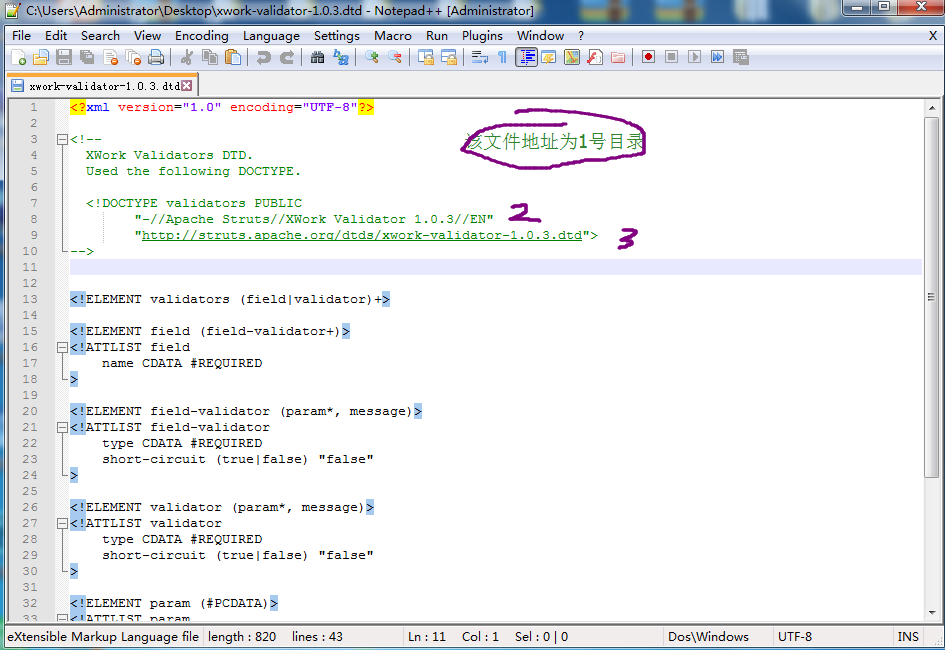
想要实现验证,需要先创建一个验证文件(这个验证文件为xml文件),创建文件位置在实现类同一个目录下。
xml文件的命名方式:
action实现类的名字-validation.xml==>针对这个action实现类中所有的方法;
action实现类的名字-action的名字-validation.xml==>针对这一个action请求;
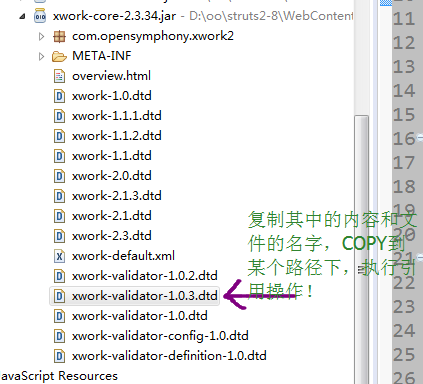
引用dtd方式:
|
|

required:字段不能为空
requiredstring:字符串不能为空
int:int类型(可指定范围)
long:long类型(可指定范围)
short:short类型(可指定范围)
double:double类型(可指定方位)
date :事件格式(可指定范围)
expression:ognl表达式判断
fieldexpression:ognl表达式判断
email:邮箱判断
url:url路径判断
visitor:把同一个验证程序配置文件用于多个动作(对一个Bean写验证文件,每个使用的Action只要引用)
conversion:格式转换
stringlength:字符串长度
regex:正则表达式判断
此时一旦验证不通过,即会把错误信息保存在FieldErrors对象中,在页面上可以直接通过FieldError来输出错误信息。
 <%@ page language="java" contentType="text/html; charset=UTF-8"
     pageEncoding="UTF-8"%>
 <%@ taglib prefix="s" uri="/struts-tags"%>
 <!DOCTYPE html PUBLIC "-//W3C//DTD HTML 4.01 Transitional//EN" "http://www.w3.org/TR/html4/loose.dtd">
 <html>
 <head>
 <meta http-equiv="Content-Type" content="text/html; charset=UTF-8">
 <title>Insert title here</title>
 </head>
 <body>
     <h3>这是index.jsp页面</h3>
     <h1>请登录:</h1>
     <s:debug></s:debug>
     <s:form action="login.action" method="post" theme="simple">
         <!-- theme="simple"属性可以去掉布局 可以在xml里面配置常量为theme-->
 用户名:<s:textfield name="userName" label="用户名"></s:textfield>
         <font color="red">${fieldErrors.userName[0]}</font>--
         <s:property value="errors.userName[0]" /><br />
 密码:<s:password name="userPwd" label="密码"></s:password>
         <font color="red">${fieldErrors.userPwd[0]}</font>--
         <s:property value="errors.userPwd[0]" /><br />
 确认密码:<s:password name="userRePwd" label="确认密码"></s:password>
         <font color="red">${fieldErrors.userRePwd[0]}</font>--
         <s:property value="errors.userRePwd[0]" /><br />
 邮箱:<s:password name="email" label="email"></s:password>
         <font color="red">${fieldErrors.email[0]}</font>--
         <s:property value="errors.email[0]" /><br />
         <s:submit value="登录"></s:submit>
     </s:form>
 </body>
 </html>
index.jsp
 <%@ page language="java" contentType="text/html; charset=UTF-8"
     pageEncoding="UTF-8"%>
      <%@ taglib prefix="s" uri="/struts-tags"%>
 <!DOCTYPE html PUBLIC "-//W3C//DTD HTML 4.01 Transitional//EN" "http://www.w3.org/TR/html4/loose.dtd">
 <html>
 <head>
 <meta http-equiv="Content-Type" content="text/html; charset=UTF-8">
 <title>Insert title here</title>
 </head>
 <body>
 <h1>成功</h1>

 <s:debug></s:debug>
 </body>
 </html>
success.jsp
 package com.tzy.www;

 import java.util.ArrayList;
 import java.util.List;

 import org.apache.struts2.ServletActionContext;

 import com.opensymphony.xwork2.ActionSupport;

 public class UsersAction extends ActionSupport {

     private String userName;
     private String userPwd;
     private String userRePwd;
     private String email;

     public String islogin() {

         System.out.println("execute方法执行");
         return "success";

     }

     public String getUserName() {
         return userName;
     }

     public void setUserName(String userName) {
         this.userName = userName;
     }

     public String getUserPwd() {
         return userPwd;
     }

     public void setUserPwd(String userPwd) {
         this.userPwd = userPwd;
     }

     public String getUserRePwd() {
         return userRePwd;
     }

     public void setUserRePwd(String userRePwd) {
         this.userRePwd = userRePwd;
     }

     public String getEmail() {
         return email;
     }

     public void setEmail(String email) {
         this.email = email;
     }

 }
UsersAction
 <?xml version="1.0" encoding="UTF-8"?>
  <!DOCTYPE validators PUBLIC
           "-//Apache Struts//XWork Validator 1.0.3//EN"
           "http://struts.apache.org/dtds/xwork-validator-1.0.3.dtd">

 <validators>
 <!-- 要验证的参数的名字 -->
     <field name="userName">
     <!-- 指定验证规则 -->
         <field-validator type="requiredstring">
         <!-- 验证不通过时,输出的错误信息 -->
         <message>用户名不能为空</message>
         </field-validator>
         <field-validator type="stringlength">
             <param name="minLength">6</param>
             <param name="maxLength">16</param>
             <message>用户名长度必须为6-16位之间</message>
         </field-validator>
     </field>

     <field name="userPwd">
     <field-validator type="requiredstring">
     <message>密码不能为空</message>
     </field-validator>
     </field>

     <field name="userRePwd">
     <field-validator type="requiredstring">
     <message>密码不能为空</message>
     </field-validator>
     <field-validator type="fieldexpression">
     <param name="expression">
         <!-- 在xml里面的string字符串如下格式 -->
         <![CDATA[userRePwd==userPwd]]>
     </param>
     <message>两次密码输入不一致</message>
     </field-validator>
     </field>

     <field name="email">
         <field-validator type="requiredstring">
             <!-- 国际化的时候key等于properties文件里面的key -->
             <message key="emailnull"></message>
         </field-validator>
         <field-validator type="regex">
             <param name="regexExpression">
                 ^[a-zA-Z0-9_-]+@[a-zA-Z0-9_-]+(\.[a-zA-Z0-9_-]+)+$
             </param>
             <message key="emailerror"></message>
         </field-validator>
     </field>
 </validators>
UsersAction-login-validation.xml
 emailnull=email\u4E0D\u80FD\u4E3A\u7A7A
 emailerror=email\u683C\u5F0F\u4E0D\u6B63\u786E
UsersAction.properties
国际化
在程序设计领域,把在无需改写源代码即可让开发出来的应用程序能够支持多种语言和数据格式的技术称为国际化。
与国际化对应的是本地化,指让一个具备国际化支持的应用程序支持某个特定的地区
Struts2国际化是建立在Java国际化基础上的:
-为不同国家/语言提供对应的消息资源文件
-Struts2框架会根据请求中包含的<s:text name="username"></s:text> (其中username对应properties里面的key)
Locale加载对应的资源文件
-通过程序代码取得该资源文件中指定key对应的消息
国际化的目标:
1)。如何配置国际化资源文件
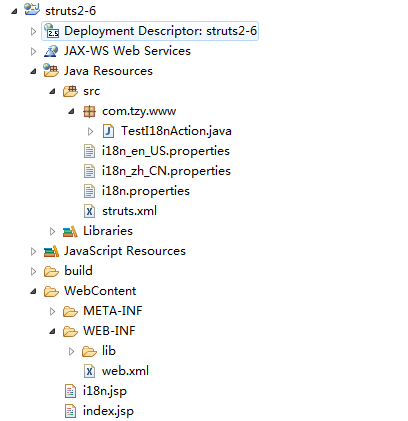
Action范围资源文件:在Action类文件所在的路径建立名为: ActionName_language_properties的文件
包范围资源文件:在包的根路径下建立文件名为: package_language_country.properties的属性文件,一旦建立,处于该包下的所有Action都可以访问该资源文件。
注:包范围资源文件的baseName就是package,不是Actiojn所在的包名。
全局资源文件:---命名方式:basename_language_country.properties
---struts.xml : <constant name="struts.custom.i18n.resources" value="baseName"/>
---struts.properties : struts.custom.i18n.resources=baseName
临时指定资源文件:<s:i18n.../>标签的name属性指定临时的国际化资源文件.
国际化资源加载的顺序:离当前Action较近的将被优先加载。
2)。如何在页面上和Action类中访问国际化资源文件的value值
在Action类中,若Action实现了TextProvider接口,则可以调用其getText()方法获取value值----》通过继承ActionSupport的方式。
页面上可以使用s:text标签;对于表单标签可以使用表单标签的key属性值
》若有占位符,则可以使用s:text标签的s:param自标签来填充占位符
》可以利用标签和OGNL表达式直接访问值栈中的属性值(对象栈和Map栈)
 username=UserName
 password=Password
 submit=submit
 time=Time:{0}
 time1=Time:${date}
i18n.properties
 username=UserName
 password=Password
 submit=submit
 time=Time:{0}
 time1=Time:${date}
i18n_en_US.properties
 username=\u7528\u6237\u540D
 password=\u5BC6\u7801
 submit=\u63D0\u4EA4
 time=\u65F6\u95F4:{0}
 time1=\u65F6\u95F4:${date}
i18n_zh_CN.properties
 <?xml version="1.0" encoding="UTF-8" ?>
 <!DOCTYPE struts PUBLIC
     "-//Apache Software Foundation//DTD Struts Configuration 2.3//EN"
     "http://struts.apache.org/dtds/struts-2.3.dtd">

 <struts>

 <!--配置全局的国际化资源文件-->
     <constant name="struts.custom.i18n.resources" value="i18n"></constant>
     <package name="tzy" extends="struts-default">
         <action name="testI18n" class="com.tzy.www.TestI18nAction">
             <result>/i18n.jsp</result>
         </action>
     </package>

 </struts>
struts.xml
 package com.tzy.www;

 import java.util.Arrays;
 import java.util.Date;

 import com.opensymphony.xwork2.ActionSupport;

 public class TestI18nAction extends ActionSupport {
     /**
      *
      */
     private static final long serialVersionUID = 1L;
     private Date date = null;
     @Override
     public String execute() throws Exception {
         date=new Date();
         //在Action中访问国际化资源文件的value值
         String username = getText("username");
         System.out.println(username);
         //带占位符的
         String time = getText("time", Arrays.asList(date));
         System.out.println(time);
         return SUCCESS;
     }
     public Date getDate() {
         return date;
     }
     public void setDate(Date date) {
         this.date = date;
     }

 }
TestI18nAction
 <%@ page language="java" contentType="text/html; charset=UTF-8"
     pageEncoding="UTF-8"%>
 <!DOCTYPE html PUBLIC "-//W3C//DTD HTML 4.01 Transitional//EN" "http://www.w3.org/TR/html4/loose.dtd">
 <html>
 <head>
 <meta http-equiv="Content-Type" content="text/html; charset=UTF-8">
 <title>Insert title here</title>
 </head>
 <body>
 <a href="testI18n.action">TO TestI18n</a>
 </body>
 </html>
index.jsp
 <%@ page language="java" contentType="text/html; charset=UTF-8"
     pageEncoding="UTF-8"%>
     <%@ taglib prefix="s" uri="/struts-tags" %>
 <!DOCTYPE html PUBLIC "-//W3C//DTD HTML 4.01 Transitional//EN" "http://www.w3.org/TR/html4/loose.dtd">
 <html>
 <head>
 <meta http-equiv="Content-Type" content="text/html; charset=UTF-8">
 <title>Insert title here</title>
 </head>
 <body>
 <s:debug></s:debug>
 <s:text name="time">
     <s:param value="date"></s:param>
 </s:text>
 <br/>
 <s:text name="time1">
 </s:text>
     <s:form action="">
         <!-- label的方式是把label写死在标签里 -->
         <s:textfield name="username" label="UserName"></s:textfield>
         <!-- 引用getText方法获取i18n 强制ognl解析 -->
         <!-- 若label标签使用%{getText('username')}的方式就可以从国际化资源文件中获取value值了
         因为此时在对象栈中有DefaultTextProvider的一个实例,该对象中提供了访问国际化资源文件的getText()方法
         同时还需要通知struts框架 label中放入的不再是一个普通的字符串,而是一个OgNL表达式,所以使用%{}把getText()
         包装起来,以强制进行OGNL解析 -->
         <s:textfield name="username" label="%{getText('username')}"></s:textfield>
         <s:textfield name="username" key="username"></s:textfield>
         <!-- key方式是直接上资源文件中获取value值 -->
         <s:password name="password" key="password"></s:password>

         <s:submit key="submit"></s:submit>
     </s:form>
     <hr><hr><hr>
     <!--simple主题 上述将不再起作用-->
     <!--页面上可以直接使用s:text标签的name属性可以来访问国际化资源文件里的value-->
     <s:form action="" theme="simple">
         <s:text name="username"></s:text>:<s:textfield name="username" label="UserName"></s:textfield>
                 <br/>
         <s:text name="username"></s:text>:<s:textfield name="username" label="%{getText('username')}"></s:textfield>
                 <br/>
         <s:text name="username"></s:text>:<s:textfield name="username" key="username"></s:textfield>
                 <br/>
         <s:text name="password"></s:text>:<s:password name="password" key="password"></s:password>
                 <br/>
         <s:submit key="submit" value="%{getText('submit')}"></s:submit>
     </s:form>
 </body>
 </html>
i18n.jsp
3)。实现通过超链接切换语言
关键之处在于知道Struts2框架是如何确定Local对象的!
可以通过阅读 I18N 拦截器知道需要设置request_locale参数.
具体确定Locale对象的过程
》Struts2使用i18n拦截器处理国际化,并且将其注册在默认的拦截其中
》i18n拦截器在执行Actiong方法前,自动查找请求中一个名为request_locale的参数。如果该参数存在,拦截器就将其作为参数,转换成Locale对象,
并将其设为用户默认的Locale(代表国家/语言环境)。
并把其设置为session的WW_TRANS_I18N_LOCALE属性
》若request没有名为request_locale的参数,则i18n拦截器会从session中获取WW_TRANS_I18N_LOCALE属性值,若该值不为空,则将该属性值设置为浏览器默认的Locale
》若session中WW_TRANS_I18N_LOCALE属性值为空,则从ActionContext中获取Locale对象。
具体实现L只需要在(请求)超链接的后面复着request_locale的请求参数,值是语言国家代码
注意:超链接必须是一个struts2的请求,不然不会经过拦截器去设置request_locale的属性值
修改后的上面的jsp代码:
 <%@ page language="java" contentType="text/html; charset=UTF-8"
     pageEncoding="UTF-8"%>
     <%@ taglib prefix="s" uri="/struts-tags" %>
 <!DOCTYPE html PUBLIC "-//W3C//DTD HTML 4.01 Transitional//EN" "http://www.w3.org/TR/html4/loose.dtd">
 <html>
 <head>
 <meta http-equiv="Content-Type" content="text/html; charset=UTF-8">
 <title>Insert title here</title>
 </head>
 <body>
 <s:debug></s:debug>

 <a href="testI18n.action?request_locale=en_US">English</a>
 <a href="testI18n.action?request_locale=zh_CN">中文</a>
 <br/>
 <a href="index.jsp">Index Page</a>
 <br/>
 <s:text name="time">
     <s:param value="date"></s:param>
 </s:text>
 <br/>
 <s:text name="time1">
 </s:text>
     <s:form action="">
         <!-- label的方式是把label写死在标签里 -->
         <s:textfield name="username" label="UserName"></s:textfield>
         <!-- 引用getText方法获取i18n 强制ognl解析 -->
         <!-- 若label标签使用%{getText('username')}的方式就可以从国际化资源文件中获取value值了
         因为此时在对象栈中有DefaultTextProvider的一个实例,该对象中提供了访问国际化资源文件的getText()方法
         同时还需要通知struts框架 label中放入的不再是一个普通的字符串,而是一个OgNL表达式,所以使用%{}把getText()
         包装起来,以强制进行OGNL解析 -->
         <s:textfield name="username" label="%{getText('username')}"></s:textfield>
         <s:textfield name="username" key="username"></s:textfield>
         <!-- key方式是直接上资源文件中获取value值 -->
         <s:password name="password" key="password"></s:password>

         <s:submit key="submit"></s:submit>
     </s:form>
     <hr><hr><hr>
     <!--simple主题 上述将不再起作用-->
     <!--页面上可以直接使用s:text标签的name属性可以来访问国际化资源文件里的value-->
     <s:form action="" theme="simple">
         <s:text name="username"></s:text>:<s:textfield name="username" label="UserName"></s:textfield>
                 <br/>
         <s:text name="username"></s:text>:<s:textfield name="username" label="%{getText('username')}"></s:textfield>
                 <br/>
         <s:text name="username"></s:text>:<s:textfield name="username" key="username"></s:textfield>
                 <br/>
         <s:text name="password"></s:text>:<s:password name="password" key="password"></s:password>
                 <br/>
         <s:submit key="submit" value="%{getText('submit')}"></s:submit>
     </s:form>
 </body>
 </html>
i18n.jsp
拦截器
~自定义拦截器步骤:
创建一个类继承AbstractInterceptor 重写intercept方法(invocation.invoke()使执行action)
在struts.xml package里配置自定义拦截器 action里调用自定义拦截器及默认拦截器,或者package里配置自定义拦截器及拦截器栈,调用自定义拦截器栈作为默认拦截器栈
 <?xml version="1.0" encoding="UTF-8" ?>
 <!DOCTYPE struts PUBLIC
     "-//Apache Software Foundation//DTD Struts Configuration 2.3//EN"
     "http://struts.apache.org/dtds/struts-2.3.dtd">

 <struts>

 <package name="tzy" extends="struts-default">
 <!-- 方法一:第一步、配置拦截器 -->
 <!--
 <interceptors>
 <interceptor name="spendtime" class="com.tzy.www.SpendTimeInterceptor"></interceptor>
 </interceptors>
  -->
 <!-- 方法二:第一步、创建拦截器及自定义拦截器栈 -->
 <interceptors>
 <interceptor name="spendtime" class="com.tzy.www.SpendTimeInterceptor"></interceptor>
 <interceptor-stack name="mystack"><!--  可以将mystack换成defaultStack省略第二步 -->
     <interceptor-ref name="spendtime"></interceptor-ref>
     <interceptor-ref name="defaultStack"></interceptor-ref>
 </interceptor-stack>
 </interceptors>
 <!-- 方法二:第二步、让默认拦截器栈为自定义拦截器栈(这样做可以使所有的action都经过自定义拦截器) -->
 <default-interceptor-ref name="mystack"></default-interceptor-ref>

 <action name="login" class="com.tzy.www.UserAction">
     <result name="input">/index.jsp</result>
     <result>/success.jsp</result>
     <!-- 方法一:第二步、指定这个请求调用拦截器 ,还需要加上默认拦截器-->
     <!--
     <interceptor-ref name="spendtime"></interceptor-ref>
     <interceptor-ref name="defaultStack"></interceptor-ref>
     -->

 </action>

 </package>

 </struts>
struts.xml
 <%@ page language="java" contentType="text/html; charset=UTF-8"
     pageEncoding="UTF-8"%>
     <%@ taglib prefix="s" uri="/struts-tags"%>
 <!DOCTYPE html PUBLIC "-//W3C//DTD HTML 4.01 Transitional//EN" "http://www.w3.org/TR/html4/loose.dtd">
 <html>
 <head>
 <meta http-equiv="Content-Type" content="text/html; charset=UTF-8">
 <title>Insert title here</title>
 </head>
 <body>
 <h3>这是index.jsp页面</h3>
 <form action="login.action" method="post">
 用户名:<input type="text" name="userName">
 密码:<input type="password" name="userPwd">
 <input type="submit" value="登录">
 </form>
 </body>
 </html>
index.jsp
 <%@ page language="java" contentType="text/html; charset=UTF-8"
     pageEncoding="UTF-8"%>
      <%@ taglib prefix="s" uri="/struts-tags"%>
 <!DOCTYPE html PUBLIC "-//W3C//DTD HTML 4.01 Transitional//EN" "http://www.w3.org/TR/html4/loose.dtd">
 <html>
 <head>
 <meta http-equiv="Content-Type" content="text/html; charset=UTF-8">
 <title>Insert title here</title>
 </head>
 <body>
 <h1>成功</h1>
 ${sessionScope.users.userName}
 ${sessionScope.users.userId}
 ${sessionScope.users.pwd}
 ${sessionScope.users.realname}
 <!-- 因为在原生的session里 不再值栈里面的MAP栈里 -->
 <s:property value="#users.userName"/><br/>
 <s:property value="#users.userId"/><br/>
 <s:property value="#users.pwd"/><br/>
 <s:property value="#users.realname"/><br/>
 <s:debug></s:debug>
 </body>
 </html>
success.jsp
 package com.tzy.www;

 import com.opensymphony.xwork2.ActionInvocation;
 import com.opensymphony.xwork2.interceptor.AbstractInterceptor;

 public class SpendTimeInterceptor extends AbstractInterceptor{

     /**
      *
      */
     private static final long serialVersionUID = 1L;

     @Override
     public String intercept(ActionInvocation invocation) throws Exception {
         //业务方法执行之前的操作
         //execute执行之前获取一次当前事件
         long start = System.currentTimeMillis();
         //调用我的业务方法
         String result = invocation.invoke();
         //业务方法执行之后
         //execute方法执行之后再次获取当前时间
         long end = System.currentTimeMillis();
         //两次时间差
         long cha = end-start;
         System.out.println("时间差:"+cha+"毫秒");
         return result;
     }

 }
SpendTimeInterceptor
 package com.tzy.www;

 import java.util.ArrayList;
 import java.util.List;

 import org.apache.struts2.ServletActionContext;

 import com.opensymphony.xwork2.ActionSupport;

 public class UserAction extends ActionSupport {
     /**
          *
          */
     private static final long serialVersionUID = 1L;
     private String userName;
     private String userPwd;

     public String execute() {
         if ("zhangsan".equals(userName) && "123".equals(userPwd)) {
             Users u =new Users(1001, "zhangsan", "123", "张三");
 ServletActionContext.getRequest().getSession().setAttribute("users", u);

             return "success";

         }
         System.out.println("execute方法执行");
         return "input";

     }

     public String getUserName() {
         return userName;
     }

     public void setUserName(String userName) {
         this.userName = userName;
     }

     public String getUserPwd() {
         return userPwd;
     }

     public void setUserPwd(String userPwd) {
         this.userPwd = userPwd;
     }

 }
UserAction
 package com.tzy.www;

 import java.io.Serializable;

 public class Users implements Serializable {
 private Integer userId;
 private String userName;
 private String pwd;
 private String realname;
 public Users(Integer userId, String userName, String pwd, String realname) {
     super();
     this.userId = userId;
     this.userName = userName;
     this.pwd = pwd;
     this.realname = realname;
 }
 public Users() {
     super();
 }
 public Integer getUserId() {
     return userId;
 }
 public void setUserId(Integer userId) {
     this.userId = userId;
 }
 public String getUserName() {
     return userName;
 }
 public void setUserName(String userName) {
     this.userName = userName;
 }
 public String getPwd() {
     return pwd;
 }
 public void setPwd(String pwd) {
     this.pwd = pwd;
 }
 public String getRealname() {
     return realname;
 }
 public void setRealname(String realname) {
     this.realname = realname;
 }

 }
Users
ognl表达式
ognl是一种表达式语言(对象导航图语言),是一种强大的技术,它被集成在Struts2中,用来帮助数据转移和类型转换。
其作用:
action实现类中接受客户端提交的参数;
action实现类中的参数传递到客户端;
参数传递过程中的自动的类型转换;
参数传递中完成封装(封装成对象或者集合);
参数类型错误时的信息提示;
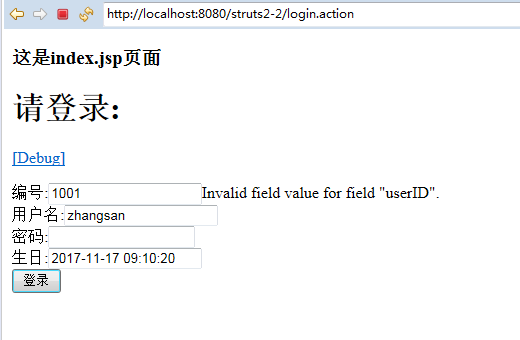
自动的类型转换出错时:
当前台传入非后台需要的文本时,后台会自动存入fieldErrors里,如果要将其显示为中文,
那么需要建立properties文件(如例子的action类为UsersAction那么properties文件名字必须为:UsersAction.properties),同目录
内容为: invalid.fieldvalue.userID=\u7F16\u53F7\u8F93\u5165\u4E0D\u5408\u6CD5\uFF1B
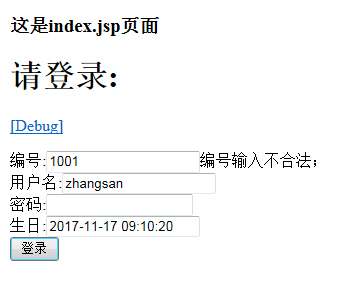
后台执行对了时候输出
islogin方法执行
编号1001
名字zhangsan
密码123
生日Fri Nov 17 00:00:00 CST 2017
如果自动类型转换不够用,如日期格式不是我们想要的类型,那么需要创建一个类型转换器,建立一个类(MyConverter)继承strutsTypeConverter类重写其2个convert方法,
在建立(请求类为UsersAction)UsersAction-conversion.properties文件,内容birthday=com.tzy.www.MyConverter。
 <%@ page language="java" contentType="text/html; charset=UTF-8"
     pageEncoding="UTF-8"%>
      <%@ taglib prefix="s" uri="/struts-tags"%>
 <!DOCTYPE html PUBLIC "-//W3C//DTD HTML 4.01 Transitional//EN" "http://www.w3.org/TR/html4/loose.dtd">
 <html>
 <head>
 <meta http-equiv="Content-Type" content="text/html; charset=UTF-8">
 <title>Insert title here</title>
 </head>
 <body>
 <h1>成功</h1>
 ${birthday}<br/>
 <s:date name="birthday" format="yyyy-MM-dd HH:mm:ss"/>
 <s:debug></s:debug>
 </body>
 </html>
success.jsp
 <%@ page language="java" contentType="text/html; charset=UTF-8"
     pageEncoding="UTF-8"%>
 <%@ taglib prefix="s" uri="/struts-tags"%>
 <!DOCTYPE html PUBLIC "-//W3C//DTD HTML 4.01 Transitional//EN" "http://www.w3.org/TR/html4/loose.dtd">
 <html>
 <head>
 <meta http-equiv="Content-Type" content="text/html; charset=UTF-8">
 <title>Insert title here</title>
 </head>
 <body>
     <h3>这是index.jsp页面</h3>
     <h1>请登录:</h1>
     <s:debug></s:debug>
     <s:form action="login.action" method="post" theme="simple">
         <!-- theme="simple"属性可以去掉布局 可以在xml里面配置常量为theme-->
 编号:<s:textfield name="userID" label="编号" value="1001"></s:textfield>${fieldErrors.userID[0]}<br/>
 用户名:<s:textfield name="userName" label="用户名" value="zhangsan"></s:textfield><br/>
 密码:<s:password name="userPwd" label="密码"></s:password><br/>
 生日:<s:textfield name="birthday" label="生日" value="2017-11-17 09:10:20"></s:textfield>${fieldErrors.birthday[0]}<br/>
         <s:submit value="登录"></s:submit>
     </s:form>
 </body>
 </html>
index.jsp
 package com.tzy.www;

 import java.util.ArrayList;
 import java.util.Date;
 import java.util.List;

 import org.apache.struts2.ServletActionContext;

 import com.opensymphony.xwork2.ActionSupport;

 public class UsersAction extends ActionSupport {
     /**
      *
      */
     private static final long serialVersionUID = 1L;
     private Integer userID;
     private String userName;
     private String userPwd;
     private Date birthday;

     public String islogin() {
         System.out.println("islogin方法执行");
         System.out.println("编号"+userID);
         System.out.println("名字"+userName);
         System.out.println("密码"+userPwd);
         System.out.println("生日"+birthday);
         return "success";

     }

     public Integer getUserID() {
         return userID;
     }

     public void setUserID(Integer userID) {
         this.userID = userID;
     }

     public String getUserName() {
         return userName;
     }

     public void setUserName(String userName) {
         this.userName = userName;
     }

     public String getUserPwd() {
         return userPwd;
     }

     public void setUserPwd(String userPwd) {
         this.userPwd = userPwd;
     }

     public Date getBirthday() {
         return birthday;
     }

     public void setBirthday(Date birthday) {
         this.birthday = birthday;
     }

 }
UsersAction
 package com.tzy.www;

 import java.text.DateFormat;
 import java.text.ParseException;
 import java.text.SimpleDateFormat;
 import java.util.Date;
 import java.util.Map;

 import org.apache.struts2.util.StrutsTypeConverter;

 import com.opensymphony.xwork2.conversion.TypeConversionException;

 public class MyConverter extends StrutsTypeConverter {

     private DateFormat dateFormat=new SimpleDateFormat("yyyy-MM-dd hh:mm:ss");

     //context老版本写法 上下文,values获得的数据数组,toclass要转成的类型的反射类
     @Override
     public Object convertFromString(Map context, String[] values, Class toclass) {
         System.out.println("object");
         if(toclass==Date.class){
             if(values !=null&&values.length>0){
                 String value = values[0];
                 try {
                     return dateFormat.parseObject(value);
                 } catch (ParseException e) {
                     // TODO Auto-generated catch block
                     e.printStackTrace();
                 }
             }

         }
         return values;
     }

     @Override
     public String convertToString(Map context, Object o) {
         System.out.println("string");
         if(o instanceof Date){
             Date date = (Date)o;
             return dateFormat.format(date);
         }
         return null;
     }
 }
MyConverter
 invalid.fieldvalue.userID=\u7F16\u53F7\u8F93\u5165\u4E0D\u5408\u6CD5;
 invalid.fieldvalue.birthday=\u65E5\u671F\u683C\u5F0F\u4E0D\u5408\u6CD5;
UsersAction.properties
birthday=com.tzy.www.MyConverter
UsersAction-conversion.properties
接收参数封装成对象,数组等:
 <%@ page language="java" contentType="text/html; charset=UTF-8"
     pageEncoding="UTF-8"%>
 <%@ taglib prefix="s" uri="/struts-tags"%>
 <!DOCTYPE html PUBLIC "-//W3C//DTD HTML 4.01 Transitional//EN" "http://www.w3.org/TR/html4/loose.dtd">
 <html>
 <head>
 <meta http-equiv="Content-Type" content="text/html; charset=UTF-8">
 <title>Insert title here</title>
 </head>
 <body>
     <h3>这是index.jsp页面</h3>
     <h1>请登录:</h1>
     <s:debug></s:debug>
     <s:form action="login.action" method="post" theme="simple">
         <!-- theme="simple"属性可以去掉布局 可以在xml里面配置常量为theme-->
 编号:<s:textfield name="u.userID" label="编号" value="1001"></s:textfield>${fieldErrors["u.userID"][0]}<br />
 用户名:<s:textfield name="u.userName" label="用户名" value="zhangsan"></s:textfield>
         <br />
 密码:<s:password name="u.userPwd" label="密码"></s:password>
         <br />
 生日:<s:textfield name="u.birthday" label="生日" value="2017-11-17 09:10:20"></s:textfield>${fieldErrors["u.birthday"][0]}<br />
 爱好:<input type="checkbox" value="足球" name="u.habit" />足球
 <input type="checkbox" value="蓝球" name="u.habit" />蓝球
 <input type="checkbox" value="羽毛球" name="u.habit" />羽毛球
 <input type="checkbox" value="网球" name="u.habit" />网球
 <br />
         <s:submit value="登录"></s:submit>
     </s:form>
 </body>
 </html>
index.jsp
 <%@ page language="java" contentType="text/html; charset=UTF-8"
     pageEncoding="UTF-8"%>
      <%@ taglib prefix="s" uri="/struts-tags"%>
 <!DOCTYPE html PUBLIC "-//W3C//DTD HTML 4.01 Transitional//EN" "http://www.w3.org/TR/html4/loose.dtd">
 <html>
 <head>
 <meta http-equiv="Content-Type" content="text/html; charset=UTF-8">
 <title>Insert title here</title>
 </head>
 <body>
 <h1>成功</h1>
 ${u.userID}<br/>
 ${u.userName}<br/>
 ${u.userPwd}<br/>
 ${u.birthday}<br/>
 <s:iterator value="u.habit" var="habit">
 ${habit}<br/>
 </s:iterator>
 <s:date name="u.birthday" format="yyyy-MM-dd HH:mm:ss"/>
 <s:debug></s:debug>
 </body>
 </html>
success.jsp
 package com.tzy.www;

 import java.util.ArrayList;
 import java.util.Date;
 import java.util.List;

 import org.apache.struts2.ServletActionContext;

 import com.opensymphony.xwork2.ActionSupport;

 public class UsersAction extends ActionSupport {
     /**
      *
      */
     private static final long serialVersionUID = 1L;
     private User u;

     public String islogin() {
         System.out.println("islogin方法执行");
         System.out.println("User:-----"+u);

         return "success";

     }

     public User getU() {
         return u;
     }

     public void setU(User u) {
         this.u = u;
     }

     public static long getSerialversionuid() {
         return serialVersionUID;
     }

 }
UsersAction
 package com.tzy.www;

 import java.io.Serializable;
 import java.util.Arrays;
 import java.util.Date;

 public class User implements Serializable {
     private Integer userID;
     private String userName;
     private String userPwd;
     private Date birthday;
     private String[] habit;
     public Integer getUserID() {
         return userID;
     }
     public void setUserID(Integer userID) {
         this.userID = userID;
     }
     public String getUserName() {
         return userName;
     }
     public void setUserName(String userName) {
         this.userName = userName;
     }
     public String getUserPwd() {
         return userPwd;
     }
     public void setUserPwd(String userPwd) {
         this.userPwd = userPwd;
     }
     public Date getBirthday() {
         return birthday;
     }
     public void setBirthday(Date birthday) {
         this.birthday = birthday;
     }
     public String[] getHabit() {
         return habit;
     }
     public void setHabit(String[] habit) {
         this.habit = habit;
     }
     @Override
     public String toString() {
         return "User [userID=" + userID + ", userName=" + userName + ", userPwd=" + userPwd + ", birthday=" + birthday
                 + ", habit=" + Arrays.toString(habit) + "]";
     }

 }
User
u.birthday=com.tzy.www.MyConverter
UsersAction-conversion.properties
 invalid.fieldvalue.u.userID=\u7F16\u53F7\u8F93\u5165\u4E0D\u5408\u6CD5;
 invalid.fieldvalue.u.birthday=\u65E5\u671F\u683C\u5F0F\u4E0D\u5408\u6CD5;
UsersAction.properties
把Action和Model隔开(用拦截器的思想,JSP的name字段直接写实体类的字段名,通过值栈栈顶对象来赋值)
在使用struts作为前端的企业级应用程序时把Action和Model清晰地隔离开是有必要的:有些Action类不代表任何Model对象,它们的功能仅限于提供显示服务,这个时候可以用到ModelDriven拦截器。
如果Action类实现了ModelDriven接口,该拦截器将把ModelDriven接口的getModel()方法的返回对象置于栈顶。
Action实现ModelDriven接口后的运行流程
1)。先会执行ModelDrivenInterceptor的intercept方法。
public String intercept(ActionInvocation invocation) throws Exception {
//获取Action对象:(EmployeeAction对象),此时该Action已经实现了ModelDriven接口
//(public class EmployeeAction implements RequestAware,ModelDriven<Employee>)
Object action = invocation.getAction();
//判断是否是ModelDriven的实例
if (action instanceof ModelDriven) {
//强制转换对象
ModelDriven modelDriven = (ModelDriven) action;
//获取值栈
ValueStack stack = invocation.getStack();
//调用ModelDriven接口的getModel()方法,即调用EmployeeActiojn的getModel()方法
/*
public Employee getModel(){
employee = new Employee();
return employee;
}
*/
Object model = modelDriven.getModel();
if (model != null) {
//把getModel()方法返回值压入到值栈的栈顶。实际压入的是EmployeeAction的employee成员变量
stack.push(model);
}
if (refreshModelBeforeResult) {
invocation.addPreResultListener(new RefreshModelBeforeResult(modelDriven, model));
}
}
return invocation.invoke();
}
2)。执行ParametersInterceptor的intercept方法:把请求参数的值赋给栈顶对象对应的属性。若值栈对象没有对应的属性,则查询值栈中下一个对象对应的属性。。。
3)。注意:getModel()方法必须和action类的成员变量产生联系。
4)。如果要在getModle()方法中判断该对象是否存在,(比如通过Employee对象的id来判断,那么需要在调用modelDriven拦截器前调用params拦截器赋值,默认拦截器做不到)
可以使用struts2给我们提供的paramsPrepareParamsStack拦截器栈。(参照拦截器介绍,配置拦截器栈)____>常见是在修改数据库的时候
5)。用了ModelDriven拦截器和paramsPrepareParamsStack拦截器栈,我们发现,在执行删除的时候,employeeId不为NULL,但getModel方法却从数据库加载了一个对象。不该加载。
指向查询全部信息的时候,也new Employee()对象,浪费!
故解决方法:使用PrepareInterceptor及实现Preparable接口,重写prepare方法,该方法的作用是为了给getModel()方法准备model的,但是该方法也无法解决我们所需要的问题,
经过下面的结论我们知道可以不再prepare方法里做任何处理,我们去私人订制,比如save方法需要准备Model,那么我们就创建
public void prepareSave(){ employee=dao.get(employeeId) } 这样可以使prepare()方法不执行,而执行我们自己创建的prepareSave()方法.
关于prepareInterceptor:
[分析后结论]
若Action视线了Preparable接口,则Struts将尝试执行prepare[ActionMethodName]方法,
若prepare[ActionMethodName]不存在,则尝试执行prepareDo[ActionMethodName],若都不存在,就都不执行。
若 alwaysInvokePrepare属性为false,则Struts2将不会调用实现了Preparable接口的Action的prepare()方法.
[能解决5问题]
可以为每一个ActionMethod准备prepare[ActionMethodName]方法,而抛弃原来的prepare()方法
将PrepareInterceptor的alwaysInvokePrepare属性设置为false,以避免Struts2框架再调用prepare()方法
如何在配置文件中为拦截器栈的属性赋值:
 <?xml version="1.0" encoding="UTF-8" ?>
 <!DOCTYPE struts PUBLIC
     "-//Apache Software Foundation//DTD Struts Configuration 2.3//EN"
     "http://struts.apache.org/dtds/struts-2.3.dtd">

 <struts>
     <package name="default" namespace="/" extends="struts-default">

     <interceptors>
         <interceptor-stack name="tzy">
             <interceptor-ref name="paramsPrepareParamsStack">
                 <param name="prepare.alwaysInvokePrepare">false</param>
             </interceptor-ref>
         </interceptor-stack>
     </interceptors>

     <default-interceptor-ref name="tzy"></default-interceptor-ref>

         <action name="emp-*" class="com.tzy.www.Employee" method="{1}">
         <result name="{1}">/emp-{1}.jsp</result>
         </action>
     </package>
 </struts>
struts.xml
------------------------------------源码解析---------------------------------------
public String doIntercept(ActionInvocation invocation) throws Exception {
//获取Action实例
Object action = invocation.getAction();
//判断Action是否实现了preparable接口
if (action instanceof Preparable) {
try {
String[] prefixes;
//根据当前拦截器的firstCallPrepareDo(默认为false)属性确定prefixes
if (firstCallPrepareDo) {
prefixes = new String[] {ALT_PREPARE_PREFIX, PREPARE_PREFIX};
} else {
prefixes = new String[] {PREPARE_PREFIX, ALT_PREPARE_PREFIX};
}
//若为false,则prefixes为【prepare,prepareDo】
//调用前缀方法。
PrefixMethodInvocationUtil.invokePrefixMethod(invocation, prefixes);
}
catch (InvocationTargetException e) {
/*
* The invoked method threw an exception and reflection wrapped it
* in an InvocationTargetException.
* If possible re-throw the original exception so that normal
* exception handling will take place.
*/
Throwable cause = e.getCause();
if (cause instanceof Exception) {
throw (Exception) cause;
} else if(cause instanceof Error) {
throw (Error) cause;
} else {
/*
* The cause is not an Exception or Error (must be Throwable) so
* just re-throw the wrapped exception.
*/
throw e;
}
}
//根据当前拦截器的alwaysInvokePrepare(默认是true)决定是否调用Action的prepare方法
if (alwaysInvokePrepare) {
((Preparable) action).prepare();
}
}
return invocation.invoke();
}
上面方法里面的前缀方法:PrefixMethodInvocationUtil.invokePrefixMethod(invocation, prefixes);
public static void invokePrefixMethod(ActionInvocation actionInvocation, String[] prefixes) throws InvocationTargetException, IllegalAccessException {
//获取Action实例
Object action = actionInvocation.getAction();
//获取要调用的Action方法的名字(update)
String methodName = actionInvocation.getProxy().getMethod();
if (methodName == null) {
// if null returns (possible according to the docs), use the default execute
methodName = DEFAULT_INVOCATION_METHODNAME;
}
//获取前缀方法
Method method = getPrefixedMethod(prefixes, methodName, action);
//若方法不为null,则通过反射调用前缀方法
if (method != null) {
method.invoke(action, new Object[0]);
}
}
上面方法的Method method = getPrefixedMethod(prefixes, methodName, action);
public static Method getPrefixedMethod(String[] prefixes, String methodName, Object action) {
assert(prefixes != null);
//把方法的首字母变为大写
String capitalizedMethodName = capitalizeMethodName(methodName);
//遍历前缀数组
for (String prefixe : prefixes) {
//通过拼接的方式,得到前缀方法名:第一次prepareUpdate,第二次prepareDoUpdate
String prefixedMethodName = prefixe + capitalizedMethodName;
try {
//利用反射从action中获取对应的方法,若有直接返回,并结束循环。
return action.getClass().getMethod(prefixedMethodName, EMPTY_CLASS_ARRAY);
}
catch (NoSuchMethodException e) {
// hmm -- OK, try next prefix
if (LOG.isDebugEnabled()) {
LOG.debug("cannot find method [#0] in action [#1]", prefixedMethodName, action.toString());
}
}
}
return null;
}
Struts2文件的上传与下载
文件上传目录结构:

 package com.tzy.www.entity;

 import java.util.Date;

 public class FileEntity {
 private String fileId;
 private String fileName;
 private String filePath;
 private Long fileSize;
 private String fileType;
 private Date fileDate;

 public String getFileId() {
     return fileId;
 }
 public void setFileId(String fileId) {
     this.fileId = fileId;
 }
 public String getFileName() {
     return fileName;
 }
 public void setFileName(String fileName) {
     this.fileName = fileName;
 }
 public String getFilePath() {
     return filePath;
 }
 public void setFilePath(String filePath) {
     this.filePath = filePath;
 }

 public String getFileType() {
     return fileType;
 }
 public void setFileType(String fileType) {
     this.fileType = fileType;
 }
 public Long getFileSize() {
     return fileSize;
 }
 public void setFileSize(Long fileSize) {
     this.fileSize = fileSize;
 }
 public Date getFileDate() {
     return fileDate;
 }
 public void setFileDate(Date fileDate) {
     this.fileDate = fileDate;
 }

 }
FileEntity package com.tzy.www.dao;
public class FileDaoImpl {
public static void insert(){
System.out.println("插入数据库成功");
}
}
FileDaoImpl package com.tzy.www.action;
import java.io.File;
import java.text.SimpleDateFormat;
import java.util.Date;
import java.util.UUID;
import org.apache.commons.io.FileUtils;
import com.opensymphony.xwork2.ActionSupport;
import com.tzy.www.dao.FileDaoImpl;
import com.tzy.www.entity.FileEntity;
public class UploadAction extends ActionSupport{
/**
* 文件上传
*/
private static final long serialVersionUID = 1L;
private File loadFile;
private String loadFileFileName;
private String loadFileContentType;
@Override
public String execute() throws Exception {
String filePath = getFilePath();
String uuuId = UUID.randomUUID().toString();
FileEntity file = new FileEntity();
file.setFileId(uuuId);
file.setFileName(loadFileFileName);
file.setFilePath(filePath+File.separator+uuuId);
file.setFileDate(new Date());
file.setFileSize(loadFile.length());
file.setFileType(loadFileContentType);
try {
File destFile = new File(file.getFilePath());
FileUtils.copyFile(loadFile, destFile);
FileDaoImpl.insert();
} catch (Exception e) {
e.printStackTrace();
}
return SUCCESS;
}
//返回服务器存储路径
public String getFilePath(){
Date date = new Date();
SimpleDateFormat format = new SimpleDateFormat("yyyy\\MM\\dd");
String formatDate = format.format(date);
String formatPath = "D:\\"+formatDate;
File file = new File(formatPath);
if(!file.exists()){
file.mkdirs();//创建路径
}
return formatPath;
}
public File getLoadFile() {
return loadFile;
}
public void setLoadFile(File loadFile) {
this.loadFile = loadFile;
}
public String getLoadFileFileName() {
return loadFileFileName;
}
public void setLoadFileFileName(String loadFileFileName) {
this.loadFileFileName = loadFileFileName;
}
public String getLoadFileContentType() {
return loadFileContentType;
}
public void setLoadFileContentType(String loadFileContentType) {
this.loadFileContentType = loadFileContentType;
}
}
UploadAction |
 <%@ page language="java" contentType="text/html; charset=UTF-8"
     pageEncoding="UTF-8"%>
 <!DOCTYPE html PUBLIC "-//W3C//DTD HTML 4.01 Transitional//EN" "http://www.w3.org/TR/html4/loose.dtd">
 <html>
 <head>
 <meta http-equiv="Content-Type" content="text/html; charset=UTF-8">
 <title>Insert title here</title>
 </head>
 <body>
 <form action="upload.action" method="post" enctype="multipart/form-data">
 <input type="file" name="loadFile" />
 <input type="submit" value="上传">
 </form>
 </body>
 </html>
index.jsp <%@ page language="java" contentType="text/html; charset=UTF-8"
pageEncoding="UTF-8"%>
<!DOCTYPE html PUBLIC "-//W3C//DTD HTML 4.01 Transitional//EN" "http://www.w3.org/TR/html4/loose.dtd">
<html>
<head>
<meta http-equiv="Content-Type" content="text/html; charset=UTF-8">
<title>Insert title here</title>
</head>
<body>
<h1>成功</h1>
</body>
</html>
success.jsp <?xml version="1.0" encoding="UTF-8" ?>
<!DOCTYPE struts PUBLIC
"-//Apache Software Foundation//DTD Struts Configuration 2.3//EN"
"http://struts.apache.org/dtds/struts-2.3.dtd">
<struts>
<package name="default" namespace="/" extends="struts-default">
<action name="upload" class="com.tzy.www.action.UploadAction" >
<result>/success.jsp</result>
</action>
</package>
</struts>
struts.xml |
上传文件大于10M解决办法:
<constant name="struts.multipart.maxSize" value="7282689"/>
<package name="tzy" extends="struts-default" namespace="/">
<action name="upload" class="com.tzy.action.UploadAction" method="upload">
<result>/index.jsp</result>
<!-- 设置所传文件的大小 -->
<interceptor-ref name="fileUpload">
<param name="maximumSize">7282688</param>
</interceptor-ref>
<!-- 因为调用了上面的自定义拦截器,所以需要重新调用一次默认拦截器 -->
<interceptor-ref name="defaultStack"/>
</action>
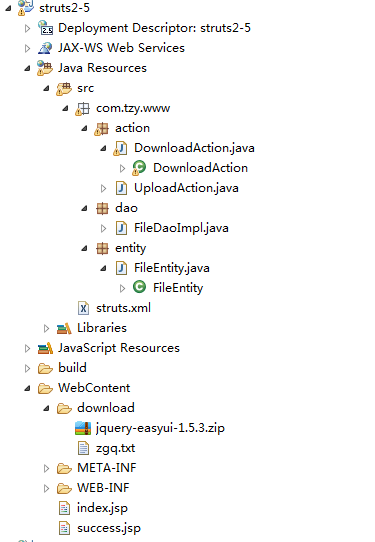
文件下载目录结构:
 package com.tzy.www.action;

 import java.io.File;
 import java.io.FileInputStream;
 import java.io.FileNotFoundException;
 import java.io.InputStream;

 import javax.servlet.http.HttpServletRequest;

 import org.apache.struts2.ServletActionContext;

 import com.opensymphony.xwork2.ActionSupport;

 public class DownloadAction extends ActionSupport {

     /**
      *
      */
     private static final long serialVersionUID = 1L;
     private String fileName;
     @Override
     public String execute() throws Exception {
         System.out.println("下载中");
         return SUCCESS;
     }
     public InputStream getDownloadFile() throws FileNotFoundException{//对应xml里inputName
         HttpServletRequest req = ServletActionContext.getRequest();
         //获取路径
         String path = req.getRealPath("/download");
         return new FileInputStream(new File(path,fileName));
     }
     public String getFileName() {
         return fileName;
     }
     public void setFileName(String fileName) {
         this.fileName = fileName;
     }

 }
DownloadAction
 <?xml version="1.0" encoding="UTF-8" ?>
 <!DOCTYPE struts PUBLIC
     "-//Apache Software Foundation//DTD Struts Configuration 2.3//EN"
     "http://struts.apache.org/dtds/struts-2.3.dtd">

 <struts>

     <package name="default" namespace="/" extends="struts-default">
         <action name="upload" class="com.tzy.www.action.UploadAction" >
         <result>/success.jsp</result>
         </action>

         <action name="download" class="com.tzy.www.action.DownloadAction">
         <result type="stream">
             <param name="contentType">applocation/octet-steam</param><!-- 下载通用类型 -->
             <param name="inputName">downloadFile</param><!-- 对应action里的get方法获取流 -->
             <param name="buffer-size">4096</param><!-- 一次读取多少字节长度 -->
             <param name="contentDisposition">attachment;filename="${fileName}"</param>
         </result>
         </action>
     </package>

 </struts>
struts.xml
ajax验证
 <%@ page language="java" contentType="text/html; charset=UTF-8"
     pageEncoding="UTF-8"%>
 <%@ taglib prefix="s" uri="/struts-tags"%>
 <!DOCTYPE html PUBLIC "-//W3C//DTD HTML 4.01 Transitional//EN" "http://www.w3.org/TR/html4/loose.dtd">
 <html>
 <head>
 <meta http-equiv="Content-Type" content="text/html; charset=UTF-8">
 <title>Insert title here</title>
 <script type="text/javascript" src="js/jquery-3.2.1.min.js"></script>
 <script type="text/javascript">
 $(function(){
     $("#userName").keyup(function(){
         $.post("checkname",{"userName":$("#userName").val()},function(data){
             console.log(data);
         },"json");
     });
 });
 </script>
 </head>
 <body>
     <h3>这是index.jsp页面</h3>
     <h1>请登录:</h1>
     <s:debug></s:debug>
     <s:form action="login.action" method="post" theme="simple">
         <!-- theme="simple"属性可以去掉布局 可以在xml里面配置常量为theme-->
         用户名:<s:textfield id="userName" name="userName" label="用户名" ></s:textfield>
                 <br />
         密码:<s:password name="userPwd" label="密码"></s:password>
                 <br />
         生日:<s:textfield name="birthday" label="生日" value="2017-11-17 09:10:20"></s:textfield>${fieldErrors["u.birthday"][0]}<br />
                 <br />
             <s:submit value="登录"></s:submit>
     </s:form>
 </body>
 </html>
index.jsp
 <%@ page language="java" contentType="text/html; charset=UTF-8"
     pageEncoding="UTF-8"%>
      <%@ taglib prefix="s" uri="/struts-tags"%>
 <!DOCTYPE html PUBLIC "-//W3C//DTD HTML 4.01 Transitional//EN" "http://www.w3.org/TR/html4/loose.dtd">
 <html>
 <head>
 <meta http-equiv="Content-Type" content="text/html; charset=UTF-8">
 <title>Insert title here</title>
 </head>
 <body>
 <h1>成功</h1>

 <s:debug></s:debug>
 </body>
 </html>
success.jsp
 <?xml version="1.0" encoding="UTF-8" ?>
 <!DOCTYPE struts PUBLIC
     "-//Apache Software Foundation//DTD Struts Configuration 2.3//EN"
     "http://struts.apache.org/dtds/struts-2.3.dtd">

 <struts>

 <package name="tzy" extends="struts-default">
 <action name="checkname" class="com.tzy.www.UsersAction" method="checkname">
 <result>/index.jsp</result>
 </action>
 </package>

 </struts>
struts.xml
 package com.tzy.www;

 import java.io.IOException;
 import java.io.PrintWriter;
 import java.util.ArrayList;
 import java.util.Date;
 import java.util.List;

 import javax.servlet.http.HttpServletResponse;

 import org.apache.struts2.ServletActionContext;

 import com.opensymphony.xwork2.ActionSupport;

 public class UsersAction extends ActionSupport {
     /**
      *
      */
     private static final long serialVersionUID = 1L;

     private String userName;
     private String userPwd;
     private Date birthday;

     public String checkname() {
         boolean flag = false;
         if("zhangsan".equals(userName)){
             flag=true;
         }
         HttpServletResponse response = ServletActionContext.getResponse();
         PrintWriter out =null;
         try {
             out = response.getWriter();
             out.print(flag);
         } catch (IOException e) {
             e.printStackTrace();
         }finally{
             out.flush();
             out.close();
         }

         return "success";

     }

     public String getUserName() {
         return userName;
     }

     public void setUserName(String userName) {
         this.userName = userName;
     }

     public String getUserPwd() {
         return userPwd;
     }

     public void setUserPwd(String userPwd) {
         this.userPwd = userPwd;
     }

     public Date getBirthday() {
         return birthday;
     }

     public void setBirthday(Date birthday) {
         this.birthday = birthday;
     }

 }
UsersAction
struts2 内容记录的更多相关文章
- Cs231n课堂内容记录-Lecture 4-Part2 神经网络
Lecture 7 神经网络二 课程内容记录:https://zhuanlan.zhihu.com/p/21560667?refer=intelligentunit 1.协方差矩阵: 协方差(Cova ...
- Cs231n课堂内容记录-Lecture 4-Part1 反向传播及神经网络
反向传播 课程内容记录:https://zhuanlan.zhihu.com/p/21407711?refer=intelligentunit 雅克比矩阵(Jacobian matrix) 参见ht ...
- Cs231n课堂内容记录-Lecture 3 最优化
Lecture 4 最优化 课程内容记录: (上)https://zhuanlan.zhihu.com/p/21360434?refer=intelligentunit (下)https://zhua ...
- Cs231n课堂内容记录-Lecture2-Part2 线性分类
Lecture 3 课程内容记录:(上)https://zhuanlan.zhihu.com/p/20918580?refer=intelligentunit (中)https://zhuanlan. ...
- Cs231n课堂内容记录-Lecture2-Part1 图像分类
Lecture 2 课程内容记录:(上)https://zhuanlan.zhihu.com/p/20894041?refer=intelligentunit (下)https://zhuanlan. ...
- mysql 操作sql语句 操作数据表中的内容/记录
#3. 操作文件中的内容/记录 往哪张表去插入 insert into 表名指定字段(id,name) 插入要加values(针对前面字段插入)(2,mike); insert into t1(id, ...
- struts2 学习记录 过滤器 国际化
struts2接触不是一天两天了,但是一直没有用它做什么项目,但老师确一直说它有很大的学习价值,所以还是把我学习到的东西给记录一下,记录的东西没有规律,只是给自己留个备份, struts2中最关键的是 ...
- 今天看到了一篇文档 app 测试内容记录下来
1 APP测试基本流程 1.1流程图 1.2测试周期 测试周期可按项目的开发周期来确定测试时间,一般测试时间为两三周(即15个工作日),根据项目情况以及版本质量可适当缩短或延长测试时间.正式测试前先向 ...
- [skill][makefile] makefile 常用内容记录
其实,makefile有点复杂. 文档看了又看,还是要经常翻,做个记录备忘 :) 1. 隐含命令 implicit rules 与 implicit rule 相对应的有 pattern rules ...
随机推荐
- 【转】 文档与笔记利器 reStructuredText 和 Sphinx
关于制作文档和笔记这种事,我已经纠结了很久,网上解决方案也一大推,我试过几样,ScrapBook 和 Zotero,编辑不太方便,同步麻烦.Google Note 过于格式简单,现在也不更新了,Goo ...
- TreeViewItem实现整行选中 (两种用法)
用法一 <ResourceDictionary xmlns="http://schemas.microsoft.com/winfx/2006/xaml/presentation&quo ...
- OpenGL ES2.0光照
一.简单光照原理 平行光(正常光) 光照效果= 环境颜色 + 漫反射颜色 + 镜面反射颜色 点光源 光照效果= 环境颜色 + (漫反射颜色 + 镜面反射颜色)× 衰减因子 聚光灯 光照效果= ...
- VS2015智能提示由英文改为中文
使用 VS2015 时,在 4.0 下智能提示显示中文,在 4.5 下显示英文,对于我这种爱(ying)国(yu)人(tai)士(lan)来说,用起来太不方便了,于 是在 知乎 上找到个好方法如下: ...
- 【转载】WAI-ARIA无障碍网页应用属性完全展示
文章转载自 张鑫旭-鑫空间-鑫生活 http://www.zhangxinxu.com/wordpress/ 原文链接:http://www.zhangxinxu.com/wordpress/?p=2 ...
- win10 uwp 简单MasterDetail
中文 English 本文主要讲实现一个简单的界面,可以在窗口比较大显示列表和内容,窗口比较小时候显示列表或内容.也就是在窗口比较小的时候,点击列表会显示内容,点击返回会显示列表. 先放图,很简单. ...
- Python学习笔记(六)
Python学习笔记(六) Ubuntu重置root密码 Ubuntu 16.4 目录结构 Ubuntu 命令讲解 1. Ubuntu重置root密码 启动系统,显示GRUB选择菜单(如果默认系统启动 ...
- macOs升级到10.13.1Beta || JAVA升级到最新版之后PhpStorm菜单栏问题
macOs升级到10.13.1Beta || JAVA升级到最新版之后PhpStorm菜单栏会消失,估计不止出现在PhpStorm,一系列jetbrains的产品可能都会有这个问题,包括eclipis ...
- Linux学习(十三)du、df、fdisk磁盘分区
一.du du命令是查看文件或者目录大小的命令. 一般使用du -sh 查看,不用-sh参数意义也不大,应为不用这个参数,它会把目录下的所有文件大小递归的显示出来,就像这样: 如果用-sh参数: [r ...
- Prime Ring Problem
Problem Description A ring is compose of n circles as shown in diagram. Put natural number 1, 2, ... ...