
[2018.05].NET Core 3 and Support for Windows Desktop Applications
.NET Core 3 and Support for Windows Desktop Applications

Richard
微软官网的内容...net 3.0

升级任务 任重道远
https://devblogs.microsoft.com/dotnet/net-core-3-and-support-for-windows-desktop-applications/
May 7th, 2018
At Microsoft Build Live today, we are sharing a first look at our plans for .NET Core 3. The highlight of .NET Core 3 is support for Windows desktop applications, specifically Windows Forms, Windows Presentation Framework (WPF), and UWP XAML. You will be able to run new and existing Windows desktop applications on .NET Core and enjoy all the benefits that .NET Core has to offer.
We are planning on releasing a first preview of .NET Core 3 later this year and the final version in 2019. We will be looking for developers to partner with us, to give us feedback, and to release versions of your applications in the same timeframe as our releases. We think that .NET Core 3.0 will be one of the most exciting .NET releases we’ve ever released.
ASP.NET Core will continue to move forward in parallel and will have a release with .NET Core 3.0. Our commitment to web and cloud applications remains unchanged. At the same time, it’s time to add Windows desktop applications as another supported workload for .NET Core. We have heard many requests for desktop applications with .NET Core and are now sharing our plan to deliver on that. Let’s take a look at that.
Benefits of .NET Core for Desktop
There are many benefits with .NET Core that are great for desktop apps. There are a few that are worth calling out explicitly:
- Performance improvements and other runtime updates that will delight your users
- Super easy to use or test a new version of .NET Core for just one app on a machine
- Enables both machine-global and application-local deployment
- Support for the .NET Core CLI tools and SDK-style projects in Visual Studio
We’re also announcing a set of improvements that we’ll be adding to both .NET Core 3.0 and .NET Framework 4.8:
- Access to the full Windows 10 (AKA “WinRT”) API.
- Ability to host UWP XAML controls in WPF and Windows Forms applications.
- Ability to host UWP browser and media controls, enabling modern browser and media content and standards.
.NET Framework 4.8
We’re also announcing our plans for .NET Framework 4.8. after shipping .NET Framework 4.7.2 only a week ago. We expect the next version to be 4.8 and for it to ship in about 12 months. Like the past few releases, the new release will include a set of targeted improvements, including the features you see listed above.
Visualizing .NET Core 3
Let’s take a look at .NET Core 3 in pictorial form.
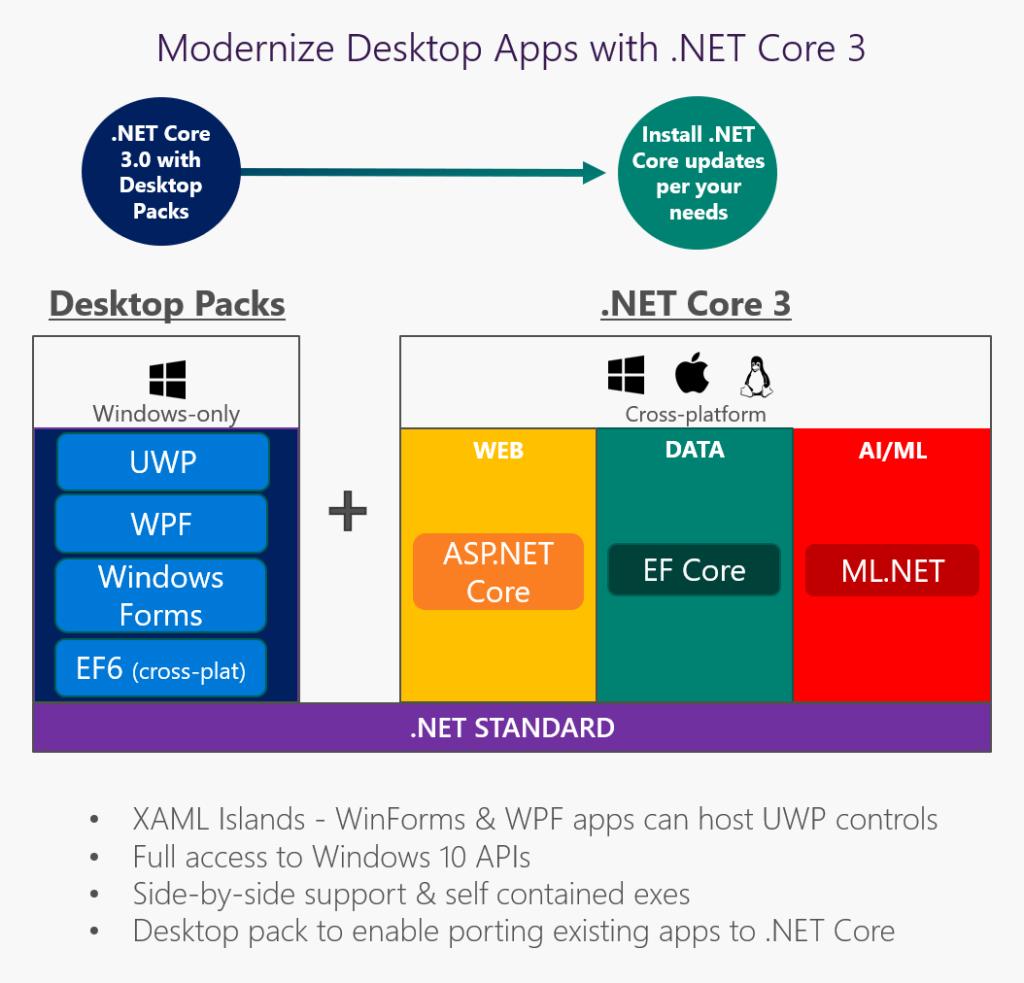
Support for Windows desktop will be added as a set of “Windows Desktop Packs”, which will only work on Windows. .NET Core isn’t changing architecturally with this new version. We’ll continue to offer a great cross-platform product, focused on the cloud. We have lots of improvements planned for those scenarios that we’ll share later.
From a 1000-meter view, you can think of WPF as a rich layer over DirectX and Windows Forms as thinner layer over GDI Plus. WPF and Windows Forms do a great job of exposing and exercising much of the desktop application functionality in Windows. It’s the C# code in Windows Forms and WPF that we’ll include as a set of libraries with .NET Core 3. Windows functionality, like GDI Plus and DirectX, will remain in Windows.
We’ll also be releasing a new version of .NET Standard at the same time. Naturally, all new .NET Standard APIs will be part of .NET Core 3.0. We have not yet added Span<T>, for example, to the standard. We’ll be doing that in the next version.
C#, F# and VB already work with .NET Core 2.0. You will be able to build desktop applications with any of those three languages with .NET Core 3.
Side-by-side and App-local Deployment
The .NET Core deployment model is one the biggest benefits that Windows desktop developers will experience with .NET Core 3. In short, you can install .NET Core in pretty much any way you want. It comes with a lot of deployment flexibility.
The ability to globally install .NET Core provides much of the same central installation and servicing benefits of .NET Framework, while not requiring in-place updates.
When a new .NET Core version is released, you can update one app on a machine at a time without any concern for affecting other applications. New .NET Core versions are installed in new directories and are not used by existing applications.
For cases where the maximum isolation is required, you can deploy .NET Core with your application. We’re working on new build tools that will bundle your app and .NET Core together as in a single executable, as a new option.
We’ve had requests for deployment options like this for many years, but were never able to deliver those with the .NET Framework. The much more modular architecture used by .NET Core makes these flexible deployment options possible.
Using .NET Core 3 for an Existing Desktop Application
For new desktop applications, we’ll guide everyone to start with .NET Core 3. The more interesting question is what the experience will be like to move existing applications, particularly big ones, to .NET Core 3. We want the experience to be straightforward enough that moving to .NET Core 3 is an easy choice for you, for any application that is in active development. Applications that are not getting much investment and don’t require much change should stay on .NET Framework 4.8.
Quick explanation of our plan:
- Desktop applications will need to target .NET Core 3 and recompile.
- Project files will need to be updated to target .NET Core 3.
- Dependencies will not need to retarget and recompile. There will be additional benefits if you update dependencies.
We intend to provide compatible APIs for desktop applications. We plan to make WPF and Windows Forms side-by-side capable, but otherwise as-is, and make them work on .NET Core. In fact, we have already done this with a number of our own apps and others we have access to.
We have a version of Paint.NET running in our lab. In fact, we didn’t have access to Paint.NET source code. We got the existing Paint.NET binaries working on .NET Core. We didn’t have a special build of WPF available, so we just used the WPF binaries in the .NET Framework directory on our lab machine. As an aside, this exercise uncovered an otherwise unknown bug in threading in .NET Core, which was fixed for .NET Core 2.1. Nice work, Paint.NET!
We haven’t done any optimization yet, but we found that Paint.NET has faster startup on .NET Core. This was a nice surprise.
Similarly, EF6 will be updated to work on .NET Core 3.0, to provide a simple path forward for existing applications using EF6. But we don’t plan to add any major new features to EF6. EF Core will be extended with new features and will remain the recommended data stack for all types of new applications. We will advise that you port to EF Core if you want to take advantage of the new features and improved performance.
There are many design decisions ahead, but the early signs are very good. We know that compatibility will be very important to everyone moving existing desktop applications to .NET Core 3. We will continue to test applications and add more functionality to .NET Core to support them. We will post about any APIs that are hard to support, so that we can get your feedback.
Updating Project Files
With .NET Core projects, we adopted SDK-style projects. One of the key aspects of SDK-style projects is PackageReference, which is a newer way of referencing NuGet packages. PackageReference replaces packages.config. PackageReference also make it possible to reference a whole component area at once, not just a single assembly at a time.
The biggest experience improvements with SDK-style projects are:
- Much smaller and cleaner project files
- Much friendlier to source control (fewer changes and smaller diffs)
- Edit project files in Visual Studio without unloading
- NuGet is part of the build and responsive to changes like target framework update
- Supports multi-targeting
The first part of adopting .NET Core 3 for desktop projects will be migrating to SDK-style projects. There will be a migration experience in Visual Studio and available at the command line.
An example of an SDK-style project, for ASP.NET Core 2.1, follows. .NET Core 3 project files will look similar.
Controls, NuGet Packages, and Existing Assembly References
Desktop applications often have many dependencies, maybe from a control vendor, from NuGet or binaries that don’t have source any more. It’s not like all of that can be updated to .NET Core 3 quickly or maybe not even at all.
As stated above, we intend to support dependencies as-is. If you are at the Build conference, you will see Scott Hunter demo a .NET Core 3 desktop application that uses an existing 3rd-party control. We will continue testing scenarios like that to validate .NET Core 3 compatibility.
Next Steps
We will start doing the following, largely in parallel:
- Test .NET Framework desktop application on .NET Core to determine what prevents them from working easily. We will often do this without access to source code.
- Enable you to easily and anonymously share dependency data with us so that we can collect broad aggregate data about applications, basically “crowd voting” on the shape of what .NET Core 3 should be.
- Publish early designs so that we can get early feedback from you.
We hope that you will work with us along the way to help us make .NET Core 3 a great release.
Closing
We have been asking for feedback on surveys recently. Thanks so much for filling those out. The response has been incredible, resulting in thousands of responses within the first day. With this last survey, we asked a subset of respondents over Skype for feedback on our plans for .NET Core 3 with (unknown to them) our Build conference slides. The response has been very positive. Based on everything we have read and heard, we believe that the .NET Core 3 feature set its characteristics are on the right track.
Todays news demonstrates a large investment and commitment in Windows desktop applications. You can expect two releases from us in 2019, .NET Core 3 and .NET Framework 4.8. A number of the features are shared between the two releases and some others are only available in .NET Core 3. We think the commonality and the differences provide a great set of choices for moving forward and modernizing your desktop applications.
It is an exciting time to be a .NET developer.
[2018.05].NET Core 3 and Support for Windows Desktop Applications的更多相关文章
- Microsoft Artificial Intelligence Conference(2018.05.21)
时间:2018.05.21地点:北京嘉丽大酒店
- windows 10 上源码编译OpenCV并支持CUDA | compile opencv with CUDA support on windows 10
本文首发于个人博客https://kezunlin.me/post/6580691f/,欢迎阅读! compile opencv with CUDA support on windows 10 Ser ...
- Professional C# 6 and .NET Core 1.0 - Chapter 39 Windows Services
本文内容为转载,供学习研究.如有侵权,请联系作者删除. 转载请注明本文出处:Professional C# 6 and .NET Core 1.0 - Chapter 39 Windows Servi ...
- ASP.NET Core 2.0 : 九.从Windows发布到CentOS的跨平台部署
本文聊一下如何在Windows上用VS开发并发布, 然后将其部署到CentOS上.对于我们一些常在Windows上逛的来说,CentOS用起来还真有些麻烦.MSDN官方有篇文章大概讲了一下(链接),按 ...
- .net core 2.2部署到Windows Server 2012 R2 standard
安装.net core 2.2 下载地址:https://dotnet.microsoft.com/download/dotnet-core/2.2 找到ASP.NET Core Runtime 2. ...
- SharePoint 2013 Support for Windows Server 2012 R2
Summary Currently, Microsoft SharePoint Server 2013 is not supported for installation on computers r ...
- 2018 dnc .NET Core、.NET开发的大型网站列表、各大公司.NET职位精选,C#王者归来
简洁.优雅.高效的C#语言,神一样的C#创始人Anders Hejlsberg,async/await编译器级异步语法,N年前就有的lambda表达式,.NET Native媲美C++的原生编译性能, ...
- 2018.06.27Dual Core CPU(最小割)
Dual Core CPU Time Limit: 15000MS Memory Limit: 131072K Total Submissions: 26136 Accepted: 11270 Cas ...
- 激活IDEA 2017.3 mac版 2018.05.21亲测可用
本文激活方式不会导致IEDA打不开,可激活一年,最简便方式,只需要30秒. 1.修改hosts sudo vim /private/etc/hosts 在文件最后一行中添加: 0.0.0.0 acco ...
随机推荐
- linux编译64bitHadoop (eg: ubuntu14.04 and hadoop 2.3.0)
Hadoop官网提供的编译好的hadoop-2.3.0.tar.gz二进制包是在32位系统上编译的,在64系统上运行会有一些错误,比如: WARN util.NativeCodeLoader: Una ...
- Ubuntu下导入PySpark到Shell和Pycharm中(未整理)
实习后面需要用到spark,虽然之前跟了edX的spark的课程以及用spark进行machine learning,但那个环境是官方已经搭建好的,但要在自己的系统里将PySpark导入shell(或 ...
- maven 将jar包推送到自己本机的maven库
mvn install:install-file -DgroupId=com.wdcloud.sdk -DartifactId=front-category-signed -Dversion=1.0. ...
- 如何征服面试官,拿到Offer [转]
转自 https://my.oschina.net/cccyb/blog/3012768 又到了茶余饭后的时间,想想写点什么,掐指一算,噢呦,快到3月份了,职场的金三银四跳槽季又来了,不同的是今年比往 ...
- 【转】ajax发送请求时候为什么会报拒绝设置不安全的header
浏览器不允许用户手动设置敏感的Http header包括但不限于cookie.host.referer 为了安全,跨域XHR对象有一些限制: 不能使用 setRequestHeader() 设置自定义 ...
- 【vue】vue中ref用法
1.获取当前元素: 例子: <div class="pop pos-a" :style="{ left: pop_x + 'px' ,top: pop_y + 'p ...
- ROS 小乌龟测试
教程 1.维基 http://wiki.ros.org/cn/ROS/Tutorials 2. 创客智造 http://www.ncnynl.com/category/ros-junior-tutor ...
- Python框架学习之Flask中的常用扩展包
Flask框架是一个扩展性非常强的框架,所以导致它有非常多的扩展包.这些扩展包的功能都很强大.本节主要汇总一些常用的扩展包. 一. Flask-Script pip install flask-scr ...
- SSH远程SOLARIS11时被拒绝
在虚拟机中新安装的solaris11,安装过程中配置了静态IP地址用以方便ssh连接,使用root用户ssh连接时,密码没有错,但总是提示密码被拒绝,连接established 代表是通的,telne ...
- SimpleDialogBox
import 'package:flutter/material.dart';import 'dart:ui';import 'dart:async';enum Option{A,B,C}void m ...