
Hangfire定时任务设置CronExpression表达式
Cron format helper
This utility helps you build Cron expressions easily by choosing job scheduling scenarios. The crontab entries produced work with Vixie Cron, popular in many Linux distributions.
Vixie Cron - a quick overview
Vixie Cron is configured by editing a "crontab" file that indicates the date and times to run given commands. Each user of the system can have their own crontab file and there is also a system-wide crontab file.
The system-wide file is usually located under the "/etc" directory and called "crontab". Changes to this file are checked and reloaded automatically but changes to user-specific crontab files wont get picked up unless you reload them with the crontab command.
The beginning of the /etc/crontab file usually has some environment variable settings. Below that each line in the file gives the information for a particular job to run. A typical crontab line looks something like this:
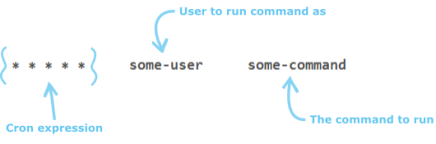
The user field ("some-user" above) is specific to the system-wide crontab file. This field isnt necessary for user-specific crontab files as commands are run as the owning user.
The command field ("some-command" above) may be a straight-forward shell command or an executable script. The path to use to locate the script can be given in the PATH environment variable in the crontab file or you can give absolute paths.
The bit that this utility is designed to assist with is the Cron expression. It consists of 5 fields that represent the following:

The values accepted for each field are: The minute field value must be 0-59, the hour field 0-23, the day of month field 1-31, the month field 1-12 and the day of week field 0-6 (Sunday is 0 but this can also be given as 7). Days can be also be given as three letter abbreviations (sun, mon, tue, wed, thu, fri, sat) as can months (jan, feb, mar, apr, may, jun, jul, aug, sep, oct, nov, dec) but you should be careful with these as some versions of Cron may not support them in ranges and lists (see below).
The values can be given in a variety of formats:
- An asterisk (
*) character will match all possible values for the field: e.g. the Cron expression "* * * * *" will run the command every minute since this is the smallest representable time period. - A literal value: e.g. "
30 * * * *" will run the command whenever the minute is 30, i.e. once an hour at half-past the hour.
"* * 5 * *" will run every minute when it is the 5th day of the month. - A list is given by separating each possible value using a comma: e.g. "
0,15,30,45 * * * *" will run the command whenever the minute is either 0, 15, 30 or 45. Another example, "0 1,2,3 * * *" will run the command between 1am and 3am (inclusive) but only when the minute is 0, i.e. on the hour. Lists can also contain ranges (see below). - A range is given by separating the lower and upper values of the range with a hyphen (
-): e.g. "0 1 1-5 * *" will run the command at 1am on the first, second, third, fourth and fifth days of the month. - An increment is given by using a forward slash: e.g. "
*/15 * * * *" will run the command every 15 minutes starting on the hour. i.e. this example is the same as the list example given above to run whenever the minute is 0, 15, 30 or 45.
Each of the possible formats above effectively resolves to a list of values to match. For example, if you use the * character in the day of week field it is the same as writing 1,2,3,4,5,6,7. Another example: putting */20in the minute field is like writing 0,20,40. This is important to remember as it is not possible to write something like */70 in the minute field and expect it to run every 70 minutes - it is invalid!
It also means you can get some unexpected behaviour - for example: say you put */40 in the minute field. This would not run every 40 minutes. It would actually run when the minute is 0 and when it is 40. So it would run 40 minutes after the hour and then again, 20 minutes later, on the next hour.
This utility produces true periodical expressions by only allowing factors of 60 or 24 for the minute/hour field respectively.
Hangfire定时任务设置CronExpression表达式的更多相关文章
- Quartz在Spring中动态设置cronExpression (spring设置动态定时任务)
什么是动态定时任务:是由客户制定生成的,服务端只知道该去执行什么任务,但任务的定时是不确定的(是由客户制定). 这样总不能修改配置文件每定制个定时任务就增加一个trigger吧,即便允许客户 ...
- spring框架的定时任务cronExpression表达式详解
附:cronExpression表达式解释: 0 0 12 * * ?---------------在每天中午12:00触发 0 15 10 ? * *---------------每天上午10:15 ...
- 关于cronExpression表达式
spring 定时任务设置,关于cronExpression表达式: 字段 允许值 允许的特殊字符 秒 0-59 , - * / 分 0-59 , - * / 小时 0-23 , - * / 日期 1 ...
- Quartz.net 定时任务之Cron表达式
一.cron表达式简单介绍和下载 1.在上一篇博客"Quartz.net 定时任务之简单任务"中,我简单介绍了quartz的使用,而这篇博客我将介绍cron的具体使用(不足之处望大 ...
- Quartz在Spring中动态设置cronExpression
什么是动态定时任务:是由客户制定生成的,服务端只知道该去执行什么任务,但任务的定时是不确定的(是由客户制定). 这样总不能修改配置文件每定制个定时任务就增加一个trigger吧,即便允许客户修改配置文 ...
- JDK、Spring、Quartz等几种不同定时器的用法,以及cronExpression表达式定义
referenc:https://blog.csdn.net/clementad/article/details/42042111 下面介绍几种常用的定时器及其实现方法: 第一种:Timer和Time ...
- 【Hadoop离线基础总结】oozie定时任务设置
目录 简介 概述 oozie定时任务设置 1.拷贝定时任务的调度模板 拷贝hello.sh脚本 3.修改配置文件 4.上传到hdfs对应路径 5.运行定时任务 简介 概述 在oozie当中,主要是通过 ...
- Quartz中时间表达式的设置-----corn表达式
Quartz中时间表达式的设置-----corn表达式 时间格式: <!-- s m h d m w(?) y(?) -->, 分别相应: 秒>分>小时>日>月 ...
- Quartz中时间表达式的设置-----corn表达式 (转)(http://www.cnblogs.com/GarfieldTom/p/3746290.html)
Quartz中时间表达式的设置-----corn表达式 (注:这是让我看比较明白的一个博文,但是抱歉,没有找到原作者,如有侵犯,请告知) 时间格式: <!-- s m h d m w(?) y( ...
随机推荐
- appium安装问题集锦
问题一: MacBook-Air:Cellar$ npm -v dyld: Library not loaded: /usr/local/opt/icu4c/lib/libicui18n.61.dyl ...
- 我的C#跨平台之旅(六):发布应用
由于此架构从一开始就将.NET Framework 的依赖降低到最低,且不依赖IIS,在ORM层面,完全实现代码优先,即真正做到数据库无关: Windows服务器部署: 在Windows应用服务器上安 ...
- Flask框架(二)
request @app.route('/requests/', method=['GET', 'POST']) def req(): print(request.data) #请求方式 print( ...
- Visual Studio 常见的快捷键
“Ctrl + -” 回到上一个光标位置 “Ctrl + Shift + -” 前进到下一个光标位置 “Ctrl + C” ...
- 浅析http缓存
1.什么是缓存 将服务器上的静态资源,保存在本地,当发送web请求的时候,如果本地有“已缓存”的静态资源,则从使用本地保存的静态资源,而不是从源原服务器再次请求. 2.缓存的优点 缓存减少冗余的数据传 ...
- querySelectorAll选择器的js实现
自从标准浏览器增加了querySelector这个类JQ的方法后,选择一个元素变成了一件so easy的事情.但是某些浏览器还是不支持.使用jq库又有点太大,其实可以自己动手实现这个选择器,具体代码如 ...
- iproute2学习笔记
一.替代arp, ifconfig, route等命令 显示网卡和IP地址 root@openstack:~# ip link list 1: lo: <LOOPBACK,UP,LOWER_UP ...
- 使用bat脚本部署hexo到coding和github
因项目的不同适当的改造吧,本文以hexo为例. 拉取coding.net的代码和github的代码到本地 确保代码能够正常的运行,commit,push 在项目的目录外新建一个push.bat文件 快 ...
- 10个经典的Java面试题集合
这里有10个经典的Java面试题,也为大家列出了答案.这是Java开发人员面试经常容易遇到的问题,相信你了解和掌握之后一定会有所提高.让我们一起来看看吧. 1.Java的HashMap是如何工作的? ...
- PHP LDAP 目录协议函数库
在 LDAP 的协议之中,很像硬盘目录结构或倒过来的树状结构.LDAP 的根就是全世界,第一级是属于国别 (countries) 性质的层级,之后可能会有公司 (organization) 的层级,接 ...