
用Web api /Nancy 通过Owin Self Host简易实现一个 Http 服务器
过去做 端游的Http 服务器 用的WebApi 或者Mvc架构,都是放在iis。。。而我已经是懒出一个地步,并不想去配iis,或者去管理iis,所以我很喜欢 Self host 的启动方式。
C#做 http 有2个轻量级的框架, 一个是Nancy ,一个是 微软官方的Web Api 都可以通过owin self host 在应用程序中启动监听
Web Api
官方教程 :https://www.asp.net/web-api/overview/hosting-aspnet-web-api/use-owin-to-self-host-web-api
新建一个控制台从程序
在Nuget控制台上 安装包 Install-Package Microsoft.AspNet.WebApi.OwinSelfHost
然后添加一个Owin Startup类
以往所有的配置都正常的放在Startup中进行配置就可以
public class Startup

    {

        // This code configures Web API. The Startup class is specified as a type

        // parameter in the WebApp.Start method.

        public void Configuration(IAppBuilder appBuilder)

        {

            // Configure Web API for self-host.

            HttpConfiguration config = new HttpConfiguration();

            config.Formatters.JsonFormatter.SupportedMediaTypes.Add(new MediaTypeHeaderValue("text/html"));

            config.Routes.MapHttpRoute(

                name: "DefaultApi",

                routeTemplate: "api/{controller}/{id}",

                defaults: new { id = RouteParameter.Optional }

            );

            appBuilder.UseWebApi(config);

        }

} - 1
- 2
- 3
- 4
- 5
- 6
- 7
- 8
- 9
- 10
- 11
- 12
- 13
- 14
- 15
- 16
- 17
然后在Main 函数里面加入 WebApp.Start() 就会在SelfHost 上面运行你的Web Api,十分简洁
class Program

    {

        static void Main(string[] args)

        {

            string baseAddress = "http://localhost:9000/";

            // Start OWIN host

            using (WebApp.Start<Startup>(url: baseAddress))

            {

                // Create HttpCient and make a request to api/values

                HttpClient client = new HttpClient();

                var response =client.GetAsync(baseAddress + "api/home").Result;

                Console.WriteLine(response);

                Console.WriteLine(response.Content.ReadAsStringAsync().Result);

                Console.ReadLine();

            }

            Console.ReadLine();

        }

}- 1
- 2
- 3
- 4
- 5
- 6
- 7
- 8
- 9
- 10
- 11
- 12
- 13
- 14
- 15
- 16
- 17
- 18
尝试添加一个Controller
public class HomeController : ApiController

    {

        // GET api/values

        public IHttpActionResult Get()

        {

            return Ok(125);

        }

        // GET api/values/5

        public string Get(int id)

        {

            return "value";

        }

        // POST api/values

        public void Post([FromBody]string value)

        {

        }

        // PUT api/values/5

        public void Put(int id, [FromBody]string value)

        {

        }

        // DELETE api/values/5

        public void Delete(int id)

        {

        }

} - 1
- 2
- 3
- 4
- 5
- 6
- 7
- 8
- 9
- 10
- 11
- 12
- 13
- 14
- 15
- 16
- 17
- 18
- 19
- 20
- 21
- 22
- 23
- 24
- 25
尝试运行的结果
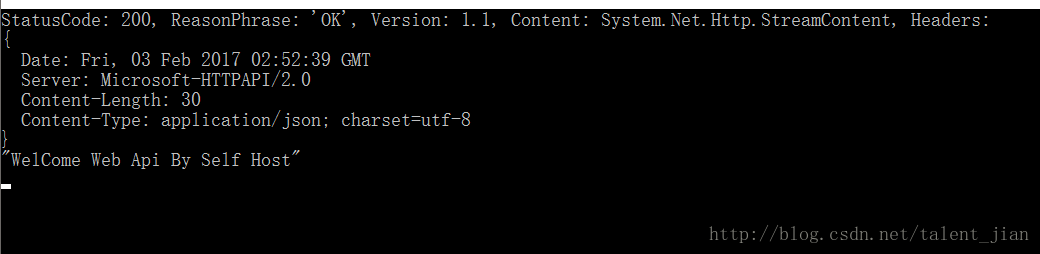
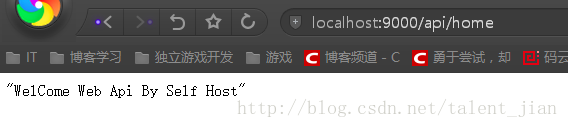
Nancy
Nancy是很多人都推荐的一个轻量级的Http 库,可以架在Mono,.net.core 上,也是开源
安装Nancy可以 Install-Package Nancy
而要 在SelfHost 监听则需要安装以下3个
Install-Package Microsoft.Owin.Hosting

Install-Package Microsoft.Owin.Host.HttpListener

Install-Package Nancy.Owin- 1
- 2
- 3
在OwinStartup中表明使用Nancy
using Owin;

public class Startup

{

    public void Configuration(IAppBuilder app)

    {

        app.UseNancy();

    }

}- 1
- 2
- 3
- 4
- 5
- 6
- 7
- 8
入口也是通过WebApp.Start(url)
using Microsoft.Owin.Hosting;

class Program

{

    static void Main(string[] args)

    {

        var url = "http://+:8080";

        using (WebApp.Start<Startup>(url))

        {

            Console.WriteLine("Running on {0}", url);

            Console.WriteLine("Press enter to exit");

            Console.ReadLine();

        }

    }

}- 1
- 2
- 3
- 4
- 5
- 6
- 7
- 8
- 9
- 10
- 11
- 12
- 13
- 14
来源: https://github.com/NancyFx/Nancy/wiki/Hosting-nancy-with-owin#katana—httplistener-selfhost
添加一个Module
/// <summary>

   /// 发现

   /// 可以通过 Before 进行 安全的验证

   /// </summary>

   public class HomeModule : NancyModule

   {

       public HomeModule()

       {

           Get["/"] = x => "Hello";

           Get["/login"] = x => {  return "person name :" + Request.Query.name + " age : " + Request.Query.age; };

       }

}- 1
- 2
- 3
- 4
- 5
- 6
- 7
- 8
- 9
- 10
- 11
- 12
运行结果 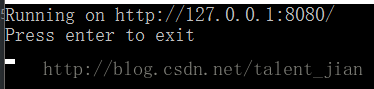

用Web api /Nancy 通过Owin Self Host简易实现一个 Http 服务器的更多相关文章
- 购物车Demo,前端使用AngularJS,后端使用ASP.NET Web API(3)--Idetity,OWIN前后端验证
原文:购物车Demo,前端使用AngularJS,后端使用ASP.NET Web API(3)--Idetity,OWIN前后端验证 chsakell分享了前端使用AngularJS,后端使用ASP. ...
- [转] JSON Web Token in ASP.NET Web API 2 using Owin
本文转自:http://bitoftech.net/2014/10/27/json-web-token-asp-net-web-api-2-jwt-owin-authorization-server/ ...
- JSON Web Token in ASP.NET Web API 2 using Owin
In the previous post Decouple OWIN Authorization Server from Resource Server we saw how we can separ ...
- ASP.NET Web API消息处理管道:Self Host下的消息处理管道[下篇]
ASP.NET Web API消息处理管道:Self Host下的消息处理管道[下篇] 我们知道ASP.NET Web API借助于HttpSelfHostServer以Self Host模式寄宿于当 ...
- ASP.NET Web API的消息处理管道: Self Host下的消息处理管道[上篇]
ASP.NET Web API的消息处理管道: Self Host下的消息处理管道[上篇] ASP.NET Web API服务端框架核心是一个独立于具体寄宿环境的消息处理管道,它不关心请求消息来源于何 ...
- ASP.NET Web API实践系列02,在MVC4下的一个实例, 包含EF Code First,依赖注入, Bootstrap等
本篇体验在MVC4下,实现一个对Book信息的管理,包括增删查等,用到了EF Code First, 使用Unity进行依赖注入,前端使用Bootstrap美化.先上最终效果: →创建一个MVC4项目 ...
- ASP.NET Web API 记录请求响应数据到日志的一个方法
原文:http://blog.bossma.cn/dotnet/asp-net-web-api-log-request-response/ ASP.NET Web API 记录请求响应数据到日志的一个 ...
- OAuth Implementation for ASP.NET Web API using Microsoft Owin.
http://blog.geveo.com/OAuth-Implementation-for-WebAPI2 OAuth is an open standard for token based aut ...
- 使用JS通过Web API执行批量操作,多个操作是一个事务!
关注本人微信和易信公众号: 微软动态CRM专家罗勇 ,回复235或者20161105可方便获取本文,同时可以在第一间得到我发布的最新的博文信息,follow me!我的网站是 www.luoyong. ...
随机推荐
- Git学习笔记04-管理修改
Git跟踪并管理的是修改,而非文件.新增文件,修改一行,删除一点,都算是修改. 在.git工作区新增一个文件,test.txt,输入test git ...然后git add add之后修改t ...
- python创建和删除文件
#!/usr/bin/python #-*-coding:utf-8-*- #指定编码格式,python默认unicode编码 import os directory = "./dir&qu ...
- $Django Rest Framework-序列化组件
1 序列化组件 e=serializers.SerializerMethodField() # 方法名:叫get_字段名, 参数,返回字典 def get_e(self,obj): #obj为b ...
- Cassandra docker 使用记录
环境介绍: docker 安装 cassandra 3.11.1 , 然后进入docker 的终端,输入 > cqlsh , 即可使用Cassandra了,详细介绍如下: 查看表空间descri ...
- C#生成Excel保存到服务器端并下载
using MongoDB.Bson; using Newtonsoft.Json.Linq; using NPOI.HSSF.UserModel; using NPOI.SS.UserModel; ...
- 在线HTTP POST/GET接口测试工具 - aTool在线工具
百度搜索标题或直接访问网址如下 网址:http://www.atool.org/httptest.php 很好用的在线http get/post 测试工具
- C# Winform控件对透明图片重叠时导致图片不透明的解决方法(转)
在Winform中如果将一个透明图片放在窗体上能正常显示透明,但是如果将该图片放在另一个控件上会导致不能显示透明效果. 解决这种情况,可以采取在控件上使用GDI+绘画出透明图片. 这里我们就以一个pi ...
- Modbus库开发笔记:Modbus ASCII Slave开发
与Modbus RTU在串行链路上分为Slave和Master一样,Modbus ASCII也分为Slave和Master,这一节我们就来开发Slave.对于Modbus ASCII从站来说,需要实现 ...
- Ubuntu16.04安装Maven3.5.4
本篇教程在示例步骤中使用了以下版本的软件.操作时,请您以实际软件版本为准. 操作系统:Ubuntu 16.04.3 LTS Maven 版本:Apache Maven 3.5.4 JDK 版本:J ...
- Confluence 6 使用 Apache 的 mod_jk
在 Confluence 6 及其后续版本中,不能使用 mod_jk 来做代理.这是因为 Synchrony 服务导致的这个限制. Synchrony 在协同编辑的时候需要启动,同时还不能接受 A ...