
spring boot 2.0.3+spring cloud (Finchley)3、声明式调用Feign
Feign受Retrofix、JAXRS-2.0和WebSocket影响,采用了声明式API接口的风格,将Java Http客户端绑定到他的内部。Feign的首要目标是将Java Http客户端调用过程变得简单。
源码地址:https://github.com/OpenFeign/feign
本章案例基于上一章,可参考:
spring boot 2.0.3+spring cloud (Finchley)1、搭建Eureka 以及构建高可用Eureka Server集群
spring boot 2.0.3+spring cloud (Finchley)2、搭建负载均衡Ribbon (Eureka+Ribbon+RestTemplate)
新建module工程eureka-feign-client。pom文件引入相关依赖,包括主maven工程的pom文件,eureka client起步依赖,feign的起步依赖,web的起步依赖(已在主maven工程pom中配置)

<?xml version="1.0" encoding="UTF-8"?>
<project xmlns="http://maven.apache.org/POM/4.0.0" xmlns:xsi="http://www.w3.org/2001/XMLSchema-instance"
xsi:schemaLocation="http://maven.apache.org/POM/4.0.0 http://maven.apache.org/xsd/maven-4.0.0.xsd">
<modelVersion>4.0.0</modelVersion><span style="color: #0000ff;"><</span><span style="color: #800000;">groupId</span><span style="color: #0000ff;">></span>com.cralor<span style="color: #0000ff;"></</span><span style="color: #800000;">groupId</span><span style="color: #0000ff;">></span>
<span style="color: #0000ff;"><</span><span style="color: #800000;">artifactId</span><span style="color: #0000ff;">></span>eureka-feign-client<span style="color: #0000ff;"></</span><span style="color: #800000;">artifactId</span><span style="color: #0000ff;">></span>
<span style="color: #0000ff;"><</span><span style="color: #800000;">version</span><span style="color: #0000ff;">></span>0.0.1-SNAPSHOT<span style="color: #0000ff;"></</span><span style="color: #800000;">version</span><span style="color: #0000ff;">></span>
<span style="color: #0000ff;"><</span><span style="color: #800000;">packaging</span><span style="color: #0000ff;">></span>jar<span style="color: #0000ff;"></</span><span style="color: #800000;">packaging</span><span style="color: #0000ff;">></span> <span style="color: #0000ff;"><</span><span style="color: #800000;">name</span><span style="color: #0000ff;">></span>eureka-feign-client<span style="color: #0000ff;"></</span><span style="color: #800000;">name</span><span style="color: #0000ff;">></span>
<span style="color: #0000ff;"><</span><span style="color: #800000;">description</span><span style="color: #0000ff;">></span>Demo project for Spring Boot<span style="color: #0000ff;"></</span><span style="color: #800000;">description</span><span style="color: #0000ff;">></span> <span style="color: #0000ff;"><</span><span style="color: #800000;">parent</span><span style="color: #0000ff;">></span>
<span style="color: #0000ff;"><</span><span style="color: #800000;">groupId</span><span style="color: #0000ff;">></span>com.cralor<span style="color: #0000ff;"></</span><span style="color: #800000;">groupId</span><span style="color: #0000ff;">></span>
<span style="color: #0000ff;"><</span><span style="color: #800000;">artifactId</span><span style="color: #0000ff;">></span>chap7-feign<span style="color: #0000ff;"></</span><span style="color: #800000;">artifactId</span><span style="color: #0000ff;">></span>
<span style="color: #0000ff;"><</span><span style="color: #800000;">version</span><span style="color: #0000ff;">></span>0.0.1-SNAPSHOT<span style="color: #0000ff;"></</span><span style="color: #800000;">version</span><span style="color: #0000ff;">></span>
<span style="color: #0000ff;"><</span><span style="color: #800000;">relativePath</span><span style="color: #0000ff;">/></span> <span style="color: #008000;"><!--</span><span style="color: #008000;"> lookup parent from repository </span><span style="color: #008000;">--></span>
<span style="color: #0000ff;"></</span><span style="color: #800000;">parent</span><span style="color: #0000ff;">></span> <span style="color: #0000ff;"><</span><span style="color: #800000;">properties</span><span style="color: #0000ff;">></span>
<span style="color: #0000ff;"><</span><span style="color: #800000;">project.build.sourceEncoding</span><span style="color: #0000ff;">></span>UTF-8<span style="color: #0000ff;"></</span><span style="color: #800000;">project.build.sourceEncoding</span><span style="color: #0000ff;">></span>
<span style="color: #0000ff;"><</span><span style="color: #800000;">project.reporting.outputEncoding</span><span style="color: #0000ff;">></span>UTF-8<span style="color: #0000ff;"></</span><span style="color: #800000;">project.reporting.outputEncoding</span><span style="color: #0000ff;">></span>
<span style="color: #0000ff;"><</span><span style="color: #800000;">java.version</span><span style="color: #0000ff;">></span>1.8<span style="color: #0000ff;"></</span><span style="color: #800000;">java.version</span><span style="color: #0000ff;">></span>
<span style="color: #0000ff;"></</span><span style="color: #800000;">properties</span><span style="color: #0000ff;">></span> <span style="color: #0000ff;"><</span><span style="color: #800000;">dependencies</span><span style="color: #0000ff;">></span>
<span style="color: #0000ff;"><</span><span style="color: #800000;">dependency</span><span style="color: #0000ff;">></span>
<span style="color: #0000ff;"><</span><span style="color: #800000;">groupId</span><span style="color: #0000ff;">></span>org.springframework.cloud<span style="color: #0000ff;"></</span><span style="color: #800000;">groupId</span><span style="color: #0000ff;">></span>
<span style="color: #0000ff;"><</span><span style="color: #800000;">artifactId</span><span style="color: #0000ff;">></span>spring-cloud-starter-netflix-eureka-client<span style="color: #0000ff;"></</span><span style="color: #800000;">artifactId</span><span style="color: #0000ff;">></span>
<span style="color: #0000ff;"></</span><span style="color: #800000;">dependency</span><span style="color: #0000ff;">></span> <span style="color: #0000ff;"><</span><span style="color: #800000;">dependency</span><span style="color: #0000ff;">></span>
<span style="color: #0000ff;"><</span><span style="color: #800000;">groupId</span><span style="color: #0000ff;">></span>org.springframework.cloud<span style="color: #0000ff;"></</span><span style="color: #800000;">groupId</span><span style="color: #0000ff;">></span>
<span style="color: #0000ff;"><</span><span style="color: #800000;">artifactId</span><span style="color: #0000ff;">></span>spring-cloud-starter-openfeign<span style="color: #0000ff;"></</span><span style="color: #800000;">artifactId</span><span style="color: #0000ff;">></span>
<span style="color: #0000ff;"></</span><span style="color: #800000;">dependency</span><span style="color: #0000ff;">></span> <span style="color: #0000ff;"><</span><span style="color: #800000;">dependency</span><span style="color: #0000ff;">></span>
<span style="color: #0000ff;"><</span><span style="color: #800000;">groupId</span><span style="color: #0000ff;">></span>org.springframework.boot<span style="color: #0000ff;"></</span><span style="color: #800000;">groupId</span><span style="color: #0000ff;">></span>
<span style="color: #0000ff;"><</span><span style="color: #800000;">artifactId</span><span style="color: #0000ff;">></span>spring-boot-starter-test<span style="color: #0000ff;"></</span><span style="color: #800000;">artifactId</span><span style="color: #0000ff;">></span>
<span style="color: #0000ff;"><</span><span style="color: #800000;">scope</span><span style="color: #0000ff;">></span>test<span style="color: #0000ff;"></</span><span style="color: #800000;">scope</span><span style="color: #0000ff;">></span>
<span style="color: #0000ff;"></</span><span style="color: #800000;">dependency</span><span style="color: #0000ff;">></span>
<span style="color: #0000ff;"></</span><span style="color: #800000;">dependencies</span><span style="color: #0000ff;">></span> <span style="color: #0000ff;"><</span><span style="color: #800000;">build</span><span style="color: #0000ff;">></span>
<span style="color: #0000ff;"><</span><span style="color: #800000;">plugins</span><span style="color: #0000ff;">></span>
<span style="color: #0000ff;"><</span><span style="color: #800000;">plugin</span><span style="color: #0000ff;">></span>
<span style="color: #0000ff;"><</span><span style="color: #800000;">groupId</span><span style="color: #0000ff;">></span>org.springframework.boot<span style="color: #0000ff;"></</span><span style="color: #800000;">groupId</span><span style="color: #0000ff;">></span>
<span style="color: #0000ff;"><</span><span style="color: #800000;">artifactId</span><span style="color: #0000ff;">></span>spring-boot-maven-plugin<span style="color: #0000ff;"></</span><span style="color: #800000;">artifactId</span><span style="color: #0000ff;">></span>
<span style="color: #0000ff;"></</span><span style="color: #800000;">plugin</span><span style="color: #0000ff;">></span>
<span style="color: #0000ff;"></</span><span style="color: #800000;">plugins</span><span style="color: #0000ff;">></span>
<span style="color: #0000ff;"></</span><span style="color: #800000;">build</span><span style="color: #0000ff;">></span>
</project>
配置文件做相关配置
server:

  port: 8765

spring:

  application:

    name: eureka-feign-client

eureka:

  client:

    serviceUrl:

      defaultZone: http://localhost:8761/eureka/
在程序的启动类加上注解@EnableFeignClients开启Feign Client功能
@EnableFeignClients
@SpringBootApplication
public class EurekaFeignClientApplication {</span><span style="color: #0000ff;">public</span> <span style="color: #0000ff;">static</span> <span style="color: #0000ff;">void</span><span style="color: #000000;"> main(String[] args) {
SpringApplication.run(EurekaFeignClientApplication.</span><span style="color: #0000ff;">class</span><span style="color: #000000;">, args);
}
}
通过以上步骤,该程序已经具备了Feign的功能,现在来实现一个简单的feign client。新建一个EurekaClientFeign的接口,在接口上加@FeignClient注解来声明一个Feign Client。value为远程调用其他服务的服务名,FeignConfig.class为配置类,在EurekaClientFeign内部有一个sayHiFromClientEureka()的方法,该方法通过Feign来调用eureka-client服务的“/hi”的aipi接口。
@Component

@FeignClient(value = "eureka-client",configuration = FeignConfig.class)

public interface EurekaClientFeign {

    @GetMapping(value = "/hi")

    String sayHiFromClientEureka(@RequestParam(value = "name")String name);

}
在FeignConfig类上加上@Configuration注解,表明这是一个配置类,并注入一个BeanName为feignRetryer的Retryer的Bean。可使feign在远程调用失败后会进行重试。
@Configuration

public class FeignConfig {

    @Bean

    public Retryer feignRetryer(){

        return new Retryer.Default(100,TimeUnit.SECONDS.toMillis(1),5);

    }

}
service层HiService类注入EurekaClient的Bean
@Service
public class HiService {
@Autowired
EurekaClientFeign eurekaClientFeign;</span><span style="color: #0000ff;">public</span><span style="color: #000000;"> String sayHi(String name){
</span><span style="color: #0000ff;">return</span><span style="color: #000000;"> eurekaClientFeign.sayHiFromClientEureka(name);
}
}
新建HiController类,调用HiService的sayHi()方法,HiService通过EurekaClientFeign远程调用eureka-client服务的API接口“/hi”。
@RestController
public class HiController {
@Autowired
HiService hiService;@GetMapping(</span>"/hi"<span style="color: #000000;">)
</span><span style="color: #0000ff;">public</span> String sayHi(@RequestParam(defaultValue = "cralor",required = <span style="color: #0000ff;">false</span><span style="color: #000000;">)String name){
</span><span style="color: #0000ff;">return</span><span style="color: #000000;"> hiService.sayHi(name);
}
}
启动eureka-server工程,端口号8761,启动两个eureka-client工程的实例,端口号8762、8763,启动eureka-feign-client工程,端口号8765。在浏览器多次访问http://localhost:8765/hi,浏览器会轮流显示
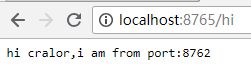
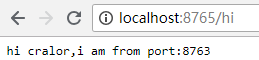
可见Feign Client远程调用了eureka-client的服务(存在端口号为8762和8763的两个实例)的“/hi”API接口,feign client有负载均衡的能力。
总结:feign源码实现过程如下
1.首先通过@EnableFeignClients注解开启FeignClient功能。只有这个注解的存在,程序启动时才会开启对@FeignConfig注解的包的扫描,
2.根据Feig的规则实现接口,并在接口上面加上@FeignClient注解。
3.程序启动后会进行包扫描,扫描所有@FeignClient注解的类,并将这些信息注入IOC容器中。
4.当接口的方法被调用时,通过JDK的代理来生成具体的RequestTemplate模板对象。
5.根据RequestTemplate再生成Http请求的Request对象。
6.Request对象交给Client去处理,其中Client的网络请求框架可以是HttpURLConnection、HttpClient和OkHttp。
7.最后Client被封装到LoadBalanceClient类,这个类结合类Ribbon做到了负载均衡。
参考:https://windmt.com/2018/04/15/spring-cloud-3-service-producer-and-consumer/#Spring-Cloud-Feign
案例代码地址:https://github.com/cralor7/springcloud

原文地址:http://www.cnblogs.com/cralor/p/9228678.html
spring boot 2.0.3+spring cloud (Finchley)3、声明式调用Feign的更多相关文章
- spring boot 2.0.3+spring cloud (Finchley)2、搭建负载均衡Ribbon (Eureka+Ribbon+RestTemplate)
Ribbon是Netflix公司开源的一个负载均衡组件,将负载均衡逻辑封装在客户端中,运行在客户端的进程里. 本例子是在搭建好eureka的基础上进行的,可参考spring boot 2.0.3+sp ...
- spring boot 2.0.3+spring cloud (Finchley)5、路由网关Spring Cloud Zuul
Zuul作为微服务系统的网关组件,用于构建边界服务,致力于动态路由.过滤.监控.弹性伸缩和安全. 为什么需要Zuul Zuul.Ribbon以及Eureka结合可以实现智能路由和负载均衡的功能:网关将 ...
- spring boot 2.0.3+spring cloud (Finchley)4、熔断器Hystrix
在分布式系统中服务与服务之间的依赖错综复杂,一种不可避免的情况就是某些服务会出现故障,导致依赖于他们的其他服务出现远程调度的线程阻塞.某个服务的单个点的请求故障会导致用户的请求处于阻塞状态,最终的结果 ...
- spring boot 2.0.3+spring cloud (Finchley)7、服务链路追踪Spring Cloud Sleuth
参考:Spring Cloud(十二):分布式链路跟踪 Sleuth 与 Zipkin[Finchley 版] Spring Cloud Sleuth 是Spring Cloud的一个组件,主要功能是 ...
- spring boot 2.0.3+spring cloud (Finchley)8、微服务监控Spring Boot Admin
参考:Spring Boot Admin 2.0 上手 Spring Boot Admin 用于管理和监控一个或多个Spring Boot程序,在 Spring Boot Actuator 的基础上提 ...
- spring boot 2.0.3+spring cloud (Finchley)1、搭建服务注册和发现组件Eureka 以及构建高可用Eureka Server集群
一 .搭建Eureka 编写Eureka Server 由于有多个spring boot项目,采用maven多module的结构,项目结构如下: 新建一个maven主工程,在主maven的pom文件中 ...
- spring boot 2.0.3+spring cloud (Finchley)6、配置中心Spring Cloud Config
https://www.cnblogs.com/cralor/p/9239976.html Spring Cloud Config 是用来为分布式系统中的基础设施和微服务应用提供集中化的外部配置支持, ...
- spring boot 2.0.3+spring cloud (Finchley)9、 安全组件Spring Boot Security
官方文档 一.Spring Security介绍 Spring Security是Spring Resource社区的一个安全组件,Spring Security为JavaEE企业级开发提供了全面的安 ...
- Spring Boot 2.0 利用 Spring Security 实现简单的OAuth2.0认证方式1
0. 前言 之前帐号认证用过自己写的进行匹配,现在要学会使用标准了.准备了解和使用这个OAuth2.0协议. 1. 配置 1.1 配置pom.xml 有些可能会用不到,我把我项目中用到的所有包都贴出来 ...
随机推荐
- hihoCoder #1646 : Rikka with String II(容斥原理)
题意 给你 \(n\) 个 \(01\) 串 \(S\) ,其中有些位置可能为 \(?\) 表示能任意填 \(0/1\) .问对于所有填法,把所有串插入到 \(Trie\) 的节点数之和(空串看做根节 ...
- 用keras实现基本的回归问题
数据集介绍 共有506个样本,拆分为404个训练样本和102个测试样本 该数据集包含 13 个不同的特征: 人均犯罪率. 占地面积超过 25000 平方英尺的住宅用地所占的比例. 非零售商业用地所占的 ...
- linux中监控CPU、内存和磁盘状态的shell脚本。(centos7)
这篇博客中所写的脚本,在实际工作中并没有什么卵用,工作中并不会用到这种脚本去监控.不过自己写一遍,可以让初学者对CPU.内存.磁盘等一些基础知识和基础命令更加了解. 1.利用vmstat工具监控CPU ...
- 【BZOJ5417】[NOI2018]你的名字(线段树,后缀自动机)
[BZOJ5417][NOI2018]你的名字(线段树,后缀自动机) 题面 BZOJ 洛谷 题解 首先考虑\(l=1,r=|S|\)的做法,对于每次询问的\(T\)串,暴力在\(S\)串的\(SAM\ ...
- C++类相关
本文打算通过一些小例子来说明几个关键的知识点. 一:成员函数相关 #include <iostream> using namespace std; class D { public: vo ...
- hex文件格式
hex文件格式是可以烧写到单片机中,被单片机执行的一种文件格式,生成Hex文件的方式有很多种,可以通过不同的编译器将C程序或者汇编程序编译生成hex. Hex文件格式解析 Hex文件如果用特殊的程 ...
- poj 2356 (抽屉原理)
题目链接:http://poj.org/problem?id=2356 题目大意:给你n个数,要你从n个数选出若干个数,要求这若干个数的和是n的倍数,输出选择数的个数,以及相应的数. 解题思路: 以下 ...
- 【UR #3】链式反应
http://uoj.ac/problem/50 %炮姐 好博客 树形结构 枚举根节点的儿子是哪两个 然后列出方程: 然后有EGF的影子! 倍增? 泰勒展开可以把未知数从函数里拿出来!并且变成1次项, ...
- [THUWC2017]在美妙的数学王国中畅游
[THUWC2017]在美妙的数学王国中畅游 e和sin信息不能直接合并 泰勒展开,大于21次太小,认为是0,保留前21次多项式即可 然后就把e,sin ,kx+b都变成多项式了,pushup合并 上 ...
- 洛谷P1477 假面舞会
坑死了...... 题意:给你个有向图,你需要把点分成k种,满足每条边都是分层的(从i种点连向i + 1种点,从k连向1). 要确保每种点至少有一个. 求k的最大值,最小值. n <= 1e5, ...