
Zip文件格式
Overview
This document describes the on-disk structure of a PKZip (Zip) file. The documentation currently only describes the file layout format and meta information but does not address the actual compression or encryption of the file data itself. This documentation also does not discuss Zip archives that span multiple files in great detail. This documentation was created using the official documentation provided by PKWare Inc.
General structure
Each Zip file is structured in the following manner:
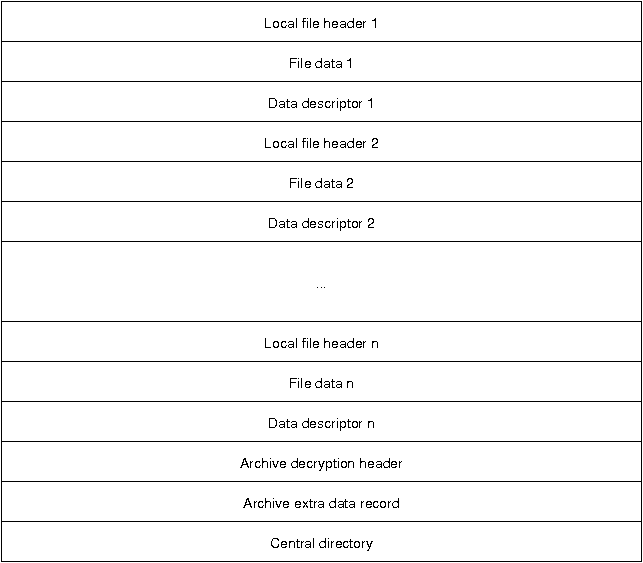
The archive consists of a series of local file descriptors, each containing a local file header, the actual compressed and/or encrypted data, as well as an optional data descriptor. Whether a data descriptor exists or not depends on a flag in the local file header.
Following the file descriptors is the archive decryption header, which only exists in PKZip file version 6.2 or greater. This header is only present if the central directory is encrypted and contains information about the encryption specification. The archive extra data record is also only for file of version 6.2 or greater and is not present in all Zip files. It is used in to support the encryption or compression of the central directory.
The central directory summarizes the local file descriptors and carries additional information regarding file attributes, file comments, location of the local headers, and multi-file archive information.
Local file headers
Each local file header has the following structure:
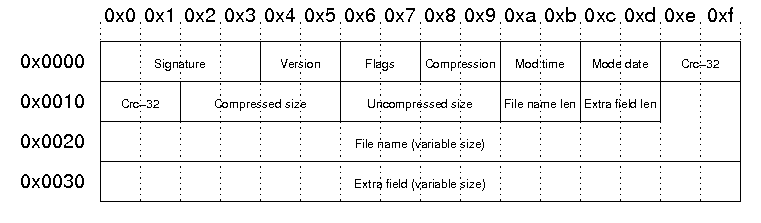
| Signature | The signature of the local file header. This is always '\x50\x4b\x03\x04'. |
| Version | PKZip version needed to extract |
| Flags | General purpose bit flag: Bit 00: encrypted file Bit 01: compression option Bit 02: compression option Bit 03: data descriptor Bit 04: enhanced deflation Bit 05: compressed patched data Bit 06: strong encryption Bit 07-10: unused Bit 11: language encoding Bit 12: reserved Bit 13: mask header values Bit 14-15: reserved |
| Compression method | 00: no compression 01: shrunk 02: reduced with compression factor 1 03: reduced with compression factor 2 04: reduced with compression factor 3 05: reduced with compression factor 4 06: imploded 07: reserved 08: deflated 09: enhanced deflated 10: PKWare DCL imploded 11: reserved 12: compressed using BZIP2 13: reserved 14: LZMA 15-17: reserved 18: compressed using IBM TERSE 19: IBM LZ77 z 98: PPMd version I, Rev 1 |
| File modification time | stored in standard MS-DOS format: Bits 00-04: seconds divided by 2 Bits 05-10: minute Bits 11-15: hour |
| File modification date | stored in standard MS-DOS format: Bits 00-04: day Bits 05-08: month Bits 09-15: years from 1980 |
| Crc-32 checksum | value computed over file data by CRC-32 algorithm with 'magic number' 0xdebb20e3 (little endian) |
| Compressed size | if archive is in ZIP64 format, this filed is 0xffffffff and the length is stored in the extra field |
| Uncompressed size | if archive is in ZIP64 format, this filed is 0xffffffff and the length is stored in the extra field |
| File name length | the length of the file name field below |
| Extra field length | the length of the extra field below |
| File name | the name of the file including an optional relative path. All slashes in the path should be forward slashes '/'. |
| Extra field | Used to store additional information. The field consistes of a sequence of header and data pairs, where the header has a 2 byte identifier and a 2 byte data size field. |
Example
Our sample zip file starts with a local file header:
00000000  50 4b 03 04 14 00 00 00  08 00 1c 7d 4b 35 a6 e1  |PK.........}K5..|
00000010  90 7d 45 00 00 00 4a 00  00 00 05 00 15 00 66 69  |.}E...J.......fi|
00000020  6c 65 31 55 54 09 00 03  c7 48 2d 45 c7 48 2d 45  |le1UT....H-E.H-E|
00000030  55 78 04 00 f5 01 f5 01  0b c9 c8 2c 56 00 a2 92  |Ux.........,V...|
This results in the following fields and field values:
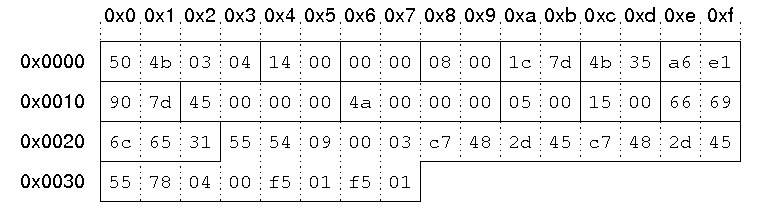
| Signature | '\x50\x4b\x03\x04'. |
| Version | 0x14 = 20 -> 2.0 |
| Flags | no flags |
| Compression method | 08: deflated |
| File modification time | 0x7d1c = 0111110100011100 hour = (01111)10100011100 = 15 minute = 01111(101000)11100 = 40 second = 01111101000(11100) = 28 = 56 seconds 15:40:56 |
| File modification date | 0x354b = 0011010101001011 year = (0011010)101001011 = 26 month = 0011010(1010)01011 = 10 day = 00110101010(01011) = 11 10/11/2006 |
| Crc-32 checksum | 0x7d90e1a6 |
| Compressed size | 0x45 = 69 bytes |
| Uncompressed size | 0x4a = 74 bytes |
| File name length | 5 bytes |
| Extra field length | 21 bytes |
| File name | "file1" |
| Extra field | id 0x5455: extended timestamp, size: 9 bytes Id 0x7855: Info-ZIP UNIX, size: 4 bytes |
Data descriptor
The data descriptor is only present if bit 3 of the bit flag field is set. In this case, the CRC-32, compressed size, and uncompressed size fields in the local header are set to zero. The data descriptor field is byte aligned and immediately follows the file data. The structure is as follows:

The example file does not contain a data descriptor.
Archive decryption header
This header is used to support the Central Directory Encryption Feature. It is present when the central directory is encrypted. The format of this data record is identical to the Decryption header record preceding compressed file data.
Archive extra data record
This header is used to support the Central Directory Encryption Feature. When present, this record immediately precedes the central directory data structure. The size of this data record will be included in the Size of the Central Directory field in the End of Central Directory record. The structure is as follows:

Central directory
The central directory contains more metadata about the files in the archive and also contains encryption information and information about Zip64 (64-bit zip archives) archives. Furthermore, the central directory contains information about archives that span multiple files. The structure of the central directory is as follows:
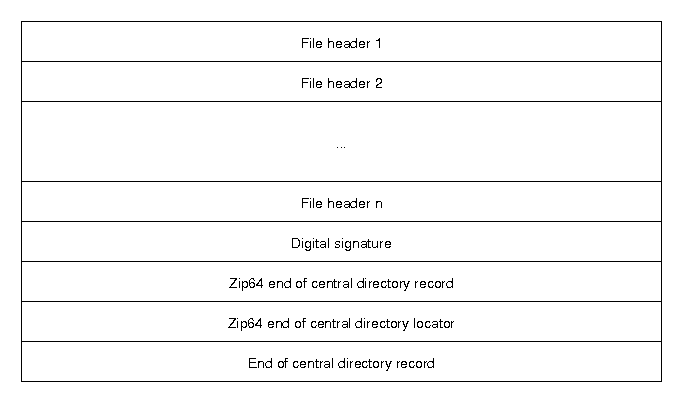
The file headers are similar to the local file headers, but contain some extra information. The Zip64 entries handle the case of a 64-bit Zip archive, and the end of the central directory record contains information about the archive itself.
Central directory file header
The structure of the file header in the central directory is as follows:
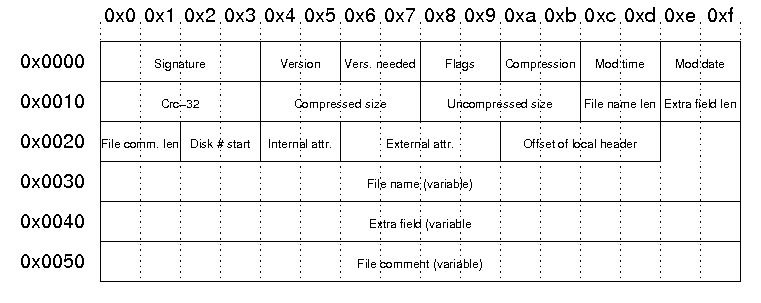
| Signature | The signature of the file header. This is always '\x50\x4b\x01\x02'. |
| Version | Version made by:
upper byte: lower byte: |
| Vers. needed |
PKZip version needed to extract |
| Flags | General purpose bit flag: Bit 00: encrypted file Bit 01: compression option Bit 02: compression option Bit 03: data descriptor Bit 04: enhanced deflation Bit 05: compressed patched data Bit 06: strong encryption Bit 07-10: unused Bit 11: language encoding Bit 12: reserved Bit 13: mask header values Bit 14-15: reserved |
| Compression method | 00: no compression 01: shrunk 02: reduced with compression factor 1 03: reduced with compression factor 2 04: reduced with compression factor 3 05: reduced with compression factor 4 06: imploded 07: reserved 08: deflated 09: enhanced deflated 10: PKWare DCL imploded 11: reserved 12: compressed using BZIP2 13: reserved 14: LZMA 15-17: reserved 18: compressed using IBM TERSE 19: IBM LZ77 z 98: PPMd version I, Rev 1 |
| File modification time | stored in standard MS-DOS format: Bits 00-04: seconds divided by 2 Bits 05-10: minute Bits 11-15: hour |
| File modification date | stored in standard MS-DOS format: Bits 00-04: day Bits 05-08: month Bits 09-15: years from 1980 |
| Crc-32 checksum | value computed over file data by CRC-32 algorithm with 'magic number' 0xdebb20e3 (little endian) |
| Compressed size | if archive is in ZIP64 format, this filed is 0xffffffff and the length is stored in the extra field |
| Uncompressed size | if archive is in ZIP64 format, this filed is 0xffffffff and the length is stored in the extra field |
| File name length | the length of the file name field below |
| Extra field length | the length of the extra field below |
| File comm. len | the length of the file comment |
| Disk # start | the number of the disk on which this file exists |
| Internal attr. |
Internal file attributes: |
| External attr. | External file attributes: host-system dependent |
| Offset of local header | Relative offset of local header. This is the offset of where to find the corresponding local file header from the start of the first disk. |
| File name | the name of the file including an optional relative path. All slashes in the path should be forward slashes '/'. |
| Extra field | Used to store additional information. The field consistes of a sequence of header and data pairs, where the header has a 2 byte identifier and a 2 byte data size field. |
| File comment | An optional comment for the file. |
Example:
The corresponding file header from our local file header example above starts at byte 0x9a2 in the example file:
000009a0  28 f0 50 4b 01 02 17 03  14 00 00 00 08 00 1c 7d  |(.PK...........}|
000009b0  4b 35 a6 e1 90 7d 45 00  00 00 4a 00 00 00 05 00  |K5...}E...J.....|
000009c0  0d 00 1c 00 00 00 01 00  00 00 a4 81 00 00 00 00  |................|
000009d0  66 69 6c 65 31 55 54 05  00 03 c7 48 2d 45 55 78  |file1UT....H-EUx|
000009e0  00 00 74 68 69 73 20 69  73 20 61 20 63 6f 6d 6d  |..this is a comm|
000009f0  65 6e 74 20 66 6f 72 20  66 69 6c 65 20 31 50 4b  |ent for file 1PK|
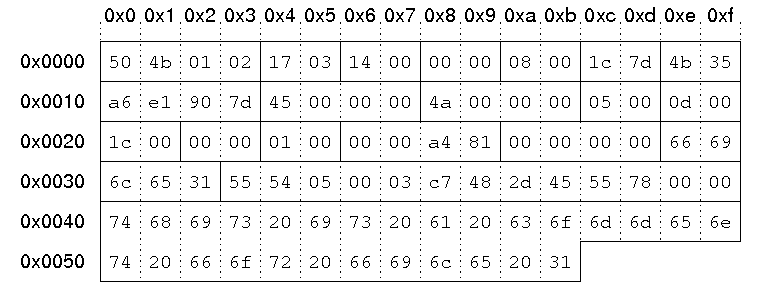
| Signature | '\x50\x4b\x01\x02'. |
| Version | 0x0317 upper byte: 03 -> UNIX lower byte: 23 -> 2.3 |
| Version needed | 0x14 = 20 -> 2.0 |
| Flags | no flags |
| Compression method | 08: deflated |
| File modification time | 0x7d1c = 0111110100011100 hour = (01111)10100011100 = 15 minute = 01111(101000)11100 = 40 second = 01111101000(11100) = 28 = 56 seconds 15:40:56 |
| File modification date | 0x354b = 0011010101001011 year = (0011010)101001011 = 26 month = 0011010(1010)01011 = 10 day = 00110101010(01011) = 11 10/11/2006 |
| Crc-32 checksum | 0x7d90e1a6 |
| Compressed size | 0x45 = 69 bytes |
| Uncompressed size | 0x4a = 74 bytes |
| File name length | 5 bytes |
| Extra field length | 13 bytes |
| File comment length | 28 bytes |
| Disk # start | 0 |
| Internal attributes | Bit 0 set: ASCII/text file |
| External attributes | 0x81a40000 |
| Offset of local header | 0 |
| File name | "file1" |
| Extra field | id 0x5455: extended timestamp, size: 5 bytes Id 0x7855: Info-ZIP UNIX, size: 0 bytes |
| File comment | "this is a comment for file 1" |
End of central directory record
The structure of the end of central directory record is as follows:

| Signature | The signature of end of central directory record. This is always '\x50\x4b\x05\x06'. |
| Disk Number | The number of this disk (containing the end of central directory record) |
| Disk # w/cd | Number of the disk on which the central directory starts |
| Disk entries | The number of central directory entries on this disk |
| Total entries | Total number of entries in the central directory. |
| Central directory size | Size of the central directory in bytes |
| Offset of cd wrt to starting disk | Offset of the start of the central directory on the disk on which the central directory starts |
| Comment len | The length of the following comment field |
| ZIP file comment | Optional comment for the Zip file |
Example:
The end of central directory in out example file starts at byte 0xb36:
00000b30  6f 6d 6d 65 6e 74 50 4b  05 06 00 00 00 00 04 00  |ommentPK........|
00000b40  04 00 94 01 00 00 a2 09  00 00 33 00 74 68 69 73  |..........3.this|
00000b50  20 69 73 20 61 0d 0a 6d  75 6c 74 69 6c 69 6e 65  | is a..multiline|
00000b60  20 63 6f 6d 6d 65 6e 74  20 66 6f 72 20 74 68 65  | comment for the|
00000b70  20 65 6e 74 69 72 65 20  61 72 63 68 69 76 65     | entire archive|
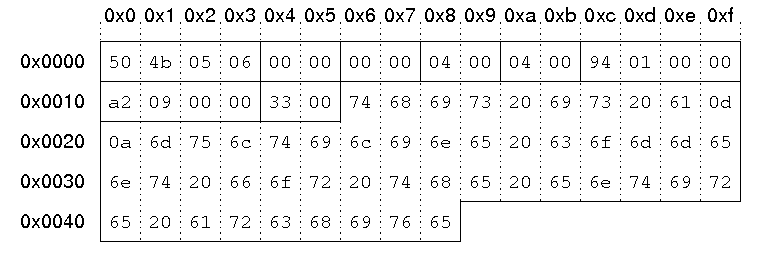
| Signature | '\x50\x4b\x05\x06'. |
| Disk Number | 0 |
| Disk # w/cd | 0 |
| Disk entries | 4 |
| Total entries | 4 |
| Central directory size | 0x194 = 404 bytes |
| Offset of cd wrt to starting disk | byte 0x9a2 = byte 2466 |
| Comment len | 0x33 = 51 bytes |
| ZIP file comment | "this is a multiline comment for the entire archive" |
Zip文件格式的更多相关文章
- 转(zip文件格式说明)
zip文件由三部分组成:压缩的文件内容源数据.压缩的目录源数据.目录结束标识结构 1. 压缩的文件内容源数据: 记录着压缩的所有文件的内容信息,其数据组织结构是对于每个文件都由file header ...
- ZIP压缩算法详细分析及解压实例解释
最近自己实现了一个ZIP压缩数据的解压程序,觉得有必要把ZIP压缩格式进行一下详细总结,数据压缩是一门通信原理和计算机科学都会涉及到的学科,在通信原理中,一般称为信源编码,在计算机科学里,一般称为数据 ...
- 彻底解决mysql中文乱码的办法,修改mysql解压缩版(免安装版或zip版)字符编码
MySQL会出现中文乱码的原因不外乎下列几点:1.server本身设定问题,例如server字符编码还停留在latin12.table的语系设定问题(包含character与collation)3.客 ...
- java-a实现压缩与解压缩(zip、gzip)
zip扮演着归档和压缩两个角色:gzip并不将文件归档,仅只是对单个文件进行压缩,所以,在UNIX平台上,命令tar通常用来创建一个档案文件,然后命令gzip来将档案文件压缩. Java I/O类库还 ...
- ( 解压缩版 免安装版 或 zip版 )如何修改mysql5.6.24 字符编码
1.当我们把zip文件格式解压到指定目录后,并且完成基本环境配置后,打开mysql 5.6.24会发现名为[my-default.ini]的文件.我们用记事本打开该文件会发现并没有[default-c ...
- Java实现文件压缩与解压[zip格式,gzip格式]
Java实现ZIP的解压与压缩功能基本都是使用了Java的多肽和递归技术,可以对单个文件和任意级联文件夹进行压缩和解压,对于一些初学者来说是个很不错的实例. zip扮演着归档和压缩两个角色:gzip并 ...
- liux之我用过的zip解压命令
用途说明 zip文件是一种常用的压缩文件格式,WinZip.WinRar等压缩软件都支持zip文件格式,就连java的jar包也是zip格式 的,Firefox插件xpi文件也是zip格式的.Linu ...
- java基础---->Zip压缩的使用(转)
java中提供了对压缩格式的数据流的读写.它们封装到现成的IO 类中,以提供压缩功能.下面我们开始java中压缩文件的使用. 目录导航: 关于压缩的简要说明 GZIP压缩文件的使用 ZIP压缩文件的使 ...
- 用Python写一款属于自己的 简易zip压缩软件 附完成图(适合初学者)
一.软件描述 用Python tkinter模块写一款属于自己的压缩软件.zip文件格式是通用的文档压缩标准,在ziplib模块中,使用ZipFile来操作zip文件,具有功能:zip压缩功能,zip ...
随机推荐
- HDU1102&&POJ2421 Constructing Roads 2017-04-12 19:09 44人阅读 评论(0) 收藏
Constructing Roads Time Limit : 2000/1000ms (Java/Other) Memory Limit : 65536/32768K (Java/Other) ...
- 自我简介与Github的注册和使用
我叫陈鑫,学号1413042059,来自网络工程142班.喜欢打乒乓球,玩策略类游戏,团队竞技. ...
- iperf命令 +speedtest-cli
iperf工具可以用来测量TCP或者是UDP的网络吞吐量,即bandwidth(带宽)测试. iPerf的主要目标是帮助调整特定路径上的TCP连接. 众所周知,TCP最基本的调整问题是调整TCP窗口 ...
- UDP通讯
上一篇有说到TCP通讯,这篇来谈谈UDP通讯方式 基于Udp协议是无连接模式通讯,占用资源少,响应速度快,延时低.至于可靠性,可通过应用层的控制来满足.(不可靠连接) (1).建立一个套接字(Sock ...
- 加固apk的开发者最常面对的十种问题
欢迎访问网易云社区,了解更多网易技术产品运营经验. 因为工信部对移动App应用安全过检要求日益增多,不加固大都达不到工信部的要求,同时开发者加固App大都是为了防止以下10个检测项出现问题,影响App ...
- k8s 入门系列之集群安装篇
关于kubernetes组件的详解介绍,请阅读上一篇文章<k8s入门系列之介绍篇> Kubernetes集群安装部署 •Kubernetes集群组件: - etcd 一个高可用的K/V键值 ...
- 1270: Wooden Sticks [贪心]
点击打开链接 1270: Wooden Sticks [贪心] 时间限制: 1 Sec 内存限制: 128 MB 提交: 31 解决: 11 统计 题目描述 Lialosiu要制作木棍,给n根作为原料 ...
- indexOf用法
例子: <!DOCTYPE html> <html lang="en"> <head> <meta charset="UTF-8 ...
- 《Spark MLlib 机器学习实战》1——读后总结
1 概念 2 安装 3 RDD RDD包含两种基本的类型:Transformation和Action.RDD的执行是延迟执行,只有Action算子才会触发任务的执行. 宽依赖和窄依赖用于切分任务,如果 ...
- mxonline实战15,用户中心:我的课程, 我的收藏,我的消息,登出和点击数以及收藏数
对应github地址:第15天 一. 我的课程 1. 继承usercenter-base页面 2. 编写url, view