
springboot 配置webservice接口
导入依赖的jar
<!-- webservice cxf -->

    <dependency>

        <groupId>org.apache.cxf</groupId>

        <artifactId>cxf-rt-frontend-jaxws</artifactId>

        <version>3.1.6</version>

    </dependency>

    <dependency>

        <groupId>org.apache.cxf</groupId>

        <artifactId>cxf-rt-transports-http</artifactId>

        <version>3.1.6</version>

    </dependency>
创建webservice配置类
import com.xbsafe.webservice.service.DemoService;

import com.xbsafe.webservice.service.DemoServiceImpl;

import org.apache.cxf.Bus;

import org.apache.cxf.bus.spring.SpringBus;

import org.apache.cxf.jaxws.EndpointImpl;

import org.apache.cxf.transport.servlet.CXFServlet;

import org.springframework.boot.web.servlet.ServletRegistrationBean;

import org.springframework.context.annotation.Bean;

import org.springframework.context.annotation.Configuration;

import javax.xml.ws.Endpoint;

@Configuration

public class CxfConfig {

    @Bean

    public ServletRegistrationBean dispatcherServlet() {

        ServletRegistrationBean servletRegistrationBean = new ServletRegistrationBean(new CXFServlet(), "/demo/*");

        servletRegistrationBean.setName("webService");

        return servletRegistrationBean;

    }

    @Bean(name = Bus.DEFAULT_BUS_ID)

    public SpringBus springBus() {

        return new SpringBus();

    }

    @Bean

    public DemoService demoJsonService(){

        return new DemoServiceImpl();

    }

    @Bean

    public Endpoint endpoint() {

        EndpointImpl endpoint = new EndpointImpl(springBus(), demoJsonService());

        endpoint.publish("/ws");

        endpoint.getInInterceptors().add(new WsInterceptor()); //add webservice inteceptor

        return endpoint;

    }

}
创建webservice拦截器类
import org.apache.cxf.helpers.IOUtils;

import org.apache.cxf.interceptor.AbstractLoggingInterceptor;

import org.apache.cxf.interceptor.Fault;

import org.apache.cxf.io.CachedOutputStream;

import org.apache.cxf.io.DelegatingInputStream;

import org.apache.cxf.message.Message;

import org.apache.cxf.phase.Phase;

import org.slf4j.LoggerFactory;

import java.io.InputStream;

import java.io.SequenceInputStream;

import java.util.logging.Logger;

public class WsInterceptor extends AbstractLoggingInterceptor {

    private static final org.slf4j.Logger LOGGER = LoggerFactory.getLogger(WsInterceptor.class);

    public WsInterceptor() {

        super(Phase.RECEIVE);

    }

    @Override

    public void handleMessage(Message message) throws Fault {

        InputStream is = message.getContent(InputStream.class);

        if(is!=null){

            CachedOutputStream bos = new CachedOutputStream();

            if (threshold > 0) {

                bos.setThreshold(threshold);

            }

            try {

                // use the appropriate input stream and restore it later

                InputStream bis = is instanceof DelegatingInputStream

                        ? ((DelegatingInputStream)is).getInputStream() : is;

                //only copy up to the limit since that's all we need to log

                //we can stream the rest

                IOUtils.copyAtLeast(bis, bos, limit == -1 ? Integer.MAX_VALUE : limit);

                bos.flush();

                bis = new SequenceInputStream(bos.getInputStream(), bis);

                // restore the delegating input stream or the input stream

                if (is instanceof DelegatingInputStream) {

                    ((DelegatingInputStream)is).setInputStream(bis);

                } else {

                    message.setContent(InputStream.class, bis);

                }

                bos.close();

            } catch (Exception e) {

                throw new Fault(e);

            }finally{

                LOGGER.info(bos.toString());

            }

        }

    }

    @Override

    protected Logger getLogger() {

        // TODO Auto-generated method stub

        return null;

    }

}
创建接口类(webservice的方法)
import javax.jws.WebMethod;

import javax.jws.WebParam;

import javax.jws.WebService;

@WebService

public interface DemoService {

    @WebMethod

    public String test(@WebParam(name="param") String param);

}
接口实现类
public class DemoServiceImpl implements DemoService {

    @Override

    public String test(String param) {

        return "webservice demo get param:"+param;

    }

}
测试:
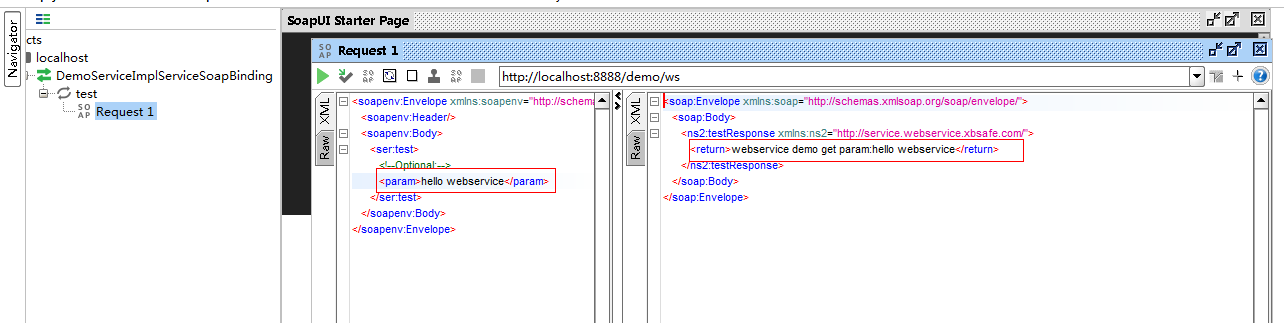
注意事项:
springboot在配置webservice之后发现原来在controller里面写的get或post接口不能访问了,原因是springboot默认注册的是 dispatcherServlet,当
手动配置 ServletRegistrationBean 之后便不会再去注册默认的dispatcherServlet,此时需要手动去注册一个dispatcherServlet,代码如下:
/**

     * 注册一个dispatcherServlet,解决增加ws之后http接口访问不了问题

     */

    @Bean

    public ServletRegistrationBean restServlet(){

        //注解扫描上下文

        AnnotationConfigWebApplicationContext applicationContext = new AnnotationConfigWebApplicationContext();

        //base package

        applicationContext.scan("com.xbsafe");

        //通过构造函数指定dispatcherServlet的上下文

        DispatcherServlet rest_dispatcherServlet = new DispatcherServlet(applicationContext);

        //用ServletRegistrationBean包装servlet

        ServletRegistrationBean registrationBean = new ServletRegistrationBean(rest_dispatcherServlet);

        registrationBean.setLoadOnStartup(1);

        //指定urlmapping

        registrationBean.addUrlMappings("/*");

        //指定name,如果不指定默认为dispatcherServlet

        registrationBean.setName("rest");

        return registrationBean;

    }
springboot 配置webservice接口的更多相关文章
- springboot配置health接口
springboot配置health接口 spring-boot-starter-actuator 健康监控配置及使用 这样是可以看到一些结果的 如果在配置文件中用了下面这个,也是可以生效的 # 不进 ...
- spring与cxf整合配置webservice接口(以jaxws:server的方式配置)
ps:最近项目需要跟其他系统做同步,需要使用webservice来提供接口给其他系统调用:临时抱佛脚赶紧去网上找了下资料,发现用Endpoint的方式发布接口好容易哦:赶紧写了个例子做验证,发布成功. ...
- webService 接口调用配置
1.配置XML文件,如果新建一个XML文件需要在applicationContext.xm里面配置一下 <import resource="cxf-client.xml" / ...
- python通过webservice接口实现配置下发
项目上要开发一个小工具,通过webservice接口实现配置下发,考虑到python的第三方库对soap的良好支持,果断决定用python来完成这一使命. Python的支持webservice的第三 ...
- day63-webservice 08.在web项目中配置带有接口的webservice服务
这个是配置带有接口的WebService的服务. http://localhost:8080/cxf-web-server/service 带有接口的实现类也给它做好了.jaxws:endpoint是 ...
- WebService:java配置类形式发布WebService接口及遇见的问题总结
配置WebService前需要以下依赖jar包 #版本只供参考,具体看项目 <dependency> <grouId>org.apache.cxf</grouId> ...
- springboot配置cxf
1.引入两个需要的jar <dependency> <groupId>org.apache.cxf</groupId> <artifactId>cxf- ...
- Springboot整合webservice
Springboot整合webservice 2019-12-10 16:34:42 星期二 WebService是什么 WebService是一种跨编程语言和跨操作系统平台的远程调用技术,服务之间的 ...
- springboot整合WebService简单版
一.什么是webservice 关于webservice的介绍摘自百度百科,上面的介绍很详细.(链接:https://baike.baidu.com/item/Web%20Service/121503 ...
随机推荐
- LevelDB 的缺憾
[LevelDB 的缺憾] 1.Snapshots 只能通过 DB::GetSnapshot() 创建,意即只能创建当下的 Snapshot. 2.
- 二硫化铼(ReS2)的电子输运特性及逻辑器件研究进展
南京大学物理学院.固体微结构物理国家重点实验室.微结构科学与技术协同创新中心的缪峰教授课题组和王伯根教授课题组在新型二维材料二硫化铼(ReS2)的电子输运特性及逻辑器件研究领域取得重要进展,相关论文于 ...
- ASP.NET 网页动态添加客户端脚本
在System.Web.UI.Page类中包含了RegisterStarupScript()和RegisterClientScriptBlock()两个方法,使用这两个方法可以实现向Web页面动态添加 ...
- chrome扩展安装图文教程
众所周知chrome的各类插件,扩展很丰富,也有很多经典的应用.但是谷歌经常被墙,无法访问,想要通过访问谷歌的应用市场来直接安装浏览器扩展会比较让人抓狂,好不容易无数次刷新后打开了页面,找到了想要的应 ...
- 配置Linux防火墙
配置防火墙(服务器安全优化)(转) 安全规划:开启 80 22 端口并 打开回路(回环地址 127.0.0.1) # iptables –P INPUT ACCEPT # iptables –P O ...
- 超级详细的解决方法 (CentOS7) :永久修改 mysql read-only 问题 could not retrieve transation read-only status server
一.查看mysql的事物隔离级别 SHOW VARIABLES LIKE '%iso%'; 二.临时修改事物隔离级别 SET GLOBAL tx_isolation='READ-COMMITTED'; ...
- UVa 11925 Generating Permutations (构造法)
题意:给定一个序列,让你从一个升序列变成该序列,并且只有两种操作,操作1:交换前两个元素,操作2:把第一个元素移动到最后. 析:一开始的时候吧,不会,还是看的题解,首先是要逆序来做,这样可能好做一点, ...
- http应答码
1xx - 信息提示 这些状态代码表示临时的响应.客户端在收到常规响应之前,应准备接收一个或多个 1xx 响应.· 100 - Continue 初始的请求已经接受,客户应当继续发送请求的其余部分.( ...
- fedora 系统安装后常用设置
#表示root命令 $表示普通用户命令 给普通用户添加sudo权限 #visudo (编辑/etc/sudoers文件的命令) root all = (all) all username al ...
- Oracle EBS客户化程序中格式化金额
在Oracle EBS系统中,随处可见金额的显示格式,通常情况下都具有千分位符,同时有一定位数的精度,让我们先来看看一些现成的例子 上面这些列子中的金额都显示了千分位符,同时具备以2位小数,难道 ...