
springMVC补充——springMVC的表单标签
同其他标签一样,使用标签的第一步是进行标签库的导入(如果页面频繁导入比较多的标签库,应当专门建立导入标签库的页面,详见ztree的随笔)
导入标签库:
<%@ taglib prefix="form" uri="http://www.springframework.org/tags/form" %>
先看一个实例:
<%@ page contentType="text/html;charset=UTF-8" %>
<%@ include file="/WEB-INF/views/include/taglib.jsp"%>
<html>
<head>
<title>党员信息管理</title>
<meta name="decorator" content="default"/>
<script type="text/javascript">
$(document).ready(function() {
//$("#name").focus();
$("#inputForm").validate({
submitHandler: function(form){
loading('正在提交,请稍等...');
form.submit();
},
errorContainer: "#messageBox",
errorPlacement: function(error, element) {
$("#messageBox").text("输入有误,请先更正。");
if (element.is(":checkbox")||element.is(":radio")||element.parent().is(".input-append")){
error.appendTo(element.parent().parent());
} else {
error.insertAfter(element);
}
}
});
});
</script>
</head>
<body>
<ul class="nav nav-tabs">
<li><a href="${ctx}/pm/partyMember/">党员信息列表</a></li>
<li class="active"><a href="${ctx}/pm/partyMember/form?id=${partyMember.id}">党员信息<shiro:hasPermission name="pm:partyMember:edit">${not empty partyMember.id?'修改':'添加'}</shiro:hasPermission><shiro:lacksPermission name="pm:partyMember:edit">查看</shiro:lacksPermission></a></li>
</ul><br/>
<form:form id="inputForm" modelAttribute="partyMember" action="${ctx}/pm/partyMember/save" method="post" class="form-horizontal">
<form:hidden path="id"/>
<sys:message content="${message}"/>
<div class="control-group">
<label class="control-label">党员名称:</label>
<div class="controls">
<form:input path="name" htmlEscape="false" maxlength="100" class="input-xlarge required"/>
<span class="help-inline"><font color="red">*</font> </span>
</div>
</div>
<div class="control-group">
<label class="control-label">党员生日:</label>
<div class="controls">
<input name="birthday" type="text" readonly="readonly" maxlength="20" class="input-medium Wdate required"
value="<fmt:formatDate value="${partyMember.birthday}" pattern="yyyy-MM-dd HH:mm:ss"/>"
onclick="WdatePicker({dateFmt:'yyyy-MM-dd HH:mm:ss',isShowClear:false});"/>
<span class="help-inline"><font color="red">*</font> </span>
</div>
</div>
<div class="control-group">
<label class="control-label">党员身份证号:</label>
<div class="controls">
<form:input path="idcard" htmlEscape="false" maxlength="18" class="input-xlarge required"/>
<span class="help-inline"><font color="red">*</font> </span>
</div>
</div>
<div class="control-group">
<label class="control-label">党员联系电话:</label>
<div class="controls">
<form:input path="phone" htmlEscape="false" maxlength="200" class="input-xlarge "/>
</div>
</div>
<div class="control-group">
<label class="control-label">党员职位:</label>
<div class="controls">
<%-- <form:input path="position" htmlEscape="false" maxlength="1" class="input-xlarge "/> --%>
<form:select path="position" class="input-medium">
<form:option value="" label=""/>
<form:options items="${fns:getDictList('party_position')}" itemLabel="label" itemValue="value" htmlEscape="false"/>
</form:select>
</div>
</div>
<div class="control-group">
<label class="control-label">党员所属支部:</label>
<div class="controls">
<sys:treeselect id="partyOrganization" name="partyOrganization.id" value="${partyMember.partyOrganization.id}" labelName="partyOrganization.name" labelValue="${partyMember.partyOrganization.name}"
title="部门" url="/po/partyOrganization/treeData" cssClass="required" allowClear="true" notAllowSelectParent="true"/>
<span class="help-inline"><font color="red">*</font> </span>
</div>
</div>
<div class="control-group">
<label class="control-label">入党时间:</label>
<div class="controls">
<input name="joinDate" type="text" readonly="readonly" maxlength="20" class="input-medium Wdate required"
value="<fmt:formatDate value="${partyMember.joinDate}" pattern="yyyy-MM-dd HH:mm:ss"/>"
onclick="WdatePicker({dateFmt:'yyyy-MM-dd HH:mm:ss',isShowClear:false});"/>
<span class="help-inline"><font color="red">*</font> </span>
</div>
</div>
<div class="control-group">
<label class="control-label">备注信息:</label>
<div class="controls">
<form:textarea path="remarks" htmlEscape="false" rows="4" maxlength="255" class="input-xxlarge "/>
</div>
</div>
<div class="form-actions">
<shiro:hasPermission name="pm:partyMember:edit"><input id="btnSubmit" class="btn btn-primary" type="submit" value="保 存"/> </shiro:hasPermission>
<input id="btnCancel" class="btn" type="button" value="返 回" onclick="history.go(-1)"/>
</div>
</form:form>
</body>
</html>
再来简要介绍各标签用法:
1.表单标签——form:
<form:form modelAttribute="modelName" method="post">
//modelAttribute属性指定该form绑定的是哪个Model,当指定了对应的Model后就可以在form标签内部其它表单标签上通过为path指定Model属性的名称来绑定Model中的数据了。
我们也可以通过commandName属性来指定我们将绑定的Model
2.输入框标签——input
<form:input path="username"/><br/>
//通过 path 来绑定Model中对应的属性的值,input标签在没有指定id的情况下它会自动获取path指定的属性作为id和name
(可以通过查看渲染代码来验证),当然,hidden标签 同理。
<form:hidden path="id"/>
3.密码标签——password
<form:password path="password"/>
//渲染生成一个type为password的输入框,绑定规则同 Input
4.复选框标签——checkbox
绑定单个数据,选中状态与绑定boolean值的状态一致
<form:checkbox path="testBoolean"/>
//通过path绑定boolean数据会生成一个复选框,当boolean为true该复选框为选定状态,false为不选定状态。
绑定列表数据,如果绑定的数据中有对应checkbox指定的value时则为选定状态,反之为不选定状态:
               <form:checkbox path="roles" value="role1"/>Role1<br/>

               <form:checkbox path="roles" value="role2"/>Role2<br/>

               <form:checkbox path="roles" value="role3"/>Role3
//例如,path绑定的为模型数据User中的一个集合属性 List<String> ,则页面显示三个标签,当value值与List中value值一致时选中
5.复选框组标签——checkboxs
一个checkboxes标签将根据其绑定的数据生成N个复选框。checkboxes绑定的数据可以是数组、集合和Map。在使用checkboxes时我们有两个属性是必须指定的,一个是path,另一个是items。Items表示当前要用来展现的项有哪些,其中checkboxs的path属性也必指定,当path中的数据有和items中的数据值同的时候对应的checkbox为选定状态,反之为不选定状态。
<form:checkboxes path="roles" items="${roleList}"/>
//如上,展示的是后台放到model中(当然modelMap也OK)中的list,而path绑定的是表单绑定对象的list,选中的即为相等的项,
并且,显示的checkbox的id和Label是一样的,这个时候我们就可以使用Map作为数据源了。使用Map作为checkboxes的items属性的数据源时Key将作为真正的复选框的value,而Map的value将作为Label进行展示。此时path不变,匹配规则也不变
<form:checkboxes path="roles" items="${roleMap}"/>
//当我们使用Array或者集合作为数据源,且里面的元素都是一个一个POJO时,我们还可以使用checkboxes标签的itemLabel和itemValue属性来表示使用数组或者集合中元素对象的哪一个属性作为需要呈现的单选框的label和value。
6.单选按钮标签——radiobutton
会生成一个type为radio的Html input标签,如果绑定的数据的值对应radiobutton指定的value时则为选定状态,反之为不选定状态:
<form:radiobutton path="radiobuttonId" value="0"/>0

<form:radiobutton path="radiobuttonId" value="1"/>1

<form:radiobutton path="radiobuttonId" value="2"/>2
//生成三个标签,并且匹配规则和普通单选框一致
7.单选按钮组标签——radiobuttons
使用radiobuttons有两个属性也是我们必须指定的,一个是path属性,表示绑定的表单对象对应的属性,另一个是items属性,表示用于生成单选按钮的数据源。跟checkboxes一样,radiobuttons的items属性和path属性都可以是Array、集合或者是Map。用法与5复选框组类似:
<form:radiobuttons path="favoriteBall" items="${ballMap}" delimiter=" "/>
//将会根据items生成一组单选按钮,而实际选中的为value值与path相等的一个。所以不同的是此处path绑定一个,而复选框path可以是list等的一组,数据源是list时类似5的用法。
结合字典实例:
<form:radiobuttons path="sex" items="${fns:getDictList('sex')}" itemLabel="label" itemValue="value" htmlEscape="false" maxlength="1" class="input-xlarge required" delimiter=" "/>
显示性别:
${tCustomer.sex=="1"?"男":"女"}
fns函数如下:
/**
* Copyright © 2012-2016 <a href="https://github.com/thinkgem/jeesite">JeeSite</a> All rights reserved.
*/
package com.thinkgem.jeesite.modules.sys.utils; import java.util.List;
import java.util.Map; import org.apache.commons.lang3.StringUtils; import com.google.common.collect.Lists;
import com.google.common.collect.Maps;
import com.thinkgem.jeesite.common.mapper.JsonMapper;
import com.thinkgem.jeesite.common.utils.CacheUtils;
import com.thinkgem.jeesite.common.utils.SpringContextHolder;
import com.thinkgem.jeesite.modules.sys.dao.DictDao;
import com.thinkgem.jeesite.modules.sys.entity.Dict; /**
* 字典工具类
* @author ThinkGem
* @version 2013-5-29
*/
public class DictUtils { private static DictDao dictDao = SpringContextHolder.getBean(DictDao.class); public static final String CACHE_DICT_MAP = "dictMap"; public static String getDictLabel(String value, String type, String defaultValue){
if (StringUtils.isNotBlank(type) && StringUtils.isNotBlank(value)){
for (Dict dict : getDictList(type)){
if (type.equals(dict.getType()) && value.equals(dict.getValue())){
return dict.getLabel();
}
}
}
return defaultValue;
} public static String getDictLabels(String values, String type, String defaultValue){
if (StringUtils.isNotBlank(type) && StringUtils.isNotBlank(values)){
List<String> valueList = Lists.newArrayList();
for (String value : StringUtils.split(values, ",")){
valueList.add(getDictLabel(value, type, defaultValue));
}
return StringUtils.join(valueList, ",");
}
return defaultValue;
} public static String getDictValue(String label, String type, String defaultLabel){
if (StringUtils.isNotBlank(type) && StringUtils.isNotBlank(label)){
for (Dict dict : getDictList(type)){
if (type.equals(dict.getType()) && label.equals(dict.getLabel())){
return dict.getValue();
}
}
}
return defaultLabel;
} public static List<Dict> getDictList(String type){
@SuppressWarnings("unchecked")
Map<String, List<Dict>> dictMap = (Map<String, List<Dict>>)CacheUtils.get(CACHE_DICT_MAP);
if (dictMap==null){
dictMap = Maps.newHashMap();
for (Dict dict : dictDao.findAllList(new Dict())){
List<Dict> dictList = dictMap.get(dict.getType());
if (dictList != null){
dictList.add(dict);
}else{
dictMap.put(dict.getType(), Lists.newArrayList(dict));
}
}
CacheUtils.put(CACHE_DICT_MAP, dictMap);
}
List<Dict> dictList = dictMap.get(type);
if (dictList == null){
dictList = Lists.newArrayList();
}
return dictList;
} /**
* 返回字典列表(JSON)
* @param type
* @return
*/
public static String getDictListJson(String type){
return JsonMapper.toJsonString(getDictList(type));
} }
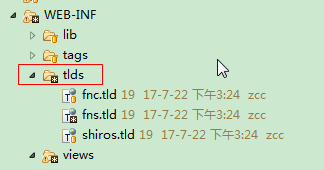
它的tlds如下:
<?xml version="1.0" encoding="UTF-8" ?>

<taglib xmlns="http://java.sun.com/xml/ns/j2ee"

  xmlns:xsi="http://www.w3.org/2001/XMLSchema-instance"

  xsi:schemaLocation="http://java.sun.com/xml/ns/j2ee http://java.sun.com/xml/ns/j2ee/web-jsptaglibrary_2_0.xsd"

  version="2.0">

  <description>JSTL 1.1 functions library</description>

  <display-name>JSTL functions sys</display-name>

  <tlib-version>1.1</tlib-version>

  <short-name>fns</short-name>

  <uri>http://java.sun.com/jsp/jstl/functionss</uri>

  <function>

    <description>获取管理路径</description>

    <name>getAdminPath</name>

    <function-class>com.thinkgem.jeesite.common.config.Global</function-class>

    <function-signature>java.lang.String getAdminPath()</function-signature>

    <example>${fns:getAdminPath()}</example>

  </function>

  <function>

    <description>获取网站路径</description>

    <name>getFrontPath</name>

    <function-class>com.thinkgem.jeesite.common.config.Global</function-class>

    <function-signature>java.lang.String getFrontPath()</function-signature>

    <example>${fns:getFrontPath()}</example>

  </function>

  <function>

    <description>获取网站URL后缀</description>

    <name>getUrlSuffix</name>

    <function-class>com.thinkgem.jeesite.common.config.Global</function-class>

    <function-signature>java.lang.String getUrlSuffix()</function-signature>

    <example>${fns:getUrlSuffix()}</example>

  </function>

  <function>

    <description>获取配置</description>

    <name>getConfig</name>

    <function-class>com.thinkgem.jeesite.common.config.Global</function-class>

    <function-signature>java.lang.String getConfig(java.lang.String)</function-signature>

    <example>${fns:getConfig(key)}</example>

  </function>

  <function>

    <description>获取常量</description>

    <name>getConst</name>

    <function-class>com.thinkgem.jeesite.common.config.Global</function-class>

    <function-signature>java.lang.Object getConst(java.lang.String)</function-signature>

    <example>${fns:getConst(key)}</example>

  </function>

  <!-- UserUtils -->

  <function>

    <description>获取当前用户对象</description>

    <name>getUser</name>

    <function-class>com.thinkgem.jeesite.modules.sys.utils.UserUtils</function-class>

    <function-signature>com.thinkgem.jeesite.modules.sys.entity.User getUser()</function-signature>

    <example>${fns:getUser()}</example>

  </function>

  <function>

    <description>根据编码获取用户对象</description>

    <name>getUserById</name>

    <function-class>com.thinkgem.jeesite.modules.sys.utils.UserUtils</function-class>

    <function-signature>com.thinkgem.jeesite.modules.sys.entity.User get(java.lang.String)</function-signature>

    <example>${fns:getUserById(id)}</example>

  </function>

  <function>

    <description>获取授权用户信息</description>

    <name>getPrincipal</name>

    <function-class>com.thinkgem.jeesite.modules.sys.utils.UserUtils</function-class>

    <function-signature>com.thinkgem.jeesite.modules.sys.security.SystemAuthorizingRealm.Principal getPrincipal()</function-signature>

    <example>${fns:getPrincipal()}</example>

  </function>

  <function>

    <description>获取当前用户的菜单对象列表</description>

    <name>getMenuList</name>

    <function-class>com.thinkgem.jeesite.modules.sys.utils.UserUtils</function-class>

    <function-signature>java.util.List getMenuList()</function-signature>

    <example>${fns:getMenuList()}</example>

  </function>

  <function>

    <description>获取当前用户的区域对象列表</description>

    <name>getAreaList</name>

    <function-class>com.thinkgem.jeesite.modules.sys.utils.UserUtils</function-class>

    <function-signature>java.util.List getAreaList()</function-signature>

    <example>${fns:getAreaList()}</example>

  </function>

  <function>

    <description>获取当前用户的部门对象列表</description>

    <name>getOfficeList</name>

    <function-class>com.thinkgem.jeesite.modules.sys.utils.UserUtils</function-class>

    <function-signature>java.util.List getOfficeList()</function-signature>

    <example>${fns:getOfficeList()}</example>

  </function>

  <function>

    <description>获取当前用户缓存</description>

    <name>getCache</name>

    <function-class>com.thinkgem.jeesite.modules.sys.utils.UserUtils</function-class>

    <function-signature>java.lang.Object getCache(java.lang.String, java.lang.Object)</function-signature>

    <example>${fns:getCache(cacheName, defaultValue)}</example>

  </function>

  <!-- DictUtils -->

  <function>

    <description>获取字典标签</description>

    <name>getDictLabel</name>

    <function-class>com.thinkgem.jeesite.modules.sys.utils.DictUtils</function-class>

    <function-signature>java.lang.String getDictLabel(java.lang.String, java.lang.String, java.lang.String)</function-signature>

    <example>${fns:getDictLabel(value, type, defaultValue)}</example>

  </function>

  <function>

    <description>获取字典标签(多个)</description>

    <name>getDictLabels</name>

    <function-class>com.thinkgem.jeesite.modules.sys.utils.DictUtils</function-class>

    <function-signature>java.lang.String getDictLabels(java.lang.String, java.lang.String, java.lang.String)</function-signature>

    <example>${fns:getDictLabels(values, type, defaultValue)}</example>

  </function>

  <function>

    <description>获取字典值</description>

    <name>getDictValue</name>

    <function-class>com.thinkgem.jeesite.modules.sys.utils.DictUtils</function-class>

    <function-signature>java.lang.String getDictValue(java.lang.String, java.lang.String, java.lang.String)</function-signature>

    <example>${fns:getDictValue(label, type, defaultValue)}</example>

  </function>

  <function>

    <description>获取字典对象列表</description>

    <name>getDictList</name>

    <function-class>com.thinkgem.jeesite.modules.sys.utils.DictUtils</function-class>

    <function-signature>java.util.List getDictList(java.lang.String)</function-signature>

    <example>${fns:getDictList(type)}</example>

  </function>

  <function>

    <description>获取字典对象列表</description>

    <name>getDictListJson</name>

    <function-class>com.thinkgem.jeesite.modules.sys.utils.DictUtils</function-class>

    <function-signature>java.lang.String getDictListJson(java.lang.String)</function-signature>

    <example>${fns:getDictListJson(type)}</example>

  </function>

  <function>

    <description>获取菜单分类列表</description>

    <name>getCategoryList</name>

    <function-class>com.thinkgem.jeesite.modules.sys.utils.DictUtils</function-class>

    <function-signature>java.util.List getCategoryList()</function-signature>

    <example>${getCategoryList()}</example>

  </function>

  <!-- Encodes -->

  <function>

    <description>URL编码</description>

    <name>urlEncode</name>

    <function-class>com.thinkgem.jeesite.common.utils.Encodes</function-class>

    <function-signature>java.lang.String urlEncode(java.lang.String)</function-signature>

    <example>${fns:urlEncode(part)}</example>

  </function>

  <function>

    <description>URL解码</description>

    <name>urlDecode</name>

    <function-class>com.thinkgem.jeesite.common.utils.Encodes</function-class>

    <function-signature>java.lang.String urlDecode(java.lang.String)</function-signature>

    <example>${fns:urlDecode(part)}</example>

  </function>

  <function>

    <description>HTML编码</description>

    <name>escapeHtml</name>

    <function-class>com.thinkgem.jeesite.common.utils.Encodes</function-class>

    <function-signature>java.lang.String escapeHtml(java.lang.String)</function-signature>

    <example>${fns:escapeHtml(html)}</example>

  </function>

  <function>

    <description>HTML解码</description>

    <name>unescapeHtml</name>

    <function-class>com.thinkgem.jeesite.common.utils.Encodes</function-class>

    <function-signature>java.lang.String unescapeHtml(java.lang.String)</function-signature>

    <example>${fns:unescapeHtml(html)}</example>

  </function>

  <!-- StringUtils -->

  <function>

    <description>从后边开始截取字符串</description>

    <name>substringAfterLast</name>

    <function-class>org.apache.commons.lang3.StringUtils</function-class>

    <function-signature>java.lang.String substringAfterLast(java.lang.String, java.lang.String)</function-signature>

    <example>${fns:substringAfterLast(str,separator)}</example>

  </function>

  <function>

    <description>判断字符串是否以某某开头</description>

    <name>startsWith</name>

    <function-class>org.apache.commons.lang3.StringUtils</function-class>

    <function-signature>boolean startsWith(java.lang.CharSequence, java.lang.CharSequence)</function-signature>

    <example>${fns:startsWith(str,prefix)}</example>

  </function>

  <function>

    <description>判断字符串是否以某某结尾</description>

    <name>endsWith</name>

    <function-class>org.apache.commons.lang3.StringUtils</function-class>

    <function-signature>boolean endsWith(java.lang.CharSequence, java.lang.CharSequence)</function-signature>

    <example>${fns:endsWith(str,suffix)}</example>

  </function>

  <function>

    <description>缩写字符串,超过最大宽度用“...”表示</description>

    <name>abbr</name>

    <function-class>com.thinkgem.jeesite.common.utils.StringUtils</function-class>

    <function-signature>java.lang.String abbr(java.lang.String, int)</function-signature>

    <example>${fns:abbr(str,length)}</example>

  </function>

  <function>

    <description>替换掉HTML标签</description>

    <name>replaceHtml</name>

    <function-class>com.thinkgem.jeesite.common.utils.StringUtils</function-class>

    <function-signature>java.lang.String replaceHtml(java.lang.String)</function-signature>

    <example>${fns:replaceHtml(html)}</example>

  </function>

  <function>

    <description>转换为JS获取对象值,生成三目运算返回结果。</description>

    <name>jsGetVal</name>

    <function-class>com.thinkgem.jeesite.common.utils.StringUtils</function-class>

    <function-signature>java.lang.String jsGetVal(java.lang.String)</function-signature>

    <example>${fns:jsGetVal('row.user.id')}  返回:!row?'':!row.user?'':!row.user.id?'':row.user.id</example>

  </function>

  <!-- DateUtils -->

  <function>

    <description>获取当前日期</description>

    <name>getDate</name>

    <function-class>com.thinkgem.jeesite.common.utils.DateUtils</function-class>

    <function-signature>java.lang.String getDate(java.lang.String)</function-signature>

    <example>${fns:getDate(pattern)}</example>

  </function>

  <function>

    <description>获取过去的天数</description>

    <name>pastDays</name>

    <function-class>com.thinkgem.jeesite.common.utils.DateUtils</function-class>

    <function-signature>long pastDays(java.util.Date)</function-signature>

    <example>${fns:pastDays(date)}</example>

  </function>

  <!-- JsonMapper -->

  <function>

    <description>对象转换JSON字符串</description>

    <name>toJson</name>

    <function-class>com.thinkgem.jeesite.common.mapper.JsonMapper</function-class>

    <function-signature>java.lang.String toJsonString(java.lang.Object)</function-signature>

    <example>${fns:toJson(object)}</example>

  </function>

</taglib>
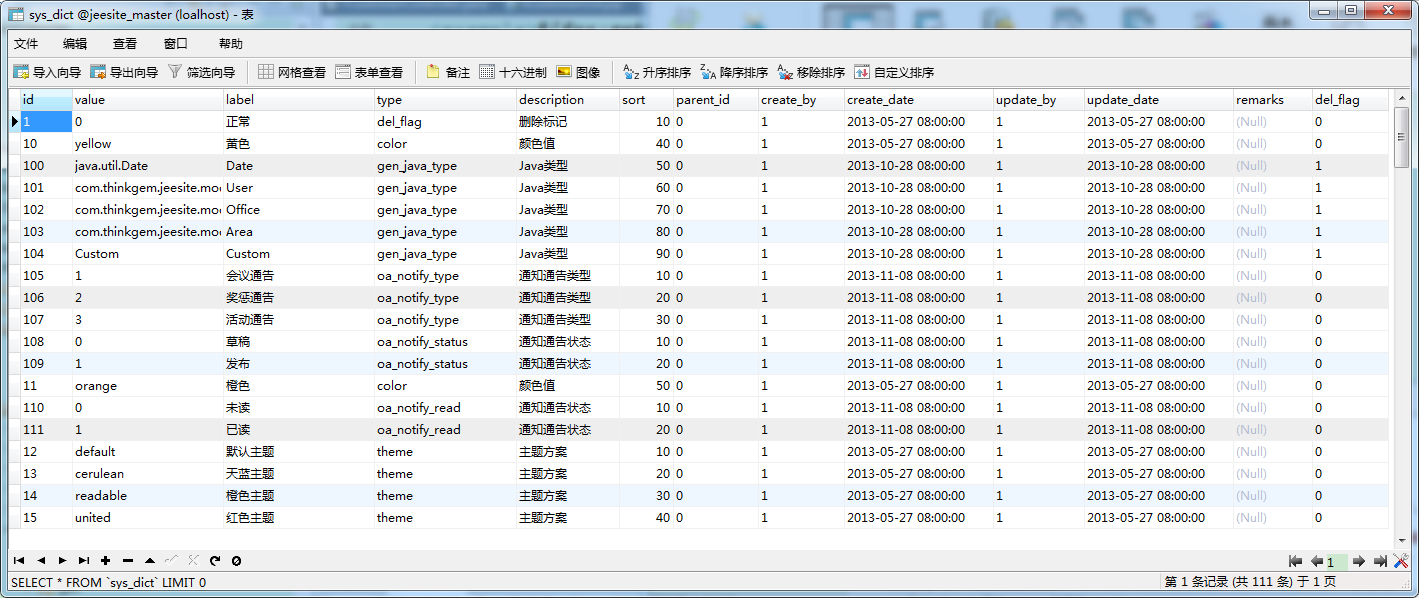
字典信息如下:
8.下拉标签——select
绑定的items数据可以是数组、集合或Map会根据items的内容生成select里面的option选项,当path的值和items中的某条数据值相同的时候对应的option为选定状态,反之为不选定状态,用法与radiobuttons很相似:
<form:select path="favoriteBall" items="${ballMap}"/>
也可以手动生成option:
<form:select path="selectId">

   <option>请选择人员</option>

   <form:option value="1">路人甲</form:option>

   <form:option value="2">路人乙</form:option>

   <form:option value="3">路人丙</form:option>

</form:select>
或者通过给option绑定数据源来生成下拉框:
         <form:select path="favoriteBall">

                   <option>请选择</option>

                   <form:options items="${ballMap}"/>

               </form:select>
9.富文本框标签——textarea
<form:textarea path="introduction" cols="20" rows="10"/>
//用法比较简单,这里不再赘述
springMVC补充——springMVC的表单标签的更多相关文章
- SpringMVC学习记录(五)--表单标签
在使用SpringMVC的时候我们能够使用Spring封装的一系列表单标签,这些标签都能够訪问到ModelMap中的内容. 以下将对这些标签一一介绍. 1.引入标签头文件 在正式介绍SpringMVC ...
- SpringMVC学习系列 之 表单标签
http://www.cnblogs.com/liukemng/p/3754211.html 本篇我们来学习Spring MVC表单标签的使用,借助于Spring MVC提供的表单标签可以让我们在视图 ...
- SpringMVC(11)表单标签
本篇我们来学习Spring MVC表单标签的使用,借助于Spring MVC提供的表单标签可以让我们在视图上展示WebModel中的数据更加轻松. 一.首先我们先做一个简单了例子来对Spring MV ...
- SpringMVC 表单标签 & 处理静态资源
使用 Spring 的表单标签 通过 SpringMVC 的表单标签可以实现将模型数据中的属性和 HTML 表单元素相绑定,以实现表单数据更便捷编辑和表单值的回显. form 标签 一般情况下,通过 ...
- (转载)SPRINGMVC表单标签简介
SpringMVC表单标签简介 在使用SpringMVC的时候我们可以使用Spring封装的一系列表单标签,这些标签都可以访问到ModelMap中的内容.下面将对这些标签一一介绍. 在正式介绍Spri ...
- SpringMVC表单标签简介
在使用SpringMVC的时候我们可以使用Spring封装的一系列表单标签,这些标签都可以访问到ModelMap中的内容.下面将对这些标签一一介绍. 在正式介绍SpringMVC的表单标签之前,我们需 ...
- SpringMVC表单标签
SpringMVC学习系列(11) 之 表单标签 本篇我们来学习Spring MVC表单标签的使用,借助于Spring MVC提供的表单标签可以让我们在视图上展示WebModel中的数据更加轻松. ...
- springMVC(7)---表单标签
springMVC(7)---表单标签 form标签作用 简单来讲form表单有两大作用 1:第一就是往后端提交数据或者前端回显 ...
- 第七节 认识SpringMVC中的表单标签
所谓成熟,就是:你要习惯,任何人的忽冷忽热:也要看淡,任何人的渐行渐远: --胖先生 SpringMVC的表单标签 回顾: JSTL标签 --C标签 FMT标签 自学:JSP如何自定义标签[开源社区当 ...
随机推荐
- August 09th 2017 Week 32nd Wednesday
Find hope from despair, life will become brilliant. 从绝望中寻找希望,人生终将辉煌. Have you ever seen the movie Ba ...
- Scala编译器安装
1.安装JDK 因为Scala是运行在JVM平台上的,所以安装Scala之前要安装JDK. 2.安装Scala Windows安装Scala编译器 访问Scala官网http://www.scala- ...
- PetaPoco轻量级ORM框架 - 对Database类的进行扩展,可以返回Table格式数据
一.有时我们需要将常用的功能添加到PetaPoco中的Database类中 实现方式有2种,以下以查询字段为例 1.通过扩展方式实现,此方式不改变被调用(Database)类名(只能增加方法) pub ...
- BZOJ 1059 矩阵游戏 二分图匹配
题目链接: https://www.lydsy.com/JudgeOnline/problem.php?id=1059 题目大意: 小Q是一个非常聪明的孩子,除了国际象棋,他还很喜欢玩一个电脑益智游戏 ...
- BZOJ 2440 完全平方数 莫比乌斯反演模板题
题目链接: https://www.lydsy.com/JudgeOnline/problem.php?id=2440 题目大意: 求第k个无平方因子的数 思路: 二分答案x,求1-x中有多少个平方因 ...
- 14. Android框架和工具之 ImageLoader(图片加载)
1. 这个图片加载框架网友很多都已经使用过,而且分析也很到位,这里我就不写了,直接引用别人,尊重别人的劳动成果. 2. 参考如下: (1)Android 开源框架Universal-Image-Loa ...
- C/C++——老夫记不住
常指针 Coordinate * const pCoor=&coor1; 指针所指向的地址不可改变. 常对象指针 const Coordinate *pCoor=&coor1; 所指对 ...
- 连接池中的maxIdle,MaxActive,maxWait等参数详解
转: 连接池中的maxIdle,MaxActive,maxWait等参数详解 2017年06月03日 15:16:22 阿祥小王子 阅读数:6481 版权声明:本文为博主原创文章,未经博主允许不得 ...
- 【Git】常见错误提示解决办法和常用方法
1.添加远程仓库时提示fatal: remote origin already exists. 先删除远程仓库,再添加远程仓库 最后再push 2.修改本地文件(比如README.md)后,更新到gi ...
- forward_list详解
forward_list在头文件<forward_list>中,与list类似,区别就是list时双链表,forward_list是单链表,forward_list只支持前向迭代.在访问第 ...