
[javaSE] GUI(对话框Dialog)
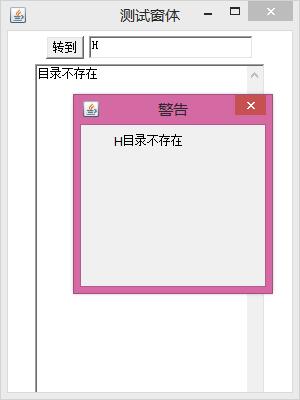
对话框不能单独存在,依赖于窗体,有显示标题,有模式
获取Dialog对象,new出来,构造参数:Frame对象,String的标题,模式
窗体内部的内容,Label对象,Button对象,调用Dialog对象的add()方法,把这两个添加进去
Dialog也是一个普通的窗体,需要设置尺寸和位置
这个Dialog窗体不用加入到Frame窗体中,只需要设置是否显示就可以了
对话框的叉号,给对话框添加窗体事件
调用Dialog对象的addWindowListener()方法,设置,重写windowClosing()方法,方法里面调用Dialog对象setVisible(flase),隐藏掉
显示信息
调用Label对象的setText()方法,设置文本
import java.awt.Button;

import java.awt.Dialog;

import java.awt.FlowLayout;

import java.awt.Frame;

import java.awt.Label;

import java.awt.TextArea;

import java.awt.TextField;

import java.awt.event.ActionEvent;

import java.awt.event.ActionListener;

import java.awt.event.WindowAdapter;

import java.awt.event.WindowEvent;

import java.io.File;

public class FrameDemo {

    private Frame frame;

    private TextField tf;

    private TextArea ta;

    private Button button;

    private Dialog dialog;

    private Label label;

    public FrameDemo() {

        init();

    }

    /**

     * 初始化

     */

    public void init() {

        frame = new Frame("测试窗体");

        frame.setBounds(300, 200, 300, 400);

        frame.setLayout(new FlowLayout());

        tf = new TextField(20);

        button = new Button("转到");

        ta = new TextArea(30, 30);

        frame.add(button);

        frame.add(tf);

        frame.add(ta);

        dialog=new Dialog(frame, "警告", false);

        dialog.setBounds(250, 100, 200, 100);

        dialog.setLayout(new FlowLayout());

        label=new Label();

        dialog.add(label);

        frame.setVisible(true);

        addEventAction();

    }

    /**

     * 添加事件

     */

    public void addEventAction() {

        // 退出

        frame.addWindowListener(new WindowAdapter() {

            @Override

            public void windowClosing(WindowEvent e) {

                System.exit(0);

            }

        });

        //对话框的window事件

        dialog.addWindowListener(new WindowAdapter() {

            @Override

            public void windowClosing(WindowEvent e) {

                dialog.setVisible(false);

            }

        });

        // action事件

        button.addActionListener(new ActionListener() {

            @Override

            public void actionPerformed(ActionEvent e) {

                String dirName = tf.getText();

                File file = new File(dirName);

                if (!file.isDirectory() || !file.exists()) {

                    dialog.setVisible(true);

                    label.setText(dirName+"目录不存在");

                    ta.setText("目录不存在");

                    return;

                }

                String[] files = file.list();

                StringBuilder sb = new StringBuilder();

                for (String name : files) {

                    sb.append(name);

                    sb.append("\r\n");

                }

                ta.setText(sb.toString());

            }

        });

    }

    /**

     * @param args

     */

    public static void main(String[] args) {

        new FrameDemo();

    }

}
[javaSE] GUI(对话框Dialog)的更多相关文章
- Android 对话框(Dialog)大全 建立你自己的对话框
Android 对话框(Dialog)大全 建立你自己的对话框 原文地址: http://www.cnblogs.com/salam/archive/2010/11/15/1877512.html A ...
- 转 Android 对话框(Dialog)大全 建立你自己的对话框
Activities提供了一种方便管理的创建.保存.回复的对话框机制,例如 onCreateDialog(int), onPrepareDialog(int, Dialog), showDialog( ...
- 95秀-自定义对话框 dialog 合集
普通的确认对话框 NormalDialog.java import android.app.Dialog; import android.content.Context; import android ...
- Android 常用对话框Dialog封装
Android 6种 常用对话框Dialog封装 包括: 消息对话框.警示(含确认.取消)对话框.单选对话框. 复选对话框.列表对话框.自定义视图(含确认.取消)对话框 分别如下图所示: ...
- Android项目实战(三十二):圆角对话框Dialog
前言: 项目中多处用到对话框,用系统对话框太难看,就自己写一个自定义对话框. 对话框包括:1.圆角 2.app图标 , 提示文本,关闭对话框的"确定"按钮 难点:1.对话框边框圆角 ...
- Android 对话框(Dialog)大全
转自: http://www.cnblogs.com/salam/archive/2010/11/15/1877512.html Activities提供了一种方便管理的创建.保存.回复的对话框机制, ...
- Android 对话框(Dialog)
Activities提供了一种方便管理的创建.保存.回复的对话框机制,例如 onCreateDialog(int), onPrepareDialog(int, Dialog), showDialog( ...
- Android 对话框(Dialog) 及 自己定义Dialog
Activities提供了一种方便管理的创建.保存.回复的对话框机制,比如 onCreateDialog(int), onPrepareDialog(int, Dialog), showDialog( ...
- (转载)Android项目实战(三十二):圆角对话框Dialog
Android项目实战(三十二):圆角对话框Dialog 前言: 项目中多处用到对话框,用系统对话框太难看,就自己写一个自定义对话框. 对话框包括:1.圆角 2.app图标 , 提示文本,关闭对话 ...
- android对话框(Dialog)的使用方法
Activities提供了一种方便管理的创建.保存.回复的对话框机制.比如 onCreateDialog(int), onPrepareDialog(int, Dialog), showDialog( ...
随机推荐
- PHP消息队列实现
一个经典的消息队列就是这样的,主要是入队出队操作. shell脚本日志输出 学习地址:http://www.imooc.com/article/19111
- IDEA 引入外部jar包 pom 配置,防止打包失败
1. <!--添加外部依赖--> <dependency> <groupId>Ice</groupId> ...
- Oracle to_char的用法
The following are number examples for the to_char function. to_char(1210.73, '9999.9') would return ...
- 解决无法运行Terminator出现以下问题: File "/usr/bin/terminator"...SyntaxError: invalid syntax
在安装或者启动Terminator时可能出现这个问题: lin@Dev:~$ terminator File "/usr/bin/terminator", line 123 exc ...
- Carte作为Windows服务
有一些用例将Carte作为Windows服务运行: 当使用命令窗口运行Carte实例时,任何人都会错误地关闭实例并且Carte将关闭. Carte.bat命令窗口与调用批处理文件的用户会话相关联,需要 ...
- github上关于campbell数据采集的一些代码。
数据自动采集: https://github.com/USGS-OWI/deployer-campbell program that reads loggernet files and refor ...
- 02-url路由分配及模板渲染方式
本章主要内容 1.url基本概念及格式 2.path和re_path 3.模板路径配置 4.模板渲染方式 1.url基本概念及格式 URL(uniform Resoure Locator)统一资源定位 ...
- 解决flex布局下, elementui table组件不能跟随父组件的宽度而变化的bug
bug: 我在flex布局的元素中使用了elementui的table组件,饿了么的table上会被加一个动态的宽度, 当第一次改变flex元素宽度的时候.table的动态宽度会变化,第二次和以后就不 ...
- excel 正则表达式用法
Private Sub RegEx_Replace() Dim myRegExp As Object Dim Myrange As Range, C As Range ...
- dotnet core webapi +vue 搭建前后端完全分离web架构(一)
架构 服务端采用 dotnet core webapi 前端采用: Vue + router +elementUI+axios 问题 使用前后端完全分离的架构,首先遇到的问题肯定是跨域访问.前后端可 ...