
Dynamics 365设置错误通知首选项的方法
本人微信公众号:微软动态CRM专家罗勇 ,回复288或者20181205可方便获取本文,同时可以在第一间得到我发布的最新博文信息,follow me!我的网站是 www.luoyong.me 。
使用Microsoft Dynamics 365有时候会碰到类似如下的错误提示:Microsoft Dynamics 365 has encounted an error.
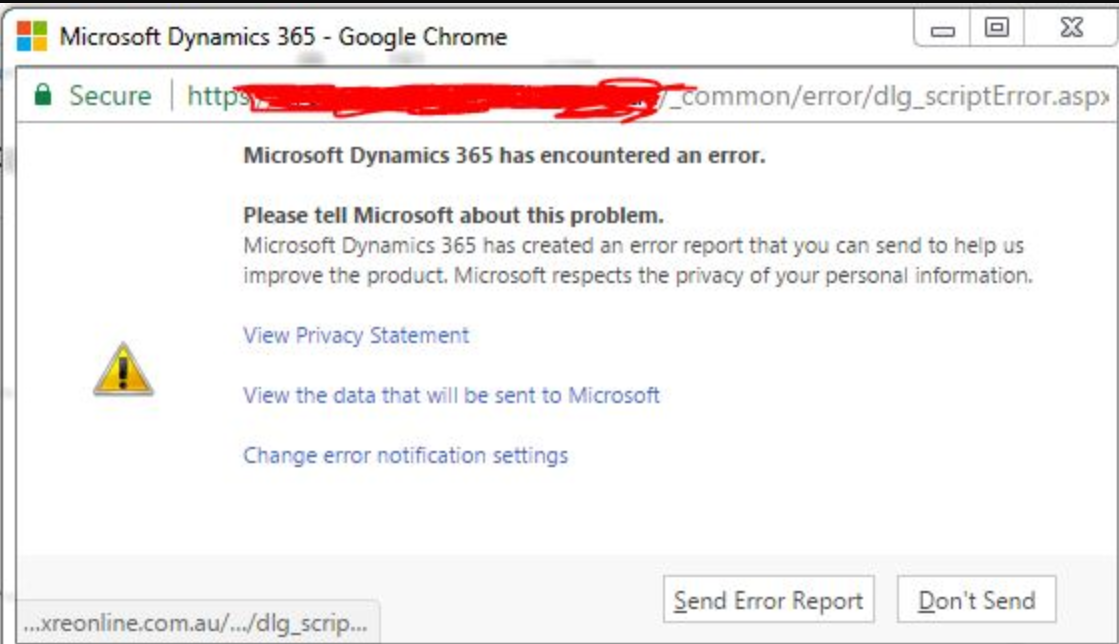
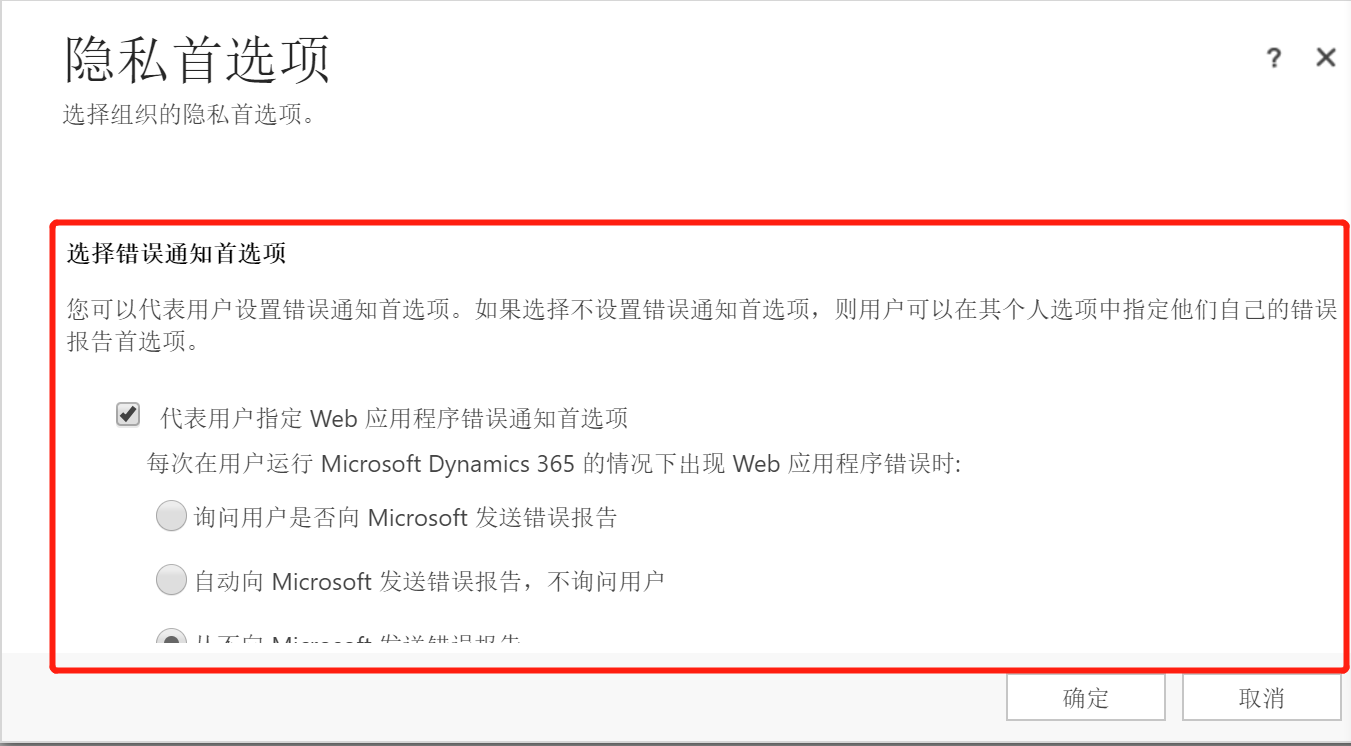
很多时候为了避免这个提示干扰用户操作,系统管理员会在安装后设置不弹出这个提示框。在【设置】>【管理】> 【隐私首选项】做如下设置即可。
- 选中【代表用户指定 Web 应用程序错误通知首选项】
- 选中【从不向 Microsoft 发送错误报告】

当然用户个人也是可以自己设置的,通过【选项】 > 【隐私】,选中【从不向 Microsoft 发送有关 Microsoft Dynamics 365 的错误报告】并确认保存。
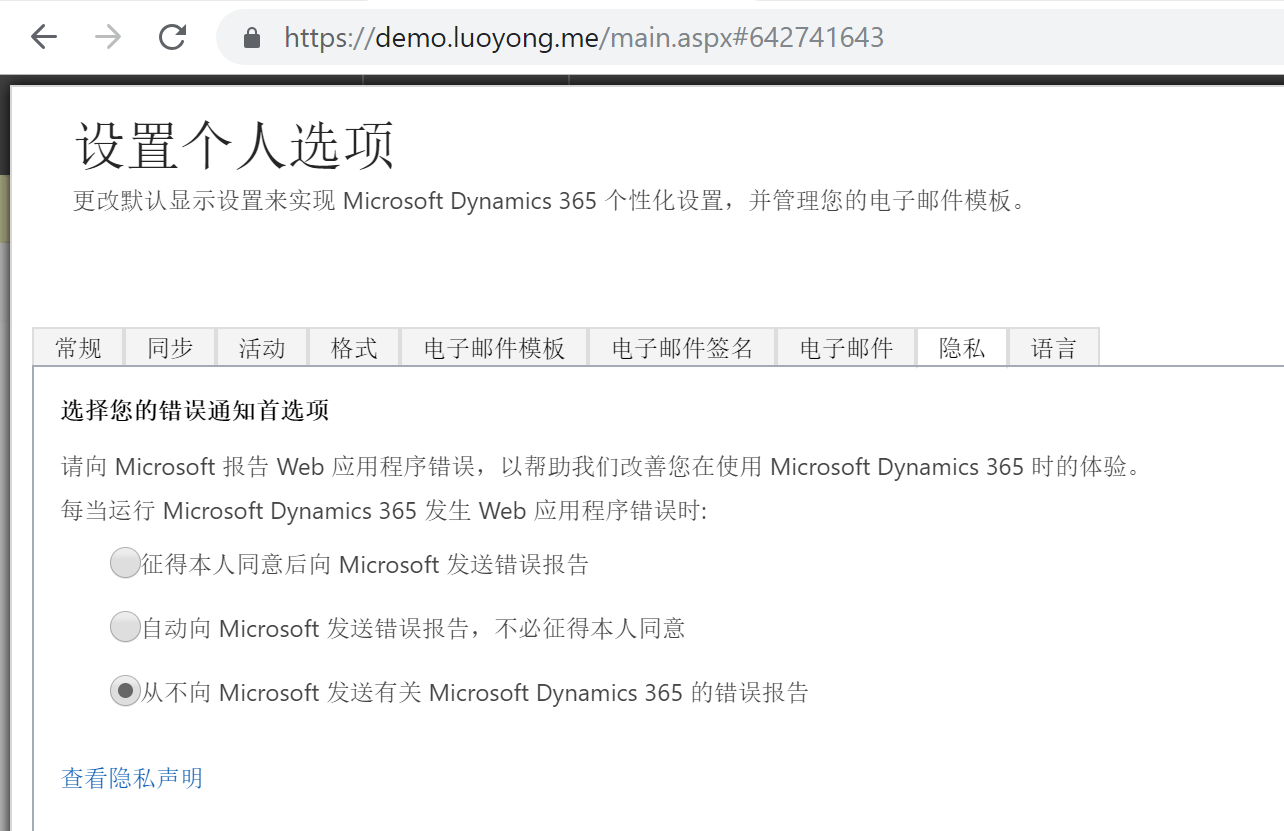
但是有的Dynamics 365版本如下部分不会出现,怎么做个全局设置呢?
办法也是有的,可以使用消息来更新Organiaztion实体的 reportscripterrors 属性值,通过MetadataBrowser可以知道该属性是选项集,有如下四个选项:
- 0 代表 没有用于向 Microsoft 发送有关 Microsoft Dynamics 365 错误报告的首选项
- 1 代表 征得本人同意后向 Microsoft 发送错误报告
- 2 代表 自动向 Microsoft 发送错误报告,不必征得本人同意
- 3 代表 从不向 Microsoft 发送有关 Microsoft Dynamics 365 的错误报告
我是用如下的代码来更新为 0 看看:
using Microsoft.Crm.Sdk.Messages;

using Microsoft.Xrm.Sdk;

using Microsoft.Xrm.Sdk.Client;

using Microsoft.Xrm.Sdk.Query;

using System;

using System.Collections.Generic;

using System.Configuration;

using System.Linq;

using System.ServiceModel.Description;

using System.Text;

using System.Threading.Tasks;

namespace UpdateOrgAttribute

{

    class Program

    {

        static void Main(string[] args)

        {

            IServiceManagement<IOrganizationService> orgServiceMgr = ServiceConfigurationFactory.CreateManagement<IOrganizationService>(new Uri(ConfigurationManager.AppSettings["orgUrl"]));

            AuthenticationCredentials orgAuCredentials = new AuthenticationCredentials();

            orgAuCredentials.ClientCredentials.UserName.UserName = ConfigurationManager.AppSettings["userName"];

            orgAuCredentials.ClientCredentials.UserName.Password = ConfigurationManager.AppSettings["passWord"];

            using (OrganizationServiceProxy orgSvc = GetProxy<IOrganizationService, OrganizationServiceProxy>(orgServiceMgr, orgAuCredentials))

            {

                WhoAmIRequest whoReq = new WhoAmIRequest();

                WhoAmIResponse whoRep = orgSvc.Execute(whoReq) as WhoAmIResponse;

                var userEntity = orgSvc.Retrieve("systemuser", whoRep.UserId, new ColumnSet("fullname"));

                Console.WriteLine(string.Format("登录组织{0}成功,欢迎{1},继续操作请输入y!", ConfigurationManager.AppSettings["orgUrl"], userEntity.GetAttributeValue<string>("fullname")));

                var input = Console.ReadLine().ToString().ToUpper();

                if (input == "Y")

                {

                    QueryExpression pagequery = new QueryExpression("organization");

                    pagequery.ColumnSet.AllColumns = true;

                    Console.WriteLine("组织的各项属性及其值如下:");

                    foreach (var attr in orgSvc.RetrieveMultiple(pagequery).Entities[].Attributes.Where(t => t.Key != "sitemapxml" && t.Key != "referencesitemapxml").OrderBy(t => t.Key))

                    {

                        Console.WriteLine(string.Format("{0} : {1}", attr.Key, attr.Value.GetType() == typeof(Microsoft.Xrm.Sdk.OptionSetValue) ? ((OptionSetValue)attr.Value).Value : attr.Value));

                        Console.WriteLine("==============================================");

                    }

                    Console.WriteLine("请为【reportscripterrors】输入你要设置的值:");

                    Console.WriteLine("0 代表 没有用于向 Microsoft 发送有关 Microsoft Dynamics 365 错误报告的首选项");

                    Console.WriteLine("1 代表 征得本人同意后向 Microsoft 发送错误报告");

                    Console.WriteLine("2 代表 自动向 Microsoft 发送错误报告,不必征得本人同意");

                    Console.WriteLine("3 代表 从不向 Microsoft 发送有关 Microsoft Dynamics 365 的错误报告");

                    input = Console.ReadLine().ToString().Trim();

                    var orgEntity = new Entity("organization", orgSvc.RetrieveMultiple(pagequery).Entities[].Id);

                    orgEntity["reportscripterrors"] = new OptionSetValue(Convert.ToInt32(input));

                    orgSvc.Update(orgEntity);

                    Console.WriteLine("更新成功!");

                }

            }

            Console.WriteLine("程序执行完毕!");

            Console.ReadKey();

        }

        private static TProxy GetProxy<TService, TProxy>(

IServiceManagement<TService> serviceManagement,

AuthenticationCredentials authCredentials)

            where TService : class

            where TProxy : ServiceProxy<TService>

        {

            Type classType = typeof(TProxy);

            if (serviceManagement.AuthenticationType !=

                AuthenticationProviderType.ActiveDirectory)

            {

                AuthenticationCredentials tokenCredentials =

                    serviceManagement.Authenticate(authCredentials);

                return (TProxy)classType

                    .GetConstructor(new Type[] { typeof(IServiceManagement<TService>), typeof(SecurityTokenResponse) })

                    .Invoke(new object[] { serviceManagement, tokenCredentials.SecurityTokenResponse });

            }

            return (TProxy)classType

                .GetConstructor(new Type[] { typeof(IServiceManagement<TService>), typeof(ClientCredentials) })

                .Invoke(new object[] { serviceManagement, authCredentials.ClientCredentials });

        }

    }

}
下面是执行截图:
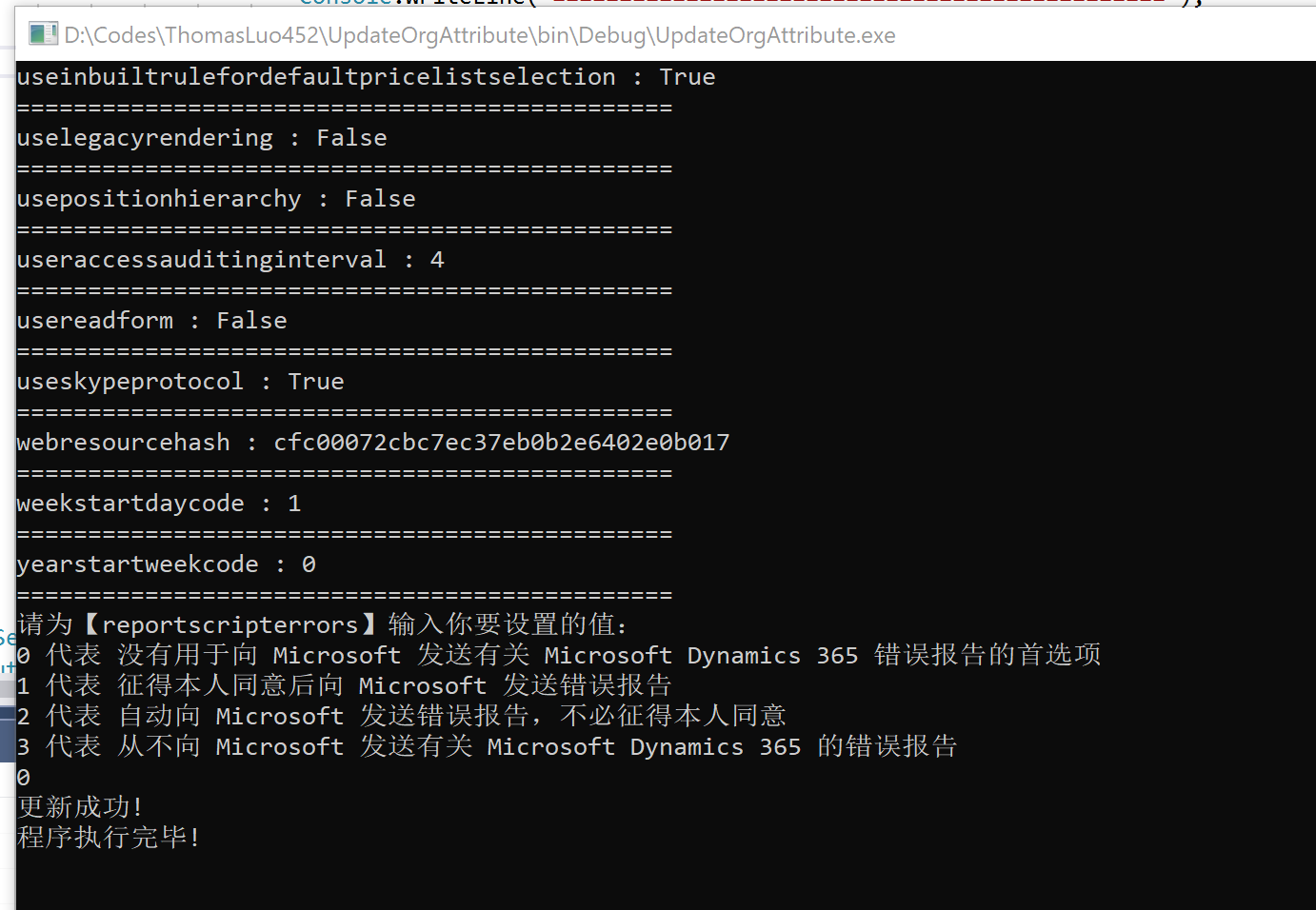
这样更新后,界面上会显示不出来,对CRM的应用程序池执行一下【回收...】就可以看到效果了。
Dynamics 365设置错误通知首选项的方法的更多相关文章
- NX二次开发-UFUN工程图表格注释设置单元格首选项UF_TABNOT_set_cell_prefs
NX9+VS2012 #include <uf.h> #include <uf_tabnot.h> #include <NXOpen/Part.hxx> #incl ...
- 如何解决Dynamics 365的错误:用户身份验证无效,MSIS0006
关注本人微信和易信公众号: 微软动态CRM专家罗勇 ,回复246或者20170312可方便获取本文,同时可以在第一间得到我发布的最新的博文信息,follow me!我的网站是 www.luoyong. ...
- Windows 8 动手实验系列教程 实验6:设置和首选项
动手实验 实验6:设置和首选项 2012年9月 简介 实验3介绍了合约并演示了应用程序如何轻松地与共享和搜索合约实现集成.合约同样包含设置超级按钮,它对活动的Windows应用商店应用的设置进行修改. ...
- Google AdWords 广告排名首选项
排名首选项目标:了解 AdWords 广告客户可怎样为其广告设置排名首选项. 排名首选项简介 通过排名首选项,用户可以告诉 Google 他们希望其广告在给定网页上的所有 AdWords 广告中所处的 ...
- NX二次开发-UFUN工程图表格注释检索默认单元格首选项UF_TABNOT_ask_default_cell_prefs
NX9+VS2012 #include <uf.h> #include <uf_tabnot.h> #include <NXOpen/Part.hxx> #incl ...
- PHP 错误与异常 笔记与总结(3)PHP 配置文件(php.ini)中与错误相关的选项 与 设置错误级别
[PHP 配置文件中与错误相关的选项 ] 选项 描述 error_reporting 设置错误报告的级别 display_errors 是否显示错误 log_errors 设置是否将错误信息记录到日志 ...
- Dynamics 365出现数据加密错误怎么办?
本人微信公众号:微软动态CRM专家罗勇 ,回复290或者20181227可方便获取本文,同时可以在第一间得到我发布的最新博文信息,follow me!我的网站是 www.luoyong.me . Dy ...
- Dynamics 365客户端编程示例:获取当前用户的信息,表单级通知/提示,表单OnLoad事件执行代码
我是微软Dynamics 365 & Power Platform方面的工程师罗勇,也是2015年7月到2018年6月连续三年Dynamics CRM/Business Solutions方面 ...
- 使用Dynamics 365 CE Web API查询数据加点料及选项集字段常用查询
微软动态CRM专家罗勇 ,回复336或者20190516可方便获取本文,同时可以在第一间得到我发布的最新博文信息,follow me. 紧接上文:配置Postman通过OAuth 2 implicit ...
随机推荐
- 几个比较常用的jar包
implementation 'com.android.support:recyclerview-v7:26+'implementation 'org.greenrobot:eventbus:3.1. ...
- svn错误:更新源码出现校验和不匹配问题
svn 的文本校验和不匹配: 最近在更新自动化源代码的时候出现了一个错误:svn: Checksum mismatch while updating.... 查了下google,原来是在更新源码出现校 ...
- [Swift]LeetCode739. 每日温度 | Daily Temperatures
Given a list of daily temperatures T, return a list such that, for each day in the input, tells you ...
- [Swift]LeetCode951. 翻转等价二叉树 | Flip Equivalent Binary Trees
For a binary tree T, we can define a flip operation as follows: choose any node, and swap the left a ...
- SecureCRT8.1发送命令到多个或所有linux终端
- CMake根据平台移植检查设置文件编译选项
#添加函数检查功能 include(CheckFunctionExists) //检查系统是否支持accpet4,将检查结果设置至HAVE_ACCEPT4 check_function_exists( ...
- 面试题:反转字符串(leetcode344)
编写一个函数,其作用是将输入的字符串反转过来.输入字符串以字符数组 char[] 的形式给出. 不要给另外的数组分配额外的空间,你必须原地修改输入数组.使用 O(1) 的额外空间解决这一问题. 你可以 ...
- Linux篇---Vi的使用
一.前述 Vi类似记事本,所以用好记事本对编程效率有很大得影响,有着事半功倍的效率. 二.具体操作 1.打开文件vim /path/to/somefilevim +# :打开文件,并定位于第#行 v ...
- 实现网站页面的QQ临时会话,分享到空间微博等按钮.
一 qq临时会话 要实现qq临时会话首先要到qq在线状态官网开通qq在线状态,其中临时对话也分为加密和未加密. 1.1:加密模式 <a target="_blank" hre ...
- 关于QT下资源使用和资源占用…
原文地址:关于QT下资源使用和资源占用内存过多的问题作者:技术成就梦想 最近研究了一下如何从外部动态调用图片的问题,从而研究了图片资源的使用方法.网上最常见的帖子是这个,感觉总结的还不错. h ...