
mpvue——引入vant_weapp组件
克隆仓库
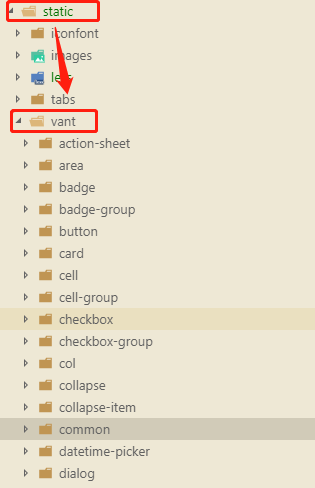
克隆后,将dist目录下的所有文件复制到项目中的/static/vant/目录下,vant目录是我自己创建为了区分的
git clone https://github.com/youzan/vant-weapp.git
注意:一定要确保复制完全了,我当时复制的时候common文件夹没复制过来,就出现错误了!
引入
直接在用的页面的main.json中引用了,这里的配置是根据我的目录结构来的,如果你和我前面的操作一致,那么直接复制粘贴就可以了,不然就要自己修改哦~
https://youzan.github.io/vant-weapp/#/intro官方文档,有些新功能更新,这里的引入可能还没加进来,大家可以自己去官方的网站看下
"usingComponents": {

        "van-action-sheet": "/static/vant/cell-group/index",

        "van-area": "/static/vant/area/index",

        "van-badge": "/static/vant/badge/index",

        "van-badge-group": "/static/vant/badge-group/index",

        "van-button": "/static/vant/button/index",

        "van-card": "/static/vant/card/index",

        "van-cell": "/static/vant/cell/index",

        "van-cell-group": "/static/vant/cell-group/index",

        "van-checkbox": "/static/vant/checkbox/index",

        "van-checkbox-group": "/static/vant/checkbox-group/index",

        "van-col": "/static/vant/col/index",

        "van-collapse": "/static/vant/collapse/index",

        "van-datetime-picker": "/static/vant/datetime-picker/index",

        "van-dialog": "/static/vant/dialog/index",

        "van-field": "/static/vant/field/index",

        "van-goods-action": "/static/vant/goods-action/index",

        "van-goods-action-button": "/static/vant/goods-action-button/index",

        "van-goods-action-icon": "/static/vant/goods-action-icon/index",

        "van-icon": "/static/vant/icon/index",

        "van-info": "/static/vant/info/index",

        "van-loading": "/static/vant/loading/index",

        "van-nav-bar": "/static/vant/nav-bar/index",

        "van-notice-bar": "/static/vant/notice-bar/index","van-notify": "/static/vant/notify/index",

        "van-overlay": "/static/vant/overlay/index",

        "van-panel": "/static/vant/panel/index",

        "van-picker": "/static/vant/picker/index",

        "van-picker-column": "/static/vant/picker-column/index",

        "van-popup": "/static/vant/popup/index",

        "van-progress": "/static/vant/progress/index",

        "van-radio": "/static/vant/radio/index",

        "van-radio-group": "/static/vant/radio-group/index",

        "van-rate": "/static/vant/rate/index",

        "van-row": "/static/vant/row/index",

        "van-search": "/static/vant/search/index",

        "van-slider": "/static/vant/slider/index",

        "van-stepper": "/static/vant/stepper/index",

        "van-steps": "/static/vant/steps/index",

        "van-submit-bar": "/static/vant/submit-bar/index",

        "van-swipe-cell": "/static/vant/swipe-cell/index",

        "van-switch": "/static/vant/switch/index",

        "van-switch-cell": "/static/vant/switch-cell/index",

        "van-tab": "/static/vant/tab/index",

        "van-tabbar": "/static/vant/tabbar/index",

        "van-tabbar-item": "/static/vant/tabbar-item/index",

        "van-tabs": "/static/vant/tabs/index",

        "van-tag": "/static/vant/tag/index",

        "van-toast": "/static/vant/toast/index",

        "van-tree-select": "/static/vant/tree-select/index"

    }

使用
在页面中直接使用就ok了,只要和引入中命名一致
 <van-cell-group name="form-list">

            <div class="form-item">

              <label class="label-text" for="prizeName">奖品名称</label>

              <van-field

                class="input"

                adjust-position="true"

                input-align="right"

                id="prize"

                name="prizeName"

                v-model="contactFormData.prizeName"

                placeholder="请输入奖品名称"

              />

            </div>

            <div class="form-item">

              <label class="label-text" for="prizeNumber">奖品数量</label>

              <van-field

                class="input"

                adjust-position="true"

                input-align="right"

                id="prizeNumber"

                name="prizeNumber"

                type="number"

                v-model="contactFormData.prizeNumber"

                placeholder="请输入奖品数量"

                onkeyup = "value=value.replace(/[^0-9]/g,'')"

                onpaste = "value=value.replace(/[^0-9]/g,'')"

                oncontextmenu = "value=value.replace(/[^0-9]/g,'')"

              />

            </div>

            <div class="form-item">

              <label class="label-text" for="userName">联系人</label>

              <van-field

                class="input"

                adjust-position="true"

                input-align="right"

                id="userName"

                name="userName"

                v-model="contactFormData.userName"

                placeholder="请输入姓名"

              />

            </div>

            <div class="form-item">

              <label class="label-text" for="mobile">联系电话</label>

              <van-field

                class="input"

                adjust-position="true"

                input-align="right"

                id="mobile"

                name="mobile"

                type="number"

                v-model="contactFormData.mobile"

                placeholder="请输入联系电话"

                maxlength="11"

              />

            </div>

            <div class="form-item">

              <label class="label-text" for="goodsLink">商品链接</label>

              <van-field

                class="input"

                adjust-position="true"

                input-align="right"

                id="goodsLink"

                name="goodsLink"

                v-model="contactFormData.goodsLink"

                placeholder="请输入商品链接"

              />

            </div>

            <div class="form-item h200">

              <label class="label-text" for="prize">备注信息</label>

              <van-field

                class="input-big"

                adjust-position="true"

                type="textarea"

                id="remark"

                name="remark"

                v-model="contactFormData.remark"

                rows="2"

                autosize

                placeholder="请输入备注信息"

              />

            </div>

          </van-cell-group>
不要忘记,引入后重新编译一下哦!
mpvue——引入vant_weapp组件的更多相关文章
- MpVue开发之组件引入的问题
再一次开发订餐系统中,遇到订餐页面引入头部商品列表,底部组件时,报错,模块编译失败,未进入缓存区. 我以为是新添加的模块没有重新启动导致的,然后重新与运行npm run dev后还是失败, 最后经过反 ...
- mpvue——引入antv-F2图表
踩坑中~ 官方文档 https://www.yuque.com/antv/f2/intro 毕竟不像echarts接触过,所以还是先看看文档较好 github https://github.com/s ...
- 想在已创建的Vue工程里引入vux组件
<1>. 在项目里安装vux npm install vux --save <2>. 安装vux-loader (这个vux文档似乎没介绍,当初没安装结果报了一堆错误) npm ...
- Vue:如何在vue-cli中创建并引入自定义组件
一.创建并引入一个组件 1.创建组件 vue-cli中的所有组件都是存放在components文件夹下面的,所以在components文件夹下面创建一个名为First.vue的自定义组件: <t ...
- 不再手写import - VSCode自动引入Vue组件和Js模块
:first-child{margin-top:0!important}.markdown-body>:last-child{margin-bottom:0!important}.markdow ...
- react 项目实战(十)引入AntDesign组件库
本篇带你使用 AntDesign 组件库为我们的系统换上产品级的UI! 安装组件库 在项目目录下执行:npm i antd@3.3.0 -S 或 yarn add antd 安装组件包 执行:npm ...
- html页面引入vue组件
html页面引入vue组件需要在页面引入http-vue-loader.js 注意:要查看页面引入vue组件的效果不能直接在本地打开index.html,会有跨域问题,可以在本地配置一个nginx转发 ...
- js 实现vue—引入子组件props传参
参考:https://www.cnblogs.com/xiaohuochai/p/7388866.html 效果 html <!DOCTYPE html> <html> < ...
- uni-app开发微信小程序引入UI组件库(Vant-weapp)步骤
uni-app开发微信小程序引入UI组件库(Vant-weapp)步骤 这里以vant-weapp为例 uni-app官方文档介绍引入组件的方法 1. 新建相关目录 根目录下创建 wxcomponen ...
随机推荐
- JavaScript(二)
本文转载自https://blog.csdn.net/xiaogeldx/article/details/85412716 JavaScript操作符 算术运算符 算术运算符有:+,-,*,/,%,+ ...
- 为你揭秘知乎是如何搞AI的——窥大厂 | 数智方法论第1期
文章发布于公号[数智物语] (ID:decision_engine),关注公号不错过每一篇干货. 数智物语(公众号ID:decision_engine)出品 策划.编写:卷毛雅各布 「我们相信,在垃圾 ...
- AEAI HR开源人力资源管理v1.6.0发版公告
1 升级说明 AEAI HR v1.6.0版是AEAI HR v1.5.2版人力资源管理系统的升级版本,本次升级的系统是基于AEAI DP 3.8.0_20170228进行打包部署的,升级内容主要是针 ...
- pip 使用豆瓣源
pip 使用豆瓣源 由于pip 默认使用Python的官方源pypi.python.org/pypi,导致我们经常使用pip装包时速度过慢或者无法安装(请求超时)等问题, 所以国内用户建议使用pip ...
- 微信小程序(二)登录授权实现
相对于上一节,这一节主要是动态获取数据,主要是对登陆信息的接收,以及页面获取授权按钮的相对相应(未授权时,显示,授权后不显示) 关键在于状态值的判断,以及对页面的不同响应(m-->v) wxml ...
- 转一篇OpenSSL的例子:简单的TLS服务器
原名:Simple TLS Server 原址:https://wiki.openssl.org/index.php/Simple_TLS_Server Windows下就不要从源码编译OpenSSL ...
- 搭建MHA时 yum 安装perl模块提示 baseurl 错误
今天在搭建MySQL MHA 安装MHA node所需的perl模块(DBD:mysql)时遇到了一个小的错误,如果思路不对的话,还是产生不少麻烦. 现梳理记录下来. 问题现象 执行的命令 yum ...
- 宇宙第一开发工具:vs2019 开发Python
1.初步认识 现在人工智能逐步进入人们的视野,人工智能开发也越来越火. 而python语言,被作为大数据库开发的首选语言之一~.前一段时间vs2019预览版发布.相信不少小伙伴已经开始使用,vs201 ...
- 转:[kipmi0]进程导致系统负载高
最近一个用户这边服务器出现服务器负载很高的情况,原本正常是0.3~0.5左右 不正常的时候会达到3,重启机器就正常,开始以为是程序问题,后来在观察的时候把程序给杀掉了 然后重启,结果负载还是很高,于 ...
- LeetCode算法题-Relative Ranks(Java实现)
这是悦乐书的第248次更新,第261篇原创 01 看题和准备 今天介绍的是LeetCode算法题中Easy级别的第115题(顺位题号是506).根据N名运动员的得分,找到他们的相对等级和得分最高的三个 ...