
Angular结构型指令,模块和样式
结构型指令
*是一个语法糖,<a *ngIf="user.login">退出</a>相当于
<ng-template [ngIf]="user.login">
<a>退出</a>
</ng-template>
避免了写ng-template。
    <ng-template [ngIf]="item.reminder">

      <mat-icon >

        alarm

      </mat-icon>

    </ng-template>

    <!-- <mat-icon *ngIf="item.reminder">

      alarm

    </mat-icon> -->
结构型指令为什么能改变结构?
ngIf源码
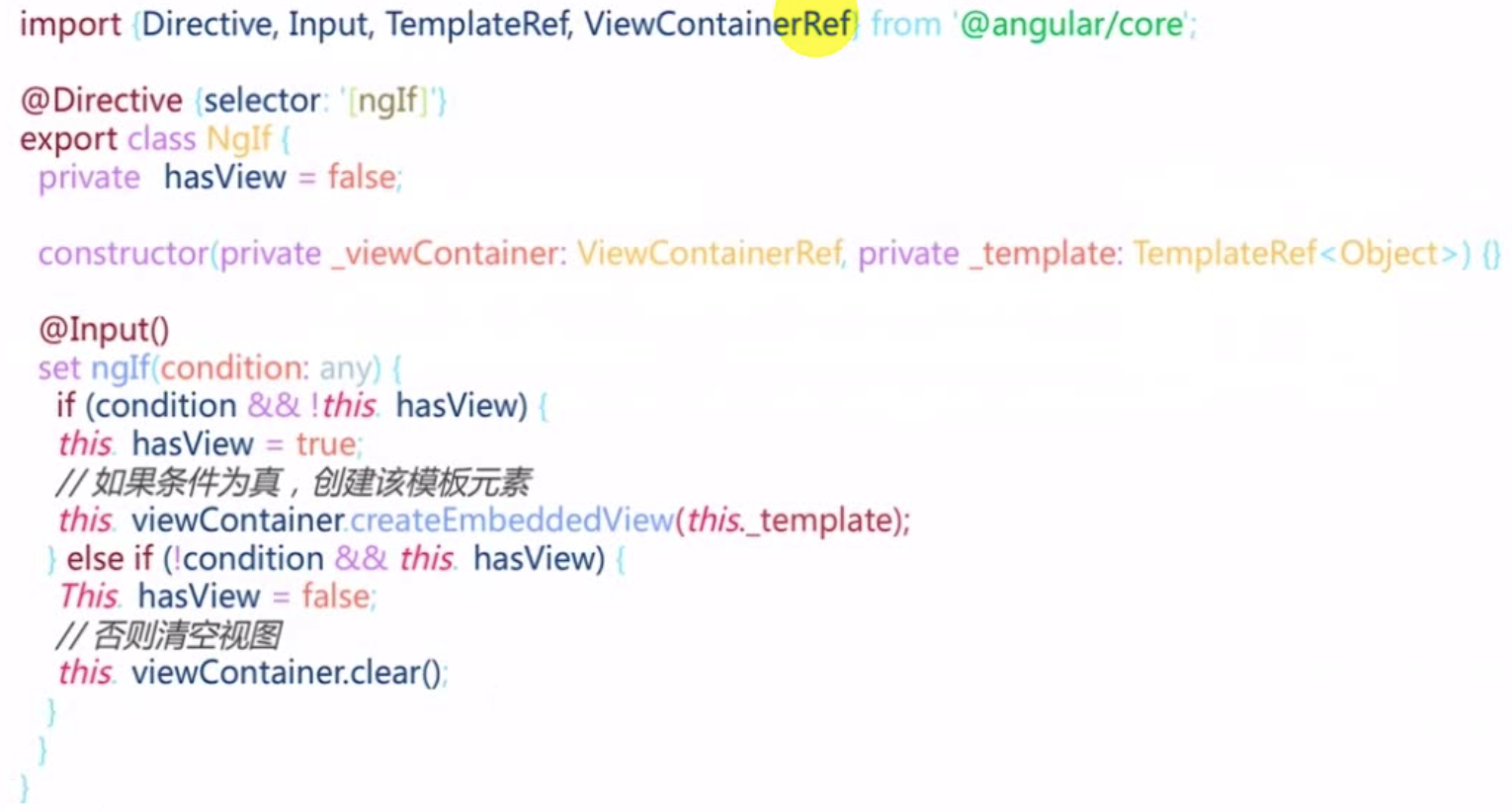
set方法标记为@Input,如果条件为真而且不含view的话,把内部hasView标识位置为true然后通过viewContainer根据template创建一个子view。
条件不为真就用视图容器清空所含内容。
viewContainerRef:容器,指令所在的视图的容器
模块
什么使用模块?独立功能的文件集合,文件组织。
模块元数据
entryComponents:进入模块就要立刻加载的(比如对话框),而不是调用的时候加载。
exports:模块内部的想要让大家公用,一定要export出来。
forRoot()是什么?
imports: [RouterModule.forChild(route)];
其实forRoot和forChild是两个静态方法。
    constructor(guard: any, router: Router);

    /**

     * Creates a module with all the router providers and directives. It also optionally sets up an

     * application listener to perform an initial navigation.

     *

     * Options (see `ExtraOptions`):

     * * `enableTracing` makes the router log all its internal events to the console.

     * * `useHash` enables the location strategy that uses the URL fragment instead of the history

     * API.

     * * `initialNavigation` disables the initial navigation.

     * * `errorHandler` provides a custom error handler.

     * * `preloadingStrategy` configures a preloading strategy (see `PreloadAllModules`).

     * * `onSameUrlNavigation` configures how the router handles navigation to the current URL. See

     * `ExtraOptions` for more details.

     * * `paramsInheritanceStrategy` defines how the router merges params, data and resolved data

     * from parent to child routes.

     */

    static forRoot(routes: Routes, config?: ExtraOptions): ModuleWithProviders<RouterModule>;

    /**

     * Creates a module with all the router directives and a provider registering routes.

     */

    static forChild(routes: Routes): ModuleWithProviders<RouterModule>;

}
元数据根据不同情况会变化,元数据没办法动态指定,不写元数据,直接构造一个静态的工程方法,返回一个Module。
创建一个serviceModule:$ ng g m services
import { NgModule } from '@angular/core';

import { CommonModule } from '@angular/common';

@NgModule({

  declarations: [],

  imports: [

    CommonModule

  ]

})

export class ServicesModule { }
ServiceModule里面的元数据不要了。用一个静态方法forRoot返回。
import { NgModule, ModuleWithProviders } from '@angular/core';

import { CommonModule } from '@angular/common';

@NgModule()

export class ServicesModule {

  static forRoot(): ModuleWithProviders{

    return {

      ngModule: ServicesModule,

      providers:[]

    }

  }

}
导入的时候使用
imports: [ServicesModule.forRoot();]
风格定义
ngClass,ngStyle和[class.yourstyle]
ngClass:用于条件动态指定样式类,适合对样式做大量更改的情况。预先定义好class。
<mat-list-item class="container" [@item]="widerPriority" [ngClass]="{

  'priority-normal':item.priority===3,

  'priority-important':item.priority===2,

  'priority-emergency':item.priority===1

}"
<div class="content" mat-line [ngClass]="{'completed':item.completed}">

    <span [matTooltip]="item.desc">{{item.desc}}</span>

</div>
ngStyle:用于条件动态指定样式,适合少量更改的情况。
[class.yourstyle] :
[class.yourcondition] = "condition"直接对应一个条件。这个condition满足适合应用这个class
<div class="content" mat-line [class.completed]="item.completed">

    <span [matTooltip]="item.desc">{{item.desc}}</span>

</div>
使用ngStyle在拖拽的时候调整顺序。
原理就是动态指定flex容器样式的order为list模型对象里的order。
1、在taskHome中给app-task-list添加order
  <app-task-list *ngFor="let list of lists"

  class="list-container"

  app-droppable="true"

  [dropTags]="['task-item','task-list']"

  [dragEnterClass]=" 'drag-enter' "

  [app-draggable]="true"

  [dragTag]=" 'task-list' "

  [draggedClass]=" 'drag-start' "

  [dragData]="list"

  (dropped)="handleMove($event,list)"

  [ngStyle]="{'order': list.order}"

  >
2、list数据结构里需要有order,所以增加order属性
lists = [

    {

      id: 1,

      name: "待办",

      order: 1,

      tasks: [

        {

          id: 1,

          desc: "任务一: 去星巴克买咖啡",

          completed: true,

          priority: 3,

          owner: {

            id: 1,

            name: "张三",

            avatar: "avatars:svg-11"

          },

          dueDate: new Date(),

          reminder: new Date()

        },

        {

          id: 2,

          desc: "任务一: 完成老板布置的PPT作业",

          completed: false,

          priority: 2,

          owner: {

            id: 2,

            name: "李四",

            avatar: "avatars:svg-12"

          },

          dueDate: new Date()

        }

      ]

    },

    {

      id: 2,

      name: "进行中",

      order:2,

      tasks: [

        {

          id: 1,

          desc: "任务三: 项目代码评审",

          completed: false,

          priority: 1,

          owner: {

            id: 1,

            name: "王五",

            avatar: "avatars:svg-13"

          },

          dueDate: new Date()

        },

        {

          id: 2,

          desc: "任务一: 制定项目计划",

          completed: false,

          priority: 2,

          owner: {

            id: 2,

            name: "李四",

            avatar: "avatars:svg-12"

          },

          dueDate: new Date()

        }

      ]

    }

  ];
3、在list拖拽换顺序的时候,改变order
  handleMove(srcData,targetList){

    switch (srcData.tag) {

      case 'task-item':

        console.log('handling item');

        break;

      case 'task-list':

        console.log('handling list');

        const srcList = srcData.data;

        const tempOrder = srcList.order;

        srcList.order = targetList.order;

        targetList.order = tempOrder;

      default:

        break;

    }

  }
Angular结构型指令,模块和样式的更多相关文章
- Angular.js之指令学习笔记
<!DOCTYPE html><html lang="en"><head><meta charset="UTF-8"& ...
- 桥接模式 桥梁模式 bridge 结构型 设计模式(十二)
桥接模式Bridge Bridge 意为桥梁,桥接模式的作用就像桥梁一样,用于把两件事物连接起来 意图 将抽象部分与他的实现部分进行分离,使得他们都可以独立的发展. 意图解析 依赖倒置原 ...
- 组合模式 合成模式 COMPOSITE 结构型 设计模式(十一)
组合模式(合成模式 COMPOSITE) 意图 将对象组合成树形结构以表示“部分-整体”的层次结构. Composite使得用户对单个对象和组合对象的使用具有一致性. 树形结构介绍 为了便于理解, ...
- 设计模式GOF23(结构型模式:代理模式,适配模式,桥接模式,组合模式,装饰模式,外观模式,享元模式)
结构型模式: – 分类: • 适配器模式.代理模式.桥接模式.装饰模式.组合模式.外观模式.享元模式 – 核心作用:是从程序的结构上实现松耦合,从而可以扩大整体的类结构,用来解决更大的问题. 结构 ...
- 【转】设计模式(十一)代理模式Proxy(结构型)
设计模式(十一)代理模式Proxy(结构型) 1.概述 因为某个对象消耗太多资源,而且你的代码并不是每个逻辑路径都需要此对象, 你曾有过延迟创建对象的想法吗 ( if和else就是不同的两条逻辑路径) ...
- JAVA设计模式(09):结构型-代理模式(Proxy)
代理模式是经常使用的结构型设计模式之中的一个,当无法直接訪问某个对象或訪问某个对象存在困难时能够通过一个代理对象来间接訪问,为了保证client使用的透明性,所訪问的真实对象与代理对象须要实现同样的接 ...
- 设计模式(十三): Proxy代理模式 -- 结构型模式
设计模式(十一)代理模式Proxy(结构型) 1.概述 因为某个对象消耗太多资源,而且你的代码并不是每个逻辑路径都需要此对象, 你曾有过延迟创建对象的想法吗 ( if和else就是不同的两条逻辑路 ...
- 设计模式(八)装饰器模式Decorator(结构型)
设计模式(八)装饰器模式Decorator(结构型) 1. 概述 若你从事过面向对象开发,实现给一个类或对象增加行为,使用继承机制,这是所有面向对象语言的一个基本特性.如果已经存在的一个类缺少某些方法 ...
- OOAD-设计模式(四)结构型模式之适配器、装饰器、代理模式
前言 前面我们学习了创建型设计模式,其中有5中,个人感觉比较重要的是工厂方法模式.单例模式.原型模式.接下来我将分享的是结构型模式! 一.适配器模式 1.1.适配器模式概述 适配器模式(Adapter ...
随机推荐
- YUI Compressor
简介 根据雅虎卓越性能团队的说法,40%到60%的雅虎用户拥有空闲缓存体验,所有页面浏览量中约有20%是使用空缓存完成的(请参阅Tenni Theurer在YUIBlog上的这篇文章)有关浏览器缓存使 ...
- loj6074 子序列
题目链接 思路 首先考虑暴力\(dp\) 用\(f[i][j]\)表示前\(i\)个字符,以\(j\)这个字符结尾的本质不同的字符串个数. 然后就有如下的转移 \(if(s_i==j)\) \[f_{ ...
- (八)控件介绍,QLable
Radio单选框 默认互斥,加GroupBox进行分组可以解决这个 checkBox复选 ListWidget TableWIdget:有表头 #include "widget.h" ...
- oracle not in 改为 not exist
修改前 SELECT pageID, permissionID FROM tableA WHERE userID=#{userID} AND projectCode=#{projectCode} AN ...
- Angular记录(11)
开始使用Angular写页面 使用WebStorm:版本2018.3.5 官网资料 资料大部分有中文翻译,很不错 速查表:https://www.angular.cn/guide/cheatsheet ...
- 基于jeesite的cms系统(六):Lucene全文搜索引擎
1.lucene初始化 // @Value("${lucene.index.path}") private String indexPath = "/Users/vito ...
- 一个Ajax读数据并使用IScroll显示辅助类
花了2天时间对iscroll进行了一些封装,方便进行ajax读取数据和显示 1.IScroll直接使用的话还是挺麻烦的,特别是牵涉到分页加载动态加载数据时,以下是核心实现代码. 2.Loading提示 ...
- (Python3) 连加 连乘 代码
a=[1,2,3,4,5,6,7,8,9,10] #连加 b=0 for i in a: b+=i print(b) #连乘 c=1 for i in a: c*=i print(c)
- Arduino-常用指令
pinMode(LEDPin,OUTPUT); //设置引脚模式 参数1 引脚 参数2 OUTPUT 输出:INPUT 输入 用在setup()函数里 digi ...
- Git学习(一):初始化仓库、添加文件、版本回退
目录 Git学习(一):初始化.添加文件.版本回退 初始化一个仓库 添加文件到Git仓库 版本回退 Git学习(一):初始化.添加文件.版本回退 初始化一个仓库 本文使用的命令行工具为cmder,部分 ...