
EF Code First一对一、一对多、多对多关联关系配置
1、EF Code First一对一关联关系
项目结构图:
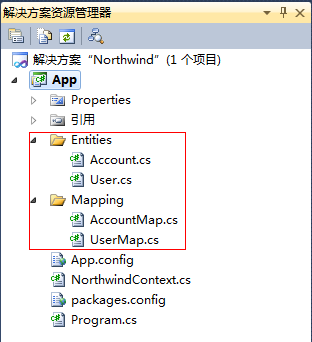
实体类:
Account.cs

using System;

using System.Collections.Generic;

using System.Linq;

using System.Text;

namespace Northwind.App.Entities

{

   public class Account

    {

       /// <summary>

       /// 账户ID

       /// </summary>

       public int AccountID { get; set; }

       /// <summary>

       /// 账户名

       /// </summary>

       public string AccountName { get; set; }

       /// <summary>

       /// 密码

       /// </summary>

       public string Password { get; set; }

       /// <summary>

       /// 用户信息

       /// </summary>

       public virtual User User { get; set; }

    }

}
User.cs
using System;

using System.Collections.Generic;

using System.Linq;

using System.Text;

namespace Northwind.App.Entities

{

   public class Account

    {

       /// <summary>

       /// 账户ID

       /// </summary>

       public int AccountID { get; set; }

       /// <summary>

       /// 账户名

       /// </summary>

       public string AccountName { get; set; }

       /// <summary>

       /// 密码

       /// </summary>

       public string Password { get; set; }

       /// <summary>

       /// 用户信息

       /// </summary>

       public virtual User User { get; set; }

    }

}
实体映射类:
AccountMap.cs
using System;

using System.Collections.Generic;

using System.Linq;

using System.Text;

using System.Data.Entity.ModelConfiguration;

using System.ComponentModel.DataAnnotations.Schema;

using Northwind.App.Entities;

namespace Northwind.App.Mapping

{

    public class AccountMap : EntityTypeConfiguration<Account>

    {

        public AccountMap()

        {

            // Primary Key

            this.HasKey(t => t.AccountID);

            // Properties

            this.Property(t => t.AccountName).HasMaxLength(50);

            this.Property(t => t.Password).HasMaxLength(100);

            // Table & Column Mappings

            this.ToTable("Account");

            this.Property(t => t.AccountID).HasColumnName("AccountID");

            this.Property(t => t.AccountName).HasColumnName("AccountName");

            this.Property(t => t.Password).HasColumnName("Password");

        }

    }

}
UserMap.cs
using System;

using System.Collections.Generic;

using System.Linq;

using System.Text;

using System.Data.Entity.ModelConfiguration;

using System.ComponentModel.DataAnnotations.Schema;

using Northwind.App.Entities;

namespace Northwind.App.Mapping

{

    public class UserMap : EntityTypeConfiguration<User>

    {

        public UserMap()

        {

            // Primary Key

            this.HasKey(t => t.AccountID);

            // Properties

            this.Property(t => t.AccountID).HasDatabaseGeneratedOption(DatabaseGeneratedOption.None);

            this.Property(t => t.UserName).HasMaxLength(50);

            this.Property(t => t.Email).HasMaxLength(100);

            // Table & Column Mappings

            this.ToTable("User");

            this.Property(t => t.AccountID).HasColumnName("AccountID");

            this.Property(t => t.UserName).HasColumnName("UserName");

            this.Property(t => t.Email).HasColumnName("Email");

            this.Property(t => t.RegisterDate).HasColumnName("RegisterDate");

            // Relationships

            this.HasRequired(t => t.Account)

                .WithRequiredDependent(t => t.User);

        }

    }

}
NorthwindContext.cs
using System;

using System.Collections.Generic;

using System.Linq;

using System.Text;

using System.Data.Entity;

using Northwind.App.Entities;

using Northwind.App.Mapping;

namespace Northwind.App

{

    public class NorthwindContext : DbContext

    {

        static NorthwindContext()

        {

            Database.SetInitializer(new DropCreateDatabaseIfModelChanges<NorthwindContext>());

        }

        public DbSet<Account> Accounts { get; set; }

        public DbSet<User> Users { get; set; }

        protected override void OnModelCreating(DbModelBuilder modelBuilder)

        {

            modelBuilder.Configurations.Add(new AccountMap());

            modelBuilder.Configurations.Add(new UserMap());

        }

    }

}
Program.cs
using System;

using System.Collections.Generic;

using System.Linq;

using System.Text;

using Northwind.App.Entities;

namespace Northwind.App

{

    class Program

    {

        static void Main(string[] args)

        {

            using (NorthwindContext db = new NorthwindContext())

            {

                Account account = new Account { AccountName = "Test", Password = "1" };

                db.Accounts.Add(account);

                User user = new User { AccountID = account.AccountID, UserName = "测试", Email = "test@126.com", RegisterDate = DateTime.Now };

                db.Users.Add(user);

                db.SaveChanges();

            }

        }

    }

}
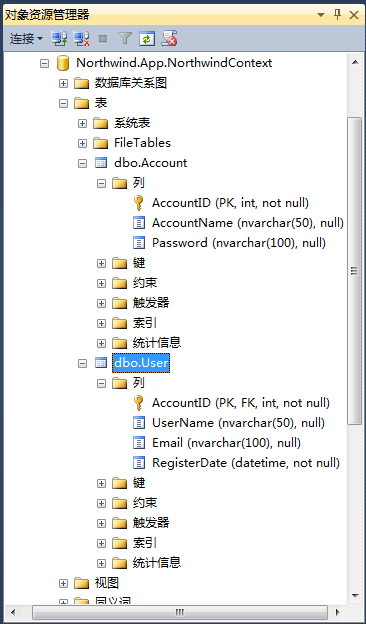
代码运行后生成的数据库结构图:
2、EF Code First一对多关联关系
关联表:Product 产品表、Category分类表
关联关系:一个产品属于一个分类,一个分类可以有多个产品
实体代码:
Category.cs
using System;

using System.Collections.Generic;

using System.Linq;

using System.Text;

namespace Northwind.App.Entities

{

    public class Category

    {

        /// <summary>

        /// 分类ID

        /// </summary>

        public Guid CategoryID { get; set; }

        /// <summary>

        /// 分类名称

        /// </summary>

        public string CategoryName { get; set; }

        /// <summary>

        /// 产品

        /// </summary>

        public virtual ICollection<Product> Products { get; set; }

    }

}
Product.cs
using System;

using System.Collections.Generic;

using System.Linq;

using System.Text;

namespace Northwind.App.Entities

{

    public class Product

    {

        /// <summary>

        /// 产品ID

        /// </summary>

        public Guid ProductID { get; set; }

        /// <summary>

        /// 产品名称

        /// </summary>

        public string ProductName { get; set; }

        /// <summary>

        /// 单价

        /// </summary>

        public decimal UnitPrice { get; set; }

        /// <summary>

        /// 数量

        /// </summary>

        public Nullable<int> Quantity { get; set; }

        /// <summary>

        /// 库存

        /// </summary>

        public Nullable<int> UnitsInStock { get; set; }

        /// <summary>

        /// 产品类别ID

        /// </summary>

        public Guid CategoryID { get; set; }

        /// <summary>

        /// 产品类别

        /// </summary>

        public virtual Category Category { get; set; }

    }

}
实体映射类:
CategoryMap.cs
using System;

using System.Collections.Generic;

using System.Linq;

using System.Text;

using System.Data.Entity.ModelConfiguration;

using System.ComponentModel.DataAnnotations.Schema;

using Northwind.App.Entities;

namespace Northwind.App.Mapping

{

    public class CategoryMap : EntityTypeConfiguration<Category>

    {

        public CategoryMap()

        {

            // Primary Key

            this.HasKey(t => t.CategoryID);

            // Properties

            this.Property(t => t.CategoryID)

                .HasDatabaseGeneratedOption(DatabaseGeneratedOption.Identity);

            this.Property(t => t.CategoryName).IsRequired()

                .HasMaxLength(100);

            // Table & Column Mappings

            this.ToTable("Category");

            this.Property(t => t.CategoryID).HasColumnName("CategoryID");

            this.Property(t => t.CategoryName).HasColumnName("CategoryName");

        }

    }

}
ProductMap.cs
using System;

using System.Collections.Generic;

using System.Linq;

using System.Text;

using System.Data.Entity.ModelConfiguration;

using System.ComponentModel.DataAnnotations.Schema;

using Northwind.App.Entities;

namespace Northwind.App.Mapping

{

    public class ProductMap : EntityTypeConfiguration<Product>

    {

        public ProductMap()

        {

            // Primary Key

            this.HasKey(t => t.ProductID);

            // Properties

            this.Property(t => t.ProductID)

                .HasDatabaseGeneratedOption(DatabaseGeneratedOption.Identity);

            this.Property(t => t.ProductName).IsRequired()

                .HasMaxLength(100);

            this.Property(t => t.UnitPrice).HasPrecision(10, 2);

            // Table & Column Mappings

            this.ToTable("Product");

            this.Property(t => t.ProductID).HasColumnName("ProductID");

            this.Property(t => t.ProductName).HasColumnName("ProductName");

            this.Property(t => t.UnitPrice).HasColumnName("UnitPrice");

            this.Property(t => t.Quantity).HasColumnName("Quantity");

            this.Property(t => t.UnitsInStock).HasColumnName("UnitsInStock");

            this.Property(t => t.CategoryID).HasColumnName("CategoryID");

            // Relationships

            this.HasRequired(t => t.Category)

                .WithMany(t => t.Products)

                .HasForeignKey(t => t.CategoryID)

                .WillCascadeOnDelete(false);

        }

    }

}
NorthwindContext.cs
using System;

using System.Collections.Generic;

using System.Linq;

using System.Text;

using System.Data.Entity;

using Northwind.App.Entities;

using Northwind.App.Mapping;

namespace Northwind.App

{

    public class NorthwindContext : DbContext

    {

        static NorthwindContext()

        {

            Database.SetInitializer(new DropCreateDatabaseIfModelChanges<NorthwindContext>());

        }

        public DbSet<Account> Accounts { get; set; }

        public DbSet<User> Users { get; set; }

        public DbSet<Category> Categories { get; set; }

        public DbSet<Product> Products { get; set; }

        protected override void OnModelCreating(DbModelBuilder modelBuilder)

        {

            modelBuilder.Configurations.Add(new AccountMap());

            modelBuilder.Configurations.Add(new UserMap());

            modelBuilder.Configurations.Add(new CategoryMap());

            modelBuilder.Configurations.Add(new ProductMap());

        }

    }

}
Program.cs
using System;

using System.Collections.Generic;

using System.Linq;

using System.Text;

using Northwind.App.Entities;

namespace Northwind.App

{

    class Program

    {

        static void Main(string[] args)

        {

            using (NorthwindContext db = new NorthwindContext())

            {

                Category category = new Category { CategoryName = "手机数码" };

                db.Categories.Add(category);

                Product product = new Product { CategoryID = category.CategoryID, ProductName = "IPhone5", UnitPrice = 5000m, Quantity = 100, UnitsInStock = 60 };

                db.Products.Add(product);

                db.SaveChanges();

            }

        }

    }

}
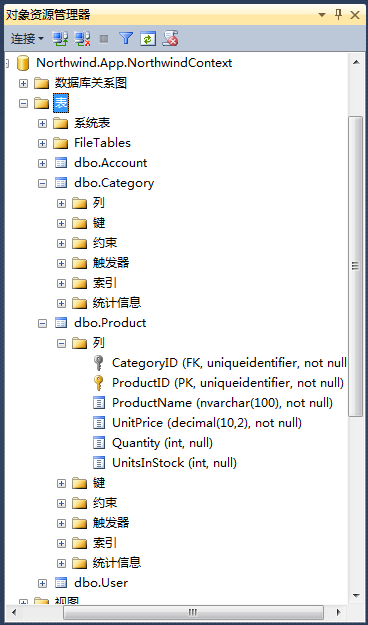
运行代码后生成的数据表:
http://www.cnblogs.com/libingql/archive/2013/01/31/2888201.html
EF Code First一对一、一对多、多对多关联关系配置的更多相关文章
- JPA级联(一对一 一对多 多对多)注解【实际项目中摘取的】并非自己实际应用
下面把项目中的用户类中有个:一对一 一对多 多对多的注解对应关系列取出来用于学习 说明:项目运行正常 问题类:一对多.一对一.多对多 ============一对多 一方的设置 @One ...
- Python进阶----表与表之间的关系(一对一,一对多,多对多),增删改查操作
Python进阶----表与表之间的关系(一对一,一对多,多对多),增删改查操作,单表查询,多表查询 一丶表与表之间的关系 背景: 由于如果只使用一张表存储所有的数据,就会操作数 ...
- mybatis 一对一 一对多 多对多
一对一 一对多 多对多
- 【EF Code First】 一对多、多对多的多重关系配置
这里使用用户表(User)和项目(Project)表做示例 有这样一个需求: 用户与项目的关系是:一个用户可以发多个项目,可以参加多个项目,而项目可以有多个参与成员和一个发布者 [其中含1-n和n-n ...
- 使用NHibernate(7)-- 一对一 && 一对多 && 多对多
1, 一对一. 对于数据量比较大的时候,考虑查询的性能,肯能会把一个对象的属性分到两个表中存放:比如用户和用户资料,经常使用的一般是Id和用户名,用户资料(学校,籍贯等)是不经常被查询的,所以就会分成 ...
- day 69-70 一对一 一对多 多对一联表查询
day 69 orm操作之表关系,多对多,多对一 多对一/一对多, 多对多{类中的定义方法} day69 1. 昨日内容回顾 1. 单表增删改查 2. 单表查询API 返回QuerySet对象的: 1 ...
- JPA 一对一 一对多 多对一 多对多配置
1 JPA概述 1.1 JPA是什么 JPA (Java Persistence API) Java持久化API.是一套Sun公司 Java官方制定的ORM 方案,是规范,是标准 ,sun公司自己并没 ...
- SQLAlchemy_定义(一对一/一对多/多对多)关系
目录 Basic Relationship Patterns One To Many One To One Many To Many Basic Relationship Patterns 基本关系模 ...
- MySQL一对一:一对多:多对多: 实例!!!!
学生表和课程表可以多对多 一个学生可以学多门课程 一门课程可以有多个学生: 多对多 *** 一个学生对应一个班级 一个班级对应多个学生: 一对多 *** 一个老师对应多个学生 多个学生对应一个老师:一 ...
随机推荐
- C# 获取当前服务器域名
"http://"是协议名 "www.test.com"是域名 "aaa"是站点名 "bbb.aspx"是页面名(文件名 ...
- go语言打造p2p网络
传送门: 柏链项目学院 就像1000个人眼中有1000个哈姆雷特一样,每个人眼中的区块链也是不一样的!作为技术人员眼中的区块链就是将各种技术的融合,包括密码学,p2p网络,分布式共识机制以及博弈论等. ...
- Swift中 删除Array的元素对象
Swift中Array的删除对象 在Swift中数组Array没有removeObject的方法 1.找到下标 let model_index = selectedArray.index(where: ...
- 自定义react数据验证组件
我们在做前端表单提交时,经常会遇到要对表单中的数据进行校验的问题.如果用户提交的数据不合法,例如格式不正确.非数字类型.超过最大长度.是否必填项.最大值和最小值等等,我们需要在相应的地方给出提示信息. ...
- [翻译] ASP.NET Core 2.2 正式版发布
本文为翻译,原文地址:https://blogs.msdn.microsoft.com/webdev/2018/12/04/asp-net-core-2-2-available-today/ 我(文章 ...
- Facebook 广告投放相关概念简介(1)
本文不涉及具体代码实现,仅对开发API的前置内容做简单介绍,想参考代码请绕行! 广告主(广告管理工具) ·需要推广自己的应用.网站.主页,所以有了广告管理工具 . ·一个广告主仅可拥有一个广告账户(可 ...
- shell脚本监控
监控磁盘空间 vim check_disk.sh #!/bin/bash # test common. #warn=$ #err=$ #mount=$ check_val() { /usr/bin/e ...
- WMI入门教程之WMI中的类在哪里?
Powershell专栏: https://www.jb51.net/list/list_234_1.htm https://www.pstips.net/get-wmiobject-becomes- ...
- springdata 动态查询之分页
- webpack4 学习 --- 处理静态资源
webpack 是利用loader 来处理各种资源的,wepback的配置基本上就是为各种资源文件,指定不同类型的loader. 1,处理css 最基本的css 处理loader 是css-loade ...