
jenkins+ant+jmeter接口测试
<?xml version="1.0" encoding="UTF-8"?>
<xsl:stylesheet xmlns:xsl="http://www.w3.org/1999/XSL/Transform" version="1.0">
<xsl:output method="html" indent="no" encoding="UTF-8" doctype-public="-//W3C//DTD HTML 4.01 Transitional//EN" doctype-system="http://www.w3.org/TR/html4/loose.dtd"/>
<xsl:strip-space elements="*"/>
<xsl:template match="/testResults">
<html lang="en">
<head>
<meta name="Author" content="shanhe.me"/>
<title>JMeter Test Results</title>
<style type="text/css"><![CDATA[ * { margin: 0; padding: 0 }
html, body { width: 100%; height: 100%; background: #b4b4b4; font-size: 12px }
table { border: none; border-collapse: collapse; table-layout: fixed }
td { vertical-align: baseline; font-size: 12px }
#left-panel { position: absolute; left: 0; top: 0; bottom: 0; width: 300px; overflow: auto; background: #dee4ea }
#left-panel li.navigation { font-weight: bold; cursor: default; color: #9da8b2; line-height: 18px; background-position: 12px 5px; background-repeat: no-repeat; padding: 0 0 0 25px; background-image: url(data:image/png;base64,iVBORw0KGgoAAAANSUhEUgAAAAkAAAAICAYAAAArzdW1AAAAAXNSR0IArs4c6QAAAAZiS0dEAP8A/wD/oL2nkwAAAAlwSFlzAAALEwAACxMBAJqcGAAAAAd0SU1FB9sDEBQqGbO7BEcAAAAdaVRYdENvbW1lbnQAAAAAAENyZWF0ZWQgd2l0aCBHSU1QZC5lBwAAAKRJREFUGNN1zM0KgkAYheF3RvtXSsGyWhRNaILS7bdt11W0KgJvoPwZp0UlBPUtz3nOJw7Hk7necv5dOA2Qaazo2vZP0LEt9olCVtqQROufKNmuqBuBNAYW4QzXGX6B0bDPcjGnMQYJ8Cg12U59oSzaUJQa4IUAXMclDHwAAn/MxPMw765FZd2QRgopBWmsKCrdfhXnS/4ZYElBXdyxewN008Y8AephLAkqz613AAAAAElFTkSuQmCC) }
#left-panel li.success { color: #565b60 }
#left-panel li.failure { color: red }
#left-panel li { list-style: none; color: black; cursor: pointer }
#left-panel li.selected { background-repeat: repeat-x; color: white; background: url(data:image/png;base64,iVBORw0KGgoAAAANSUhEUgAAAAEAAAAUCAYAAABMDlehAAAAAXNSR0IArs4c6QAAAAZiS0dEAP8A/wD/oL2nkwAAAAlwSFlzAAALEwAACxMBAJqcGAAAAAd0SU1FB9sDEBQxLTs5O2gAAAAdaVRYdENvbW1lbnQAAAAAAENyZWF0ZWQgd2l0aCBHSU1QZC5lBwAAAEdJREFUCNc1y7ERgEAMA0GNUhIyGqM2uqKgtyWZhE9v53A/7/A6D7BkMDNgy2AroB2wHTCZv5UMOgFLG1bvd7XBckBlwCXjA5wMOF5iOX/MAAAAAElFTkSuQmCC) }
#left-panel div { line-height: 20px; background-position: 25px 3px; background-repeat: no-repeat; padding: 0 0 0 45px }
#left-panel div.success { background-image: url(data:image/png;base64,iVBORw0KGgoAAAANSUhEUgAAAA8AAAAOCAYAAADwikbvAAAAAXNSR0IArs4c6QAAAAZiS0dEAP8A/wD/oL2nkwAAAAlwSFlzAAALEwAACxMBAJqcGAAAAAd0SU1FB9sDEBULEEc6wzcAAAAdaVRYdENvbW1lbnQAAAAAAENyZWF0ZWQgd2l0aCBHSU1QZC5lBwAAAiNJREFUKM99kktIVGEYhp/jzJl08lI6logp2Y2EFkbtaqlFROsWrlq4ioJWQRs37VoUVItWkYEVRGSBlhleCpywDEWxTEuxcURTZ6YzxzP/5WshCOHUt36f93kXnyMi5Lsnb4clI4s4fhkXzp5w8mWcfHBvfEpUxVdCUUU6lUPNHuD86cYtBQX5GhPrM7hRg7GaSDRg2vuUd90WuOPVsOyqy6FFo2yOQHlU1S9z9dZT+S/8I7GCLlkAN4eyAf56mnT6Fy1HLnGuuYa++MS/4e74qMRqfXLaJ9BpfnsrLC0m2BYuoqwUbj/+274JD43OEqmexwvW8NUKXnaZtVSS1pNtAAyOvyC6v48HnUNb4Z7PH8UtTlIQWA5tb2RhYY7kz3l2FleytJYg/qWb8t2KZ/0PN+1hgI6uEUr2jpHKpGlquExVaS0VbjUZL7WxaqIXK6ADQ0n9GNfv9XCttWnD/O57t0TKFklnF3g5fJ/seoaa2D4O1x0F4PlgO9oIftbgFgYMfLgjACGqj0vlsddoUnj+Kt/mxunq72RP+UGqYjWMTA7R+b6dUCSEGEF5hoJQip6BaFs4HJtCyRrKs6wHCovDip/kys0WWpovMpOYBCtoT2N9B5uzWG0Zid8gnFrVFEQDtBaUrxEgXBimaEeER2/uIiK4roPOaMRYjBKsFly3fOO3G06dETGCWIsYjckprMphtEKMAQtgsMYi1mJMQHJ6xvkDKQoyphCzkl0AAAAASUVORK5CYII=) }
#left-panel div.failure { background-image: url(data:image/png;base64,iVBORw0KGgoAAAANSUhEUgAAAA8AAAAOCAYAAADwikbvAAAAAXNSR0IArs4c6QAAAAZiS0dEAP8A/wD/oL2nkwAAAAlwSFlzAAALEwAACxMBAJqcGAAAAAd0SU1FB9sDEBUJOEC5CU8AAAAdaVRYdENvbW1lbnQAAAAAAENyZWF0ZWQgd2l0aCBHSU1QZC5lBwAAAeVJREFUKM+NkDtok2EUhp8vl9ZLo/EyKI6KFgqCKC4OClrBWUQEcRRx1cGpk3WyInWrgoMZKkW8thYaEYQ0i7WC2ngrNDTERHJvkv/L/3//dxwc7F8jeOAsh/c973OOEhG61aPnaen7maXYt4MLZ4+pbppQt+F06jNH3QWOb8pxUs+SmJzjv83hxY8SVy3wNdtVneiHqe54IhLoB4/TUkyMyOrKj5yXoVtPZK02kLyYK7OnlqFWzgcCGtUC/YUJ3n5a/jd28tU7ORTN0myUA6Jms8bpWIa798elqzn1fokjThrpVBC3ETzNbYAuca59j/Hp+b/N869Tsk8tgVMCXQk+RlfQuk1/tMLMwzsSMCcm5zjhvoR2AdpF0GuwO4aqttS05ZSbZHhsBoAIwI83Cdkd/460XDAOG02d24MxvlR8dsUUh3f2UHaEtgdbWCHz4oZwcVCp66PP5FLhKjEc8DXaCMsNy8DYn/SnZ+L0hhWOb/F8yLs9fDtwk8j+VpqwrlC34PrgGEu2bhlYhZ1b8dncq3AMeBaUr/k6NUyk4ChKzu+N2hc6Bqody+WDG8g2fLatD7F3axjPgmvAtYJvIbouhhIRrl0ZktnkBGIt1gqeMXQ8D2MMiCIUCqFEsFhEQMSykCuqX0MzLAUJTzRsAAAAAElFTkSuQmCC) }
#left-panel div.detail { display: none }
#right-panel { position: absolute; right: 0; top: 0; bottom: 0; left: 301px; overflow: auto; background: white }
#right-panel .group { font-size: 12px; font-weight: bold; line-height: 16px; padding: 0 0 0 18px; counter-reset: assertion; background-repeat: repeat-x; background-image: url(data:image/png;base64,iVBORw0KGgoAAAANSUhEUgAAAAEAAAAQCAYAAADXnxW3AAAAAXNSR0IArs4c6QAAAAZiS0dEAP8A/wD/oL2nkwAAAAlwSFlzAAALEwAACxMBAJqcGAAAAAd0SU1FB9sDEBUkDq8pxjkAAAAdaVRYdENvbW1lbnQAAAAAAENyZWF0ZWQgd2l0aCBHSU1QZC5lBwAAADdJREFUCNdVxrERwDAMAzGK0v47eS6Z927SpMFBAAbkvSvnRk5+7K5cVfLMyN39bWakJAjA5xw9R94jN3tVhVEAAAAASUVORK5CYII=) }
#right-panel .zebra { background-repeat: repeat; padding: 0 0 0 18px; background-image: url(data:image/png;base64,iVBORw0KGgoAAAANSUhEUgAAAAEAAAAmCAYAAAAFvPEHAAAAAXNSR0IArs4c6QAAAAZiS0dEAP8A/wD/oL2nkwAAAAlwSFlzAAALEwAACxMBAJqcGAAAAAd0SU1FB9sDEBYWFlNztEcAAAAdaVRYdENvbW1lbnQAAAAAAENyZWF0ZWQgd2l0aCBHSU1QZC5lBwAAABdJREFUCNdjYKAtePv5338mBgYGBpoQAGy1BAJlb/y6AAAAAElFTkSuQmCC) }
#right-panel .data { line-height: 19px; white-space: nowrap }
#right-panel pre.data { white-space: pre }
#right-panel tbody.failure { color: red }
#right-panel td.key { min-width: 108px }
#right-panel td.delimiter { min-width: 18px }
#right-panel td.assertion:before { counter-increment: assertion; content: counter(assertion) ". " }
#right-panel td.assertion { color: black }
#right-panel .trail { border-top: 1px solid #b4b4b4 } ]]></style>
<script type="text/javascript"><![CDATA[ var onclick_li = (function() {
var last_selected = null;
return function(li) {
if( last_selected == li )
return;
if( last_selected )
last_selected.className = "";
last_selected = li;
last_selected.className = "selected";
document.getElementById("right-panel").innerHTML = last_selected.firstChild.nextSibling.innerHTML;
return false;
};
})(); var patch_timestamp = function() {
var spans = document.getElementsByTagName("span");
var len = spans.length;
for( var i = 0; i < len; ++i ) {
var span = spans[i];
if( "patch_timestamp" == span.className )
span.innerHTML = new Date( parseInt( span.innerHTML ) );
}
}; var patch_navigation_class = (function() { var set_class = function(el, flag) {
if(el) {
el.className += flag ? " success" : " failure";
}
}; var traverse = function(el, group_el, flag) {
while(1) {
if(el) {
if(el.className == 'navigation') {
set_class(group_el, flag);
group_el = el;
flag = true;
} else {
var o = el.firstChild;
o = o ? o.className : null;
flag = flag ? (o == 'success') : false;
}
el = el.nextSibling;
} else {
set_class(group_el, flag);
break;
}
}
}; return function() {
var o = document.getElementById("result-list");
o = o ? o.firstChild : null;
if(o)
traverse(o, null, true);
};
})(); window.onload = function() {
patch_timestamp();
patch_navigation_class();
var o = document.getElementById("result-list");
o = o ? o.firstChild : null;
o = o ? o.nextSibling : null;
if(o)
onclick_li(o);
}; ]]></script>
</head>
<body>
<div id="left-panel">
<ol id="result-list">
<xsl:for-each select="*">
<!-- group with the previous sibling -->
<xsl:if test="position() = 1 or @tn != preceding-sibling::*[1]/@tn">
<li class="navigation">Thread: <xsl:value-of select="@tn"/></li>
</xsl:if>
<li onclick="return onclick_li(this);">
<div>
<xsl:attribute name="class">
<xsl:choose>
<xsl:when test="@s = 'true'">success</xsl:when>
<xsl:otherwise>failure</xsl:otherwise>
</xsl:choose>
</xsl:attribute>
<xsl:value-of select="@lb"/>
</div><div class="detail">
<div class="group">Sampler</div>
<div class="zebra">
<table>
<tr><td class="data key">Thread Name</td><td class="data delimiter">:</td><td class="data"><xsl:value-of select="@tn"/></td></tr>
<tr><td class="data key">Timestamp</td><td class="data delimiter">:</td><td class="data"><span class="patch_timestamp"><xsl:value-of select="@ts"/></span></td></tr>
<tr><td class="data key">Time</td><td class="data delimiter">:</td><td class="data"><xsl:value-of select="@t"/> ms</td></tr>
<tr><td class="data key">Latency</td><td class="data delimiter">:</td><td class="data"><xsl:value-of select="@lt"/> ms</td></tr>
<tr><td class="data key">Bytes</td><td class="data delimiter">:</td><td class="data"><xsl:value-of select="@by"/></td></tr>
<tr><td class="data key">Sample Count</td><td class="data delimiter">:</td><td class="data"><xsl:value-of select="@sc"/></td></tr>
<tr><td class="data key">Error Count</td><td class="data delimiter">:</td><td class="data"><xsl:value-of select="@ec"/></td></tr>
<tr><td class="data key">Response Code</td><td class="data delimiter">:</td><td class="data"><xsl:value-of select="@rc"/></td></tr>
<tr><td class="data key">Response Message</td><td class="data delimiter">:</td><td class="data"><xsl:value-of select="@rm"/></td></tr>
</table>
</div>
<div class="trail"></div>
<xsl:if test="count(assertionResult) > 0">
<div class="group">Assertion</div>
<div class="zebra">
<table>
<xsl:for-each select="assertionResult">
<tbody>
<xsl:attribute name="class">
<xsl:choose>
<xsl:when test="failure = 'true'">failure</xsl:when>
<xsl:when test="error = 'true'">failure</xsl:when>
</xsl:choose>
</xsl:attribute>
<tr><td class="data assertion" colspan="3"><xsl:value-of select="name"/></td></tr>
<tr><td class="data key">Failure</td><td class="data delimiter">:</td><td class="data"><xsl:value-of select="failure"/></td></tr>
<tr><td class="data key">Error</td><td class="data delimiter">:</td><td class="data"><xsl:value-of select="error"/></td></tr>
<tr><td class="data key">Failure Message</td><td class="data delimiter">:</td><td class="data"><xsl:value-of select="failureMessage"/></td></tr>
</tbody>
</xsl:for-each>
</table>
</div>
<div class="trail"></div>
</xsl:if>
<div class="group">Request</div>
<div class="zebra">
<table>
<tr><td class="data key">Method/Url</td><td class="data delimiter">:</td><td class="data"><pre class="data"><xsl:value-of select="method"/><xsl:text> </xsl:text><xsl:value-of select="java.net.URL"/></pre></td></tr>
<tr><td class="data key">Query String</td><td class="data delimiter">:</td><td class="data"><pre class="data"><xsl:value-of select="queryString"/></pre></td></tr>
<tr><td class="data key">Cookies</td><td class="data delimiter">:</td><td class="data"><pre class="data"><xsl:value-of select="cookies"/></pre></td></tr>
<tr><td class="data key">Request Headers</td><td class="data delimiter">:</td><td class="data"><pre class="data"><xsl:value-of select="requestHeader"/></pre></td></tr>
</table>
</div>
<div class="trail"></div>
<div class="group">Response</div>
<div class="zebra">
<table>
<tr><td class="data key">Response Headers</td><td class="data delimiter">:</td><td class="data"><pre class="data"><xsl:value-of select="responseHeader"/></pre></td></tr>
<tr><td class="data key">Response Data</td><td class="data delimiter">:</td><td class="data"><pre class="data"><xsl:value-of select="responseData"/></pre></td></tr>
<tr><td class="data key">Response File</td><td class="data delimiter">:</td><td class="data"><pre class="data"><xsl:value-of select="responseFile"/></pre></td></tr>
</table>
</div>
<div class="trail"></div>
</div>
</li>
</xsl:for-each>
</ol>
</div>
<div id="right-panel"></div>
</body>
</html>
</xsl:template>
</xsl:stylesheet>
jmeter.results.shanhe.me.xsl
<?xml version="1.0"?>

<!--

ant -v -d -Dtest=crm_mobile_api_uat -Djmeter.home=D:\tools\apache-jmeter-3.3

   Licensed to the Apache Software Foundation (ASF) under one or more

   contributor license agreements.  See the NOTICE file distributed with

   this work for additional information regarding copyright ownership.

   The ASF licenses this file to You under the Apache License, Version 2.0

   (the "License"); you may not use this file except in compliance with

   the License.  You may obtain a copy of the License at

       http://www.apache.org/licenses/LICENSE-2.0

   Unless required by applicable law or agreed to in writing, software

   distributed under the License is distributed on an "AS IS" BASIS,

   WITHOUT WARRANTIES OR CONDITIONS OF ANY KIND, either express or implied.

   See the License for the specific language governing permissions and

   limitations under the License.

-->

<project name="ant-jmeter" default="all">

    <description>

        Sample build file for use with ant-jmeter.jar

        See http://www.programmerplanet.org/pages/projects/jmeter-ant-task.php

    To run a test and create the output report:

        ant -Dtest=script

    To run a test only:

        ant -Dtest=script run

    To run report on existing test output

        ant -Dtest=script report

    The "script" parameter is the name of the script without the .jmx suffix.

    Additional options:

        -Dshow-data=y - include response data in Failure Details

        -Dtestpath=xyz - path to test file(s) (default user.dir).

                         N.B. Ant interprets relative paths against the build file

        -Djmeter.home=.. - path to JMeter home directory (defaults to parent of this build file)

        -Dreport.title="My Report" - title for html report (default is 'Load Test Results')

    </description>

    <property name="testpath" value="${user.dir}"/>

    <property name="jmeter.home" value="${basedir}/.."/>

    <property name="report.title" value="Load Test Results"/>

    <!-- Name of test (without .jmx) -->

    <property name="test" value="Test"/>

    <!-- Should report include response data for failures? -->

    <property name="show-data" value="y"/>

    <property name="format" value="2.1"/>

    <condition property="style_version" value="_21">

        <equals arg1="${format}" arg2="2.1"/>

    </condition>

    <condition property="funcMode">

        <equals arg1="${show-data}" arg2="y"/>

    </condition>

    <condition property="funcMode" value="false">

      <not>

        <equals arg1="${show-data}" arg2="y"/>

      </not>

    </condition>

    <!-- Allow jar to be picked up locally -->

    <path id="jmeter.classpath">

        <fileset dir="${basedir}">

          <include name="ant-jmeter*.jar"/>

        </fileset>

    </path>

   <path id="derek.classpath">

        <fileset dir="${jmeter.home}/lib/">

          <include name="*.jar"/>

        </fileset>

    </path>

    <taskdef

        name="jmeter"

        classpathref="jmeter.classpath"

        classname="org.programmerplanet.ant.taskdefs.jmeter.JMeterTask"/>

    <target name="all" depends="run,report"/>

    <target name="run">

        <echo>funcMode = ${funcMode}</echo>

        <delete file="${testpath}/${test}.html"/>

        <delete file="${testpath}/${test}.jtl"/>

        <jmeter

            jmeterhome="${jmeter.home}"

            testplan ="${testpath}/${test}.jmx"

            resultlog="${testpath}/${test}.jtl">

            <jvmarg value="-Xmx1024m"/>

            <property name="jmeter.save.saveservice.output_format" value="xml"/>

            <property name="sampleresult.default.encoding" value="utf-8"/>

            <property name="jmeter.save.saveservice.response_data" value="true"/>

            <property name="jmeter.save.saveservice.response_data.on_error" value="true"/>

            <property name="jmeter.save.saveservice.samplerData" value="true"/>

            <property name="jmeter.save.saveservice.responseHeaders" value="true"/>

            <property name="jmeter.save.saveservice.requestHeaders" value="true"/>

            <property name="jmeter.save.saveservice.encoding" value="true"/>

            <property name="jmeter.save.saveservice.sample_count" value="true"/>

        </jmeter>

    </target>

    <property name="lib.dir" value="${jmeter.home}/lib"/>

    <!-- Use xalan copy from JMeter lib directory to ensure consistent processing with Java 1.4+ -->

    <path id="xslt.classpath">

        <fileset dir="${lib.dir}" includes="xalan*.jar"/>

        <fileset dir="${lib.dir}" includes="serializer*.jar"/>

    </path>

    <target name="report" depends="xslt-report,copy-images">

        <echo>Report generated at ${report.datestamp}</echo>

    </target>

    <target name="xslt-report" depends="_message_xalan">

        <tstamp><format property="report.datestamp" pattern="yyyy/MM/dd HH:mm"/></tstamp>

        <xslt

            classpathref="xslt.classpath"

            force="true"

            in="${testpath}/${test}.jtl"

            out="${testpath}/${test}.html"

            style="${testpath}/jmeter.results.shanhe.me.xsl">

            <param name="showData" expression="${show-data}"/>

            <param name="titleReport" expression="${report.title}"/>

            <param name="dateReport" expression="${report.datestamp}"/>

        </xslt>

    </target>

    <!-- Copy report images if needed -->

    <target name="copy-images" depends="verify-images" unless="samepath">

        <copy file="${basedir}/expand.png" tofile="${testpath}/expand.png"/>

        <copy file="${basedir}/collapse.png" tofile="${testpath}/collapse.png"/>

    </target>

    <target name="verify-images">

        <condition property="samepath">

                <equals arg1="${testpath}" arg2="${basedir}" />

        </condition>

    </target>

    <!-- Check that the xalan libraries are present -->

    <condition property="xalan.present">

          <and>

              <!-- No need to check all jars; just check a few -->

            <available classpathref="xslt.classpath" classname="org.apache.xalan.processor.TransformerFactoryImpl"/>

            <available classpathref="xslt.classpath" classname="org.apache.xml.serializer.ExtendedContentHandler"/>

          </and>

    </condition>

    <target name="_message_xalan" unless="xalan.present">

          <echo>Cannot find all xalan and/or serialiser jars</echo>

        <echo>The XSLT formatting may not work correctly.</echo>

        <echo>Check you have xalan and serializer jars in ${lib.dir}</echo>

    </target>

</project>
build.xml
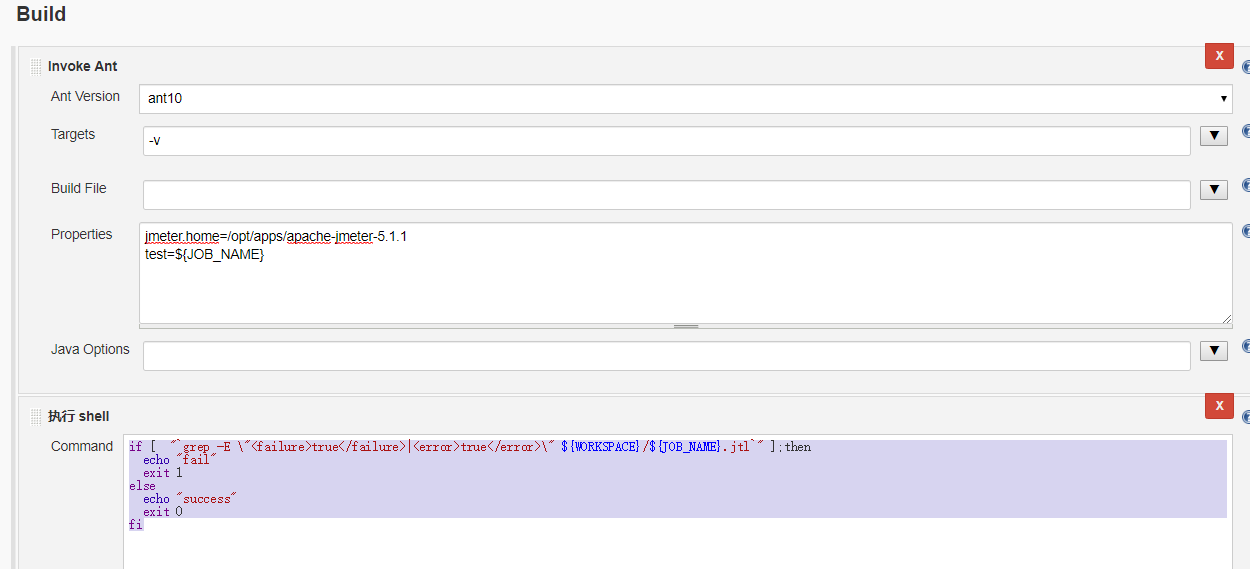
jmeter.home=/opt/apps/apache-jmeter-5.1.1
test=${JOB_NAME}
if [ "`grep -E \"<failure>true</failure>|<error>true</error>\" ${WORKSPACE}/${JOB_NAME}.jtl`" ];then
echo "fail"
exit 1
else
echo "success"
exit 0
fi
可以用jmc监控的build.xml:
<?xml version="1.0"?>

<!--

ant -v -d -Dtest=crm_mobile_api_uat -Djmeter.home=D:\tools\apache-jmeter-3.3

   Licensed to the Apache Software Foundation (ASF) under one or more

   contributor license agreements.  See the NOTICE file distributed with

   this work for additional information regarding copyright ownership.

   The ASF licenses this file to You under the Apache License, Version 2.0

   (the "License"); you may not use this file except in compliance with

   the License.  You may obtain a copy of the License at

       http://www.apache.org/licenses/LICENSE-2.0

   Unless required by applicable law or agreed to in writing, software

   distributed under the License is distributed on an "AS IS" BASIS,

   WITHOUT WARRANTIES OR CONDITIONS OF ANY KIND, either express or implied.

   See the License for the specific language governing permissions and

   limitations under the License.

-->

<project name="ant-jmeter" default="all">

    <description>

        Sample build file for use with ant-jmeter.jar

        See http://www.programmerplanet.org/pages/projects/jmeter-ant-task.php

    To run a test and create the output report:

        ant -Dtest=script

    To run a test only:

        ant -Dtest=script run

    To run report on existing test output

        ant -Dtest=script report

    The "script" parameter is the name of the script without the .jmx suffix.

    Additional options:

        -Dshow-data=y - include response data in Failure Details

        -Dtestpath=xyz - path to test file(s) (default user.dir).

                         N.B. Ant interprets relative paths against the build file

        -Djmeter.home=.. - path to JMeter home directory (defaults to parent of this build file)

        -Dreport.title="My Report" - title for html report (default is 'Load Test Results')

    </description>

    <property name="testpath" value="${user.dir}"/>

    <property name="jmeter.home" value="${basedir}/.."/>

    <property name="report.title" value="Load Test Results"/>

    <!-- Name of test (without .jmx) -->

    <property name="test" value="Test"/>

    <!-- Should report include response data for failures? -->

    <property name="show-data" value="y"/>

    <property name="format" value="2.1"/>

    <condition property="style_version" value="_21">

        <equals arg1="${format}" arg2="2.1"/>

    </condition>

    <condition property="funcMode">

        <equals arg1="${show-data}" arg2="y"/>

    </condition>

    <condition property="funcMode" value="false">

      <not>

        <equals arg1="${show-data}" arg2="y"/>

      </not>

    </condition>

    <!-- Allow jar to be picked up locally -->

    <path id="jmeter.classpath">

        <fileset dir="${basedir}">

          <include name="ant-jmeter*.jar"/>

        </fileset>

    </path>

   <path id="derek.classpath">

        <fileset dir="${jmeter.home}/lib/">

          <include name="*.jar"/>

        </fileset>

    </path>

    <taskdef

        name="jmeter"

        classpathref="jmeter.classpath"

        classname="org.programmerplanet.ant.taskdefs.jmeter.JMeterTask"/>

    <target name="all" depends="run,report"/>

    <target name="run">

        <echo>funcMode = ${funcMode}</echo>

        <delete file="${testpath}/${test}.html"/>

        <delete file="${testpath}/${test}.jtl"/>

        <jmeter

            jmeterhome="${jmeter.home}"

            testplan ="${testpath}/${test}.jmx"

            resultlog="${testpath}/${test}.jtl">

            <jvmarg value="-Xmx1024m"/>

            <jvmarg value="-Djava.rmi.server.hostname=192.168.14.53"/>

            <jvmarg value="-Dcom.sun.management.jmxremote.port=9009"/>

            <jvmarg value="-Dcom.sun.management.jmxremote=true"/>

            <jvmarg value="-Dcom.sun.management.jmxremote.ssl=false"/>

            <jvmarg value="-Dcom.sun.managementote.ssl=false"/>

            <jvmarg value="-Dcom.sun.management.jmxremote.authenticate=false"/>

            <property name="jmeter.save.saveservice.output_format" value="xml"/>

            <property name="sampleresult.default.encoding" value="utf-8"/>

            <property name="jmeter.save.saveservice.response_data" value="true"/>

            <property name="jmeter.save.saveservice.response_data.on_error" value="true"/>

            <property name="jmeter.save.saveservice.samplerData" value="true"/>

            <property name="jmeter.save.saveservice.responseHeaders" value="true"/>

            <property name="jmeter.save.saveservice.requestHeaders" value="true"/>

            <property name="jmeter.save.saveservice.encoding" value="true"/>

            <property name="jmeter.save.saveservice.sample_count" value="true"/>

        </jmeter>

    </target>

    <property name="lib.dir" value="${jmeter.home}/lib"/>

    <!-- Use xalan copy from JMeter lib directory to ensure consistent processing with Java 1.4+ -->

    <path id="xslt.classpath">

        <fileset dir="${lib.dir}" includes="xalan*.jar"/>

        <fileset dir="${lib.dir}" includes="serializer*.jar"/>

    </path>

    <target name="report" depends="xslt-report,copy-images">

        <echo>Report generated at ${report.datestamp}</echo>

    </target>

    <target name="xslt-report" depends="_message_xalan">

        <tstamp><format property="report.datestamp" pattern="yyyy/MM/dd HH:mm"/></tstamp>

        <xslt

            classpathref="xslt.classpath"

            force="true"

            in="${testpath}/${test}.jtl"

            out="${testpath}/${test}.html"

            style="${testpath}/jmeter.results.shanhe.me.xsl">

            <param name="showData" expression="${show-data}"/>

            <param name="titleReport" expression="${report.title}"/>

            <param name="dateReport" expression="${report.datestamp}"/>

        </xslt>

    </target>

    <!-- Copy report images if needed -->

    <target name="copy-images" depends="verify-images" unless="samepath">

        <copy file="${basedir}/expand.png" tofile="${testpath}/expand.png"/>

        <copy file="${basedir}/collapse.png" tofile="${testpath}/collapse.png"/>

    </target>

    <target name="verify-images">

        <condition property="samepath">

                <equals arg1="${testpath}" arg2="${basedir}" />

        </condition>

    </target>

    <!-- Check that the xalan libraries are present -->

    <condition property="xalan.present">

          <and>

              <!-- No need to check all jars; just check a few -->

            <available classpathref="xslt.classpath" classname="org.apache.xalan.processor.TransformerFactoryImpl"/>

            <available classpathref="xslt.classpath" classname="org.apache.xml.serializer.ExtendedContentHandler"/>

          </and>

    </condition>

    <target name="_message_xalan" unless="xalan.present">

          <echo>Cannot find all xalan and/or serialiser jars</echo>

        <echo>The XSLT formatting may not work correctly.</echo>

        <echo>Check you have xalan and serializer jars in ${lib.dir}</echo>

    </target>

</project>
build.xml
jenkins+ant+jmeter接口测试的更多相关文章
- mac: jenkins+ant+jmeter接口测试
最近研究Jenkins平台上使用ant进行集成测试,在网上查阅了很多资料,将 jenkins+ant+jmeter简单使用方法记录下来,方便以后查阅.有很多不足之处,后期不断优化. 一.环境搭建 1. ...
- jenkins+ANT+jmeter 接口测试环境搭建
目的 jmeter很早就接触了,最近又在接触项目的时候整了一下.写这篇博客主要有两个目的 1,为了给自己搭建jmeter做一个总结. 2,在部署过程中遇到过一些坑,在这分享出来,也希望能给需要的人一个 ...
- Jenkins+ANT+Jmeter 接口测试的实践(转载)
转载地址:https://testerhome.com/topics/5262 1.前言 最近感觉大家都在讲Jenkins+jmeter+ant或maven的使用,但没有说到具体怎么投入到项目使用,只 ...
- 对 Jenkins+ANT+Jmeter 接口测试的实践
转载地址:https://testerhome.com/topics/5262 1.前言 最近感觉大家都在讲Jenkins+jmeter+ant或maven的使用,但没有说到具体怎么投入到项目使用,只 ...
- jmeter --- 搭建持续集成接口测试平台(Jenkins+Ant+Jmeter)
jmeter --- 搭建持续集成接口测试平台(Jenkins+Ant+Jmeter) 一.环境准备: 1.JDK:http://www.oracle.com/technetwork/java/jav ...
- 通过Jenkins跑Jmeter接口测试脚本,我想当有接口跑失败时Jenkins发送邮件通知,这个如何弄呢
通过Jenkins跑Jmeter接口测试脚本,我想当有接口跑失败时Jenkins发送邮件通知,这个如何弄呢
- jenkins+ant+jmeter html报告文件作为附件发送(ant-jmeter支持javamail)
前言:由于ant-jmeter目前的版本不支持javamail,也就是说发送邮件时只能借助jenkins自带的发送邮件插件来发送报告. 但是jenkins发送邮件支持发送邮件内容(且有价值.有营养的内 ...
- 性能测试四十八:Jenkins+Ant+Jmeter系统部署
工作步骤: 1.开发提交代码SVN/Git 2.代码编译.打war包 3.上传war包到服务器 4.重启web服务器 5.开始测试/自动化测试 6.发测试结果 Jenkins工作: 1.开发提交代码G ...
- jenkins+ant+jmeter自动化性能测试平台
jenkins+ant+jmeter自动化性能测试平台 Jmeter是性能测试的工具,java编写.开源,小巧方便,可以图形界面运行也可以在命令行下运行.网上已经有人使用ant来运行,http://w ...
随机推荐
- Android Intent通讯实例
//1.拨打电话 // 给移动客服10086拨打电话 Uri uri = Uri.parse("tel:10086"); Intent intent = new Intent(In ...
- 【Linux】【MySQL】CentOS7安装最新版MySQL8.0.13(最新版MySQL从安装到运行)
1.前言 框框博客在线报时:2018-11-07 19:31:06 当前MySQL最新版本:8.0.13 (听说比5.7快2倍) 官方之前表示:MySQL 8.0 正式版 8.0.11 已发布,MyS ...
- django csrf token添加
#views.py from django.shortcuts import render_to_response, RequestContext from django.views.decorato ...
- 借书证信息管理系统,C语言实现
自己实现的如有缺漏欢迎提出 /* 原创文章 转载请附上原链接: https://www.cnblogs.com/jiujue/p/10325628.html */ 设计内容: 设计一个排序和查找系 ...
- 测试面试话题8:测试人员如何让开发少写bug?
在测试过程中和不同开发合作,往往会发现一些bug都是大多数开发人员常出现的错误,为了帮助开发人员,也减少测试的重复工作量,非常有必要将以往出现的bug做整理,分析原因,让开发知道这些bug, 避免再次 ...
- mysql下载安装及常见问题
1.下载MySql 官网下载地址:https://dev.mysql.com/downloads/mysql/ 2.安装 如果下载的是zip的,直接解压目录即可,我的解压目录时:C:\mysql\my ...
- 【心得】Lattice Diamond 后端约束实战小结
[博客导航] [导航]FPGA相关 IOB约束 参考<插入IO寄存器和位置约束---lattice&diamond>,推荐的方法是: 1.在strategy设置[Map Desig ...
- jquery字符串操作
目的:把自己常用到的jquery操作字符串总结一下 w3cSchool关于js字符串的整理:有需要的时候可以查 http://www.w3school.com.cn/js/jsref_obj_stri ...
- ARTS打卡第四周
Algorithm 只出现一次的数字 给定一个非空整数数组,除了某个元素只出现一次以外,其余每个元素均出现两次.找出那个只出现了一次的元素. 说明: 你的算法应该具有线性时间复杂度. 你可以不使用 ...
- Java异步NIO框架Netty实现高性能高并发
原文地址:http://blog.csdn.net/opengl_es/article/details/40979371?utm_source=tuicool&utm_medium=refer ...