
自定义Spring Shell
目录
概述
官网:https://projects.spring.io/spring-shell/。
Spring Shell除了提供一些常用的内置命令之外,还允许开发者对一些默认功能进行定制。
自定义内置命令
禁用内置命令
禁用Spring Shell的内置命令非常简单,只需要在pom.xml文件中进行简单配置即可,如下所示:
<!-- Spring Shell -->

<dependency>

    <groupId>org.springframework.shell</groupId>

    <artifactId>spring-shell-starter</artifactId>

    <version>2.0.0.RELEASE</version>

    <exclusions>

        <!-- 禁用内置命令 -->

        <exclusion>

            <groupId>org.springframework.shell</groupId>

            <artifactId>spring-shell-standard-commands</artifactId>

        </exclusion>

    </exclusions>

</dependency>
shell:>help

No command found for 'help'

shell:>exit

No command found for 'exit'

shell:>
完全禁用了所有内置命令之后,将无法通过help命令查询其他命令信息,也不能再使用exit命令退出应用。
因此,如果有需要的情况下,应该只是禁用某些内置命令。
如果需要禁用指定内置命令,需要在代码中设置对应的命令属性为false,格式为:spring.shell.command.<command>.enabled=true。
例如,需要禁用help命令:
@SpringBootApplication

public class TestSpringshellApplication {

    public static void main(String[] args) {

        String[] disabledCommands = new String[]{"--spring.shell.command.help.enabled=false"};

        String[] fullArgs = StringUtils.concatenateStringArrays(args, disabledCommands);

        SpringApplication.run(TestSpringshellApplication.class, fullArgs);

    }

}
# help命令将不再能使用

shell:>help

No command found for 'help'

Details of the error have been omitted. You can use the stacktrace command to print the full stacktrace.

shell:>exit
如果禁用的是其他命令,如:clear,在Spring Shell应用启动之后通过help命令不再能看被禁用的命令了。
@SpringBootApplication

public class TestSpringshellApplication {

    public static void main(String[] args) {

        // 禁用了内置的clear命令

        String[] disabledCommands = new String[]{"--spring.shell.command.clear.enabled=false"};

        String[] fullArgs = StringUtils.concatenateStringArrays(args, disabledCommands);

        SpringApplication.run(TestSpringshellApplication.class, fullArgs);

    }

}
shell:>help

AVAILABLE COMMANDS

Built-In Commands

        exit, quit: Exit the shell.

        help: Display help about available commands.

        script: Read and execute commands from a file.

        stacktrace: Display the full stacktrace of the last error.
显然,在禁用了指定的内置命令之后,通过help命令将不能看到该命令了。
覆盖内置命令
如果希望重写内置命令的实现,可以通过实现接口org.springframework.shell.standard.commands.<Command>.Command来完成(如:需要重写clear命令的实现,实现接口org.springframework.shell.standard.commands.Clear.Command)。
如下为重写内置命令script的实现:
import org.springframework.shell.standard.ShellComponent;

import org.springframework.shell.standard.ShellMethod;

import org.springframework.shell.standard.commands.Script;

// 实现接口org.springframework.shell.standard.commands.Script.Command

@ShellComponent

public class MyScript implements Script.Command {

    // 注意:命令名称与内置命令保持一致

    @ShellMethod("Read and execute commands from a file.")

    public void script() {

      / // 实现自定义逻辑

        System.out.println("override default script command");

    }

}
有意思的是,此时在内置命令“Built-In Commands”分组中将不能看到script命令了,而是在自定义的分组中,
shell:>help

AVAILABLE COMMANDS

Built-In Commands  # 在内置命令分组中看不到重写的命令了

        clear: Clear the shell screen.

        exit, quit: Exit the shell.

        help: Display help about available commands.

        stacktrace: Display the full stacktrace of the last error.

My Script          # 重写的命令此时在自定义分组中

        scriptdo: Read and execute commands from a file.
如果希望被覆盖的内置命令依然能够在“Built-In Commands”分组中看到,可以通过注解@ShellMethod的group属性指定。
// 指定被覆盖的内置命令分组为“Built-In Commands”

@ShellMethod(value = "Read and execute commands from a file.", group = "Built-In Commands")

public void script() {

    System.out.println("override default script command");

}
shell:>help

AVAILABLE COMMANDS

Built-In Commands

        clear: Clear the shell screen.

        exit, quit: Exit the shell.

        help: Display help about available commands.

        script: Read and execute commands from a file.

        stacktrace: Display the full stacktrace of the last error.

shell:>script

override default script command
自定义命令提示符
默认情况下,Spring Shell启动之后显示的是一个黄色的命令提示符(shell:>)等待用户输入。
可以通过Spring Shell提供的接口org.springframework.shell.jline.PromptProvider对该命令提示符进行定制。
// 通过实现接口org.springframework.shell.jline.PromptProvider定制命令提示符

import org.jline.utils.AttributedString;

import org.jline.utils.AttributedStyle;

import org.springframework.shell.jline.PromptProvider;

import org.springframework.stereotype.Component;

@Component

public class MyPromptProvider implements PromptProvider {

    @Override

    public AttributedString getPrompt() {

        // 定制命令提示符为红色的“#”

        return new AttributedString("#", AttributedStyle.DEFAULT.foreground(AttributedStyle.RED));

    }

}
如下为定制的命令提示符:

自定义命令行选项行为
Spring Shell提供了2个默认的ApplicationRunner,用于实现命令行选项的行为。
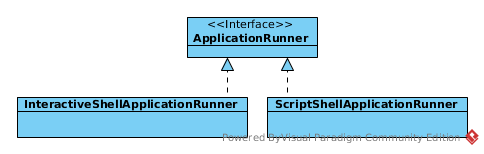
1.InteractiveShellApplicationRunner用于启动交互式界面,接收用户输入命令。
2.ScriptShellApplicationRunner用于在应用启动时从程序参数中读取指定文件中的命令并执行,具体来讲:将多个命令写在文件中,并通过参数的形式将包含了批量命令的文件路径传递给程序,传递的文件路径参数必须以“@”开始,如下示例:
$ java -jar /home/test/sun/workspace/test-springshell/target/test-springshell-0.0.1-SNAPSHOT.jar @/home/test/cmd
文件/home/test/cmd中的内容为:
$ cat /home/test/cmd

help
这样,在启动程序时,将会自动执行/home/test/cmd文件中的命令(如果文件不存在,启动应用时报错)。
值得注意的是: 当在程序参数中存在“@local_file_path”这样的参数时,应用启动后执行完文件“local_file_path”内命令之后就退出了,不会进入交互式命令行界面(上述示例中,应用启动后执行help命令之后就退出了)。
如果Spring Shell默认提供的上述2个ApplicationRunner无法满足需求,可以自定义其他的命令行选项行为,直接实现接口org.springframework.boot.ApplicationRunner即可。
自定义参数转换器
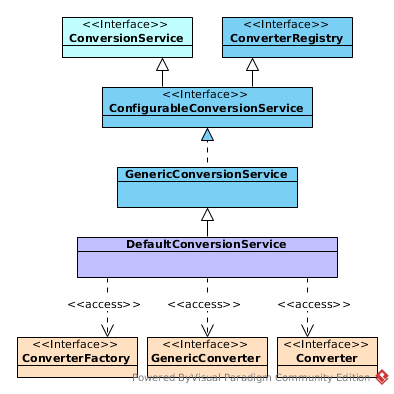
默认情况下,Spring Shell使用标准的Spring类型转换机制将命令行的文本参数转换为指定的类型。
实际上,Spring Shell是通过DefaultConversionService注册Converter<S, T>,GenericConverter或者ConverterFactory<S, R>类型的Bean对象来实现对命令行参数进行类型转换的。
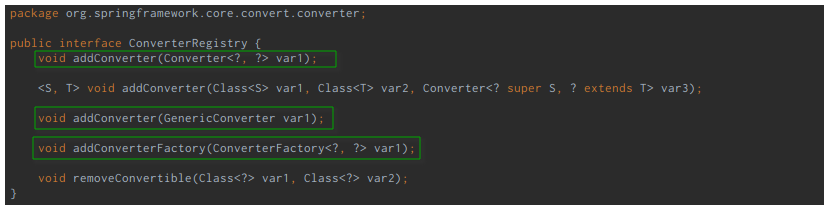
换句话说,如果我们需要自定义类型转换器,只需要简单实现接口org.springframework.core.convert.converter.Converter<S, T>就可以了。
// 自定义类型

public class Food {

    private String value = null;

    public Food(String value) {

        this.value = value;

    }

    @Override

    public String toString() {

        return new StringBuilder()

                .append("Food{").append("value='").append(value).append("'}")

                .toString();

    }

}

// 自定义类型转换器

@Component

public class MyConverter implements Converter<String, Food> {

    @Override

    public Food convert(String s) {

        // 将输入参数转换为Food类型实例

        return new Food(s);

    }

}

// 使用自定义转换类型

@ShellComponent

public class ConvertionCmd {

    // 在命令方法中直接可以获取Food对象,这是通过前面的自定义类型转换器MyConverter实现的

    @ShellMethod("Conversion food")

    public String food(Food food) {

        return food.toString();

    }

}
在命令行指定命令food:
#food apple

Food{value='apple'}
显然,通过自定义类型转换器可以实现对命令参数的特殊处理,非常实用。
【参考】
https://blog.csdn.net/zknxx/article/details/52196427 SpringBoot之CommandLineRunner接口和ApplicationRunner接口
https://www.jianshu.com/p/5d4ffe267596 CommandLineRunner或者ApplicationRunner接口
我的博客即将同步至腾讯云+社区,邀请大家一同入驻:https://cloud.tencent.com/developer/support-plan?invite_code=33hxmqpel3wgg
自定义Spring Shell的更多相关文章
- 开发Spring Shell应用程序
2 开发Spring Shell应用程序 向shell提供命令非常简单,需要学习的注解很少.该命令的实现风格与使用依赖注入的应用程序的开发类相同,您可以利用Spring容器的所有特性来实现您的命令类. ...
- Spring Shell参考文档
Spring Shell的核心组件是它的插件模型(plugin model).内置命令(built-in commands)和转换器( converters). 1.1 Plugin Model(插件 ...
- Spring Shell入门介绍
目录 Spring Shell是什么 入门实践 基础配置 简单示例 注解@ShellMethod 注解@ShellOption 自定义参数名称 设置参数默认值 为一个参数传递多个值 对布尔参数的特殊处 ...
- 自定义spring参数注解 - 打破@RequestBody单体限制
本文主要描述怎样自定义类似@RequestBody这样的参数注解来打破@RequestBody的单体限制. 目录1 @RequestBody的单体限制2 自定义spring的参数注解3 编写sprin ...
- Spring Shell介绍
最近开发中在下遇到了spring-shell开发工具的项目,现在整理了相关文章,以供大家学习 本博客相关的文章均是在Spring Shell 1.2.0的基础上建立 Spring Shell介绍 ...
- 自定义Spring Security的身份验证失败处理
1.概述 在本快速教程中,我们将演示如何在Spring Boot应用程序中自定义Spring Security的身份验证失败处理.目标是使用表单登录方法对用户进行身份验证. 2.认证和授权(Authe ...
- Spring Shell简单应用
大致:想要使用Spring Shell,则项目需要是 Spring Boot项目,下面贴出结构和代码 1.POM依赖 <?xml version="1.0" encoding ...
- Spring Security学习笔记-自定义Spring Security过滤链
Spring Security使用一系列过滤器处理用户请求,下面是spring-security.xml配置文件. <?xml version="1.0" encoding= ...
- 自定义spring boot的自动配置
文章目录 添加Maven依赖 创建自定义 Auto-Configuration 添加Class Conditions 添加 bean Conditions Property Conditions Re ...
随机推荐
- Buffer源码深入分析
博客园对MarkDown显示的层次感不是很好,大家可以看这里:Buffeer. 本机环境: Linux 4.4.0-21-generic #37-Ubuntu SMP Mon Apr 18 18:33 ...
- 反汇编引擎Capstone
反汇编引擎Capstone Capstone是Kali Linux自带的一款轻量级反汇编引擎.它可以支持多种硬件构架,如ARM.ARM64.MIPS.X86.该框架使用C语言实现,但支持C++.P ...
- First Missing Positive -- LeetCode
Given an unsorted integer array, find the first missing positive integer. For example,Given [1,2,0] ...
- nginx配置及常见问题
问题 1.openresty请求时,不能解析域名? openresty依赖配置里面的resolver 192.168.1.1; 2.文件上传是报错413 Request Entity Too Larg ...
- POJ 3694 Network (求桥,边双连通分支缩点,lca)
Network Time Limit: 5000MS Memory Limit: 65536K Total Submissions: 5619 Accepted: 1939 Descripti ...
- tc: 模拟网络异常的工具-----------鸟窝
http://colobu.com/2017/04/21/tc-introduction/
- readlink命令
转:http://blog.csdn.net/zz198808/article/details/9319479 readlink是linux系统中一个常用工具,主要用来找出符号链接所指向的位置. 在U ...
- 【Linux】CentOS7上的一些操作小方法
1.在文件夹目录下删除文件 点击文件,按Delete键删除,就可以把文件删除到回收站中. 2.更改命令窗口的样式 打开命令窗口--->右键---->配置文件---->配置文件首选项
- UVA 1665 Islands
题意:输入一个n*m矩阵,每一个格子都有一个正整数,再输入T个整数ti,对于每一个ti,输出大于ti的正整数组成多少个四连快 思路:正着做的话事实上相当于删除连通块,而假设反着做的话就相当于变成添加连 ...
- OpenSessionInViewFilter的配置
OpenSessionInViewFilter是用来处理懒加载异常的. 懒加载异常的意思的就是:还用不到的东西,就先不加载,等需要的时候再来加载. 所以懒加载对性能有一定的提升,但是,这也会出现一些问 ...