
winform 公共控件 ListView
//数据显示,刷新

        public void F5()

        {

            listView1.Items.Clear();

            List<Students> Stu = new StudentsData().SeletAll(F1.textBox1.Text);

            foreach (Students s in Stu)

            {

                ListViewItem li = new ListViewItem();

                li.Text = s.Ids.ToString();

                li.SubItems.Add(s.Code);

                li.SubItems.Add(s.Name);

                li.SubItems.Add(s.Sexdd);

                li.SubItems.Add(s.Age.ToString());

                li.SubItems.Add(s.Birthday.ToString("yyyy年MM月dd日"));

                li.SubItems.Add(s.Nationna);

                li.SubItems.Add(s.ClassNa);

                li.SubItems.Add(s.Score.ToString());

                listView1.Items.Add(li);

            }

        }
ListView控件是一个winform自带的表格型的应用数据展示控件
好处:是功能比较完善,不需要再自己设置
缺点:不好的地方就是不能设置控件中单元格的大小,字体变大之后超出部分就会隐藏,不能直接输入内容,
要将表中的数据展示出来,需要做到以下几步:
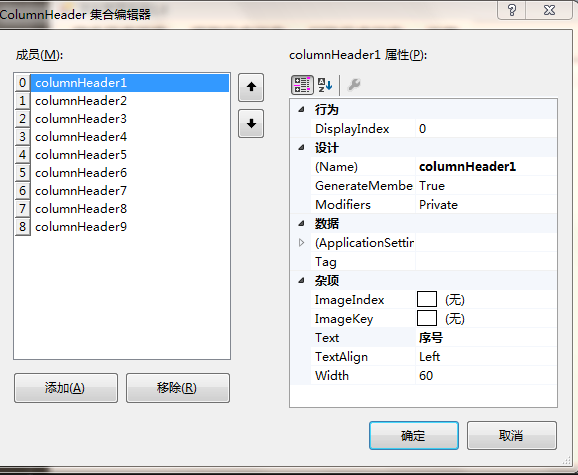
1.先设置好ListView的列名,确定好要展示的的数据有几列
(1)如何设置列名:
点击行为属性Columns,可以设置要设置的列名(text),可以设置很多属性,基本和其他控件一致,如图:
2.查询要展示的表的内容,把这个写成一个方法,方便别的Form调用
//查询所有学生信息

        public List<Students> SeletAll(string a)

        {

            List<Students> Stu = new List<Students>();

            cmd.CommandText = "select *from Students where Adm=@a order by Ids asc";

            cmd.Parameters.Clear();

            cmd.Parameters.AddWithValue("@a", a);

            conn.Open();

            SqlDataReader dr = cmd.ExecuteReader();

            if (dr.HasRows)

            {

                while (dr.Read())

                {

                    Students s = new Students();

                    s.Ids = Convert.ToInt32(dr["Ids"]);

                    s.Code = dr["Code"].ToString();

                    s.Name = dr["Name"].ToString();

                    s.Sex = Convert.ToBoolean(dr["Sex"]);

                    s.Nation = dr["Nation"].ToString();

                    s.Birthday = Convert.ToDateTime(dr["Birthday"]);

                    s.Class = dr["Class"].ToString();

                    s.Score = Convert.ToInt32(dr["Score"]);

                    Stu.Add(s);

                }

            }

            conn.Close();

            return Stu;

        }
3.将数据关联起来
这个写成了一个方法,方便在每次重载时调用,并能保证数据传递后调用刷新的方法
//数据显示,刷新

        public void F5()

        {

            listView1.Items.Clear();

            List<Students> Stu = new StudentsData().SeletAll(F1.textBox1.Text);

            foreach (Students s in Stu)

            {

                ListViewItem li = new ListViewItem();

                li.Text = s.Ids.ToString();

                li.SubItems.Add(s.Code);

                li.SubItems.Add(s.Name);

                li.SubItems.Add(s.Sexdd);

                li.SubItems.Add(s.Age.ToString());

                li.SubItems.Add(s.Birthday.ToString("yyyy年MM月dd日"));

                li.SubItems.Add(s.Nationna);

                li.SubItems.Add(s.ClassNa);

                li.SubItems.Add(s.Score.ToString());

                listView1.Items.Add(li);

            }

        }
4.获取选中数据的各种操作
(1)一次删除多个信息
if (listView1.CheckedItems.Count <= )

            {

                MessageBox.Show("请先选中学生信息!");

            }

            else

            {

                int count = ;

                int Nxx = listView1.CheckedItems.Count;

                List<int> Lt = new List<int>();

                foreach (ListViewItem li in listView1.CheckedItems)

                {

                    Lt.Add(Convert.ToInt32(li.Text));

                }

                for (int cxx = ; cxx < Nxx; cxx++)

                {

                    if (new StudentsData().Delete(Lt[cxx], F1.textBox1.Text))

                    {

                        count++;

                    }

                }

                F5();

                MessageBox.Show("学生信息删除成功,本次共删除" + count + "名学生.");

            }
winform 公共控件 ListView的更多相关文章
- WinForm 公共控件
一.窗体属性: 1.AcceptButton - 窗体的“接受”按钮.如果设置该属性,每次用户按“Enter”键都相当于“单击”了该按钮. 需要设置哪个键,就在后面选择. 2.CancelButton ...
- WinForm公共控件
公共控件:1.Button:按钮 用户点击时触发事件 行为属性 Enabled -是否启用 Visible -是否隐藏2.CheckBox .CheckListBox - 复选框 复选框组 3.Com ...
- 【2017-04-25】winform公共控件、菜单和工具栏、Tab和无边框窗体制作
一.公共控件 1. Button 按钮 + 布局 - AutoSize 按钮尺寸自动适应里面内容的长度 - Location 位置 - Margin 控件与控件外边距 - S ...
- 【2017-04-25】winform公共控件、菜单和工具栏
一.公共控件 公共控件很多的属性很多都相似,这些是大部分都相同的: +布局 - AutoSize:自动适应控件上文字内容- Location:位置- Margin:控件间的间距- Size:控件大小 ...
- WinFrom 公共控件 Listview 的使用
Listview绑定数据库数据展示与操作使用 1.拖一个Listview控件到项目中先将视图改为Details 2.编辑列 设置列头 添加columnHeader成员 Text 是显示的名称 3. ...
- 公共控件Listview
ListView属性中,Items是行的总集合,Items集合中的每一个是一行,Items集合里面有ListViewItem集合,这个集合实例化:ListViewItem li=new ListVie ...
- winform 之控件ListView
使用ListView构建表格展示数据 1.添加列数据:控件ListView--上方按钮--视图(Details)--编辑列--添加 2.添加行数据:--编辑项(行)--添加 添加数据:Text:默认添 ...
- WinForm 公共控件和属性
Button 按钮 布局 AutoSize 内容超出部分是否扩展到适应尺寸大小 Location 位置坐标 Size 控件大小 行为 Enabled 控件是否启用 visible 控件 ...
- WinForm 窗体基本属性、公共控件
一.WinForm:客户端程序制作 - C/S (B/S:服务器端) 它是基于.NET Framework框架上运行,不是必须在windows系统上才能运行---------------------- ...
随机推荐
- android 取mac若干问题
问题一:Error:Error: The WIFI_SERVICE must be looked up on the Application context or memory will leak o ...
- ZeroClipboard 简单应用
ZeroClipboard.config({ swfPath: "/scripts/ZeroClipboard.swf" }); var client = new ZeroClip ...
- SpringBoot WebSocket实现
1.添加依赖 <dependency> <groupId>org.springframework.boot</groupId> <artifactId> ...
- Linux-Crontab服务
1.安装并检查Crontab服务 检查cron服务: 检查Crontab工具是否安装:crontab -l 检查crond服务是否启动:service crond status 安装cron: yum ...
- SQL-主键与外键
1.PRIMARY KEY 主键,唯一标识一行或多行,不允许重复值,也不允许未NULL. 语法:[CONSTRAINT <约束名>] PRIMARY KEY [(列名1,列名2...)] ...
- PhotoShop使用指南(1)——动态图gif的制作
第一步:菜单栏 > 窗口 > 工作区 > 动感 第二步:时间轴 > 设置延迟时间 第三步:时间轴 > 设置循环次数 第四步:存储为Web所用格式 Ctrl+Shift+A ...
- dirent.h
#include <dirent.h> 是POSIX.1标准定义的unix类目录操作的头文件,包含了许多UNIX系统服务的函数原型,例如opendir函数.readdir函数. opend ...
- Git 版本管理工具(一)
转自:http://blog.csdn.net/ithomer/article/details/7527877 Git 是一个分布式版本控制工具,它的作者 Linus Torvalds 是这样给我们介 ...
- swing之flowlayout
import java.awt.FlowLayout; import javax.swing.JButton; import javax.swing.JFrame; //1.继承 JFrame类 // ...
- [C++] 动态规划之矩阵连乘、最长公共子序列、最大子段和、最长单调递增子序列、0-1背包
一.动态规划的基本思想 动态规划算法通常用于求解具有某种最优性质的问题.在这类问题中,可能会有许多可行解.每一个解都对应于一个值,我们希望找到具有最优值的解. 将待求解问题分解成若干个子问题,先求解子 ...